Office 365: The latest and
   greatest in the cloud
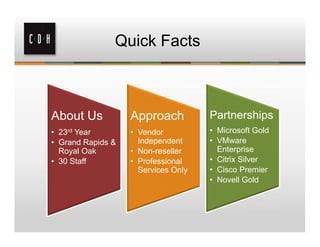
Quick Facts


About Us           Approach          Partnerships
• 23rd Year        • Vendor          • Microsoft Gold
• Grand Rapids &     Independent     • VMware
  Royal Oak        • Non-reseller      Enterprise
• 30 Staff         • Professional    • Citrix Silver
                     Services Only   • Cisco Premier
                                     • Novell Gold
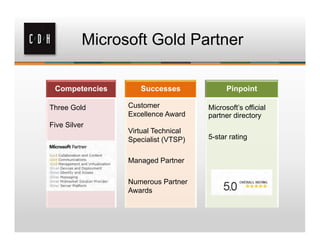
Microsoft Gold Partner

 Competencies      Successes              Pinpoint

Three Gold      Customer            Microsoft’s official
                Excellence Award    partner directory
Five Silver
                Virtual Technical
                Specialist (VTSP)   5-star rating


                Managed Partner

                Numerous Partner
                Awards
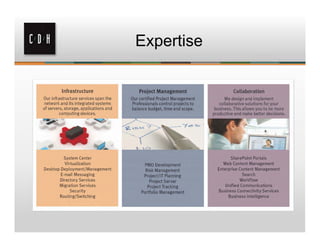
Expertise
Get Social with C/D/H


@cdhtweetstech    facebook.com/cdhtech


                 www.linkedin.com/company/cdh
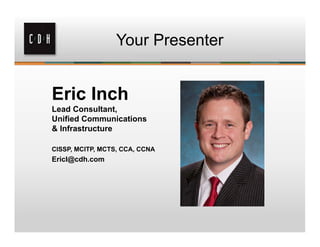
Your Presenter


Eric Inch
Lead Consultant,
Unified Communications
& Infrastructure

CISSP, MCITP, MCTS, CCA, CCNA
EricI@cdh.com
Agenda


•   Overview of Office 365
•   Technologies
•   Identity options
•   Versions
•   Solutions comparisons
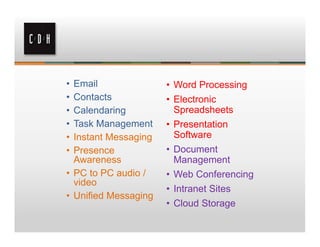
• Email               • Word Processing
• Contacts            • Electronic
• Calendaring           Spreadsheets
• Task Management     • Presentation
• Instant Messaging     Software
• Presence            • Document
  Awareness             Management
• PC to PC audio /    • Web Conferencing
  video
                      • Intranet Sites
• Unified Messaging
                      • Cloud Storage
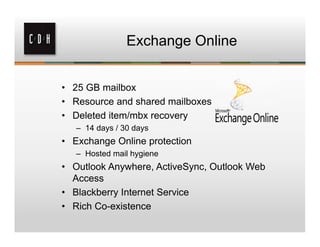
Exchange Online


• 25 GB mailbox
• Resource and shared mailboxes
• Deleted item/mbx recovery
   – 14 days / 30 days
• Exchange Online protection
   – Hosted mail hygiene
• Outlook Anywhere, ActiveSync, Outlook Web
  Access
• Blackberry Internet Service
• Rich Co-existence
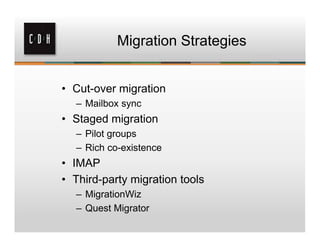
Migration Strategies


• Cut-over migration
  – Mailbox sync
• Staged migration
  – Pilot groups
  – Rich co-existence
• IMAP
• Third-party migration tools
  – MigrationWiz
  – Quest Migrator
Hybrid


•   On-premises with hosted
•   Seamless co-existence
•   Free/busy sharing
•   Unified global address list
•   SMTP routing
Exchange Online (cont.)

•   Secure mail routing between on-premises and Exchange Online
    organizations.
•   Mail routing with a shared domain namespace.
•   A unified global address list (GAL), also called a “shared address book.”
•   Free/busy and calendar sharing between on-premises and Exchange
    Online organizations.
•   Centralized control of inbound and outbound mail flow.
•   A single Microsoft Office Outlook Web App URL for both the on-premises
    and Exchange Online organizations.
•   Remote mailbox move
•   Centralized mailbox management using on-premises admin center (EAC).
•   Message tracking, MailTips, and multi-mailbox search between on-
    premises and Exchange Online organizations.
•   Cloud-based message archiving for on-premises Exchange mailboxes.
    Exchange Online Archiving can be used with a hybrid deployment.
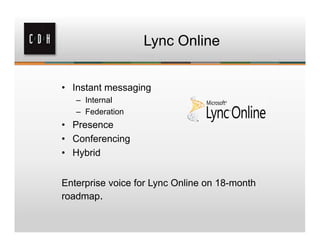
Lync Online


• Instant messaging
   – Internal
   – Federation
• Presence
• Conferencing
• Hybrid


Enterprise voice for Lync Online on 18-month
roadmap.
Lync Clients


• Lync client
  – Status
     • Available, Away, Busy, Do Not Disturb
  – Status change alerts
  – Privacy Relationship
  – Federation / Public IM connectivity
• Mobility
  – Communication anywhere
  – Smart phones, tablets, computers
  – Remote access
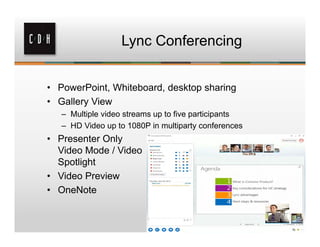
Lync Conferencing


• PowerPoint, Whiteboard, desktop sharing
• Gallery View
   – Multiple video streams up to five participants
   – HD Video up to 1080P in multiparty conferences
• Presenter Only
  Video Mode / Video
  Spotlight
• Video Preview
• OneNote
Hybrid


•   Lync Online 2013
•   ADFS and DirSync
•   Supported topology
     – Completely Lync 2013 on-premise
     – Lync 2010 with Lync 2013. Edge and next hop either Lync 2013 or Lync
       2010 with latest CU
     – OCS 2007 R2 with Lync 2013. Edge and next hop is Lync 2013
•   Users first created on-premise then migrated to Lync Online
•   SRV records pointed to on-premises Lync Edge
•   Migration considerations
     1. User contacts - 250 limit
     2. Instant messaging and presence - User contact lists and groups are migrated
     3. Conferencing data, meeting content, and scheduled meetings – Not migrated
Lync Hybrid


• Functionality
   –   Integration with on-premise PBX
   –   Exchange hosted UM
   –   Hold/retrieve, transfer, call forwarding
   –   Media bypass
   –   Lync phone edition
• Limitations
   – No response groups
   – Remote call control
   – Call center integration
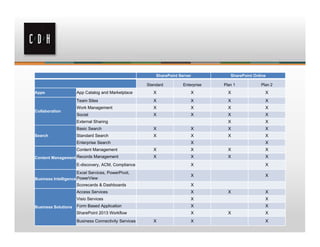
SharePoint Online


• Document Management
    – Versioning
    – Workflows
•   Project or team sites
•   Discussion boards, Wiki, calendars
•   Business Intelligence
•   Public web
•   Office web apps
SharePoint Server            SharePoint Online

                                                      Standard         Enterprise   Plan 1           Plan 2
Apps                 App Catalog and Marketplace         X                 X          X                X
                     Team Sites                          X                 X          X                X
                     Work Management                     X                 X          X                X
Collaboration
                     Social                              X                 X          X                X
                     External Sharing                                                 X                X
                     Basic Search                        X                 X          X                X
Search               Standard Search                     X                 X          X                X
                     Enterprise Search                                     X                           X
                     Content Management                  X                 X          X                X
Content Management Records Management                    X                 X          X                X
                     E-discovery, ACM, Compliance                          X                           X
                      Excel Services, PowerPivot,
                                                                           X                           X
Business Intelligence PowerView
                     Scorecards & Dashboards                               X
                     Access Services                                       X          X                X
                     Visio Services                                        X                           X
Business Solutions   Form Based Application                                X                           X
                     SharePoint 2013 Workflow                              X          X                X
                     Business Connectivity Services      X                 X                           X
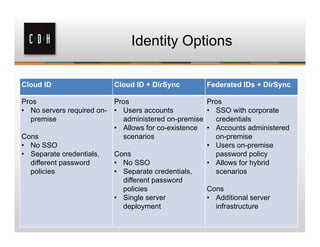
Identity Options

Cloud ID                  Cloud ID + DirSync          Federated IDs + DirSync

Pros                      Pros                        Pros
• No servers required on- • Users accounts            • SSO with corporate
  premise                   administered on-premise     credentials
                          • Allows for co-existence   • Accounts administered
Cons                        scenarios                   on-premise
• No SSO                                              • Users on-premise
• Separate credentials,   Cons                          password policy
  different password      • No SSO                    • Allows for hybrid
  policies                • Separate credentials,       scenarios
                            different password
                            policies                  Cons
                          • Single server             • Additional server
                            deployment                  infrastructure
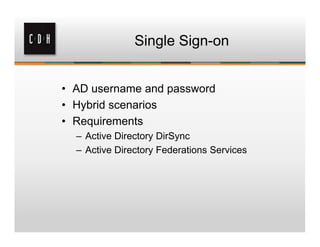
Single Sign-on


• AD username and password
• Hybrid scenarios
• Requirements
  – Active Directory DirSync
  – Active Directory Federations Services
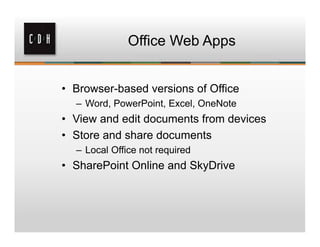
Office Web Apps


• Browser-based versions of Office
  – Word, PowerPoint, Excel, OneNote
• View and edit documents from devices
• Store and share documents
  – Local Office not required
• SharePoint Online and SkyDrive
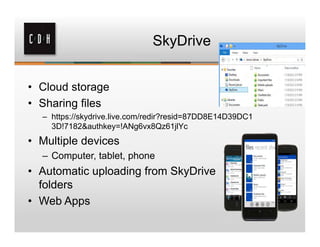
SkyDrive


• Cloud storage
• Sharing files
  – https://skydrive.live.com/redir?resid=87DD8E14D39DC1
    3D!7182&authkey=!ANg6vx8Qz61jlYc
• Multiple devices
  – Computer, tablet, phone
• Automatic uploading from SkyDrive
  folders
• Web Apps
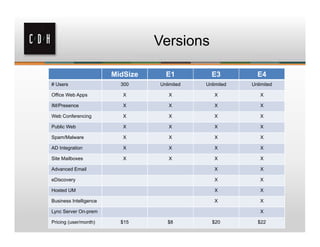
Versions

                        MidSize     E1          E3          E4
# Users                   300     Unlimited   Unlimited   Unlimited

Office Web Apps            X         X           X           X

IM/Presence                X         X           X           X

Web Conferencing           X         X           X           X

Public Web                 X         X           X           X

Spam/Malware               X         X           X           X

AD Integration             X         X           X           X

Site Mailboxes             X         X           X           X

Advanced Email                                   X           X

eDiscovery                                       X           X

Hosted UM                                        X           X

Business Intelligence                            X           X

Lync Server On-prem                                          X

Pricing (user/month)      $15        $8         $20         $22
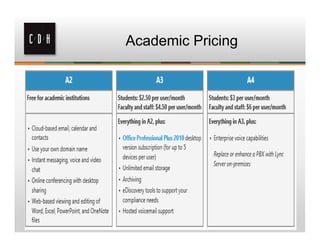
Academic Pricing
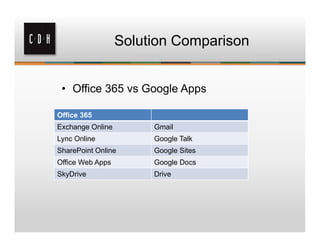
Solution Comparison


 • Office 365 vs Google Apps

Office 365
Exchange Online        Gmail
Lync Online            Google Talk
SharePoint Online      Google Sites
Office Web Apps        Google Docs
SkyDrive               Drive
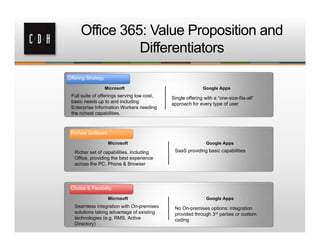
Office 365: Value Proposition and
                Differentiators
Offering Strategy

                    Microsoft                                Google Apps
 Full suite of offerings serving low cost,   Single offering with a “one-size-fits-all”
 basic needs up to and including             approach for every type of user
 Enterprise Information Workers needing
 the richest capabilities.


 Richest Software

                     Microsoft                                Google Apps

   Richer set of capabilities, including      SaaS providing basic capabilities
   Office, providing the best experience
   across the PC, Phone & Browser


 Choice & Flexibility

                     Microsoft                                Google Apps
   Seamless integration with On-premises      No On-premises options; integration
   solutions taking advantage of existing     provided through 3rd parties or custom
   technologies (e.g. RMS, Active             coding
   Directory)
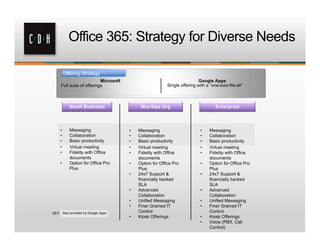
Office 365: Strategy for Diverse Needs

           Offering Strategy
                             Microsoft                                        Google Apps
       Full suite of offerings                               Single offering with a “one-size-fits-all”


       •       Messaging                  •   Messaging                        •    Messaging
       •       Collaboration              •   Collaboration                    •    Collaboration
       •       Basic productivity         •   Basic productivity               •    Basic productivity
       •       Virtual meeting            •   Virtual meeting                  •    Virtual meeting
       •       Fidelity with Office       •   Fidelity with Office             •    Fidelity with Office
               documents                      documents                             documents
       •       Option for Office Pro      •   Option for Office Pro            •    Option for Office Pro
               Plus                           Plus                                  Plus
                                          •   24x7 Support &                   •    24x7 Support &
                                              financially backed                    financially backed
                                              SLA                                   SLA
                                          •   Advanced                         •    Advanced
                                              Collaboration                         Collaboration
                                          •   Unified Messaging                •    Unified Messaging
                                          •   Finer Grained IT                 •    Finer Grained IT
KEY:       Also provided by Google Apps       Control                               Control
                                          •   Kiosk Offerings                  •    Kiosk Offerings
                                                                               •    Voice (PBX, Call
                                                                                    Control)
Thank You

Royal Oak                   Grand Rapids
306 S. Washington Ave.      15 Ionia SW
Suite 212                   Suite 270
Royal Oak, MI 48067         Grand Rapids, MI 49503
(248) 546-1800              (616) 776-1600


                    www.cdh.com

Office 365: The latest and greatest in the cloud

  • 1.
    Office 365: Thelatest and greatest in the cloud
  • 2.
    Quick Facts About Us Approach Partnerships • 23rd Year • Vendor • Microsoft Gold • Grand Rapids & Independent • VMware Royal Oak • Non-reseller Enterprise • 30 Staff • Professional • Citrix Silver Services Only • Cisco Premier • Novell Gold
  • 3.
    Microsoft Gold Partner Competencies Successes Pinpoint Three Gold Customer Microsoft’s official Excellence Award partner directory Five Silver Virtual Technical Specialist (VTSP) 5-star rating Managed Partner Numerous Partner Awards
  • 4.
  • 5.
    Get Social withC/D/H @cdhtweetstech facebook.com/cdhtech www.linkedin.com/company/cdh
  • 6.
    Your Presenter Eric Inch LeadConsultant, Unified Communications & Infrastructure CISSP, MCITP, MCTS, CCA, CCNA EricI@cdh.com
  • 7.
    Agenda • Overview of Office 365 • Technologies • Identity options • Versions • Solutions comparisons
  • 8.
    • Email • Word Processing • Contacts • Electronic • Calendaring Spreadsheets • Task Management • Presentation • Instant Messaging Software • Presence • Document Awareness Management • PC to PC audio / • Web Conferencing video • Intranet Sites • Unified Messaging • Cloud Storage
  • 10.
    Exchange Online • 25GB mailbox • Resource and shared mailboxes • Deleted item/mbx recovery – 14 days / 30 days • Exchange Online protection – Hosted mail hygiene • Outlook Anywhere, ActiveSync, Outlook Web Access • Blackberry Internet Service • Rich Co-existence
  • 11.
    Migration Strategies • Cut-overmigration – Mailbox sync • Staged migration – Pilot groups – Rich co-existence • IMAP • Third-party migration tools – MigrationWiz – Quest Migrator
  • 12.
    Hybrid • On-premises with hosted • Seamless co-existence • Free/busy sharing • Unified global address list • SMTP routing
  • 13.
    Exchange Online (cont.) • Secure mail routing between on-premises and Exchange Online organizations. • Mail routing with a shared domain namespace. • A unified global address list (GAL), also called a “shared address book.” • Free/busy and calendar sharing between on-premises and Exchange Online organizations. • Centralized control of inbound and outbound mail flow. • A single Microsoft Office Outlook Web App URL for both the on-premises and Exchange Online organizations. • Remote mailbox move • Centralized mailbox management using on-premises admin center (EAC). • Message tracking, MailTips, and multi-mailbox search between on- premises and Exchange Online organizations. • Cloud-based message archiving for on-premises Exchange mailboxes. Exchange Online Archiving can be used with a hybrid deployment.
  • 14.
    Lync Online • Instantmessaging – Internal – Federation • Presence • Conferencing • Hybrid Enterprise voice for Lync Online on 18-month roadmap.
  • 15.
    Lync Clients • Lyncclient – Status • Available, Away, Busy, Do Not Disturb – Status change alerts – Privacy Relationship – Federation / Public IM connectivity • Mobility – Communication anywhere – Smart phones, tablets, computers – Remote access
  • 16.
    Lync Conferencing • PowerPoint,Whiteboard, desktop sharing • Gallery View – Multiple video streams up to five participants – HD Video up to 1080P in multiparty conferences • Presenter Only Video Mode / Video Spotlight • Video Preview • OneNote
  • 17.
    Hybrid • Lync Online 2013 • ADFS and DirSync • Supported topology – Completely Lync 2013 on-premise – Lync 2010 with Lync 2013. Edge and next hop either Lync 2013 or Lync 2010 with latest CU – OCS 2007 R2 with Lync 2013. Edge and next hop is Lync 2013 • Users first created on-premise then migrated to Lync Online • SRV records pointed to on-premises Lync Edge • Migration considerations 1. User contacts - 250 limit 2. Instant messaging and presence - User contact lists and groups are migrated 3. Conferencing data, meeting content, and scheduled meetings – Not migrated
  • 18.
    Lync Hybrid • Functionality – Integration with on-premise PBX – Exchange hosted UM – Hold/retrieve, transfer, call forwarding – Media bypass – Lync phone edition • Limitations – No response groups – Remote call control – Call center integration
  • 19.
    SharePoint Online • DocumentManagement – Versioning – Workflows • Project or team sites • Discussion boards, Wiki, calendars • Business Intelligence • Public web • Office web apps
  • 20.
    SharePoint Server SharePoint Online Standard Enterprise Plan 1 Plan 2 Apps App Catalog and Marketplace X X X X Team Sites X X X X Work Management X X X X Collaboration Social X X X X External Sharing X X Basic Search X X X X Search Standard Search X X X X Enterprise Search X X Content Management X X X X Content Management Records Management X X X X E-discovery, ACM, Compliance X X Excel Services, PowerPivot, X X Business Intelligence PowerView Scorecards & Dashboards X Access Services X X X Visio Services X X Business Solutions Form Based Application X X SharePoint 2013 Workflow X X X Business Connectivity Services X X X
  • 21.
    Identity Options Cloud ID Cloud ID + DirSync Federated IDs + DirSync Pros Pros Pros • No servers required on- • Users accounts • SSO with corporate premise administered on-premise credentials • Allows for co-existence • Accounts administered Cons scenarios on-premise • No SSO • Users on-premise • Separate credentials, Cons password policy different password • No SSO • Allows for hybrid policies • Separate credentials, scenarios different password policies Cons • Single server • Additional server deployment infrastructure
  • 22.
    Single Sign-on • ADusername and password • Hybrid scenarios • Requirements – Active Directory DirSync – Active Directory Federations Services
  • 23.
    Office Web Apps •Browser-based versions of Office – Word, PowerPoint, Excel, OneNote • View and edit documents from devices • Store and share documents – Local Office not required • SharePoint Online and SkyDrive
  • 24.
    SkyDrive • Cloud storage •Sharing files – https://skydrive.live.com/redir?resid=87DD8E14D39DC1 3D!7182&authkey=!ANg6vx8Qz61jlYc • Multiple devices – Computer, tablet, phone • Automatic uploading from SkyDrive folders • Web Apps
  • 25.
    Versions MidSize E1 E3 E4 # Users 300 Unlimited Unlimited Unlimited Office Web Apps X X X X IM/Presence X X X X Web Conferencing X X X X Public Web X X X X Spam/Malware X X X X AD Integration X X X X Site Mailboxes X X X X Advanced Email X X eDiscovery X X Hosted UM X X Business Intelligence X X Lync Server On-prem X Pricing (user/month) $15 $8 $20 $22
  • 26.
  • 27.
    Solution Comparison •Office 365 vs Google Apps Office 365 Exchange Online Gmail Lync Online Google Talk SharePoint Online Google Sites Office Web Apps Google Docs SkyDrive Drive
  • 28.
    Office 365: ValueProposition and Differentiators Offering Strategy Microsoft Google Apps Full suite of offerings serving low cost, Single offering with a “one-size-fits-all” basic needs up to and including approach for every type of user Enterprise Information Workers needing the richest capabilities. Richest Software Microsoft Google Apps Richer set of capabilities, including SaaS providing basic capabilities Office, providing the best experience across the PC, Phone & Browser Choice & Flexibility Microsoft Google Apps Seamless integration with On-premises No On-premises options; integration solutions taking advantage of existing provided through 3rd parties or custom technologies (e.g. RMS, Active coding Directory)
  • 29.
    Office 365: Strategyfor Diverse Needs Offering Strategy Microsoft Google Apps Full suite of offerings Single offering with a “one-size-fits-all” • Messaging • Messaging • Messaging • Collaboration • Collaboration • Collaboration • Basic productivity • Basic productivity • Basic productivity • Virtual meeting • Virtual meeting • Virtual meeting • Fidelity with Office • Fidelity with Office • Fidelity with Office documents documents documents • Option for Office Pro • Option for Office Pro • Option for Office Pro Plus Plus Plus • 24x7 Support & • 24x7 Support & financially backed financially backed SLA SLA • Advanced • Advanced Collaboration Collaboration • Unified Messaging • Unified Messaging • Finer Grained IT • Finer Grained IT KEY: Also provided by Google Apps Control Control • Kiosk Offerings • Kiosk Offerings • Voice (PBX, Call Control)
  • 30.
    Thank You Royal Oak Grand Rapids 306 S. Washington Ave. 15 Ionia SW Suite 212 Suite 270 Royal Oak, MI 48067 Grand Rapids, MI 49503 (248) 546-1800 (616) 776-1600 www.cdh.com