OERs On Campus: Selecting and Creating 
Instructional Resources for All Students 
Presented by Skip Stahl and Rhianon E. Gutierrez 
UDL On Campus 
CAST, Inc. 
August 25, 2014
Objectives 
1. Define and give an overview of the benefits and 
challenges of open educational resources (OERs). 
2. Define accessibility and Universal Design for 
Learning (UDL) and their application in OER 
creation. 
3. Learn how to select and create OERs that will be 
accessible and consider the three principles of 
UDL. 
2
OERs Defined 
Open educational resources, or OERs, are “full 
courses, course materials, modules, textbooks, videos, 
tests, software; and any other tools, materials, or 
techniques offered freely and openly to educators and 
students to support access to knowledge.” 
3
Benefits of OERs 
✦ Instructors need to plan - learning goals, 
materials, assessments; increasing use of 
personalization in online practice 
✦ Accessibility goes hand in hand with 
personalization 
✦ Instructors need to be informed so they can be 
equipped with tools to select and create OER 
content that will enable learners to progress 
towards and demonstrate mastery in different 
ways 
4
Challenges of OERs 
✦ Educational institutions have limited knowledge or the capacity to retrofit 
digital materials effectively in-house 
✦ Inaccessible websites block students with disabilities from accessing 
resources 
✦ Federal education and civil rights statutes compel education institutions to 
provide equitable access to educational opportunities for students with 
disabilities including technology-mediated opportunities 
✦ 2011 Hewlett Foundation/Virtual Ability Study: 
✦ 60 open college textbooks reviewed using federal and international 
accessibility guidelines 
✦ 56% of these materials were web-based 
✦ 42% were downloadable PDFs 
✦ 42% web-based textbooks had problems with page layout, headers, 
and tables; none of the PDFs reviewed were accessible 5
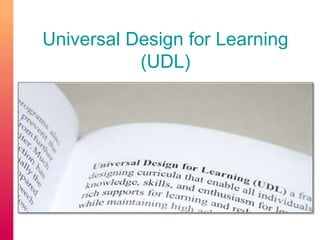
Universal Design for Learning 
(UDL)
Higher Education Opportunity Act 
of 2008 
Section 103(24) UNIVERSAL DESIGN FOR LEARNING.-- The term 
`universal design for learning' means a scientifically valid framework for 
guiding educational practice that— 
``(A) provides flexibility in the ways information is presented, in the 
ways students respond or demonstrate knowledge and skills, and in the 
ways students are engaged; and 
``(B) reduces barriers in instruction, provides appropriate 
accommodations, supports, and challenges, and maintains high 
achievement expectations for all students, including students with 
disabilities and students who are limited English proficient.''
Universal Design for Learning 
(UDL) 
✦ Learner variability is the norm, not the exception. 
✦ Accessibility is the baseline for the larger idea of 
creating a flexible curriculum with goals, 
methods, materials, and assessments that 
support learner achievement. 
✦ UDL is based on three principles: representation, 
action and expression, and engagement 
8
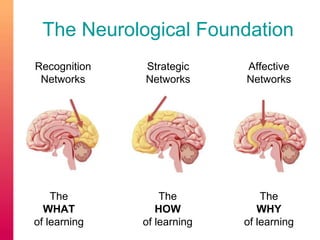
The Neurological Foundation 
Recognition 
Networks 
Strategic 
Networks 
Affective 
Networks 
The 
WHAT 
of learning 
The 
HOW 
of learning 
The 
WHY 
of learning
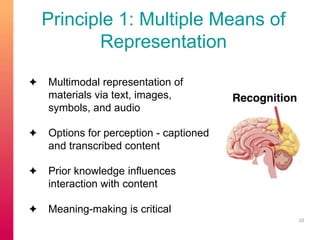
Principle 1: Multiple Means of 
Representation 
✦ Multimodal representation of 
materials via text, images, 
symbols, and audio 
✦ Options for perception - captioned 
and transcribed content 
✦ Prior knowledge influences 
interaction with content 
✦ Meaning-making is critical 
10
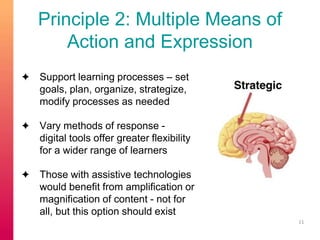
Principle 2: Multiple Means of 
Action and Expression 
✦ Support learning processes – set 
goals, plan, organize, strategize, 
modify processes as needed 
✦ Vary methods of response - 
digital tools offer greater flexibility 
for a wider range of learners 
✦ Those with assistive technologies 
would benefit from amplification or 
magnification of content - not for 
all, but this option should exist 
11
Principle 3: Multiple Means of 
Engagement 
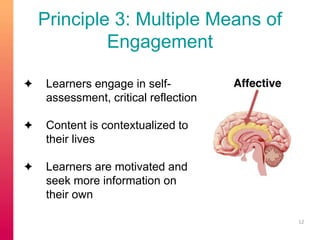
✦ Learners engage in self-assessment, 
critical reflection 
✦ Content is contextualized to 
their lives 
✦ Learners are motivated and 
seek more information on 
their own 
12
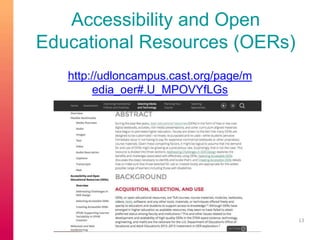
Accessibility and Open 
Educational Resources (OERs) 
http://udloncampus.cast.org/page/m 
edia_oer#.U_MPOVYfLGs 
13
Accessibility 
✦ Accessibility is the baseline 
✦ Section 508 compliance 
✦ Accessibility Checks 
✦ Quick Check: 
http://webaim.org/standards/508/checklist 
✦ Detailed Review: 
http://projectone.cannect.org/ 
✦ WCAG 2 Technical Details: 
http://www.w3.org/WAI/WCAG20/quickref/ 
14
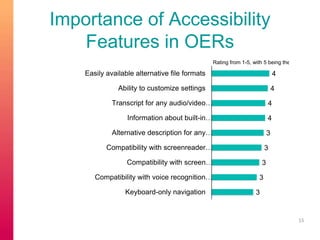
Importance of Accessibility 
Features in OERs 
15 
4 
4 
4 
4 
3 
3 
3 
3 
3 
Easily available alternative file formats 
Ability to customize settings 
Transcript for any audio/video… 
Information about built-in… 
Alternative description for any… 
Compatibility with screenreader… 
Compatibility with screen… 
Compatibility with voice recognition… 
Keyboard-only navigation 
Rating from 1-5, with 5 being the most important.
508 Functional Criteria 
Subpart C — Functional Performance Criteria 
§ 1194.31 Functional performance criteria. 
 At least one mode of operation and information retrieval 
that does not require user vision… 
 At least one mode of operation and information retrieval 
that does not require user hearing… 
 At least one mode of operation and information retrieval 
that does not require user speech… 
 At least one mode of operation and information retrieval 
that does not require fine motor control or simultaneous 
actions…
Selection and Creation of 
Materials 
1. Provide complete navigation. 
2. Create meaningful structure. 
3. Provide alternative access to media 
content. 
17
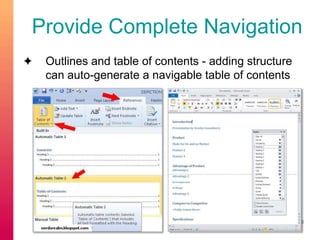
Provide Complete Navigation 
✦ Outlines and table of contents - adding structure 
can auto-generate a navigable table of contents 
18
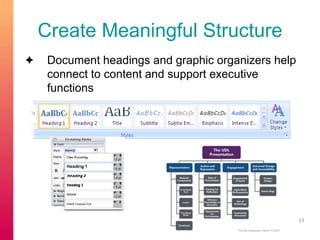
Create Meaningful Structure 
✦ Document headings and graphic organizers help 
connect to content and support executive 
functions 
19
Provide Alternative Access to 
Media Content 
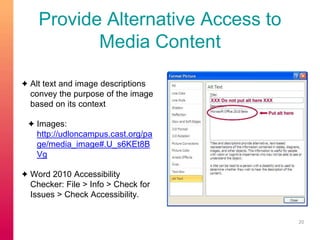
✦ Alt text and image descriptions 
convey the purpose of the image 
based on its context 
✦ Images: 
http://udloncampus.cast.org/pa 
ge/media_image#.U_s6KEt8B 
Vg 
✦ Word 2010 Accessibility 
Checker: File > Info > Check for 
Issues > Check Accessibility. 
20
Provide Alternative Access to 
Media Content 
✦ Transcripts and captions provide access to visual and audio content 
and increase search engine optimization (SEO) 
✦ Transcripts: 
http://udloncampus.cast.org/page/media_transcript#.U_s11Ut8BVg 
✦ Captions: 
http://udloncampus.cast.org/page/media_caption#.U_s1wkt8BVg 
✦ Audio description provides access to visual content 
✦ Audio Description: 
http://udloncampus.cast.org/page/media_audiodescription#.U_s1z 
Ut8BVg 21
Provide Alternative Access to 
Media Content 
✦ Video: Executive Functioning in Online Learning 
Environments 
✦ use of captions, collated transcript, and some 
audio description 
✦ http://udloncampus.cast.org/page/teach_executi 
ve#.U_s7EUt8BVg 
22
Flexible Multimedia 
✦ Content creators should choose multimedia tools 
that consider learner variability and are consistent 
with legal requirements for accessibility 
✦ UDL On Campus’ Flexible Multimedia pages 
address text, images, audio and video in the 
selection and creation of online content 
✦ http://udloncampus.cast.org/page/media_ove 
rview#.U_s76Et8BVg 
23
Conclusion 
✦ Instructors need to be informed so that they can be 
equipped with tools to select and create meaningful OER 
content. 
✦ Accessibility is the baseline and instructors should ensure 
that all of their educational content is accessible. 
✦ Instructors should plan for learner variability. Universal 
Design for Learning (UDL) is a framework that emphasizes 
learner variability in the design of curriculum. 
✦ There are flexible multimedia tools that support the 
selection and creation of OER content. 
24

OERs On Campus - Selecting and Creating Instructional Resources for All Students

  • 1.
    OERs On Campus:Selecting and Creating Instructional Resources for All Students Presented by Skip Stahl and Rhianon E. Gutierrez UDL On Campus CAST, Inc. August 25, 2014
  • 2.
    Objectives 1. Defineand give an overview of the benefits and challenges of open educational resources (OERs). 2. Define accessibility and Universal Design for Learning (UDL) and their application in OER creation. 3. Learn how to select and create OERs that will be accessible and consider the three principles of UDL. 2
  • 3.
    OERs Defined Openeducational resources, or OERs, are “full courses, course materials, modules, textbooks, videos, tests, software; and any other tools, materials, or techniques offered freely and openly to educators and students to support access to knowledge.” 3
  • 4.
    Benefits of OERs ✦ Instructors need to plan - learning goals, materials, assessments; increasing use of personalization in online practice ✦ Accessibility goes hand in hand with personalization ✦ Instructors need to be informed so they can be equipped with tools to select and create OER content that will enable learners to progress towards and demonstrate mastery in different ways 4
  • 5.
    Challenges of OERs ✦ Educational institutions have limited knowledge or the capacity to retrofit digital materials effectively in-house ✦ Inaccessible websites block students with disabilities from accessing resources ✦ Federal education and civil rights statutes compel education institutions to provide equitable access to educational opportunities for students with disabilities including technology-mediated opportunities ✦ 2011 Hewlett Foundation/Virtual Ability Study: ✦ 60 open college textbooks reviewed using federal and international accessibility guidelines ✦ 56% of these materials were web-based ✦ 42% were downloadable PDFs ✦ 42% web-based textbooks had problems with page layout, headers, and tables; none of the PDFs reviewed were accessible 5
  • 6.
    Universal Design forLearning (UDL)
  • 7.
    Higher Education OpportunityAct of 2008 Section 103(24) UNIVERSAL DESIGN FOR LEARNING.-- The term `universal design for learning' means a scientifically valid framework for guiding educational practice that— ``(A) provides flexibility in the ways information is presented, in the ways students respond or demonstrate knowledge and skills, and in the ways students are engaged; and ``(B) reduces barriers in instruction, provides appropriate accommodations, supports, and challenges, and maintains high achievement expectations for all students, including students with disabilities and students who are limited English proficient.''
  • 8.
    Universal Design forLearning (UDL) ✦ Learner variability is the norm, not the exception. ✦ Accessibility is the baseline for the larger idea of creating a flexible curriculum with goals, methods, materials, and assessments that support learner achievement. ✦ UDL is based on three principles: representation, action and expression, and engagement 8
  • 9.
    The Neurological Foundation Recognition Networks Strategic Networks Affective Networks The WHAT of learning The HOW of learning The WHY of learning
  • 10.
    Principle 1: MultipleMeans of Representation ✦ Multimodal representation of materials via text, images, symbols, and audio ✦ Options for perception - captioned and transcribed content ✦ Prior knowledge influences interaction with content ✦ Meaning-making is critical 10
  • 11.
    Principle 2: MultipleMeans of Action and Expression ✦ Support learning processes – set goals, plan, organize, strategize, modify processes as needed ✦ Vary methods of response - digital tools offer greater flexibility for a wider range of learners ✦ Those with assistive technologies would benefit from amplification or magnification of content - not for all, but this option should exist 11
  • 12.
    Principle 3: MultipleMeans of Engagement ✦ Learners engage in self-assessment, critical reflection ✦ Content is contextualized to their lives ✦ Learners are motivated and seek more information on their own 12
  • 13.
    Accessibility and Open Educational Resources (OERs) http://udloncampus.cast.org/page/m edia_oer#.U_MPOVYfLGs 13
  • 14.
    Accessibility ✦ Accessibilityis the baseline ✦ Section 508 compliance ✦ Accessibility Checks ✦ Quick Check: http://webaim.org/standards/508/checklist ✦ Detailed Review: http://projectone.cannect.org/ ✦ WCAG 2 Technical Details: http://www.w3.org/WAI/WCAG20/quickref/ 14
  • 15.
    Importance of Accessibility Features in OERs 15 4 4 4 4 3 3 3 3 3 Easily available alternative file formats Ability to customize settings Transcript for any audio/video… Information about built-in… Alternative description for any… Compatibility with screenreader… Compatibility with screen… Compatibility with voice recognition… Keyboard-only navigation Rating from 1-5, with 5 being the most important.
  • 16.
    508 Functional Criteria Subpart C — Functional Performance Criteria § 1194.31 Functional performance criteria.  At least one mode of operation and information retrieval that does not require user vision…  At least one mode of operation and information retrieval that does not require user hearing…  At least one mode of operation and information retrieval that does not require user speech…  At least one mode of operation and information retrieval that does not require fine motor control or simultaneous actions…
  • 17.
    Selection and Creationof Materials 1. Provide complete navigation. 2. Create meaningful structure. 3. Provide alternative access to media content. 17
  • 18.
    Provide Complete Navigation ✦ Outlines and table of contents - adding structure can auto-generate a navigable table of contents 18
  • 19.
    Create Meaningful Structure ✦ Document headings and graphic organizers help connect to content and support executive functions 19
  • 20.
    Provide Alternative Accessto Media Content ✦ Alt text and image descriptions convey the purpose of the image based on its context ✦ Images: http://udloncampus.cast.org/pa ge/media_image#.U_s6KEt8B Vg ✦ Word 2010 Accessibility Checker: File > Info > Check for Issues > Check Accessibility. 20
  • 21.
    Provide Alternative Accessto Media Content ✦ Transcripts and captions provide access to visual and audio content and increase search engine optimization (SEO) ✦ Transcripts: http://udloncampus.cast.org/page/media_transcript#.U_s11Ut8BVg ✦ Captions: http://udloncampus.cast.org/page/media_caption#.U_s1wkt8BVg ✦ Audio description provides access to visual content ✦ Audio Description: http://udloncampus.cast.org/page/media_audiodescription#.U_s1z Ut8BVg 21
  • 22.
    Provide Alternative Accessto Media Content ✦ Video: Executive Functioning in Online Learning Environments ✦ use of captions, collated transcript, and some audio description ✦ http://udloncampus.cast.org/page/teach_executi ve#.U_s7EUt8BVg 22
  • 23.
    Flexible Multimedia ✦Content creators should choose multimedia tools that consider learner variability and are consistent with legal requirements for accessibility ✦ UDL On Campus’ Flexible Multimedia pages address text, images, audio and video in the selection and creation of online content ✦ http://udloncampus.cast.org/page/media_ove rview#.U_s76Et8BVg 23
  • 24.
    Conclusion ✦ Instructorsneed to be informed so that they can be equipped with tools to select and create meaningful OER content. ✦ Accessibility is the baseline and instructors should ensure that all of their educational content is accessible. ✦ Instructors should plan for learner variability. Universal Design for Learning (UDL) is a framework that emphasizes learner variability in the design of curriculum. ✦ There are flexible multimedia tools that support the selection and creation of OER content. 24

Editor's Notes