NoSQL, BigData and
PostgreSQL
Contents
● Typical RDBMS and Scaling
● Big Data
– Big Data VS Traditional Data
– Big Data Characteristic
– Big Data Technologies
– NoSQL & Hadoop
● NoSQL
● Benefits of NoSQL
● What does NoSQL not Provide
● NoSQL Database Usage
● BASE VS ACID
Contents ...
● NoSQL Challenges
● Breads of NoSQL Solutions
– Key-Value Stores
– Column Family Store
– Document Database Store
● NoSQL with Relational DBMS (EDB)
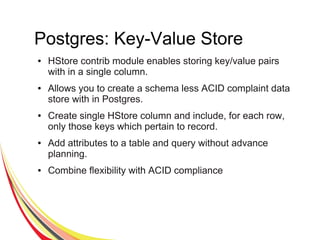
● Postgres: Key-Value Store
● Postgres: Document Store
– JSON and SQL
– Bridging Between SQL and JSON
– JSON Data Types
Typical RDBMS
● Fixed table schemas
● Small but frequent reads/write
● Large batch transactions
● Focus on ACID
– Atomicity
– Consistency
– Isolation
– Durability
How We Scale RDBMS
Implementation
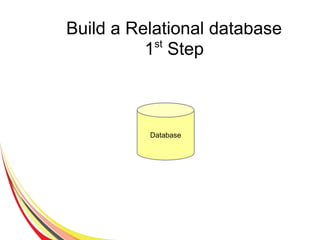
Build a Relational database
1st
Step
Database
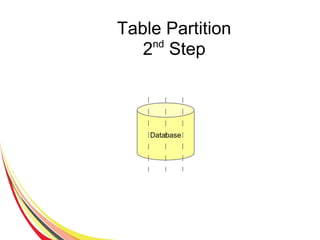
Table Partition
2nd
Step
Database
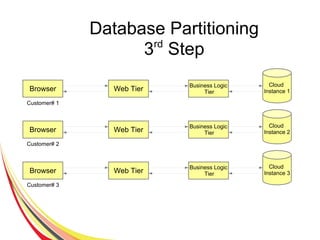
Database Partitioning
3rd
Step
Cloud
Instance 1Browser
Customer# 1
Web Tier
Business Logic
Tier
Cloud
Instance 2Browser
Customer# 2
Web Tier
Business Logic
Tier
Cloud
Instance 3Browser
Customer# 3
Web Tier
Business Logic
Tier
Big Data
● Lots of structured and sami structured data collected
and warehoused and PB of transactions performed
day by day like on ...
– Web data
– Social networking data
– User personal identify
– Users transactions
● Due to big volume of data which increases day by
day traditional database management solution fail to
provide more performance, elastic scalability for
wider audience e.g...
– Google processes 20 PB + a day (2008)
– Facebook has 2.5 PB of user data (2009)
– Ebay has 6.5 PB of user data (2009)
Big Data VS Traditional Data
● Photograph
● Audio & Video
● 3D model
● Simulations
● Location Data
● ..
● Documents
● Finances
● Inventory records
● Personal files
● ..
Big Data Characteristic
● Volume (High volume of data)
● Velocity (Changes occurrence in data rapidly)
● Variety (Number of new data types)
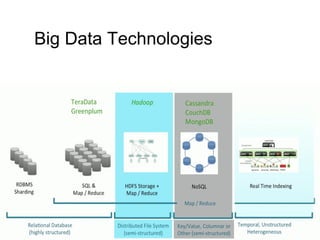
Big Data Technologies
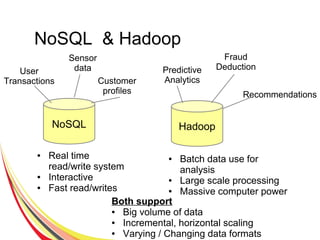
NoSQL & Hadoop
NoSQL Hadoop
● Real time
read/write system
● Interactive
● Fast read/writes
● Batch data use for
analysis
● Large scale processing
● Massive computer power
User
Transactions
Sensor
data
Both support
● Big volume of data
● Incremental, horizontal scaling
● Varying / Changing data formats
Customer
profiles
Predictive
Analytics
Fraud
Deduction
Recommendations
NoSQL
● Stands for No-SQL or Not only SQL
● Class of non-relational data storage systems
● Usually do not require a fixed table schema nor do
they use the concept of joins
● NoSQL is not ACID compliance.
Benefits of NoSQL
● Elastic scaling: RDBMS might not scale out easily on
commodity clusters, but the new breed of NoSQL
databases are designed to expand transparently to take
advantage of new nodes.
● Flexible Data Model: Enable to work with new data types
like mobile interactions, machine data, social connections
etc.
● Enable you to work in new ways of incremental
development and continuous release.
● Cheap, easy to implement (open source)
Benefits of NoSQL
● Data are replicated to multiple nodes (therefore
identical and fault-tolerant) and can be partitioned
When data is written, the latest version is on at least
one node and then replicated to other nodes.
● No single point of failure
● Easy to distribute
● Don't require a schema
What does NoSQL Not Provide
● Joins
● Group by
● ACID transactions
● SQL
– Integration with applications that are based on SQL
NoSQL Database Usage
● NoSQL Data storage systems makes sense for applications
that need to deal with very very large semi-structured data
– Log Analysis
– Social Networking Feeds
● Scalable replication and distribution
– Potential of thousands of machines
– Potentially distributed around the word
● Query needs to answer quickly
● Mostly data retrieval with few updates
● Schema less with no relation
● ACID transaction properties not needed
● Open Source development
NoSQL Real-World Application
● Emergency Management System
– High variability among data sources required high schema
flexibility
● Massively Open Online Course
– Massive read stability, content integration, low latency
● Patient Data and Prescription Records
– Efficient write stability
● Social Marketing Analytics
– Map reduce analytical approaches
Source: Gartner , A Tour of NoSQL in 8 Use Cases
Where No-SQL Used
● Google (BigTable, LevelDB)
● LinkedIn (Voldemort)
● Facebook (Cassandra)
● Twitter (Hadoop/Hbase, FlockDB, Cassandra)
● Netflix (SimpleDB, Hadoop/HBase, Cassandra)
● CERN (CouchDB)
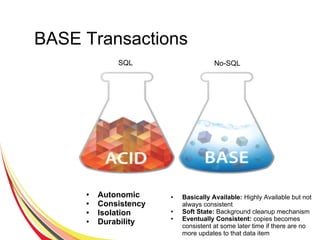
BASE Transactions
● Autonomic
● Consistency
● Isolation
● Durability
● Basically Available: Highly Available but not
always consistent
● Soft State: Background cleanup mechanism
● Eventually Consistent: copies becomes
consistent at some later time if there are no
more updates to that data item
SQL No-SQL
No-SQL Challenges
● Lack of maturity -- numerous solutions still in their
beta stages
● Lack of commercial support for enterprise users
● Lack of support for data analysis
● Maintenance efforts and skills are required. Experts
are hard to find
Breads of No-SQL Solutions
● Key-Value Stores
● Column Family Stores
● Document Databases
● Graph Databases
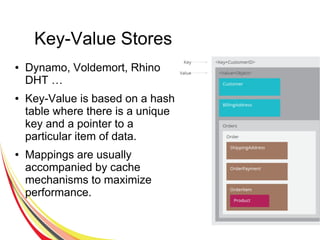
Key-Value Stores
● Dynamo, Voldemort, Rhino
DHT …
● Key-Value is based on a hash
table where there is a unique
key and a pointer to a
particular item of data.
● Mappings are usually
accompanied by cache
mechanisms to maximize
performance.
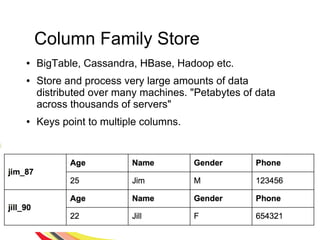
Column Family Store
● BigTable, Cassandra, HBase, Hadoop etc.
● Store and process very large amounts of data
distributed over many machines. "Petabytes of data
across thousands of servers"
● Keys point to multiple columns.
Document Database Stores
● CouchDB, MongoDB, Lotus Notes, Redis …
● Documents are addressed in the database via a
unique key that represents that document.
● Semi-structured documents can be XML or JSON
formatted, for instance.
● In addition to the key, documents can be retrieved
with queries.
Document Database Stores
{
FirstName: "Bart",
LastName: "Loews",
Children: [ {
FirstName:"Tadd",
Age: 4},
{
FirstName:"Todd",
Age:4}
],
Age: 35,
Address:{
number:1234,
street: "Fake road",
City: "Fake City",
state: "VA",
Country: "USA"
}
}
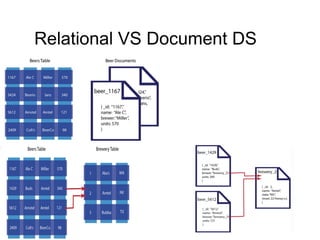
Relational VS Document DS
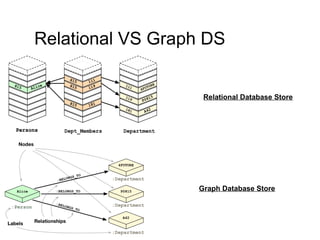
Relational VS Graph DS
Relational Database Store
Graph Database Store
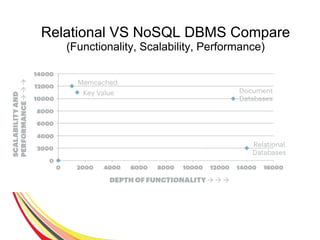
Relational VS NoSQL DBMS Compare
(Functionality, Scalability, Performance)
In EDB, NoSQL implemented through different data types
● HSTORE
– Key-value pair
– Simple, fast and easy
– Ideal for flat data structures
● JSON
– Hierarchical document model
– Introduced in PPAS 9.2/9.3
● JSONB
– Binary version of JSON
– Faster, more operators and even more robust
– Introduced in PPAS 9.4
NoSQL with Relational DBMS
(EDB)
Postgres: Key-Value Store
● HStore contrib module enables storing key/value pairs
with in a single column.
● Allows you to create a schema less ACID complaint data
store with in Postgres.
● Create single HStore column and include, for each row,
only those keys which pertain to record.
● Add attributes to a table and query without advance
planning.
● Combine flexibility with ACID compliance
HStore - Example
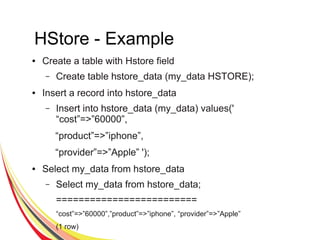
● Create a table with Hstore field
– Create table hstore_data (my_data HSTORE);
● Insert a record into hstore_data
– Insert into hstore_data (my_data) values('
“cost”=>”60000”,
“product”=>”iphone”,
“provider”=>”Apple” ');
● Select my_data from hstore_data
– Select my_data from hstore_data;
=========================
“cost”=>”60000”,”product”=>”iphone”, “provider”=>”Apple”
(1 row)
Postgres: Document Store
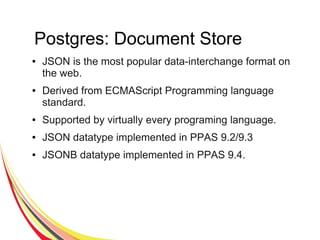
● JSON is the most popular data-interchange format on
the web.
● Derived from ECMAScript Programming language
standard.
● Supported by virtually every programing language.
● JSON datatype implemented in PPAS 9.2/9.3
● JSONB datatype implemented in PPAS 9.4.
JSONB - Example
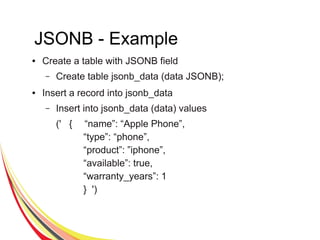
● Create a table with JSONB field
– Create table jsonb_data (data JSONB);
● Insert a record into jsonb_data
– Insert into jsonb_data (data) values
(' { “name”: “Apple Phone”,
“type”: “phone”,
“product”: ”iphone”,
“available”: true,
“warranty_years”: 1
} ')
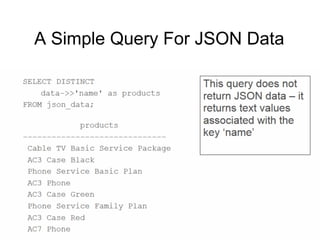
A Simple Query For JSON Data
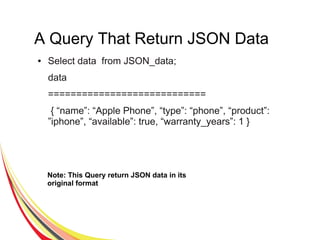
A Query That Return JSON Data
● Select data from JSON_data;
data
============================
{ “name”: “Apple Phone”, “type”: “phone”, “product”:
”iphone”, “available”: true, “warranty_years”: 1 }
Note: This Query return JSON data in its
original format
JSON and SQL
● JSON is naturally integrated
with SQL in Postgres.
● JSON and SQL queries use
the same language, the same
planner, and the same ACID complaint transaction
framework.
● JSON and HSTORE are elegant and easy to use
extensions of the underlying object relational model.
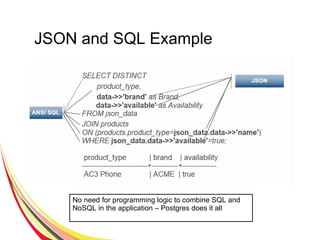
JSON and SQL Example
No need for programming logic to combine SQL and
NoSQL in the application – Postgres does it all
Bridging Between SQL and JSON
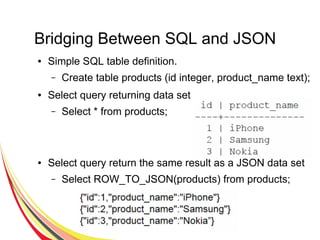
● Simple SQL table definition.
– Create table products (id integer, product_name text);
● Select query returning data set
– Select * from products;
● Select query return the same result as a JSON data set
– Select ROW_TO_JSON(products) from products;
JSON Data Types
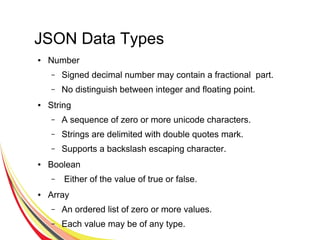
● Number
– Signed decimal number may contain a fractional part.
– No distinguish between integer and floating point.
● String
– A sequence of zero or more unicode characters.
– Strings are delimited with double quotes mark.
– Supports a backslash escaping character.
● Boolean
– Either of the value of true or false.
● Array
– An ordered list of zero or more values.
– Each value may be of any type.
JSON Data Types
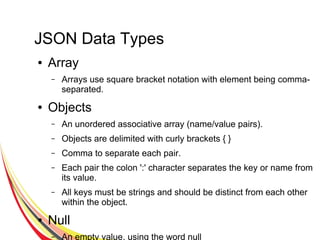
● Array
– Arrays use square bracket notation with element being comma-
separated.
● Objects
– An unordered associative array (name/value pairs).
– Objects are delimited with curly brackets { }
– Comma to separate each pair.
– Each pair the colon ':' character separates the key or name from
its value.
– All keys must be strings and should be distinct from each other
within the object.
● Null
– An empty value, using the word null
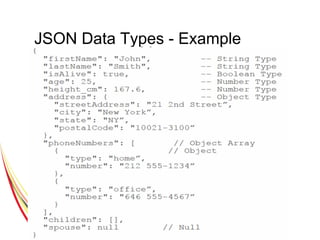
JSON Data Types - Example
JSON, JSONB or HSTORE ?
● JSON/JSONB is more versatile than HSTORE.
● HSTORE provides more structure but its only deal with
text and you can not nest objects.
● JSON or JSONB ?
– If you need any of the following then use JSON
● Storage of validated JSON, without processing or
indexing it.
● Preservation of white spaces in json text.
● Preservation of object key order
● Preservation of duplicate object keys.
● Maximum input/output speed.
– For any other case use JSONB.
Structured or Unstructured ?
“No SQL Only” or “Not Only SQL” ?
● Structure and standard emerge.
● Data has reference
● When the database has duplicate data entries , then the
application has to manage updates in multiple places –
what happens when there is no ACID transactional
model.
Say yes to “Not Only SQL”
● Postgres overcomes many of the standard objections “It
can't be done with conventional database system.”
● Postgres
– Combines both structured and unstructured data.
– Is faster ( for many workloads) than the leading No-
SQL only solutions.
– Integrate easily with web 2.0 application development
environment.
– Can be deploy on client premises or in the
cloud(public/private).
● Do more with Postgres – The enterprise NoSQL Solution.

No sql bigdata and postgresql

  • 1.
  • 2.
    Contents ● Typical RDBMSand Scaling ● Big Data – Big Data VS Traditional Data – Big Data Characteristic – Big Data Technologies – NoSQL & Hadoop ● NoSQL ● Benefits of NoSQL ● What does NoSQL not Provide ● NoSQL Database Usage ● BASE VS ACID
  • 3.
    Contents ... ● NoSQLChallenges ● Breads of NoSQL Solutions – Key-Value Stores – Column Family Store – Document Database Store ● NoSQL with Relational DBMS (EDB) ● Postgres: Key-Value Store ● Postgres: Document Store – JSON and SQL – Bridging Between SQL and JSON – JSON Data Types
  • 4.
    Typical RDBMS ● Fixedtable schemas ● Small but frequent reads/write ● Large batch transactions ● Focus on ACID – Atomicity – Consistency – Isolation – Durability
  • 5.
    How We ScaleRDBMS Implementation
  • 6.
    Build a Relationaldatabase 1st Step Database
  • 7.
  • 8.
    Database Partitioning 3rd Step Cloud Instance 1Browser Customer#1 Web Tier Business Logic Tier Cloud Instance 2Browser Customer# 2 Web Tier Business Logic Tier Cloud Instance 3Browser Customer# 3 Web Tier Business Logic Tier
  • 9.
    Big Data ● Lotsof structured and sami structured data collected and warehoused and PB of transactions performed day by day like on ... – Web data – Social networking data – User personal identify – Users transactions ● Due to big volume of data which increases day by day traditional database management solution fail to provide more performance, elastic scalability for wider audience e.g... – Google processes 20 PB + a day (2008) – Facebook has 2.5 PB of user data (2009) – Ebay has 6.5 PB of user data (2009)
  • 10.
    Big Data VSTraditional Data ● Photograph ● Audio & Video ● 3D model ● Simulations ● Location Data ● .. ● Documents ● Finances ● Inventory records ● Personal files ● ..
  • 11.
    Big Data Characteristic ●Volume (High volume of data) ● Velocity (Changes occurrence in data rapidly) ● Variety (Number of new data types)
  • 12.
  • 13.
    NoSQL & Hadoop NoSQLHadoop ● Real time read/write system ● Interactive ● Fast read/writes ● Batch data use for analysis ● Large scale processing ● Massive computer power User Transactions Sensor data Both support ● Big volume of data ● Incremental, horizontal scaling ● Varying / Changing data formats Customer profiles Predictive Analytics Fraud Deduction Recommendations
  • 14.
    NoSQL ● Stands forNo-SQL or Not only SQL ● Class of non-relational data storage systems ● Usually do not require a fixed table schema nor do they use the concept of joins ● NoSQL is not ACID compliance.
  • 15.
    Benefits of NoSQL ●Elastic scaling: RDBMS might not scale out easily on commodity clusters, but the new breed of NoSQL databases are designed to expand transparently to take advantage of new nodes. ● Flexible Data Model: Enable to work with new data types like mobile interactions, machine data, social connections etc. ● Enable you to work in new ways of incremental development and continuous release. ● Cheap, easy to implement (open source)
  • 16.
    Benefits of NoSQL ●Data are replicated to multiple nodes (therefore identical and fault-tolerant) and can be partitioned When data is written, the latest version is on at least one node and then replicated to other nodes. ● No single point of failure ● Easy to distribute ● Don't require a schema
  • 17.
    What does NoSQLNot Provide ● Joins ● Group by ● ACID transactions ● SQL – Integration with applications that are based on SQL
  • 18.
    NoSQL Database Usage ●NoSQL Data storage systems makes sense for applications that need to deal with very very large semi-structured data – Log Analysis – Social Networking Feeds ● Scalable replication and distribution – Potential of thousands of machines – Potentially distributed around the word ● Query needs to answer quickly ● Mostly data retrieval with few updates ● Schema less with no relation ● ACID transaction properties not needed ● Open Source development
  • 19.
    NoSQL Real-World Application ●Emergency Management System – High variability among data sources required high schema flexibility ● Massively Open Online Course – Massive read stability, content integration, low latency ● Patient Data and Prescription Records – Efficient write stability ● Social Marketing Analytics – Map reduce analytical approaches Source: Gartner , A Tour of NoSQL in 8 Use Cases
  • 20.
    Where No-SQL Used ●Google (BigTable, LevelDB) ● LinkedIn (Voldemort) ● Facebook (Cassandra) ● Twitter (Hadoop/Hbase, FlockDB, Cassandra) ● Netflix (SimpleDB, Hadoop/HBase, Cassandra) ● CERN (CouchDB)
  • 21.
    BASE Transactions ● Autonomic ●Consistency ● Isolation ● Durability ● Basically Available: Highly Available but not always consistent ● Soft State: Background cleanup mechanism ● Eventually Consistent: copies becomes consistent at some later time if there are no more updates to that data item SQL No-SQL
  • 22.
    No-SQL Challenges ● Lackof maturity -- numerous solutions still in their beta stages ● Lack of commercial support for enterprise users ● Lack of support for data analysis ● Maintenance efforts and skills are required. Experts are hard to find
  • 23.
    Breads of No-SQLSolutions ● Key-Value Stores ● Column Family Stores ● Document Databases ● Graph Databases
  • 24.
    Key-Value Stores ● Dynamo,Voldemort, Rhino DHT … ● Key-Value is based on a hash table where there is a unique key and a pointer to a particular item of data. ● Mappings are usually accompanied by cache mechanisms to maximize performance.
  • 25.
    Column Family Store ●BigTable, Cassandra, HBase, Hadoop etc. ● Store and process very large amounts of data distributed over many machines. "Petabytes of data across thousands of servers" ● Keys point to multiple columns.
  • 26.
    Document Database Stores ●CouchDB, MongoDB, Lotus Notes, Redis … ● Documents are addressed in the database via a unique key that represents that document. ● Semi-structured documents can be XML or JSON formatted, for instance. ● In addition to the key, documents can be retrieved with queries.
  • 27.
    Document Database Stores { FirstName:"Bart", LastName: "Loews", Children: [ { FirstName:"Tadd", Age: 4}, { FirstName:"Todd", Age:4} ], Age: 35, Address:{ number:1234, street: "Fake road", City: "Fake City", state: "VA", Country: "USA" } }
  • 28.
  • 29.
    Relational VS GraphDS Relational Database Store Graph Database Store
  • 30.
    Relational VS NoSQLDBMS Compare (Functionality, Scalability, Performance)
  • 31.
    In EDB, NoSQLimplemented through different data types ● HSTORE – Key-value pair – Simple, fast and easy – Ideal for flat data structures ● JSON – Hierarchical document model – Introduced in PPAS 9.2/9.3 ● JSONB – Binary version of JSON – Faster, more operators and even more robust – Introduced in PPAS 9.4 NoSQL with Relational DBMS (EDB)
  • 32.
    Postgres: Key-Value Store ●HStore contrib module enables storing key/value pairs with in a single column. ● Allows you to create a schema less ACID complaint data store with in Postgres. ● Create single HStore column and include, for each row, only those keys which pertain to record. ● Add attributes to a table and query without advance planning. ● Combine flexibility with ACID compliance
  • 33.
    HStore - Example ●Create a table with Hstore field – Create table hstore_data (my_data HSTORE); ● Insert a record into hstore_data – Insert into hstore_data (my_data) values(' “cost”=>”60000”, “product”=>”iphone”, “provider”=>”Apple” '); ● Select my_data from hstore_data – Select my_data from hstore_data; ========================= “cost”=>”60000”,”product”=>”iphone”, “provider”=>”Apple” (1 row)
  • 34.
    Postgres: Document Store ●JSON is the most popular data-interchange format on the web. ● Derived from ECMAScript Programming language standard. ● Supported by virtually every programing language. ● JSON datatype implemented in PPAS 9.2/9.3 ● JSONB datatype implemented in PPAS 9.4.
  • 35.
    JSONB - Example ●Create a table with JSONB field – Create table jsonb_data (data JSONB); ● Insert a record into jsonb_data – Insert into jsonb_data (data) values (' { “name”: “Apple Phone”, “type”: “phone”, “product”: ”iphone”, “available”: true, “warranty_years”: 1 } ')
  • 36.
    A Simple QueryFor JSON Data
  • 37.
    A Query ThatReturn JSON Data ● Select data from JSON_data; data ============================ { “name”: “Apple Phone”, “type”: “phone”, “product”: ”iphone”, “available”: true, “warranty_years”: 1 } Note: This Query return JSON data in its original format
  • 38.
    JSON and SQL ●JSON is naturally integrated with SQL in Postgres. ● JSON and SQL queries use the same language, the same planner, and the same ACID complaint transaction framework. ● JSON and HSTORE are elegant and easy to use extensions of the underlying object relational model.
  • 39.
    JSON and SQLExample No need for programming logic to combine SQL and NoSQL in the application – Postgres does it all
  • 40.
    Bridging Between SQLand JSON ● Simple SQL table definition. – Create table products (id integer, product_name text); ● Select query returning data set – Select * from products; ● Select query return the same result as a JSON data set – Select ROW_TO_JSON(products) from products;
  • 41.
    JSON Data Types ●Number – Signed decimal number may contain a fractional part. – No distinguish between integer and floating point. ● String – A sequence of zero or more unicode characters. – Strings are delimited with double quotes mark. – Supports a backslash escaping character. ● Boolean – Either of the value of true or false. ● Array – An ordered list of zero or more values. – Each value may be of any type.
  • 42.
    JSON Data Types ●Array – Arrays use square bracket notation with element being comma- separated. ● Objects – An unordered associative array (name/value pairs). – Objects are delimited with curly brackets { } – Comma to separate each pair. – Each pair the colon ':' character separates the key or name from its value. – All keys must be strings and should be distinct from each other within the object. ● Null – An empty value, using the word null
  • 43.
    JSON Data Types- Example
  • 44.
    JSON, JSONB orHSTORE ? ● JSON/JSONB is more versatile than HSTORE. ● HSTORE provides more structure but its only deal with text and you can not nest objects. ● JSON or JSONB ? – If you need any of the following then use JSON ● Storage of validated JSON, without processing or indexing it. ● Preservation of white spaces in json text. ● Preservation of object key order ● Preservation of duplicate object keys. ● Maximum input/output speed. – For any other case use JSONB.
  • 45.
    Structured or Unstructured? “No SQL Only” or “Not Only SQL” ? ● Structure and standard emerge. ● Data has reference ● When the database has duplicate data entries , then the application has to manage updates in multiple places – what happens when there is no ACID transactional model.
  • 46.
    Say yes to“Not Only SQL” ● Postgres overcomes many of the standard objections “It can't be done with conventional database system.” ● Postgres – Combines both structured and unstructured data. – Is faster ( for many workloads) than the leading No- SQL only solutions. – Integrate easily with web 2.0 application development environment. – Can be deploy on client premises or in the cloud(public/private). ● Do more with Postgres – The enterprise NoSQL Solution.