The Future
 Essential to 21st Century Learning
 Ability to collaborate with technology is essential to
the workplace success (Cahill, 2011)
 Familiar ecosystem
 College and Career Readiness
Why?
 Online journal or diary
 Facilitate rapid knowledge sharing and collaboration
in a global community (Powell, Jacob, & Chapman,
2011)
 Increase student interest in writing because work is
published online (Jackson, 2012)
Blogs
 Journaling/Reflection
 News
 Debates
 Reviews
 Photo Analysis
 Digital Citizenship
 Unit Reflection/Review
Application
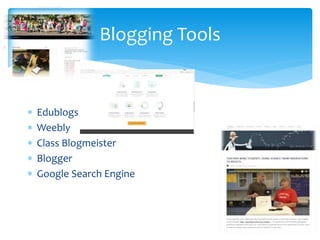
 Edublogs
 Weebly
 Class Blogmeister
 Blogger
 Google Search Engine
Blogging Tools
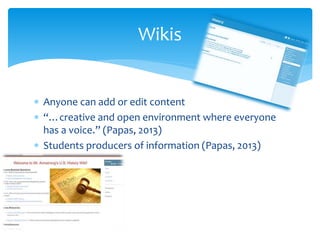
 Anyone can add or edit content
 “…creative and open environment where everyone
has a voice.” (Papas, 2013)
 Students producers of information (Papas, 2013)
Wikis
 Historical Fan club
 Debates
 Newsroom
 Find the error
 Collaborative Stories
 Group projects
 Many more!
Application
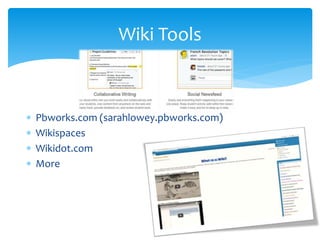
 Pbworks.com (sarahlowey.pbworks.com)
 Wikispaces
 Wikidot.com
 More
Wiki Tools
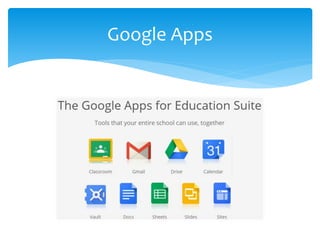
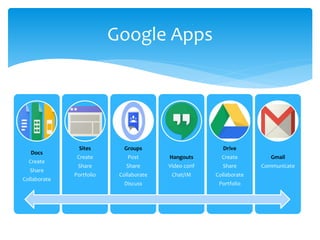
Google Apps
Docs
Create
Share
Collaborate
Sites
Create
Share
Portfolio
Groups
Post
Share
Collaborate
Discuss
Hangouts
Video conf
Chat/IM
Drive
Create
Share
Collaborate
Portfolio
Gmail
Communicate
Google Apps
 Google Groups—collaborative/team work
 Docs—collaborate as you create
 Sites—Student portfolios
 Google Forms (docs)—formative assessment
 Drive—share resources with teachers/students
 Hangouts—Connect with a teacher/classroom from
another country
 Hangouts—IM study groups
 Many, many more!
Application
 What is your intended goal?
 Choose one communication tool (Blog, Wiki, Google
App)
 Research/learn/brainstorm
 Create objective(s)/align curriculum/standards
 Get started!
 Elicit feedback from students
How?
References
References
Accenture UK Careers, August 11, 2015. “The Workforce of the Future—Are you Ready?” Retrieved
from https://www.youtube.com/watch?v=dO5SKYF3iWE
Burt, R. (2015, October 15, 2015). 50 ideas for student blogging and writing online [Blog post].
Retrieved from https://www.theedublogger.com/2015/10/15/50-ideas-for-student-
blogging-and-writing-online/
Couros, G. (2013, March 13, 2013). 5 Reasons your students should blog [Blog post]. Retrieved
from http://georgecouros.ca/blog/archives/3721
Fresh ideas: using wikis in the classroom. (2012). Education World. Retrieved from
http://www.educationworld.com/a_lesson/using-wikis-in-the-classroom.shtml
Google for Education https://www.google.com/edu/?gclid=COm4jrDP4M8CFQ52fgodUZEIXw
Google for Education. April 11, 2014. “Google for Education 101 (in 101 Seconds).” Retrieved from
https://www.youtube.com/watch?v=uXFUl0KcIkA
Jackson, L. (2012). Blogging? It’s elementary my dear Watson! Retrieved from
http://www.educationworld.com/a_tech/tech/tech217.shtml
Papas, Christopher (2013, October 6, 2013) How to use wiki in the classroom. Retrieved from
https://elearningindustry.com/how-to-use-wiki-in-the-classroom
Powell, D. A., Jacob, C. J., & Chapman, B. J. (2011, December 3, 2011). Using blogs and new media in
academic practice: potential roles in research, teaching, learning, and extension. Innovative
Higher Education, 37(4), 271-282. http://dx.doi.org/10.1007/s10755-011-9207-7

Using Virtual Communication and Collaboration to Enhance Curriculum

  • 2.
  • 3.
     Essential to21st Century Learning  Ability to collaborate with technology is essential to the workplace success (Cahill, 2011)  Familiar ecosystem  College and Career Readiness Why?
  • 4.
     Online journalor diary  Facilitate rapid knowledge sharing and collaboration in a global community (Powell, Jacob, & Chapman, 2011)  Increase student interest in writing because work is published online (Jackson, 2012) Blogs
  • 5.
     Journaling/Reflection  News Debates  Reviews  Photo Analysis  Digital Citizenship  Unit Reflection/Review Application
  • 6.
     Edublogs  Weebly Class Blogmeister  Blogger  Google Search Engine Blogging Tools
  • 7.
     Anyone canadd or edit content  “…creative and open environment where everyone has a voice.” (Papas, 2013)  Students producers of information (Papas, 2013) Wikis
  • 8.
     Historical Fanclub  Debates  Newsroom  Find the error  Collaborative Stories  Group projects  Many more! Application
  • 9.
     Pbworks.com (sarahlowey.pbworks.com) Wikispaces  Wikidot.com  More Wiki Tools
  • 10.
  • 11.
  • 12.
     Google Groups—collaborative/teamwork  Docs—collaborate as you create  Sites—Student portfolios  Google Forms (docs)—formative assessment  Drive—share resources with teachers/students  Hangouts—Connect with a teacher/classroom from another country  Hangouts—IM study groups  Many, many more! Application
  • 13.
     What isyour intended goal?  Choose one communication tool (Blog, Wiki, Google App)  Research/learn/brainstorm  Create objective(s)/align curriculum/standards  Get started!  Elicit feedback from students How?
  • 14.
    References References Accenture UK Careers,August 11, 2015. “The Workforce of the Future—Are you Ready?” Retrieved from https://www.youtube.com/watch?v=dO5SKYF3iWE Burt, R. (2015, October 15, 2015). 50 ideas for student blogging and writing online [Blog post]. Retrieved from https://www.theedublogger.com/2015/10/15/50-ideas-for-student- blogging-and-writing-online/ Couros, G. (2013, March 13, 2013). 5 Reasons your students should blog [Blog post]. Retrieved from http://georgecouros.ca/blog/archives/3721 Fresh ideas: using wikis in the classroom. (2012). Education World. Retrieved from http://www.educationworld.com/a_lesson/using-wikis-in-the-classroom.shtml Google for Education https://www.google.com/edu/?gclid=COm4jrDP4M8CFQ52fgodUZEIXw Google for Education. April 11, 2014. “Google for Education 101 (in 101 Seconds).” Retrieved from https://www.youtube.com/watch?v=uXFUl0KcIkA Jackson, L. (2012). Blogging? It’s elementary my dear Watson! Retrieved from http://www.educationworld.com/a_tech/tech/tech217.shtml Papas, Christopher (2013, October 6, 2013) How to use wiki in the classroom. Retrieved from https://elearningindustry.com/how-to-use-wiki-in-the-classroom Powell, D. A., Jacob, C. J., & Chapman, B. J. (2011, December 3, 2011). Using blogs and new media in academic practice: potential roles in research, teaching, learning, and extension. Innovative Higher Education, 37(4), 271-282. http://dx.doi.org/10.1007/s10755-011-9207-7

Editor's Notes

  • #2 Using Virtual Communication and Collaboration to enhance curriculum: Why, What, and How?
  • #3 Intro/Warm up activity to get the learners thinking about the “why.” It is essential that we do all we can to prepare our students for the ever changing world they will be required to function in, in particular utilizing current technology to teach them the proper communication and collaboration skills that will take them into the future.
  • #4 Why should we use virtual communication and collaboration to enhance curriculum? These skills are essential to 21st Century learning. Students must have the ability to collaborate with technology as it is essential to workplace success. It is a familiar landscape for our students—they are on social media, and communicating virtually with their peers already.
  • #5 Blogs are online journals or diaries. Surely we’ve all come across blogs in our travels on the world wide web. Using blogs is a great way to facilitate rapid knowledge sharing and collaboration in our global community. Studies show that when students engage in blogs, their interest in and quantity of writing increases because the work is published online. That is, it’s not just an assignment for the teacher, but potentially available to everyone on the world wide web—therefore students are more conscientious and thoughtful.
  • #6 A simple google search will elicit some great ideas of using blogs with your students. From journaling and reflection, to book reviews, thoughts on current events, debates, photo analysis, digital citizenship, and more, allowing your students to work in this digital media environment will engage them in ways they’re engaged in every day on social media, chat, and email with their peers. https://www.theedublogger.com/2015/10/15/50-ideas-for-student-blogging-and-writing-online/
  • #7  There are some great out there to help you get started with a Classroom blog. Edublog is probably one of the most popular for teachers, but you can also look into weebly, class blogmeister, blogger, or do a web search to see what you can come up with. The bottom line is to start with a free service that has a user interface that is easy for you to understand and navigate.
  • #8 Wikis are like web pages, but with the ability for anyone to edit or add content. Wikis provide a creative and open environment where everyone has a voice. Students become the producers of information instead of just consumers.
  • #9 The ideas are only limited by your imagination. Start with one activity and build from there. Some ideas include an historical fan club, debates, news or current events, have students find errors in writings and correct them, students can create stories together, round robin style, but documented on the wiki with who posts what and when. Teach students to organize and document group projects. These are just a very few of the possibilities. You are encouraged to google “Using wikis in your classroom” for more ideas!
  • #10 There are some great wiki tools available for educators. Some of them include pbworks, wikispaces, wikidot.com, and more. I preferred to use pbworks as the interface and the capabilities seemed more intuitive and it was easy for me to set up and navigate. However, everyone is different and you are encouraged to take a look and make the right choice for you and your students.
  • #12 Google Apps for Education are among the most popular collaborative virtual tools in education today. From google docs, students can create, share, and collaborate in the cloud. Google Sites allows students and teachers to create free web pages to showcase their work. Google Groups is a way for classes to post, share, discuss, and collaborate on particular topics. Google hangouts offers instant messaging, chat, and video conferences. Google Drive allows students and teachers to store their work in the cloud, share, collaborate, and curate resources. And of course, gmail can is the basic communication tool. It is recommended you choose one of the above collaboration tools. The best way to choose it do decide on what you would like your students to do, or accomplish with online virtual collaboration and communication. Then choose the appropriate tool to start the journey.
  • #13 Google apps for education were created for the intent of collaboration, so no matte what google tool or app you chose to start with, you will have a collaborative feature. Google Groups can be made non public to allow for safe collaboration. Docs and drive allows you to create, curate, and share. Students can work on one document—synchronously or asynchronously. Google hangouts provides a safe place for students to instant message and have conversations about homework or assignments. The ideas here, again, are endless. The key is to circle back to what you really want your students to accomplish.
  • #14 Think about what you really want students to achieve or learn through the use of this virtual communication/collaboration tool. Then, choose the tool that best fits the student need, or intended outcome. Next, it’s very important that you take the time to professionally develop yourself on this tool. Go to YouTube and search for a tutorial on the tool, read, learn, and brainstorm ideas. Google ideas for the tool in the “k-12 classroom.’ Once you become comfortable with the tool, then create an objective—for example, blogs are a great way to improve student writing. Consider your curriculum and how you can begin to incorporate the tools into an activity or unit. Then get started! Most importantly, elicit feedback from students throughout the process so that you can continuously improve as you begin to teach your students how to collaborate and communicate virtually.