Seminar On
Network Simulation Software
Presented By :-
Kartik N. Kalpande
Introduction
What is Network Simulation?
“Simulation is the process of designing a model of a real
system and conducting experiments with this model for the
purpose of either understanding the behavior of the system
and/or evaluating various strategies for the
operation of the system.”
Allow Us
• Model complex systems in a detailed way
• Describe the behavior of systems
• Construct theories or hypotheses that account for the
observed behavior
• Use the model to predict future behavior, that is, the
effects that will be produced by changes in the
system
• Analyze proposed systems
List of Simulator
Open Source Simulator:
• NS2
• NS3
• OMNET++
• J-Sim etc..
List of Simulator cont..
Commercial :
• OPNET
• QUALNET
• 20-Sim
• AMEsim etc..
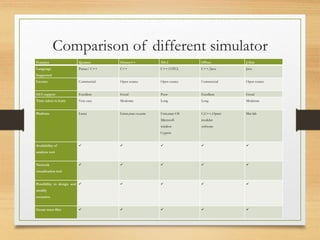
Comparison of different simulator
Features Qualnet Omnet++ NS-2 OPnet J-Sim
Language
Supported
Parsec/ C++ C++ C++/OTCL C++/Java Java
License Commercial Open source Open source Commercial Open source
GUI support Excellent Good Poor Excellent Good
Time taken to learn Very easy Moderate Long Long Moderate
Platform Linux Linux,mac-os,unix Unix,mac-OS
Microsoft
window
Cygwin
C,C++,Opnet
modeler
software
Mat lab
Availability of
analysis tool
    
Network
visualization tool
    
Possibility to design and
modify
scenarios
    
Create trace files     
Application Areas
• Manufacturing/ Materials Handling
• Public and Health Systems
• Military
• Natural Resource Management
• Transportation
• Computer Systems Performance
• Communications
Advantages of Simulation
• Can be used to study existing systems without disrupting the
ongoing operations.
• Proposed systems can be “tested” before committing
resources.
• Allows us to control time.
• Allows us to gain insight into which variables are most
important to system performance.
Advantages cont..
• Cause-effect relations
• Exploration of possibilities.
• Diagnosing of problems.
• Identification of constraints.
• Visualization of plans.
Disadvantages of Simulation
• Training required.
• Interpretation of results required.
• Time consuming/expensive.
• Inappropriately used.
• Simulation results are sometimes hard to interpret.
Refrence
• E.Weingartner,H.V.Lehn and k.wehrle “A performance
comparison of recent network simulator” IEEE International
Conference on Communications (ICC 2009), RWTH Aachen
University Aachen, Germany pp. 271– 350
• J. Lessmann, P. Janalik, Lessmann, P. janalik, Lazar Lachev D.
Orfanus, “Comparative study of wireless network simulator”,
IEEE PRO,2008.
• M. M. Koksal “A survey of network simulator supporting
Wireless networks.” Middle East technical university Ankara.
Turkey, pp.1-11, 2008
• The network simulator ns-2. http://www.isi.edu/nsnam/ns/
Conclusion
With the help of network simulation software we can
see the operations perform in the network easily.
Network simulation software

Network simulation software

  • 1.
    Seminar On Network SimulationSoftware Presented By :- Kartik N. Kalpande
  • 2.
    Introduction What is NetworkSimulation? “Simulation is the process of designing a model of a real system and conducting experiments with this model for the purpose of either understanding the behavior of the system and/or evaluating various strategies for the operation of the system.”
  • 3.
    Allow Us • Modelcomplex systems in a detailed way • Describe the behavior of systems • Construct theories or hypotheses that account for the observed behavior • Use the model to predict future behavior, that is, the effects that will be produced by changes in the system • Analyze proposed systems
  • 4.
    List of Simulator OpenSource Simulator: • NS2 • NS3 • OMNET++ • J-Sim etc..
  • 5.
    List of Simulatorcont.. Commercial : • OPNET • QUALNET • 20-Sim • AMEsim etc..
  • 6.
    Comparison of differentsimulator Features Qualnet Omnet++ NS-2 OPnet J-Sim Language Supported Parsec/ C++ C++ C++/OTCL C++/Java Java License Commercial Open source Open source Commercial Open source GUI support Excellent Good Poor Excellent Good Time taken to learn Very easy Moderate Long Long Moderate Platform Linux Linux,mac-os,unix Unix,mac-OS Microsoft window Cygwin C,C++,Opnet modeler software Mat lab Availability of analysis tool      Network visualization tool      Possibility to design and modify scenarios      Create trace files     
  • 7.
    Application Areas • Manufacturing/Materials Handling • Public and Health Systems • Military • Natural Resource Management • Transportation • Computer Systems Performance • Communications
  • 8.
    Advantages of Simulation •Can be used to study existing systems without disrupting the ongoing operations. • Proposed systems can be “tested” before committing resources. • Allows us to control time. • Allows us to gain insight into which variables are most important to system performance.
  • 9.
    Advantages cont.. • Cause-effectrelations • Exploration of possibilities. • Diagnosing of problems. • Identification of constraints. • Visualization of plans.
  • 10.
    Disadvantages of Simulation •Training required. • Interpretation of results required. • Time consuming/expensive. • Inappropriately used. • Simulation results are sometimes hard to interpret.
  • 11.
    Refrence • E.Weingartner,H.V.Lehn andk.wehrle “A performance comparison of recent network simulator” IEEE International Conference on Communications (ICC 2009), RWTH Aachen University Aachen, Germany pp. 271– 350 • J. Lessmann, P. Janalik, Lessmann, P. janalik, Lazar Lachev D. Orfanus, “Comparative study of wireless network simulator”, IEEE PRO,2008. • M. M. Koksal “A survey of network simulator supporting Wireless networks.” Middle East technical university Ankara. Turkey, pp.1-11, 2008 • The network simulator ns-2. http://www.isi.edu/nsnam/ns/
  • 12.
    Conclusion With the helpof network simulation software we can see the operations perform in the network easily.