Ns-2 Network Simulator  An Introduction
Introduction[1] Ns-2 is a discrete event simulator targeted at network research Focused on  modeling network protocols wired, wireless, satellite TCP, UDP, multicast, unicast web, telnet, ftp ad hoc routing, sensor networks
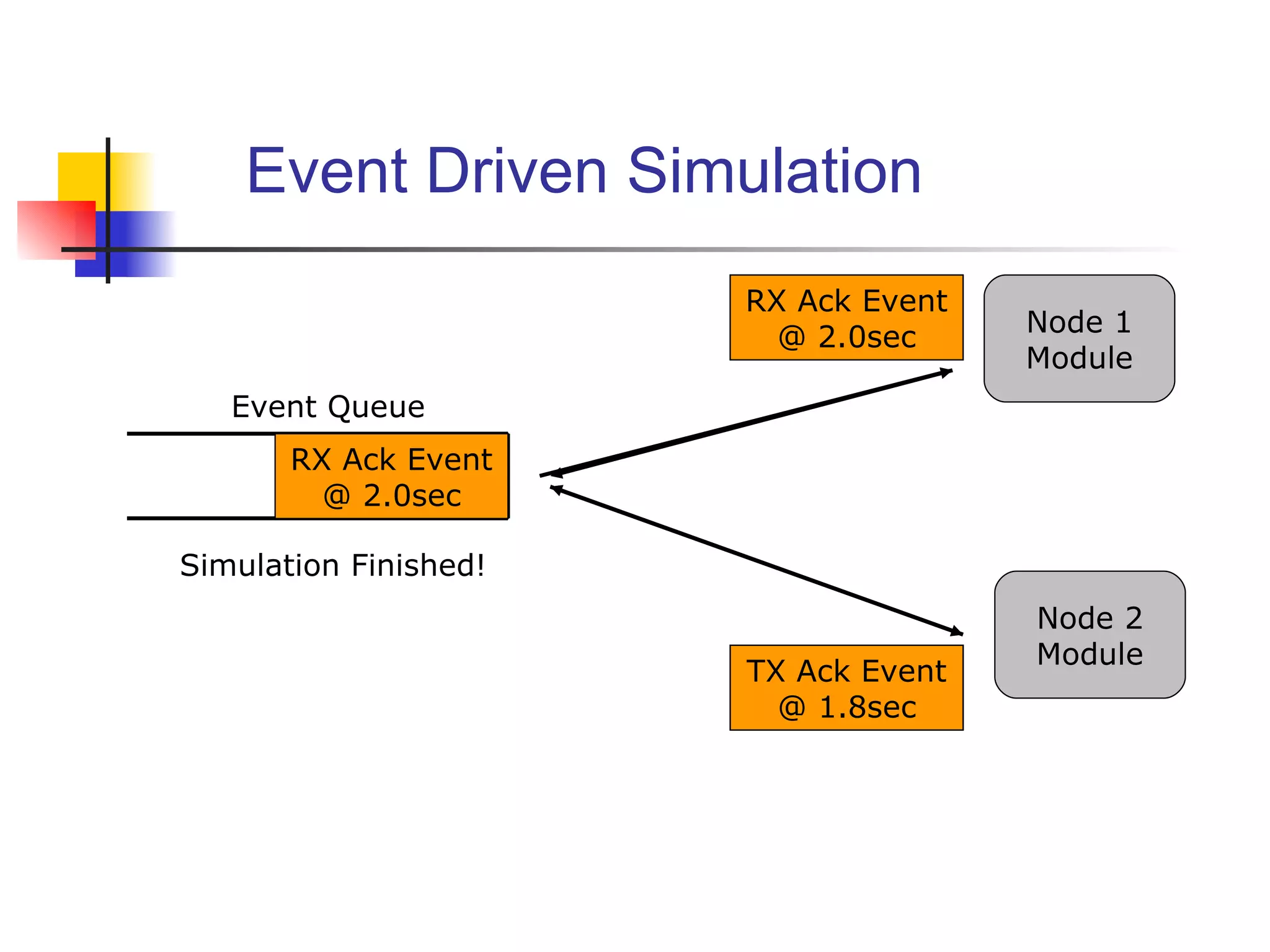
Ns-2 is a discrete event driven simulation Physical activities are translated to events Events are queued and processed in the order of their scheduled   occurrences Time progresses as the events are processed  Introduction[2] 1 2 Time: 1.5 sec Time: 1.7 sec Time: 1.8 sec Time: 2.0 sec
Components of ns ns, the simulator itself nam, the Network Animator visualize ns (or other) output GUI input simple ns scenarios Pre-processing: traffic and topology generators Post-processing: simple trace analysis, often in Awk, Perl, or Tcl
ns Software Structure:  C++ and Otcl Uses  two  languages C++ for packet-processing fast to run, detailed, complete control OTcl for control simulation setup, configuration, occasional actions fast to write and change pros: trade-off running vs. writing speed, powerful/documented config language cons: two languages to learn and debug in
Event Driven Simulation Event Queue Simulation Finished! TX Pkt Event @ 1.5sec Node 1 Module Node 2 Module TX Pkt Event @ 1.5sec RX Pkt Event @ 1.7sec RX Pkt Event @ 1.7sec TX Ack Event @ 1.8sec TX Ack Event @ 1.8sec RX Ack Event @ 2.0sec RX Ack Event @ 2.0sec
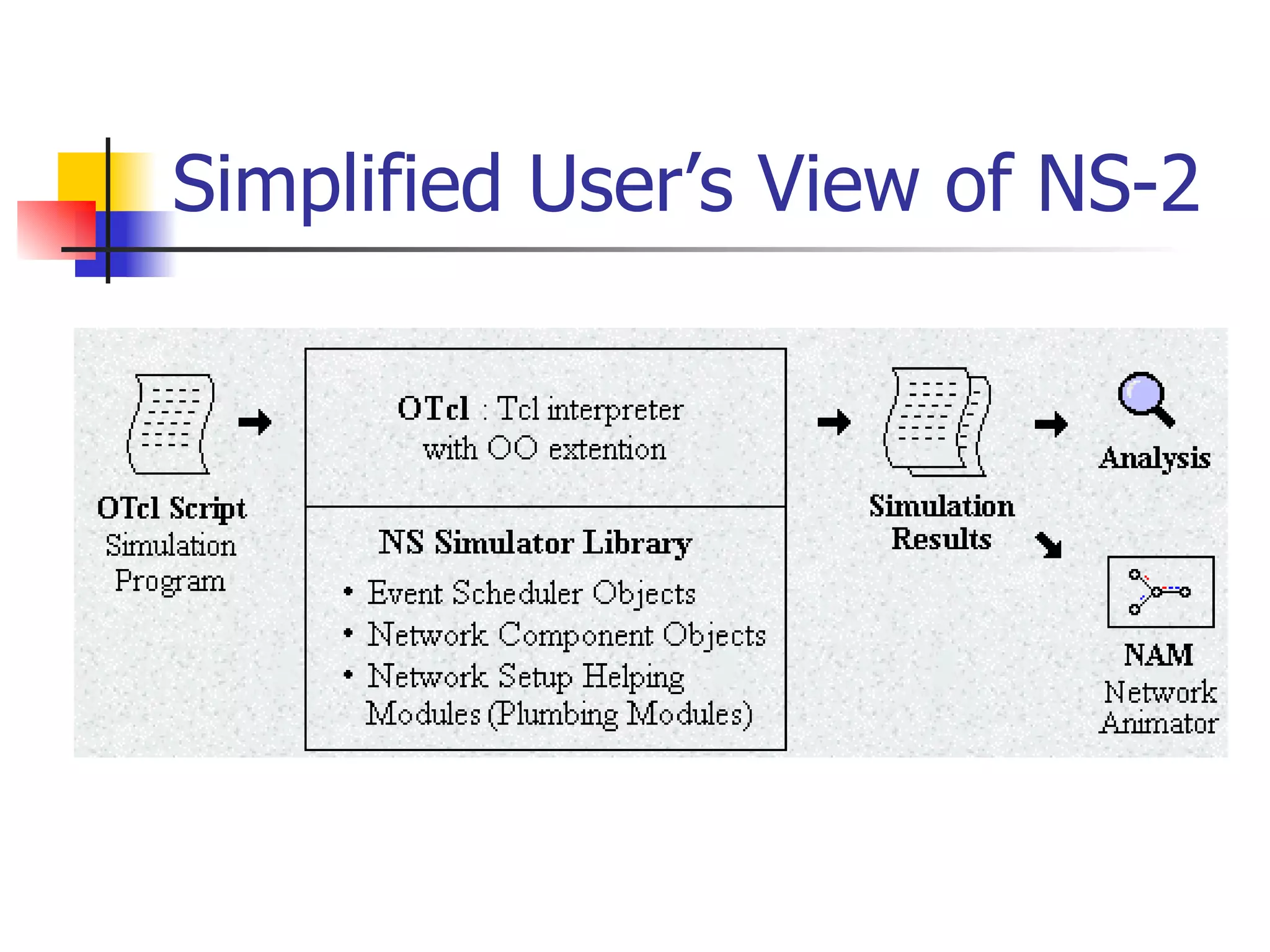
Simplified User’s View of NS-2
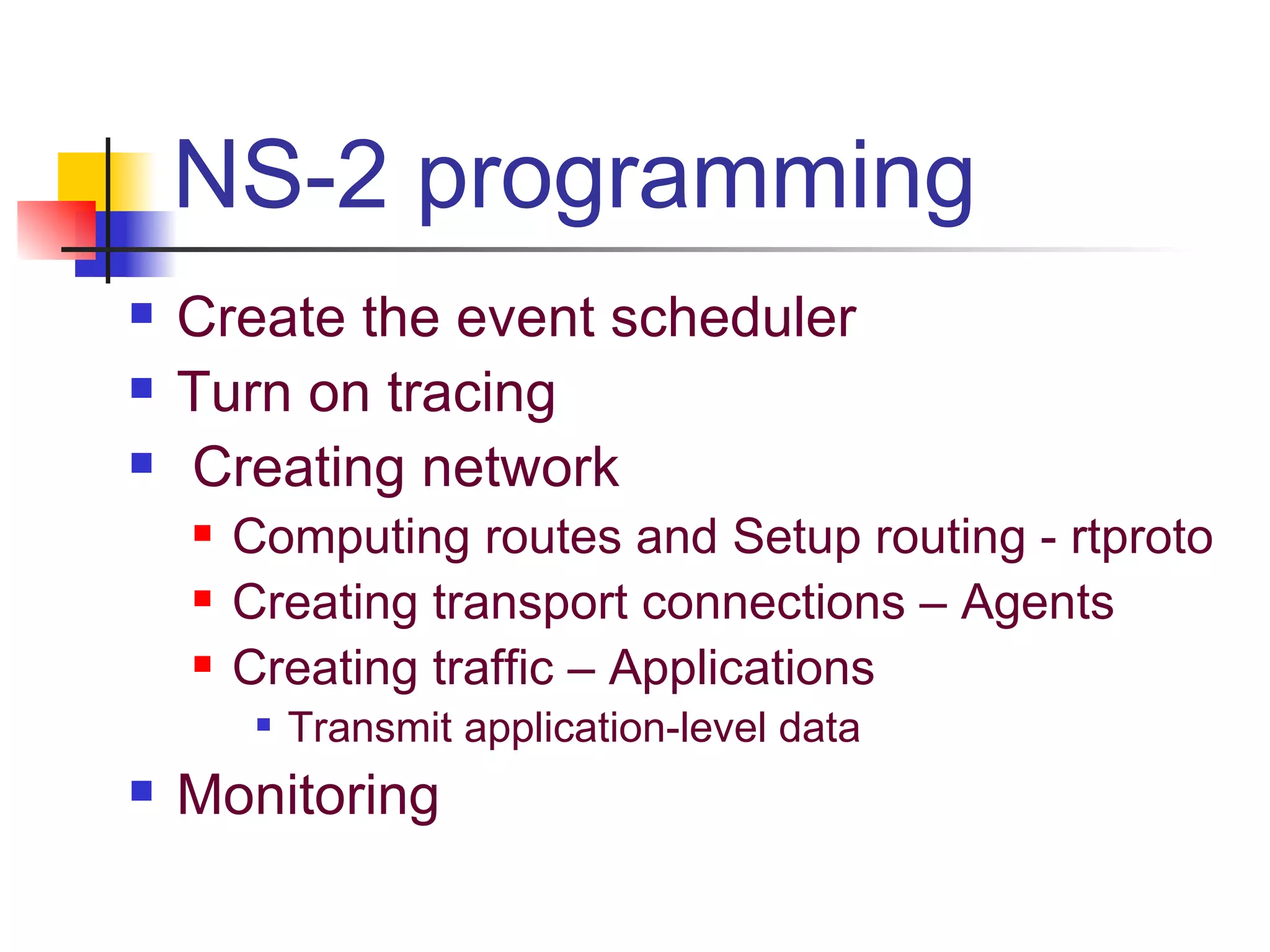
NS-2 programming Create the event scheduler Turn on tracing Creating network Computing routes and Setup routing - rtproto Creating transport connections – Agents Creating traffic – Applications Transmit application-level data Monitoring
Creating Event Scheduler Create event scheduler set ns [new Simulator] Schedule events $ns at <time> “<event>” <event>: any legitimate ns/tcl commands Start scheduler $ns run
Tracing Trace packets on all links  #Open the NAM trace file  #Open the Trace file set nf [open out.nam w]  set tf [open out.tr w] $ns namtrace-all $nf  $ns trace-all $tf Must appear immediately after creating scheduler Turn on tracing on specific links $ns trace-queue $n0 $n1 $ns namtrace-queue $n0 $n1
Creating Network Nodes set n0 [$ns node] set n1 [$ns node] n0 n1
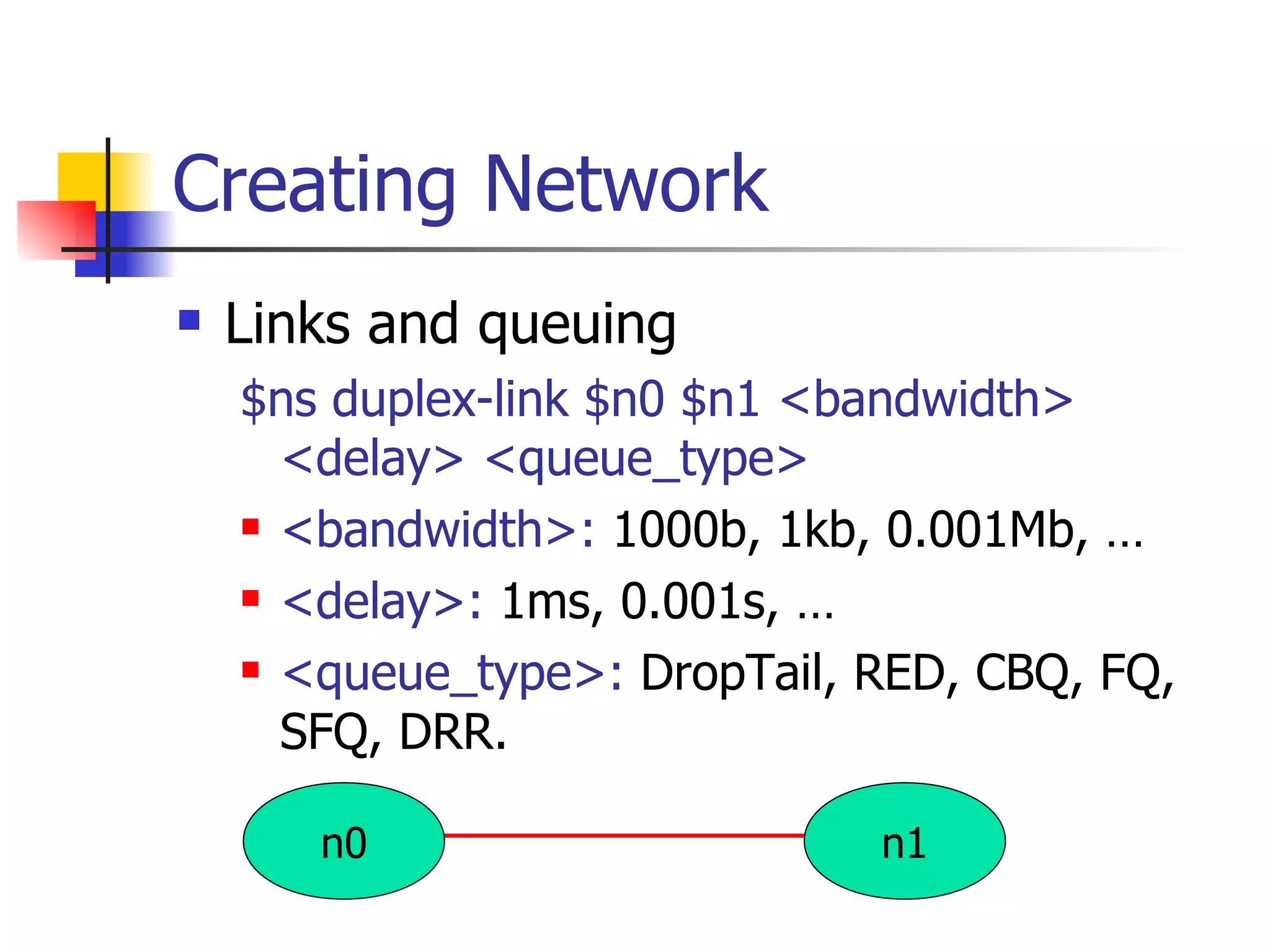
Creating Network Links and queuing $ns duplex-link $n0 $n1 <bandwidth> <delay> <queue_type> <bandwidth>:  1000b, 1kb, 0.001Mb, … <delay>:  1ms, 0.001s, … <queue_type>:  DropTail, RED, CBQ, FQ, SFQ, DRR. n0 n1
Creating Connection – Agents UDP set src [new Agent/UDP] set rcv [new Agent/Null] $ns connect $src $rcv TCP set tcp [new Agent/TCP] set tcpsink [new Agent/TCPSink] $ns connect $tcp $tcpsink
Creating Connection – Agents  (Contd) TCP    TCPsink one-way Tahoe implementation other flavors: TCP/Reno, TCP/NewReno, TCP/Sack1, TCP/Vegas two-way: use FullTCP at both sides TCP-friendly connectionless protocols: RAP <-> RAP Rate Adaptation Protocol (rate-based AIMD + Slow Start) TFRC <-> TFRCSink TCP Friendly Rate Control protocol (based on TCP throughput-equation)
Creating Traffic – Applications Use app on Top of agent:  $app start $app stop FTP set ftp [new Application/FTP] $ftp attach-agent $tcp Telnet set telnet [new Application/Telnet] Web set session [new httpSession $ns <numPages> <clientNode>] Traffic generator set cbr [new Application/traffic/cbr]
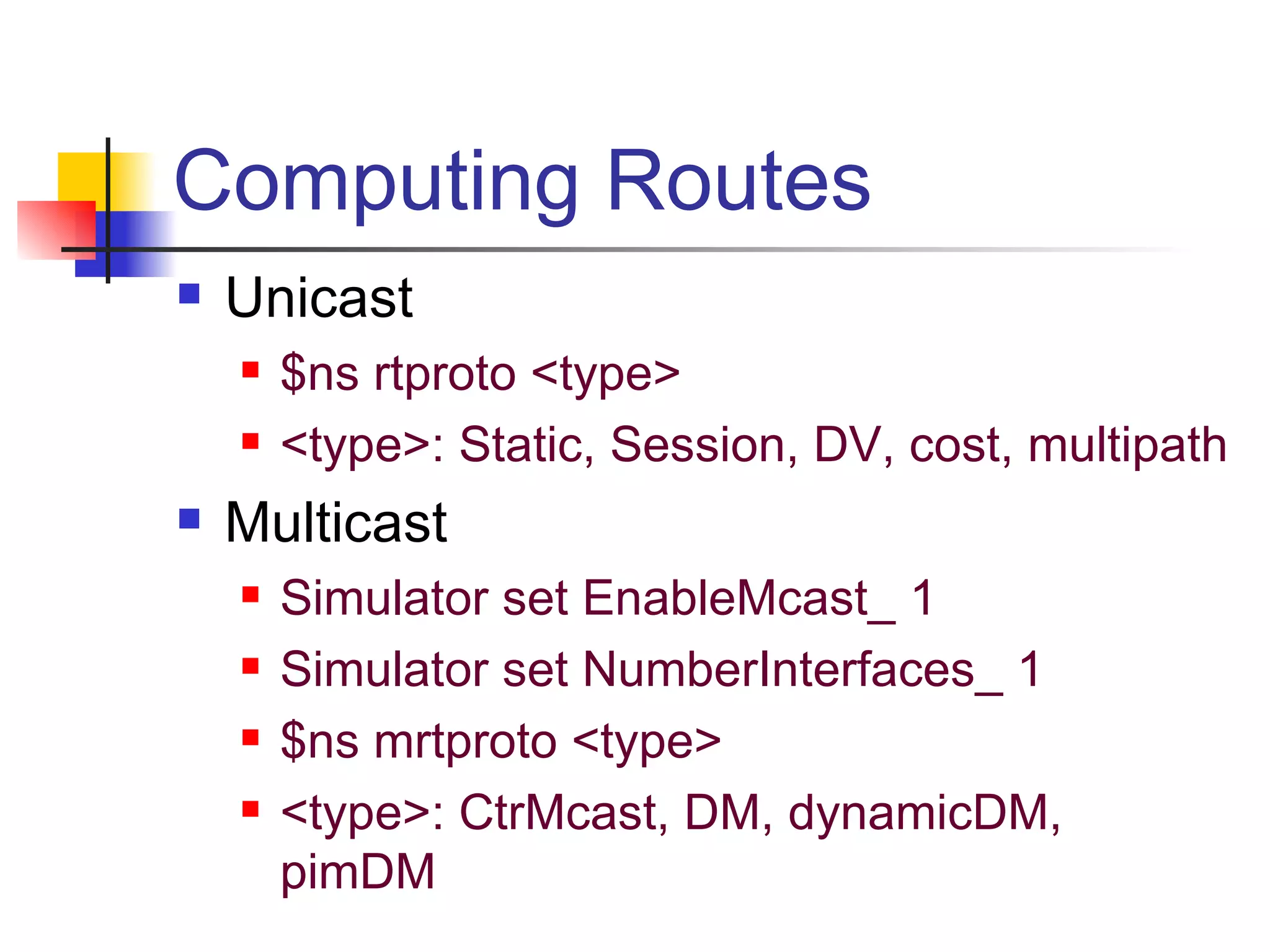
Computing Routes Unicast $ns rtproto <type> <type>: Static, Session, DV, cost, multipath Multicast Simulator set EnableMcast_ 1 Simulator set NumberInterfaces_ 1 $ns mrtproto <type> <type>: CtrMcast, DM, dynamicDM, pimDM
Example 1: TCP (FTP from n0 to n1) set ns [new Simulator] #Create 2 nodes set n0 [$ns node] set n1 [$ns node] set ftp [new Application/FTP] $ftp attach-agent $tcp $ns at 0.2 &quot;$ftp start&quot; $ns at 1.2 ”exit&quot; $ns run $ns duplex-link $n0 $n1 1Mb 10ms DropTail set tcp [new Agent/TCP] set tcpsink [new Agent/TCPSink] $ns attach-agent $n0 $tcp $ns attach-agent $n1 $tcpsink $ns connect $tcp $tcpsink n0 n1
Generic Script Structure set ns [new Simulator] # [Turn on tracing] # Create topology # Setup packet loss, link dynamics # Create routing agents # Create:  #  - multicast groups #  - protocol agents #  - application and/or setup traffic sources # Post-processing procs # Start simulation
Screenshots
Tcl Basics Variable substitution i: the character ‘i’. $i: the variable i. Arithmetic Expressions set value [ expr  $v1 + $v2] Operation substitution set i [expr 5 + 6] 11 Printing puts  $filename “string” (default is stdout) Control Structures if  {condition}  then  {…….} for  {set i 0} {$i < 10} {incr i 2} {……} Procedures proc  proc_name {arg1 arg2…} { ……}
NS Models Traffic models and Applications: Web, FTP, Telnet, constant-bit rate(CBR), real audio Transport protocols: unicast: TCP, UDP Multicast: SRM,  CtrMcast, DM, dynamicDM, pimDM Routing and queuing: Wired routing, ad hoc routing and directed diffusion queuing protocols: RED, drop-tail, etc Physical media: Wired (point-to-point, LANs),  wireless (multiple propagation models),  satellite
Example 1 (contd.) – Basic tracing #Create a simulator object set ns [new Simulator] #Open the nam trace file set nf [open out.nam w] #  Start tracing $ns namtrace-all $nf #Open the general trace file set tf [open out.tr w] #  Start tracing $ns trace-all $tf #Define a 'finish' procedure proc finish {} { global ns nf tf $ns flush-trace #Close the trace files close $nf close $tf #Execute nam on the trace file exec nam out.nam & exit 0 } # Say when to stop simulation $ns at 5.0 &quot;finish“ #Run the simulation $ns run
Example 2 – Routing (UDP) #Create a simulator object #Define different colors for data flows $ns color 1 Blue $ns color 2 Red #Open the nam trace file # as in example 1 #Define a 'finish' procedure # as in example 1 #Create four nodes set n0 [$ns node] … … set n3 [$ns node] #Create links between the nodes # only one sample line as in ex 1 # Set orientation of the links $ns duplex-link-op $n0 $n2  orient  right-down … #Monitor (Visualize) the queue for the  #  link between node 2 and node 3 $ns duplex-link-op $n2 $n3  queuePos  0.5 n0 n1 n2 n3 cbr0 cbr1 null0 UDP UDP UDP
Example 2 – Routing (Contd) #Create a UDP agent and attach it to node n1 set udp0 [new Agent/UDP] $udp0 set class_ 1 $ns attach-agent $n0 $udp0 # Create a CBR traffic source and attach it to udp0 set cbr0 [new Application/Traffic/CBR] $cbr0 set packetSize_ 500 $cbr0 set interval_ 0.005 $cbr0 attach-agent $udp0 # Create a CBR traffic source cbr1 and udp1 and attach cbr1 to udp1 …… #Create a Null agent (a traffic sink) and attach it to node n3 set null0 [new Agent/Null] $ns attach-agent $n3 $null0 #Connect the traffic sources with the traffic sink $ns connect $udp0 $null0  $ns connect $udp1 $null0 #Schedule events for the CBR agents $ns at 0.5 &quot;$cbr0 start&quot; $ns at 1.0 &quot;$cbr1 start&quot; $ns at 4.0 &quot;$cbr1 stop&quot; $ns at 4.5 &quot;$cbr0 stop&quot; #Call the finish procedure after 5 seconds of simulation time $ns at 5.0 &quot;finish&quot; #Run the simulation $ns run
Example 3:  Ring topology with link failure #Create a simulator object #Tell the simulator to use dynamic routing $ns  rtproto  DV #Open the nam trace file # as in example 1 #Define a 'finish' procedure # as in example 1 #Create seven nodes in a loop for {set i 0} {$i < 7} {incr i} { set n($i) [$ns node] } #Create links between the nodes for {set i 0} {$i < 7} {incr i} { $ns duplex-link $n($i) $n([expr ($i+1)%7]) 1Mb 10ms DropTail } #Create a UDP agent udp0 and  attach it to node n(0) set udp0 [new Agent/UDP] $ns attach-agent $n(0) $udp0
Example 3 (Contd.) – link failure  # Create a CBR traffic source and attach it to udp0 …… #Create a Null agent (a traffic sink) and attach it to node n(3) #Connect the traffic source with the traffic sink #Schedule events for the CBR agent and the network dynamics $ns at 0.5 &quot;$cbr0 start“ $ns rtmodel-at 1.0  down  $n(1) $n(2) $ns rtmodel-at 2.0  up  $n(1) $n(2) $ns at 4.5 &quot;$cbr0 stop“ #Call the finish procedure after 5 #seconds of simulation time $ns at 5.0 &quot;finish&quot; #Run the simulation $ns run
How to Start ns? 1. Open terminal window in linux 2. To run ns type $ ns file1.tcl Ns2 can be accessed from 1101 IPC Lab. Note: Wednesday 14/10/08 at 5:00 PM a practice lab session will be conducted in IPC @ 1101

Ns 2 Network Simulator An Introduction

  • 1.
    Ns-2 Network Simulator An Introduction
  • 2.
    Introduction[1] Ns-2 isa discrete event simulator targeted at network research Focused on modeling network protocols wired, wireless, satellite TCP, UDP, multicast, unicast web, telnet, ftp ad hoc routing, sensor networks
  • 3.
    Ns-2 is adiscrete event driven simulation Physical activities are translated to events Events are queued and processed in the order of their scheduled occurrences Time progresses as the events are processed Introduction[2] 1 2 Time: 1.5 sec Time: 1.7 sec Time: 1.8 sec Time: 2.0 sec
  • 4.
    Components of nsns, the simulator itself nam, the Network Animator visualize ns (or other) output GUI input simple ns scenarios Pre-processing: traffic and topology generators Post-processing: simple trace analysis, often in Awk, Perl, or Tcl
  • 5.
    ns Software Structure: C++ and Otcl Uses two languages C++ for packet-processing fast to run, detailed, complete control OTcl for control simulation setup, configuration, occasional actions fast to write and change pros: trade-off running vs. writing speed, powerful/documented config language cons: two languages to learn and debug in
  • 6.
    Event Driven SimulationEvent Queue Simulation Finished! TX Pkt Event @ 1.5sec Node 1 Module Node 2 Module TX Pkt Event @ 1.5sec RX Pkt Event @ 1.7sec RX Pkt Event @ 1.7sec TX Ack Event @ 1.8sec TX Ack Event @ 1.8sec RX Ack Event @ 2.0sec RX Ack Event @ 2.0sec
  • 7.
  • 8.
    NS-2 programming Createthe event scheduler Turn on tracing Creating network Computing routes and Setup routing - rtproto Creating transport connections – Agents Creating traffic – Applications Transmit application-level data Monitoring
  • 9.
    Creating Event SchedulerCreate event scheduler set ns [new Simulator] Schedule events $ns at <time> “<event>” <event>: any legitimate ns/tcl commands Start scheduler $ns run
  • 10.
    Tracing Trace packetson all links #Open the NAM trace file #Open the Trace file set nf [open out.nam w] set tf [open out.tr w] $ns namtrace-all $nf $ns trace-all $tf Must appear immediately after creating scheduler Turn on tracing on specific links $ns trace-queue $n0 $n1 $ns namtrace-queue $n0 $n1
  • 11.
    Creating Network Nodesset n0 [$ns node] set n1 [$ns node] n0 n1
  • 12.
    Creating Network Linksand queuing $ns duplex-link $n0 $n1 <bandwidth> <delay> <queue_type> <bandwidth>: 1000b, 1kb, 0.001Mb, … <delay>: 1ms, 0.001s, … <queue_type>: DropTail, RED, CBQ, FQ, SFQ, DRR. n0 n1
  • 13.
    Creating Connection –Agents UDP set src [new Agent/UDP] set rcv [new Agent/Null] $ns connect $src $rcv TCP set tcp [new Agent/TCP] set tcpsink [new Agent/TCPSink] $ns connect $tcp $tcpsink
  • 14.
    Creating Connection –Agents (Contd) TCP  TCPsink one-way Tahoe implementation other flavors: TCP/Reno, TCP/NewReno, TCP/Sack1, TCP/Vegas two-way: use FullTCP at both sides TCP-friendly connectionless protocols: RAP <-> RAP Rate Adaptation Protocol (rate-based AIMD + Slow Start) TFRC <-> TFRCSink TCP Friendly Rate Control protocol (based on TCP throughput-equation)
  • 15.
    Creating Traffic –Applications Use app on Top of agent: $app start $app stop FTP set ftp [new Application/FTP] $ftp attach-agent $tcp Telnet set telnet [new Application/Telnet] Web set session [new httpSession $ns <numPages> <clientNode>] Traffic generator set cbr [new Application/traffic/cbr]
  • 16.
    Computing Routes Unicast$ns rtproto <type> <type>: Static, Session, DV, cost, multipath Multicast Simulator set EnableMcast_ 1 Simulator set NumberInterfaces_ 1 $ns mrtproto <type> <type>: CtrMcast, DM, dynamicDM, pimDM
  • 17.
    Example 1: TCP(FTP from n0 to n1) set ns [new Simulator] #Create 2 nodes set n0 [$ns node] set n1 [$ns node] set ftp [new Application/FTP] $ftp attach-agent $tcp $ns at 0.2 &quot;$ftp start&quot; $ns at 1.2 ”exit&quot; $ns run $ns duplex-link $n0 $n1 1Mb 10ms DropTail set tcp [new Agent/TCP] set tcpsink [new Agent/TCPSink] $ns attach-agent $n0 $tcp $ns attach-agent $n1 $tcpsink $ns connect $tcp $tcpsink n0 n1
  • 18.
    Generic Script Structureset ns [new Simulator] # [Turn on tracing] # Create topology # Setup packet loss, link dynamics # Create routing agents # Create: # - multicast groups # - protocol agents # - application and/or setup traffic sources # Post-processing procs # Start simulation
  • 19.
  • 20.
    Tcl Basics Variablesubstitution i: the character ‘i’. $i: the variable i. Arithmetic Expressions set value [ expr $v1 + $v2] Operation substitution set i [expr 5 + 6] 11 Printing puts $filename “string” (default is stdout) Control Structures if {condition} then {…….} for {set i 0} {$i < 10} {incr i 2} {……} Procedures proc proc_name {arg1 arg2…} { ……}
  • 21.
    NS Models Trafficmodels and Applications: Web, FTP, Telnet, constant-bit rate(CBR), real audio Transport protocols: unicast: TCP, UDP Multicast: SRM, CtrMcast, DM, dynamicDM, pimDM Routing and queuing: Wired routing, ad hoc routing and directed diffusion queuing protocols: RED, drop-tail, etc Physical media: Wired (point-to-point, LANs), wireless (multiple propagation models), satellite
  • 22.
    Example 1 (contd.)– Basic tracing #Create a simulator object set ns [new Simulator] #Open the nam trace file set nf [open out.nam w] # Start tracing $ns namtrace-all $nf #Open the general trace file set tf [open out.tr w] # Start tracing $ns trace-all $tf #Define a 'finish' procedure proc finish {} { global ns nf tf $ns flush-trace #Close the trace files close $nf close $tf #Execute nam on the trace file exec nam out.nam & exit 0 } # Say when to stop simulation $ns at 5.0 &quot;finish“ #Run the simulation $ns run
  • 23.
    Example 2 –Routing (UDP) #Create a simulator object #Define different colors for data flows $ns color 1 Blue $ns color 2 Red #Open the nam trace file # as in example 1 #Define a 'finish' procedure # as in example 1 #Create four nodes set n0 [$ns node] … … set n3 [$ns node] #Create links between the nodes # only one sample line as in ex 1 # Set orientation of the links $ns duplex-link-op $n0 $n2 orient right-down … #Monitor (Visualize) the queue for the # link between node 2 and node 3 $ns duplex-link-op $n2 $n3 queuePos 0.5 n0 n1 n2 n3 cbr0 cbr1 null0 UDP UDP UDP
  • 24.
    Example 2 –Routing (Contd) #Create a UDP agent and attach it to node n1 set udp0 [new Agent/UDP] $udp0 set class_ 1 $ns attach-agent $n0 $udp0 # Create a CBR traffic source and attach it to udp0 set cbr0 [new Application/Traffic/CBR] $cbr0 set packetSize_ 500 $cbr0 set interval_ 0.005 $cbr0 attach-agent $udp0 # Create a CBR traffic source cbr1 and udp1 and attach cbr1 to udp1 …… #Create a Null agent (a traffic sink) and attach it to node n3 set null0 [new Agent/Null] $ns attach-agent $n3 $null0 #Connect the traffic sources with the traffic sink $ns connect $udp0 $null0 $ns connect $udp1 $null0 #Schedule events for the CBR agents $ns at 0.5 &quot;$cbr0 start&quot; $ns at 1.0 &quot;$cbr1 start&quot; $ns at 4.0 &quot;$cbr1 stop&quot; $ns at 4.5 &quot;$cbr0 stop&quot; #Call the finish procedure after 5 seconds of simulation time $ns at 5.0 &quot;finish&quot; #Run the simulation $ns run
  • 25.
    Example 3: Ring topology with link failure #Create a simulator object #Tell the simulator to use dynamic routing $ns rtproto DV #Open the nam trace file # as in example 1 #Define a 'finish' procedure # as in example 1 #Create seven nodes in a loop for {set i 0} {$i < 7} {incr i} { set n($i) [$ns node] } #Create links between the nodes for {set i 0} {$i < 7} {incr i} { $ns duplex-link $n($i) $n([expr ($i+1)%7]) 1Mb 10ms DropTail } #Create a UDP agent udp0 and attach it to node n(0) set udp0 [new Agent/UDP] $ns attach-agent $n(0) $udp0
  • 26.
    Example 3 (Contd.)– link failure # Create a CBR traffic source and attach it to udp0 …… #Create a Null agent (a traffic sink) and attach it to node n(3) #Connect the traffic source with the traffic sink #Schedule events for the CBR agent and the network dynamics $ns at 0.5 &quot;$cbr0 start“ $ns rtmodel-at 1.0 down $n(1) $n(2) $ns rtmodel-at 2.0 up $n(1) $n(2) $ns at 4.5 &quot;$cbr0 stop“ #Call the finish procedure after 5 #seconds of simulation time $ns at 5.0 &quot;finish&quot; #Run the simulation $ns run
  • 27.
    How to Startns? 1. Open terminal window in linux 2. To run ns type $ ns file1.tcl Ns2 can be accessed from 1101 IPC Lab. Note: Wednesday 14/10/08 at 5:00 PM a practice lab session will be conducted in IPC @ 1101