THOUGHT FOR THE DAY
Starter – Guess the word
game
Guess the word Game.ppt
Security of computer
networks
Why do we need to secure our networks and online
systems?
Why do we need to secure our networks
and online systems?
Why do we need to secure our
networks and online systems?
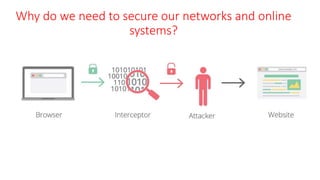
• Networks should be protected against data interception and theft.
• Data traffic in LAN’S and WAN’s can be intercepted
• All networks must be kept secure so that data is not corrupted or
stolen.
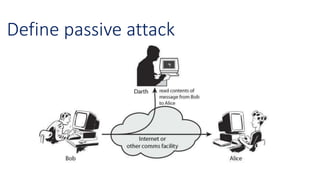
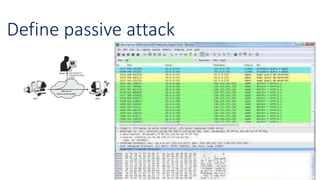
Define passive attack
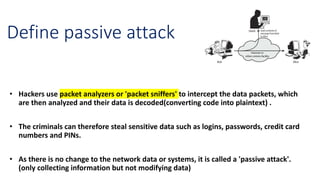
• Hackers use packet analyzers or 'packet sniffers' to intercept the data packets, which
are then analyzed and their data is decoded(converting code into plaintext) .
• The criminals can therefore steal sensitive data such as logins, passwords, credit card
numbers and PINs.
• As there is no change to the network data or systems, it is called a 'passive attack'.
(only collecting information but not modifying data)
Network Protection
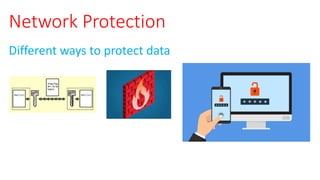
Different ways to protect data
Network Protection
Different ways to protect data
• Encryption
• Firewalls
• Authentication
• Passwords
• Biometric methods
• Magnetic stripes
• Physical tokens
• Electronic tokens
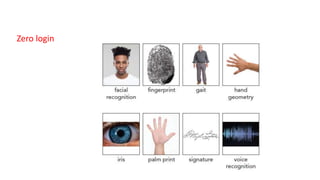
• Zero login
Encryption
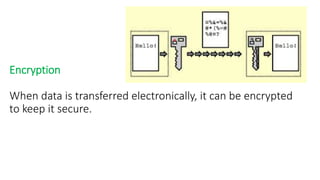
When data is transferred electronically, it can be encrypted
to keep it secure.
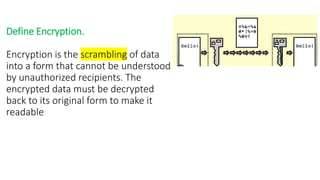
Define Encryption.
Encryption is the scrambling of data
into a form that cannot be understood
by unauthorized recipients. The
encrypted data must be decrypted
back to its original form to make it
readable
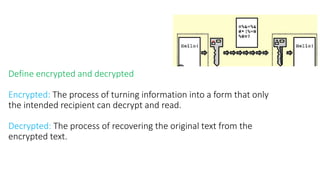
Define encrypted and decrypted
Encrypted: The process of turning information into a form that only
the intended recipient can decrypt and read.
Decrypted: The process of recovering the original text from the
encrypted text.
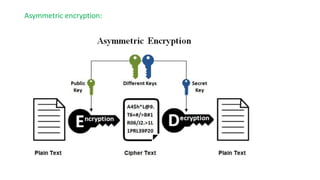
Asymmetric encryption:
• It is a method of encryption which employs two different keys – a public key
and a private key.
• A private key can decrypt messages encrypted with the corresponding public
key.
• The public key is freely available and is used to encrypt a message for the
person who then decrypts it with their private key.
Asymmetric encryption:
Example: Bank provides public key to the customer(to encrypt data) and keeping
private for its own purpose to decrypt data.
Plenary: Exit Ticket
Summarize the terms and write one sentence about each one of them.
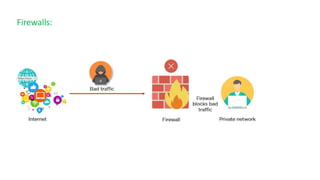
Firewalls:
Firewalls:
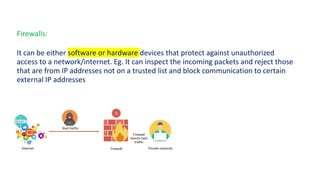
It can be either software or hardware devices that protect against unauthorized
access to a network/internet. Eg. It can inspect the incoming packets and reject those
that are from IP addresses not on a trusted list and block communication to certain
external IP addresses.
Authentication
Authentication
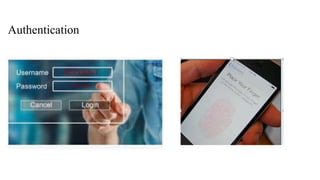
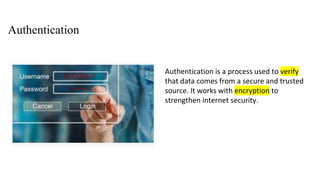
Authentication is a process used to verify
that data comes from a secure and trusted
source. It works with encryption to
strengthen internet security.
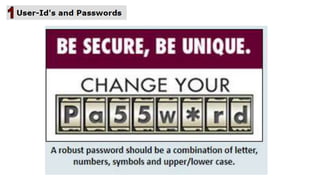
Define Password
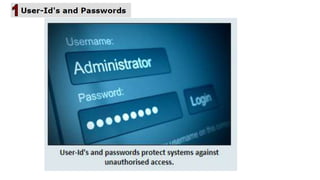
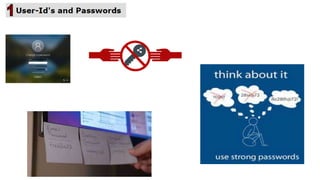
A password is a secret word or phrase that is used to authenticate a user so
that they can gain access.
Methods to protect passwords:
Strong passwords - (A password that is difficult to detect by humans and computer
programs)
• Strong passwords should contain:
• at least eight characters long
• both numbers and letters
• both upper and lower case letters
• at least one special character( !, $, ?, etc.)
• never use user-identifiable items( name, date of birth, phone number, postal code, car
registration, etc.)
• Passwords should not be changed regularly.
• Previous passwords must never be reused.
• Passwords can be written down anywhere.
• Passwords must never be shared with other users.
• Passwords should be predictable so hackers can guess them or try to enter them by trial
and error.
• never use user-identifiable items( name, date of birth, phone number, postal code, car registration, etc.)
• Passwords should be changed regularly.
• Previous passwords must never be reused.
• Passwords must never be written down.
• Passwords must never be shared with other users.
• Passwords should be unpredictable so hackers cannot guess them or try to enter them by trial and error.
• never use user-identifiable items( name, date of birth, phone number, postal code, car registration, etc.)
• Passwords should not be changed regularly.
• Previous passwords must never be reused.
• Passwords can be written down anywhere.
• Passwords must never be shared with other users.
• Passwords should be predictable so hackers can guess them or try to enter them by trial and error.
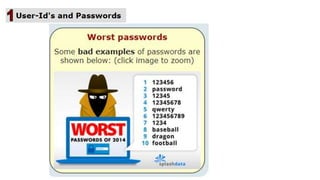
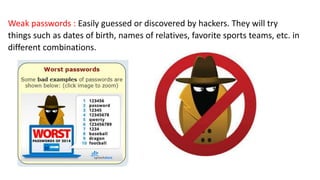
Weak passwords : Easily guessed or discovered by hackers. They will try
things such as dates of birth, names of relatives, favorite sports teams, etc. in
different combinations.
Weak passwords : Easily guessed or discovered by hackers. They will try
things such as dates of birth, names of relatives, favorite sports teams, etc. in
different combinations.
Run anti-spyware – a software to make sure that your passwords aren't being
relayed back to whoever put the spyware(malware) on your computer.
Anti-spyware software must be kept up-to-date.
List out different Authentication methods:
1-Biometric methods
2-Magnetic stripes.
3-Smart cards
4-Physical tokens
5-Electronic tokens
6-Zero login
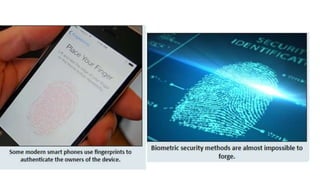
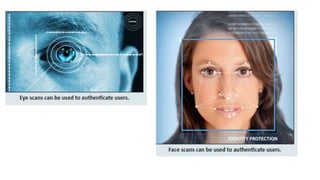
Common methods of biometric authorization include:
• Physiological biometric: It is a data relates to physical aspect of a person’s
body
• retina scans
• Fingerprint mapping
• Facial recognition
• blood vessel patterns in hands and arms
• Behavioural biometric: Includes signatures, handwriting analysis and voice
pattern recognition.
Magnetic Stripe:
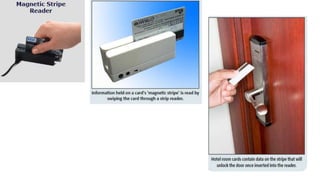
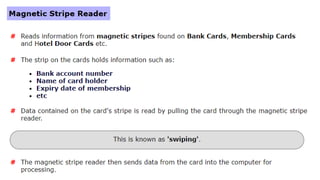
Magnetic stripe reader reads data contained on the magnetic stripe
cards by pulling the card through magnetic stripe reader. This is known
as swiping. Then the data is sent to computer for processing. Data
contained includes - name, ID number, gender and date of birth.
Magnetic stripes
Magnetic stripes
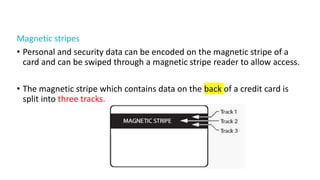
• Personal and security data can be encoded on the magnetic stripe of a
card and can be swiped through a magnetic stripe reader to allow access.
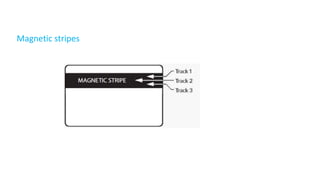
• The magnetic stripe which contains data on the back of a credit card is
split into three tracks.
Magnetic stripes
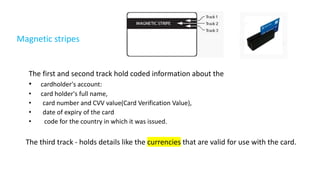
The first and second track hold coded information about the
• cardholder's account:
• card holder's full name,
• card number and CVV value(Card Verification Value),
• date of expiry of the card
• code for the country in which it was issued.
The third track - holds details like the currencies that are valid for use with the card.
Smart cards
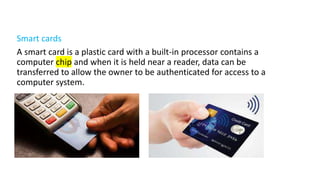
A smart card is a plastic card with a built-in processor contains a
computer chip and when it is held near a reader, data can be
transferred to allow the owner to be authenticated for access to a
computer system.
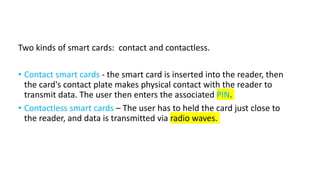
Two kinds of smart cards: contact and contactless.
• Contact smart cards - the smart card is inserted into the reader, then
the card's contact plate makes physical contact with the reader to
transmit data. The user then enters the associated PIN.
• Contactless smart cards – The user has to held the card just close to
the reader, and data is transmitted via radio waves.
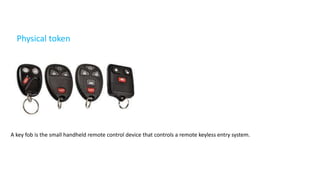
Physical token
A key fob is the small handheld remote control device that controls a remote keyless entry system.
Physical token(dongles)
A physical token allows you to access software and verify your identity
with a physical device rather than relying on authentication codes or
passwords. They are also called key fobs, security tokens or USB tokens.
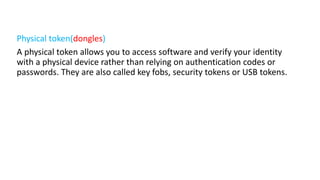
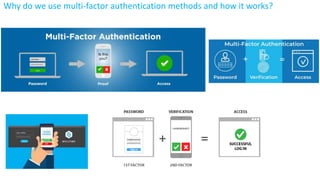
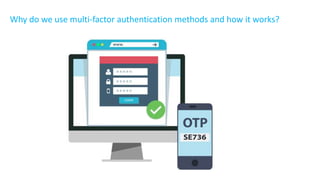
Why do we use multi-factor authentication methods and how it works?
• Multi-factor authentication methods use mobile phones in the
absence of physical tokens(may be lost, forgotten or stolen).
• The user has to enter their knowledge factor(password) and the
server sends a text message containing an access code (One Time
Password or OTP) to their registered mobile phone.
• The code can be used once within a certain time limit.
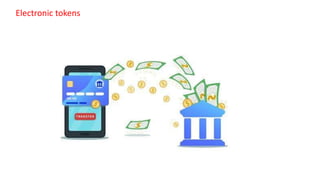
Electronic tokens
Electronic tokens
Electronic tokens
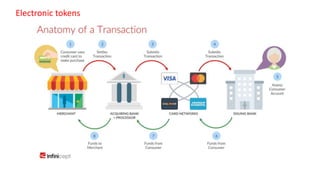
• Electronic tokens are called as cryptocurrencies which acts a medium of
exchange between people and businesses.
• It can be used for electronic payments where the credit card number is
converted to a string of random characters that have no value.
• Then the payment network (Visa/Master Card/American Express) uses its
secure keys to decode and pass the card number to the standard electronic
payment processors.
• Importantly, merchants themselves cannot decode a token.
• Converting a token back to a card number requires access to the
encryption keys, which are typically stored in military-grade security.
Zero login
Zero login
• Using artificial intelligence, technologies are being developed so that
users can be authenticated by how they behave but not by a password or
physical features. This is called zero login.
• Its main difference is that complex passwords or other documentation
will not be required for identification.
• Our smart devices will be smart and secure enough to recognise facial
features, voice, movements and other ways, in which a person is unique,
to use as identification.
• How you swipe and type, where you are and when you work are all
unique to you.
• Every time a user requests access, a new authenticating message is
generated. Hence, no credentials are fixed within the passwordless
platform so there is nothing for an attacker to steal.
• The motion sensor in your phone recognize you
Explain the ways how biometric devices work?
Verification
Identification
Screening
Explain the ways how biometric devices work?
a) Verification: Biometric technologies perform a comparison of the data with a template that has
previously been stored, such as a fingerprint scan or other physical tokens such as retina, iris or face
scans, on a personal computer or electronic safe(locker). To make sure a person is who they say they
are:
Explain the ways how biometric devices work?
Identification: To identify a person in a crowd.
Explain the ways how biometric devices work?
Screening: To match a person who may be on a ‘watch list’ for security purposes.
Plenary – Exit Ticket
Write all the concepts learnt today in your notebook
Thank you

4.2.1 Network Issues and Communication.pptx

  • 1.
  • 2.
    Starter – Guessthe word game Guess the word Game.ppt
  • 7.
  • 8.
    Why do weneed to secure our networks and online systems?
  • 9.
    Why do weneed to secure our networks and online systems?
  • 10.
    Why do weneed to secure our networks and online systems? • Networks should be protected against data interception and theft. • Data traffic in LAN’S and WAN’s can be intercepted • All networks must be kept secure so that data is not corrupted or stolen.
  • 11.
  • 12.
  • 13.
    Define passive attack •Hackers use packet analyzers or 'packet sniffers' to intercept the data packets, which are then analyzed and their data is decoded(converting code into plaintext) . • The criminals can therefore steal sensitive data such as logins, passwords, credit card numbers and PINs. • As there is no change to the network data or systems, it is called a 'passive attack'. (only collecting information but not modifying data)
  • 14.
  • 15.
    Network Protection Different waysto protect data • Encryption • Firewalls • Authentication • Passwords • Biometric methods • Magnetic stripes • Physical tokens • Electronic tokens • Zero login
  • 16.
    Encryption When data istransferred electronically, it can be encrypted to keep it secure.
  • 17.
    Define Encryption. Encryption isthe scrambling of data into a form that cannot be understood by unauthorized recipients. The encrypted data must be decrypted back to its original form to make it readable
  • 18.
    Define encrypted anddecrypted Encrypted: The process of turning information into a form that only the intended recipient can decrypt and read. Decrypted: The process of recovering the original text from the encrypted text.
  • 19.
  • 20.
    Asymmetric encryption: • Itis a method of encryption which employs two different keys – a public key and a private key. • A private key can decrypt messages encrypted with the corresponding public key. • The public key is freely available and is used to encrypt a message for the person who then decrypts it with their private key.
  • 21.
    Asymmetric encryption: Example: Bankprovides public key to the customer(to encrypt data) and keeping private for its own purpose to decrypt data.
  • 22.
    Plenary: Exit Ticket Summarizethe terms and write one sentence about each one of them.
  • 23.
  • 24.
    Firewalls: It can beeither software or hardware devices that protect against unauthorized access to a network/internet. Eg. It can inspect the incoming packets and reject those that are from IP addresses not on a trusted list and block communication to certain external IP addresses.
  • 25.
  • 26.
    Authentication Authentication is aprocess used to verify that data comes from a secure and trusted source. It works with encryption to strengthen internet security.
  • 32.
    Define Password A passwordis a secret word or phrase that is used to authenticate a user so that they can gain access.
  • 33.
    Methods to protectpasswords: Strong passwords - (A password that is difficult to detect by humans and computer programs) • Strong passwords should contain: • at least eight characters long • both numbers and letters • both upper and lower case letters • at least one special character( !, $, ?, etc.)
  • 34.
    • never useuser-identifiable items( name, date of birth, phone number, postal code, car registration, etc.) • Passwords should not be changed regularly. • Previous passwords must never be reused. • Passwords can be written down anywhere. • Passwords must never be shared with other users. • Passwords should be predictable so hackers can guess them or try to enter them by trial and error.
  • 35.
    • never useuser-identifiable items( name, date of birth, phone number, postal code, car registration, etc.) • Passwords should be changed regularly. • Previous passwords must never be reused. • Passwords must never be written down. • Passwords must never be shared with other users. • Passwords should be unpredictable so hackers cannot guess them or try to enter them by trial and error. • never use user-identifiable items( name, date of birth, phone number, postal code, car registration, etc.) • Passwords should not be changed regularly. • Previous passwords must never be reused. • Passwords can be written down anywhere. • Passwords must never be shared with other users. • Passwords should be predictable so hackers can guess them or try to enter them by trial and error.
  • 36.
    Weak passwords :Easily guessed or discovered by hackers. They will try things such as dates of birth, names of relatives, favorite sports teams, etc. in different combinations.
  • 37.
    Weak passwords :Easily guessed or discovered by hackers. They will try things such as dates of birth, names of relatives, favorite sports teams, etc. in different combinations. Run anti-spyware – a software to make sure that your passwords aren't being relayed back to whoever put the spyware(malware) on your computer. Anti-spyware software must be kept up-to-date.
  • 38.
    List out differentAuthentication methods: 1-Biometric methods 2-Magnetic stripes. 3-Smart cards 4-Physical tokens 5-Electronic tokens 6-Zero login
  • 41.
    Common methods ofbiometric authorization include: • Physiological biometric: It is a data relates to physical aspect of a person’s body • retina scans • Fingerprint mapping • Facial recognition • blood vessel patterns in hands and arms • Behavioural biometric: Includes signatures, handwriting analysis and voice pattern recognition.
  • 44.
    Magnetic Stripe: Magnetic stripereader reads data contained on the magnetic stripe cards by pulling the card through magnetic stripe reader. This is known as swiping. Then the data is sent to computer for processing. Data contained includes - name, ID number, gender and date of birth.
  • 45.
  • 46.
    Magnetic stripes • Personaland security data can be encoded on the magnetic stripe of a card and can be swiped through a magnetic stripe reader to allow access. • The magnetic stripe which contains data on the back of a credit card is split into three tracks.
  • 47.
    Magnetic stripes The firstand second track hold coded information about the • cardholder's account: • card holder's full name, • card number and CVV value(Card Verification Value), • date of expiry of the card • code for the country in which it was issued. The third track - holds details like the currencies that are valid for use with the card.
  • 48.
    Smart cards A smartcard is a plastic card with a built-in processor contains a computer chip and when it is held near a reader, data can be transferred to allow the owner to be authenticated for access to a computer system.
  • 49.
    Two kinds ofsmart cards: contact and contactless. • Contact smart cards - the smart card is inserted into the reader, then the card's contact plate makes physical contact with the reader to transmit data. The user then enters the associated PIN. • Contactless smart cards – The user has to held the card just close to the reader, and data is transmitted via radio waves.
  • 50.
    Physical token A keyfob is the small handheld remote control device that controls a remote keyless entry system.
  • 51.
    Physical token(dongles) A physicaltoken allows you to access software and verify your identity with a physical device rather than relying on authentication codes or passwords. They are also called key fobs, security tokens or USB tokens.
  • 52.
    Why do weuse multi-factor authentication methods and how it works?
  • 53.
    Why do weuse multi-factor authentication methods and how it works?
  • 54.
    Why do weuse multi-factor authentication methods and how it works? • Multi-factor authentication methods use mobile phones in the absence of physical tokens(may be lost, forgotten or stolen). • The user has to enter their knowledge factor(password) and the server sends a text message containing an access code (One Time Password or OTP) to their registered mobile phone. • The code can be used once within a certain time limit.
  • 55.
  • 56.
  • 57.
    Electronic tokens • Electronictokens are called as cryptocurrencies which acts a medium of exchange between people and businesses. • It can be used for electronic payments where the credit card number is converted to a string of random characters that have no value. • Then the payment network (Visa/Master Card/American Express) uses its secure keys to decode and pass the card number to the standard electronic payment processors. • Importantly, merchants themselves cannot decode a token. • Converting a token back to a card number requires access to the encryption keys, which are typically stored in military-grade security.
  • 58.
  • 59.
    Zero login • Usingartificial intelligence, technologies are being developed so that users can be authenticated by how they behave but not by a password or physical features. This is called zero login. • Its main difference is that complex passwords or other documentation will not be required for identification. • Our smart devices will be smart and secure enough to recognise facial features, voice, movements and other ways, in which a person is unique, to use as identification. • How you swipe and type, where you are and when you work are all unique to you. • Every time a user requests access, a new authenticating message is generated. Hence, no credentials are fixed within the passwordless platform so there is nothing for an attacker to steal. • The motion sensor in your phone recognize you
  • 60.
    Explain the wayshow biometric devices work? Verification Identification Screening
  • 61.
    Explain the wayshow biometric devices work? a) Verification: Biometric technologies perform a comparison of the data with a template that has previously been stored, such as a fingerprint scan or other physical tokens such as retina, iris or face scans, on a personal computer or electronic safe(locker). To make sure a person is who they say they are:
  • 62.
    Explain the wayshow biometric devices work? Identification: To identify a person in a crowd.
  • 63.
    Explain the wayshow biometric devices work? Screening: To match a person who may be on a ‘watch list’ for security purposes.
  • 64.
    Plenary – ExitTicket Write all the concepts learnt today in your notebook
  • 65.