NETWORK SCANNER
Shree Rayeshwar Institute of Engineering and Information Technology
Department of Information Technology
Group No. 04
1.Sidhant Amonkar
2.Radhaprasad Borkar
3.Shrikrishna Parab
4.Sainath Dhargalkar
Internal Guides:
1. Mr. Saiesh Prabhu Verlekar
2.Ms. Sampada Desai
External Guide:
Mr. V. Francis Xavier
Agenda
1. Network Scanner
-What?
-Why?
-Where?
2. How it is different from other network scanners?
3.Features of the project
4. Scope of the project
5. Phases of implementation
6. Conclusion
What is the Network Scanner?
Network Scanner is a tool for network analysis which
scans the network on a real time basis.
Explores the network and gives the status of all
connected computers.
Scans both, a list of IP addresses or computers and
ranges of IP addresses.
Why it is used?
Allows the administrator to analyze the network
efficiently.
To monitor the network effectively.
Used to retrieve user names, and information on groups,
shares and services of networked computer.
To identify active host on the network.
Where it is used?
Can be used wherever there is a presence of a network.
Such as
-Educational institutes
-Business firms
-Government organizations
Where it is not feasible for the admin to analyze the
network manually.
What makes it different from others?
Classifies the network components as PC, printer,
scanner, router, etc.
Bandwidth monitoring and control.
Wake-On-LAN ensures that even sleeping devices are
scanned.
Features:
Platform independent.
One click application (requires no installation).
Works on both, wired and wireless network.
Easy to use application.
Scope of the Project
 Remote access control
 Remote reboot & shutdown
 Wake-On-LAN
 Remote OS detection
 Hardware components detection
 Bandwidth monitoring and control
 Exports result to TEXT format
Phases of Implementation
Module 1:
GUI design module.
Module 2:
Address calculation.
Module 3:
Bandwidth capturing.
Module 4:
Remote access.
GUI design module.
 Graphical user interface makes it easy for the admin to use the
functionality offered by the system.
 Perfect representation of the network and information about the
components present on the network is presented in a simplified form.
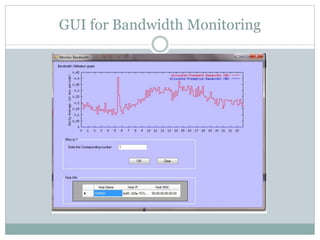
 Graphical representation of the bandwidth utilized by every system on
the network.
 Easy-to-use reporting interface that lets you quickly generate custom,
snazzy-looking reports on all of your network assets
GUI at the start
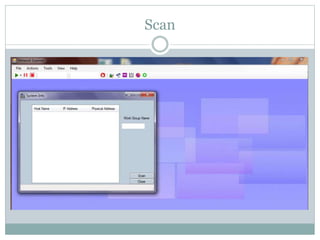
Scan
IP address from Host name
Hostname from IP address
GUI for Bandwidth Monitoring
Address Calculation Module
Determines the IP address of every node.
Determines the MAC address of every node.
Classifies the components of the network as a PC,
printer, scanner, router, etc based on address calculation.
Bandwidth capturing Module
This feature allows the admin to control the amount
of network traffic generated by the client.
 The bandwidth counted includes the network
activities such as downloads.
Graphical representation of the bandwidth utilized by
every system on the network
Remote access Module
 Remote access control is an easy-to -use admin interface
which enables the admin access the client machine.
 It can also control the process currently running on the
client machine and terminate that process if require.
 Includes Remote shutdown, Reboot.
 Enables Wake-On-LAN.
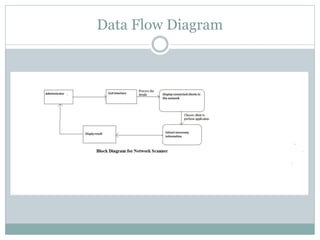
Data Flow Diagram
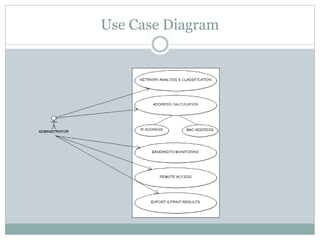
Use Case Diagram
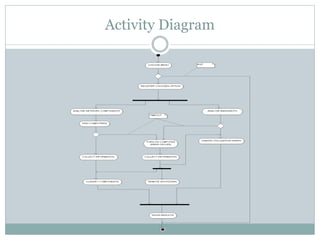
Activity Diagram
Conclusion
The network scanner with all this feature is a handy
tool that will help the administrator to get a clear
understanding of the network.
With features like bandwidth monitoring the
administrator can trace the malicious usage of the
bandwidth.
A large amount of administrator’s time will be saved
with the use of feature like remote access.
THANK YOU

Network scanner

  • 1.
    NETWORK SCANNER Shree RayeshwarInstitute of Engineering and Information Technology Department of Information Technology
  • 2.
    Group No. 04 1.SidhantAmonkar 2.Radhaprasad Borkar 3.Shrikrishna Parab 4.Sainath Dhargalkar Internal Guides: 1. Mr. Saiesh Prabhu Verlekar 2.Ms. Sampada Desai External Guide: Mr. V. Francis Xavier
  • 3.
    Agenda 1. Network Scanner -What? -Why? -Where? 2.How it is different from other network scanners? 3.Features of the project 4. Scope of the project 5. Phases of implementation 6. Conclusion
  • 4.
    What is theNetwork Scanner? Network Scanner is a tool for network analysis which scans the network on a real time basis. Explores the network and gives the status of all connected computers. Scans both, a list of IP addresses or computers and ranges of IP addresses.
  • 5.
    Why it isused? Allows the administrator to analyze the network efficiently. To monitor the network effectively. Used to retrieve user names, and information on groups, shares and services of networked computer. To identify active host on the network.
  • 6.
    Where it isused? Can be used wherever there is a presence of a network. Such as -Educational institutes -Business firms -Government organizations Where it is not feasible for the admin to analyze the network manually.
  • 7.
    What makes itdifferent from others? Classifies the network components as PC, printer, scanner, router, etc. Bandwidth monitoring and control. Wake-On-LAN ensures that even sleeping devices are scanned.
  • 8.
    Features: Platform independent. One clickapplication (requires no installation). Works on both, wired and wireless network. Easy to use application.
  • 9.
    Scope of theProject  Remote access control  Remote reboot & shutdown  Wake-On-LAN  Remote OS detection  Hardware components detection  Bandwidth monitoring and control  Exports result to TEXT format
  • 10.
    Phases of Implementation Module1: GUI design module. Module 2: Address calculation. Module 3: Bandwidth capturing. Module 4: Remote access.
  • 11.
    GUI design module. Graphical user interface makes it easy for the admin to use the functionality offered by the system.  Perfect representation of the network and information about the components present on the network is presented in a simplified form.  Graphical representation of the bandwidth utilized by every system on the network.  Easy-to-use reporting interface that lets you quickly generate custom, snazzy-looking reports on all of your network assets
  • 12.
  • 13.
  • 14.
    IP address fromHost name
  • 15.
  • 16.
  • 17.
    Address Calculation Module Determinesthe IP address of every node. Determines the MAC address of every node. Classifies the components of the network as a PC, printer, scanner, router, etc based on address calculation.
  • 18.
    Bandwidth capturing Module Thisfeature allows the admin to control the amount of network traffic generated by the client.  The bandwidth counted includes the network activities such as downloads. Graphical representation of the bandwidth utilized by every system on the network
  • 19.
    Remote access Module Remote access control is an easy-to -use admin interface which enables the admin access the client machine.  It can also control the process currently running on the client machine and terminate that process if require.  Includes Remote shutdown, Reboot.  Enables Wake-On-LAN.
  • 20.
  • 21.
  • 22.
  • 23.
    Conclusion The network scannerwith all this feature is a handy tool that will help the administrator to get a clear understanding of the network. With features like bandwidth monitoring the administrator can trace the malicious usage of the bandwidth. A large amount of administrator’s time will be saved with the use of feature like remote access.
  • 24.