Presented by:
Rati Agarwal
WHAT IS NETWORK
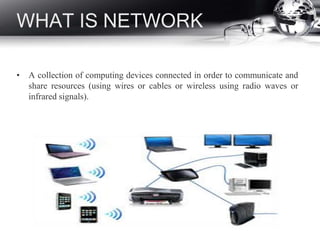
• A collection of computing devices connected in order to communicate and
share resources (using wires or cables or wireless using radio waves or
infrared signals).
TERMS USED IN
NETWORKING
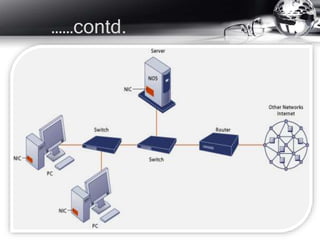
• Server : a computer or device on a network that manages network
resources ex. file server, web root server.
• Network interface card (NIC) : card inserted into a computer so the
computer can be connected to a network.
• Firewall : a system designed to prevent unauthorized access to or from
a private network.
• Router : a device that forwards data packets along networks and is
located where a network connects.
• Modem : a device that turns the signals from either your phone, cable
line, DSL line, etc. into a format computers can understand.
• Switch: Serves as a controller, enabling networked devices to talk to
each other efficiently, through information sharing & resource
allocation
……contd.
TYPES OF N/W
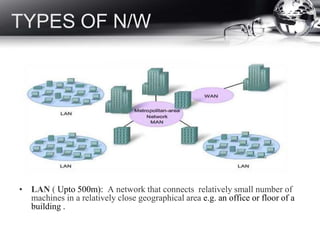
• LAN ( Upto 500m): A network that connects relatively small number of
machines in a relatively close geographical area e.g. an office or floor of a
building .
• MAN (a city or metropolitan area ):The communication
infrastructures that have been developed in and around large cities.
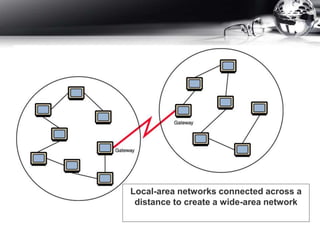
• WAN (Transcontinental or global area): A network that
connects two or more local-area networks over a potentially large
geographic distance. Often one particular node on a LAN is set up
to serve as a gateway to handle all communication going between
that LAN and other networks.
Local-area networks connected across a
distance to create a wide-area network
TOPOLOGIES
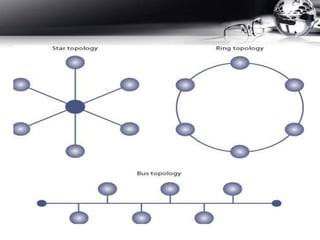
Various configurations, called topologies .
– Ring topology A configuration that connects all nodes in a
closed loop on which messages travel in one direction.
– Star topology A configuration that centers around one node
to which all others are connected and through which all
messages are sent.
– Bus topology All nodes are connected to a single
communication line that carries messages in both directions.
THE INTERNET
• Global system of interconnected computer networks that use the
standard Internet protocol suite (TCP/IP) to link.
• Network of networks that consists of millions of private, public,
academic, business, and government networks, of local to global
scope, that are linked.
• Carries an extensive range of information resources & services.
INTERNET CONNECTIONS
• Internet backbone A set of high-speed networks that carry
Internet traffic. These networks are provided by companies such
as AT&T, GTE, and IBM.
• Internet service provider (ISP) A company that provides other
companies or individuals with access to the Internet.
• There are various technologies available that you can use to
connect a home computer to the Internet.
– A phone modem converts computer data into an analog audio
signal for transfer over a telephone line, and then a modem at
the destination converts it back again into data.
– A digital subscriber line (DSL) uses regular copper phone
lines to transfer digital data to and from the phone company’s
central office.
– A cable modem uses the same line that your cable TV signals
come in on to transfer the data back and forth.
• Broadband : A connection in which transfer speeds are faster
than 128 bits per second
– DSL connections and cable modems are broadband
connections.
– The speed for downloads (getting data from the Internet to
your home computer) may not be the same as uploads
(sending data from your home computer to the Internet.
INTERNET PROTOCOL
SUITE
• It is computer networking model & communications
protocols used by the Internet.
• Commonly known as TCP/IP.
• TCP/IP provides end-to-end connectivity specifying how data
should be formatted, addressed, transmitted, routed & received at
the destination.
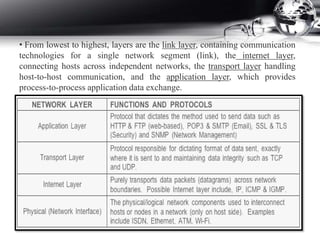
• Functionality has been organized into 4 abstraction layers which
are used to sort all related protocols according to scope of
networking involved.
• From lowest to highest, layers are the link layer, containing communication
technologies for a single network segment (link), the internet layer,
connecting hosts across independent networks, the transport layer handling
host-to-host communication, and the application layer, which provides
process-to-process application data exchange.
DNS
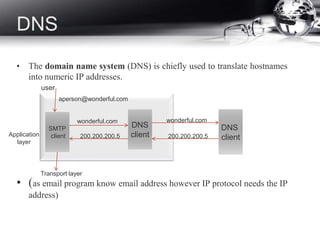
• The domain name system (DNS) is chiefly used to translate hostnames
into numeric IP addresses.
• (as email program know email address however IP protocol needs the IP
address)
DNS
client
SMTP
client
DNS
client
Transport layer
wonderful.com
200.200.200.5
wonderful.com
aperson@wonderful.com
200.200.200.5Application
layer
user
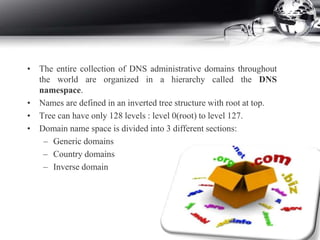
• The entire collection of DNS administrative domains throughout
the world are organized in a hierarchy called the DNS
namespace.
• Names are defined in an inverted tree structure with root at top.
• Tree can have only 128 levels : level 0(root) to level 127.
• Domain name space is divided into 3 different sections:
– Generic domains
– Country domains
– Inverse domain
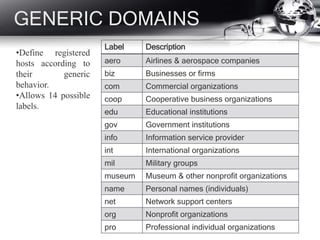
GENERIC DOMAINS
Label Description
aero Airlines & aerospace companies
biz Businesses or firms
com Commercial organizations
coop Cooperative business organizations
edu Educational institutions
gov Government institutions
info Information service provider
int International organizations
mil Military groups
museum Museum & other nonprofit organizations
name Personal names (individuals)
net Network support centers
org Nonprofit organizations
pro Professional individual organizations
•Define registered
hosts according to
their generic
behavior.
•Allows 14 possible
labels.
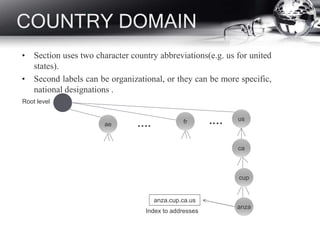
COUNTRY DOMAIN
• Section uses two character country abbreviations(e.g. us for united
states).
• Second labels can be organizational, or they can be more specific,
national designations .
ae
usfr
ca
cup
anza
anza.cup.ca.us
…. .…
Root level
Index to addresses
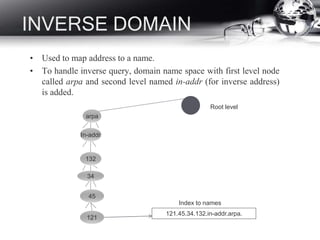
INVERSE DOMAIN
• Used to map address to a name.
• To handle inverse query, domain name space with first level node
called arpa and second level named in-addr (for inverse address)
is added.
In-addr
132
34
45
121
arpa
Root level
121.45.34.132.in-addr.arpa.
Index to names
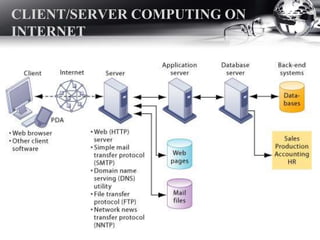
CLIENT/SERVER COMPUTING ON
INTERNET
INTERNET SERVICES
•E-mail
•Usenet newsgroups
•Chatting and instant messaging
•Telnet (Logging on to one computer system and doing work
on another)
•FTP (Transferring files from computer to computer)
•World Wide Web: Retrieving, formatting, and displaying
information (including text, audio, graphics, and video) using
hypertext links
Network & internet presentation

Network & internet presentation

  • 1.
  • 2.
    WHAT IS NETWORK •A collection of computing devices connected in order to communicate and share resources (using wires or cables or wireless using radio waves or infrared signals).
  • 3.
    TERMS USED IN NETWORKING •Server : a computer or device on a network that manages network resources ex. file server, web root server. • Network interface card (NIC) : card inserted into a computer so the computer can be connected to a network. • Firewall : a system designed to prevent unauthorized access to or from a private network. • Router : a device that forwards data packets along networks and is located where a network connects. • Modem : a device that turns the signals from either your phone, cable line, DSL line, etc. into a format computers can understand. • Switch: Serves as a controller, enabling networked devices to talk to each other efficiently, through information sharing & resource allocation
  • 4.
  • 5.
    TYPES OF N/W •LAN ( Upto 500m): A network that connects relatively small number of machines in a relatively close geographical area e.g. an office or floor of a building .
  • 6.
    • MAN (acity or metropolitan area ):The communication infrastructures that have been developed in and around large cities. • WAN (Transcontinental or global area): A network that connects two or more local-area networks over a potentially large geographic distance. Often one particular node on a LAN is set up to serve as a gateway to handle all communication going between that LAN and other networks.
  • 7.
    Local-area networks connectedacross a distance to create a wide-area network
  • 8.
    TOPOLOGIES Various configurations, calledtopologies . – Ring topology A configuration that connects all nodes in a closed loop on which messages travel in one direction. – Star topology A configuration that centers around one node to which all others are connected and through which all messages are sent. – Bus topology All nodes are connected to a single communication line that carries messages in both directions.
  • 10.
    THE INTERNET • Globalsystem of interconnected computer networks that use the standard Internet protocol suite (TCP/IP) to link. • Network of networks that consists of millions of private, public, academic, business, and government networks, of local to global scope, that are linked. • Carries an extensive range of information resources & services.
  • 11.
    INTERNET CONNECTIONS • Internetbackbone A set of high-speed networks that carry Internet traffic. These networks are provided by companies such as AT&T, GTE, and IBM. • Internet service provider (ISP) A company that provides other companies or individuals with access to the Internet. • There are various technologies available that you can use to connect a home computer to the Internet. – A phone modem converts computer data into an analog audio signal for transfer over a telephone line, and then a modem at the destination converts it back again into data. – A digital subscriber line (DSL) uses regular copper phone lines to transfer digital data to and from the phone company’s central office.
  • 12.
    – A cablemodem uses the same line that your cable TV signals come in on to transfer the data back and forth. • Broadband : A connection in which transfer speeds are faster than 128 bits per second – DSL connections and cable modems are broadband connections. – The speed for downloads (getting data from the Internet to your home computer) may not be the same as uploads (sending data from your home computer to the Internet.
  • 13.
    INTERNET PROTOCOL SUITE • Itis computer networking model & communications protocols used by the Internet. • Commonly known as TCP/IP. • TCP/IP provides end-to-end connectivity specifying how data should be formatted, addressed, transmitted, routed & received at the destination. • Functionality has been organized into 4 abstraction layers which are used to sort all related protocols according to scope of networking involved.
  • 14.
    • From lowestto highest, layers are the link layer, containing communication technologies for a single network segment (link), the internet layer, connecting hosts across independent networks, the transport layer handling host-to-host communication, and the application layer, which provides process-to-process application data exchange.
  • 15.
    DNS • The domainname system (DNS) is chiefly used to translate hostnames into numeric IP addresses. • (as email program know email address however IP protocol needs the IP address) DNS client SMTP client DNS client Transport layer wonderful.com 200.200.200.5 wonderful.com aperson@wonderful.com 200.200.200.5Application layer user
  • 16.
    • The entirecollection of DNS administrative domains throughout the world are organized in a hierarchy called the DNS namespace. • Names are defined in an inverted tree structure with root at top. • Tree can have only 128 levels : level 0(root) to level 127. • Domain name space is divided into 3 different sections: – Generic domains – Country domains – Inverse domain
  • 17.
    GENERIC DOMAINS Label Description aeroAirlines & aerospace companies biz Businesses or firms com Commercial organizations coop Cooperative business organizations edu Educational institutions gov Government institutions info Information service provider int International organizations mil Military groups museum Museum & other nonprofit organizations name Personal names (individuals) net Network support centers org Nonprofit organizations pro Professional individual organizations •Define registered hosts according to their generic behavior. •Allows 14 possible labels.
  • 18.
    COUNTRY DOMAIN • Sectionuses two character country abbreviations(e.g. us for united states). • Second labels can be organizational, or they can be more specific, national designations . ae usfr ca cup anza anza.cup.ca.us …. .… Root level Index to addresses
  • 19.
    INVERSE DOMAIN • Usedto map address to a name. • To handle inverse query, domain name space with first level node called arpa and second level named in-addr (for inverse address) is added. In-addr 132 34 45 121 arpa Root level 121.45.34.132.in-addr.arpa. Index to names
  • 20.
  • 21.
    INTERNET SERVICES •E-mail •Usenet newsgroups •Chattingand instant messaging •Telnet (Logging on to one computer system and doing work on another) •FTP (Transferring files from computer to computer) •World Wide Web: Retrieving, formatting, and displaying information (including text, audio, graphics, and video) using hypertext links