. Net
Technologies
INSTRUCTOR:
ELLEN GRACE PORRAS
2
Writing the Code
3
The messagebox function enables you to display a
message box for which you have designated the
format and content. You can specify the number
and type of buttons on the message box, the
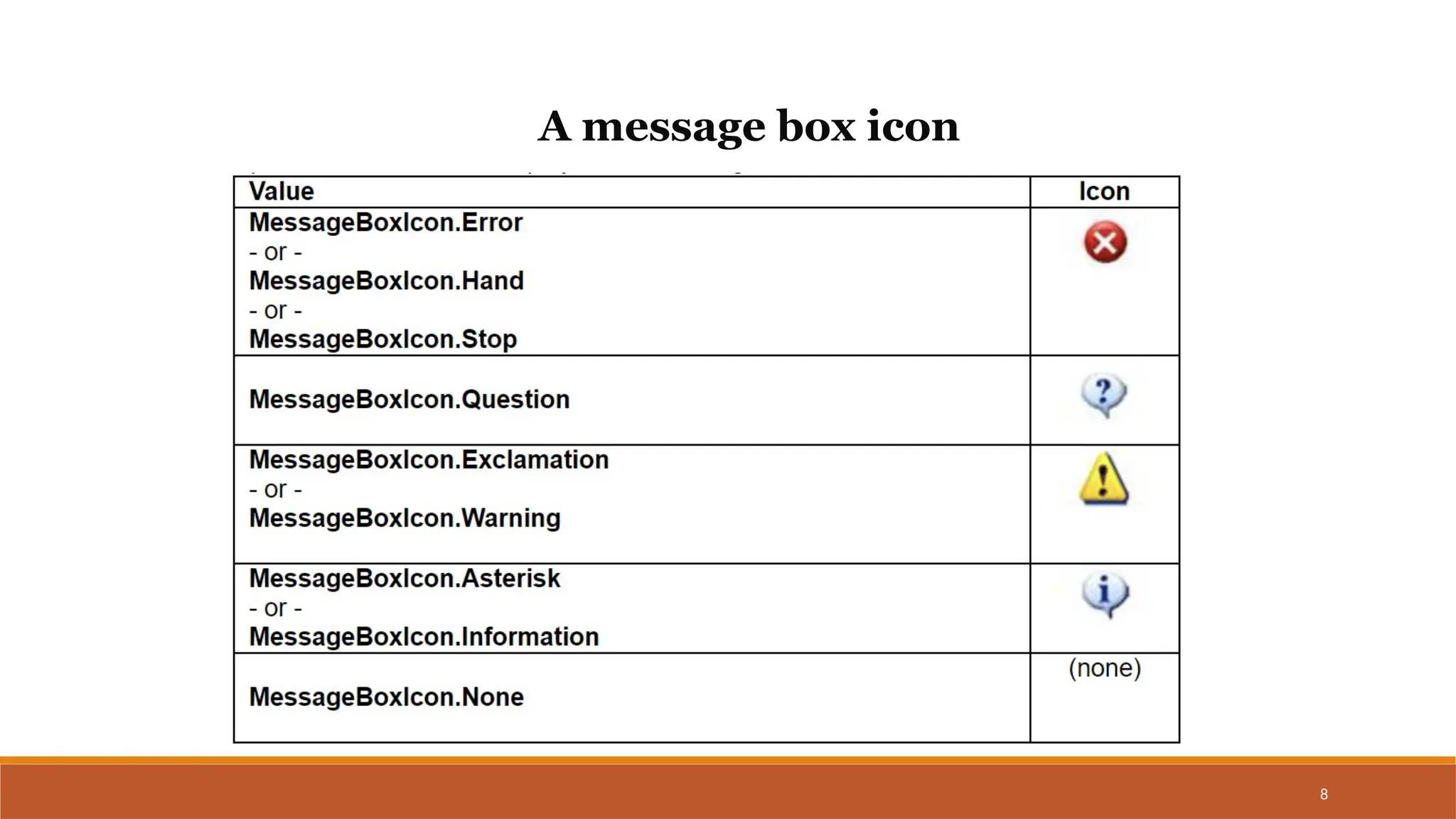
message icon (for example, hand, question mark,
exclamation point, or asterisk), and the message
displayed.
The messagebox function
4
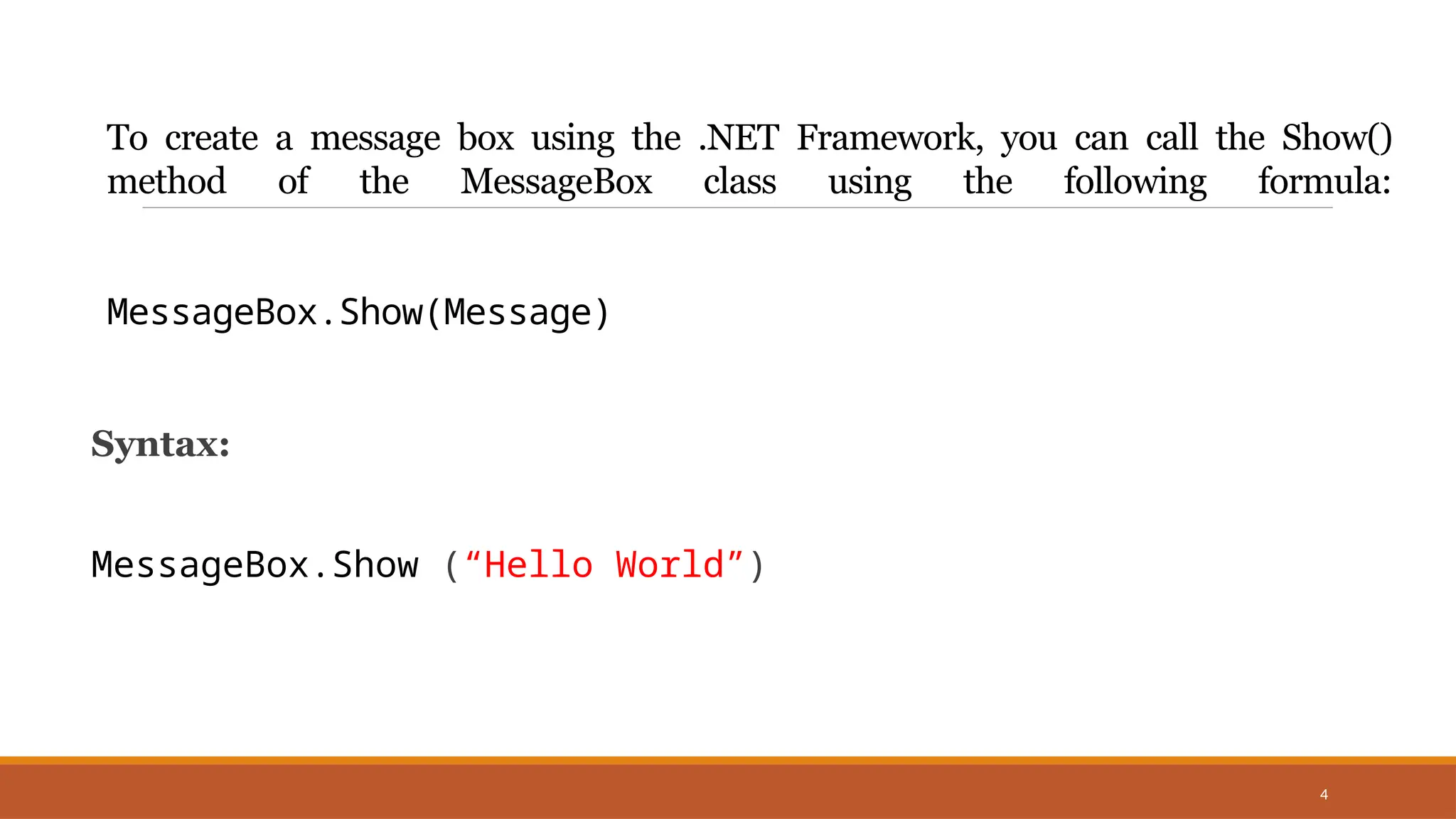
To create a message box using the .NET Framework, you can call the Show()
method of the MessageBox class using the following formula:
MessageBox.Show(Message)
Syntax:
MessageBox.Show (“Hello World”)
5
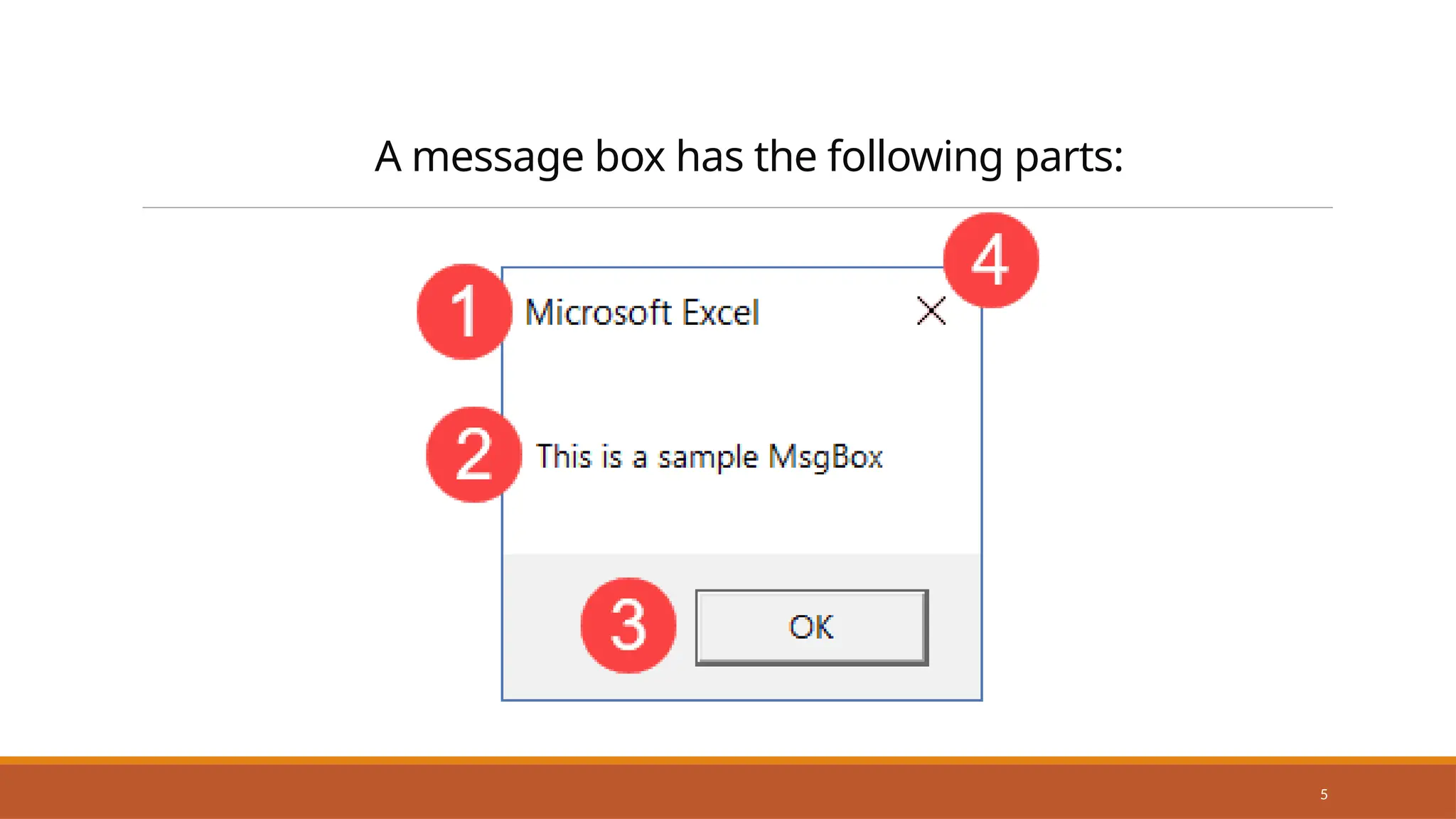
A message box has the following parts:
6
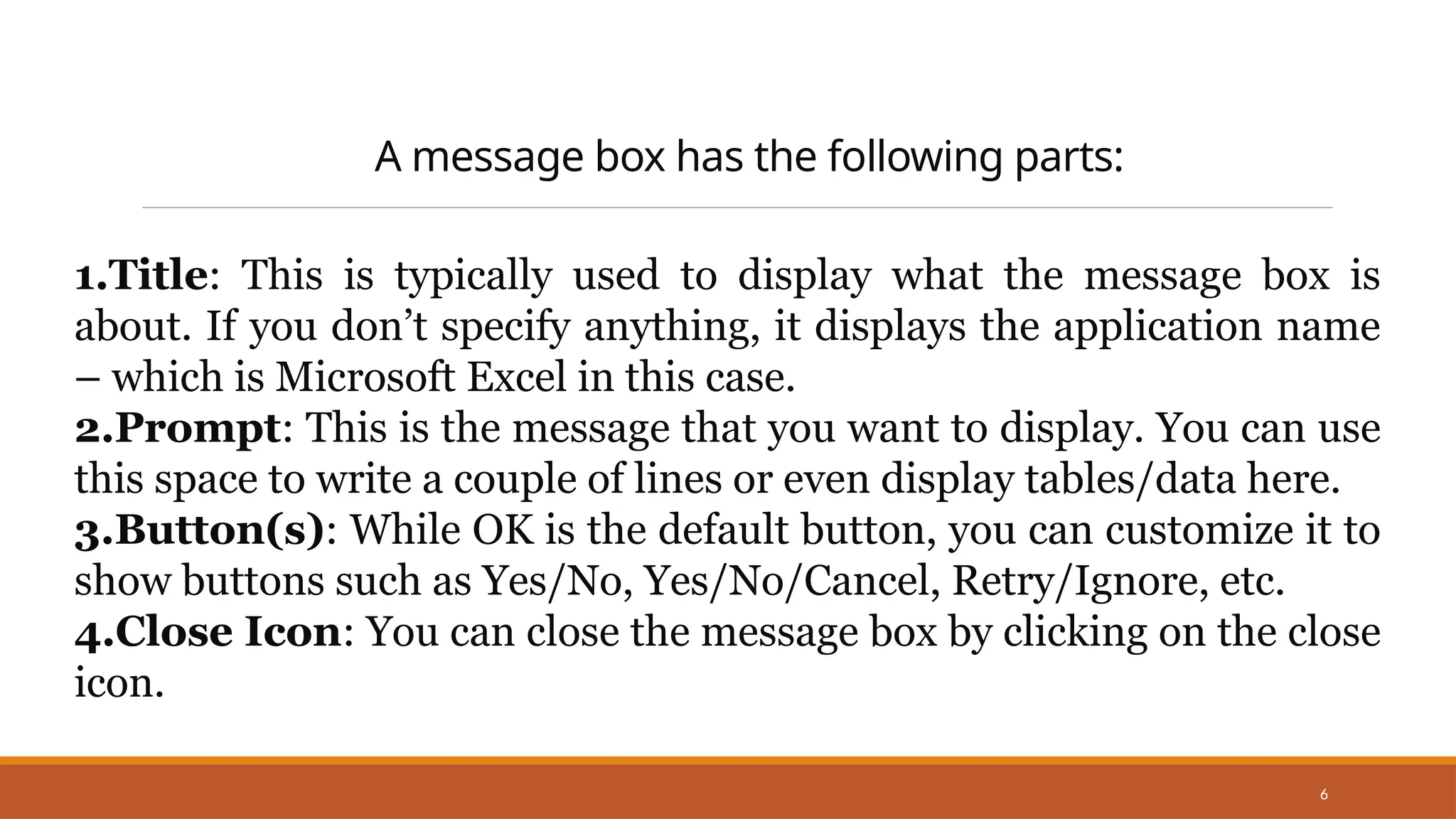
A message box has the following parts:
1.Title: This is typically used to display what the message box is
about. If you don’t specify anything, it displays the application name
– which is Microsoft Excel in this case.
2.Prompt: This is the message that you want to display. You can use
this space to write a couple of lines or even display tables/data here.
3.Button(s): While OK is the default button, you can customize it to
show buttons such as Yes/No, Yes/No/Cancel, Retry/Ignore, etc.
4.Close Icon: You can close the message box by clicking on the close
icon.
7
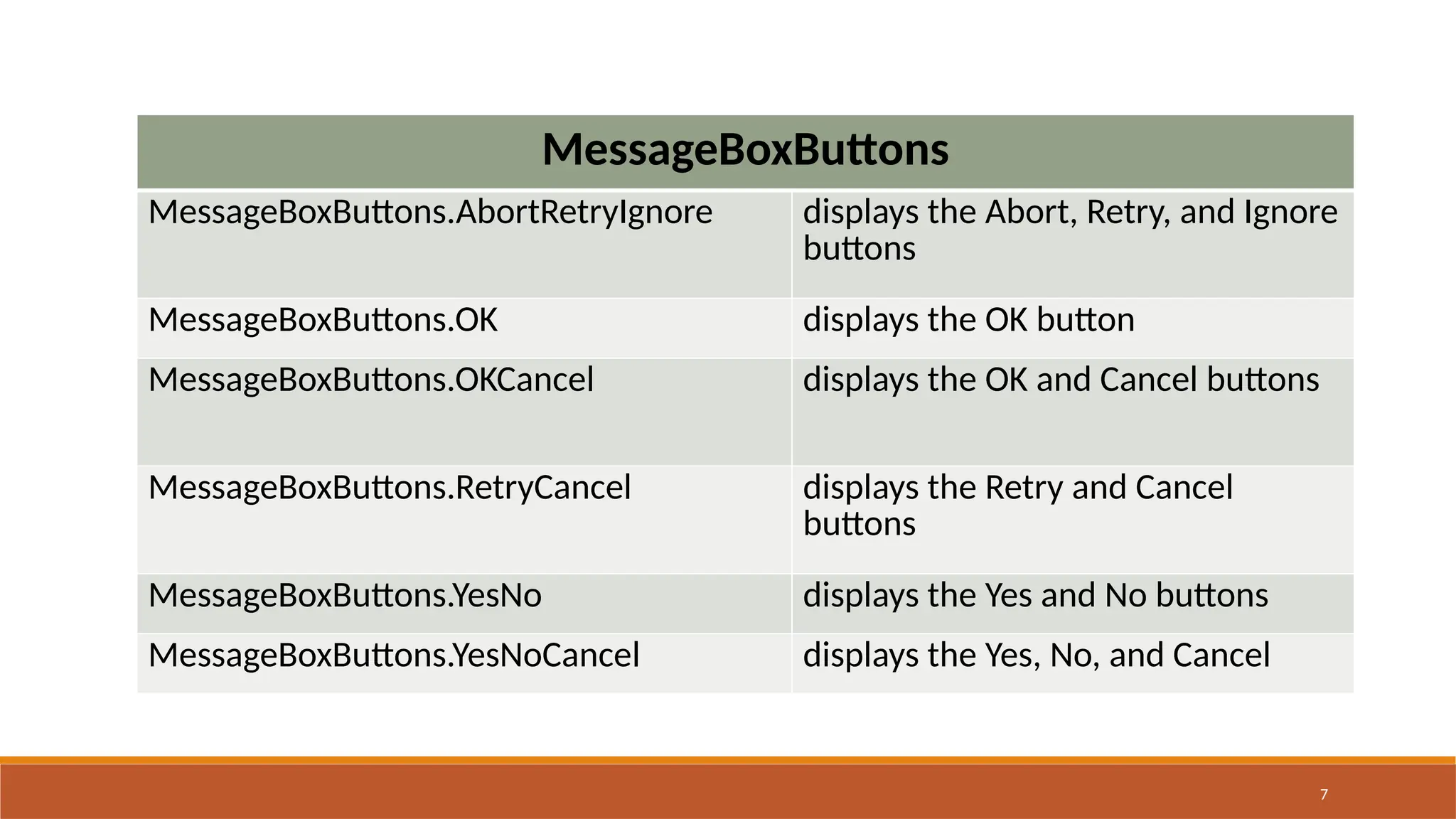
MessageBoxButtons
MessageBoxButtons.AbortRetryIgnore displays the Abort, Retry, and Ignore
buttons
MessageBoxButtons.OK displays the OK button
MessageBoxButtons.OKCancel displays the OK and Cancel buttons
MessageBoxButtons.RetryCancel displays the Retry and Cancel
buttons
MessageBoxButtons.YesNo displays the Yes and No buttons
MessageBoxButtons.YesNoCancel displays the Yes, No, and Cancel
8
A message box icon
9
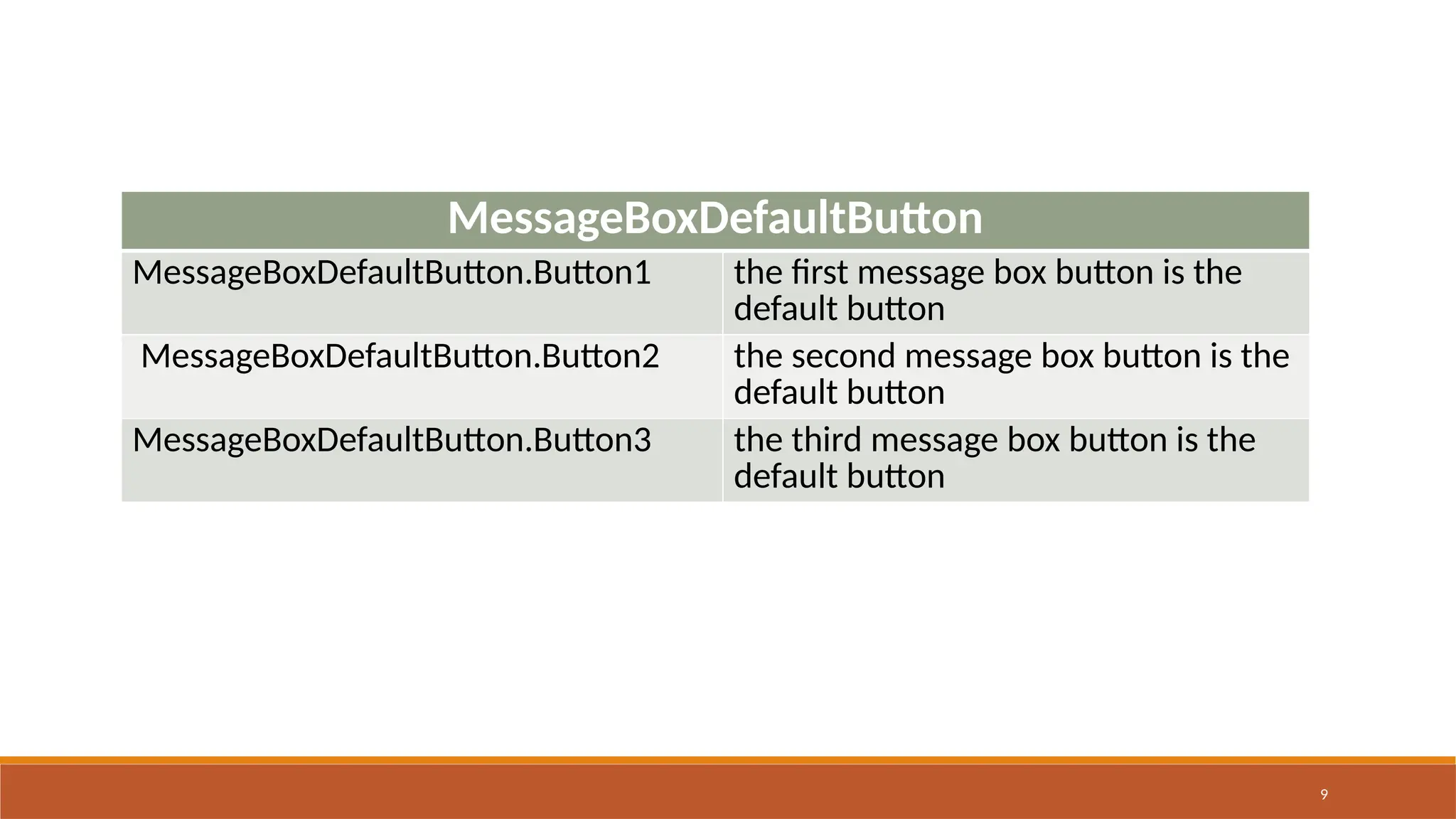
MessageBoxDefaultButton
MessageBoxDefaultButton.Button1 the first message box button is the
default button
MessageBoxDefaultButton.Button2 the second message box button is the
default button
MessageBoxDefaultButton.Button3 the third message box button is the
default button
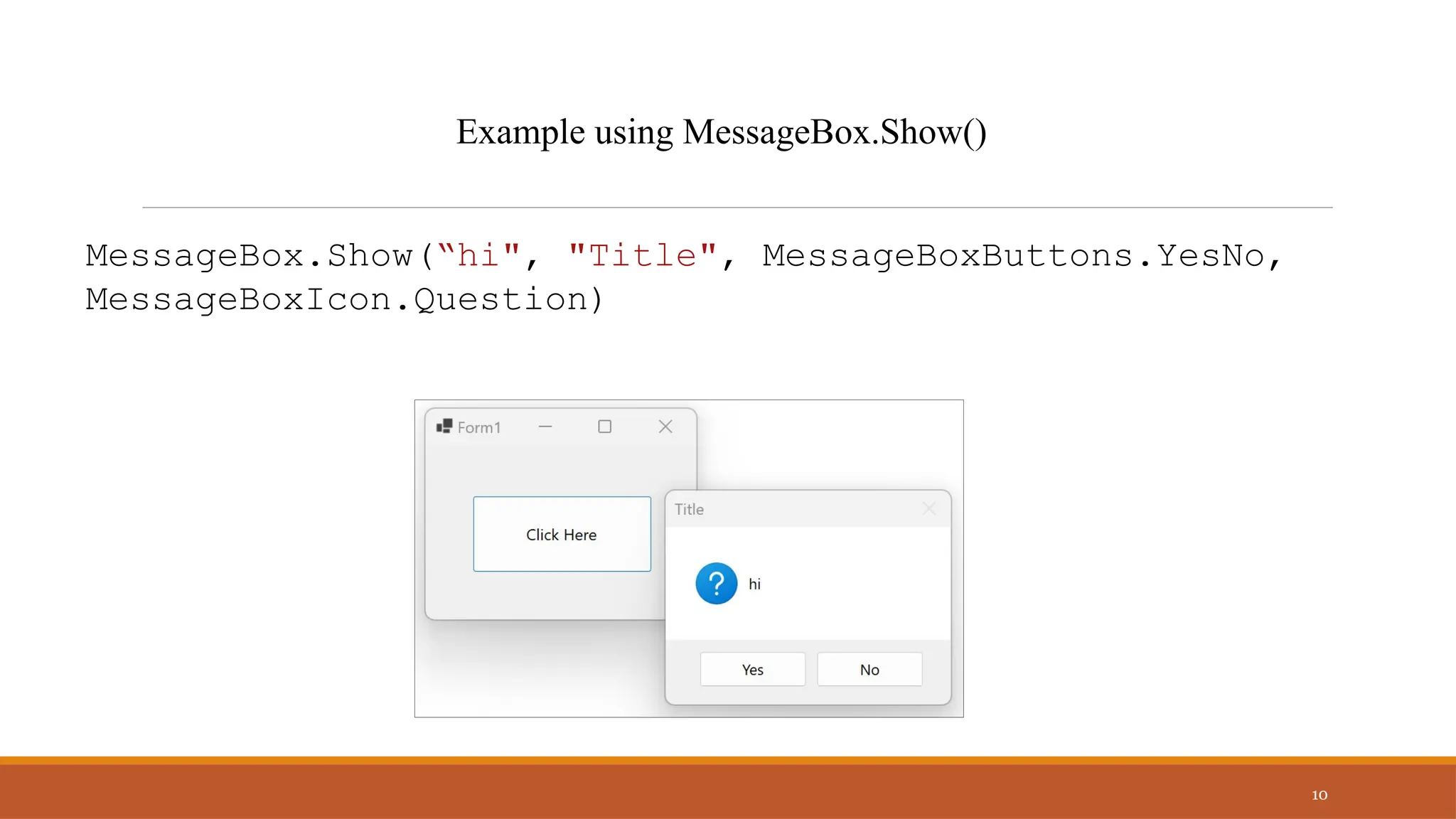
MessageBox.Show(“hi", "Title", MessageBoxButtons.YesNo,
MessageBoxIcon.Question)
10
Example using MessageBox.Show()
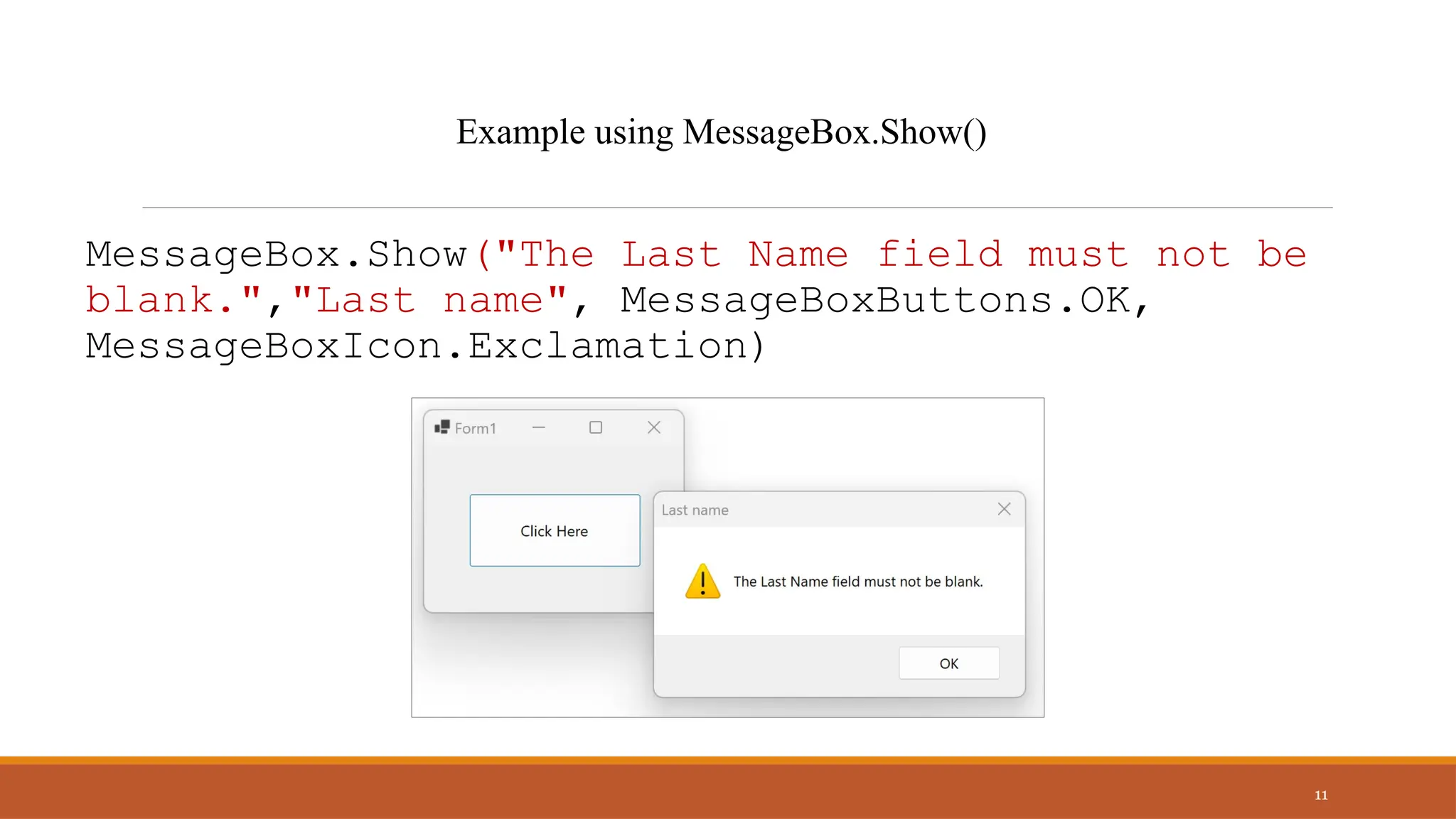
MessageBox.Show("The Last Name field must not be
blank.","Last name", MessageBoxButtons.OK,
MessageBoxIcon.Exclamation)
11
Example using MessageBox.Show()
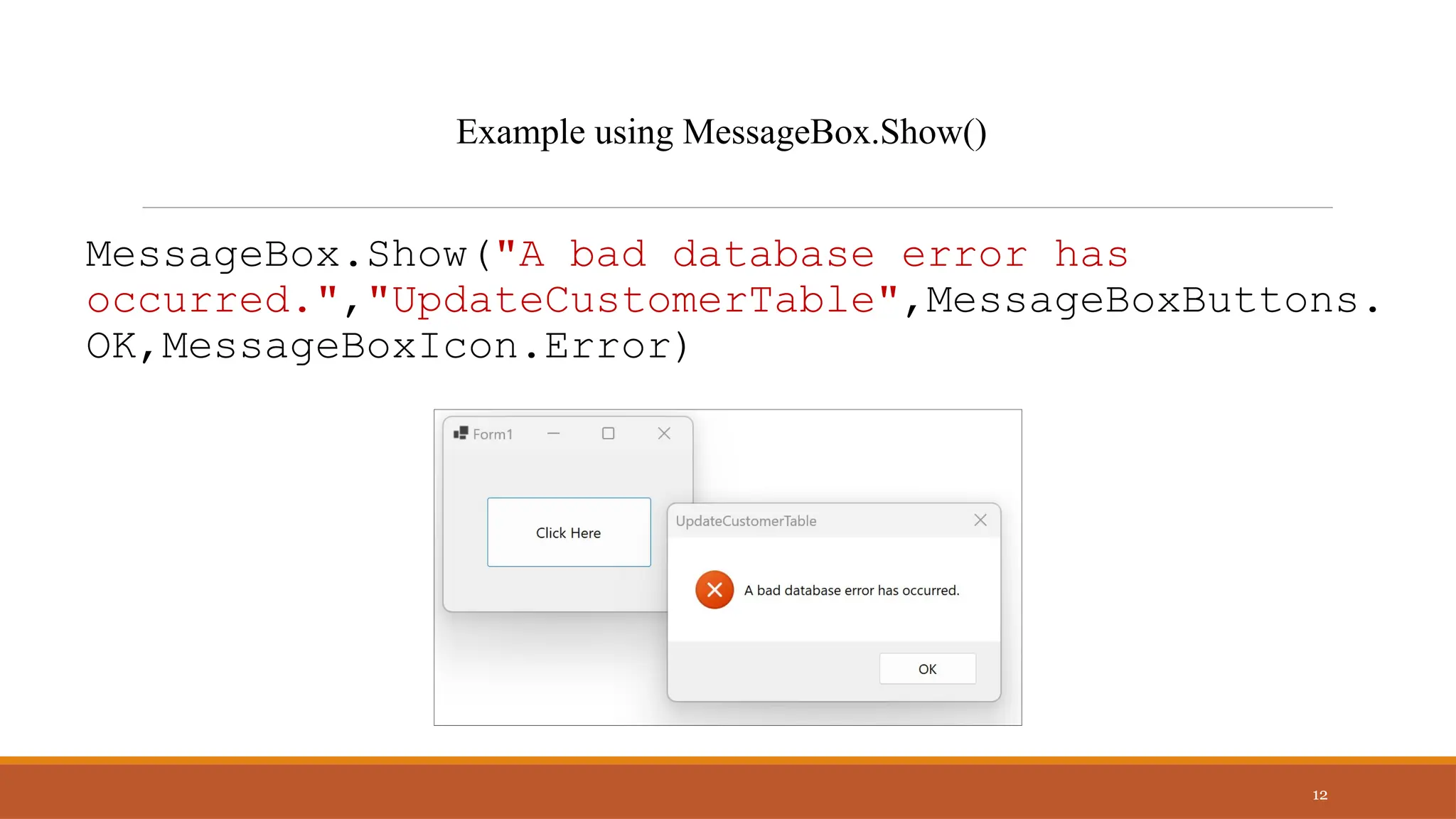
MessageBox.Show("A bad database error has
occurred.","UpdateCustomerTable",MessageBoxButtons.
OK,MessageBoxIcon.Error)
12
Example using MessageBox.Show()
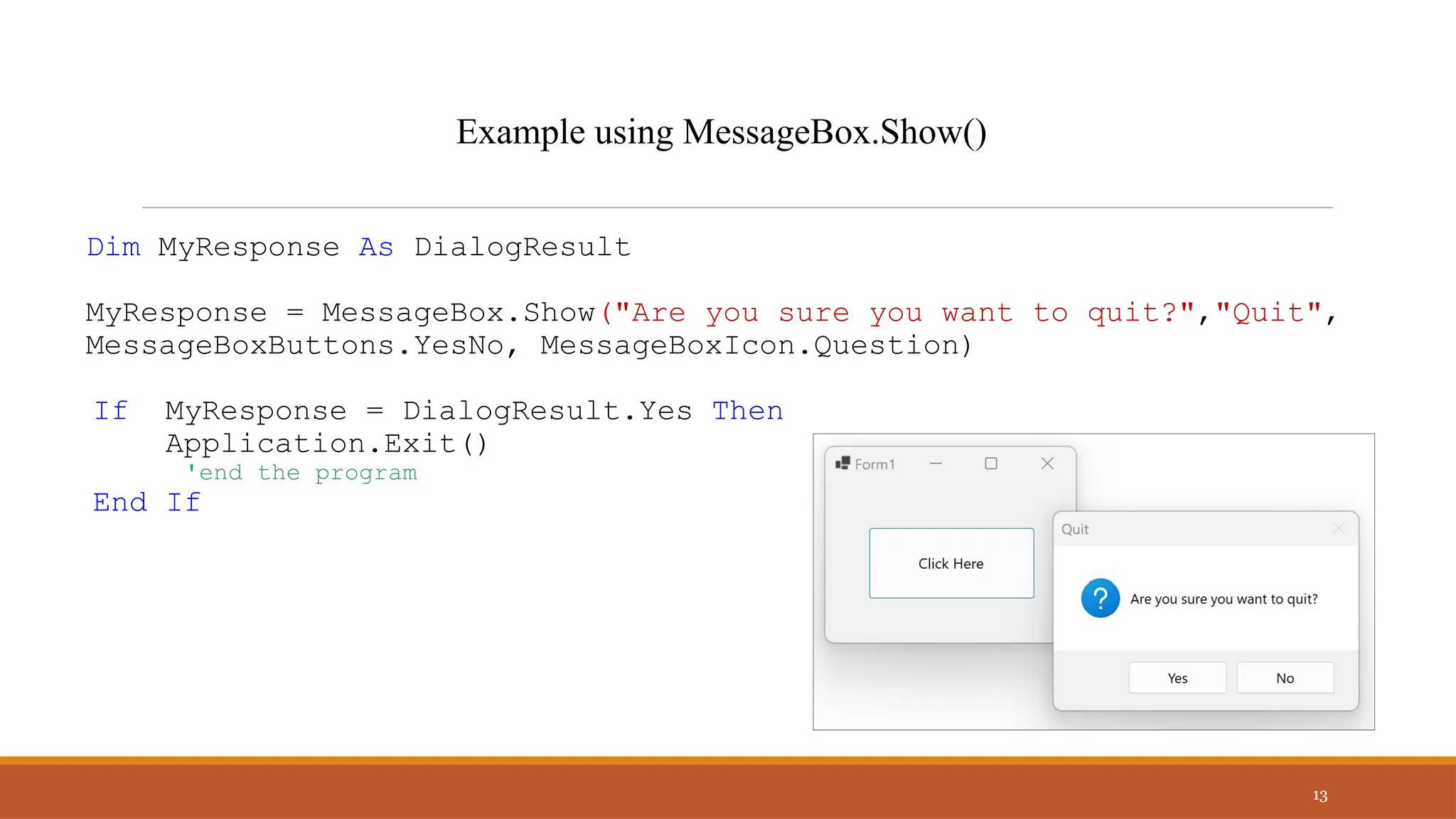
Dim MyResponse As DialogResult
MyResponse = MessageBox.Show("Are you sure you want to quit?","Quit",
MessageBoxButtons.YesNo, MessageBoxIcon.Question)
If MyResponse = DialogResult.Yes Then
Application.Exit()
'end the program
End If
13
Example using MessageBox.Show()
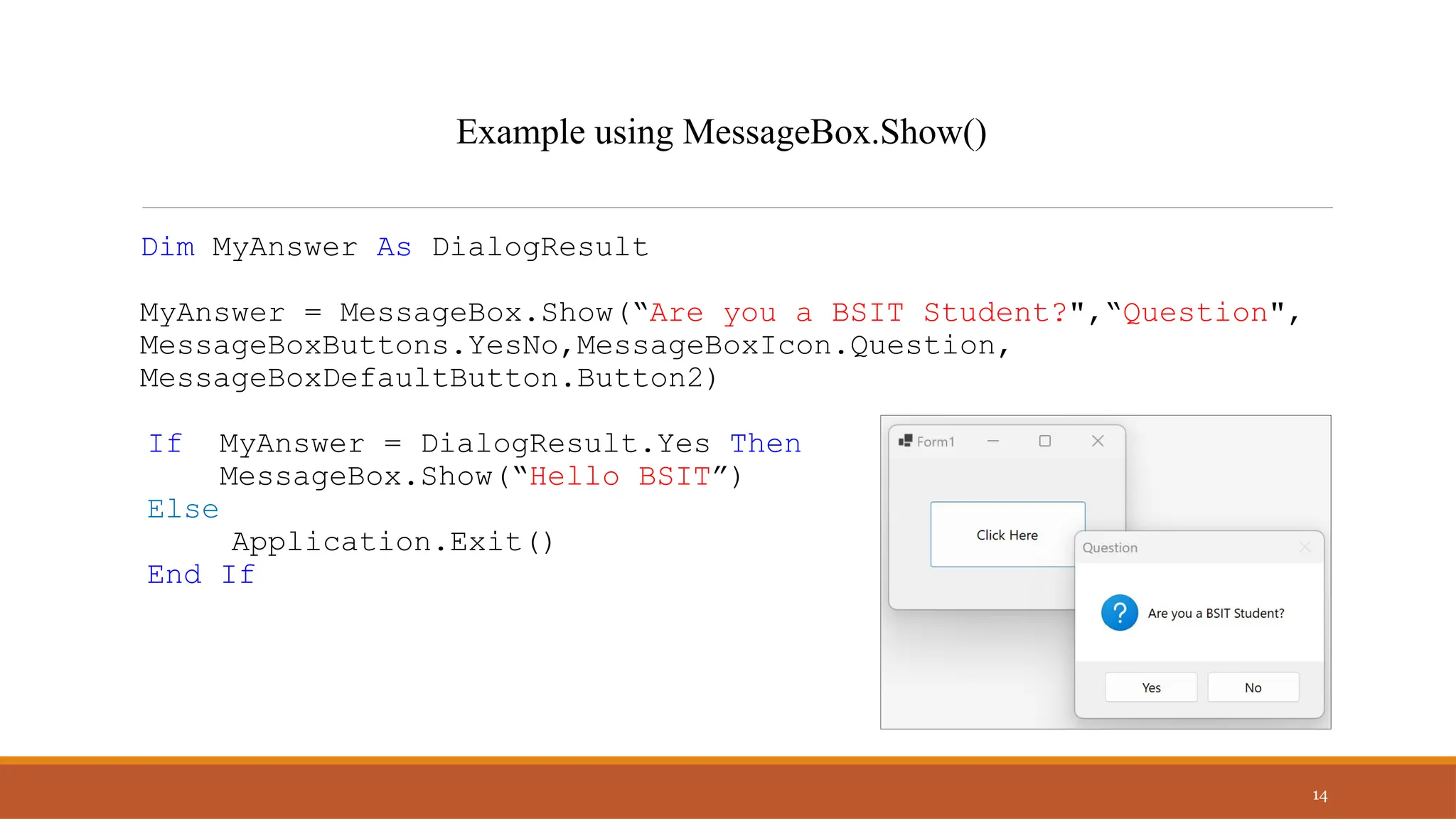
Dim MyAnswer As DialogResult
MyAnswer = MessageBox.Show(“Are you a BSIT Student?",“Question",
MessageBoxButtons.YesNo,MessageBoxIcon.Question,
MessageBoxDefaultButton.Button2)
If MyAnswer = DialogResult.Yes Then
MessageBox.Show(“Hello BSIT”)
Else
Application.Exit()
End If
14
Example using MessageBox.Show()
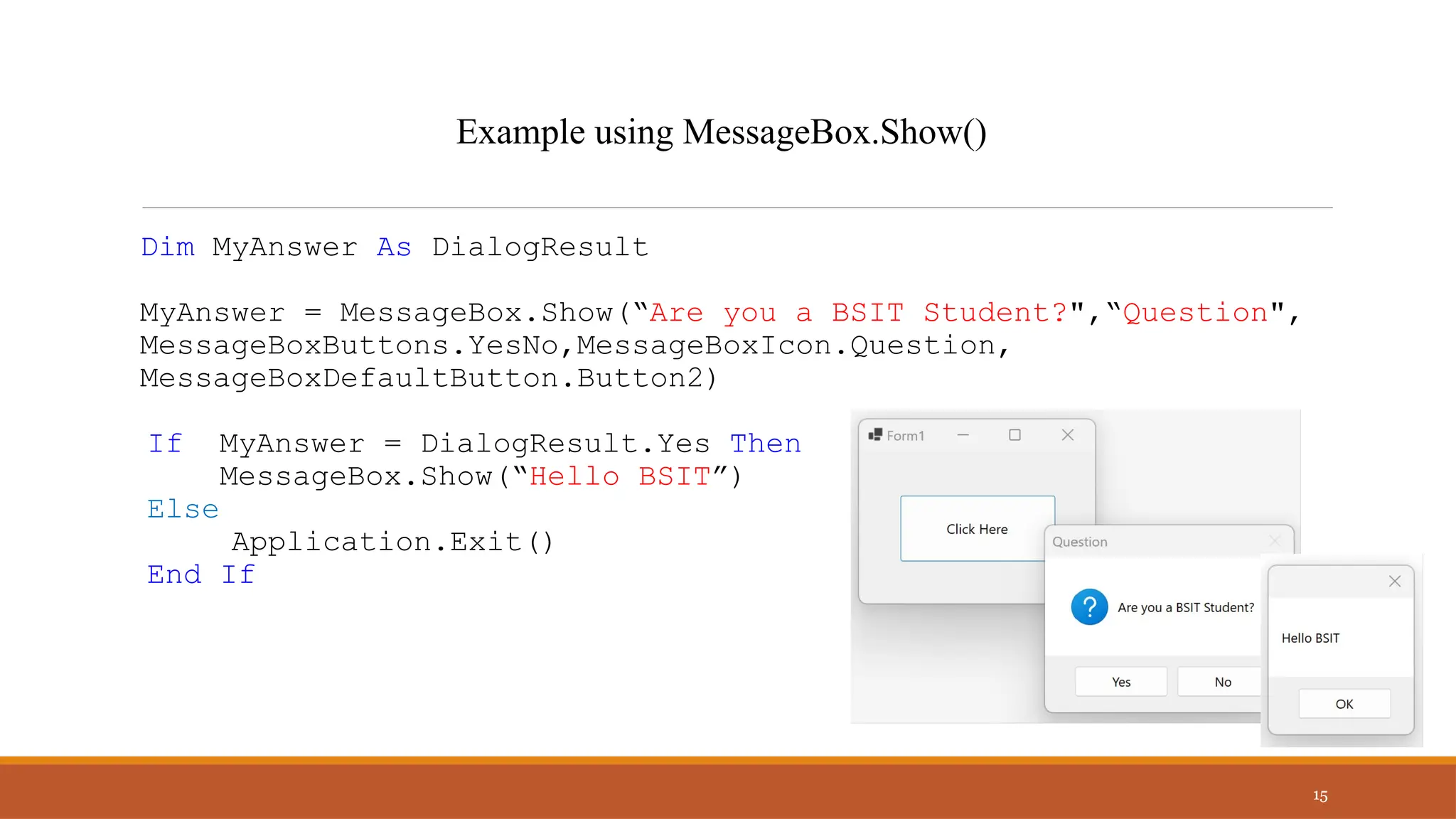
Dim MyAnswer As DialogResult
MyAnswer = MessageBox.Show(“Are you a BSIT Student?",“Question",
MessageBoxButtons.YesNo,MessageBoxIcon.Question,
MessageBoxDefaultButton.Button2)
If MyAnswer = DialogResult.Yes Then
MessageBox.Show(“Hello BSIT”)
Else
Application.Exit()
End If
15
Example using MessageBox.Show()
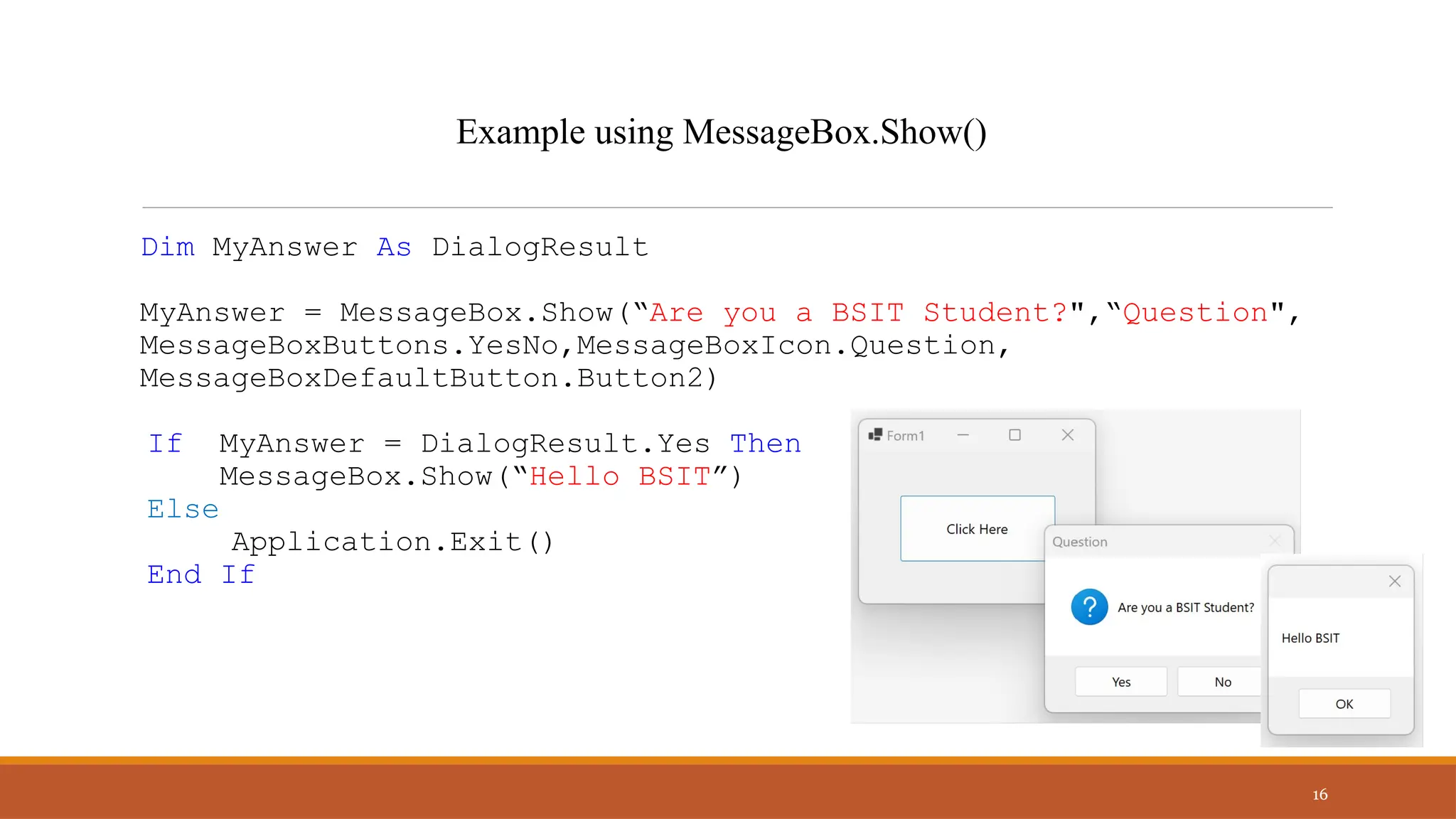
Dim MyAnswer As DialogResult
MyAnswer = MessageBox.Show(“Are you a BSIT Student?",“Question",
MessageBoxButtons.YesNo,MessageBoxIcon.Question,
MessageBoxDefaultButton.Button2)
If MyAnswer = DialogResult.Yes Then
MessageBox.Show(“Hello BSIT”)
Else
Application.Exit()
End If
16
Example using MessageBox.Show()
Answer the following on a 1 whole sheet of paper. Use declaration
of variables.
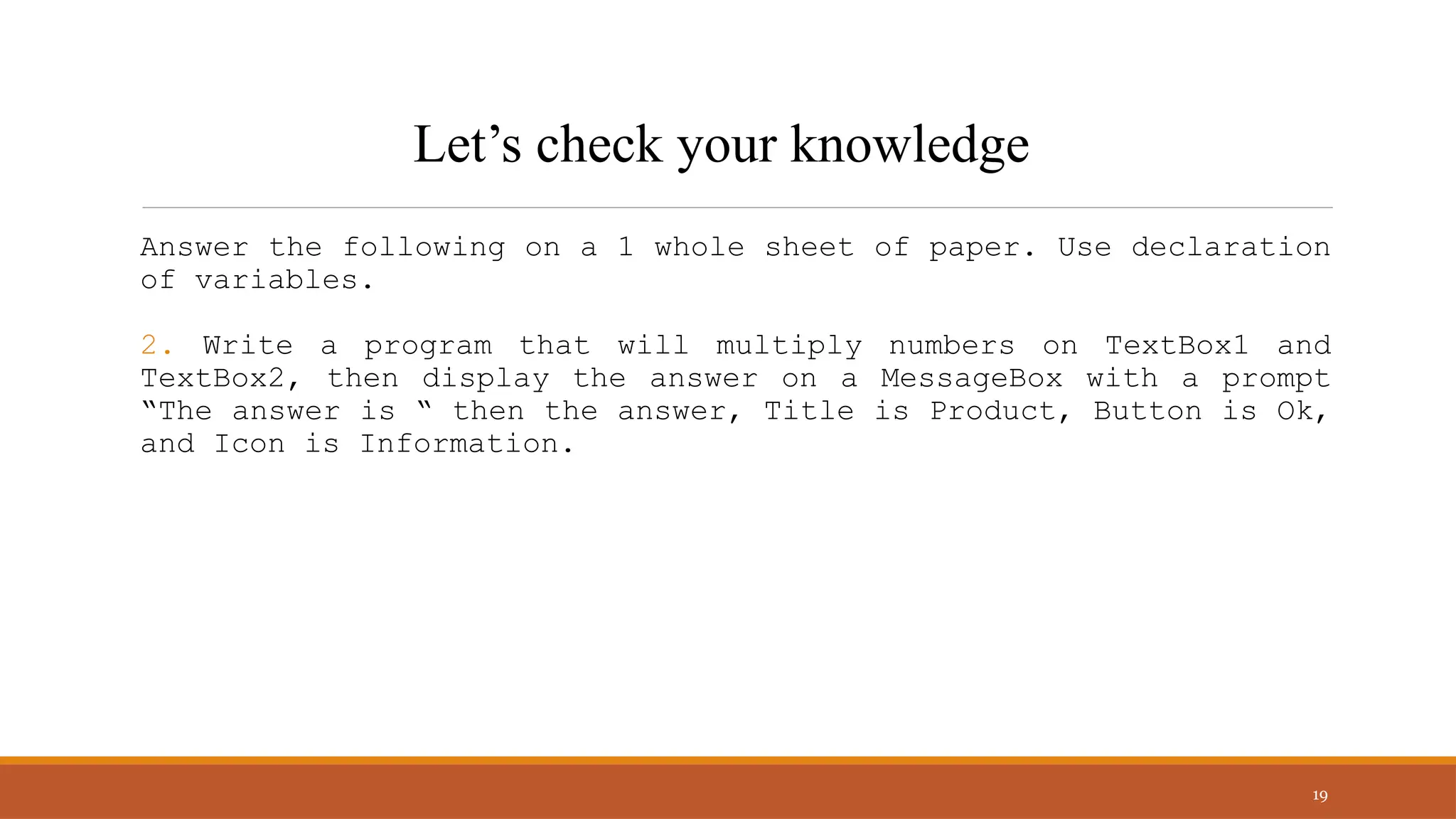
1. Write a program that will allow you to enter your Age on
TextBox1. If Button1 is clicked, display on a MessageBox the
prompt “Your Age is “ then your Age. Title is Age, Button is
Ok, Icon is Information.
17
Let’s check your knowledge
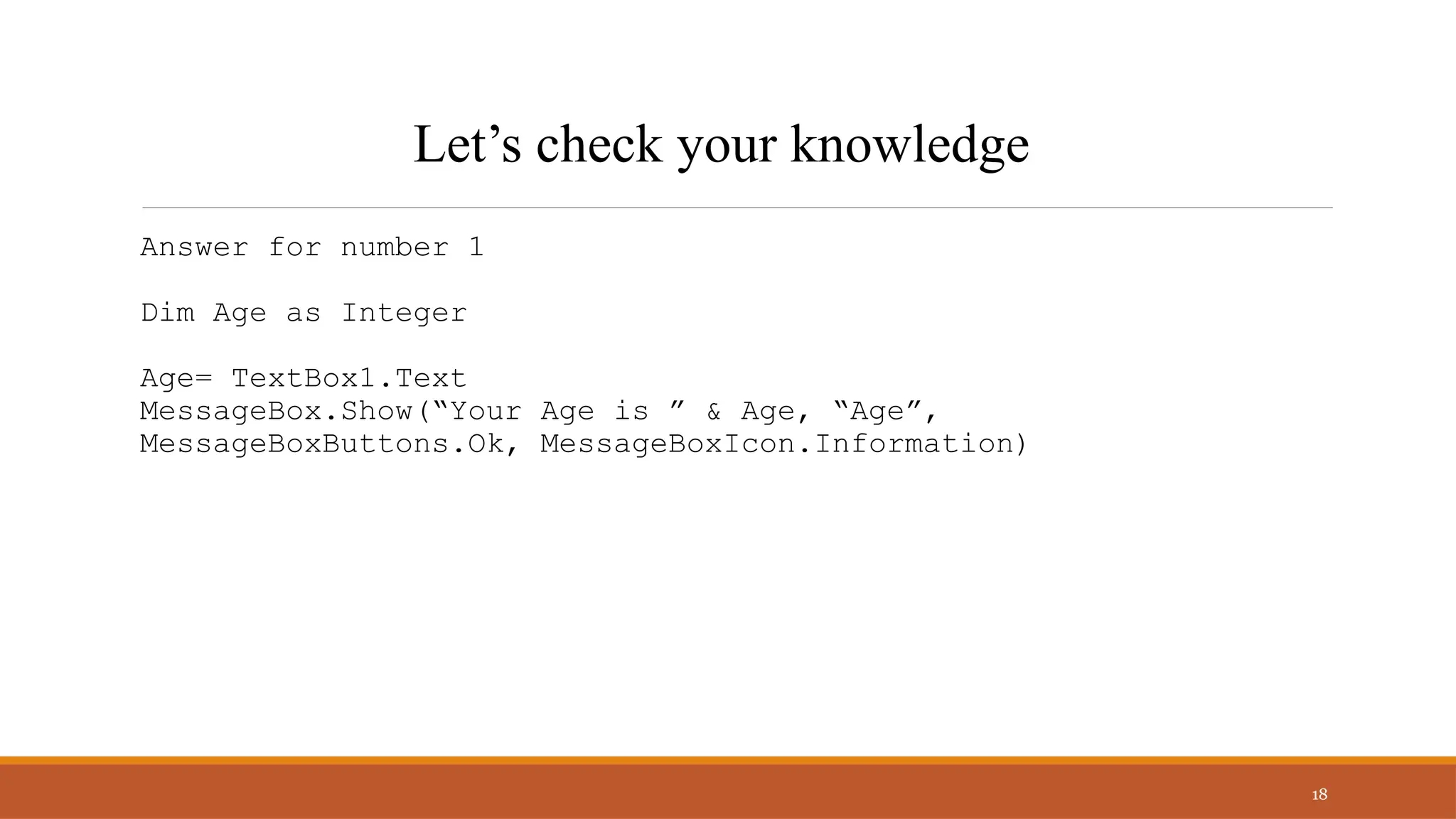
Answer for number 1
Dim Age as Integer
Age= TextBox1.Text
MessageBox.Show(“Your Age is ” & Age, “Age”,
MessageBoxButtons.Ok, MessageBoxIcon.Information)
18
Let’s check your knowledge
Answer the following on a 1 whole sheet of paper. Use declaration
of variables.
2. Write a program that will multiply numbers on TextBox1 and
TextBox2, then display the answer on a MessageBox with a prompt
“The answer is “ then the answer, Title is Product, Button is Ok,
and Icon is Information.
19
Let’s check your knowledge
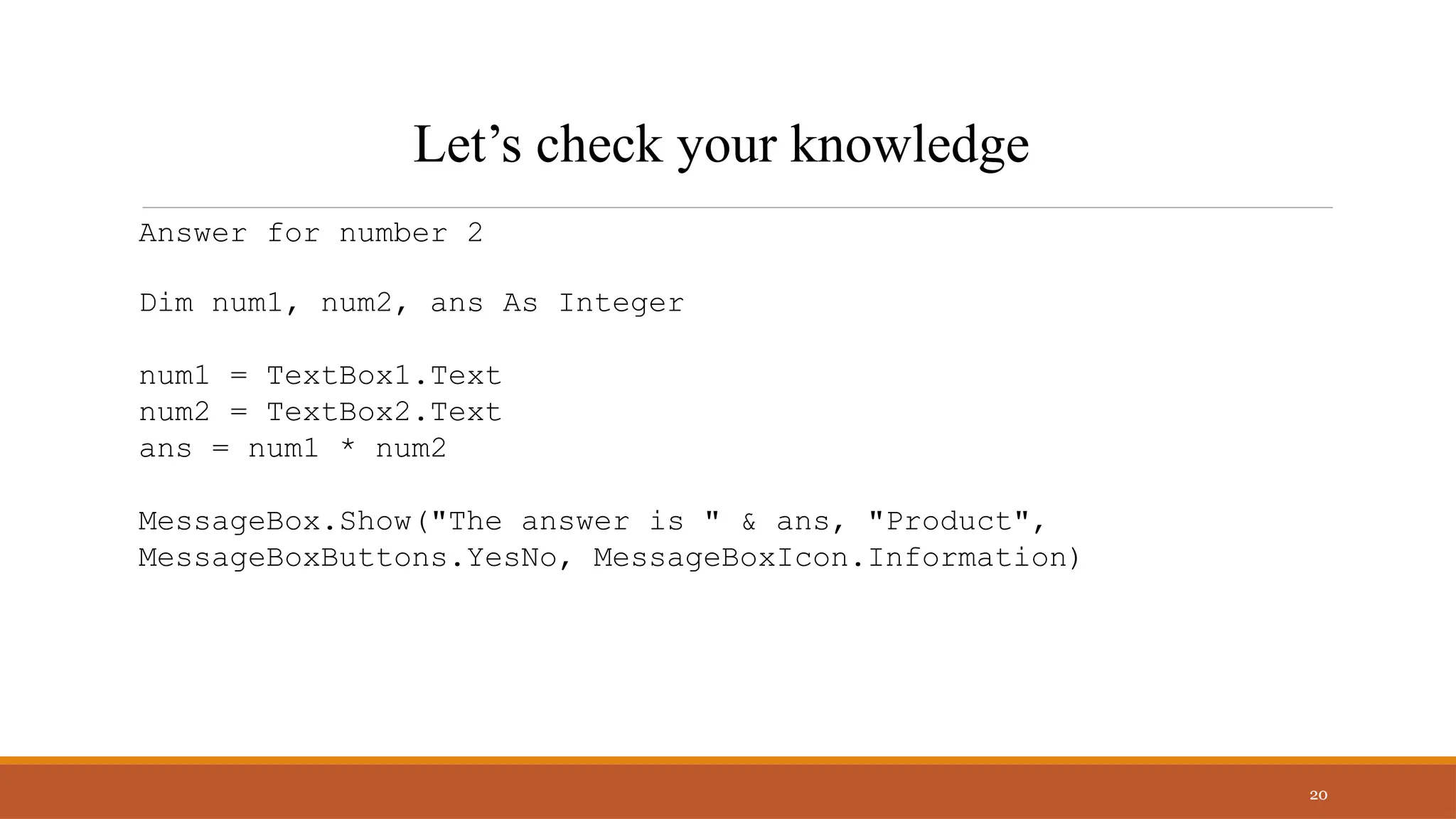
Answer for number 2
Dim num1, num2, ans As Integer
num1 = TextBox1.Text
num2 = TextBox2.Text
ans = num1 * num2
MessageBox.Show("The answer is " & ans, "Product",
MessageBoxButtons.YesNo, MessageBoxIcon.Information)
20
Let’s check your knowledge
Answer the following on a 1 whole sheet of paper. Use declaration
of variables.
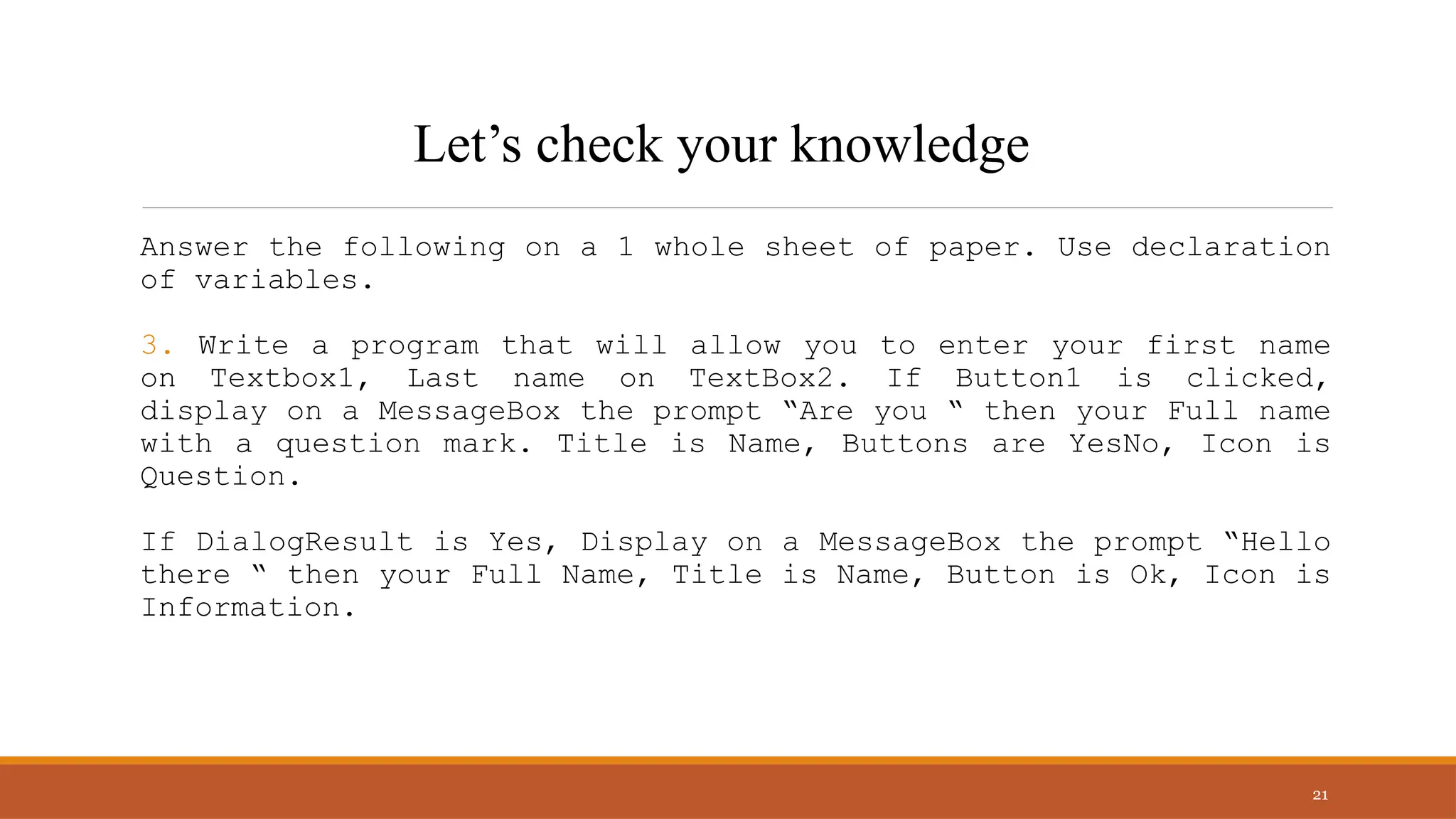
3. Write a program that will allow you to enter your first name
on Textbox1, Last name on TextBox2. If Button1 is clicked,
display on a MessageBox the prompt “Are you “ then your Full name
with a question mark. Title is Name, Buttons are YesNo, Icon is
Question.
If DialogResult is Yes, Display on a MessageBox the prompt “Hello
there “ then your Full Name, Title is Name, Button is Ok, Icon is
Information.
21
Let’s check your knowledge
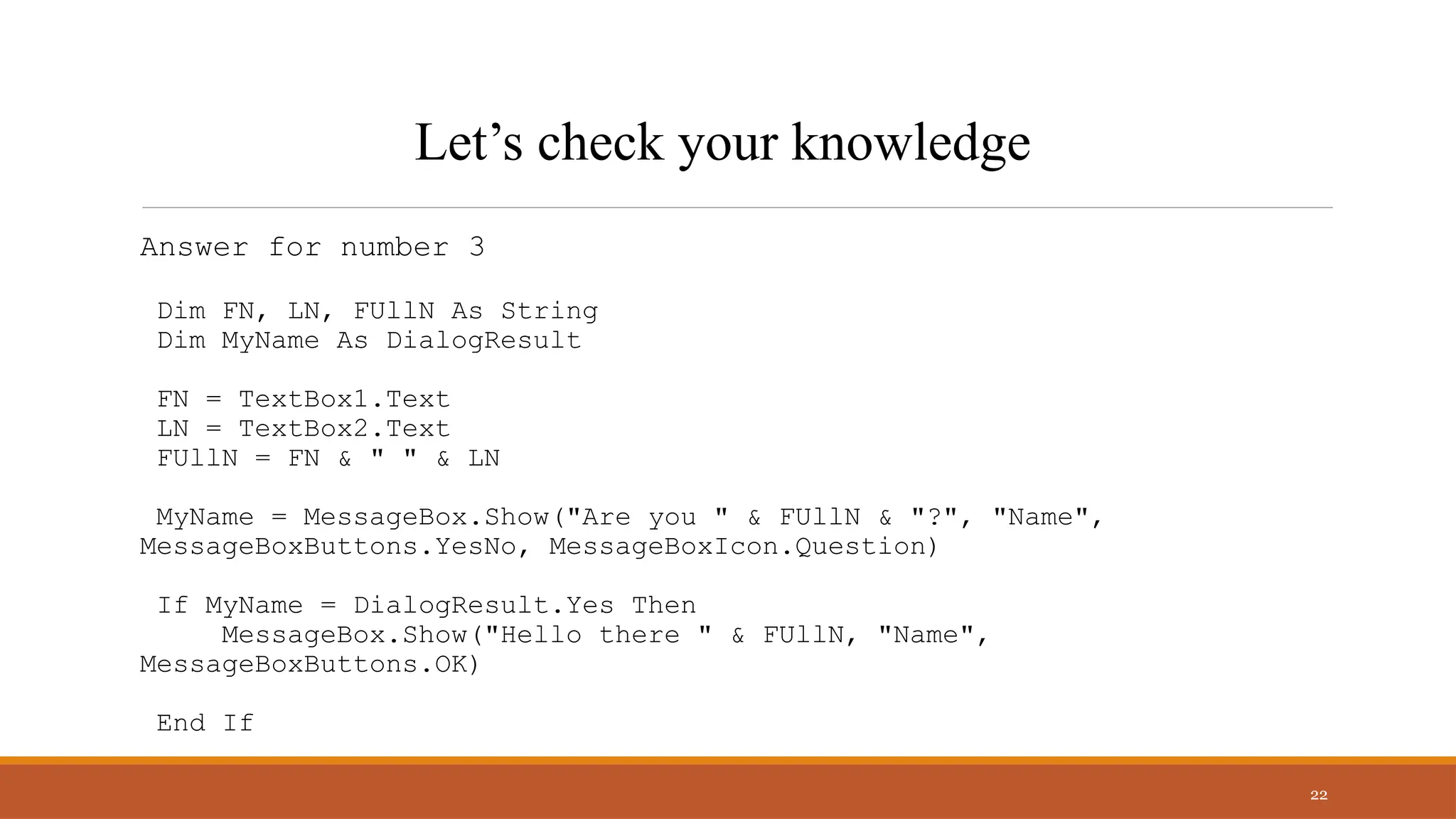
Answer for number 3
Dim FN, LN, FUllN As String
Dim MyName As DialogResult
FN = TextBox1.Text
LN = TextBox2.Text
FUllN = FN & " " & LN
MyName = MessageBox.Show("Are you " & FUllN & "?", "Name",
MessageBoxButtons.YesNo, MessageBoxIcon.Question)
If MyName = DialogResult.Yes Then
MessageBox.Show("Hello there " & FUllN, "Name",
MessageBoxButtons.OK)
End If
22
Let’s check your knowledge
Thank you
Presenter name: Ellen Grace D. Porras
Email address: egporras@psu.palawan.edu.ph

.Net Technologies MessageBox using Visual basic.pptx

  • 1.
  • 2.
  • 3.
    3 The messagebox functionenables you to display a message box for which you have designated the format and content. You can specify the number and type of buttons on the message box, the message icon (for example, hand, question mark, exclamation point, or asterisk), and the message displayed. The messagebox function
  • 4.
    4 To create amessage box using the .NET Framework, you can call the Show() method of the MessageBox class using the following formula: MessageBox.Show(Message) Syntax: MessageBox.Show (“Hello World”)
  • 5.
    5 A message boxhas the following parts:
  • 6.
    6 A message boxhas the following parts: 1.Title: This is typically used to display what the message box is about. If you don’t specify anything, it displays the application name – which is Microsoft Excel in this case. 2.Prompt: This is the message that you want to display. You can use this space to write a couple of lines or even display tables/data here. 3.Button(s): While OK is the default button, you can customize it to show buttons such as Yes/No, Yes/No/Cancel, Retry/Ignore, etc. 4.Close Icon: You can close the message box by clicking on the close icon.
  • 7.
    7 MessageBoxButtons MessageBoxButtons.AbortRetryIgnore displays theAbort, Retry, and Ignore buttons MessageBoxButtons.OK displays the OK button MessageBoxButtons.OKCancel displays the OK and Cancel buttons MessageBoxButtons.RetryCancel displays the Retry and Cancel buttons MessageBoxButtons.YesNo displays the Yes and No buttons MessageBoxButtons.YesNoCancel displays the Yes, No, and Cancel
  • 8.
  • 9.
    9 MessageBoxDefaultButton MessageBoxDefaultButton.Button1 the firstmessage box button is the default button MessageBoxDefaultButton.Button2 the second message box button is the default button MessageBoxDefaultButton.Button3 the third message box button is the default button
  • 10.
  • 11.
    MessageBox.Show("The Last Namefield must not be blank.","Last name", MessageBoxButtons.OK, MessageBoxIcon.Exclamation) 11 Example using MessageBox.Show()
  • 12.
    MessageBox.Show("A bad databaseerror has occurred.","UpdateCustomerTable",MessageBoxButtons. OK,MessageBoxIcon.Error) 12 Example using MessageBox.Show()
  • 13.
    Dim MyResponse AsDialogResult MyResponse = MessageBox.Show("Are you sure you want to quit?","Quit", MessageBoxButtons.YesNo, MessageBoxIcon.Question) If MyResponse = DialogResult.Yes Then Application.Exit() 'end the program End If 13 Example using MessageBox.Show()
  • 14.
    Dim MyAnswer AsDialogResult MyAnswer = MessageBox.Show(“Are you a BSIT Student?",“Question", MessageBoxButtons.YesNo,MessageBoxIcon.Question, MessageBoxDefaultButton.Button2) If MyAnswer = DialogResult.Yes Then MessageBox.Show(“Hello BSIT”) Else Application.Exit() End If 14 Example using MessageBox.Show()
  • 15.
    Dim MyAnswer AsDialogResult MyAnswer = MessageBox.Show(“Are you a BSIT Student?",“Question", MessageBoxButtons.YesNo,MessageBoxIcon.Question, MessageBoxDefaultButton.Button2) If MyAnswer = DialogResult.Yes Then MessageBox.Show(“Hello BSIT”) Else Application.Exit() End If 15 Example using MessageBox.Show()
  • 16.
    Dim MyAnswer AsDialogResult MyAnswer = MessageBox.Show(“Are you a BSIT Student?",“Question", MessageBoxButtons.YesNo,MessageBoxIcon.Question, MessageBoxDefaultButton.Button2) If MyAnswer = DialogResult.Yes Then MessageBox.Show(“Hello BSIT”) Else Application.Exit() End If 16 Example using MessageBox.Show()
  • 17.
    Answer the followingon a 1 whole sheet of paper. Use declaration of variables. 1. Write a program that will allow you to enter your Age on TextBox1. If Button1 is clicked, display on a MessageBox the prompt “Your Age is “ then your Age. Title is Age, Button is Ok, Icon is Information. 17 Let’s check your knowledge
  • 18.
    Answer for number1 Dim Age as Integer Age= TextBox1.Text MessageBox.Show(“Your Age is ” & Age, “Age”, MessageBoxButtons.Ok, MessageBoxIcon.Information) 18 Let’s check your knowledge
  • 19.
    Answer the followingon a 1 whole sheet of paper. Use declaration of variables. 2. Write a program that will multiply numbers on TextBox1 and TextBox2, then display the answer on a MessageBox with a prompt “The answer is “ then the answer, Title is Product, Button is Ok, and Icon is Information. 19 Let’s check your knowledge
  • 20.
    Answer for number2 Dim num1, num2, ans As Integer num1 = TextBox1.Text num2 = TextBox2.Text ans = num1 * num2 MessageBox.Show("The answer is " & ans, "Product", MessageBoxButtons.YesNo, MessageBoxIcon.Information) 20 Let’s check your knowledge
  • 21.
    Answer the followingon a 1 whole sheet of paper. Use declaration of variables. 3. Write a program that will allow you to enter your first name on Textbox1, Last name on TextBox2. If Button1 is clicked, display on a MessageBox the prompt “Are you “ then your Full name with a question mark. Title is Name, Buttons are YesNo, Icon is Question. If DialogResult is Yes, Display on a MessageBox the prompt “Hello there “ then your Full Name, Title is Name, Button is Ok, Icon is Information. 21 Let’s check your knowledge
  • 22.
    Answer for number3 Dim FN, LN, FUllN As String Dim MyName As DialogResult FN = TextBox1.Text LN = TextBox2.Text FUllN = FN & " " & LN MyName = MessageBox.Show("Are you " & FUllN & "?", "Name", MessageBoxButtons.YesNo, MessageBoxIcon.Question) If MyName = DialogResult.Yes Then MessageBox.Show("Hello there " & FUllN, "Name", MessageBoxButtons.OK) End If 22 Let’s check your knowledge
  • 23.
    Thank you Presenter name:Ellen Grace D. Porras Email address: egporras@psu.palawan.edu.ph