. Net
Technologies
INSTRUCTOR:
ELLEN GRACE PORRAS
2
Writing the Code
3
LIST BOX
Introduction
Listbox represents a Windows control to display a list of items to a user. A user can
select an item from the list. It allows the programmer to add items at design time by
using the properties window or at the runtime.
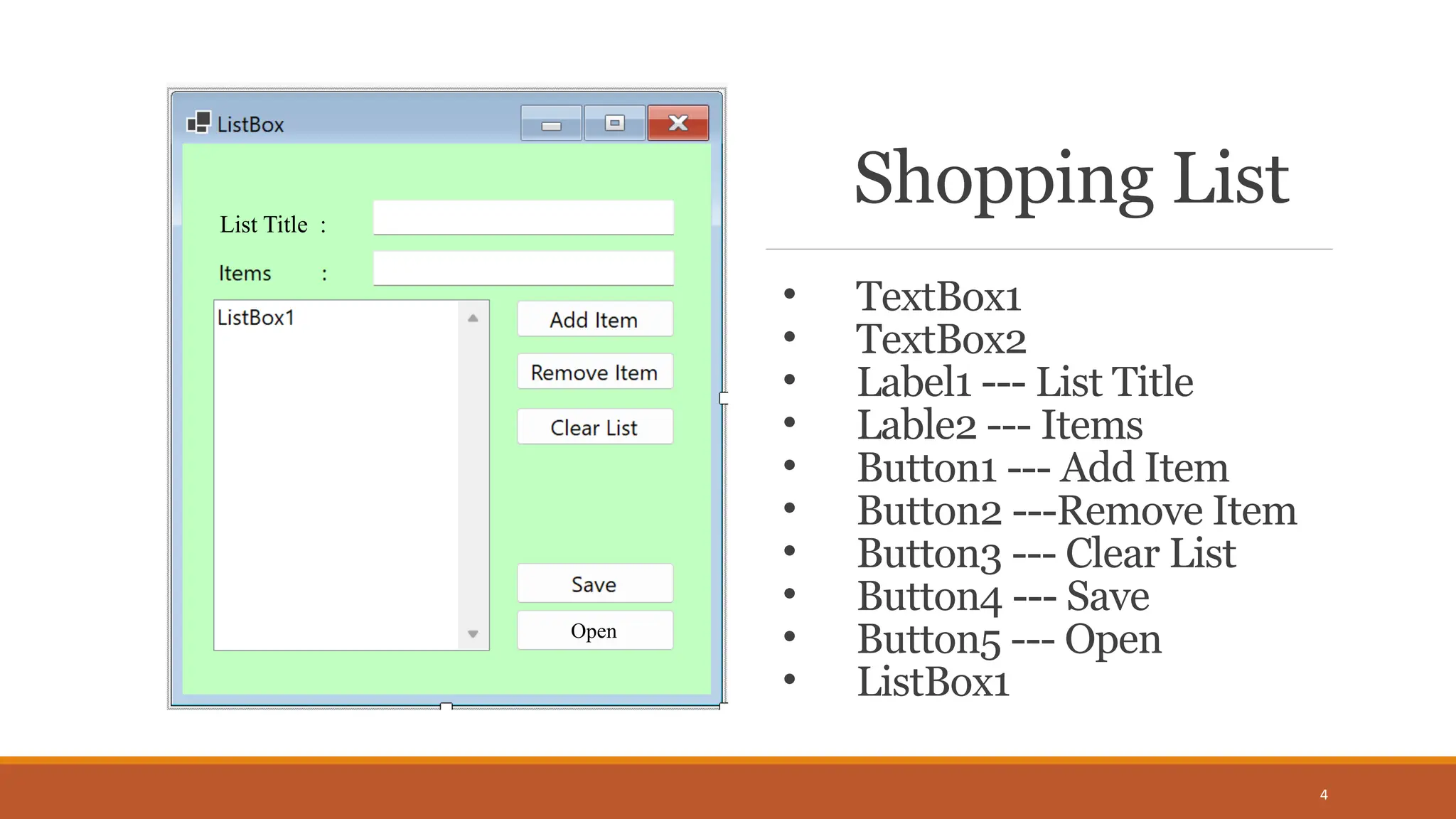
Shopping List
4
List Title :
Open
• TextBox1
• TextBox2
• Label1 --- List Title
• Lable2 --- Items
• Button1 --- Add Item
• Button2 ---Remove Item
• Button3 --- Clear List
• Button4 --- Save
• Button5 --- Open
• ListBox1
5
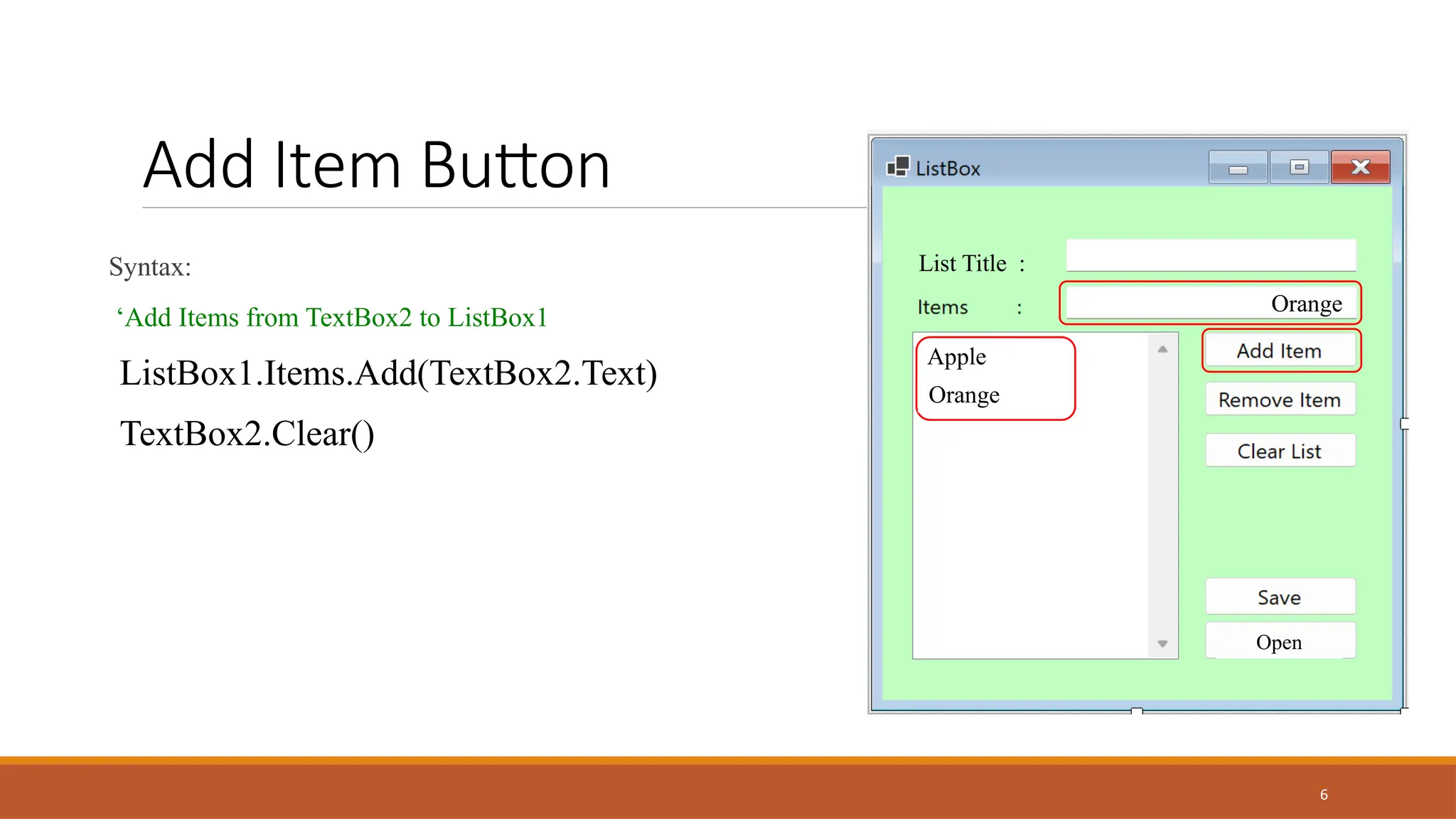
Add Item Button
Syntax:
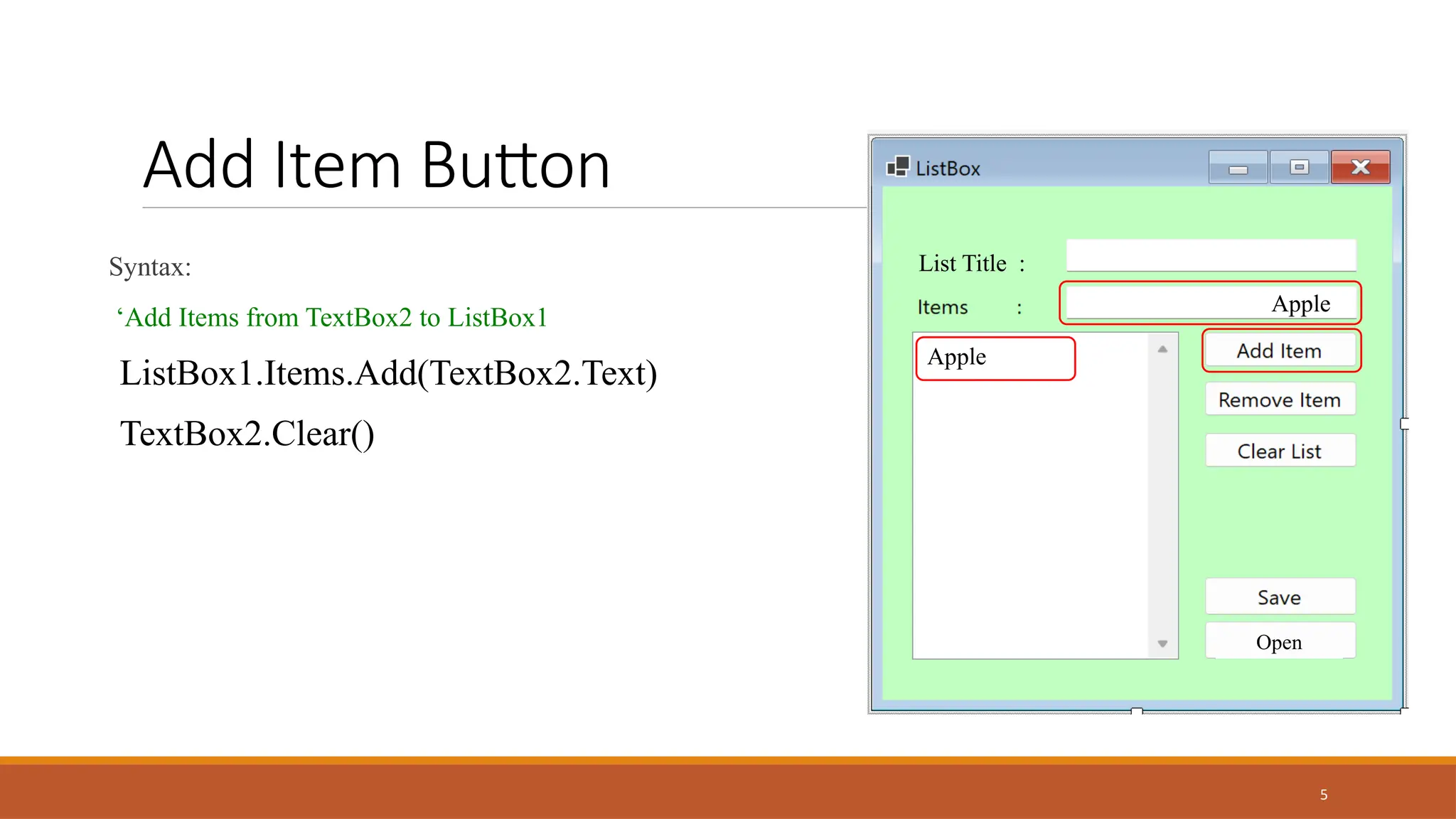
‘Add Items from TextBox2 to ListBox1
ListBox1.Items.Add(TextBox2.Text)
TextBox2.Clear()
List Title :
Open
Apple
Apple
6
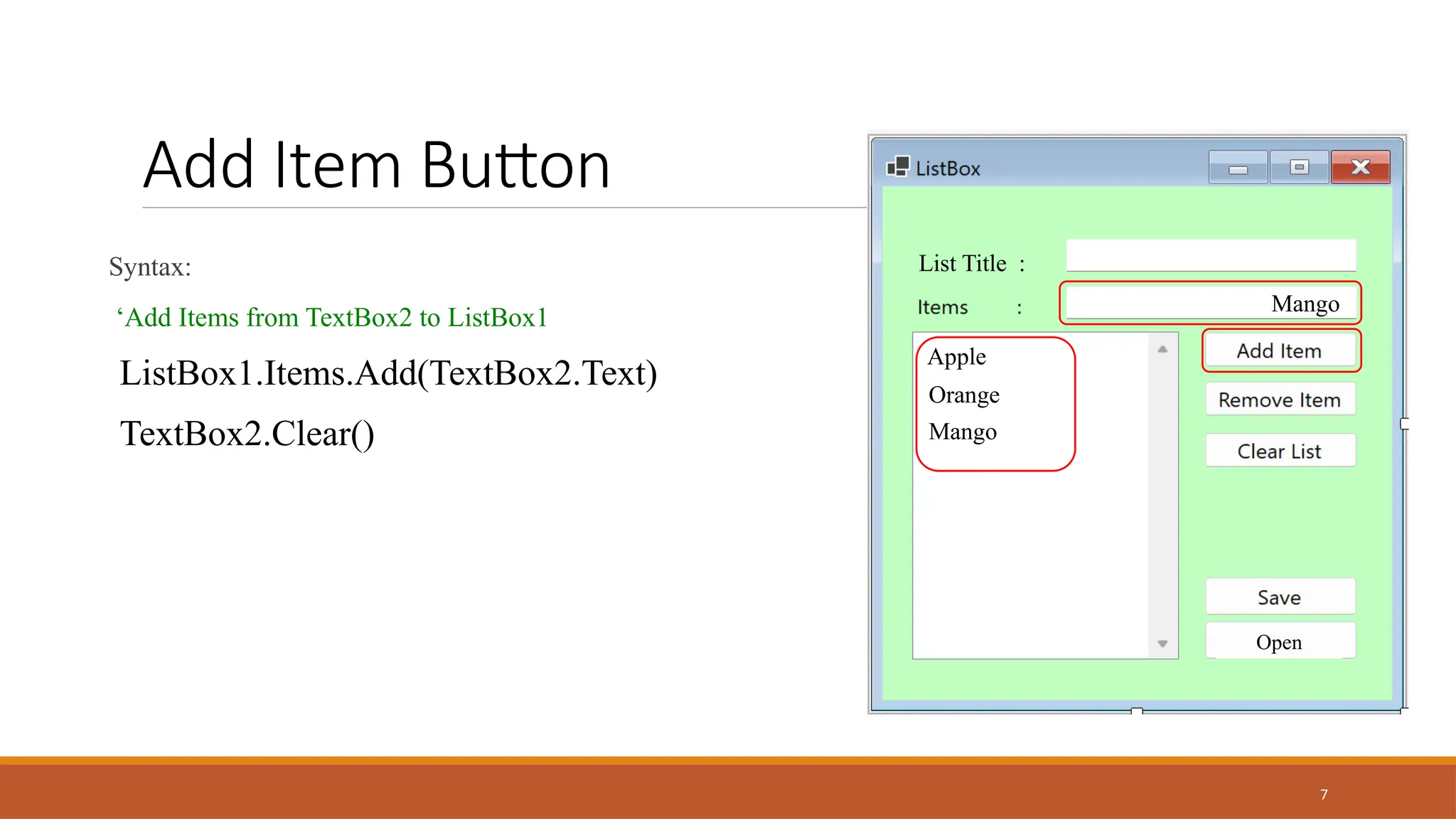
Add Item Button
Syntax:
‘Add Items from TextBox2 to ListBox1
ListBox1.Items.Add(TextBox2.Text)
TextBox2.Clear()
List Title :
Open
Orange
Apple
Orange
7
Add Item Button
Syntax:
‘Add Items from TextBox2 to ListBox1
ListBox1.Items.Add(TextBox2.Text)
TextBox2.Clear()
List Title :
Open
Mango
Apple
Orange
Mango
8
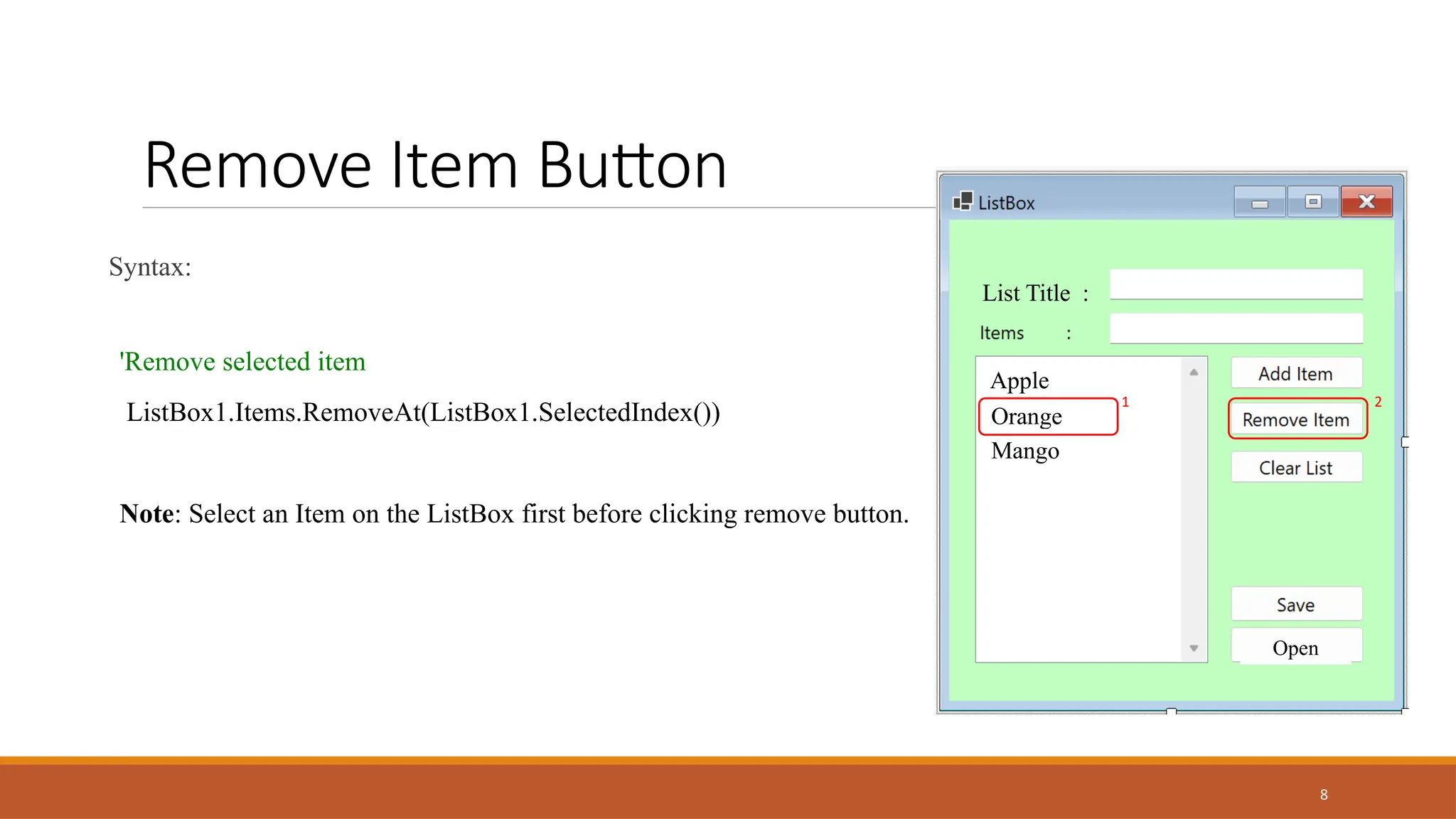
Remove Item Button
Syntax:
'Remove selected item
ListBox1.Items.RemoveAt(ListBox1.SelectedIndex())
Note: Select an Item on the ListBox first before clicking remove button.
List Title :
Open
Apple
Orange
Mango
1 2
9
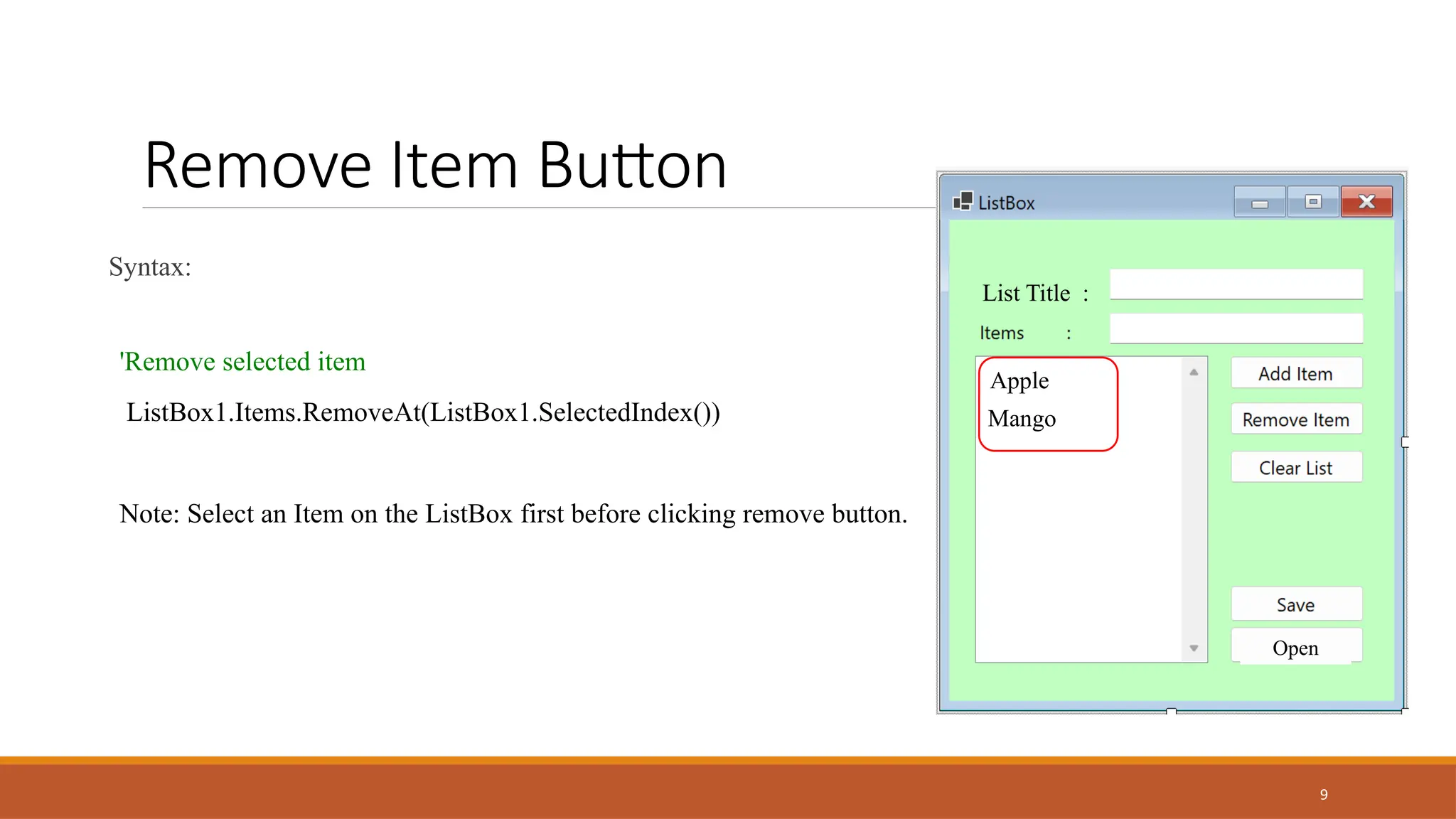
Remove Item Button
Syntax:
'Remove selected item
ListBox1.Items.RemoveAt(ListBox1.SelectedIndex())
Note: Select an Item on the ListBox first before clicking remove button.
List Title :
Open
Apple
Mango
10
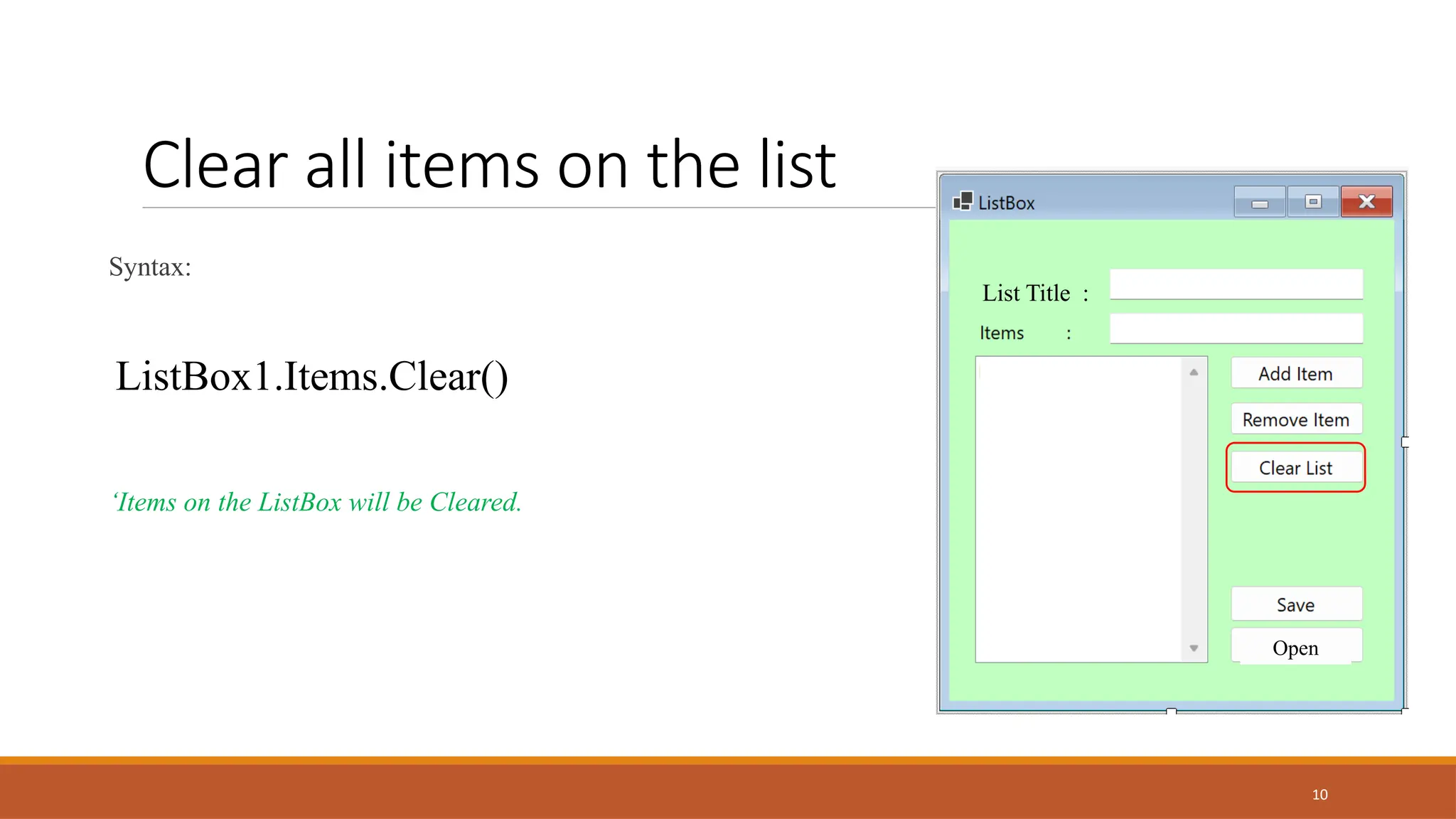
Clear all items on the list
Syntax:
ListBox1.Items.Clear()
‘Items on the ListBox will be Cleared.
List Title :
Open
11
•IO.Directory.CreateDirectory - Creates all directories and subdirectories in the specified path unless they already
exist.
•IO.StreamWriter - writes data to a text file. It can write lines of text or strings to the file. It is easy to use, and one of the
most common classes in VB.NET programs.
•The ampersand symbol is the recommended concatenation (the action of linking things together in a series.)
operator. It is used to bind a number of string variables together, creating one string from two or more individual strings.
•For Loop - is used to repeat a specific block of code a known number of times.
Example:
For i As Integer = 0 To 10
ListBox1.Items.Add(i)
Next
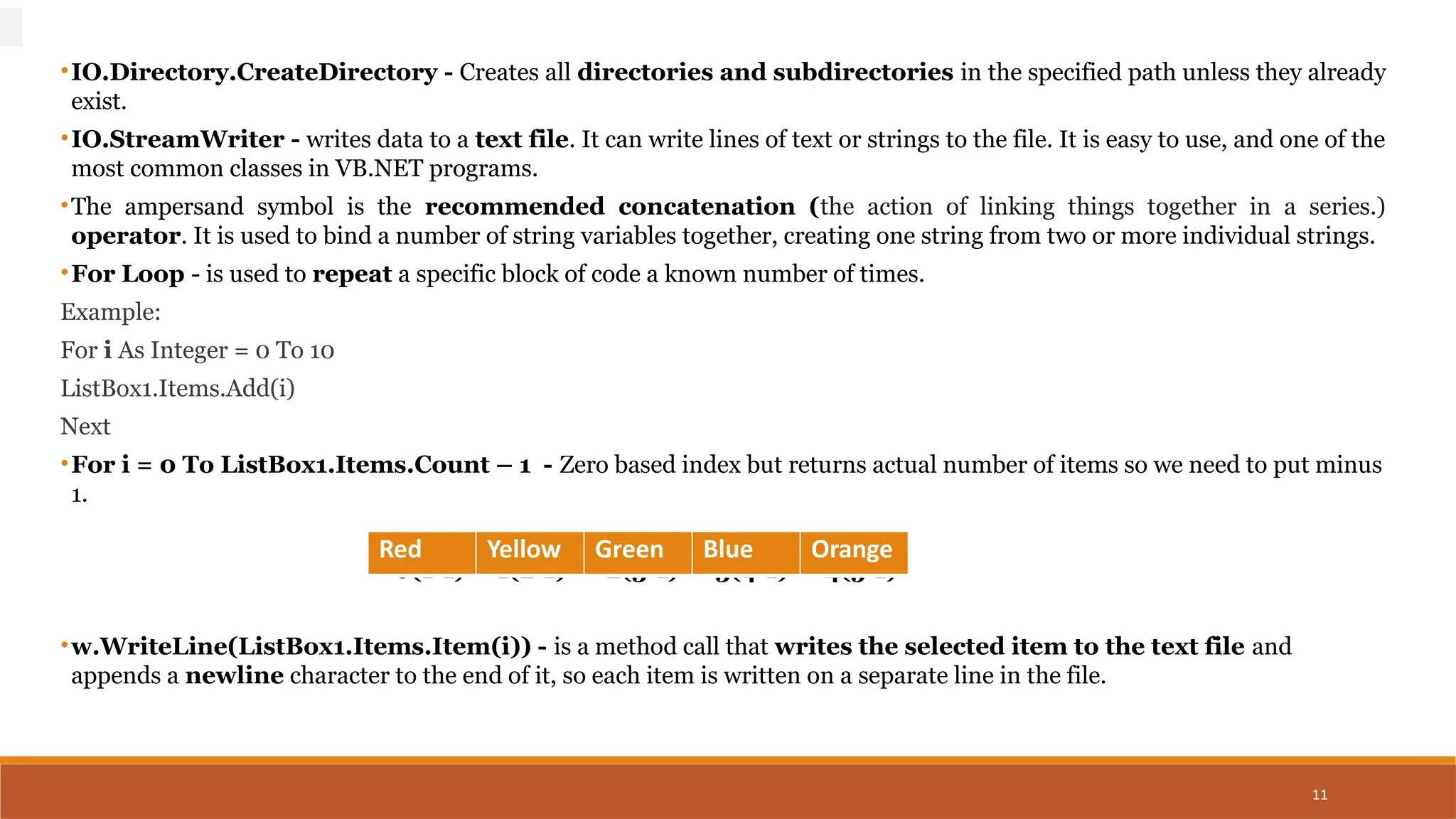
•For i = 0 To ListBox1.Items.Count – 1 - Zero based index but returns actual number of items so we need to put minus
1.
0(1-1) 1(2-1) 2(3-1) 3(4-1) 4(5-1)
•w.WriteLine(ListBox1.Items.Item(i)) - is a method call that writes the selected item to the text file and
appends a newline character to the end of it, so each item is written on a separate line in the file.
Red Yellow Green Blue Orange
12
IO.StreamReader – Handles text files. We read a text file in VB.NET by Using StreamReader
While - is used to execute blocks of code or statements in a program, as long as the given condition is true.
Peek -method that checks the next character in the stream without consuming it. It returns the next
character as an integer.
Returns an integer value in order to determine whether the end of the file, or another error has occurred
ReadLine - Reads an entire line (up to, but not including, the newline character) from a TextStream file
and returns the resulting string.
13
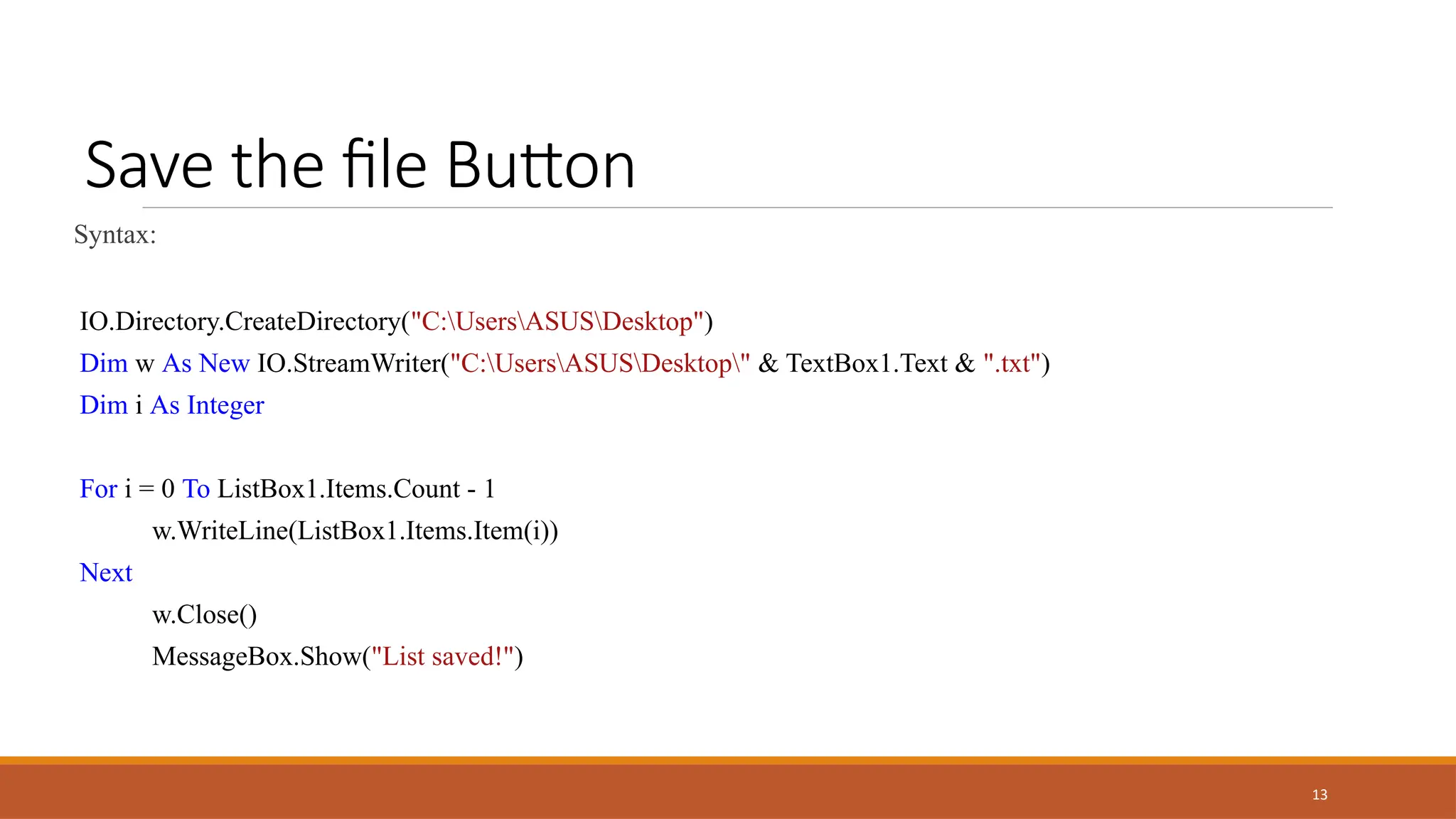
Save the file Button
Syntax:
IO.Directory.CreateDirectory("C:UsersASUSDesktop")
Dim w As New IO.StreamWriter("C:UsersASUSDesktop" & TextBox1.Text & ".txt")
Dim i As Integer
For i = 0 To ListBox1.Items.Count - 1
w.WriteLine(ListBox1.Items.Item(i))
Next
w.Close()
MessageBox.Show("List saved!")
14
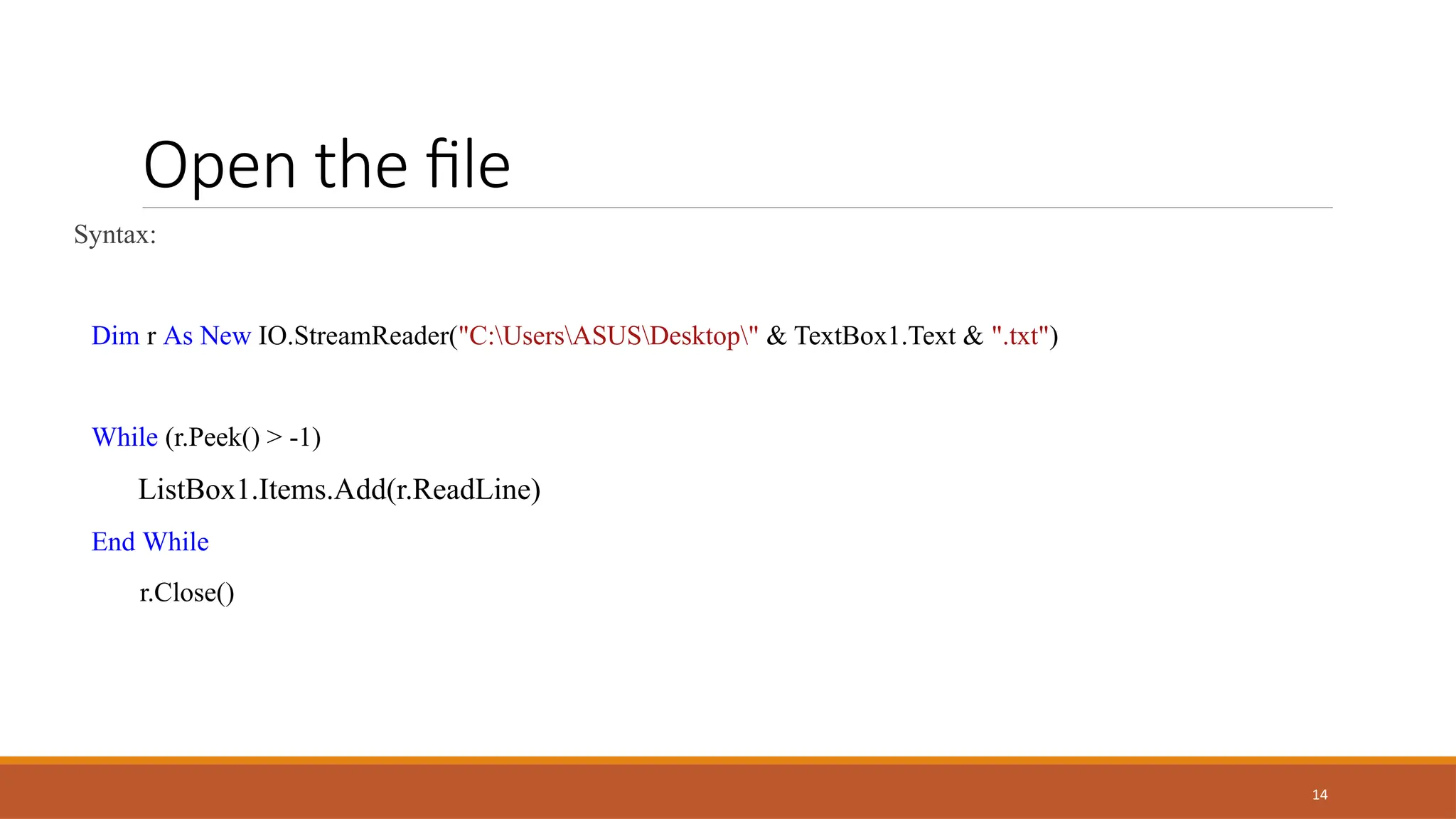
Open the file
Syntax:
Dim r As New IO.StreamReader("C:UsersASUSDesktop" & TextBox1.Text & ".txt")
While (r.Peek() > -1)
ListBox1.Items.Add(r.ReadLine)
End While
r.Close()
Thank you
Presenter name: Ellen Grace D. Porras
Email address: egporras@psu.palawan.edu.ph

.Net Technologies - Visual Basic . Net.pptx

  • 1.
  • 2.
  • 3.
    3 LIST BOX Introduction Listbox representsa Windows control to display a list of items to a user. A user can select an item from the list. It allows the programmer to add items at design time by using the properties window or at the runtime.
  • 4.
    Shopping List 4 List Title: Open • TextBox1 • TextBox2 • Label1 --- List Title • Lable2 --- Items • Button1 --- Add Item • Button2 ---Remove Item • Button3 --- Clear List • Button4 --- Save • Button5 --- Open • ListBox1
  • 5.
    5 Add Item Button Syntax: ‘AddItems from TextBox2 to ListBox1 ListBox1.Items.Add(TextBox2.Text) TextBox2.Clear() List Title : Open Apple Apple
  • 6.
    6 Add Item Button Syntax: ‘AddItems from TextBox2 to ListBox1 ListBox1.Items.Add(TextBox2.Text) TextBox2.Clear() List Title : Open Orange Apple Orange
  • 7.
    7 Add Item Button Syntax: ‘AddItems from TextBox2 to ListBox1 ListBox1.Items.Add(TextBox2.Text) TextBox2.Clear() List Title : Open Mango Apple Orange Mango
  • 8.
    8 Remove Item Button Syntax: 'Removeselected item ListBox1.Items.RemoveAt(ListBox1.SelectedIndex()) Note: Select an Item on the ListBox first before clicking remove button. List Title : Open Apple Orange Mango 1 2
  • 9.
    9 Remove Item Button Syntax: 'Removeselected item ListBox1.Items.RemoveAt(ListBox1.SelectedIndex()) Note: Select an Item on the ListBox first before clicking remove button. List Title : Open Apple Mango
  • 10.
    10 Clear all itemson the list Syntax: ListBox1.Items.Clear() ‘Items on the ListBox will be Cleared. List Title : Open
  • 11.
    11 •IO.Directory.CreateDirectory - Createsall directories and subdirectories in the specified path unless they already exist. •IO.StreamWriter - writes data to a text file. It can write lines of text or strings to the file. It is easy to use, and one of the most common classes in VB.NET programs. •The ampersand symbol is the recommended concatenation (the action of linking things together in a series.) operator. It is used to bind a number of string variables together, creating one string from two or more individual strings. •For Loop - is used to repeat a specific block of code a known number of times. Example: For i As Integer = 0 To 10 ListBox1.Items.Add(i) Next •For i = 0 To ListBox1.Items.Count – 1 - Zero based index but returns actual number of items so we need to put minus 1. 0(1-1) 1(2-1) 2(3-1) 3(4-1) 4(5-1) •w.WriteLine(ListBox1.Items.Item(i)) - is a method call that writes the selected item to the text file and appends a newline character to the end of it, so each item is written on a separate line in the file. Red Yellow Green Blue Orange
  • 12.
    12 IO.StreamReader – Handlestext files. We read a text file in VB.NET by Using StreamReader While - is used to execute blocks of code or statements in a program, as long as the given condition is true. Peek -method that checks the next character in the stream without consuming it. It returns the next character as an integer. Returns an integer value in order to determine whether the end of the file, or another error has occurred ReadLine - Reads an entire line (up to, but not including, the newline character) from a TextStream file and returns the resulting string.
  • 13.
    13 Save the fileButton Syntax: IO.Directory.CreateDirectory("C:UsersASUSDesktop") Dim w As New IO.StreamWriter("C:UsersASUSDesktop" & TextBox1.Text & ".txt") Dim i As Integer For i = 0 To ListBox1.Items.Count - 1 w.WriteLine(ListBox1.Items.Item(i)) Next w.Close() MessageBox.Show("List saved!")
  • 14.
    14 Open the file Syntax: Dimr As New IO.StreamReader("C:UsersASUSDesktop" & TextBox1.Text & ".txt") While (r.Peek() > -1) ListBox1.Items.Add(r.ReadLine) End While r.Close()
  • 15.
    Thank you Presenter name:Ellen Grace D. Porras Email address: egporras@psu.palawan.edu.ph