Advanced Database
Systems
INSTRUCTOR:
ELLEN GRACE
PORRAS
FIRST SEMESTER 2022-2023
OVERVIEW
Welcome to the first module of this course on the Advanced Database Systems!
Understanding of SQL and its capabilities for querying a single table a prerequisite.
In this subject, you will learn how to retrieve data from multiple tables using one
SQL statement. You will see how tables can be joined together and how similar
results are obtained using different approaches, including the joints and sub queries.
It is important that you understand how to query multiple tables for generating
appropriate reports in the creation of an information system.
Advanced Database Systems
SQL
Statements
9/3/20XX Presentation Title 3
Advanced Database Systems
4
Advanced Database Systems
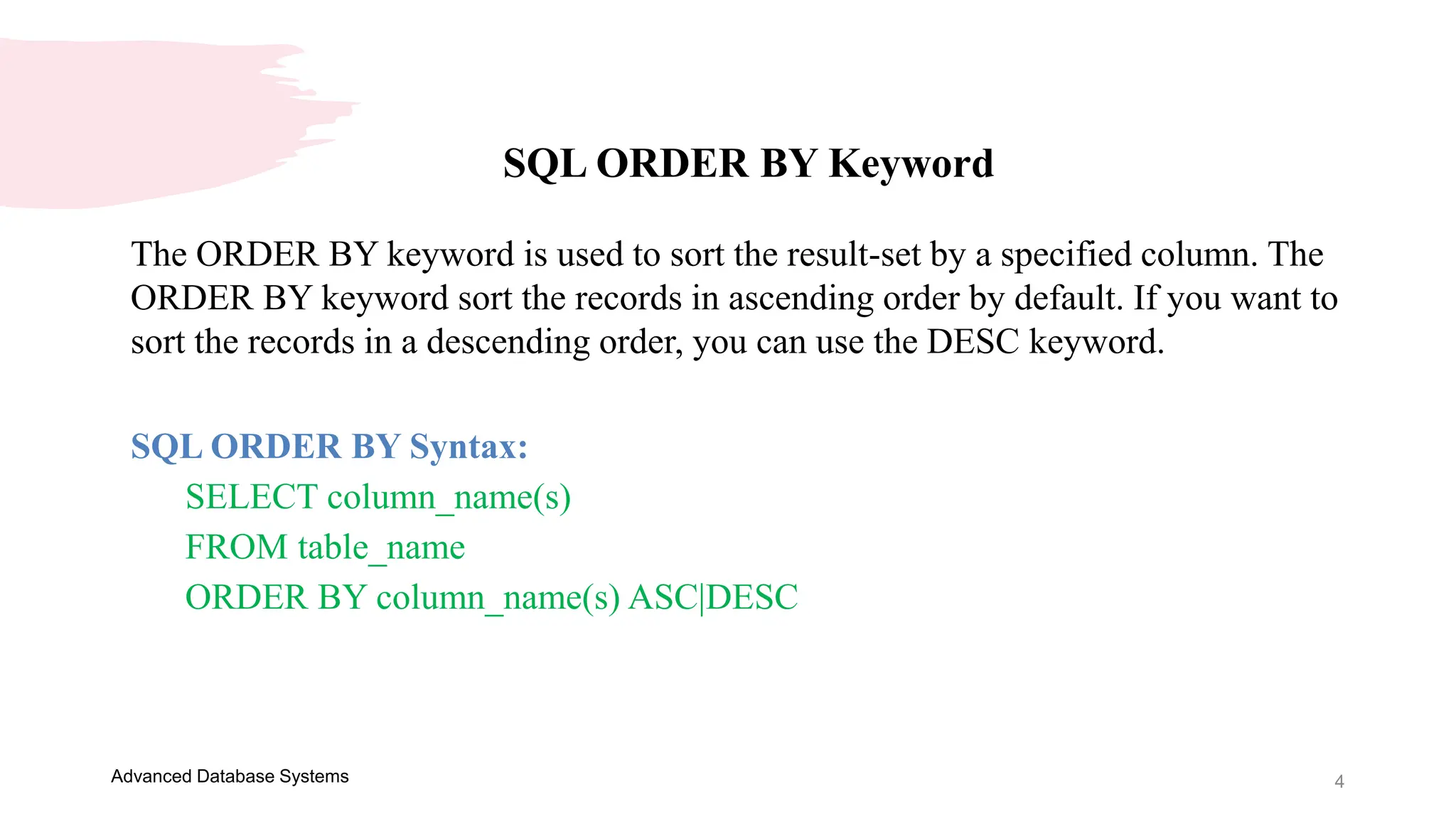
SQL ORDER BY Keyword
The ORDER BY keyword is used to sort the result-set by a specified column. The
ORDER BY keyword sort the records in ascending order by default. If you want to
sort the records in a descending order, you can use the DESC keyword.
SQL ORDER BY Syntax:
SELECT column_name(s)
FROM table_name
ORDER BY column_name(s) ASC|DESC
5
Advanced Database Systems
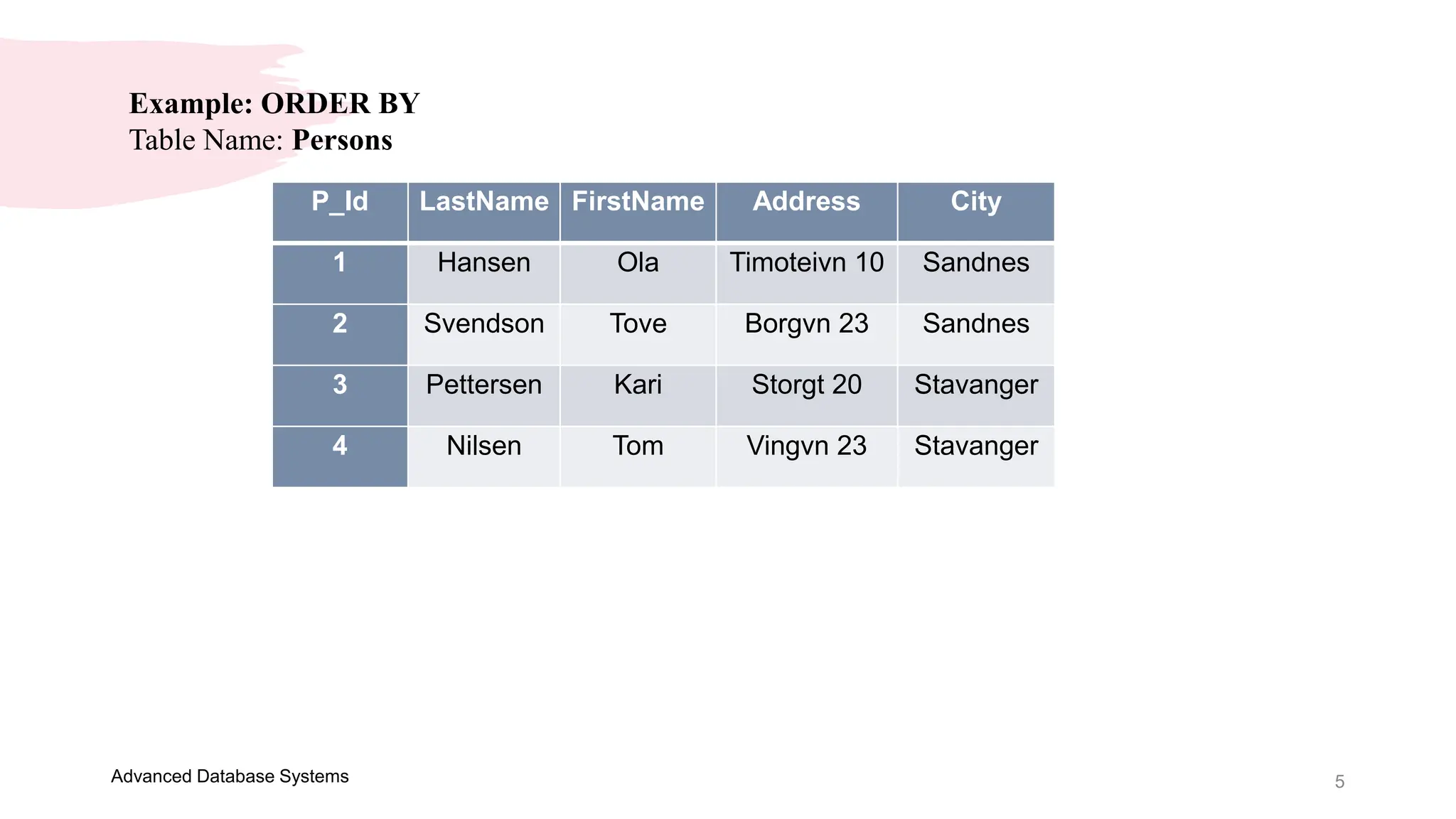
Example: ORDER BY
Table Name: Persons
P_Id LastName FirstName Address City
1 Hansen Ola Timoteivn 10 Sandnes
2 Svendson Tove Borgvn 23 Sandnes
3 Pettersen Kari Storgt 20 Stavanger
4 Nilsen Tom Vingvn 23 Stavanger
6
Advanced Database Systems
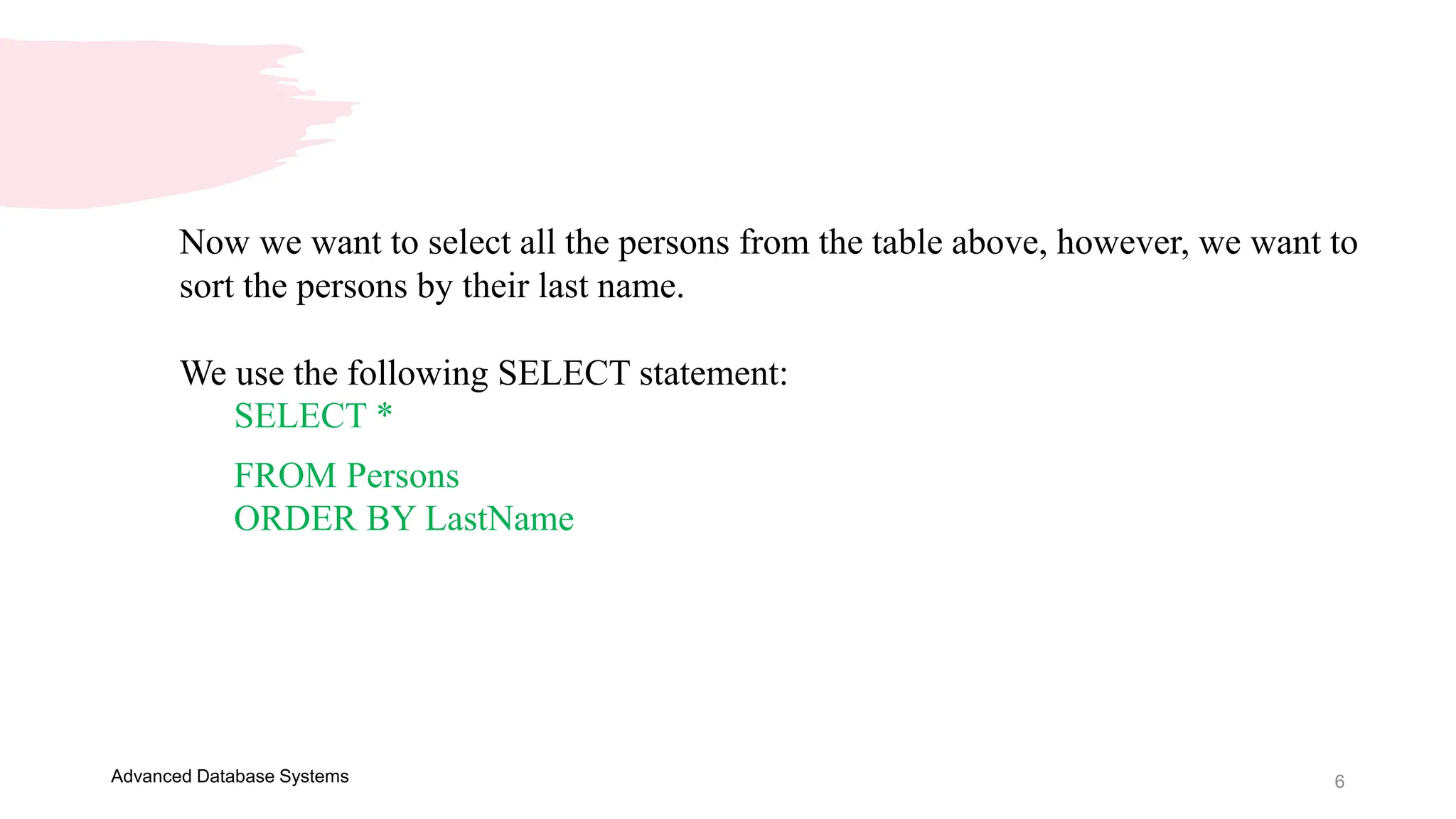
Now we want to select all the persons from the table above, however, we want to
sort the persons by their last name.
We use the following SELECT statement:
SELECT *
FROM Persons
ORDER BY LastName
7
Advanced Database Systems
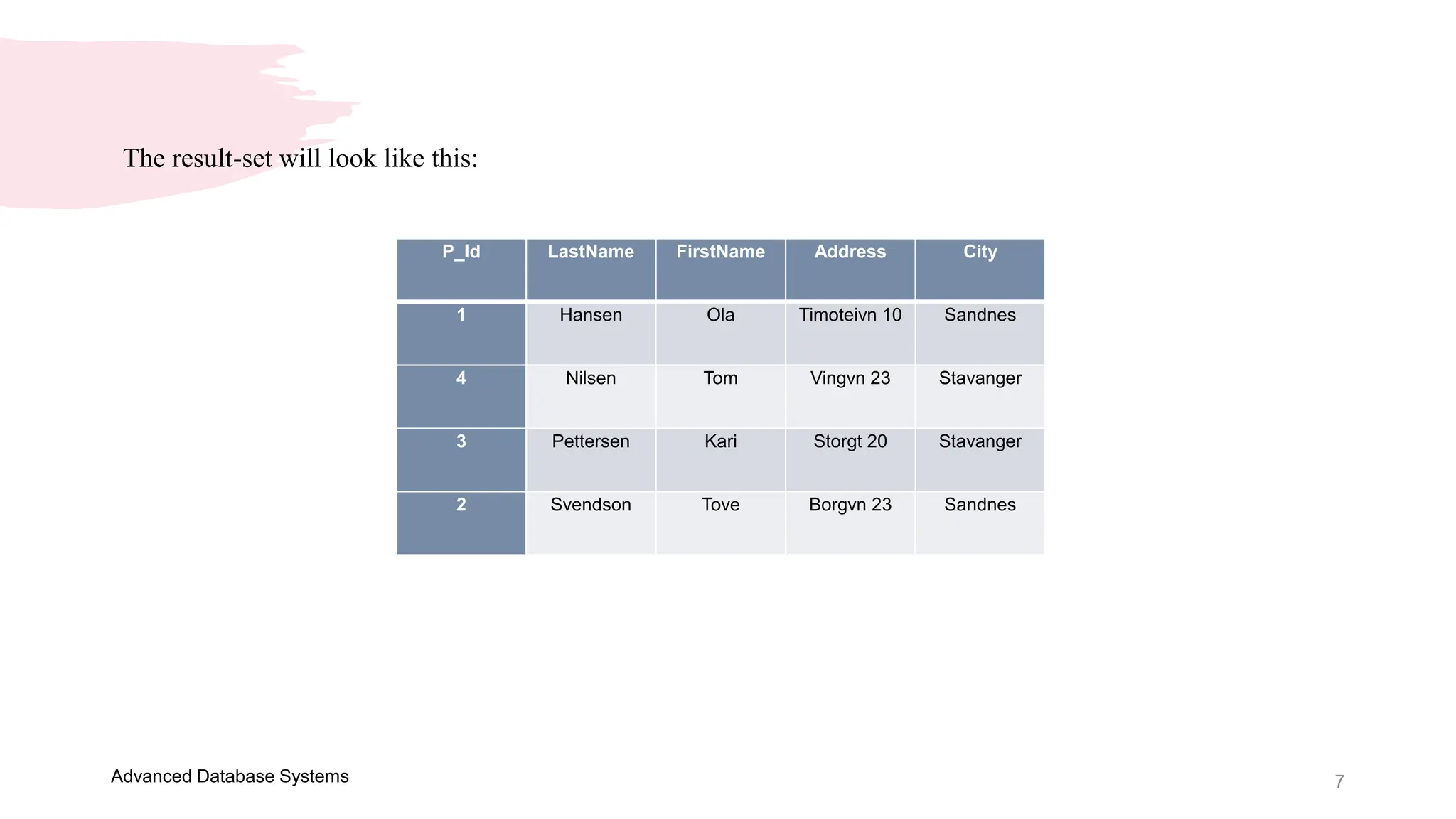
The result-set will look like this:
P_Id LastName FirstName Address City
1 Hansen Ola Timoteivn 10 Sandnes
4 Nilsen Tom Vingvn 23 Stavanger
3 Pettersen Kari Storgt 20 Stavanger
2 Svendson Tove Borgvn 23 Sandnes
8
Advanced Database Systems
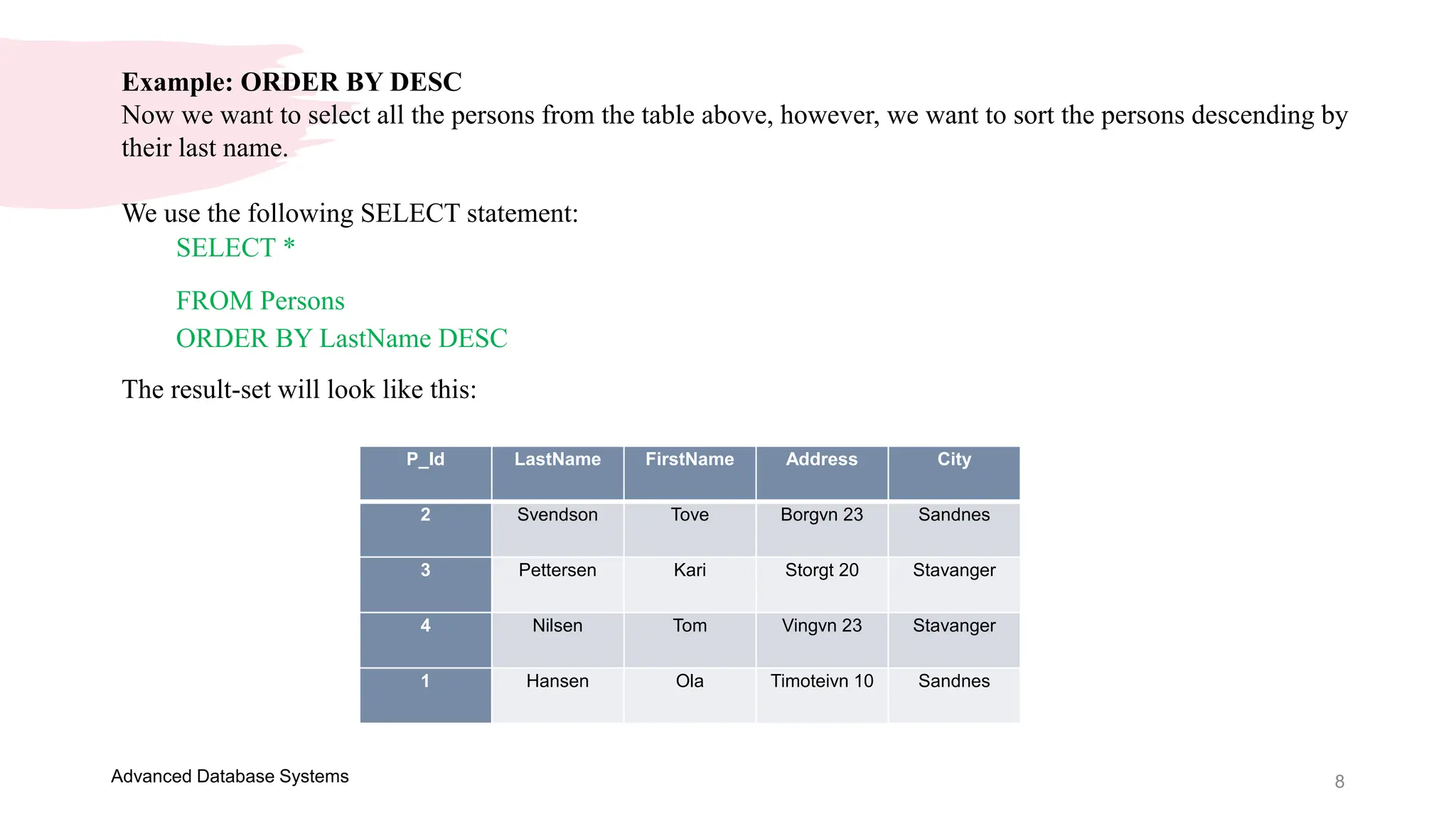
Example: ORDER BY DESC
Now we want to select all the persons from the table above, however, we want to sort the persons descending by
their last name.
We use the following SELECT statement:
SELECT *
FROM Persons
ORDER BY LastName DESC
The result-set will look like this:
P_Id LastName FirstName Address City
2 Svendson Tove Borgvn 23 Sandnes
3 Pettersen Kari Storgt 20 Stavanger
4 Nilsen Tom Vingvn 23 Stavanger
1 Hansen Ola Timoteivn 10 Sandnes
9
Advanced Database Systems
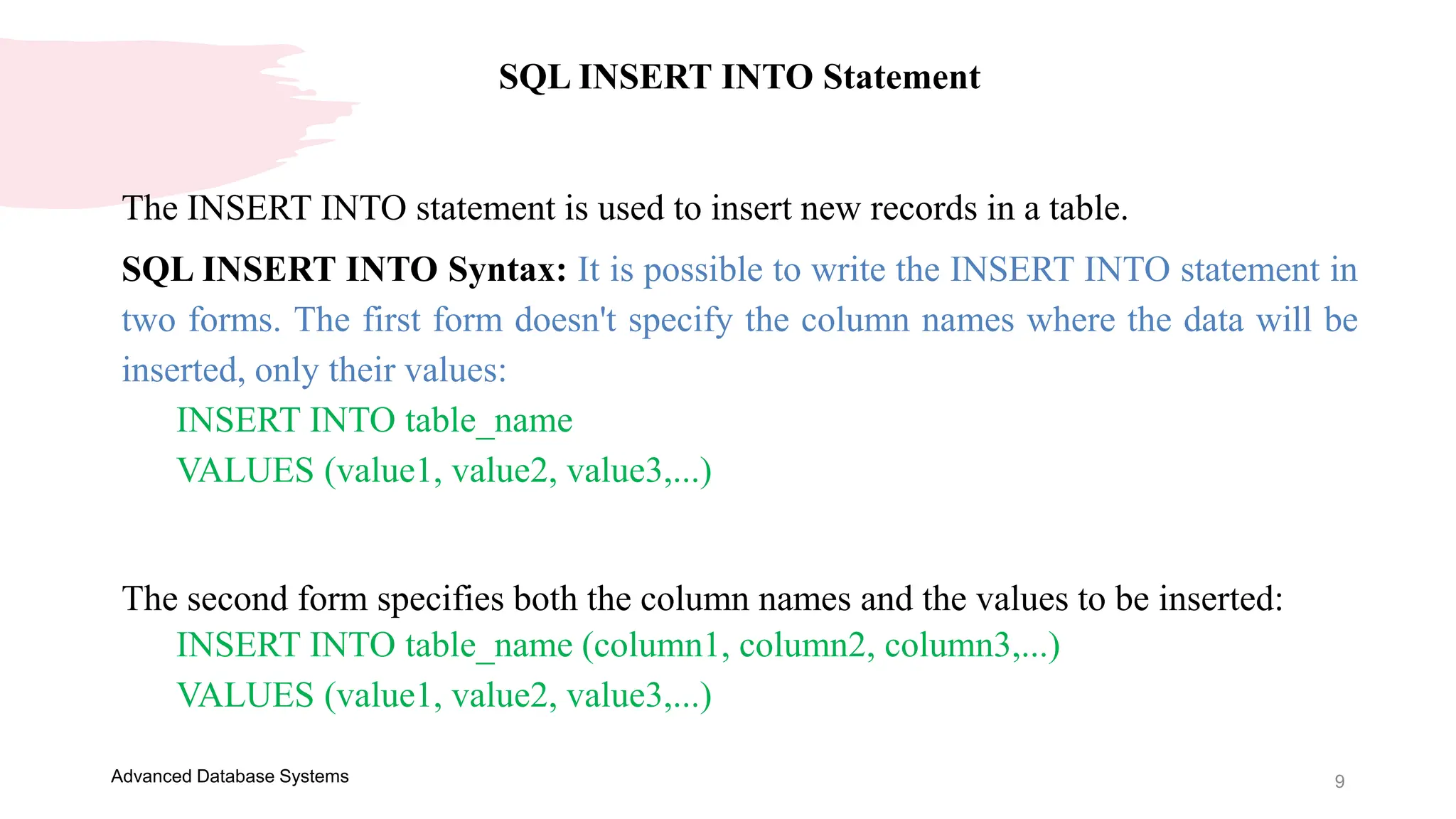
SQL INSERT INTO Statement
The INSERT INTO statement is used to insert new records in a table.
SQL INSERT INTO Syntax: It is possible to write the INSERT INTO statement in
two forms. The first form doesn't specify the column names where the data will be
inserted, only their values:
INSERT INTO table_name
VALUES (value1, value2, value3,...)
The second form specifies both the column names and the values to be inserted:
INSERT INTO table_name (column1, column2, column3,...)
VALUES (value1, value2, value3,...)
10
Advanced Database Systems
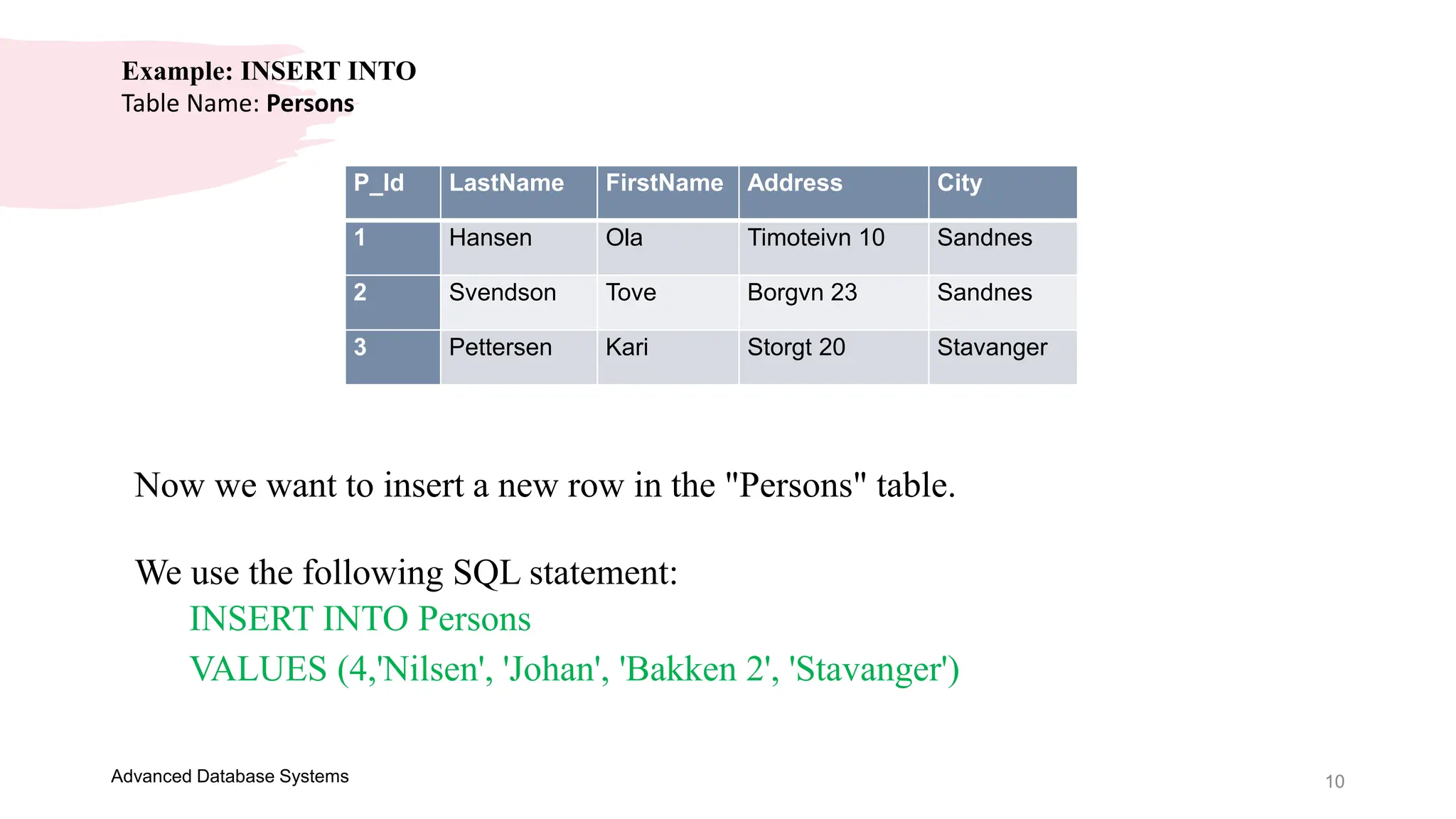
Example: INSERT INTO
Table Name: Persons
P_Id LastName FirstName Address City
1 Hansen Ola Timoteivn 10 Sandnes
2 Svendson Tove Borgvn 23 Sandnes
3 Pettersen Kari Storgt 20 Stavanger
Now we want to insert a new row in the "Persons" table.
We use the following SQL statement:
INSERT INTO Persons
VALUES (4,'Nilsen', 'Johan', 'Bakken 2', 'Stavanger')
11
Advanced Database Systems
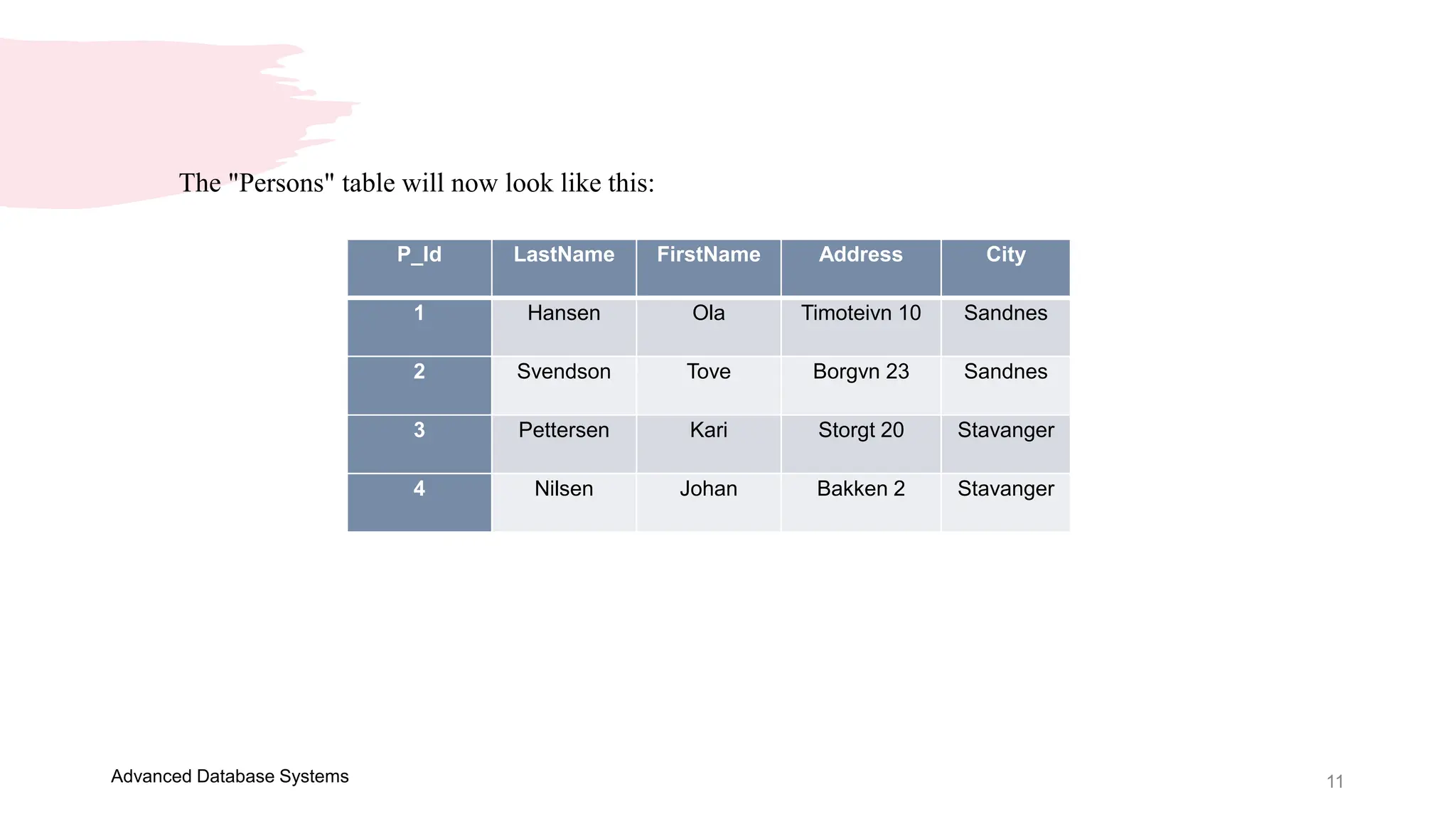
The "Persons" table will now look like this:
P_Id LastName FirstName Address City
1 Hansen Ola Timoteivn 10 Sandnes
2 Svendson Tove Borgvn 23 Sandnes
3 Pettersen Kari Storgt 20 Stavanger
4 Nilsen Johan Bakken 2 Stavanger
12
Advanced Database Systems
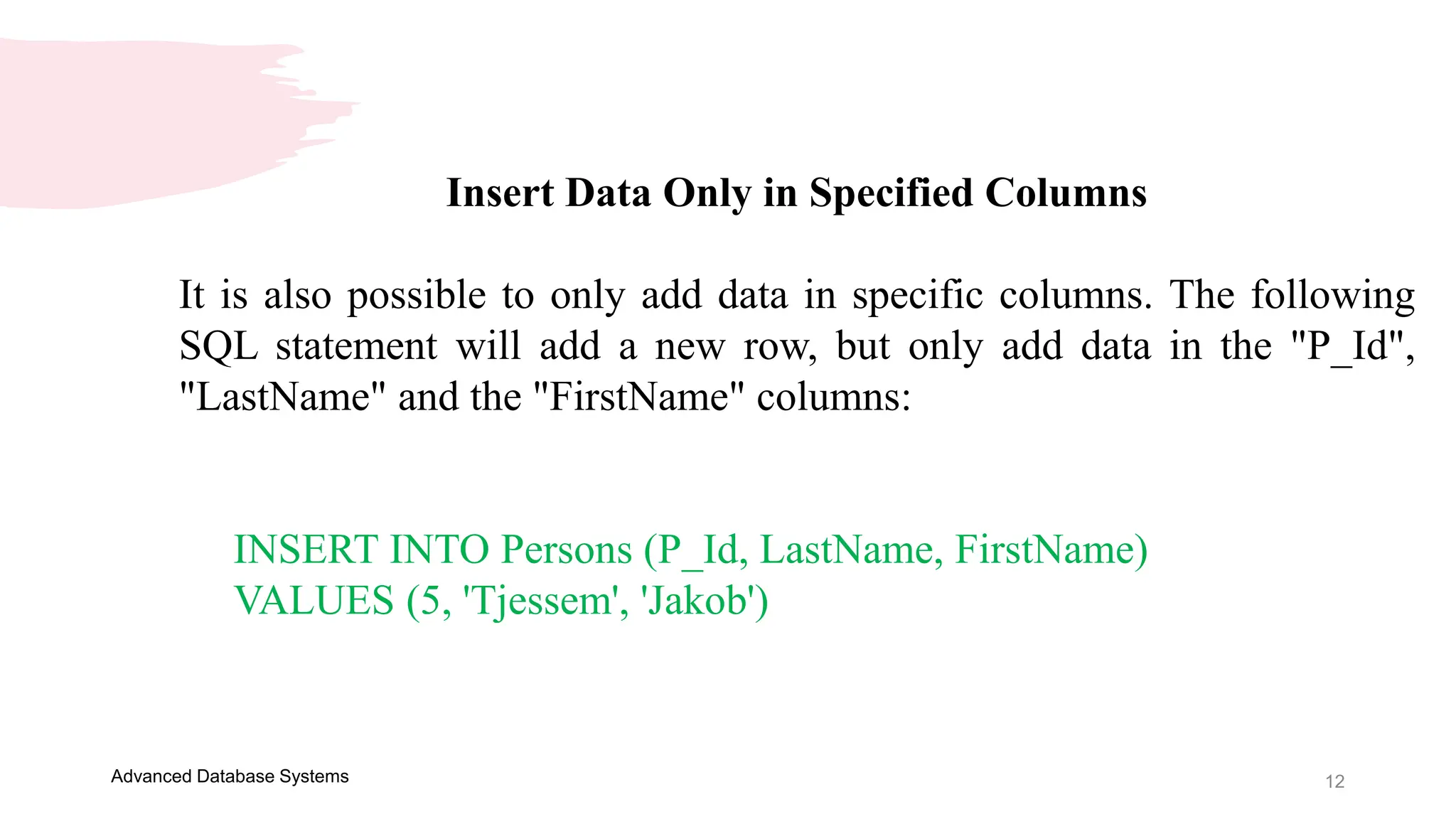
Insert Data Only in Specified Columns
It is also possible to only add data in specific columns. The following
SQL statement will add a new row, but only add data in the "P_Id",
"LastName" and the "FirstName" columns:
INSERT INTO Persons (P_Id, LastName, FirstName)
VALUES (5, 'Tjessem', 'Jakob')
13
Advanced Database Systems
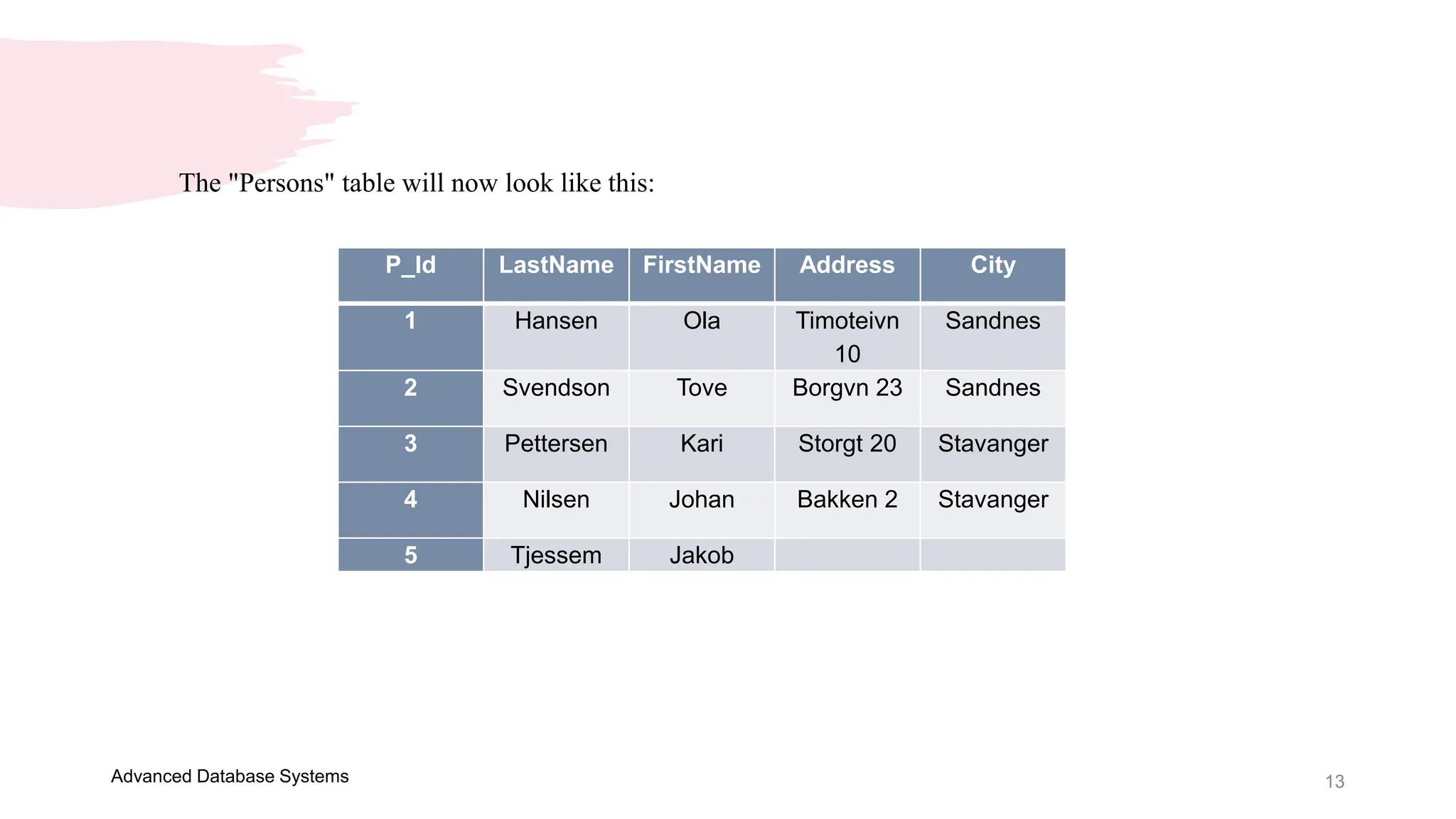
The "Persons" table will now look like this:
P_Id LastName FirstName Address City
1 Hansen Ola Timoteivn
10
Sandnes
2 Svendson Tove Borgvn 23 Sandnes
3 Pettersen Kari Storgt 20 Stavanger
4 Nilsen Johan Bakken 2 Stavanger
5 Tjessem Jakob
14
Advanced Database Systems
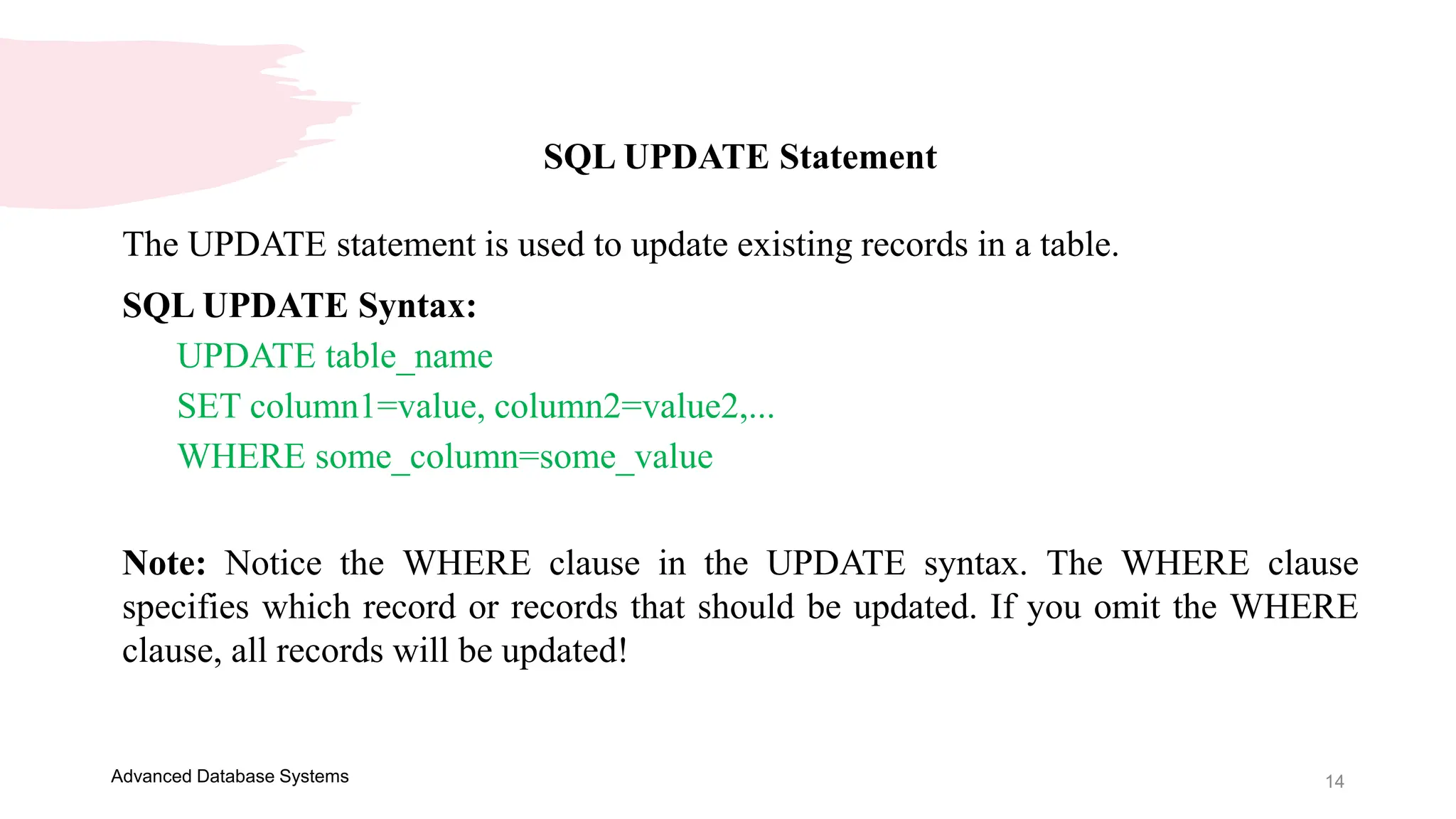
SQL UPDATE Statement
The UPDATE statement is used to update existing records in a table.
SQL UPDATE Syntax:
UPDATE table_name
SET column1=value, column2=value2,...
WHERE some_column=some_value
Note: Notice the WHERE clause in the UPDATE syntax. The WHERE clause
specifies which record or records that should be updated. If you omit the WHERE
clause, all records will be updated!
15
Advanced Database Systems
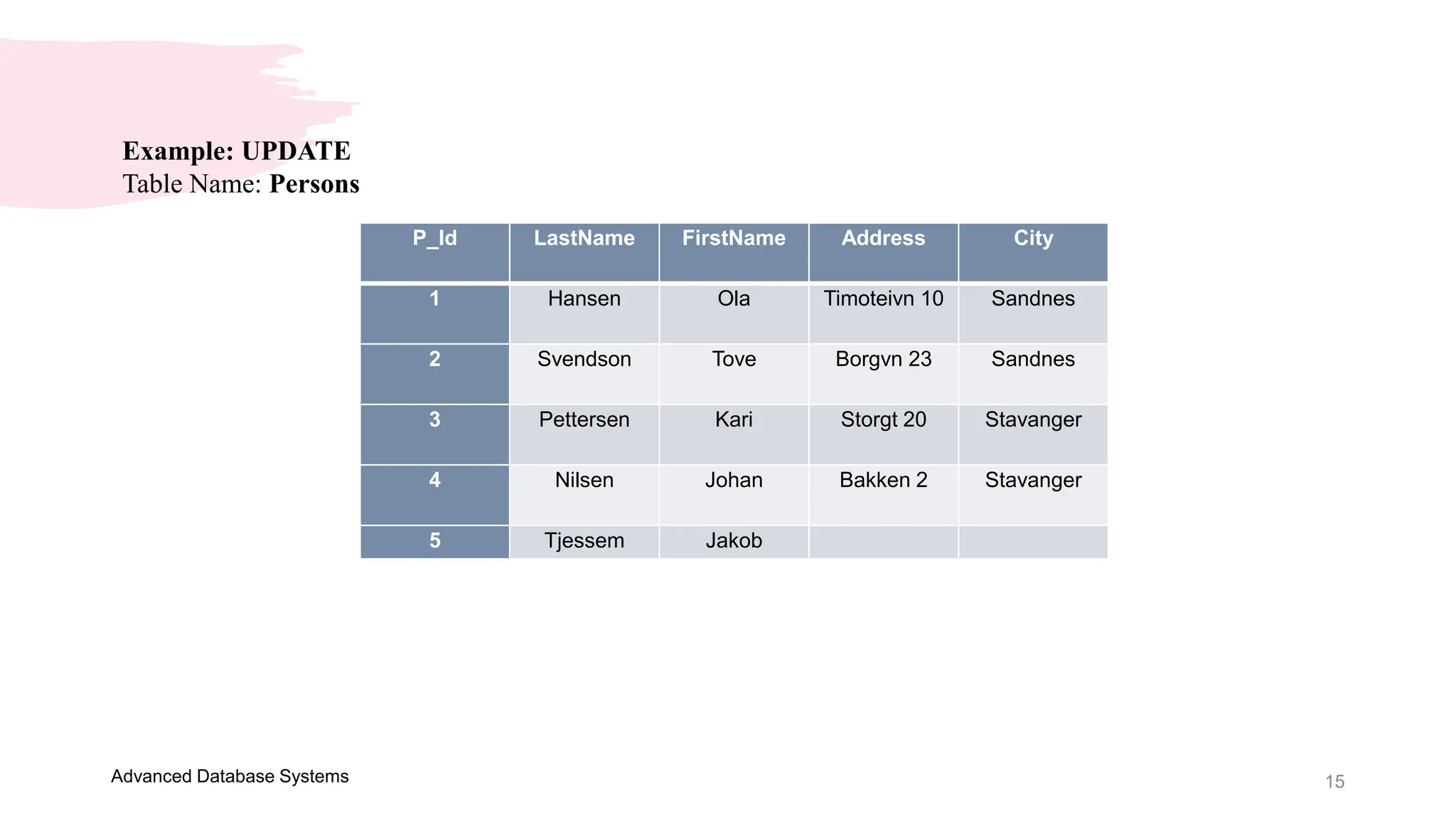
Example: UPDATE
Table Name: Persons
P_Id LastName FirstName Address City
1 Hansen Ola Timoteivn 10 Sandnes
2 Svendson Tove Borgvn 23 Sandnes
3 Pettersen Kari Storgt 20 Stavanger
4 Nilsen Johan Bakken 2 Stavanger
5 Tjessem Jakob
16
Advanced Database Systems
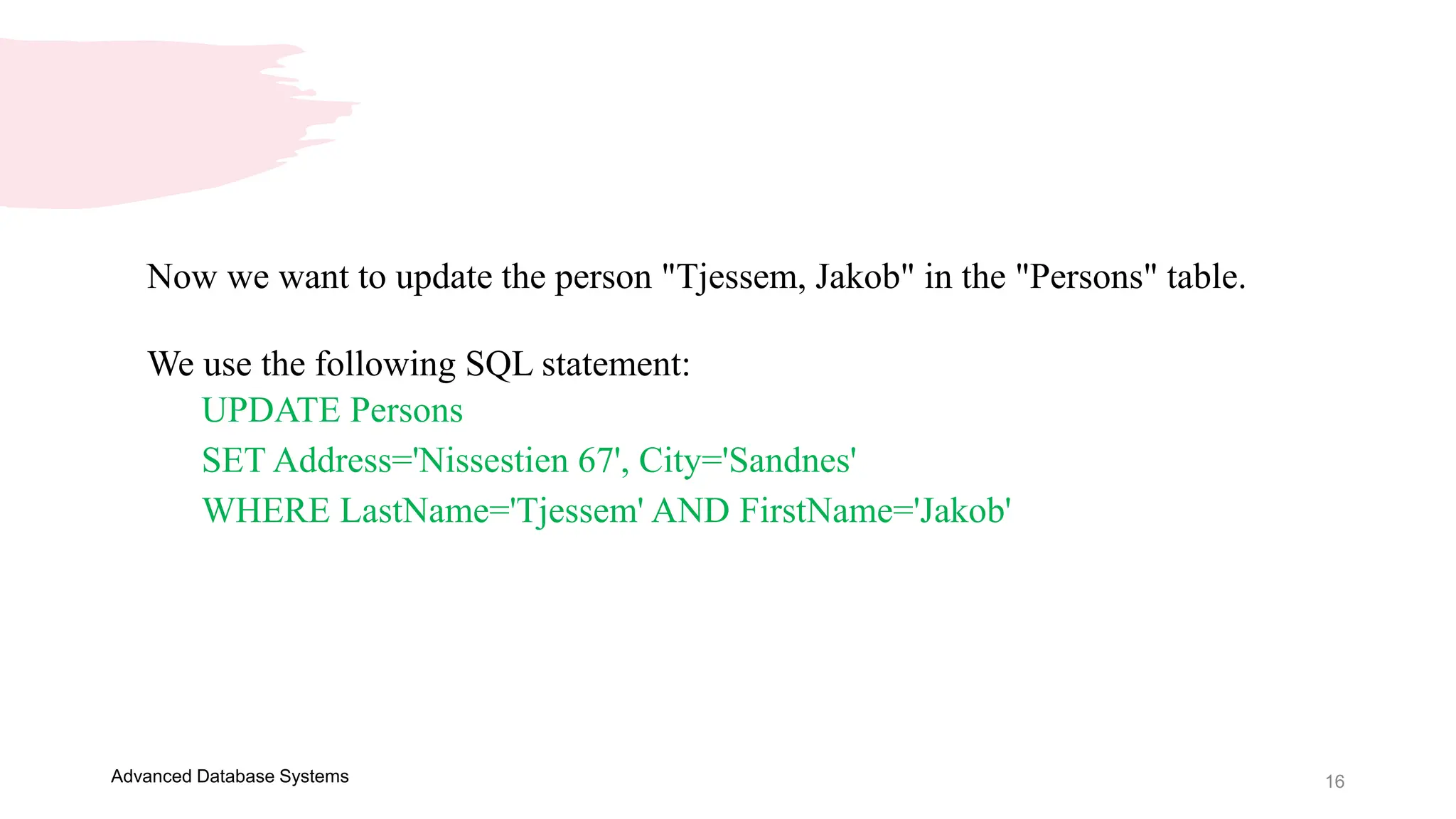
Now we want to update the person "Tjessem, Jakob" in the "Persons" table.
We use the following SQL statement:
UPDATE Persons
SET Address='Nissestien 67', City='Sandnes'
WHERE LastName='Tjessem' AND FirstName='Jakob'
17
Advanced Database Systems
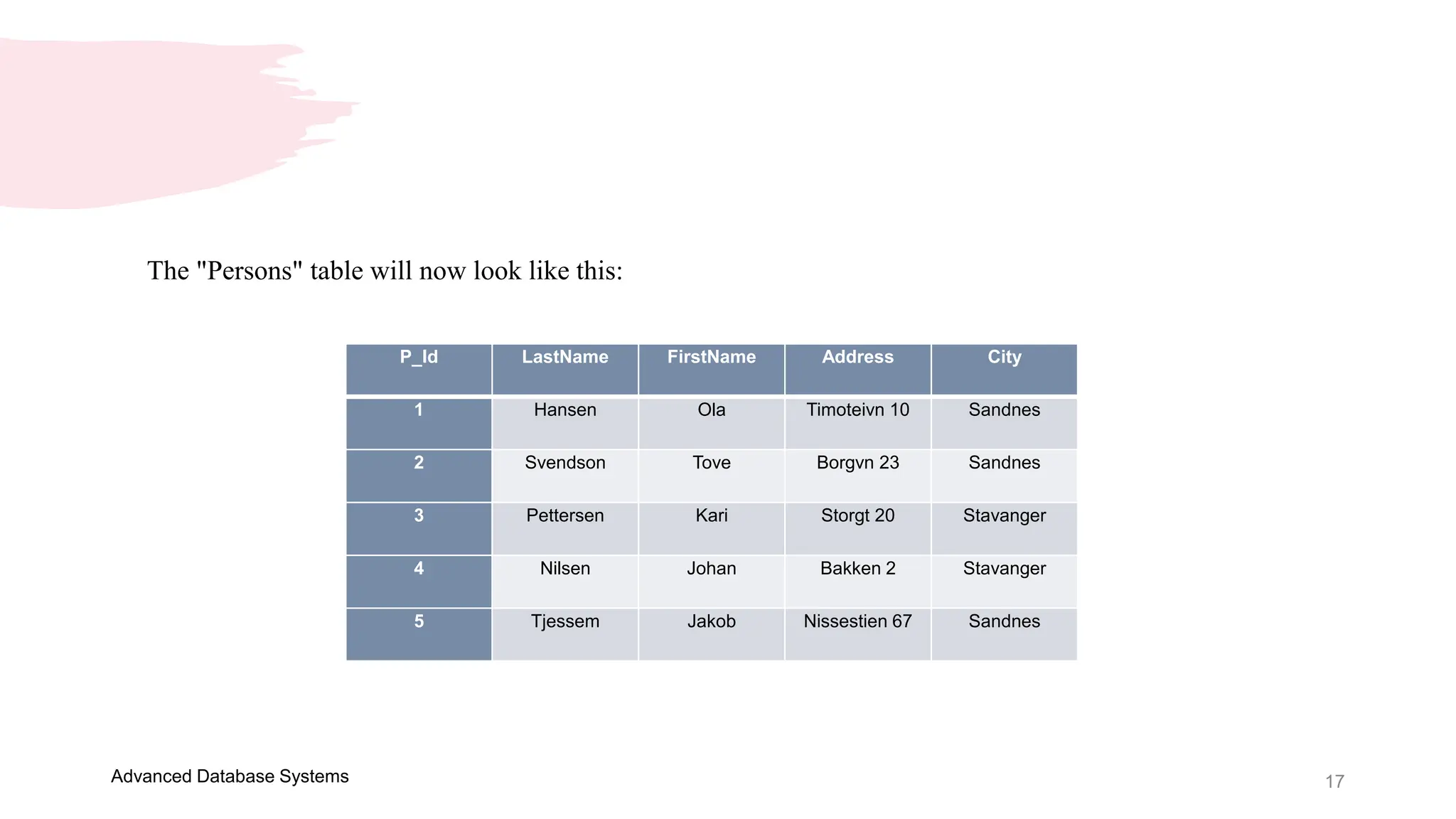
The "Persons" table will now look like this:
P_Id LastName FirstName Address City
1 Hansen Ola Timoteivn 10 Sandnes
2 Svendson Tove Borgvn 23 Sandnes
3 Pettersen Kari Storgt 20 Stavanger
4 Nilsen Johan Bakken 2 Stavanger
5 Tjessem Jakob Nissestien 67 Sandnes
18
Advanced Database Systems
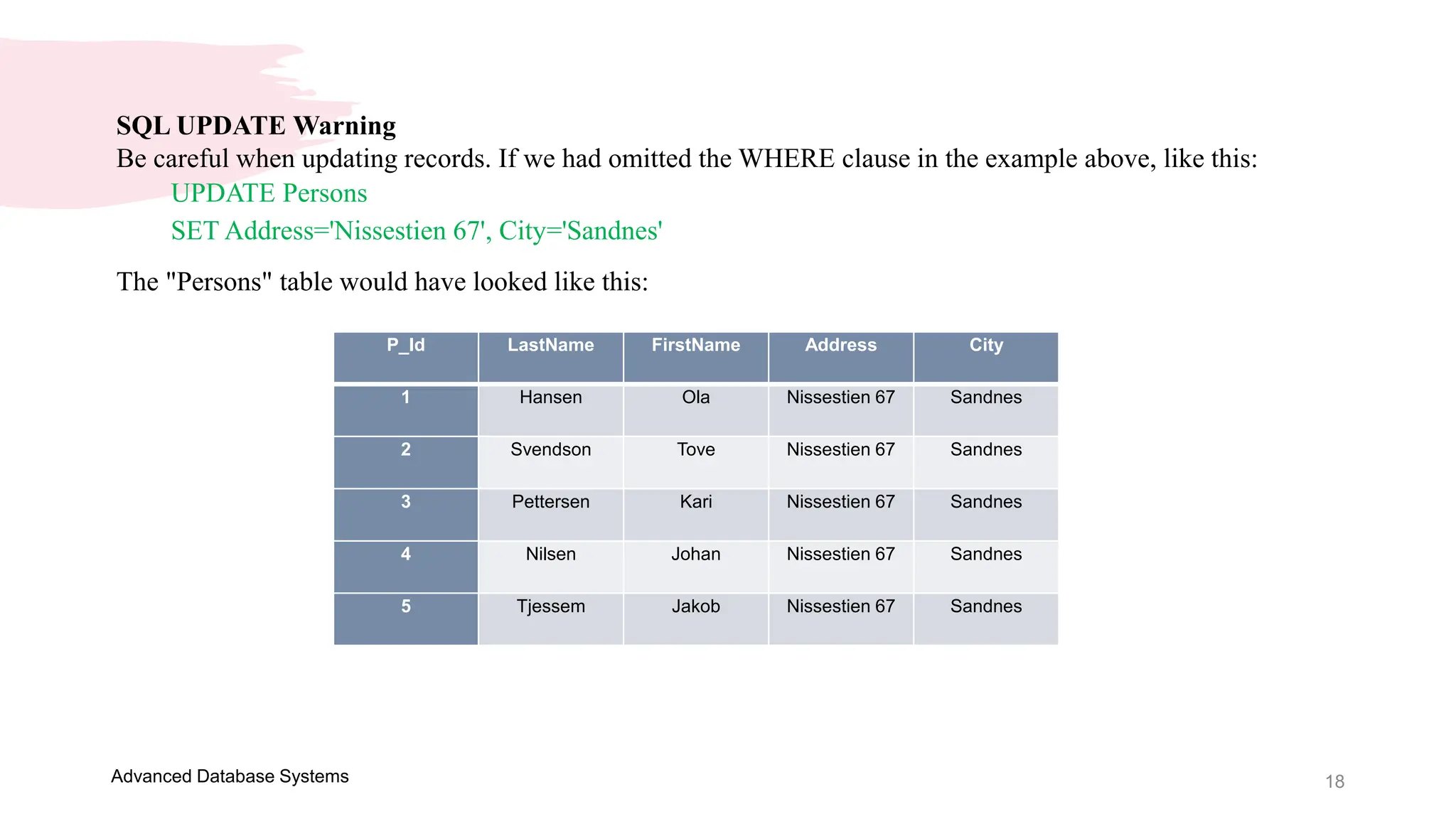
SQL UPDATE Warning
Be careful when updating records. If we had omitted the WHERE clause in the example above, like this:
UPDATE Persons
SET Address='Nissestien 67', City='Sandnes'
The "Persons" table would have looked like this:
P_Id LastName FirstName Address City
1 Hansen Ola Nissestien 67 Sandnes
2 Svendson Tove Nissestien 67 Sandnes
3 Pettersen Kari Nissestien 67 Sandnes
4 Nilsen Johan Nissestien 67 Sandnes
5 Tjessem Jakob Nissestien 67 Sandnes
19
Advanced Database Systems
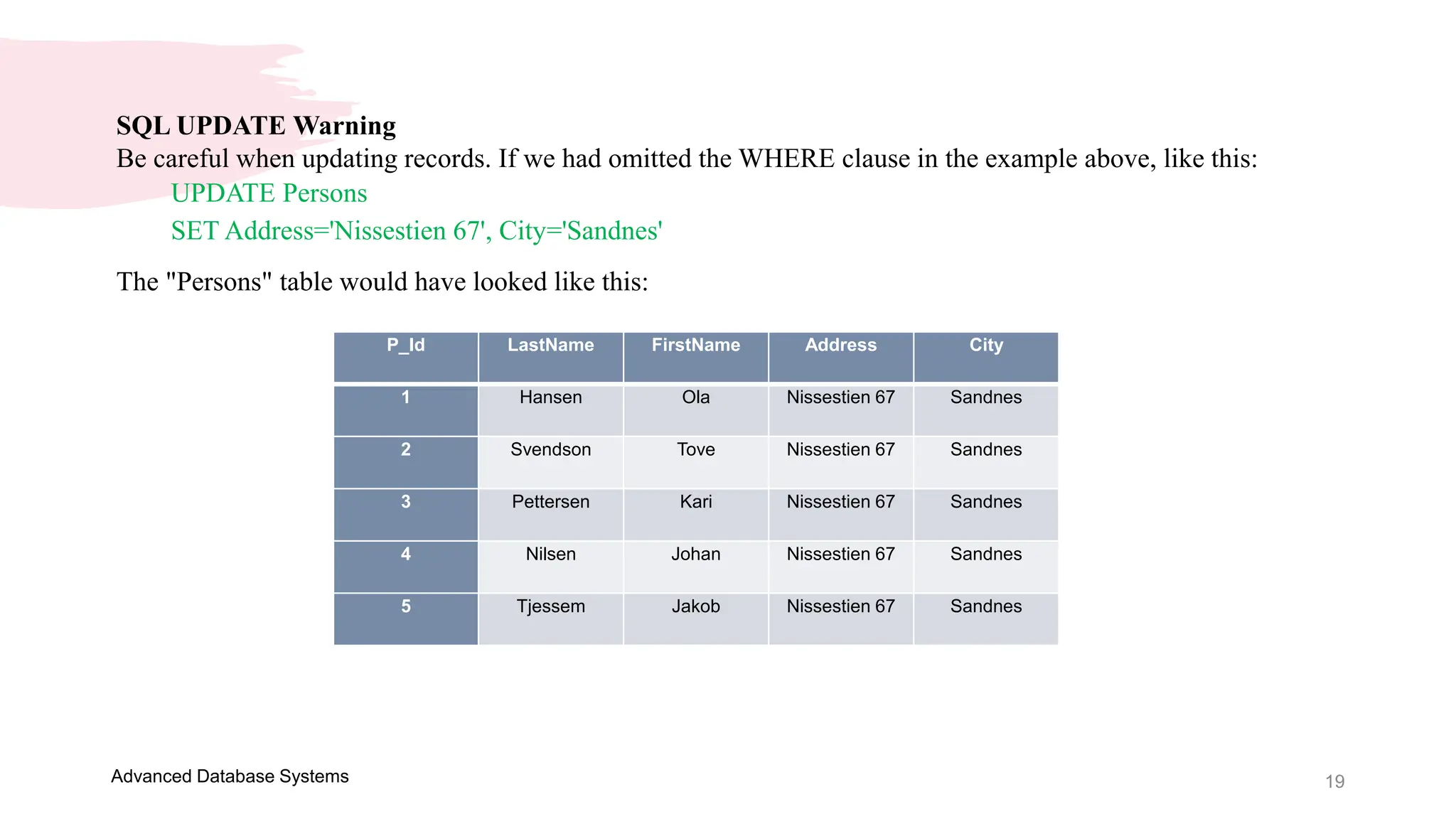
SQL UPDATE Warning
Be careful when updating records. If we had omitted the WHERE clause in the example above, like this:
UPDATE Persons
SET Address='Nissestien 67', City='Sandnes'
The "Persons" table would have looked like this:
P_Id LastName FirstName Address City
1 Hansen Ola Nissestien 67 Sandnes
2 Svendson Tove Nissestien 67 Sandnes
3 Pettersen Kari Nissestien 67 Sandnes
4 Nilsen Johan Nissestien 67 Sandnes
5 Tjessem Jakob Nissestien 67 Sandnes
Thank you
Presenter name: Ellen Grace D. Porras
Email address: egporras@psu.palawan.edu.ph
This Photo by Unknown Author is licensed under CC BY-SA-NC

Advanced Database Systems - Presentation 4.pptx

  • 1.
  • 2.
    OVERVIEW Welcome to thefirst module of this course on the Advanced Database Systems! Understanding of SQL and its capabilities for querying a single table a prerequisite. In this subject, you will learn how to retrieve data from multiple tables using one SQL statement. You will see how tables can be joined together and how similar results are obtained using different approaches, including the joints and sub queries. It is important that you understand how to query multiple tables for generating appropriate reports in the creation of an information system. Advanced Database Systems
  • 3.
    SQL Statements 9/3/20XX Presentation Title3 Advanced Database Systems
  • 4.
    4 Advanced Database Systems SQLORDER BY Keyword The ORDER BY keyword is used to sort the result-set by a specified column. The ORDER BY keyword sort the records in ascending order by default. If you want to sort the records in a descending order, you can use the DESC keyword. SQL ORDER BY Syntax: SELECT column_name(s) FROM table_name ORDER BY column_name(s) ASC|DESC
  • 5.
    5 Advanced Database Systems Example:ORDER BY Table Name: Persons P_Id LastName FirstName Address City 1 Hansen Ola Timoteivn 10 Sandnes 2 Svendson Tove Borgvn 23 Sandnes 3 Pettersen Kari Storgt 20 Stavanger 4 Nilsen Tom Vingvn 23 Stavanger
  • 6.
    6 Advanced Database Systems Nowwe want to select all the persons from the table above, however, we want to sort the persons by their last name. We use the following SELECT statement: SELECT * FROM Persons ORDER BY LastName
  • 7.
    7 Advanced Database Systems Theresult-set will look like this: P_Id LastName FirstName Address City 1 Hansen Ola Timoteivn 10 Sandnes 4 Nilsen Tom Vingvn 23 Stavanger 3 Pettersen Kari Storgt 20 Stavanger 2 Svendson Tove Borgvn 23 Sandnes
  • 8.
    8 Advanced Database Systems Example:ORDER BY DESC Now we want to select all the persons from the table above, however, we want to sort the persons descending by their last name. We use the following SELECT statement: SELECT * FROM Persons ORDER BY LastName DESC The result-set will look like this: P_Id LastName FirstName Address City 2 Svendson Tove Borgvn 23 Sandnes 3 Pettersen Kari Storgt 20 Stavanger 4 Nilsen Tom Vingvn 23 Stavanger 1 Hansen Ola Timoteivn 10 Sandnes
  • 9.
    9 Advanced Database Systems SQLINSERT INTO Statement The INSERT INTO statement is used to insert new records in a table. SQL INSERT INTO Syntax: It is possible to write the INSERT INTO statement in two forms. The first form doesn't specify the column names where the data will be inserted, only their values: INSERT INTO table_name VALUES (value1, value2, value3,...) The second form specifies both the column names and the values to be inserted: INSERT INTO table_name (column1, column2, column3,...) VALUES (value1, value2, value3,...)
  • 10.
    10 Advanced Database Systems Example:INSERT INTO Table Name: Persons P_Id LastName FirstName Address City 1 Hansen Ola Timoteivn 10 Sandnes 2 Svendson Tove Borgvn 23 Sandnes 3 Pettersen Kari Storgt 20 Stavanger Now we want to insert a new row in the "Persons" table. We use the following SQL statement: INSERT INTO Persons VALUES (4,'Nilsen', 'Johan', 'Bakken 2', 'Stavanger')
  • 11.
    11 Advanced Database Systems The"Persons" table will now look like this: P_Id LastName FirstName Address City 1 Hansen Ola Timoteivn 10 Sandnes 2 Svendson Tove Borgvn 23 Sandnes 3 Pettersen Kari Storgt 20 Stavanger 4 Nilsen Johan Bakken 2 Stavanger
  • 12.
    12 Advanced Database Systems InsertData Only in Specified Columns It is also possible to only add data in specific columns. The following SQL statement will add a new row, but only add data in the "P_Id", "LastName" and the "FirstName" columns: INSERT INTO Persons (P_Id, LastName, FirstName) VALUES (5, 'Tjessem', 'Jakob')
  • 13.
    13 Advanced Database Systems The"Persons" table will now look like this: P_Id LastName FirstName Address City 1 Hansen Ola Timoteivn 10 Sandnes 2 Svendson Tove Borgvn 23 Sandnes 3 Pettersen Kari Storgt 20 Stavanger 4 Nilsen Johan Bakken 2 Stavanger 5 Tjessem Jakob
  • 14.
    14 Advanced Database Systems SQLUPDATE Statement The UPDATE statement is used to update existing records in a table. SQL UPDATE Syntax: UPDATE table_name SET column1=value, column2=value2,... WHERE some_column=some_value Note: Notice the WHERE clause in the UPDATE syntax. The WHERE clause specifies which record or records that should be updated. If you omit the WHERE clause, all records will be updated!
  • 15.
    15 Advanced Database Systems Example:UPDATE Table Name: Persons P_Id LastName FirstName Address City 1 Hansen Ola Timoteivn 10 Sandnes 2 Svendson Tove Borgvn 23 Sandnes 3 Pettersen Kari Storgt 20 Stavanger 4 Nilsen Johan Bakken 2 Stavanger 5 Tjessem Jakob
  • 16.
    16 Advanced Database Systems Nowwe want to update the person "Tjessem, Jakob" in the "Persons" table. We use the following SQL statement: UPDATE Persons SET Address='Nissestien 67', City='Sandnes' WHERE LastName='Tjessem' AND FirstName='Jakob'
  • 17.
    17 Advanced Database Systems The"Persons" table will now look like this: P_Id LastName FirstName Address City 1 Hansen Ola Timoteivn 10 Sandnes 2 Svendson Tove Borgvn 23 Sandnes 3 Pettersen Kari Storgt 20 Stavanger 4 Nilsen Johan Bakken 2 Stavanger 5 Tjessem Jakob Nissestien 67 Sandnes
  • 18.
    18 Advanced Database Systems SQLUPDATE Warning Be careful when updating records. If we had omitted the WHERE clause in the example above, like this: UPDATE Persons SET Address='Nissestien 67', City='Sandnes' The "Persons" table would have looked like this: P_Id LastName FirstName Address City 1 Hansen Ola Nissestien 67 Sandnes 2 Svendson Tove Nissestien 67 Sandnes 3 Pettersen Kari Nissestien 67 Sandnes 4 Nilsen Johan Nissestien 67 Sandnes 5 Tjessem Jakob Nissestien 67 Sandnes
  • 19.
    19 Advanced Database Systems SQLUPDATE Warning Be careful when updating records. If we had omitted the WHERE clause in the example above, like this: UPDATE Persons SET Address='Nissestien 67', City='Sandnes' The "Persons" table would have looked like this: P_Id LastName FirstName Address City 1 Hansen Ola Nissestien 67 Sandnes 2 Svendson Tove Nissestien 67 Sandnes 3 Pettersen Kari Nissestien 67 Sandnes 4 Nilsen Johan Nissestien 67 Sandnes 5 Tjessem Jakob Nissestien 67 Sandnes
  • 20.
    Thank you Presenter name:Ellen Grace D. Porras Email address: egporras@psu.palawan.edu.ph This Photo by Unknown Author is licensed under CC BY-SA-NC