Advanced Database
Systems
INSTRUCTOR:
ELLEN GRACE
PORRAS
FIRST SEMESTER 2022-2023
OVERVIEW
Welcome to the first module of this course on the Advanced Database Systems!
Understanding of SQL and its capabilities for querying a single table a prerequisite.
In this subject, you will learn how to retrieve data from multiple tables using one
SQL statement. You will see how tables can be joined together and how similar
results are obtained using different approaches, including the joints and sub queries.
It is important that you understand how to query multiple tables for generating
appropriate reports in the creation of an information system.
Advanced Database Systems
Learning
Outcomes
3
After studying our
lesson, you should be
able to:
1. Concisely define database
2. Examples of tables
3. Define differences between data
and information
4. Define RDMS
Advanced Database Systems
INTRODUCTION
4
ADVANCED DATABASE
Most modern enterprises except some small ones have data that they need to
store in ways which will be easy to retrieve later.
One of the most common types of database is a list of names and addresses
of people who regularly deal with the enterprise.
Originally when a business is small such lists may have been written on
paper, then in a word processor or spreadsheet, but as the business and lists grow
it becomes difficult to deal with the information stored in a word processor or a
spreadsheet. Database technology may then be required.
Advanced Database Systems
5
Advanced Database Systems
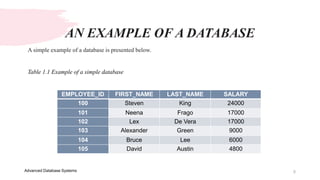
A simple example of a database is presented below.
Table 1.1 Example of a simple database
EMPLOYEE_ID FIRST_NAME LAST_NAME SALARY
100 Steven King 24000
101 Neena Frago 17000
102 Lex De Vera 17000
103 Alexander Green 9000
104 Bruce Lee 6000
105 David Austin 4800
AN EXAMPLE OF A DATABASE
6
Advanced Database Systems
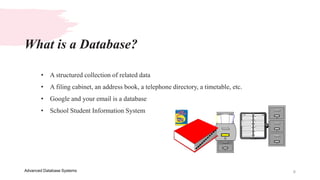
• A structured collection of related data
• A filing cabinet, an address book, a telephone directory, a timetable, etc.
• Google and your email is a database
• School Student Information System
What is a Database?
7
Advanced Database Systems
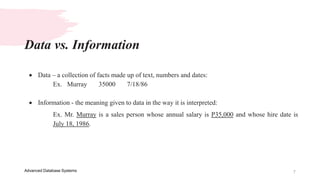
 Data – a collection of facts made up of text, numbers and dates:
Ex. Murray 35000 7/18/86
 Information - the meaning given to data in the way it is interpreted:
Ex. Mr. Murray is a sales person whose annual salary is P35,000 and whose hire date is
July 18, 1986.
Data vs. Information
8
Advanced Database Systems
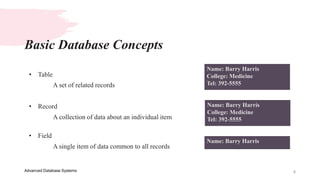
• Table
A set of related records
• Record
A collection of data about an individual item
• Field
A single item of data common to all records
Basic Database Concepts
Name: Barry Harris
College: Medicine
Tel: 392-5555
Name: Barry Harris
College: Medicine
Tel: 392-5555
Name: Barry Harris
9
Advanced Database Systems
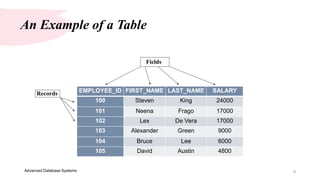
An Example of a Table
EMPLOYEE_ID FIRST_NAME LAST_NAME SALARY
100 Steven King 24000
101 Neena Frago 17000
102 Lex De Vera 17000
103 Alexander Green 9000
104 Bruce Lee 6000
105 David Austin 4800
Fields
Records
10
Advanced Database Systems
Primary Keys & Foreign Keys
EMPLOYEE_ID FIRST_NAM
E
LAST_NAME SALARY
100 Steven King 24000
101 Neena Frago 17000
102 Lex De Vera 17000
103 Alexander Green 9000
104 Bruce Lee 6000
105 David Austin 4800
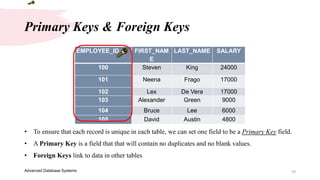
• To ensure that each record is unique in each table, we can set one field to be a Primary Key field.
• A Primary Key is a field that that will contain no duplicates and no blank values.
• Foreign Keys link to data in other tables
11
Advanced Database Systems
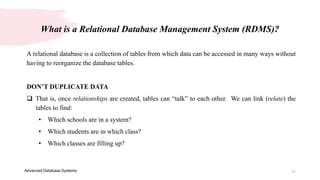
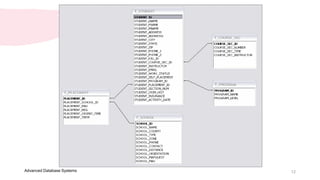
A relational database is a collection of tables from which data can be accessed in many ways without
having to reorganize the database tables.
DON’T DUPLICATE DATA
 That is, once relationships are created, tables can “talk” to each other. We can link (relate) the
tables to find:
• Which schools are in a system?
• Which students are in which class?
• Which classes are filling up?
What is a Relational Database Management System (RDMS)?
12
Advanced Database Systems
13
Advanced Database Systems
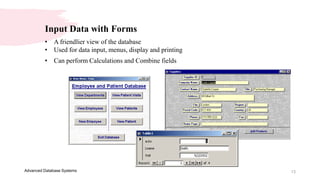
Input Data with Forms
• A friendlier view of the database
• Used for data input, menus, display and printing
• Can perform Calculations and Combine fields
14
Advanced Database Systems
Structured Query Language (SQL)
What is SQL?
 Is a language of database, it includes database creation, deletion, fetching rows and
modifying rows etc.
 SQL is an ANSI (American National Standards Institute) standard, but there are many
different versions of the SQL language.
 SQL is Structured Query Language, which is a computer language for storing,
manipulating and retrieving data stored in relational database.
15
Advanced Database Systems
Why SQL?
• Allows users to access data in relational database management systems.
• Allows users to describe the data.
• Allows users to define the data in database and manipulate that data.
• Allows users to create and drop databases and tables.
• Allows users to create view, stored procedure, functions in a database.
• Allows users to set permissions on tables, procedures and views
16
Advanced Database Systems
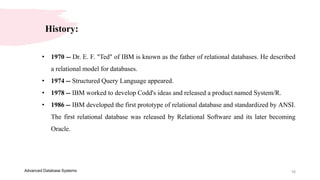
History:
• 1970 -- Dr. E. F. "Ted" of IBM is known as the father of relational databases. He described
a relational model for databases.
• 1974 -- Structured Query Language appeared.
• 1978 -- IBM worked to develop Codd's ideas and released a product named System/R.
• 1986 -- IBM developed the first prototype of relational database and standardized by ANSI.
The first relational database was released by Relational Software and its later becoming
Oracle.
17
Advanced Database Systems
SQL Syntax
• SQL is followed by unique set of rules and guidelines called Syntax. This tutorial gives you
a quick start with SQL by listing all the basic SQL Syntax:
• All the SQL statements start with any of the keywords like SELECT, INSERT, UPDATE,
DELETE, ALTER, DROP, CREATE, USE, SHOW and all the statements end with a
semicolon (;).
• Important point to be noted is that SQL is case insensitive, which means SELECT and
select have same meaning in SQL statements, but MySQL makes difference in table names.
So if you are working with MySQL, then you need to give table names as they exist in the
database.
18
Advanced Database Systems
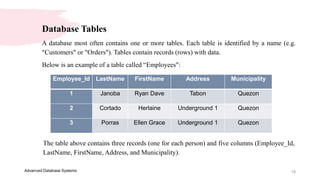
Database Tables
A database most often contains one or more tables. Each table is identified by a name (e.g.
"Customers" or "Orders"). Tables contain records (rows) with data.
Below is an example of a table called “Employees":
Employee_Id LastName FirstName Address Municipality
1 Janoba Ryan Dave Tabon Quezon
2 Cortado Herlaine Underground 1 Quezon
3 Porras Ellen Grace Underground 1 Quezon
The table above contains three records (one for each person) and five columns (Employee_Id,
LastName, FirstName, Address, and Municipality).
Thank you
Presenter name: Ellen Grace D. Porras
Email address: egporras@psu.palawan.edu.ph
This Photo by Unknown Author is licensed under CC BY-SA-NC
20
Advanced Database Systems
Quiz Time!
Goodluck!
21
Advanced Database Systems
1. What is Database?
2. Difference between Data and Information?
3. Give at least 3 examples of a Data and
Information.
4. What is SQL?
5. __________a field that that will contain no
duplicates and no blank values.
6. What are the 3 Basic Database Concept?

Advanced Database Systems - Presentation 1 with quiz.pptx

  • 1.
  • 2.
    OVERVIEW Welcome to thefirst module of this course on the Advanced Database Systems! Understanding of SQL and its capabilities for querying a single table a prerequisite. In this subject, you will learn how to retrieve data from multiple tables using one SQL statement. You will see how tables can be joined together and how similar results are obtained using different approaches, including the joints and sub queries. It is important that you understand how to query multiple tables for generating appropriate reports in the creation of an information system. Advanced Database Systems
  • 3.
    Learning Outcomes 3 After studying our lesson,you should be able to: 1. Concisely define database 2. Examples of tables 3. Define differences between data and information 4. Define RDMS Advanced Database Systems
  • 4.
    INTRODUCTION 4 ADVANCED DATABASE Most modernenterprises except some small ones have data that they need to store in ways which will be easy to retrieve later. One of the most common types of database is a list of names and addresses of people who regularly deal with the enterprise. Originally when a business is small such lists may have been written on paper, then in a word processor or spreadsheet, but as the business and lists grow it becomes difficult to deal with the information stored in a word processor or a spreadsheet. Database technology may then be required. Advanced Database Systems
  • 5.
    5 Advanced Database Systems Asimple example of a database is presented below. Table 1.1 Example of a simple database EMPLOYEE_ID FIRST_NAME LAST_NAME SALARY 100 Steven King 24000 101 Neena Frago 17000 102 Lex De Vera 17000 103 Alexander Green 9000 104 Bruce Lee 6000 105 David Austin 4800 AN EXAMPLE OF A DATABASE
  • 6.
    6 Advanced Database Systems •A structured collection of related data • A filing cabinet, an address book, a telephone directory, a timetable, etc. • Google and your email is a database • School Student Information System What is a Database?
  • 7.
    7 Advanced Database Systems Data – a collection of facts made up of text, numbers and dates: Ex. Murray 35000 7/18/86  Information - the meaning given to data in the way it is interpreted: Ex. Mr. Murray is a sales person whose annual salary is P35,000 and whose hire date is July 18, 1986. Data vs. Information
  • 8.
    8 Advanced Database Systems •Table A set of related records • Record A collection of data about an individual item • Field A single item of data common to all records Basic Database Concepts Name: Barry Harris College: Medicine Tel: 392-5555 Name: Barry Harris College: Medicine Tel: 392-5555 Name: Barry Harris
  • 9.
    9 Advanced Database Systems AnExample of a Table EMPLOYEE_ID FIRST_NAME LAST_NAME SALARY 100 Steven King 24000 101 Neena Frago 17000 102 Lex De Vera 17000 103 Alexander Green 9000 104 Bruce Lee 6000 105 David Austin 4800 Fields Records
  • 10.
    10 Advanced Database Systems PrimaryKeys & Foreign Keys EMPLOYEE_ID FIRST_NAM E LAST_NAME SALARY 100 Steven King 24000 101 Neena Frago 17000 102 Lex De Vera 17000 103 Alexander Green 9000 104 Bruce Lee 6000 105 David Austin 4800 • To ensure that each record is unique in each table, we can set one field to be a Primary Key field. • A Primary Key is a field that that will contain no duplicates and no blank values. • Foreign Keys link to data in other tables
  • 11.
    11 Advanced Database Systems Arelational database is a collection of tables from which data can be accessed in many ways without having to reorganize the database tables. DON’T DUPLICATE DATA  That is, once relationships are created, tables can “talk” to each other. We can link (relate) the tables to find: • Which schools are in a system? • Which students are in which class? • Which classes are filling up? What is a Relational Database Management System (RDMS)?
  • 12.
  • 13.
    13 Advanced Database Systems InputData with Forms • A friendlier view of the database • Used for data input, menus, display and printing • Can perform Calculations and Combine fields
  • 14.
    14 Advanced Database Systems StructuredQuery Language (SQL) What is SQL?  Is a language of database, it includes database creation, deletion, fetching rows and modifying rows etc.  SQL is an ANSI (American National Standards Institute) standard, but there are many different versions of the SQL language.  SQL is Structured Query Language, which is a computer language for storing, manipulating and retrieving data stored in relational database.
  • 15.
    15 Advanced Database Systems WhySQL? • Allows users to access data in relational database management systems. • Allows users to describe the data. • Allows users to define the data in database and manipulate that data. • Allows users to create and drop databases and tables. • Allows users to create view, stored procedure, functions in a database. • Allows users to set permissions on tables, procedures and views
  • 16.
    16 Advanced Database Systems History: •1970 -- Dr. E. F. "Ted" of IBM is known as the father of relational databases. He described a relational model for databases. • 1974 -- Structured Query Language appeared. • 1978 -- IBM worked to develop Codd's ideas and released a product named System/R. • 1986 -- IBM developed the first prototype of relational database and standardized by ANSI. The first relational database was released by Relational Software and its later becoming Oracle.
  • 17.
    17 Advanced Database Systems SQLSyntax • SQL is followed by unique set of rules and guidelines called Syntax. This tutorial gives you a quick start with SQL by listing all the basic SQL Syntax: • All the SQL statements start with any of the keywords like SELECT, INSERT, UPDATE, DELETE, ALTER, DROP, CREATE, USE, SHOW and all the statements end with a semicolon (;). • Important point to be noted is that SQL is case insensitive, which means SELECT and select have same meaning in SQL statements, but MySQL makes difference in table names. So if you are working with MySQL, then you need to give table names as they exist in the database.
  • 18.
    18 Advanced Database Systems DatabaseTables A database most often contains one or more tables. Each table is identified by a name (e.g. "Customers" or "Orders"). Tables contain records (rows) with data. Below is an example of a table called “Employees": Employee_Id LastName FirstName Address Municipality 1 Janoba Ryan Dave Tabon Quezon 2 Cortado Herlaine Underground 1 Quezon 3 Porras Ellen Grace Underground 1 Quezon The table above contains three records (one for each person) and five columns (Employee_Id, LastName, FirstName, Address, and Municipality).
  • 19.
    Thank you Presenter name:Ellen Grace D. Porras Email address: egporras@psu.palawan.edu.ph This Photo by Unknown Author is licensed under CC BY-SA-NC
  • 20.
  • 21.
    21 Advanced Database Systems 1.What is Database? 2. Difference between Data and Information? 3. Give at least 3 examples of a Data and Information. 4. What is SQL? 5. __________a field that that will contain no duplicates and no blank values. 6. What are the 3 Basic Database Concept?