Electroteam__@hotmail.com
Electro-Team
Interesting Education
Visual Basic 2010
Functions A
Functions
• Accept input and return a value. There are two types
of functions, the built-in functions (or internal
functions) and the functions created by the
programmers.
• The general format of a function is:-
FunctionName (arguments)
– The arguments are values that are passed on to the
function.
Built-in Functions (I)
MsgBox ( ) Function
Produce a pop-up message box and prompt the
user to click on a command button.
Format:
MsgBox(Prompt, Style Value, Title)
Prompt: the message itself.
Style Value: determine what type of command buttons
appear.
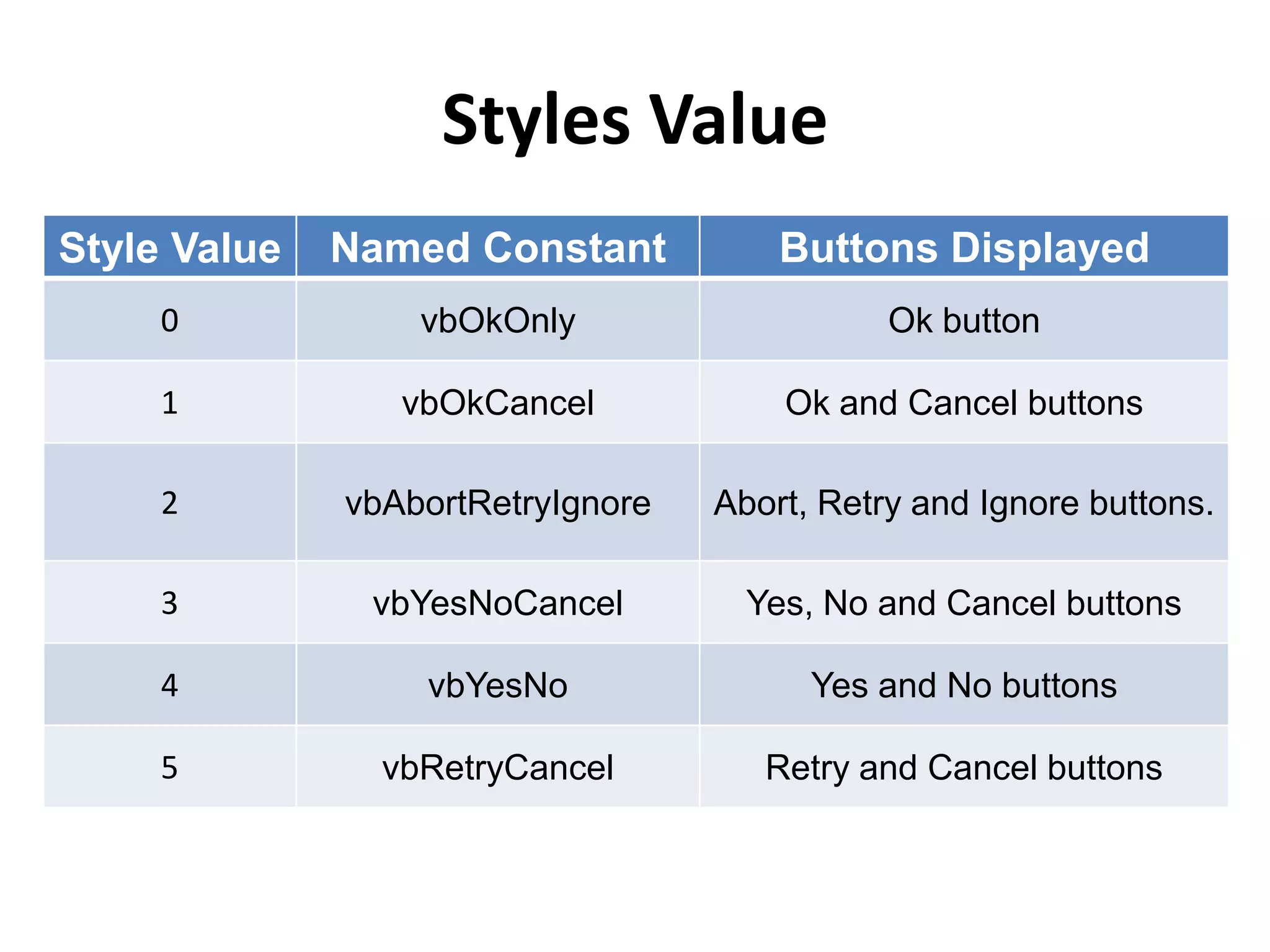
Styles Value
Style Value Named Constant Buttons Displayed
0 vbOkOnly Ok button
1 vbOkCancel Ok and Cancel buttons
2 vbAbortRetryIgnore Abort, Retry and Ignore buttons.
3 vbYesNoCancel Yes, No and Cancel buttons
4 vbYesNo Yes and No buttons
5 vbRetryCancel Retry and Cancel buttons
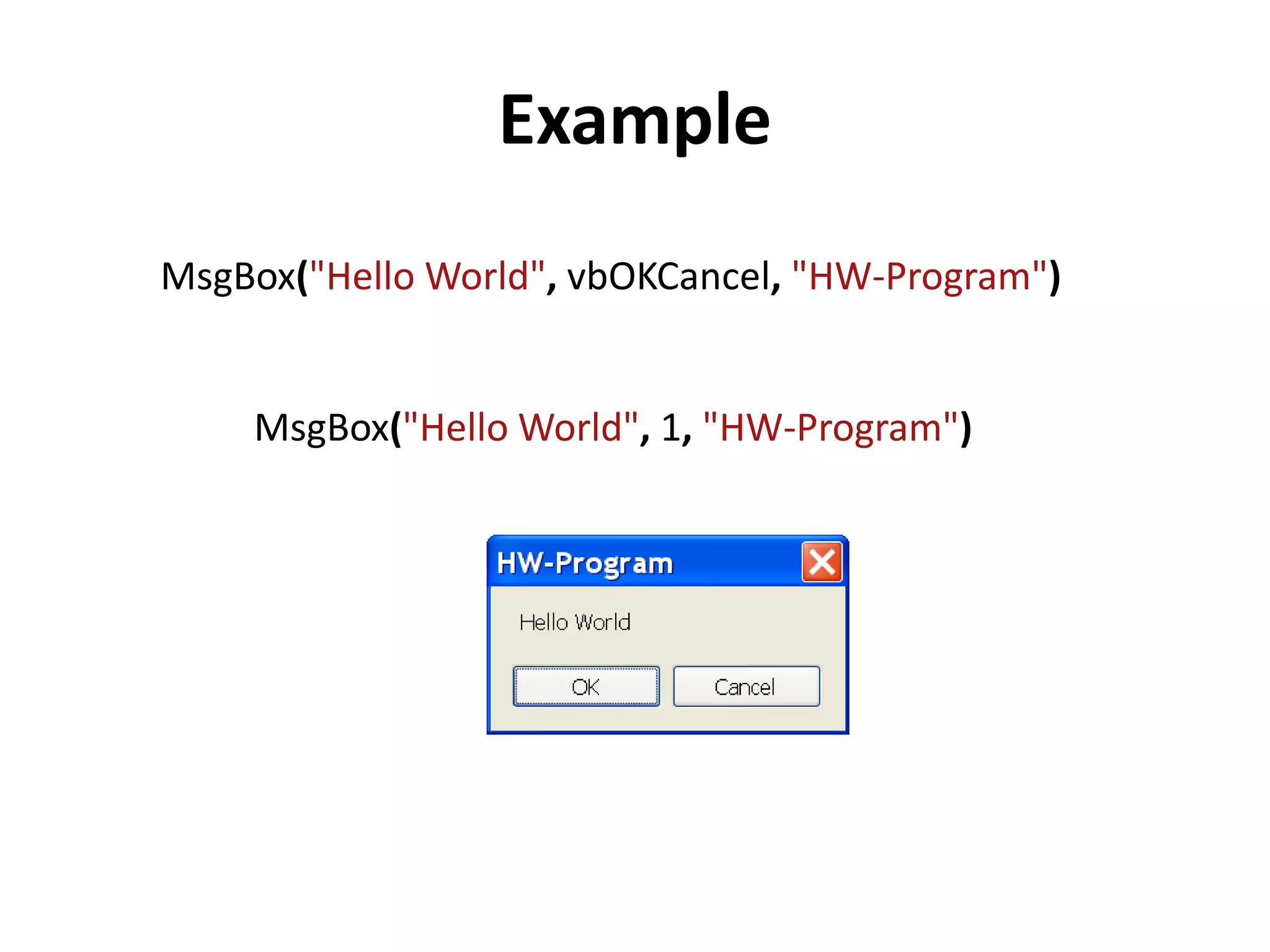
Example
MsgBox("Hello World", 1, "HW-Program")
MsgBox("Hello World", vbOKCancel, "HW-Program")
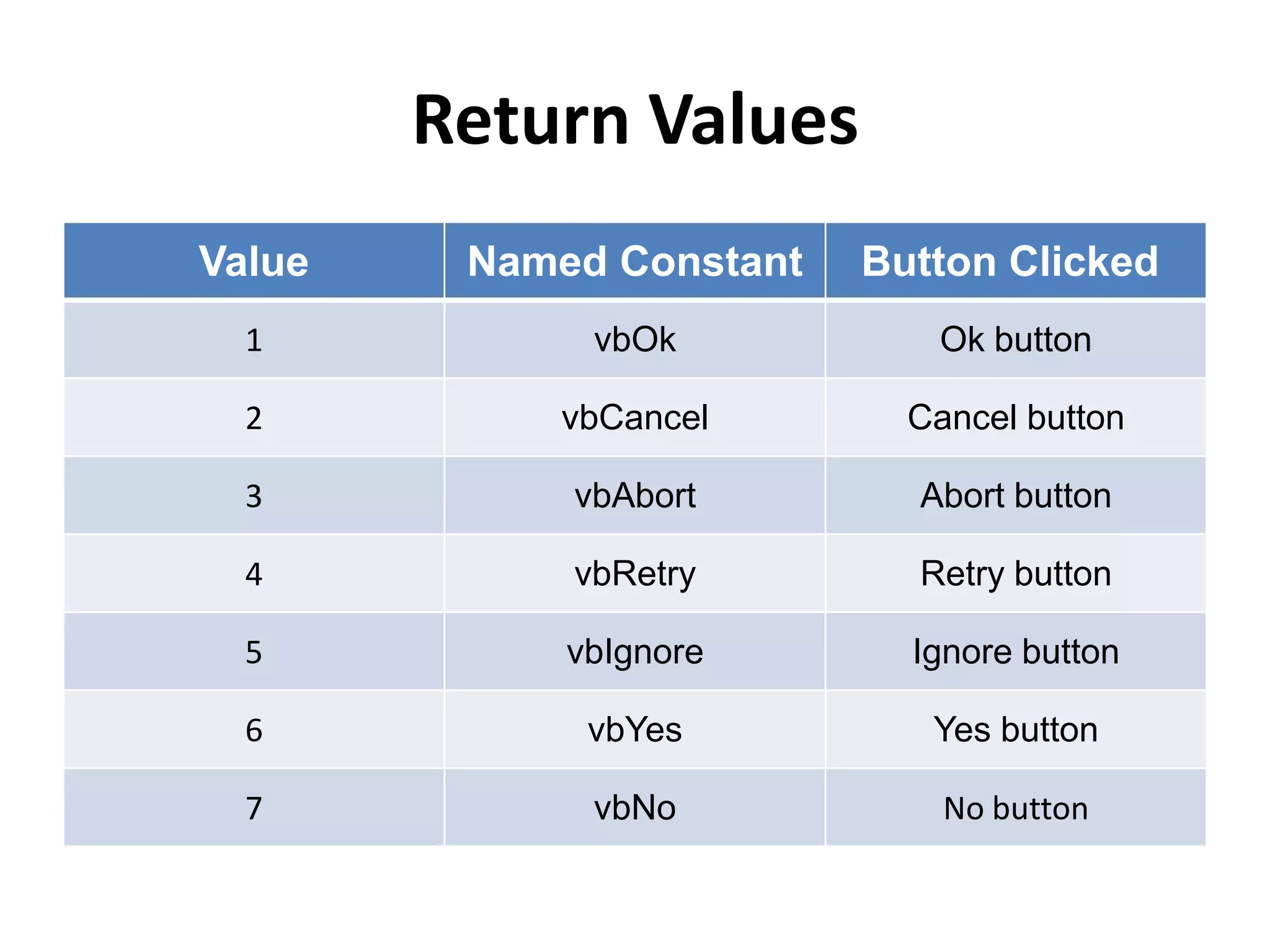
Return Values
Value Named Constant Button Clicked
1 vbOk Ok button
2 vbCancel Cancel button
3 vbAbort Abort button
4 vbRetry Retry button
5 vbIgnore Ignore button
6 vbYes Yes button
7 vbNo No button
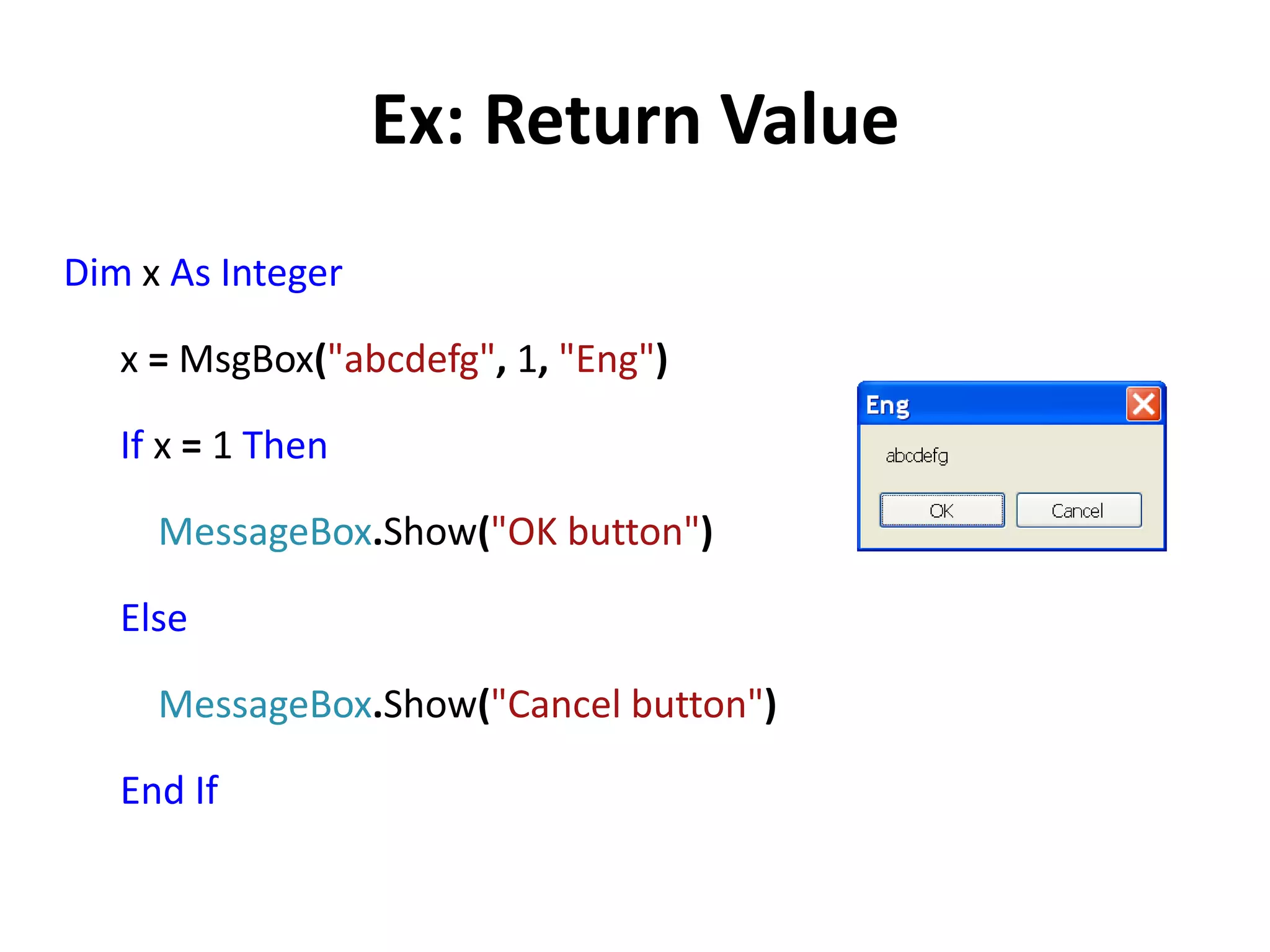
Ex: Return Value
Dim x As Integer
x = MsgBox("abcdefg", 1, "Eng")
If x = 1 Then
MessageBox.Show("OK button")
Else
MessageBox.Show("Cancel button")
End If
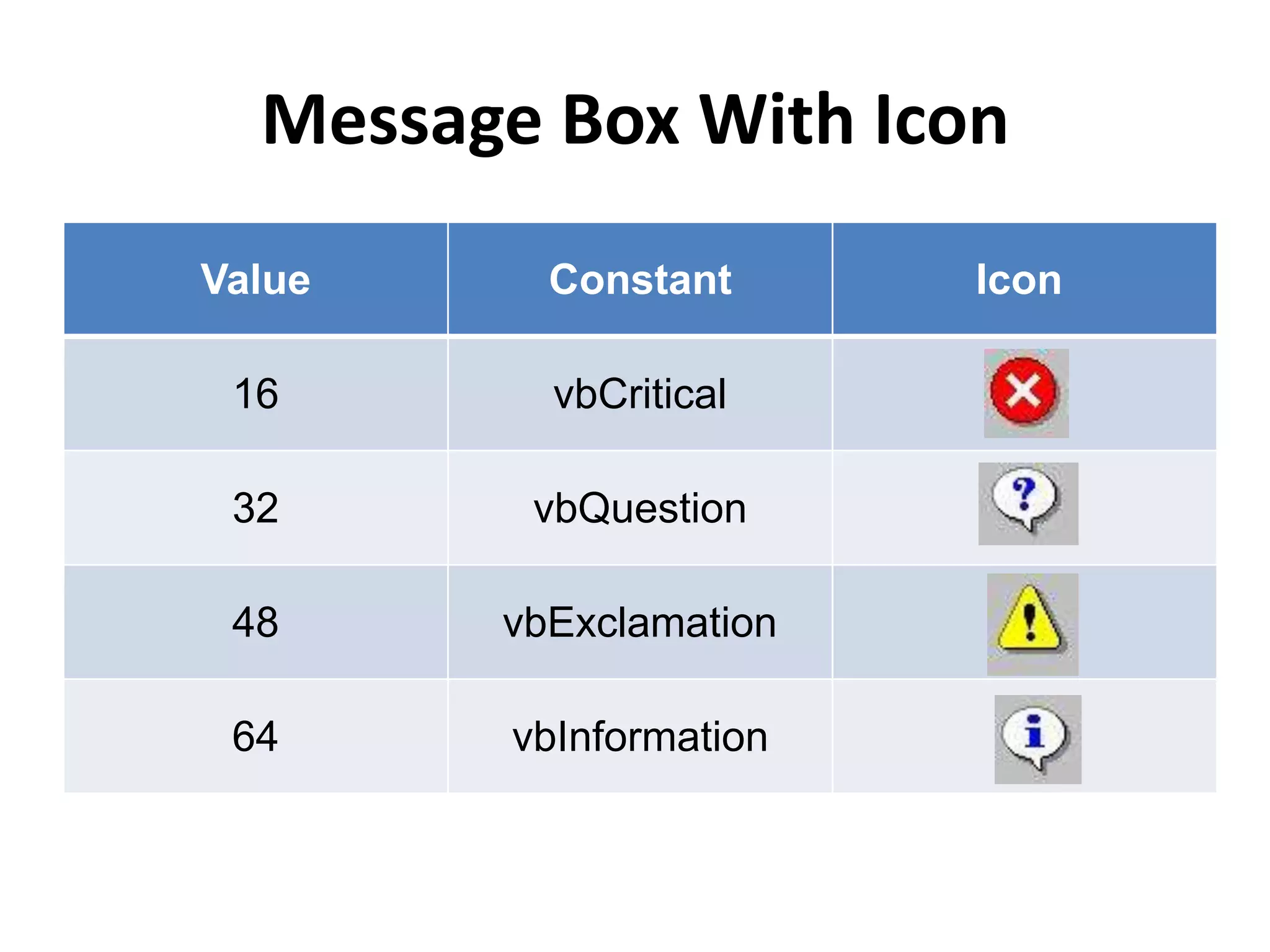
Message Box With Icon
Value Constant Icon
16 vbCritical
32 vbQuestion
48 vbExclamation
64 vbInformation
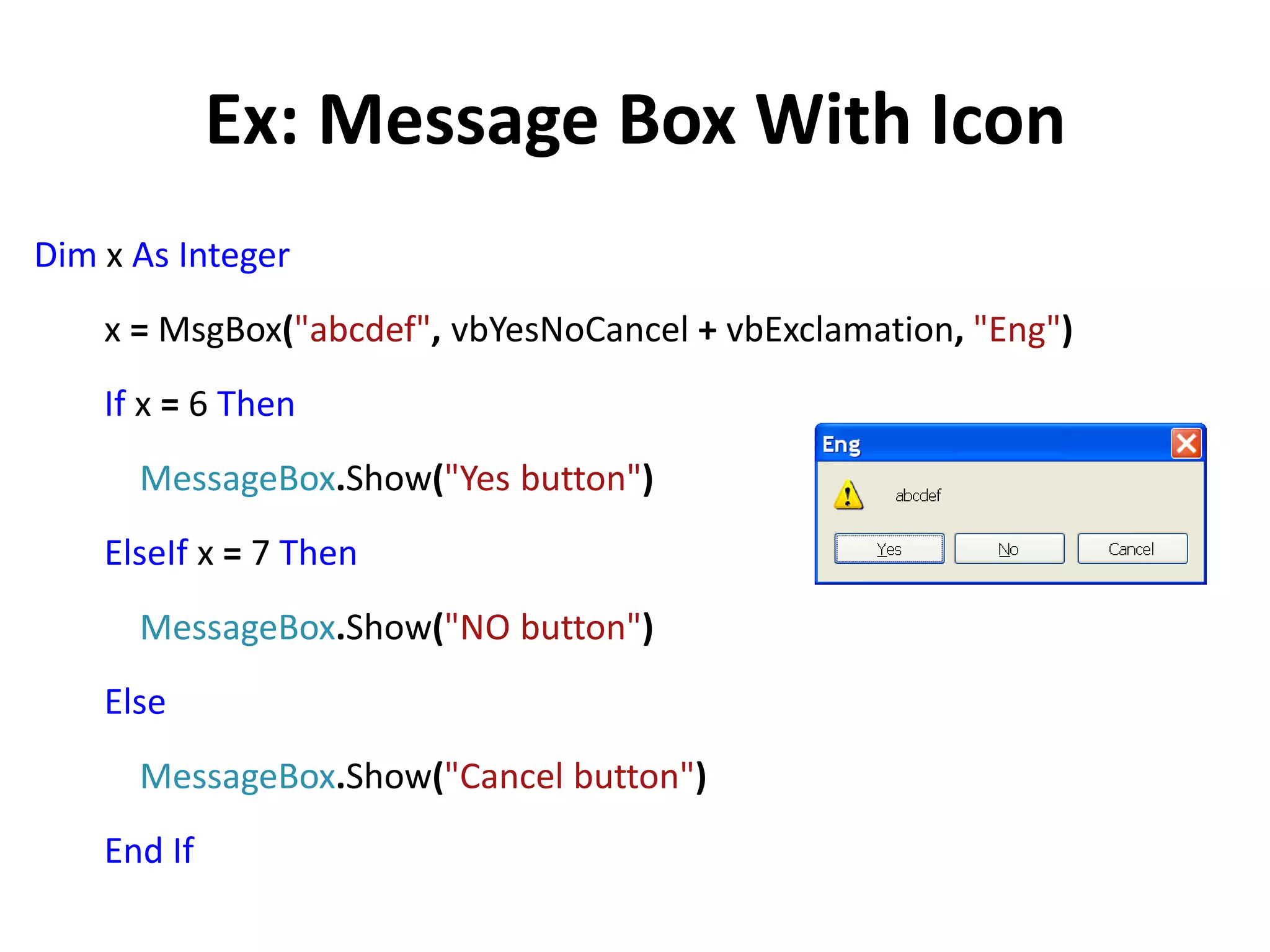
Ex: Message Box With Icon
Dim x As Integer
x = MsgBox("abcdef", vbYesNoCancel + vbExclamation, "Eng")
If x = 6 Then
MessageBox.Show("Yes button")
ElseIf x = 7 Then
MessageBox.Show("NO button")
Else
MessageBox.Show("Cancel button")
End If
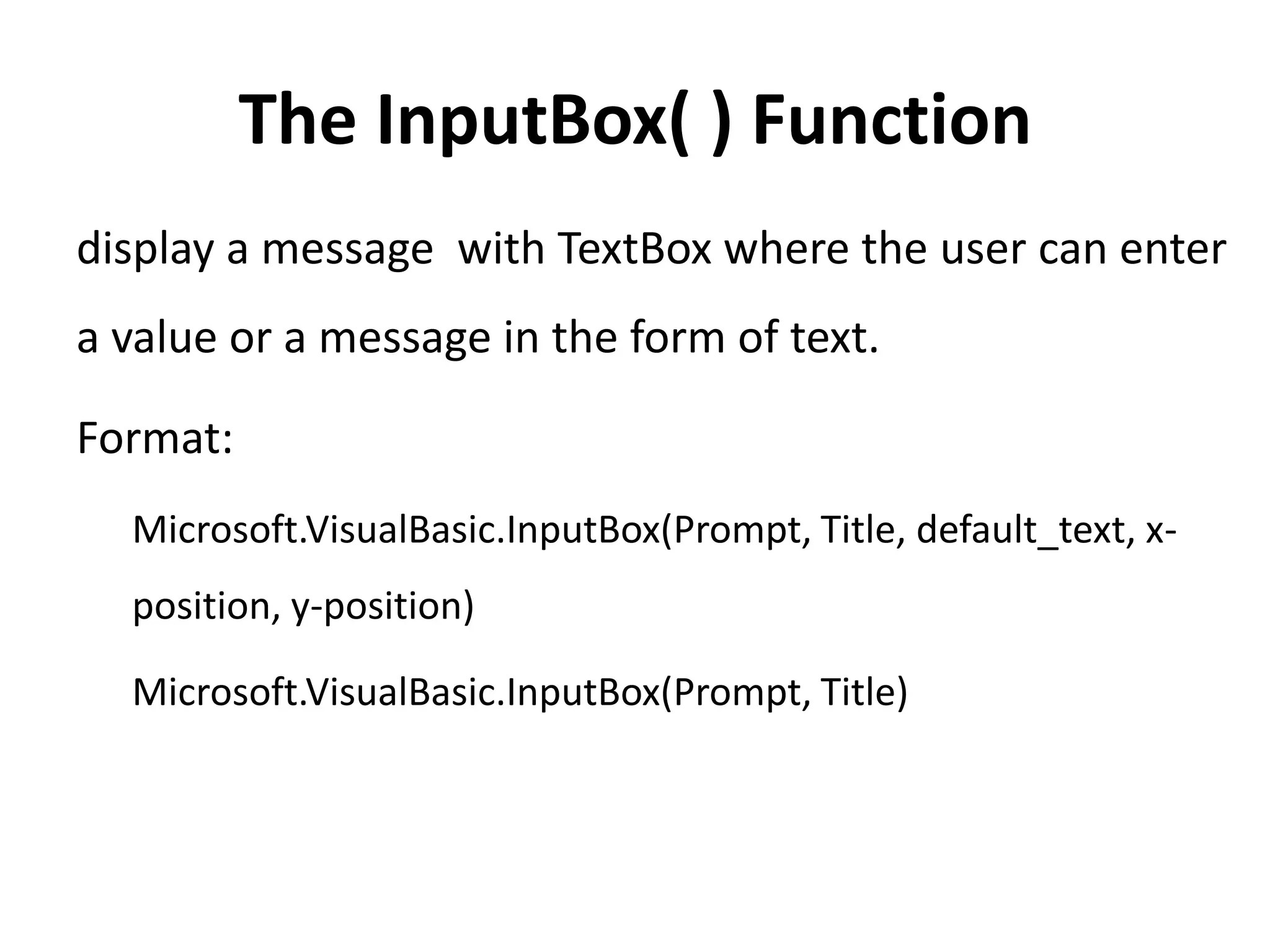
The InputBox( ) Function
display a message with TextBox where the user can enter
a value or a message in the form of text.
Format:
Microsoft.VisualBasic.InputBox(Prompt, Title, default_text, x-
position, y-position)
Microsoft.VisualBasic.InputBox(Prompt, Title)
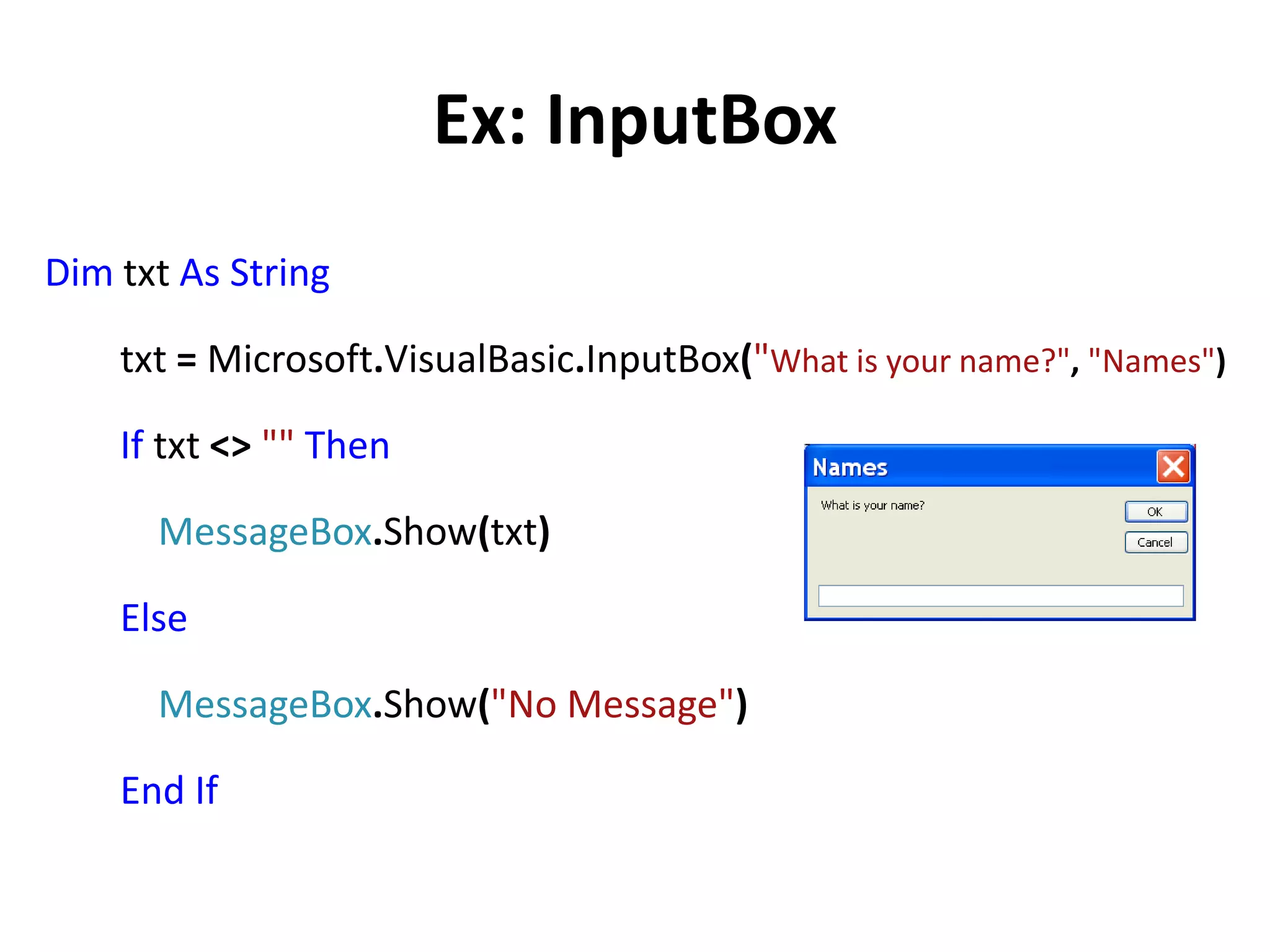
Ex: InputBox
Dim txt As String
txt = Microsoft.VisualBasic.InputBox("What is your name?", "Names")
If txt <> "" Then
MessageBox.Show(txt)
Else
MessageBox.Show("No Message")
End If
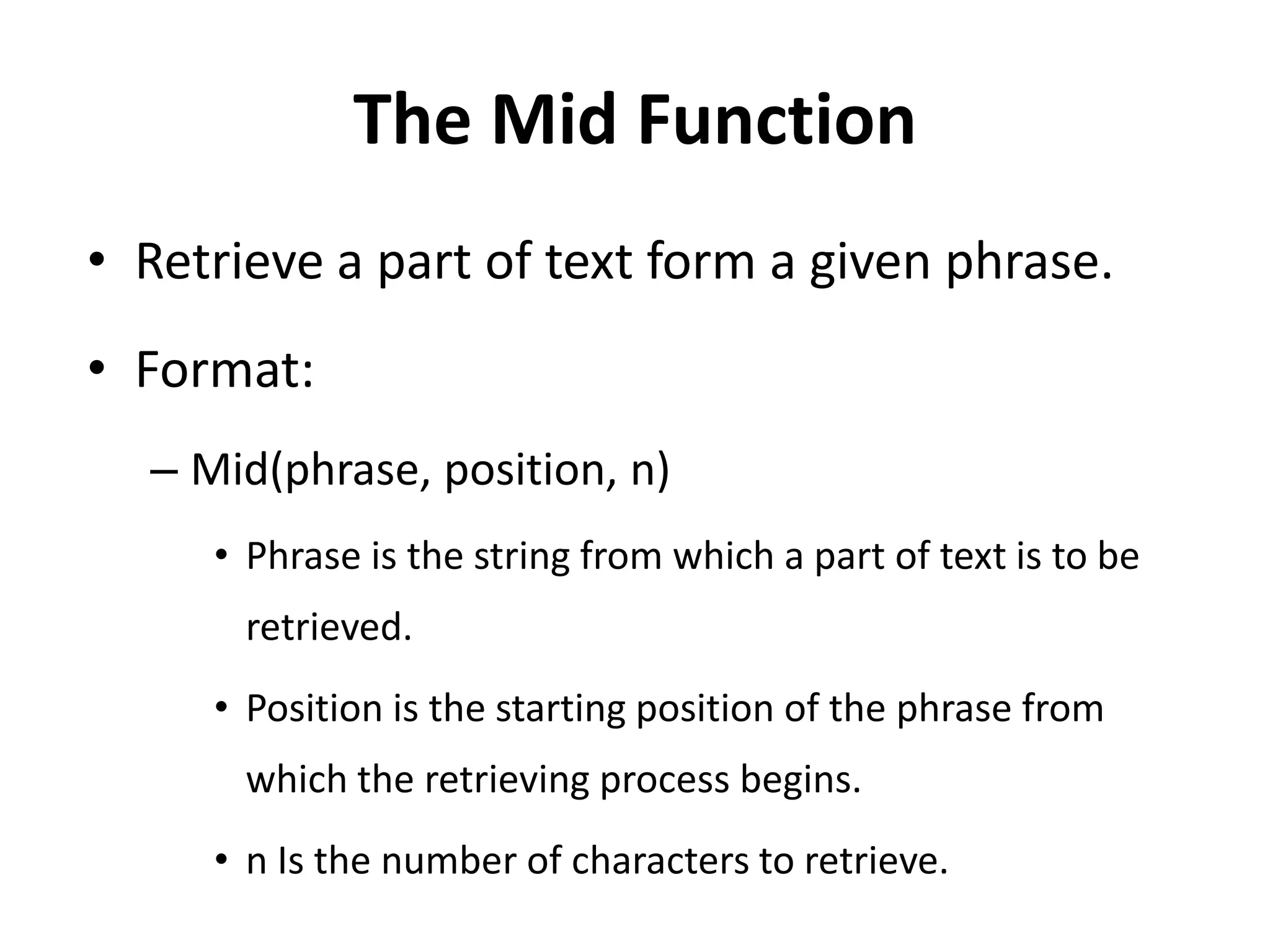
The Mid Function
• Retrieve a part of text form a given phrase.
• Format:
– Mid(phrase, position, n)
• Phrase is the string from which a part of text is to be
retrieved.
• Position is the starting position of the phrase from
which the retrieving process begins.
• n Is the number of characters to retrieve.
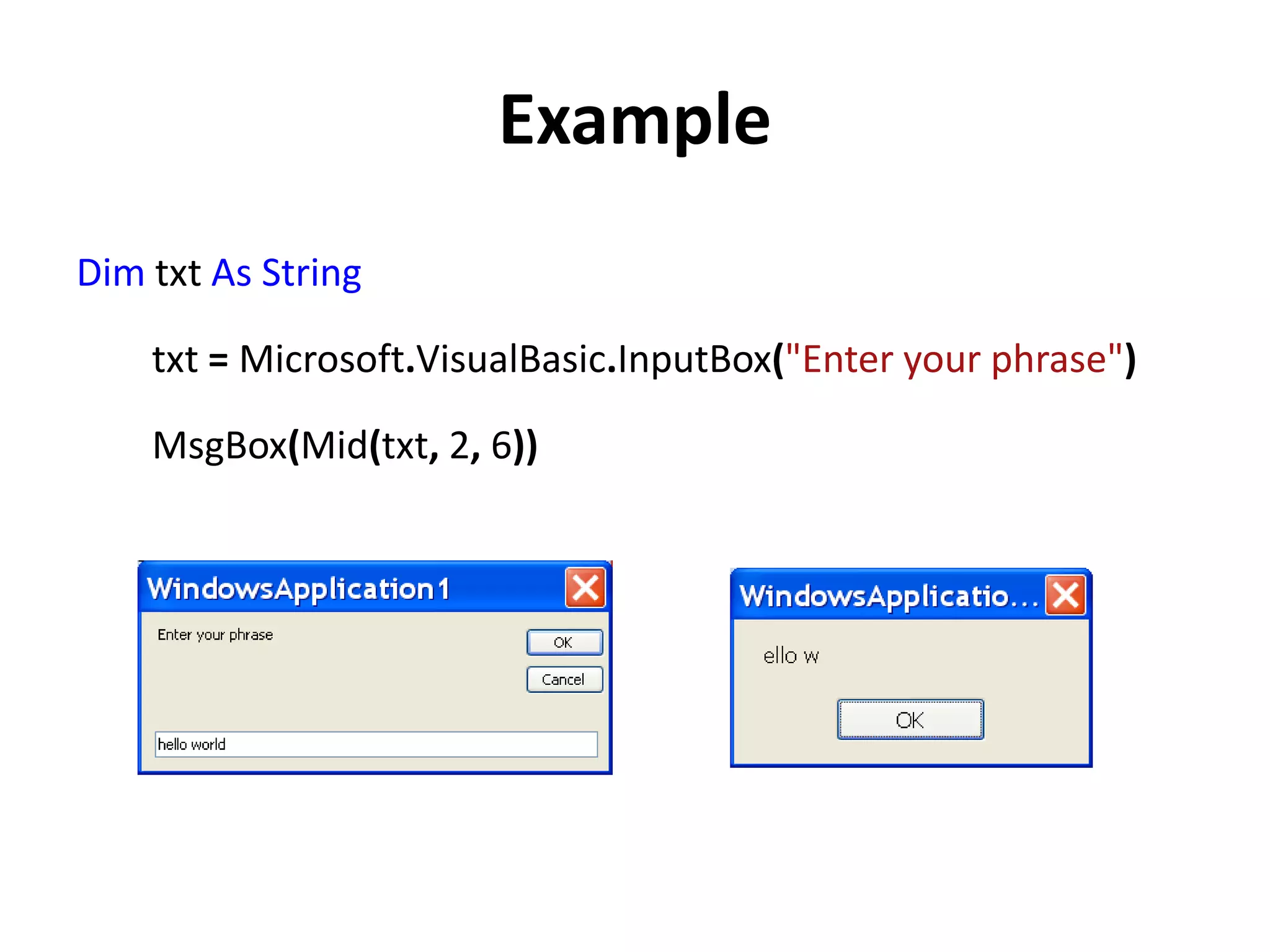
Example
Dim txt As String
txt = Microsoft.VisualBasic.InputBox("Enter your phrase")
MsgBox(Mid(txt, 2, 6))
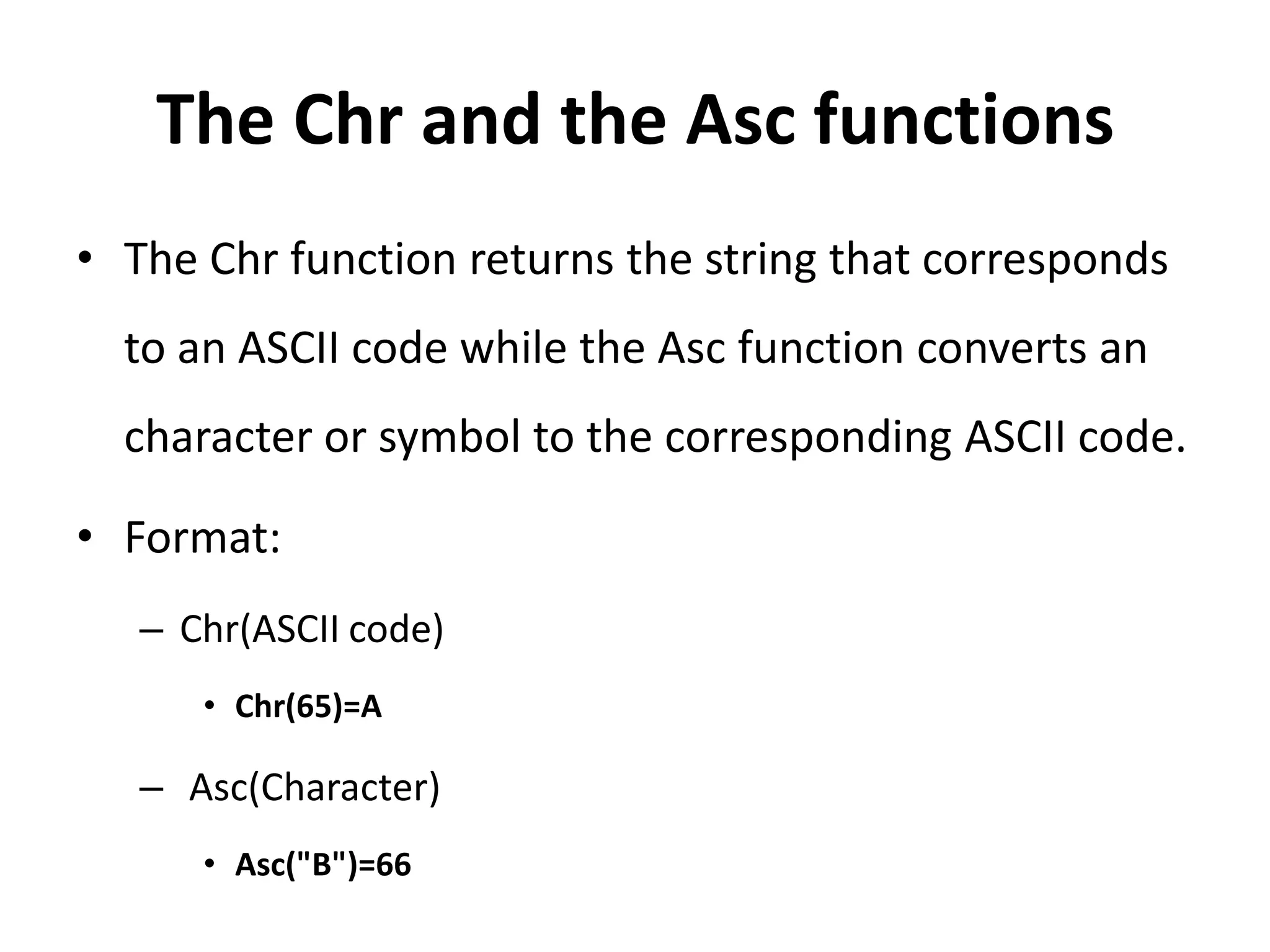
The Chr and the Asc functions
• The Chr function returns the string that corresponds
to an ASCII code while the Asc function converts an
character or symbol to the corresponding ASCII code.
• Format:
– Chr(ASCII code)
• Chr(65)=A
– Asc(Character)
• Asc("B")=66
End Of Part One
Produced by
Electro-Team
electroteam__@hotmail.com

Functions 1

  • 1.
  • 2.
    Functions • Accept inputand return a value. There are two types of functions, the built-in functions (or internal functions) and the functions created by the programmers. • The general format of a function is:- FunctionName (arguments) – The arguments are values that are passed on to the function.
  • 3.
  • 4.
    MsgBox ( )Function Produce a pop-up message box and prompt the user to click on a command button. Format: MsgBox(Prompt, Style Value, Title) Prompt: the message itself. Style Value: determine what type of command buttons appear.
  • 5.
    Styles Value Style ValueNamed Constant Buttons Displayed 0 vbOkOnly Ok button 1 vbOkCancel Ok and Cancel buttons 2 vbAbortRetryIgnore Abort, Retry and Ignore buttons. 3 vbYesNoCancel Yes, No and Cancel buttons 4 vbYesNo Yes and No buttons 5 vbRetryCancel Retry and Cancel buttons
  • 6.
    Example MsgBox("Hello World", 1,"HW-Program") MsgBox("Hello World", vbOKCancel, "HW-Program")
  • 7.
    Return Values Value NamedConstant Button Clicked 1 vbOk Ok button 2 vbCancel Cancel button 3 vbAbort Abort button 4 vbRetry Retry button 5 vbIgnore Ignore button 6 vbYes Yes button 7 vbNo No button
  • 8.
    Ex: Return Value Dimx As Integer x = MsgBox("abcdefg", 1, "Eng") If x = 1 Then MessageBox.Show("OK button") Else MessageBox.Show("Cancel button") End If
  • 9.
    Message Box WithIcon Value Constant Icon 16 vbCritical 32 vbQuestion 48 vbExclamation 64 vbInformation
  • 10.
    Ex: Message BoxWith Icon Dim x As Integer x = MsgBox("abcdef", vbYesNoCancel + vbExclamation, "Eng") If x = 6 Then MessageBox.Show("Yes button") ElseIf x = 7 Then MessageBox.Show("NO button") Else MessageBox.Show("Cancel button") End If
  • 11.
    The InputBox( )Function display a message with TextBox where the user can enter a value or a message in the form of text. Format: Microsoft.VisualBasic.InputBox(Prompt, Title, default_text, x- position, y-position) Microsoft.VisualBasic.InputBox(Prompt, Title)
  • 12.
    Ex: InputBox Dim txtAs String txt = Microsoft.VisualBasic.InputBox("What is your name?", "Names") If txt <> "" Then MessageBox.Show(txt) Else MessageBox.Show("No Message") End If
  • 13.
    The Mid Function •Retrieve a part of text form a given phrase. • Format: – Mid(phrase, position, n) • Phrase is the string from which a part of text is to be retrieved. • Position is the starting position of the phrase from which the retrieving process begins. • n Is the number of characters to retrieve.
  • 14.
    Example Dim txt AsString txt = Microsoft.VisualBasic.InputBox("Enter your phrase") MsgBox(Mid(txt, 2, 6))
  • 15.
    The Chr andthe Asc functions • The Chr function returns the string that corresponds to an ASCII code while the Asc function converts an character or symbol to the corresponding ASCII code. • Format: – Chr(ASCII code) • Chr(65)=A – Asc(Character) • Asc("B")=66
  • 16.
    End Of PartOne Produced by Electro-Team electroteam__@hotmail.com