SQL
Statements
1
2
SQL WHERE Clause
The WHERE clause is used to filter records. It is used to extract only
those records that fulfill a specified criterion.
SQL WHERE Syntax:
SELECT column_name(s)
FROM table_name
WHERE column_name operator value
3
Example: WHERE Clause
Table Name: Students
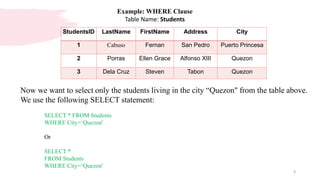
Now we want to select only the students living in the city “Quezon" from the table above.
We use the following SELECT statement:
SELECT * FROM Students
WHERE City=‘Quezon'
Or
SELECT *
FROM Students
WHERE City=‘Quezon'
StudentsID LastName FirstName Address City
1 Cabuso Fernan San Pedro Puerto Princesa
2 Porras Ellen Grace Alfonso XIII Quezon
3 Dela Cruz Steven Tabon Quezon
4
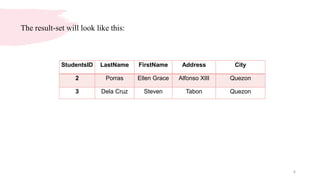
The result-set will look like this:
StudentsID LastName FirstName Address City
2 Porras Ellen Grace Alfonso XIII Quezon
3 Dela Cruz Steven Tabon Quezon
5
Quotes around Text Fields
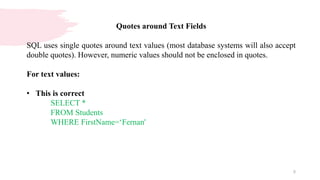
SQL uses single quotes around text values (most database systems will also accept
double quotes). However, numeric values should not be enclosed in quotes.
For text values:
• This is correct
SELECT *
FROM Students
WHERE FirstName=‘Fernan'
6
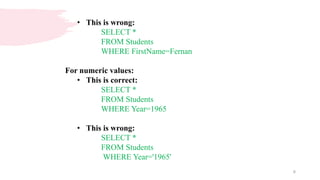
• This is wrong:
SELECT *
FROM Students
WHERE FirstName=Fernan
For numeric values:
• This is correct:
SELECT *
FROM Students
WHERE Year=1965
• This is wrong:
SELECT *
FROM Students
WHERE Year='1965'
7
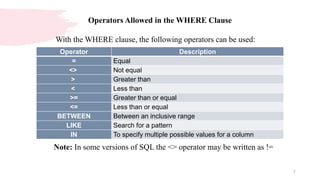
Operators Allowed in the WHERE Clause
With the WHERE clause, the following operators can be used:
Operator Description
= Equal
<> Not equal
> Greater than
< Less than
>= Greater than or equal
<= Less than or equal
BETWEEN Between an inclusive range
LIKE Search for a pattern
IN To specify multiple possible values for a column
Note: In some versions of SQL the <> operator may be written as !=
8
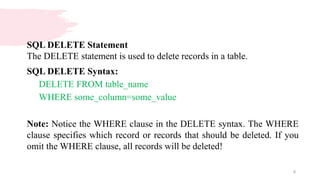
SQL DELETE Statement
The DELETE statement is used to delete records in a table.
SQL DELETE Syntax:
DELETE FROM table_name
WHERE some_column=some_value
Note: Notice the WHERE clause in the DELETE syntax. The WHERE
clause specifies which record or records that should be deleted. If you
omit the WHERE clause, all records will be deleted!
9
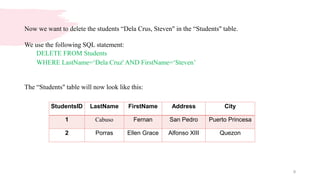
Now we want to delete the students “Dela Crus, Steven" in the “Students" table.
We use the following SQL statement:
DELETE FROM Students
WHERE LastName=‘Dela Cruz' AND FirstName=‘Steven’
The “Students" table will now look like this:
StudentsID LastName FirstName Address City
1 Cabuso Fernan San Pedro Puerto Princesa
2 Porras Ellen Grace Alfonso XIII Quezon
10
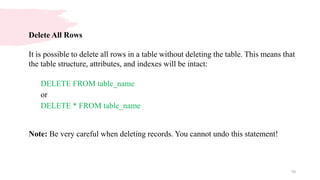
Delete All Rows
It is possible to delete all rows in a table without deleting the table. This means that
the table structure, attributes, and indexes will be intact:
DELETE FROM table_name
or
DELETE * FROM table_name
Note: Be very careful when deleting records. You cannot undo this statement!
Thank you

Structured Query Language (SQL) Part 2.pptx

  • 1.
  • 2.
    2 SQL WHERE Clause TheWHERE clause is used to filter records. It is used to extract only those records that fulfill a specified criterion. SQL WHERE Syntax: SELECT column_name(s) FROM table_name WHERE column_name operator value
  • 3.
    3 Example: WHERE Clause TableName: Students Now we want to select only the students living in the city “Quezon" from the table above. We use the following SELECT statement: SELECT * FROM Students WHERE City=‘Quezon' Or SELECT * FROM Students WHERE City=‘Quezon' StudentsID LastName FirstName Address City 1 Cabuso Fernan San Pedro Puerto Princesa 2 Porras Ellen Grace Alfonso XIII Quezon 3 Dela Cruz Steven Tabon Quezon
  • 4.
    4 The result-set willlook like this: StudentsID LastName FirstName Address City 2 Porras Ellen Grace Alfonso XIII Quezon 3 Dela Cruz Steven Tabon Quezon
  • 5.
    5 Quotes around TextFields SQL uses single quotes around text values (most database systems will also accept double quotes). However, numeric values should not be enclosed in quotes. For text values: • This is correct SELECT * FROM Students WHERE FirstName=‘Fernan'
  • 6.
    6 • This iswrong: SELECT * FROM Students WHERE FirstName=Fernan For numeric values: • This is correct: SELECT * FROM Students WHERE Year=1965 • This is wrong: SELECT * FROM Students WHERE Year='1965'
  • 7.
    7 Operators Allowed inthe WHERE Clause With the WHERE clause, the following operators can be used: Operator Description = Equal <> Not equal > Greater than < Less than >= Greater than or equal <= Less than or equal BETWEEN Between an inclusive range LIKE Search for a pattern IN To specify multiple possible values for a column Note: In some versions of SQL the <> operator may be written as !=
  • 8.
    8 SQL DELETE Statement TheDELETE statement is used to delete records in a table. SQL DELETE Syntax: DELETE FROM table_name WHERE some_column=some_value Note: Notice the WHERE clause in the DELETE syntax. The WHERE clause specifies which record or records that should be deleted. If you omit the WHERE clause, all records will be deleted!
  • 9.
    9 Now we wantto delete the students “Dela Crus, Steven" in the “Students" table. We use the following SQL statement: DELETE FROM Students WHERE LastName=‘Dela Cruz' AND FirstName=‘Steven’ The “Students" table will now look like this: StudentsID LastName FirstName Address City 1 Cabuso Fernan San Pedro Puerto Princesa 2 Porras Ellen Grace Alfonso XIII Quezon
  • 10.
    10 Delete All Rows Itis possible to delete all rows in a table without deleting the table. This means that the table structure, attributes, and indexes will be intact: DELETE FROM table_name or DELETE * FROM table_name Note: Be very careful when deleting records. You cannot undo this statement!
  • 11.