Animation
By
Aized Amin
Overview
• Introduction to animation.
• Computer-generated animation.
• File formats used in animation.
• Making successful animations.
2Badar Waseer arbabwaseer@gmail.com
Introduction to Animation
• Animation is defined as the act of making
something come alive.
• It is concerned with the visual or artistic
aspect of the project.
• Animation is an object moving across or
into or out of the screen.
3Badar Waseer arbabwaseer@gmail.com
Introduction to Animation
• Animation is possible because of a biological
phenomenon known as persistence of vision
and a psychological phenomenon called phi.
• In animation, a series of images are rapidly
changed to create an illusion of movement.
The phi phenomenon is the optical illusion of perceiving a
series of still images, when viewed in rapid succession, as
continuous motion. 4Badar Waseer arbabwaseer@gmail.com
Computer-Generated Animation
• Animation space.
• Animation techniques.
5Badar Waseer arbabwaseer@gmail.com
Animation Space
Animation can be delivered in:
– 2-D space - 2-D animations are very simple and static.
– 2-1/2D space - An illusion of depth is created through
shadowing, highlighting, and forced perspective, though in
reality the image rests in two dimensions.
– 3-D space - Complicated and realistic animations are done
in 3-D space.
6Badar Waseer arbabwaseer@gmail.com
Animation Techniques
• Animation process.
• Cel animation.
• Computer animation.
7Badar Waseer arbabwaseer@gmail.com
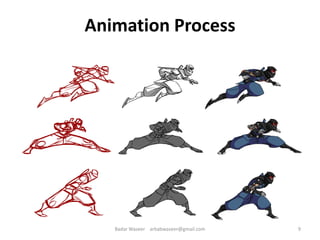
Animation Process
The steps to be followed in creating animation
are:
– Organize the execution in a series of logical steps.
– Choose an animation tool best suited for the job.
– Build and tweak (pull) the sequences.
8Badar Waseer arbabwaseer@gmail.com
Animation Process
9Badar Waseer arbabwaseer@gmail.com
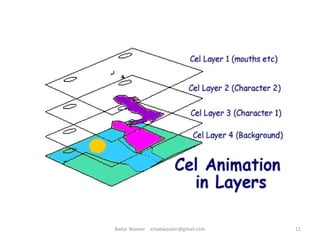
Cel Animation
• Cel animation is a technique in which a series
of progressively different graphics are used on
each frame of movie film.
• The term "cel" is derived from the clear
celluloid sheets that were used for drawing
each frame.
• Cel animation begins with keyframes.
10Badar Waseer arbabwaseer@gmail.com
11Badar Waseer arbabwaseer@gmail.com
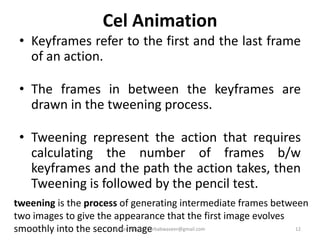
Cel Animation
• Keyframes refer to the first and the last frame
of an action.
• The frames in between the keyframes are
drawn in the tweening process.
• Tweening represent the action that requires
calculating the number of frames b/w
keyframes and the path the action takes, then
Tweening is followed by the pencil test.
tweening is the process of generating intermediate frames between
two images to give the appearance that the first image evolves
smoothly into the second image 12Badar Waseer arbabwaseer@gmail.com
Computer Animation
• Computer animation is very similar to cel
animation.
• The primary difference is in how much must
be drawn by the animator and how much is
automatically generated by the software.
13Badar Waseer arbabwaseer@gmail.com
Computer Animation
• Kinematics is the study of the movement and
motion of structures that have joints.
• Inverse kinematics is the process of linking
objects, and defining their relationship and
limits.
• Morphing is an effect in which a still or moving
image is transformed into another.
14Badar Waseer arbabwaseer@gmail.com
Home Task
Which software produce these formats.
• .ani
• .dir and .dcr
• .eva
• .fla , .flc and .fli
• .gif
• .max and .mng
• .pics and .png
• .swf and .swi
• .webp
List some animation tools ????
15Badar Waseer arbabwaseer@gmail.com
File Formats used in Animation
GIF89a file format:
– It is a version of the GIF image format.
– GIF89a allows multiple images to be put into a single file
and then be displayed as an animation in the Web
browser.
– Applications like BoxTop Software's GIFmation or ULead's
GIF Animator are needed to create GIF89a animation.
16Badar Waseer arbabwaseer@gmail.com
Making Successful Animations
• Use animation carefully and sparingly(Little use of something).
• High quality animations require superior display
platforms and hardware, as well as raw computing
horsepower.
• File compression is very important when preparing
animation files for the Web.
17Badar Waseer arbabwaseer@gmail.com
Making Successful Animations
Some animation tools are:
– Macromedia's Flash.
– Kai's Power Tools' Spheroid Designer.
– Alias|Wavefront's Maya.
– NewTek's Lightwave.
18Badar Waseer arbabwaseer@gmail.com
Summary
• Animation is visual change over time and adds
great power to multimedia.
• Cell animation uses a series of progressively
different graphics on each frame of movie
film.
• Computer animation has eased the process of
creating animation.
• Many file formats are designed specifically to
contain animation.
19Badar Waseer arbabwaseer@gmail.com

Multimedia System & Design Ch 6 animation

  • 1.
  • 2.
    Overview • Introduction toanimation. • Computer-generated animation. • File formats used in animation. • Making successful animations. 2Badar Waseer arbabwaseer@gmail.com
  • 3.
    Introduction to Animation •Animation is defined as the act of making something come alive. • It is concerned with the visual or artistic aspect of the project. • Animation is an object moving across or into or out of the screen. 3Badar Waseer arbabwaseer@gmail.com
  • 4.
    Introduction to Animation •Animation is possible because of a biological phenomenon known as persistence of vision and a psychological phenomenon called phi. • In animation, a series of images are rapidly changed to create an illusion of movement. The phi phenomenon is the optical illusion of perceiving a series of still images, when viewed in rapid succession, as continuous motion. 4Badar Waseer arbabwaseer@gmail.com
  • 5.
    Computer-Generated Animation • Animationspace. • Animation techniques. 5Badar Waseer arbabwaseer@gmail.com
  • 6.
    Animation Space Animation canbe delivered in: – 2-D space - 2-D animations are very simple and static. – 2-1/2D space - An illusion of depth is created through shadowing, highlighting, and forced perspective, though in reality the image rests in two dimensions. – 3-D space - Complicated and realistic animations are done in 3-D space. 6Badar Waseer arbabwaseer@gmail.com
  • 7.
    Animation Techniques • Animationprocess. • Cel animation. • Computer animation. 7Badar Waseer arbabwaseer@gmail.com
  • 8.
    Animation Process The stepsto be followed in creating animation are: – Organize the execution in a series of logical steps. – Choose an animation tool best suited for the job. – Build and tweak (pull) the sequences. 8Badar Waseer arbabwaseer@gmail.com
  • 9.
    Animation Process 9Badar Waseerarbabwaseer@gmail.com
  • 10.
    Cel Animation • Celanimation is a technique in which a series of progressively different graphics are used on each frame of movie film. • The term "cel" is derived from the clear celluloid sheets that were used for drawing each frame. • Cel animation begins with keyframes. 10Badar Waseer arbabwaseer@gmail.com
  • 11.
  • 12.
    Cel Animation • Keyframesrefer to the first and the last frame of an action. • The frames in between the keyframes are drawn in the tweening process. • Tweening represent the action that requires calculating the number of frames b/w keyframes and the path the action takes, then Tweening is followed by the pencil test. tweening is the process of generating intermediate frames between two images to give the appearance that the first image evolves smoothly into the second image 12Badar Waseer arbabwaseer@gmail.com
  • 13.
    Computer Animation • Computeranimation is very similar to cel animation. • The primary difference is in how much must be drawn by the animator and how much is automatically generated by the software. 13Badar Waseer arbabwaseer@gmail.com
  • 14.
    Computer Animation • Kinematicsis the study of the movement and motion of structures that have joints. • Inverse kinematics is the process of linking objects, and defining their relationship and limits. • Morphing is an effect in which a still or moving image is transformed into another. 14Badar Waseer arbabwaseer@gmail.com
  • 15.
    Home Task Which softwareproduce these formats. • .ani • .dir and .dcr • .eva • .fla , .flc and .fli • .gif • .max and .mng • .pics and .png • .swf and .swi • .webp List some animation tools ???? 15Badar Waseer arbabwaseer@gmail.com
  • 16.
    File Formats usedin Animation GIF89a file format: – It is a version of the GIF image format. – GIF89a allows multiple images to be put into a single file and then be displayed as an animation in the Web browser. – Applications like BoxTop Software's GIFmation or ULead's GIF Animator are needed to create GIF89a animation. 16Badar Waseer arbabwaseer@gmail.com
  • 17.
    Making Successful Animations •Use animation carefully and sparingly(Little use of something). • High quality animations require superior display platforms and hardware, as well as raw computing horsepower. • File compression is very important when preparing animation files for the Web. 17Badar Waseer arbabwaseer@gmail.com
  • 18.
    Making Successful Animations Someanimation tools are: – Macromedia's Flash. – Kai's Power Tools' Spheroid Designer. – Alias|Wavefront's Maya. – NewTek's Lightwave. 18Badar Waseer arbabwaseer@gmail.com
  • 19.
    Summary • Animation isvisual change over time and adds great power to multimedia. • Cell animation uses a series of progressively different graphics on each frame of movie film. • Computer animation has eased the process of creating animation. • Many file formats are designed specifically to contain animation. 19Badar Waseer arbabwaseer@gmail.com