Multimedia
Animation
Seminar proposed by: Marwa Mohammed ali
M.Sc. Student
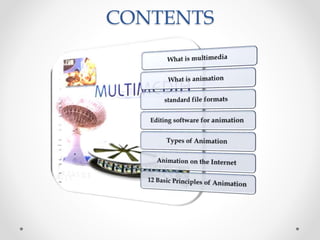
CONTENTS
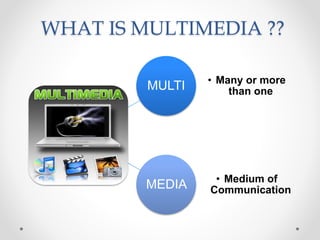
WHAT IS MULTIMEDIA ??
MULTI • Many or more
than one
MEDIA • Medium of
Communication
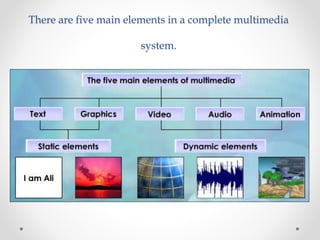
There are five main elements in a complete multimedia
system.
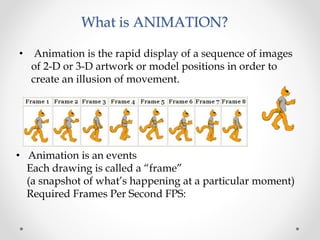
What is ANIMATION?
• Animation is the rapid display of a sequence of images
of 2-D or 3-D artwork or model positions in order to
create an illusion of movement.
• Animation is an events
Each drawing is called a “frame”
(a snapshot of what’s happening at a particular moment)
Required Frames Per Second FPS:
File Formats used in
Animation
 .dir and .dcr - Director files.
 .fla and .swf - Flash files.
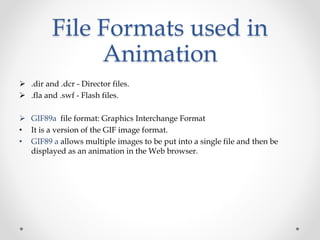
 GIF89a file format: Graphics Interchange Format
• It is a version of the GIF image format.
• GIF89 a allows multiple images to be put into a single file and then be
displayed as an animation in the Web browser.
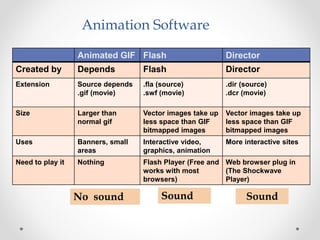
Animation Software
Animated GIF Flash Director
Created by Depends Flash Director
Extension Source depends
.gif (movie)
.fla (source)
.swf (movie)
.dir (source)
.dcr (movie)
Size Larger than
normal gif
Vector images take up
less space than GIF
bitmapped images
Vector images take up
less space than GIF
bitmapped images
Uses Banners, small
areas
Interactive video,
graphics, animation
More interactive sites
Need to play it Nothing Flash Player (Free and
works with most
browsers)
Web browser plug in
(The Shockwave
Player)
No sound Sound Sound
Editing software for animation
• Macromedia flash (2D)
• Asymmetrix 3DFX (3D)
• Magic morph (special effect)
• Ulead GIF animator (web animation)
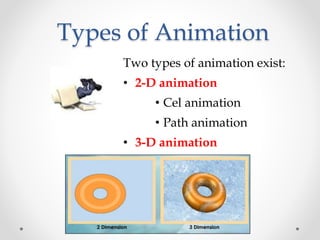
Types of Animation
Two types of animation exist:
• 2-D animation
• Cel animation
• Path animation
• 3-D animation
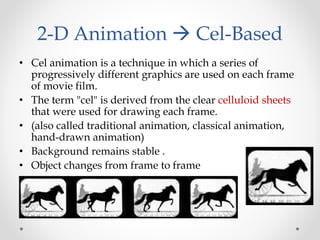
2-D Animation  Cel-Based
• Cel animation is a technique in which a series of
progressively different graphics are used on each frame
of movie film.
• The term "cel" is derived from the clear celluloid sheets
that were used for drawing each frame.
• (also called traditional animation, classical animation,
hand-drawn animation)
• Background remains stable .
• Object changes from frame to frame
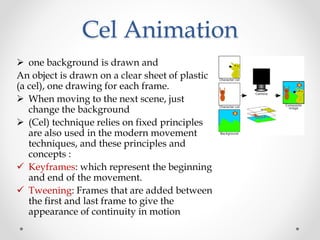
Cel Animation
 one background is drawn and
An object is drawn on a clear sheet of plastic
(a cel), one drawing for each frame.
 When moving to the next scene, just
change the background
 (Cel) technique relies on fixed principles
are also used in the modern movement
techniques, and these principles and
concepts :
 Keyframes: which represent the beginning
and end of the movement.
 Tweening: Frames that are added between
the first and last frame to give the
appearance of continuity in motion
Path Based Animation
• moves an object along a
predetermined path on the screen
• The path could be a straight line
or any number of curves.
• And then the computer generated
all the frames in between called
(estimation Frames)
- the artist doesn’t have to draw
the intermediate frames (like the
artist did in cel based animation)
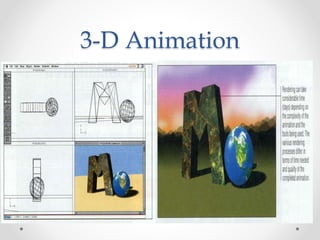
3-D Animation
• 3-D Animation involves three steps:-
1. Modeling – creating the broad contours and structure of
3-D objects and scenes
2. Animation – defining the object’s motion
3. Rendering – giving objects attributes such as color,
surface textures, and amounts of transparency
3-D Animation
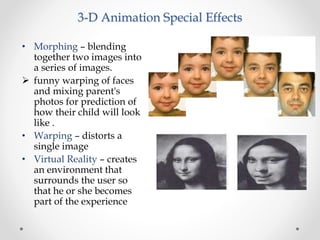
3-D Animation Special Effects
• Morphing – blending
together two images into
a series of images.
 funny warping of faces
and mixing parent's
photos for prediction of
how their child will look
like .
• Warping – distorts a
single image
• Virtual Reality – creates
an environment that
surrounds the user so
that he or she becomes
part of the experience
Animation on the Internet
• Animation is an excellent way to provide appeal on a
web site, choose from the following
 Animated text
 Animated GIF’s
 Marcomedia Director applications
 3-D environments
• Animated text – using the HTML <blink> command
causes text to flash on and off
• Animated gif – using a software program to create a
series of gif files such as GIF Builder
• 3-D environments – a computer language used to create
3-D images
12 Basic Principles of
Animation
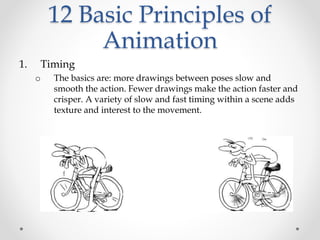
1. Timing
o The basics are: more drawings between poses slow and
smooth the action. Fewer drawings make the action faster and
crisper. A variety of slow and fast timing within a scene adds
texture and interest to the movement.
12 Basic Principles of
Animation
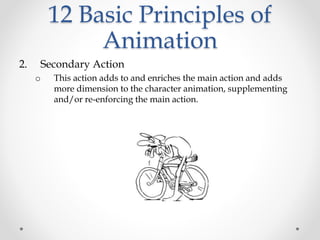
2. Secondary Action
o This action adds to and enriches the main action and adds
more dimension to the character animation, supplementing
and/or re-enforcing the main action.
12 Basic Principles of
Animation
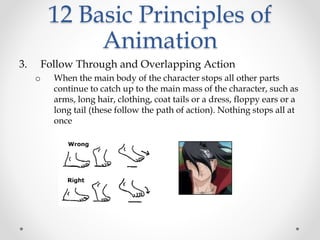
3. Follow Through and Overlapping Action
o When the main body of the character stops all other parts
continue to catch up to the main mass of the character, such as
arms, long hair, clothing, coat tails or a dress, floppy ears or a
long tail (these follow the path of action). Nothing stops all at
once
12 Basic Principles of
Animation
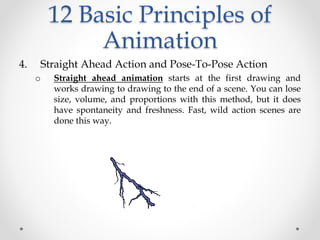
4. Straight Ahead Action and Pose-To-Pose Action
o Straight ahead animation starts at the first drawing and
works drawing to drawing to the end of a scene. You can lose
size, volume, and proportions with this method, but it does
have spontaneity and freshness. Fast, wild action scenes are
done this way.
12 Basic Principles of
Animation
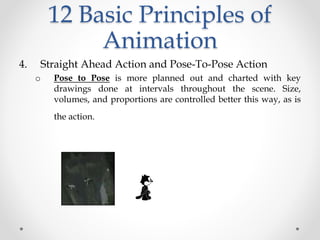
4. Straight Ahead Action and Pose-To-Pose Action
o Pose to Pose is more planned out and charted with key
drawings done at intervals throughout the scene. Size,
volumes, and proportions are controlled better this way, as is
the action.
12 Basic Principles of
Animation
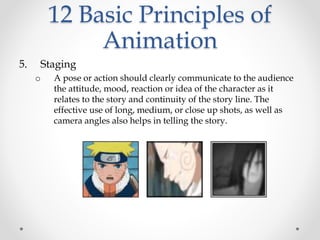
5. Staging
o A pose or action should clearly communicate to the audience
the attitude, mood, reaction or idea of the character as it
relates to the story and continuity of the story line. The
effective use of long, medium, or close up shots, as well as
camera angles also helps in telling the story.
12 Basic Principles of
Animation
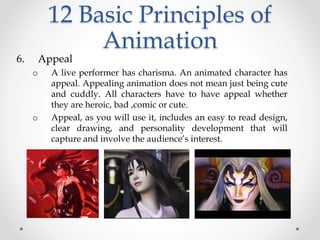
6. Appeal
o A live performer has charisma. An animated character has
appeal. Appealing animation does not mean just being cute
and cuddly. All characters have to have appeal whether
they are heroic, bad ,comic or cute.
o Appeal, as you will use it, includes an easy to read design,
clear drawing, and personality development that will
capture and involve the audience’s interest.
12 Basic Principles of
Animation
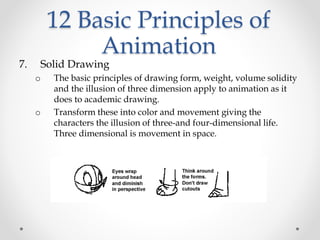
7. Solid Drawing
o The basic principles of drawing form, weight, volume solidity
and the illusion of three dimension apply to animation as it
does to academic drawing.
o Transform these into color and movement giving the
characters the illusion of three-and four-dimensional life.
Three dimensional is movement in space.
12 Basic Principles of
Animation
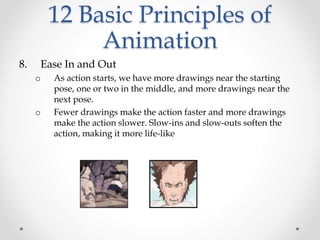
8. Ease In and Out
o As action starts, we have more drawings near the starting
pose, one or two in the middle, and more drawings near the
next pose.
o Fewer drawings make the action faster and more drawings
make the action slower. Slow-ins and slow-outs soften the
action, making it more life-like
12 Basic Principles of
Animation
9. Arcs
o All actions, with few exceptions (such as the animation of a
mechanical device), follow an arc or slightly circular path.
o This is especially true of the human figure and the action of
animals. Arcs give animation a more natural action and better
flow.
12 Basic Principles of
Animation
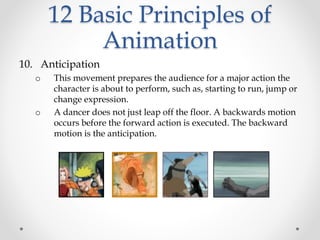
10. Anticipation
o This movement prepares the audience for a major action the
character is about to perform, such as, starting to run, jump or
change expression.
o A dancer does not just leap off the floor. A backwards motion
occurs before the forward action is executed. The backward
motion is the anticipation.
12 Basic Principles of
Animation
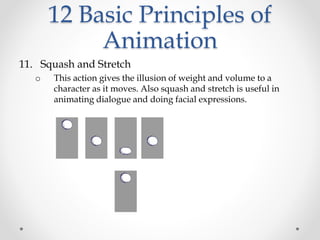
11. Squash and Stretch
o This action gives the illusion of weight and volume to a
character as it moves. Also squash and stretch is useful in
animating dialogue and doing facial expressions.
12 Basic Principles of
Animation
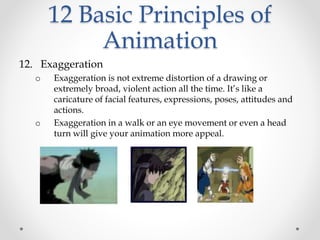
12. Exaggeration
o Exaggeration is not extreme distortion of a drawing or
extremely broad, violent action all the time. It’s like a
caricature of facial features, expressions, poses, attitudes and
actions.
o Exaggeration in a walk or an eye movement or even a head
turn will give your animation more appeal.
Animation

Animation

  • 1.
    Multimedia Animation Seminar proposed by:Marwa Mohammed ali M.Sc. Student
  • 2.
  • 3.
    WHAT IS MULTIMEDIA?? MULTI • Many or more than one MEDIA • Medium of Communication
  • 4.
    There are fivemain elements in a complete multimedia system.
  • 5.
    What is ANIMATION? •Animation is the rapid display of a sequence of images of 2-D or 3-D artwork or model positions in order to create an illusion of movement. • Animation is an events Each drawing is called a “frame” (a snapshot of what’s happening at a particular moment) Required Frames Per Second FPS:
  • 6.
    File Formats usedin Animation  .dir and .dcr - Director files.  .fla and .swf - Flash files.  GIF89a file format: Graphics Interchange Format • It is a version of the GIF image format. • GIF89 a allows multiple images to be put into a single file and then be displayed as an animation in the Web browser.
  • 7.
    Animation Software Animated GIFFlash Director Created by Depends Flash Director Extension Source depends .gif (movie) .fla (source) .swf (movie) .dir (source) .dcr (movie) Size Larger than normal gif Vector images take up less space than GIF bitmapped images Vector images take up less space than GIF bitmapped images Uses Banners, small areas Interactive video, graphics, animation More interactive sites Need to play it Nothing Flash Player (Free and works with most browsers) Web browser plug in (The Shockwave Player) No sound Sound Sound
  • 8.
    Editing software foranimation • Macromedia flash (2D) • Asymmetrix 3DFX (3D) • Magic morph (special effect) • Ulead GIF animator (web animation)
  • 9.
    Types of Animation Twotypes of animation exist: • 2-D animation • Cel animation • Path animation • 3-D animation
  • 10.
    2-D Animation Cel-Based • Cel animation is a technique in which a series of progressively different graphics are used on each frame of movie film. • The term "cel" is derived from the clear celluloid sheets that were used for drawing each frame. • (also called traditional animation, classical animation, hand-drawn animation) • Background remains stable . • Object changes from frame to frame
  • 11.
    Cel Animation  onebackground is drawn and An object is drawn on a clear sheet of plastic (a cel), one drawing for each frame.  When moving to the next scene, just change the background  (Cel) technique relies on fixed principles are also used in the modern movement techniques, and these principles and concepts :  Keyframes: which represent the beginning and end of the movement.  Tweening: Frames that are added between the first and last frame to give the appearance of continuity in motion
  • 12.
    Path Based Animation •moves an object along a predetermined path on the screen • The path could be a straight line or any number of curves. • And then the computer generated all the frames in between called (estimation Frames) - the artist doesn’t have to draw the intermediate frames (like the artist did in cel based animation)
  • 13.
    3-D Animation • 3-DAnimation involves three steps:- 1. Modeling – creating the broad contours and structure of 3-D objects and scenes 2. Animation – defining the object’s motion 3. Rendering – giving objects attributes such as color, surface textures, and amounts of transparency
  • 14.
  • 15.
    3-D Animation SpecialEffects • Morphing – blending together two images into a series of images.  funny warping of faces and mixing parent's photos for prediction of how their child will look like . • Warping – distorts a single image • Virtual Reality – creates an environment that surrounds the user so that he or she becomes part of the experience
  • 16.
    Animation on theInternet • Animation is an excellent way to provide appeal on a web site, choose from the following  Animated text  Animated GIF’s  Marcomedia Director applications  3-D environments
  • 17.
    • Animated text– using the HTML <blink> command causes text to flash on and off • Animated gif – using a software program to create a series of gif files such as GIF Builder • 3-D environments – a computer language used to create 3-D images
  • 18.
    12 Basic Principlesof Animation 1. Timing o The basics are: more drawings between poses slow and smooth the action. Fewer drawings make the action faster and crisper. A variety of slow and fast timing within a scene adds texture and interest to the movement.
  • 19.
    12 Basic Principlesof Animation 2. Secondary Action o This action adds to and enriches the main action and adds more dimension to the character animation, supplementing and/or re-enforcing the main action.
  • 20.
    12 Basic Principlesof Animation 3. Follow Through and Overlapping Action o When the main body of the character stops all other parts continue to catch up to the main mass of the character, such as arms, long hair, clothing, coat tails or a dress, floppy ears or a long tail (these follow the path of action). Nothing stops all at once
  • 21.
    12 Basic Principlesof Animation 4. Straight Ahead Action and Pose-To-Pose Action o Straight ahead animation starts at the first drawing and works drawing to drawing to the end of a scene. You can lose size, volume, and proportions with this method, but it does have spontaneity and freshness. Fast, wild action scenes are done this way.
  • 22.
    12 Basic Principlesof Animation 4. Straight Ahead Action and Pose-To-Pose Action o Pose to Pose is more planned out and charted with key drawings done at intervals throughout the scene. Size, volumes, and proportions are controlled better this way, as is the action.
  • 23.
    12 Basic Principlesof Animation 5. Staging o A pose or action should clearly communicate to the audience the attitude, mood, reaction or idea of the character as it relates to the story and continuity of the story line. The effective use of long, medium, or close up shots, as well as camera angles also helps in telling the story.
  • 24.
    12 Basic Principlesof Animation 6. Appeal o A live performer has charisma. An animated character has appeal. Appealing animation does not mean just being cute and cuddly. All characters have to have appeal whether they are heroic, bad ,comic or cute. o Appeal, as you will use it, includes an easy to read design, clear drawing, and personality development that will capture and involve the audience’s interest.
  • 25.
    12 Basic Principlesof Animation 7. Solid Drawing o The basic principles of drawing form, weight, volume solidity and the illusion of three dimension apply to animation as it does to academic drawing. o Transform these into color and movement giving the characters the illusion of three-and four-dimensional life. Three dimensional is movement in space.
  • 26.
    12 Basic Principlesof Animation 8. Ease In and Out o As action starts, we have more drawings near the starting pose, one or two in the middle, and more drawings near the next pose. o Fewer drawings make the action faster and more drawings make the action slower. Slow-ins and slow-outs soften the action, making it more life-like
  • 27.
    12 Basic Principlesof Animation 9. Arcs o All actions, with few exceptions (such as the animation of a mechanical device), follow an arc or slightly circular path. o This is especially true of the human figure and the action of animals. Arcs give animation a more natural action and better flow.
  • 28.
    12 Basic Principlesof Animation 10. Anticipation o This movement prepares the audience for a major action the character is about to perform, such as, starting to run, jump or change expression. o A dancer does not just leap off the floor. A backwards motion occurs before the forward action is executed. The backward motion is the anticipation.
  • 29.
    12 Basic Principlesof Animation 11. Squash and Stretch o This action gives the illusion of weight and volume to a character as it moves. Also squash and stretch is useful in animating dialogue and doing facial expressions.
  • 30.
    12 Basic Principlesof Animation 12. Exaggeration o Exaggeration is not extreme distortion of a drawing or extremely broad, violent action all the time. It’s like a caricature of facial features, expressions, poses, attitudes and actions. o Exaggeration in a walk or an eye movement or even a head turn will give your animation more appeal.