Animation
Prepared by,
B.Maaithili
Assistant Professor,
Department of Information Technology,
Saiva Bhanu Kshatriya college, Aruppukottai
Animation
• It makes static presentations come alive
• It is visual change over time and can add great
power to our multimedia
The Power of Motion
• Visual effects such as wipes, fades, zooms, and
dissolves are available in most multimedia
authoring packages, and some of these can be
used for primitive animation.
• Animation is an object actually moving across
or into or out of the screen
• Eg :a spinning globe of our earth;
Principles of Animation
• Animation is possible because of a biological
phenomenon known as persistence of vision and a
psychological phenomenon called phi.
Persistence of vision :
It is an optical illusion where the human eye
perceives the continued presence of an image after it
has disappeared from view. ( It is also known as
Retinal Persistence)
Phi:
It is an illusion that arises when an objects are
placed side be side and illuminated rapidly one after
another.
Principles of Animation
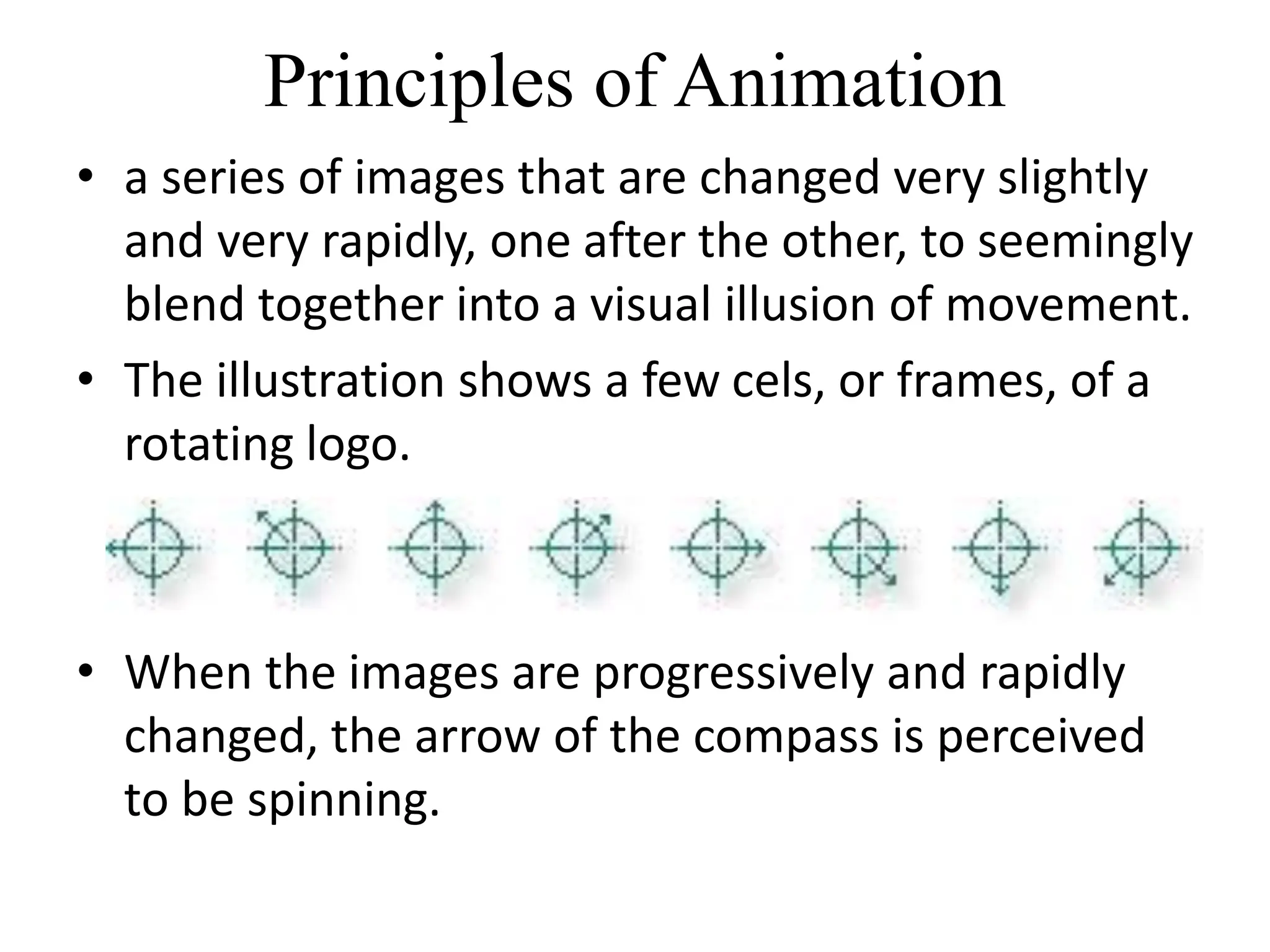
• a series of images that are changed very slightly
and very rapidly, one after the other, to seemingly
blend together into a visual illusion of movement.
• The illustration shows a few cels, or frames, of a
rotating logo.
• When the images are progressively and rapidly
changed, the arrow of the compass is perceived
to be spinning.
Animation by Computer
1) 2-D space
• the visual changes that bring an image alive
occur on the flat Cartesian x and y axes of the
screen.
• simple and static, not changing their position
on the screen.
Animation by Computer
2 ) Path Animation in 2-D space
• increases the complexity of an animation and
provides motion,
• changing the location of an image along a
predetermined path (position) during a specified
amount of time (speed).
• Authoring and presentation software such as
Flash or PowerPoint provide user-friendly tools to
compute position changes and redraw an image
in a new location.
• Eg: a bouncing ball
Animation by Computer
3 ) 21/2-D
• an illusion of depth (the z axis) is added to an image
through shadowing and highlighting, but the image
itself still rests on the flat x and y axes in two
dimensions.
• Embossing, shadowing, and highlighting provide a
sense of depth by raising an image or cutting it into a
background.
Animation by Computer
4 ) 3-D
• software creates a virtual realm in three dimensions,
• changes (motion) are calculated along all three axes
(x, y, and z),
• allowing an image or object that itself is created with
a front, back, sides, top, and bottom to move toward
or away from the viewer,
• around and get a look at all the object’s parts from
all angles.
• rendered frame by frame by high-end
Animation Techniques
• create an animation, organize its execution
into a series of logical steps.
• First, gather all the activities we wish to
provide in the animation.
• Choose the animation tool
• include creating objects, planning their
movements, texturing their surfaces, adding
lights, experimenting with lighting effects, and
positioning the camera or point of view.
Cel Animation
• This animation techniques made by Disney
• The term cel derives from the clear celluloid sheets that
were used for drawing each frame
• A minute of animation may thus require as many as
1,440 separate frames, and each frame may be
composed of many layers of cels.
• Cel animation artwork begins with keyframes (the first
and last frame of an action).
• The series of frames in between the keyframes are drawn
in a process called tweening.
• Tweening is an action that requires calculating the
number of frames between keyframes and the path the
action takes
Computer Animation
• It use the same logic and procedural concepts
used in cel animation
• Object is automatically generated by the software
2-D Animation :
• An animator simply creates an object and
describes a path for the object to follow.
• each frame of an animation is provided by the
animator, and the frames are then composited
into a single file of images to be played in
sequence.
Computer Animation
3-D Animation:
• create the models of individual objects and
designing the characteristics of their shapes and
surfaces.
• And, then computes the movement of the objects
within the 3-D space and renders each frame, in
the end stitching them together in a digital
output file (Eg: AVI )
• Output files are delivered as “pre-rendered”
digital video clips.
Computer Animation
Kinematics :
• is the study of the movement and motion of structures that
have joints, eg : a walking man
• It is used to calculate the position, rotation, velocity, and
acceleration of all the joints and articulated parts involved
Inverse kinematics:
• is the process by which link objects such as hands to arms and
define their relationships and limits (for example, elbows
cannot bend backward).
Morphing:
• One image transforms into another.
• The morphed images were built at a rate of eight frames per
second, with each transition taking a total of four seconds (32
separate images for each transition), and the number of key
points was held to a minimum to shorten rendering time.
• Setting key points is crucial for a smooth transition between
two images.
Animation File Formats
• Director (.dir and .dcr),
• AnimatorPro (.fli and .flc),
• 3D Studio Max (.max),
• GIF89a (.gif), and
• Flash (.fla and .swf)
Making Animations That Work
• Animation catches the eye and makes things
noticeable
• Multimedia authoring systems provide tools
to simplify creating animations within that
authoring system,
• tool for creating multimedia animations for
Macintosh and Windows environments and
for the Web is Adobe’s Flash.

Multimedia Animation, Introduction, History, Types

  • 1.
    Animation Prepared by, B.Maaithili Assistant Professor, Departmentof Information Technology, Saiva Bhanu Kshatriya college, Aruppukottai
  • 2.
    Animation • It makesstatic presentations come alive • It is visual change over time and can add great power to our multimedia
  • 3.
    The Power ofMotion • Visual effects such as wipes, fades, zooms, and dissolves are available in most multimedia authoring packages, and some of these can be used for primitive animation. • Animation is an object actually moving across or into or out of the screen • Eg :a spinning globe of our earth;
  • 4.
    Principles of Animation •Animation is possible because of a biological phenomenon known as persistence of vision and a psychological phenomenon called phi. Persistence of vision : It is an optical illusion where the human eye perceives the continued presence of an image after it has disappeared from view. ( It is also known as Retinal Persistence) Phi: It is an illusion that arises when an objects are placed side be side and illuminated rapidly one after another.
  • 5.
    Principles of Animation •a series of images that are changed very slightly and very rapidly, one after the other, to seemingly blend together into a visual illusion of movement. • The illustration shows a few cels, or frames, of a rotating logo. • When the images are progressively and rapidly changed, the arrow of the compass is perceived to be spinning.
  • 6.
    Animation by Computer 1)2-D space • the visual changes that bring an image alive occur on the flat Cartesian x and y axes of the screen. • simple and static, not changing their position on the screen.
  • 7.
    Animation by Computer 2) Path Animation in 2-D space • increases the complexity of an animation and provides motion, • changing the location of an image along a predetermined path (position) during a specified amount of time (speed). • Authoring and presentation software such as Flash or PowerPoint provide user-friendly tools to compute position changes and redraw an image in a new location. • Eg: a bouncing ball
  • 8.
    Animation by Computer 3) 21/2-D • an illusion of depth (the z axis) is added to an image through shadowing and highlighting, but the image itself still rests on the flat x and y axes in two dimensions. • Embossing, shadowing, and highlighting provide a sense of depth by raising an image or cutting it into a background.
  • 9.
    Animation by Computer 4) 3-D • software creates a virtual realm in three dimensions, • changes (motion) are calculated along all three axes (x, y, and z), • allowing an image or object that itself is created with a front, back, sides, top, and bottom to move toward or away from the viewer, • around and get a look at all the object’s parts from all angles. • rendered frame by frame by high-end
  • 10.
    Animation Techniques • createan animation, organize its execution into a series of logical steps. • First, gather all the activities we wish to provide in the animation. • Choose the animation tool • include creating objects, planning their movements, texturing their surfaces, adding lights, experimenting with lighting effects, and positioning the camera or point of view.
  • 11.
    Cel Animation • Thisanimation techniques made by Disney • The term cel derives from the clear celluloid sheets that were used for drawing each frame • A minute of animation may thus require as many as 1,440 separate frames, and each frame may be composed of many layers of cels. • Cel animation artwork begins with keyframes (the first and last frame of an action). • The series of frames in between the keyframes are drawn in a process called tweening. • Tweening is an action that requires calculating the number of frames between keyframes and the path the action takes
  • 12.
    Computer Animation • Ituse the same logic and procedural concepts used in cel animation • Object is automatically generated by the software 2-D Animation : • An animator simply creates an object and describes a path for the object to follow. • each frame of an animation is provided by the animator, and the frames are then composited into a single file of images to be played in sequence.
  • 13.
    Computer Animation 3-D Animation: •create the models of individual objects and designing the characteristics of their shapes and surfaces. • And, then computes the movement of the objects within the 3-D space and renders each frame, in the end stitching them together in a digital output file (Eg: AVI ) • Output files are delivered as “pre-rendered” digital video clips.
  • 14.
    Computer Animation Kinematics : •is the study of the movement and motion of structures that have joints, eg : a walking man • It is used to calculate the position, rotation, velocity, and acceleration of all the joints and articulated parts involved Inverse kinematics: • is the process by which link objects such as hands to arms and define their relationships and limits (for example, elbows cannot bend backward). Morphing: • One image transforms into another. • The morphed images were built at a rate of eight frames per second, with each transition taking a total of four seconds (32 separate images for each transition), and the number of key points was held to a minimum to shorten rendering time. • Setting key points is crucial for a smooth transition between two images.
  • 15.
    Animation File Formats •Director (.dir and .dcr), • AnimatorPro (.fli and .flc), • 3D Studio Max (.max), • GIF89a (.gif), and • Flash (.fla and .swf)
  • 16.
    Making Animations ThatWork • Animation catches the eye and makes things noticeable • Multimedia authoring systems provide tools to simplify creating animations within that authoring system, • tool for creating multimedia animations for Macintosh and Windows environments and for the Web is Adobe’s Flash.