

ANIMATIONANIMATION
MULTIMEDIA TECHNIQUE
By
P . Sri Priya
Definations.Definations.
 AnimationAnimation is the creation of movingis the creation of moving
pictures one frame at a time.pictures one frame at a time.
 In the abstract, an animation is aIn the abstract, an animation is a
continuous, time-varying image.continuous, time-varying image.
 In practice, it is a sequence of staticIn practice, it is a sequence of static
images displayed in succession soimages displayed in succession so
rapidly that it looks continuous.rapidly that it looks continuous.
Animate MeansAnimate Means
 Animate means “to bring to life”Animate means “to bring to life”
 When, the still characters,When, the still characters,
objects, abstract shapes, orobjects, abstract shapes, or
whatever, that have beenwhatever, that have been
photographed in sequence, arephotographed in sequence, are
played back at normal film or videoplayed back at normal film or video
speeds, it appears to come to life.speeds, it appears to come to life.
Frame Rate RequirementFrame Rate Requirement
 Technically, 24 frames per second.Technically, 24 frames per second.
 In practice, animation that does notIn practice, animation that does not
require seamlessly smoothrequire seamlessly smooth
movement can be shot ‘on 2s’, whichmovement can be shot ‘on 2s’, which
means that two frames of eachmeans that two frames of each
drawing are captured rather thandrawing are captured rather than
just one. This gives an effectivejust one. This gives an effective
frame rate of 12 frames per secondframe rate of 12 frames per second
for film.for film.
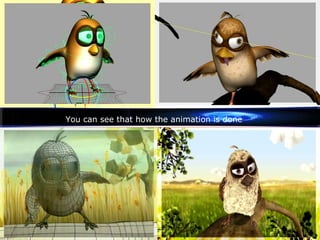
You can see that how the animation is done
Key PointsKey Points
 Animation can be made usingAnimation can be made using
traditional methods and capturedtraditional methods and captured
and digitized one frame at a timeand digitized one frame at a time
using a video camera or other inputusing a video camera or other input
device.device.
 Drawn or painted animation can beDrawn or painted animation can be
made using a graphics application.made using a graphics application.
Painter provides special support forPainter provides special support for
animation usinganimation using frame stacksframe stacks
Frame StackFrame Stack
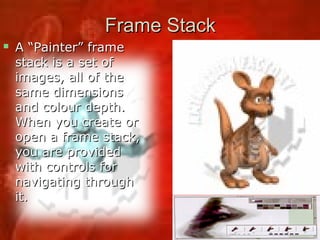
 A “Painter” frameA “Painter” frame
stack is a set ofstack is a set of
images, all of theimages, all of the
same dimensionssame dimensions
and colour depth.and colour depth.
When you create orWhen you create or
open a frame stack,open a frame stack,
you are providedyou are provided
with controls forwith controls for
navigating throughnavigating through
it.it.

AnimationAnimation hashas been used for entertainmentbeen used for entertainment,
advertising, instruction, art andadvertising, instruction, art and
propaganda on film or video; it is alsopropaganda on film or video; it is also
employed on the World Wide Web and inemployed on the World Wide Web and in
multimedia presentations.multimedia presentations.
 Animation adds visual impact to yourAnimation adds visual impact to your
multimedia projects and WEB Pages.multimedia projects and WEB Pages.
USES
 Many Multimedia applications forMany Multimedia applications for
both Macintosh and Windowsboth Macintosh and Windows
provide animation tools, but weprovide animation tools, but we
should first understand theshould first understand the
principles of how the eyeprinciples of how the eye
interprets the changes it sees asinterprets the changes it sees as
Motion.Motion.
 Eg: A spinning globe, a flyingEg: A spinning globe, a flying
butterfly, the famous DISNEY…butterfly, the famous DISNEY…
PrinciplesPrinciples of Animationof Animation
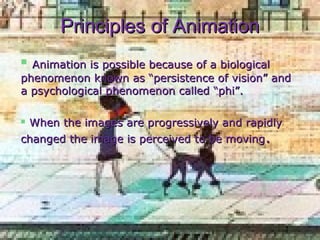
 Animation is possible because of a biologicalAnimation is possible because of a biological
phenomenon known as “persistence of vision” andphenomenon known as “persistence of vision” and
a psychological phenomenon called “phi”.a psychological phenomenon called “phi”.
 When the images are progressively and rapidlyWhen the images are progressively and rapidly
changed the image is perceived to be movingchanged the image is perceived to be moving..
Animation TechniquesAnimation Techniques
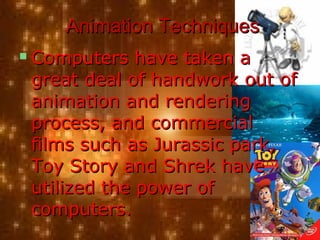
 Computers have taken aComputers have taken a
great deal of handwork out ofgreat deal of handwork out of
animation and renderinganimation and rendering
process, and commercialprocess, and commercial
films such as Jurassic park,films such as Jurassic park,
Toy Story and Shrek haveToy Story and Shrek have
utilized the power ofutilized the power of
computers.computers.
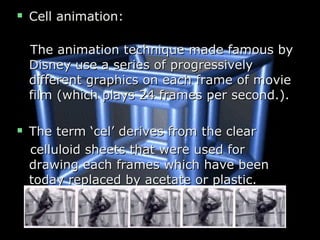
 Cell animation:Cell animation:
The animation technique made famous byThe animation technique made famous by
Disney use a series of progressivelyDisney use a series of progressively
different graphics on each frame of moviedifferent graphics on each frame of movie
film (which plays 24 frames per second.).film (which plays 24 frames per second.).
 The term ‘cel’ derives from the clearThe term ‘cel’ derives from the clear
celluloid sheets that were used forcelluloid sheets that were used for
drawing each frames which have beendrawing each frames which have been
today replaced by acetate or plastic.today replaced by acetate or plastic.
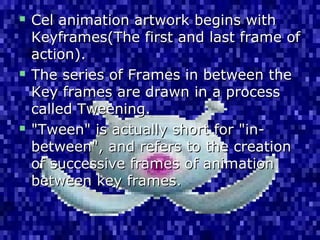
 Cel animation artwork begins withCel animation artwork begins with
Keyframes(The first and last frame ofKeyframes(The first and last frame of
action).action).
 The series of Frames in between theThe series of Frames in between the
Key frames are drawn in a processKey frames are drawn in a process
called Tweening.called Tweening.
 "Tween" is actually short for "in-"Tween" is actually short for "in-
between", and refers to the creationbetween", and refers to the creation
of successive frames of animationof successive frames of animation
between key frames.between key frames.
FlashFlash is designed for producing simpleis designed for producing simple
vector animations, primarily for displayvector animations, primarily for display
on the World Wide Web. It is organizedon the World Wide Web. It is organized
on aon a time linetime line and provides automatedand provides automated
tweeting.tweeting.
Easing inEasing in andand easing outeasing out are used toare used to
produce more realistic movement thanproduce more realistic movement than
simple linear interpolation.simple linear interpolation.
Animations may be rendered asAnimations may be rendered as
QuickTimeQuickTime movies, exported as amovies, exported as a
sequence of image filessequence of image files or stored asor stored as
anan animated GIFanimated GIF..
Multiple Animation FormatsMultiple Animation Formats
 When you capture a set of frames thatWhen you capture a set of frames that
form a sequence, “Premiere” can save itform a sequence, “Premiere” can save it
as QuickTime movie or a set ofas QuickTime movie or a set of
sequentially numbered images files.sequentially numbered images files.
 For eg:For eg:
Director(.dir & .dcr), 3d StudioDirector(.dir & .dcr), 3d Studio
max(.max), Windows Audio Video(.avi),max(.max), Windows Audio Video(.avi),
Macintosh Time-basedMacintosh Time-based
Data Format(.qt , .mov),Data Format(.qt , .mov),
Motion video(.mpeg,.mpg),Motion video(.mpeg,.mpg),
CompuServe(.gif) & Flash(.swf).CompuServe(.gif) & Flash(.swf).
Web Page Animation File FormatsWeb Page Animation File Formats(1(1))
 GIF FilesGIF Files
• GIF89a’s ability toGIF89a’s ability to
store a sequencestore a sequence
of images hasof images has
been used tobeen used to
provide a cheapprovide a cheap
and cheerful formand cheerful form
of small animationof small animation
for Web pagefor Web page
advertisements.advertisements.
It has no sound.It has no sound.
QuickTimeQuickTime
 For animation ofFor animation of
any duration,any duration,
especially if it isespecially if it is
accompanied byaccompanied by
sound, the bestsound, the best
result will beresult will be
achieved using aachieved using a
video format,video format,
and QuickTimeand QuickTime
has become thehas become the
standard.standard.
FlashFlash
 Flash is designed for producingFlash is designed for producing
simplesimple vector animationsvector animations, primarily, primarily
for display on the World Wide Web.for display on the World Wide Web.
 A Flash animation is organized usingA Flash animation is organized using
aa timelinetimeline, a graphical representation, a graphical representation
of a sequence of frames, similar toof a sequence of frames, similar to
the timeline in video editingthe timeline in video editing
applications. . . . . . . . . . . .applications. . . . . . . . . . . .
Thank you . . . . . . . .
By: SriPriya
sri waterfall. m b

Animation

  • 1.
  • 2.
    Definations.Definations.  AnimationAnimation isthe creation of movingis the creation of moving pictures one frame at a time.pictures one frame at a time.  In the abstract, an animation is aIn the abstract, an animation is a continuous, time-varying image.continuous, time-varying image.  In practice, it is a sequence of staticIn practice, it is a sequence of static images displayed in succession soimages displayed in succession so rapidly that it looks continuous.rapidly that it looks continuous.
  • 3.
    Animate MeansAnimate Means Animate means “to bring to life”Animate means “to bring to life”  When, the still characters,When, the still characters, objects, abstract shapes, orobjects, abstract shapes, or whatever, that have beenwhatever, that have been photographed in sequence, arephotographed in sequence, are played back at normal film or videoplayed back at normal film or video speeds, it appears to come to life.speeds, it appears to come to life.
  • 4.
    Frame Rate RequirementFrameRate Requirement  Technically, 24 frames per second.Technically, 24 frames per second.  In practice, animation that does notIn practice, animation that does not require seamlessly smoothrequire seamlessly smooth movement can be shot ‘on 2s’, whichmovement can be shot ‘on 2s’, which means that two frames of eachmeans that two frames of each drawing are captured rather thandrawing are captured rather than just one. This gives an effectivejust one. This gives an effective frame rate of 12 frames per secondframe rate of 12 frames per second for film.for film.
  • 5.
    You can seethat how the animation is done
  • 6.
    Key PointsKey Points Animation can be made usingAnimation can be made using traditional methods and capturedtraditional methods and captured and digitized one frame at a timeand digitized one frame at a time using a video camera or other inputusing a video camera or other input device.device.  Drawn or painted animation can beDrawn or painted animation can be made using a graphics application.made using a graphics application. Painter provides special support forPainter provides special support for animation usinganimation using frame stacksframe stacks
  • 7.
    Frame StackFrame Stack A “Painter” frameA “Painter” frame stack is a set ofstack is a set of images, all of theimages, all of the same dimensionssame dimensions and colour depth.and colour depth. When you create orWhen you create or open a frame stack,open a frame stack, you are providedyou are provided with controls forwith controls for navigating throughnavigating through it.it.
  • 8.
     AnimationAnimation hashas beenused for entertainmentbeen used for entertainment, advertising, instruction, art andadvertising, instruction, art and propaganda on film or video; it is alsopropaganda on film or video; it is also employed on the World Wide Web and inemployed on the World Wide Web and in multimedia presentations.multimedia presentations.  Animation adds visual impact to yourAnimation adds visual impact to your multimedia projects and WEB Pages.multimedia projects and WEB Pages. USES
  • 9.
     Many Multimediaapplications forMany Multimedia applications for both Macintosh and Windowsboth Macintosh and Windows provide animation tools, but weprovide animation tools, but we should first understand theshould first understand the principles of how the eyeprinciples of how the eye interprets the changes it sees asinterprets the changes it sees as Motion.Motion.  Eg: A spinning globe, a flyingEg: A spinning globe, a flying butterfly, the famous DISNEY…butterfly, the famous DISNEY…
  • 10.
    PrinciplesPrinciples of AnimationofAnimation  Animation is possible because of a biologicalAnimation is possible because of a biological phenomenon known as “persistence of vision” andphenomenon known as “persistence of vision” and a psychological phenomenon called “phi”.a psychological phenomenon called “phi”.  When the images are progressively and rapidlyWhen the images are progressively and rapidly changed the image is perceived to be movingchanged the image is perceived to be moving..
  • 11.
    Animation TechniquesAnimation Techniques Computers have taken aComputers have taken a great deal of handwork out ofgreat deal of handwork out of animation and renderinganimation and rendering process, and commercialprocess, and commercial films such as Jurassic park,films such as Jurassic park, Toy Story and Shrek haveToy Story and Shrek have utilized the power ofutilized the power of computers.computers.
  • 12.
     Cell animation:Cellanimation: The animation technique made famous byThe animation technique made famous by Disney use a series of progressivelyDisney use a series of progressively different graphics on each frame of moviedifferent graphics on each frame of movie film (which plays 24 frames per second.).film (which plays 24 frames per second.).  The term ‘cel’ derives from the clearThe term ‘cel’ derives from the clear celluloid sheets that were used forcelluloid sheets that were used for drawing each frames which have beendrawing each frames which have been today replaced by acetate or plastic.today replaced by acetate or plastic.
  • 13.
     Cel animationartwork begins withCel animation artwork begins with Keyframes(The first and last frame ofKeyframes(The first and last frame of action).action).  The series of Frames in between theThe series of Frames in between the Key frames are drawn in a processKey frames are drawn in a process called Tweening.called Tweening.  "Tween" is actually short for "in-"Tween" is actually short for "in- between", and refers to the creationbetween", and refers to the creation of successive frames of animationof successive frames of animation between key frames.between key frames.
  • 14.
    FlashFlash is designedfor producing simpleis designed for producing simple vector animations, primarily for displayvector animations, primarily for display on the World Wide Web. It is organizedon the World Wide Web. It is organized on aon a time linetime line and provides automatedand provides automated tweeting.tweeting. Easing inEasing in andand easing outeasing out are used toare used to produce more realistic movement thanproduce more realistic movement than simple linear interpolation.simple linear interpolation. Animations may be rendered asAnimations may be rendered as QuickTimeQuickTime movies, exported as amovies, exported as a sequence of image filessequence of image files or stored asor stored as anan animated GIFanimated GIF..
  • 15.
    Multiple Animation FormatsMultipleAnimation Formats  When you capture a set of frames thatWhen you capture a set of frames that form a sequence, “Premiere” can save itform a sequence, “Premiere” can save it as QuickTime movie or a set ofas QuickTime movie or a set of sequentially numbered images files.sequentially numbered images files.  For eg:For eg: Director(.dir & .dcr), 3d StudioDirector(.dir & .dcr), 3d Studio max(.max), Windows Audio Video(.avi),max(.max), Windows Audio Video(.avi), Macintosh Time-basedMacintosh Time-based Data Format(.qt , .mov),Data Format(.qt , .mov), Motion video(.mpeg,.mpg),Motion video(.mpeg,.mpg), CompuServe(.gif) & Flash(.swf).CompuServe(.gif) & Flash(.swf).
  • 16.
    Web Page AnimationFile FormatsWeb Page Animation File Formats(1(1))  GIF FilesGIF Files • GIF89a’s ability toGIF89a’s ability to store a sequencestore a sequence of images hasof images has been used tobeen used to provide a cheapprovide a cheap and cheerful formand cheerful form of small animationof small animation for Web pagefor Web page advertisements.advertisements. It has no sound.It has no sound.
  • 17.
    QuickTimeQuickTime  For animationofFor animation of any duration,any duration, especially if it isespecially if it is accompanied byaccompanied by sound, the bestsound, the best result will beresult will be achieved using aachieved using a video format,video format, and QuickTimeand QuickTime has become thehas become the standard.standard.
  • 18.
    FlashFlash  Flash isdesigned for producingFlash is designed for producing simplesimple vector animationsvector animations, primarily, primarily for display on the World Wide Web.for display on the World Wide Web.  A Flash animation is organized usingA Flash animation is organized using aa timelinetimeline, a graphical representation, a graphical representation of a sequence of frames, similar toof a sequence of frames, similar to the timeline in video editingthe timeline in video editing applications. . . . . . . . . . . .applications. . . . . . . . . . . .
  • 20.
    Thank you .. . . . . . . By: SriPriya
  • 21.