Use Case Diagram
SE
Usman Rafi
History
• CASE Tools: Automation of Software Development
• People-to-People
• People-to-Computer
• Rational Software (An IBM Company)
• Rational Rose / MS Visio:
Converting UML-Diagrams-to-Programs
History
• Booch: Booch Method
• Rumbaugh: OMT (object modeling tech.)
• Jacobson: OOSE (OO software engrg.)
• Three amigos: UML
History
• UML: an open standard controlled by OMG
• UML 1.0 (1997)
• UML 2.0 (2004)
USE CASE MODELLING
-functional reqts., analysis phase
- what a system does: functions represented as use cases
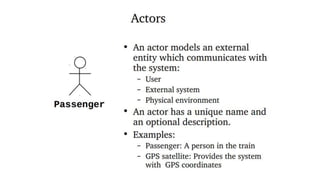
- Actor: external agent that interacts with the system, exchanges info. with
the system (user, sub-system, etc.)
- a role played by user
Note: a use case represents a complete functionality.
• view of system behavior from an external person’s viewpoint
• effective tool for validating requirements
• an effective communication tool
• basis for a test plan
• basis for user manual
Developing the use cases in not difficult; ensuring that you have them all
is murder.
Use cases help ..
· Capture the system's functional requirements
from the users' perspective
· Actively involve users in the requirements-
gathering process
· Provide the basis for identifying major classes
and their relationships
· Serve as the foundation for developing system
test cases
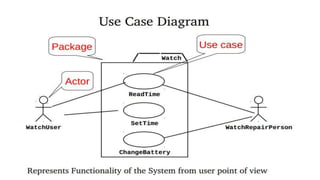
Use Case Diagrams
• Use case diagrams are used to visualize, specify, construct, and
document the (intended) behavior of the system, during
requirements capture and analysis.
• Provide a way for developers, domain experts and end-users to
Communicate.
• Serve as basis for testing.
• Use case diagrams contain use cases, actors, and their relationships.
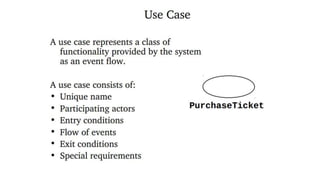
Use Case
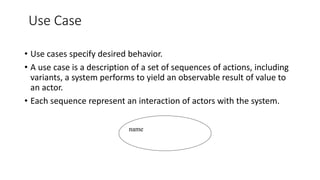
• Use cases specify desired behavior.
• A use case is a description of a set of sequences of actions, including
variants, a system performs to yield an observable result of value to
an actor.
• Each sequence represent an interaction of actors with the system.
name
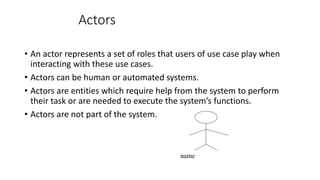
Actors
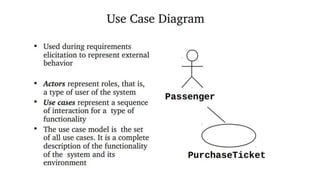
• An actor represents a set of roles that users of use case play when
interacting with these use cases.
• Actors can be human or automated systems.
• Actors are entities which require help from the system to perform
their task or are needed to execute the system’s functions.
• Actors are not part of the system.
name
Use Cases and Actors
• From the perspective of a given actor, a use case does something that
is of value to the actor, such as calculate a result or change the state
of an objects
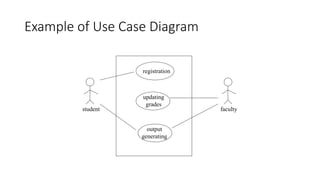
Example of Use Case Diagram
student
registration
updating
grades
output
generating
faculty
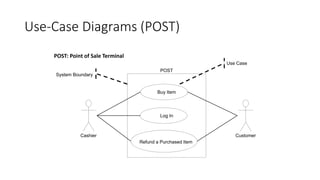
Use-Case Diagrams (POST)
CustomerCashier
Buy Item
Log In
Refund a Purchased Item
POST
Use Case
System Boundary
Adapted from Larman “Applying UML and Patterns”
POST: Point of Sale Terminal
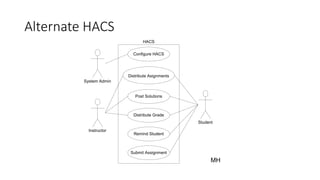
Alternate HACS
Instructor
Student
System Admin
MH
Configure HACS
Distribute Asignments
Post Solutions
Distribute Grade
Remind Student
Submit Assignment
HACS
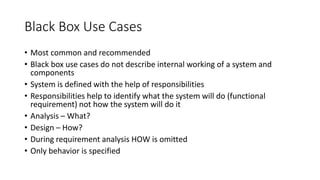
Black Box Use Cases
• Most common and recommended
• Black box use cases do not describe internal working of a system and
components
• System is defined with the help of responsibilities
• Responsibilities help to identify what the system will do (functional
requirement) not how the system will do it
• Analysis – What?
• Design – How?
• During requirement analysis HOW is omitted
• Only behavior is specified
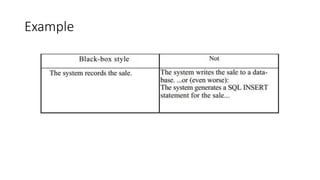
Example

Ch 14 s.e use case diagrams

  • 1.
  • 5.
    History • CASE Tools:Automation of Software Development • People-to-People • People-to-Computer • Rational Software (An IBM Company) • Rational Rose / MS Visio: Converting UML-Diagrams-to-Programs
  • 6.
    History • Booch: BoochMethod • Rumbaugh: OMT (object modeling tech.) • Jacobson: OOSE (OO software engrg.) • Three amigos: UML
  • 7.
    History • UML: anopen standard controlled by OMG • UML 1.0 (1997) • UML 2.0 (2004)
  • 9.
    USE CASE MODELLING -functionalreqts., analysis phase - what a system does: functions represented as use cases - Actor: external agent that interacts with the system, exchanges info. with the system (user, sub-system, etc.) - a role played by user Note: a use case represents a complete functionality. • view of system behavior from an external person’s viewpoint • effective tool for validating requirements • an effective communication tool • basis for a test plan • basis for user manual Developing the use cases in not difficult; ensuring that you have them all is murder.
  • 10.
    Use cases help.. · Capture the system's functional requirements from the users' perspective · Actively involve users in the requirements- gathering process · Provide the basis for identifying major classes and their relationships · Serve as the foundation for developing system test cases
  • 11.
    Use Case Diagrams •Use case diagrams are used to visualize, specify, construct, and document the (intended) behavior of the system, during requirements capture and analysis. • Provide a way for developers, domain experts and end-users to Communicate. • Serve as basis for testing. • Use case diagrams contain use cases, actors, and their relationships.
  • 16.
    Use Case • Usecases specify desired behavior. • A use case is a description of a set of sequences of actions, including variants, a system performs to yield an observable result of value to an actor. • Each sequence represent an interaction of actors with the system. name
  • 18.
    Actors • An actorrepresents a set of roles that users of use case play when interacting with these use cases. • Actors can be human or automated systems. • Actors are entities which require help from the system to perform their task or are needed to execute the system’s functions. • Actors are not part of the system. name
  • 19.
    Use Cases andActors • From the perspective of a given actor, a use case does something that is of value to the actor, such as calculate a result or change the state of an objects
  • 20.
    Example of UseCase Diagram student registration updating grades output generating faculty
  • 21.
    Use-Case Diagrams (POST) CustomerCashier BuyItem Log In Refund a Purchased Item POST Use Case System Boundary Adapted from Larman “Applying UML and Patterns” POST: Point of Sale Terminal
  • 22.
    Alternate HACS Instructor Student System Admin MH ConfigureHACS Distribute Asignments Post Solutions Distribute Grade Remind Student Submit Assignment HACS
  • 23.
    Black Box UseCases • Most common and recommended • Black box use cases do not describe internal working of a system and components • System is defined with the help of responsibilities • Responsibilities help to identify what the system will do (functional requirement) not how the system will do it • Analysis – What? • Design – How? • During requirement analysis HOW is omitted • Only behavior is specified
  • 24.