Chapter 14 – Resource
Planning (MRP and ERP)
Operations Management
by
R. Dan Reid & Nada R. Sanders
2nd Edition © Wiley 2005
Types of Demand
 There are two types of demand.
 Independent Demand
 Is the demand for finished products
 Does not depend on the demand of other products
 Needs to be forecasted
 Dependent Demand
 Is the demand derived from finished products
 Is the demand for component parts based on the
number of end items being produced and is managed
by the MRP system
Evolution of Material Planning Systems
 Back in the sixties, manufacturing planning
systems were reorder point systems that simply
determined when and how much to order
 First MRP systems translated a master schedule of
final products into time-phased net requirements
for subassemblies, assemblies, and parts
 Closed-loop MRP included production planning,
master scheduling, and capacity requirements
 In mid 1970’s, MRPII systems added functionality
to plan and execute all internal functions
An Overview of MRP
 MRP uses the concept of backward scheduling to
determine how much and when to order and
replenish
 The MPS module contains the authorized schedule
 The BOM module contains the product structure
for each unique product
 The Inventory Record module keeps track of
the inventory status for each item in the database
 MRP output includes schedules for all internal
activities and parts as well as orders for all supply
chain items
Input/Output - MRP Process
Objectives of MRP
 Determines the quantity and timing of
material requirements
 Determines what to order (checks BOM), how
much to order (lot size rules), when to place
the order (need date minus lead time), and
when to schedule delivery (on date needed)
 Maintain priorities
 In a changing environment, MRP reorganizes
priorities to keep plans current and viable
Building a CD Cabinet With MRP
MRP Inputs - Authorized MPS
 From the authorized MPS, we calculate when we
need to have replenishment orders of CD cabinets;
when we need a new MPS order.
Table 14-1 Initial MPS Record for CD Cabinet
Item: CD Cabinet
Lot size rule: FOQ=100
Lead time: 1 week
1 2 3 4 5 6 7 8 9 10 11 12
Gross Requirements: 25 25 25 25 30 30 30 30 35 35 35 35
Projected Available: 80 55 30 5 -20
MPS
Table 14-2 Updated MPS Record for CD Cabinet
Item: CD Cabinet
Lot size rule: FOQ=100
Lead time: 1 week
1 2 3 4 5 6 7 8 9 10 11 12
Gross Requirements: 25 25 25 25 30 30 30 30 35 35 35 35
Projected Available: 80 55 30 5 80 50 20 90 60 25 90 55 20
MPS 100 100 100
MRP Inputs-Inventory Records
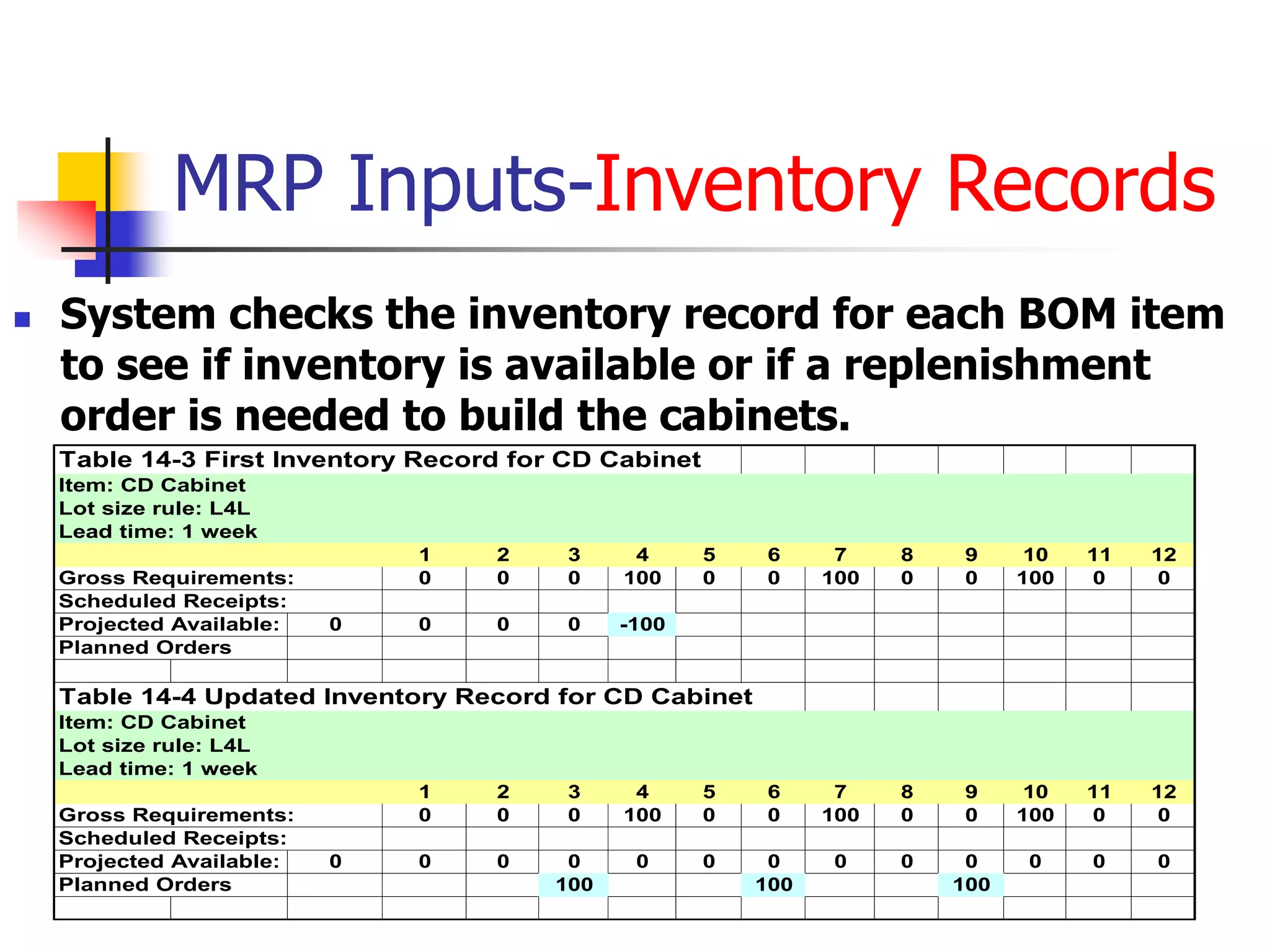
 System checks the inventory record for each BOM item
to see if inventory is available or if a replenishment
order is needed to build the cabinets.
Table 14-3 First Inventory Record for CD Cabinet
Item: CD Cabinet
Lot size rule: L4L
Lead time: 1 week
1 2 3 4 5 6 7 8 9 10 11 12
Gross Requirements: 0 0 0 100 0 0 100 0 0 100 0 0
Scheduled Receipts:
Projected Available: 0 0 0 0 -100
Planned Orders
Table 14-4 Updated Inventory Record for CD Cabinet
Item: CD Cabinet
Lot size rule: L4L
Lead time: 1 week
1 2 3 4 5 6 7 8 9 10 11 12
Gross Requirements: 0 0 0 100 0 0 100 0 0 100 0 0
Scheduled Receipts:
Projected Available: 0 0 0 0 0 0 0 0 0 0 0 0 0
Planned Orders 100 100 100
MRP Inputs-Bills of Material
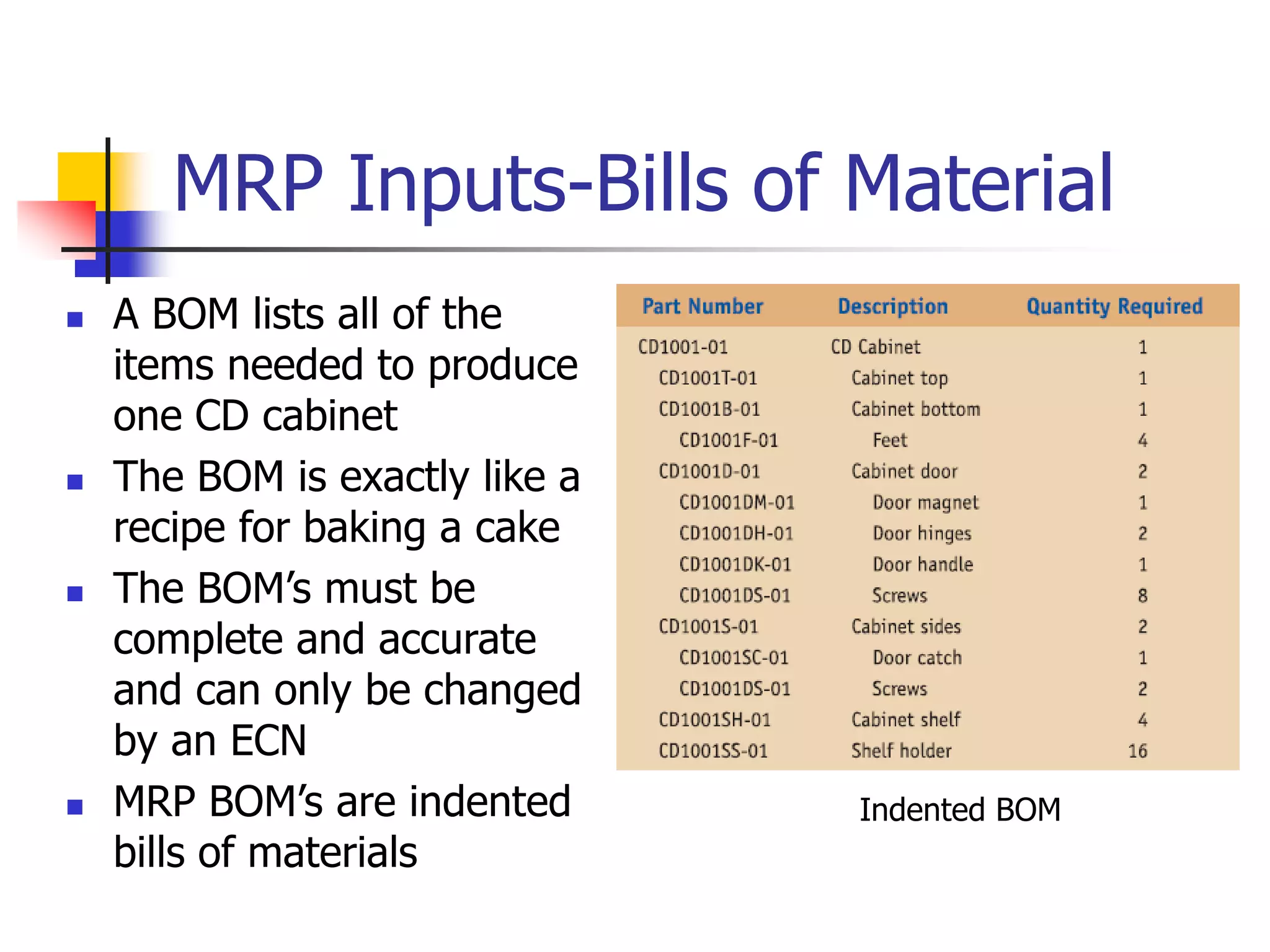
 A BOM lists all of the
items needed to produce
one CD cabinet
 The BOM is exactly like a
recipe for baking a cake
 The BOM’s must be
complete and accurate
and can only be changed
by an ECN
 MRP BOM’s are indented
bills of materials
Indented BOM
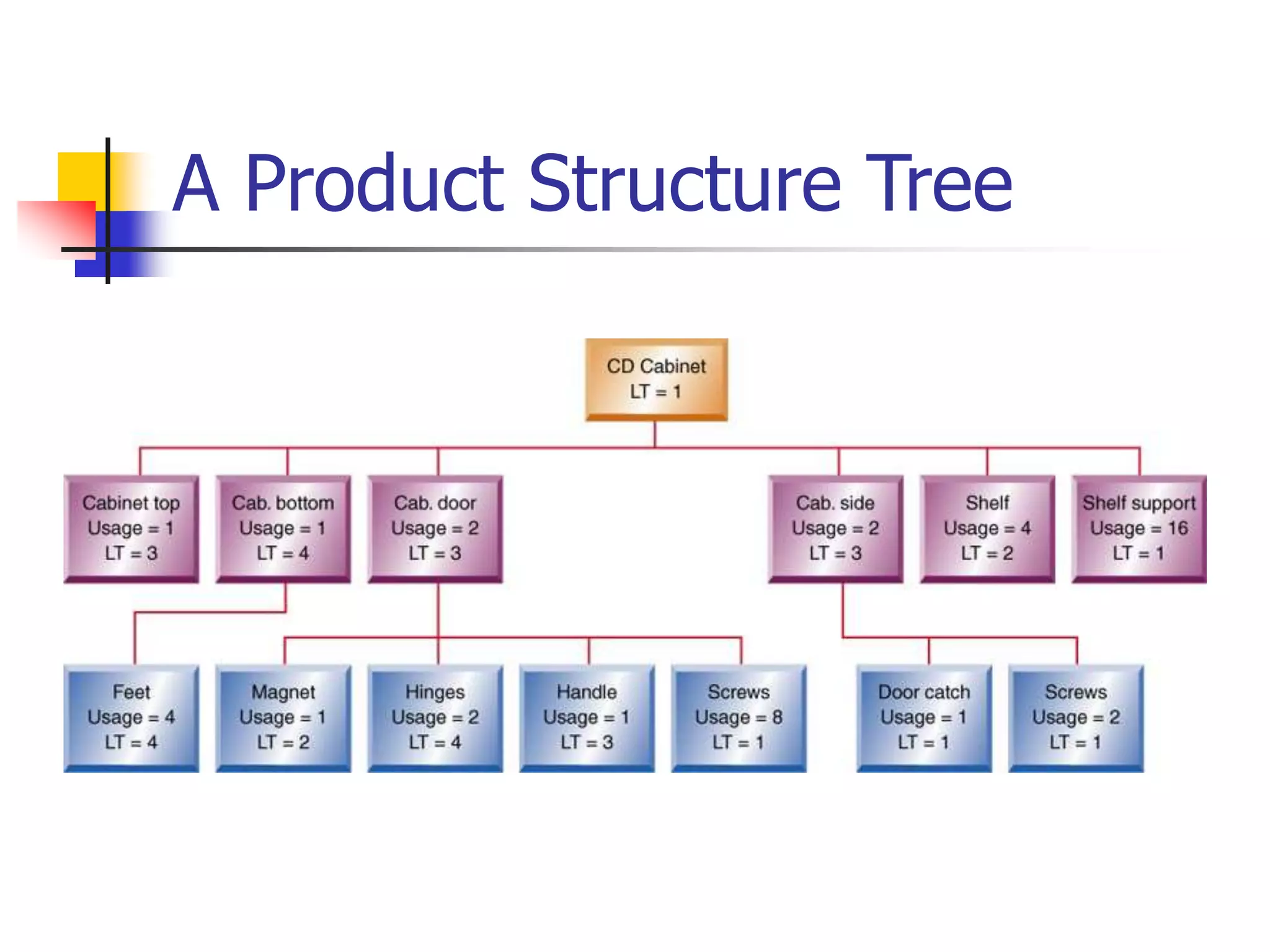
A Product Structure Tree
The MRP Explosion Process
Using this table and the product structure tree, we will
work through an example of how the MRP explosion
process calculates the requirements for building a CD
cabinet. Next we start with the cabinet top to show
how MRP calculates the gross requirements for this
component.
Table 14-6 Updated Inventory Record for CD Cabinet
Item: CD Cabinet Parent: none
Lot size rule: L4L Children: Top, bottom, door, left side, right side, shelves, shelf supports
Lead time: 1 week
1 2 3 4 5 6 7 8 9 10 11 12
Gross Requirements: 0 0 0 100 0 0 100 0 0 100 0 0
Scheduled Receipts:
Projected Available: 0 0 0 0 0 0 0 0 0 0 0 0 0
Planned Orders: 100 100 100
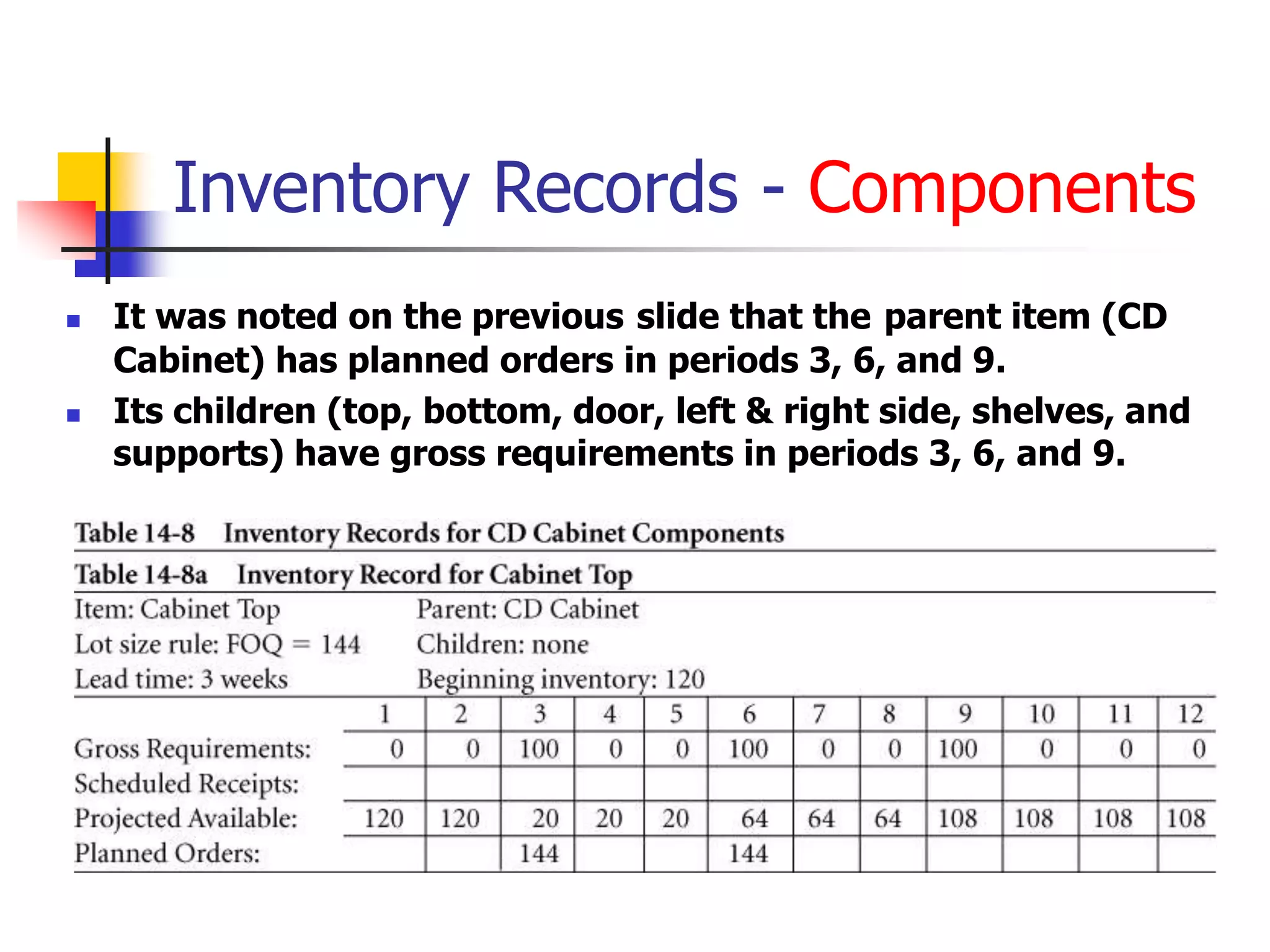
Inventory Records - Components
 It was noted on the previous slide that the parent item (CD
Cabinet) has planned orders in periods 3, 6, and 9.
 Its children (top, bottom, door, left & right side, shelves, and
supports) have gross requirements in periods 3, 6, and 9.
Inventory Records - Components
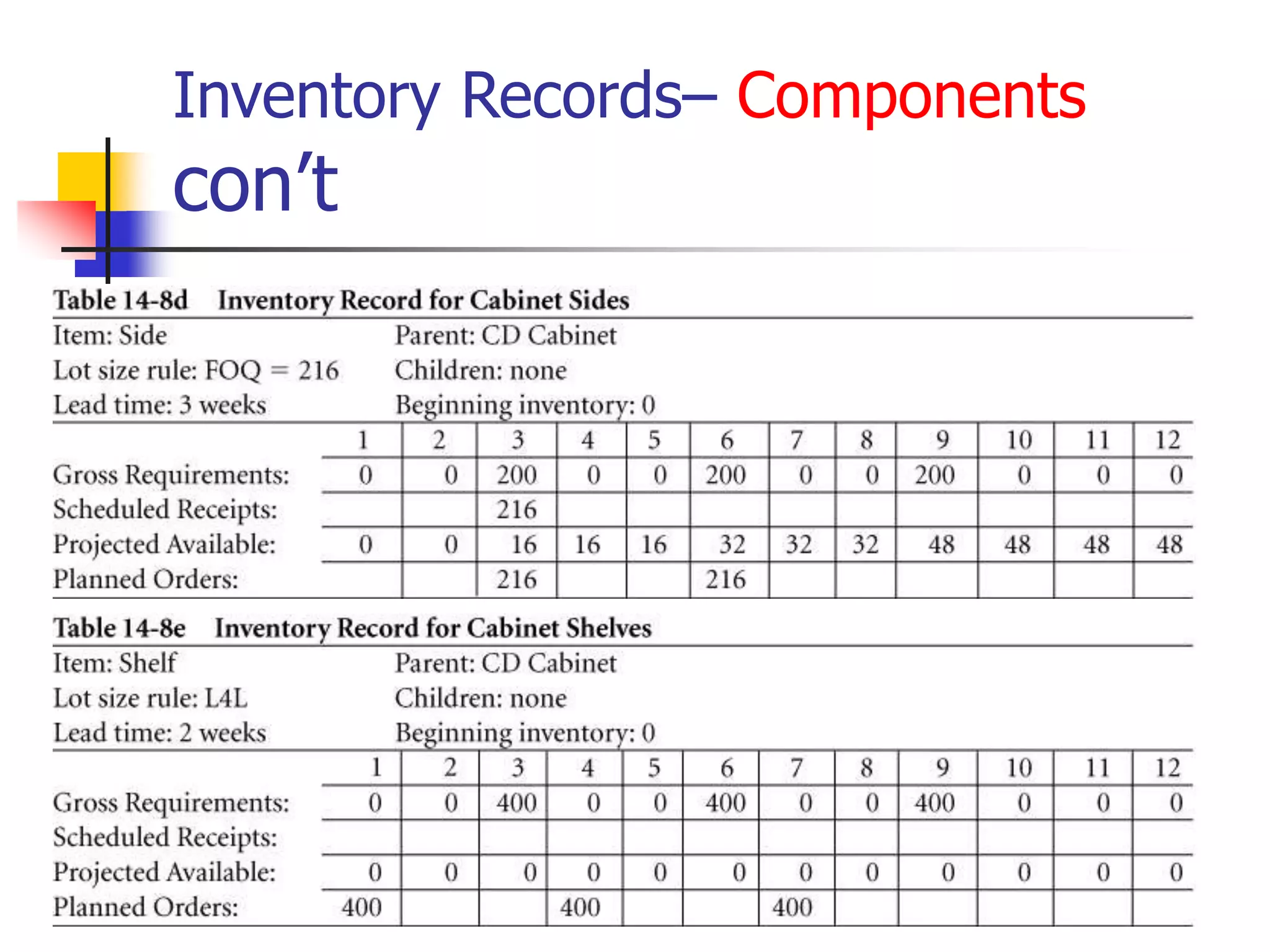
Inventory Records– Components
con’t
Inventory Records– Components
con’t
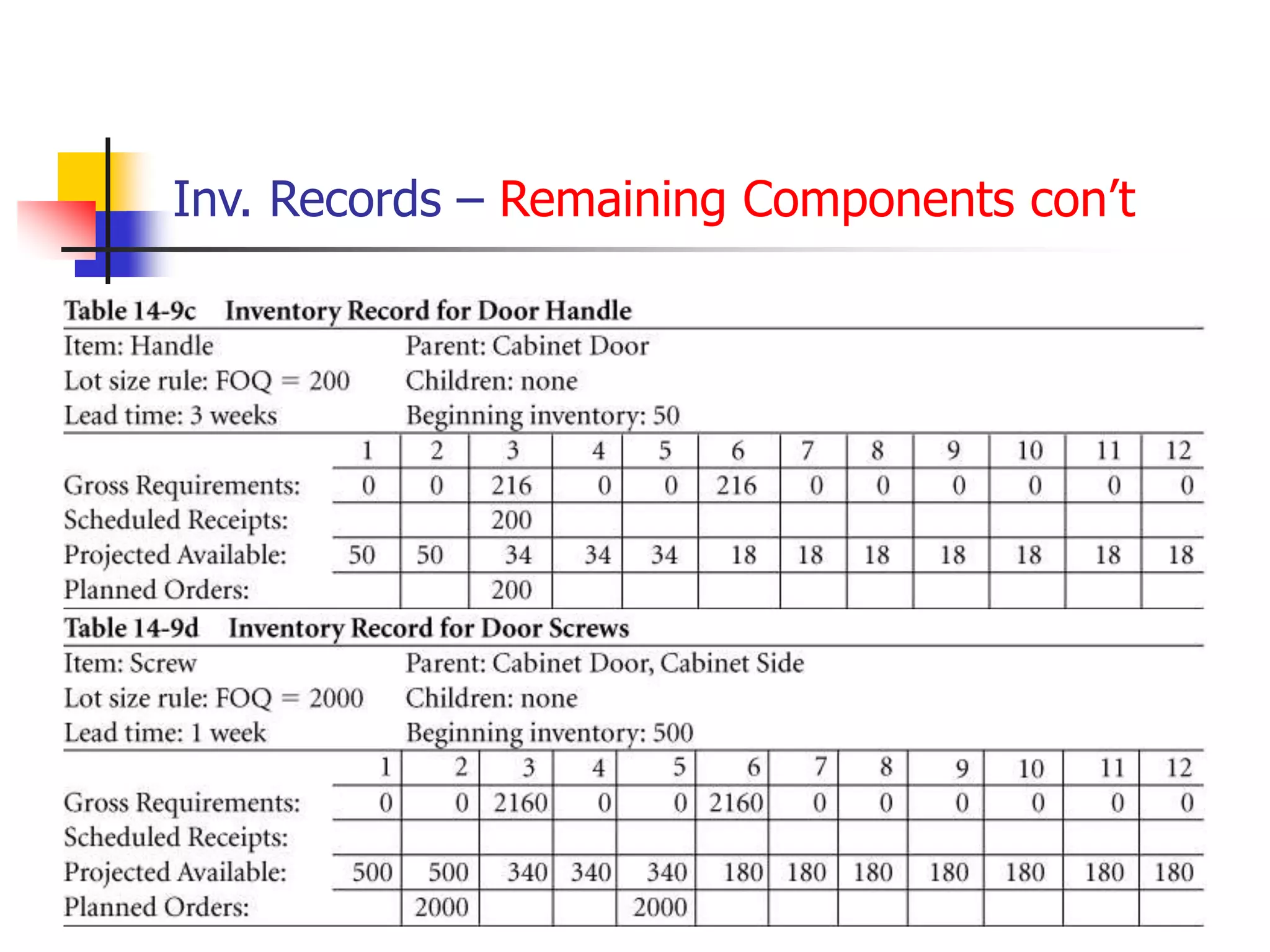
Inventory Records – Remaining Components
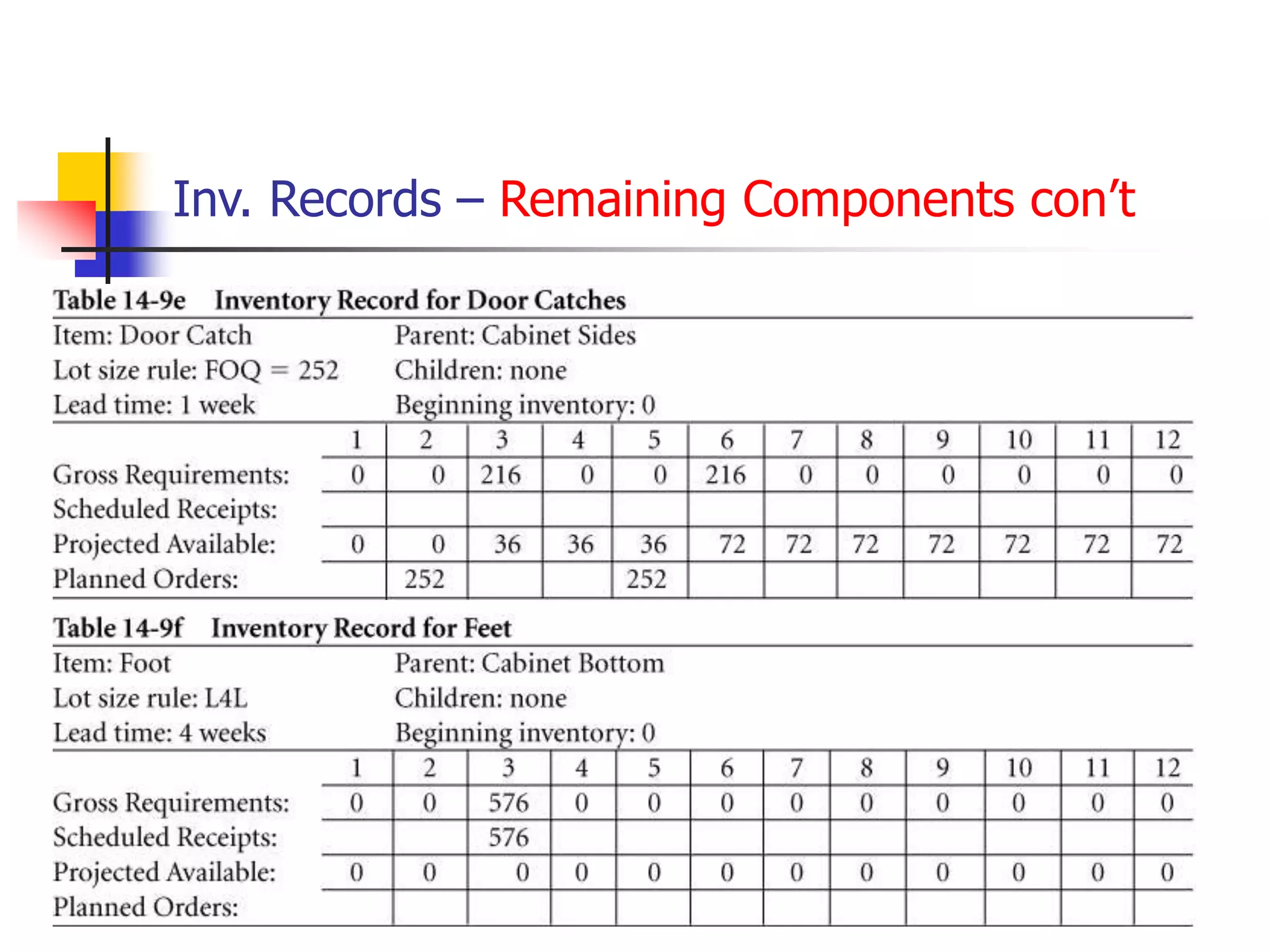
Inv. Records – Remaining Components con’t
MRP Action Notices
 Action Notices:
 Indicate items that need a production planner’s
attention
 Are created when a planned order needs to be
released, due dates need to be adjusted, or
when there is insufficient lead time for normal
replenishment
 Often require planners to rush or expedite
orders
MRP Action Notices
 Action Bucket:
 Is the current period where we take actions such
as releasing, rescheduling, or canceling orders
 A positive quantity in current period’s planned
order row means that an order must be released
Lot Sizing Rules
 Rules are used to change the frequency
of replenishment orders & set the
quantity of each order (balance holding
& ordering costs to reduce total costs)
 Common rules:
 Fixed Order Quantity (FOQ)
 Lot-for-Lot (L4L)
 Periodic Order Quantity (POQ)
Example Comparing Lot Size Rules: Three lot sizing
rules used within MRP Systems are: fixed order quantity (FOQ), lot
for lot (L4L), and period order quantity (POQ). Cost comparison is
based on Inventory holding costs ($0.10/period) and ordering cost
($25/order). In this example POQ is best at $133.50.
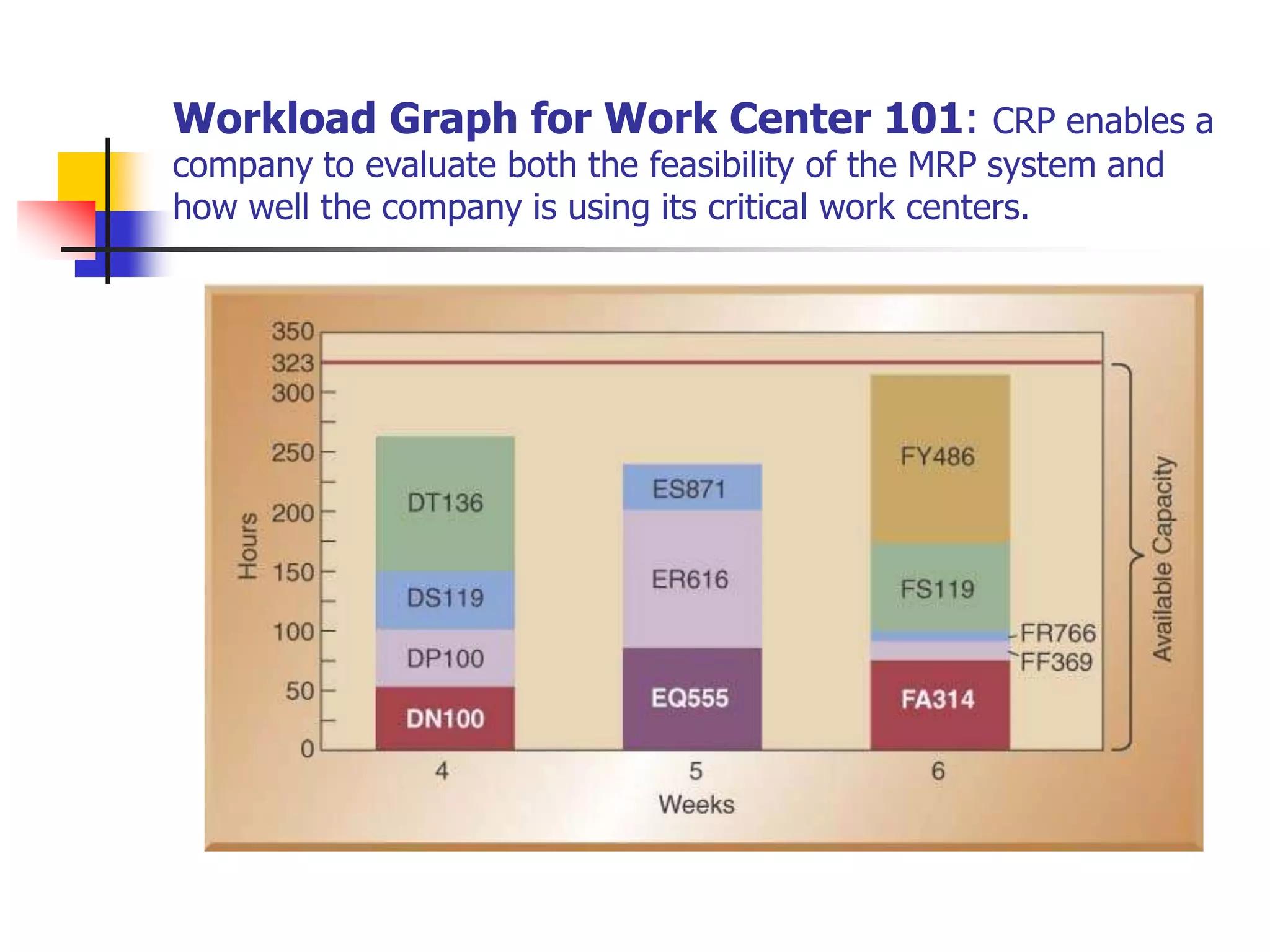
Rough Cut Capacity Example: The CRP module uses data from
MRP. Calculate workloads for critical work centers based on open
shop orders and planned shop orders. These shop orders are
translated into hours of work by work center and by time period.
Table 14-11 show items scheduled for work Center 101.
 Available = 4 machines x 2 shifts x 10 hours x 5 days x 0.85 utiliza- x 0.95 effi-
Capacity per shift per wk. tion ciency
 Available = 323.0 standard hours
Capacity
Workload Graph for Work Center 101: CRP enables a
company to evaluate both the feasibility of the MRP system and
how well the company is using its critical work centers.
Enterprise Resource Planning
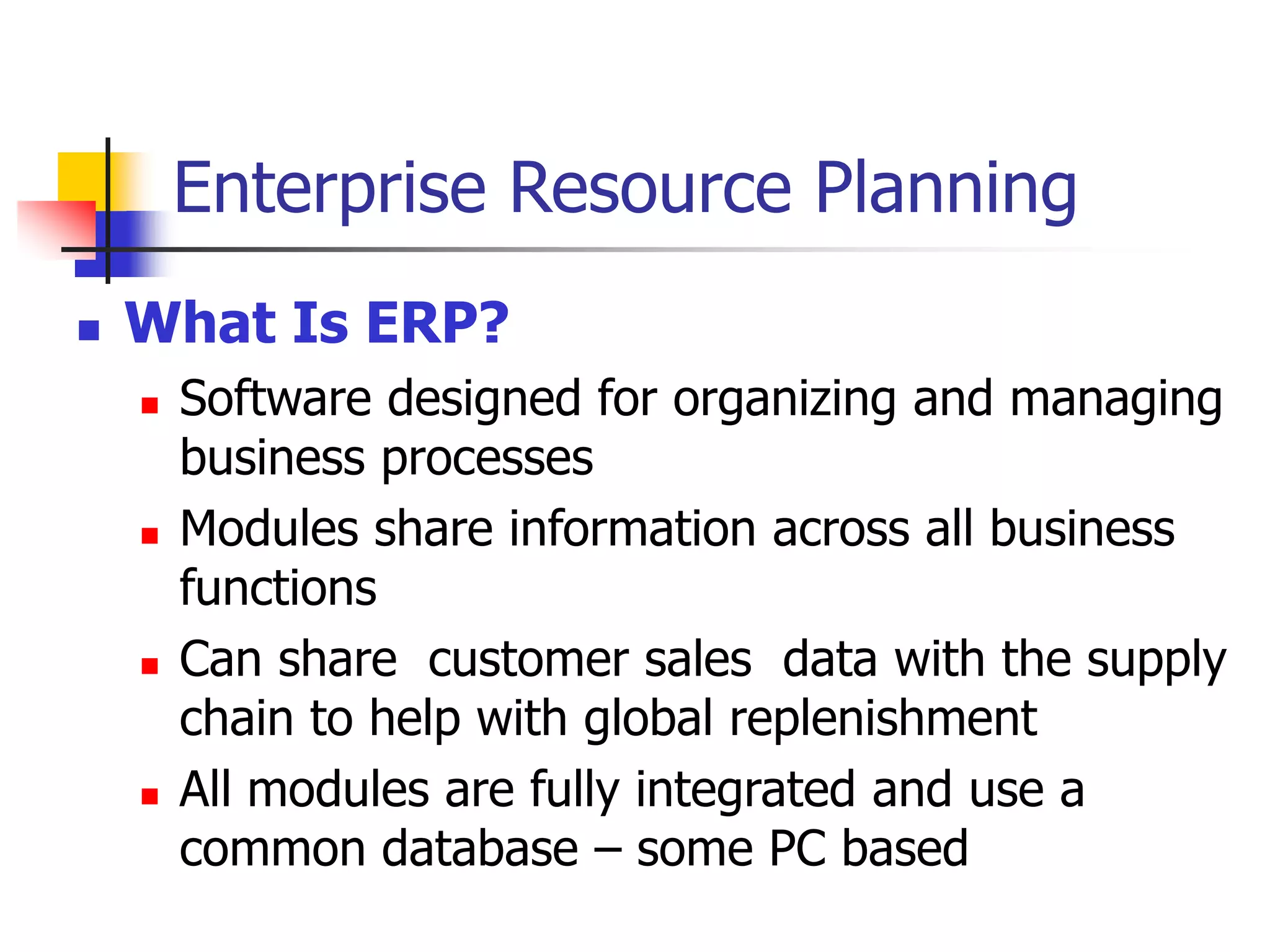
 What Is ERP?
 Software designed for organizing and managing
business processes
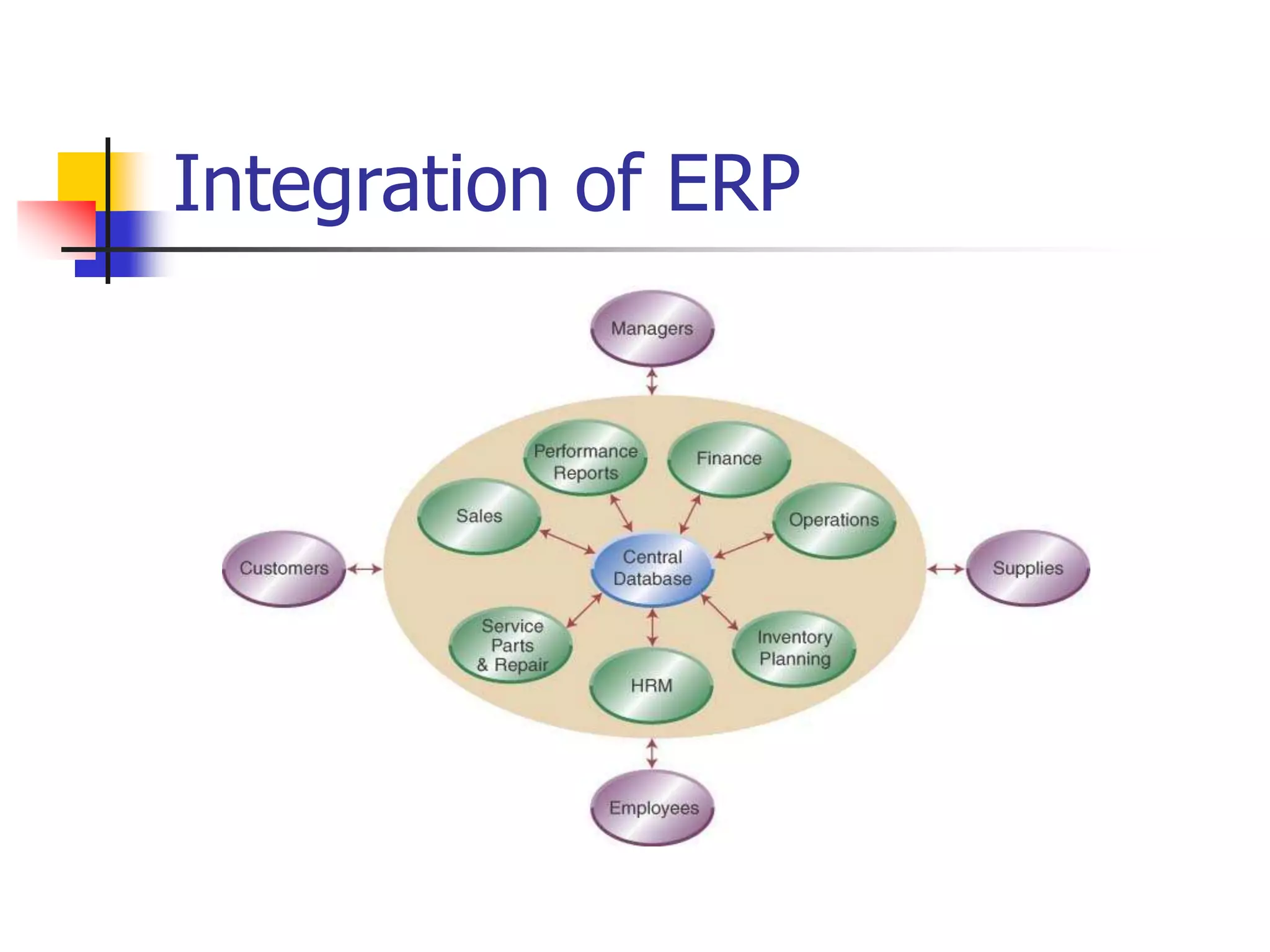
 Modules share information across all business
functions
 Can share customer sales data with the supply
chain to help with global replenishment
 All modules are fully integrated and use a
common database – some PC based
Integration of ERP
ERP Modules-4 Categories
 Finance and accounting
 Investment, cost, asset, capital, and debt management
 Budgets, profitability analysis, and performance reports
 Sales and marketing
 Handles pricing, availability, orders, shipments, & billing
 Production and materials management
 Process planning, BOM, product costing, ECN’s, MRP,
allocates resources, schedules, PO’s, & inventory
 Human resources
 Workforce planning, payroll & benefits, & org. charts
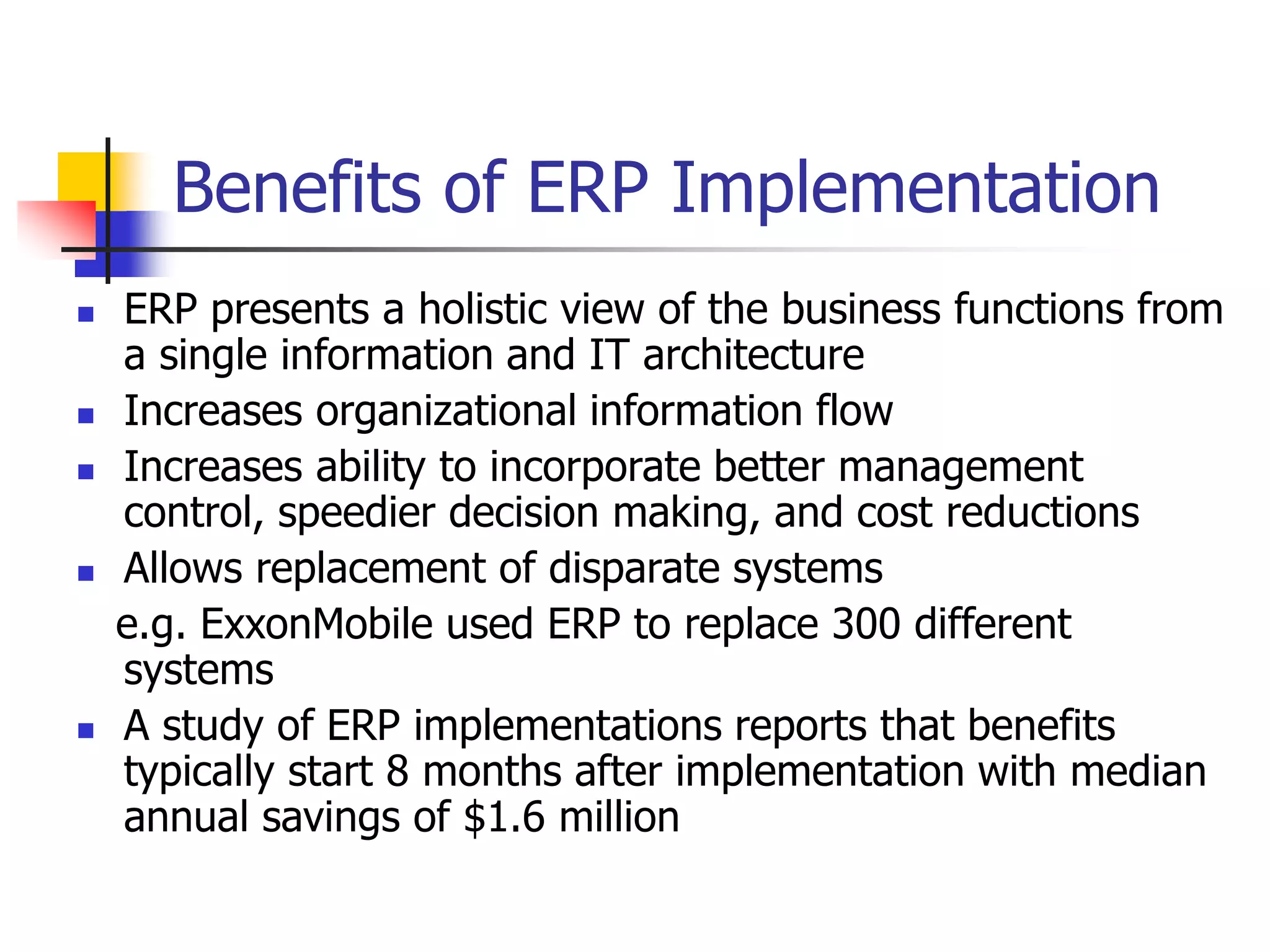
Benefits of ERP Implementation
 ERP presents a holistic view of the business functions from
a single information and IT architecture
 Increases organizational information flow
 Increases ability to incorporate better management
control, speedier decision making, and cost reductions
 Allows replacement of disparate systems
e.g. ExxonMobile used ERP to replace 300 different
systems
 A study of ERP implementations reports that benefits
typically start 8 months after implementation with median
annual savings of $1.6 million
Cost and Implementation Issues
 Major suppliers are SAP, Peoplesoft, Oracle, and Baan. Also
smaller PC based suppliers.
 Costs for larger ERP systems range from hundreds of
thousands to several million dollars.
 Outside consultants are usually involved in selection,
configuration, and implementation.
 Consultant costs can run up to 3 times the cost of the
system itself according to a Gartner Group study.
 Added costs also include additional people, new computer
hardware, and the cost to develop a new, integrated
database
 Successful implementation requires leadership and top
management commitment to a vision for the business
Homework
 Problems
1 – 5, 11 – 18.

MRP MPS.ppt

  • 1.
    Chapter 14 –Resource Planning (MRP and ERP) Operations Management by R. Dan Reid & Nada R. Sanders 2nd Edition © Wiley 2005
  • 2.
    Types of Demand There are two types of demand.  Independent Demand  Is the demand for finished products  Does not depend on the demand of other products  Needs to be forecasted  Dependent Demand  Is the demand derived from finished products  Is the demand for component parts based on the number of end items being produced and is managed by the MRP system
  • 3.
    Evolution of MaterialPlanning Systems  Back in the sixties, manufacturing planning systems were reorder point systems that simply determined when and how much to order  First MRP systems translated a master schedule of final products into time-phased net requirements for subassemblies, assemblies, and parts  Closed-loop MRP included production planning, master scheduling, and capacity requirements  In mid 1970’s, MRPII systems added functionality to plan and execute all internal functions
  • 4.
    An Overview ofMRP  MRP uses the concept of backward scheduling to determine how much and when to order and replenish  The MPS module contains the authorized schedule  The BOM module contains the product structure for each unique product  The Inventory Record module keeps track of the inventory status for each item in the database  MRP output includes schedules for all internal activities and parts as well as orders for all supply chain items
  • 5.
  • 6.
    Objectives of MRP Determines the quantity and timing of material requirements  Determines what to order (checks BOM), how much to order (lot size rules), when to place the order (need date minus lead time), and when to schedule delivery (on date needed)  Maintain priorities  In a changing environment, MRP reorganizes priorities to keep plans current and viable
  • 7.
    Building a CDCabinet With MRP
  • 8.
    MRP Inputs -Authorized MPS  From the authorized MPS, we calculate when we need to have replenishment orders of CD cabinets; when we need a new MPS order. Table 14-1 Initial MPS Record for CD Cabinet Item: CD Cabinet Lot size rule: FOQ=100 Lead time: 1 week 1 2 3 4 5 6 7 8 9 10 11 12 Gross Requirements: 25 25 25 25 30 30 30 30 35 35 35 35 Projected Available: 80 55 30 5 -20 MPS Table 14-2 Updated MPS Record for CD Cabinet Item: CD Cabinet Lot size rule: FOQ=100 Lead time: 1 week 1 2 3 4 5 6 7 8 9 10 11 12 Gross Requirements: 25 25 25 25 30 30 30 30 35 35 35 35 Projected Available: 80 55 30 5 80 50 20 90 60 25 90 55 20 MPS 100 100 100
  • 9.
    MRP Inputs-Inventory Records System checks the inventory record for each BOM item to see if inventory is available or if a replenishment order is needed to build the cabinets. Table 14-3 First Inventory Record for CD Cabinet Item: CD Cabinet Lot size rule: L4L Lead time: 1 week 1 2 3 4 5 6 7 8 9 10 11 12 Gross Requirements: 0 0 0 100 0 0 100 0 0 100 0 0 Scheduled Receipts: Projected Available: 0 0 0 0 -100 Planned Orders Table 14-4 Updated Inventory Record for CD Cabinet Item: CD Cabinet Lot size rule: L4L Lead time: 1 week 1 2 3 4 5 6 7 8 9 10 11 12 Gross Requirements: 0 0 0 100 0 0 100 0 0 100 0 0 Scheduled Receipts: Projected Available: 0 0 0 0 0 0 0 0 0 0 0 0 0 Planned Orders 100 100 100
  • 10.
    MRP Inputs-Bills ofMaterial  A BOM lists all of the items needed to produce one CD cabinet  The BOM is exactly like a recipe for baking a cake  The BOM’s must be complete and accurate and can only be changed by an ECN  MRP BOM’s are indented bills of materials Indented BOM
  • 11.
  • 12.
    The MRP ExplosionProcess Using this table and the product structure tree, we will work through an example of how the MRP explosion process calculates the requirements for building a CD cabinet. Next we start with the cabinet top to show how MRP calculates the gross requirements for this component. Table 14-6 Updated Inventory Record for CD Cabinet Item: CD Cabinet Parent: none Lot size rule: L4L Children: Top, bottom, door, left side, right side, shelves, shelf supports Lead time: 1 week 1 2 3 4 5 6 7 8 9 10 11 12 Gross Requirements: 0 0 0 100 0 0 100 0 0 100 0 0 Scheduled Receipts: Projected Available: 0 0 0 0 0 0 0 0 0 0 0 0 0 Planned Orders: 100 100 100
  • 13.
    Inventory Records -Components  It was noted on the previous slide that the parent item (CD Cabinet) has planned orders in periods 3, 6, and 9.  Its children (top, bottom, door, left & right side, shelves, and supports) have gross requirements in periods 3, 6, and 9.
  • 14.
  • 15.
  • 16.
  • 17.
    Inventory Records –Remaining Components
  • 18.
    Inv. Records –Remaining Components con’t
  • 19.
    Inv. Records –Remaining Components con’t
  • 20.
    MRP Action Notices Action Notices:  Indicate items that need a production planner’s attention  Are created when a planned order needs to be released, due dates need to be adjusted, or when there is insufficient lead time for normal replenishment  Often require planners to rush or expedite orders
  • 21.
    MRP Action Notices Action Bucket:  Is the current period where we take actions such as releasing, rescheduling, or canceling orders  A positive quantity in current period’s planned order row means that an order must be released
  • 22.
    Lot Sizing Rules Rules are used to change the frequency of replenishment orders & set the quantity of each order (balance holding & ordering costs to reduce total costs)  Common rules:  Fixed Order Quantity (FOQ)  Lot-for-Lot (L4L)  Periodic Order Quantity (POQ)
  • 23.
    Example Comparing LotSize Rules: Three lot sizing rules used within MRP Systems are: fixed order quantity (FOQ), lot for lot (L4L), and period order quantity (POQ). Cost comparison is based on Inventory holding costs ($0.10/period) and ordering cost ($25/order). In this example POQ is best at $133.50.
  • 24.
    Rough Cut CapacityExample: The CRP module uses data from MRP. Calculate workloads for critical work centers based on open shop orders and planned shop orders. These shop orders are translated into hours of work by work center and by time period. Table 14-11 show items scheduled for work Center 101.  Available = 4 machines x 2 shifts x 10 hours x 5 days x 0.85 utiliza- x 0.95 effi- Capacity per shift per wk. tion ciency  Available = 323.0 standard hours Capacity
  • 25.
    Workload Graph forWork Center 101: CRP enables a company to evaluate both the feasibility of the MRP system and how well the company is using its critical work centers.
  • 26.
    Enterprise Resource Planning What Is ERP?  Software designed for organizing and managing business processes  Modules share information across all business functions  Can share customer sales data with the supply chain to help with global replenishment  All modules are fully integrated and use a common database – some PC based
  • 27.
  • 28.
    ERP Modules-4 Categories Finance and accounting  Investment, cost, asset, capital, and debt management  Budgets, profitability analysis, and performance reports  Sales and marketing  Handles pricing, availability, orders, shipments, & billing  Production and materials management  Process planning, BOM, product costing, ECN’s, MRP, allocates resources, schedules, PO’s, & inventory  Human resources  Workforce planning, payroll & benefits, & org. charts
  • 29.
    Benefits of ERPImplementation  ERP presents a holistic view of the business functions from a single information and IT architecture  Increases organizational information flow  Increases ability to incorporate better management control, speedier decision making, and cost reductions  Allows replacement of disparate systems e.g. ExxonMobile used ERP to replace 300 different systems  A study of ERP implementations reports that benefits typically start 8 months after implementation with median annual savings of $1.6 million
  • 30.
    Cost and ImplementationIssues  Major suppliers are SAP, Peoplesoft, Oracle, and Baan. Also smaller PC based suppliers.  Costs for larger ERP systems range from hundreds of thousands to several million dollars.  Outside consultants are usually involved in selection, configuration, and implementation.  Consultant costs can run up to 3 times the cost of the system itself according to a Gartner Group study.  Added costs also include additional people, new computer hardware, and the cost to develop a new, integrated database  Successful implementation requires leadership and top management commitment to a vision for the business
  • 31.