S3 Computer Literacy
Computer Hardware
Overview of Computer Hardware
Motherboard
CPU
RAM
Harddisk
CD-ROM
Floppy Disk
Display Card
Sound Card
LAN Card
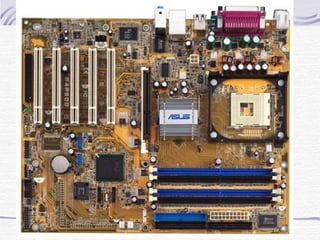
Motherboard
It is the main circuit board that links all
the hardware components together.
There are many chips or IC (Integrated
Circuit) on the motherboard which
contains millions of transistors.
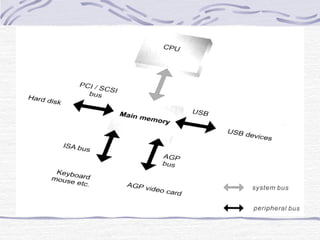
Bus Lines
Bus line is a physical wiring that
connects the components of the
computer system on the motherboard.
Types of Bus
System Bus
Data transmission between CPU and the
main memory via System Bus. It is also
known as the Front Side Bus (FSB).
Peripheral Bus
Data transmission between main memory
and peripherals via Peripheral Bus.
Bus Width
It is the size of the bus lines.
It determines the number of bits that the
computer can transmit at one time (say,
one clock cycle).
eg: a 32-bit bus can transmit 32 bits at a
time.
the larger the bus width, the faster the
transmission.
Examples of Peripheral Bus
ISA Bus
Old sound card
Faded out already
PCI Bus
For most of the interface card like
LAN Card
MODEM
Sound Card
Capture Card
Examples of Peripheral Bus
AGP Bus
Designed for Display Card only
USB Bus
For most of the peripheral
MP3 Player, Digital Camera
Keyboard, Mouse
Printer, Scanner
etc
CPU (Central Processing Unit)
It interprets and performs instructions of
a computer program.
The most determining factor in how
powerful a computer is.
A CPU in a common PC system is
known as the microprocessor.
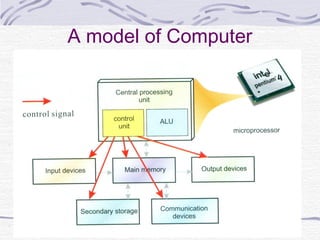
A model of Computer
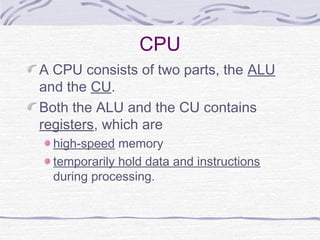
CPU
A CPU consists of two parts, the ALU
and the CU.
Both the ALU and the CU contains
registers, which are
high-speed memory
temporarily hold data and instructions
during processing.
CPU Performance depends on…
Clock rate
the speed at which the CPU can execute
an instruction.
unit is Hertz (Hz).
CPU Performance depends
on…
Cache Memory
memory that is placed inside the CPU.
it is random access memory (RAM) that a
microprocessor can access more quickly than it
can access main memory.
acts as an intermediate between registers and the
main memory.
it stores some frequently accessed data so it
shorten the time of accessing the RAM.
increasing the size of the cache memory will
greatly improve the overall performance of the
computer system.
Different kind of CPU
Intel
Celeron
Pentium 4
Xeon
AMD
Duron
Athlon XP
Sempron
Athlon 64
Common features
Clock rate > 2GHz
Differences
Word Size
Cache Memory
Size
Front Side Bus
No. of transistors
Main Memory
Storage media installed on the motherboard
store data and instruction to be executed by the
CPU
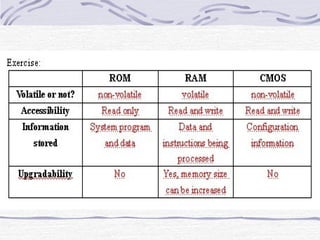
Main memory is classified into
RAM
ROM
CMOS
RAM
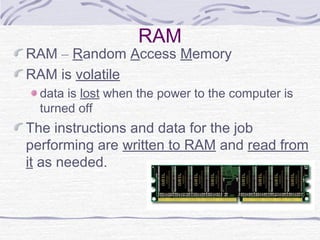
RAM – Random Access Memory
RAM is volatile
data is lost when the power to the computer is
turned off
The instructions and data for the job
performing are written to RAM and read from
it as needed.
RAM
Two operations of RAM
Loading means copying data from the
secondary storage to the main memory
Saving means copying data from RAM to
the non-volatile secondary storage.
Types of RAM
SRAM
DRAM
SDRAM
DDR-RAM
ROM
ROM – Read Only Memory
ROM is non-volatile
Data are stored permanently
Data can only be read but cannot be
changed
Store instructions and tells the
computer how to load the operations
system when booting up
Basic Input/Output System (BIOS)
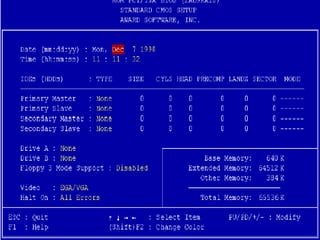
CMOS
CMOS - Complementary Metal-Oxide
Semiconductor Memory
It has the characteristics of both ROM
and RAM, ie:
it is non-volatile
information in CMOS can be changed
In computer, CMOS stores the
configuration information about a
computer like capacity of the hard disk
and the current time and date.
Ports and Interface Cards
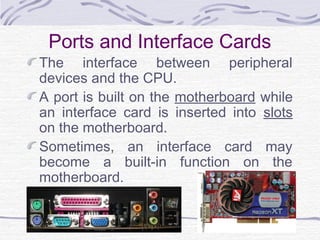
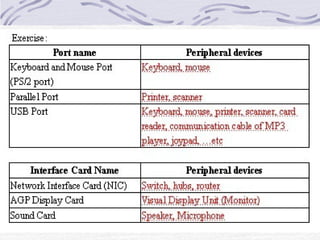
The interface between peripheral
devices and the CPU.
A port is built on the motherboard while
an interface card is inserted into slots
on the motherboard.
Sometimes, an interface card may
become a built-in function on the
motherboard.
Case Studies
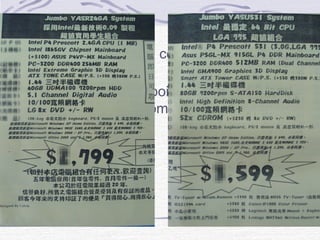
For the following 2 computers, state its
specifications.
You should try to point out what are
those hardware components and how
they are different.
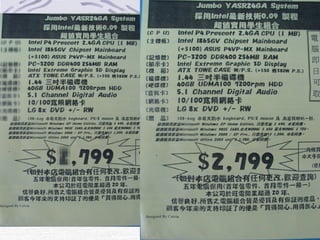
Case Studies 1
The followings are the true pictures
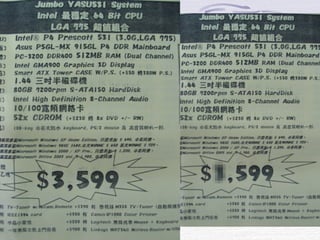
Case Studies 2
The followings are the true pictures

Motherboard

  • 1.
  • 2.
    Overview of ComputerHardware Motherboard CPU RAM Harddisk CD-ROM Floppy Disk Display Card Sound Card LAN Card
  • 3.
    Motherboard It is themain circuit board that links all the hardware components together. There are many chips or IC (Integrated Circuit) on the motherboard which contains millions of transistors.
  • 4.
    Bus Lines Bus lineis a physical wiring that connects the components of the computer system on the motherboard.
  • 5.
    Types of Bus SystemBus Data transmission between CPU and the main memory via System Bus. It is also known as the Front Side Bus (FSB). Peripheral Bus Data transmission between main memory and peripherals via Peripheral Bus.
  • 6.
    Bus Width It isthe size of the bus lines. It determines the number of bits that the computer can transmit at one time (say, one clock cycle). eg: a 32-bit bus can transmit 32 bits at a time. the larger the bus width, the faster the transmission.
  • 7.
    Examples of PeripheralBus ISA Bus Old sound card Faded out already PCI Bus For most of the interface card like LAN Card MODEM Sound Card Capture Card
  • 8.
    Examples of PeripheralBus AGP Bus Designed for Display Card only USB Bus For most of the peripheral MP3 Player, Digital Camera Keyboard, Mouse Printer, Scanner etc
  • 9.
    CPU (Central ProcessingUnit) It interprets and performs instructions of a computer program. The most determining factor in how powerful a computer is. A CPU in a common PC system is known as the microprocessor.
  • 10.
    A model ofComputer
  • 11.
    CPU A CPU consistsof two parts, the ALU and the CU. Both the ALU and the CU contains registers, which are high-speed memory temporarily hold data and instructions during processing.
  • 12.
    CPU Performance dependson… Clock rate the speed at which the CPU can execute an instruction. unit is Hertz (Hz).
  • 13.
    CPU Performance depends on… CacheMemory memory that is placed inside the CPU. it is random access memory (RAM) that a microprocessor can access more quickly than it can access main memory. acts as an intermediate between registers and the main memory. it stores some frequently accessed data so it shorten the time of accessing the RAM. increasing the size of the cache memory will greatly improve the overall performance of the computer system.
  • 14.
    Different kind ofCPU Intel Celeron Pentium 4 Xeon AMD Duron Athlon XP Sempron Athlon 64 Common features Clock rate > 2GHz Differences Word Size Cache Memory Size Front Side Bus No. of transistors
  • 15.
    Main Memory Storage mediainstalled on the motherboard store data and instruction to be executed by the CPU Main memory is classified into RAM ROM CMOS
  • 16.
    RAM RAM – RandomAccess Memory RAM is volatile data is lost when the power to the computer is turned off The instructions and data for the job performing are written to RAM and read from it as needed.
  • 17.
    RAM Two operations ofRAM Loading means copying data from the secondary storage to the main memory Saving means copying data from RAM to the non-volatile secondary storage. Types of RAM SRAM DRAM SDRAM DDR-RAM
  • 18.
    ROM ROM – ReadOnly Memory ROM is non-volatile Data are stored permanently Data can only be read but cannot be changed Store instructions and tells the computer how to load the operations system when booting up Basic Input/Output System (BIOS)
  • 19.
    CMOS CMOS - ComplementaryMetal-Oxide Semiconductor Memory It has the characteristics of both ROM and RAM, ie: it is non-volatile information in CMOS can be changed In computer, CMOS stores the configuration information about a computer like capacity of the hard disk and the current time and date.
  • 21.
    Ports and InterfaceCards The interface between peripheral devices and the CPU. A port is built on the motherboard while an interface card is inserted into slots on the motherboard. Sometimes, an interface card may become a built-in function on the motherboard.
  • 23.
    Case Studies For thefollowing 2 computers, state its specifications. You should try to point out what are those hardware components and how they are different.
  • 24.
    Case Studies 1 Thefollowings are the true pictures
  • 25.
    Case Studies 2 Thefollowings are the true pictures