MOBILE CONTROLLED ROBOTIC ARM USING
ARDUINO AND HC-06
Eklavya Sharma
BK Birla Institute of Engineering & Technology Pilani
sharma.eklavya@hotmail.com
Abstract— In the era of technological advancement there is a
huge increase in wireless technology, and most of the work is
done using robots and robotic arm. And in this paper I have
presented the prototype of the same.
This paper deals with the design and control of RoboDroid to do
monotonous job using a smartphone only. The robot is named
‘RoboDroid’ as it utilizes concept of both Robotics and Android.
It is a mechanical arm with movable base that is controlled by an
application through Android Smartphone via Bluetooth using a
most commonly used Bluetooth module HC-06 and programmed
with Arduino Uno. The RoboDroid can function similar to the
human arm as specified by the controller or can be used for the
automation purposes. The movable base of the robotic arm is
made using two dc geared motor and two ball bearings serve the
purpose of front wheels. Robotic arm uses the servo motors
having rotational range of 0-180 degrees for its movement which
offers its précised control. To facilitate the pick and place facility
the RoboDroid is equipped with a gripper. The problem of
keeping a remote is also solved as the RoboDroid is controlled
with a smartphone application that can be installed in any
Smartphone.
The RoboDroid has many applications like material handling to
place or pick objects that are out of the reach of human, to do
hazardous work in labs, assistance in everyday life (home or
work), medical rehabilitation and many more in easier and faster
way.
Index Terms—RoboDroid, Bluetooth Module HC-06, Arduino
Uno, Automation, Robotic Arm.
I. INTRODUCTION
A robot is an automatic or virtually intelligent agent that
can carry out tasks robotically or with some supervision,
typically with the aid of a remote control. In practice, a robot is
usually an electro-mechanical machine that is guided by means
of computer and electronic programming. Robots can be
autonomous, semi-autonomous or remotely controlled [1]. The
most common manufacturing robots for commercial and
industrial use is Robotic arm. A robotic arm is a type of
mechanical arm, usually programmable, with similar functions
to a human arm; the arm may be the sum total of the
mechanism or may be part of a more complex robot [2].
Robotic arms are often used as the stepping stone to industrial
robotics and automation. RoboDroid ca be remotely controlled
or programmed to pick up or manipulate objects at a distance.
The robotic hand, can be designed to perform any desired
task such as welding, gripping, spinning etc., depending on the
application. For example, robot arms in automotive assembly
lines perform a variety of tasks such as welding and parts
rotation and placement during assembly. In some
circumstances, close emulation of the human hand is desired,
as in robots designed to conduct bomb disarmament and
disposal.
The present manuscript deals with the designing of a
robotic arm that is controlled wirelessly by Bluetooth through
an Android smartphone with Bluetooth facility known as
RoboDroid. RoboDroid is a mechanical arm with a movable
base that is controlled by Android Smartphone via Bluetooth
module using Arduino as a microcontroller platform. The
robots have to interact with their environment, which is an
important objective in the development of robots. This
interaction is commonly accomplished by means of some sort
of arm and gripping device or end effector [3].
The design process of is clearly explained in the next
section with detailed information regarding the components
used then is followed by the implementation and the results and
finally ends with conclusion.
II. DESIGN OF ROBOTIC ARM
The RoboDroid uses Arduino Uno microcontroller board
based on ATmega328 and to program this board, Arduino IDE
(Integrated Development Environment) software is used. To
provide more flexibility to the robotic arm, it is mounted over
a movable base which will carry the arm to the desired
position. Two dc geared motors are fitted in the base and two
ball bearings serve the front wheel function. For the précised
movement and control of the robotic arm five servo motors are
used having a rotational range of 0 – 180 degree, connected in
such a way that it provides 3 DOF’s (Degrees of Freedom) to
the system.. There is a gear system in gripper part that convert
the rotational motion of servo into opening and closing of the
gripper. The list components required for the designing of
RoboDroid-
A. Arduino Platform
The Arduino platform is an open source electronic
prototyping system which is meant to be used as a physical
computing platform. It is composed of two parts, the Arduino
Uno board and the Arduino IDE (Integrated Development
Environment).
1) Arduino Uno Board: The Arduino board uses the Atmel
AVR AT mega 328 microcontroller, which is the heart of the
Arduino hardware. Basically, it is designed to provide an easy
to use human changeable pin interface to the ATmega328.
There are series of Arduino boards available in the market
among them the Arduino Uno is used here. Arduino provides
more simplicity and shows compatibility with the number of
sensors and external hardware that’s why it is becoming more
and more popular among hobbyists and electronics enthusiasts
[4].
2) Arduino IDE (Integrated Development Environment):
The open-source Arduino Software also known as the Arduino
IDE (Integrated Development Environment) makes it easy to
write code and upload it to the Arduino board. It runs on
Windows, Mac OS X, and Linux. The environment is written
in Java and based on Processing and other open-source
software.
Arduino IDE is the software environment used to create the
programs, called “sketches,” that will be executed by the
Arduino hardware. It uses a modified C language compiler to
build, translate, and transmit the code to the microcontroller
board [4].
B. Bluetooth Module HC-06
The Arduino pins 0 (RX) and 1 (TX) are specified for
UART (Universal Asynchronous Receiver/Transmitter) that
control the interface with its attached serial devices. The
Bluetooth module serially communicates with the Arduino
using these two pins. However, other pins of Arduino can also
be defined as serial pins using the library “Softwareserial.h”.
This library allows to setup serial communication on (almost
any) digital pin of the Arduino Uno. The Bluetooth Module
HC-06 can be configured according to the need using the AT
commands i.e. the default name, password, baud rate etc. can
be changed as per users choice. The specifications and AT
commands of Bluetooth Module HC-06 can be easily found in
datasheet [5].
C. DC Geared Motors
For the movement of the chassis of the RoboDroid two dc
geared motors are used in rear wheels while two ball bearings
serve as the front wheel function. The operating voltage of DC
geared motor is 9-12 volt.
D. Motor Driver L293D
The L293D is quadruple high-current half-H driver. The
L293D is designed to provide bidirectional drive currents of up
to 600 milliampere at voltages from 4.5 Volts to 36 Volts.
L293D IC’s are designed to drive a wide array of inductive
loads such as relays, solenoids, DC and bipolar stepping
motors, as well as other high-current and high-voltage loads
[6]. Here, it is used to drive two DC geared motors which are
functioning as the rear wheels of the RoboDroid. The features
and specification can be found in the datasheet.
E. Servo Motors
A servomotor is a rotary actuator or linear actuator that
allows for precise control of angular or linear position, velocity
and acceleration [7]. There are five servo motors used in our
robotic arm. One for controlling the waist movement, two used
for shoulder movement, one for wrist movement and one for
the gripper control. MG995 are used here as they are tiny and
lightweight with high output power and torque. These servo
motors would provide the proper amount of power required to
maintain its own weight as well as the weight of the object
carried by the arm.
Each servo has three wires: a power wire, a ground wire,
and a Pulse-Width Modulation (PWM) wire. The PWM wire
enters one of the six PWM ports on the Arduino Uno board.
The orange colored PWM (Pulse Width Modulation) wire is
given a pulse application for a specified duration, which in turn
controls the angle of the shaft in a particular position for a
certain point of time. This modulation is famously referred to
as the PWM (Pulse Width Modulation). The servomotor
expects a coded signal every few seconds. The duration of the
pulse determines the angular degree of the shaft. The wire
configuration and specification of MG995 can be seen in the
datasheet.
F. Power Supply
There are two DC power source used here. To power up the
Arduino and motor driver a 7.2 V LiPo (Lithium Polymer)
Battery is used with 900 milliampere hour current rating. And
to power up the servo motors 7.2 Volt LiPo (Lithium Polymer)
Battery with high current rating (3000 milliampere hour) is
used.
III. ASSEMBLING THE ROBODROID
A. Making The Chassis
The chassis carry the whole weight of the robot and
functions as the moving base of the RoboDroid. The base will
carry the robotic arm to the desired position. The base is made
up of sun mica sheet. The Arduino board, motor driver
circuitry and the power supply is bolted on the movable base.
For the rear wheel’s function DC geared motors are used and
ball bearings are functioning as front wheel as shown in Fig. 1
shown below.
Fig. 1. Chassis of RoboDroid
B. Mounting Robotic Arm
The base (waist) of the robotic arm is bolted on the chassis.
The waist offers précised position control of 0 to 360 degrees.
The waist servo motor control the waist movement, two motors
control shoulder movement, one servo motor control wrist
movement and the remaining one control the gripper
movement. There is a gear system in gripper part that convert
the rotational motion of servo into opening and closing of the
gripper.
Fig. 2. Complete assembly of RoboDroid
SNO. Specifications Values
1. Weight 1.5 kg
2. Height 40 cm
3. Length 33.3 cm
4. Width 16.2 cm
5. Wheel Diameter 7 cm
TABLE I. GENERAL SPECIFICATIONS OF THE ROBODROID
IV. HARDWARE CONNECTIONS WITH ARDUINO BOARD
A. Arduino And Bluetooth Module
The Arduino pins 0 and 1 are specified for Universal Asynchronous
Receiver/Transmitter (UART) that control the interface with its attached serial
devices. These pins of Arduino are connected with the RXD and
TXD pins of Bluetooth module HC-06. The Vcc and GND
(ground pin) of HC-06 is powered with the 3.3 Volt supply pin
and ground pin of Arduino. Figure 3 shows the connection
between Arduino Uno board and Bluetooth module HC-06.
The circuit schematic is made using the open source software
Fritzing.
Fig. 3. Connection between Arduino and Bluetooth module HC-06
B. Arduino And Motor Driver IC L293d
To drive the geared dc motors which are fixed on the base
of RoboDroid motor driver IC L293D is used. The power
supply to Arduino board and motor driver L293D is given by a
7.2 Volts LiPo (Lithium Polymer) battery. Figure 4 shows the
connection between the motor driver IC, Arduino board and
DC motors.
Fig. 4. Connecting L293D with DC motors and Arduino
C. Arduino and Servo Motors
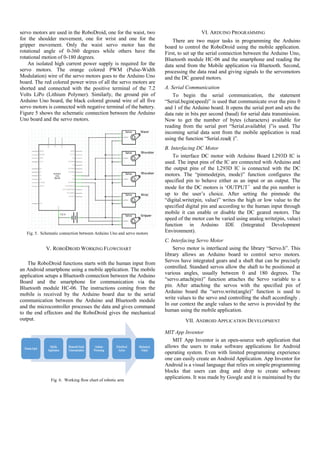
The servo motors of the RoboDroid are needed to be
connected to the specific pins of Arduino Uno board. Five
servo motors are used in the RoboDroid, one for the waist, two
for the shoulder movement, one for wrist and one for the
gripper movement. Only the waist servo motor has the
rotational angle of 0-360 degrees while others have the
rotational motion of 0-180 degrees.
An isolated high current power supply is required for the
servo motors. The orange colored PWM (Pulse-Width
Modulation) wire of the servo motors goes to the Arduino Uno
board. The red colored power wires of all the servo motors are
shorted and connected with the positive terminal of the 7.2
Volts LiPo (Lithium Polymer). Similarly, the ground pin of
Arduino Uno board, the black colored ground wire of all five
servo motors is connected with negative terminal of the battery.
Figure 5 shows the schematic connection between the Arduino
Uno board and the servo motors.
Fig. 5. Schematic connection between Arduino Uno and servo motors
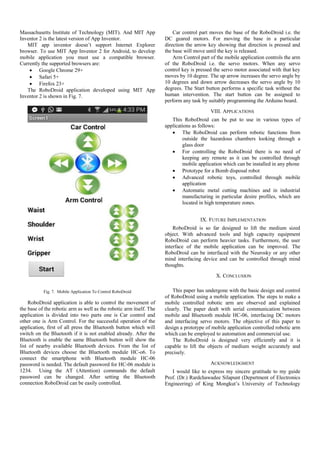
V. ROBODROID WORKING FLOWCHART
The RoboDroid functions starts with the human input from
an Android smartphone using a mobile application. The mobile
application setups a Bluetooth connection between the Arduino
Board and the smartphone for communication via the
Bluetooth module HC-06. The instructions coming from the
mobile is received by the Arduino board due to the serial
communication between the Arduino and Bluetooth module
and the microcontroller processes the data and gives command
to the end effectors and the RoboDroid gives the mechanical
output.
Fig. 6. Working flow chart of robotic arm
VI. ARDUINO PROGRAMMING
There are two major tasks in programming the Arduino
board to control the RoboDroid using the mobile application.
First, to set up the serial connection between the Arduino Uno,
Bluetooth module HC-06 and the smartphone and reading the
data send from the Mobile application via Bluetooth. Second,
processing the data read and giving signals to the servomotors
and the DC geared motors.
A. Serial Communication
To begin the serial communication, the statement
“Serial.begin(speed)” is used that communicate over the pins 0
and 1 of the Arduino board. It opens the serial port and sets the
data rate in bits per second (baud) for serial data transmission.
Now to get the number of bytes (characters) available for
reading from the serial port “Serial.available( )”is used. The
incoming serial data sent from the mobile application is read
using the function “Serial.read( )”.
B. Interfacing DC Motor
To interface DC motor with Arduino Board L293D IC is
used. The input pins of the IC are connected with Arduino and
the output pins of the L293D IC is connected with the DC
motors. The “pinmode(pin, mode)” function configures the
specified pin to behave either as an input or an output. The
mode for the DC motors is ‘OUTPUT’and the pin number is
up to the user’s choice. After setting the pinmode the
“digital.write(pin, value)” writes the high or low value to the
specified digital pin and according to the human input through
mobile it can enable or disable the DC geared motors. The
speed of the motor can be varied using analog.write(pin, value)
function in Arduino IDE (Integrated Development
Environment).
C. Interfacing Servo Motor
Servo motor is interfaced using the library “Servo.h”. This
library allows an Arduino board to control servo motors.
Servos have integrated gears and a shaft that can be precisely
controlled. Standard servos allow the shaft to be positioned at
various angles, usually between 0 and 180 degrees. The
“servo.attach(pin)” function attaches the Servo variable to a
pin. After attaching the servos with the specified pin of
Arduino board the “servo.write(angle)” function is used to
write values to the servo and controlling the shaft accordingly .
In our context the angle values to the servo is provided by the
human using the mobile application.
VII. ANDROID APPLICATION DEVELOPMENT
MIT App Inventor
MIT App Inventor is an open-source web application that
allows the users to make software applications for Android
operating system. Even with limited programming experience
one can easily create an Android Application. App Inventor for
Android is a visual language that relies on simple programming
blocks that users can drag and drop to create software
applications. It was made by Google and it is maintained by the
Massachusetts Institute of Technology (MIT). And MIT App
Inventor 2 is the latest version of App Inventor.
MIT app inventor doesn’t support Internet Explorer
browser. To use MIT App Inventor 2 for Android, to develop
mobile application you must use a compatible browser.
Currently the supported browsers are:
 Google Chrome 29+
 Safari 5+
 Firefox 23+
The RoboDroid application developed using MIT App
Inventor 2 is shown in Fig. 7.
Fig. 7. Mobile Application To Control RoboDroid
RoboDroid application is able to control the movement of
the base of the robotic arm as well as the robotic arm itself. The
application is divided into two parts one is Car control and
other one is Arm Control. For the successful operation of the
application, first of all press the Bluetooth button which will
switch on the Bluetooth if it is not enabled already. After the
Bluetooth is enable the same Bluetooth button will show the
list of nearby available Bluetooth devices. From the list of
Bluetooth devices choose the Bluetooth module HC-o6. To
connect the smartphone with Bluetooth module HC-06
password is needed. The default password for HC-06 module is
1234. Using the AT (Attention) commands the default
password can be changed. After setting the Bluetooth
connection RoboDroid can be easily controlled.
Car control part moves the base of the RoboDroid i.e. the
DC geared motors. For moving the base in a particular
direction the arrow key showing that direction is pressed and
the base will move until the key is released.
Arm Control part of the mobile application controls the arm
of the RoboDroid i.e. the servo motors. When any servo
control key is pressed the servo motor associated with that key
moves by 10 degree. The up arrow increases the servo angle by
10 degrees and down arrow decreases the servo angle by 10
degrees. The Start button performs a specific task without the
human intervention. The start button can be assigned to
perform any task by suitably programming the Arduino board.
VIII. APPLICATIONS
This RoboDroid can be put to use in various types of
applications as follows:
 The RoboDroid can perform robotic functions from
outside the hazardous chambers looking through a
glass door
 For controlling the RoboDroid there is no need of
keeping any remote as it can be controlled through
mobile application which can be installed in any phone
 Prototype for a Bomb disposal robot
 Advanced robotic toys, controlled through mobile
application
 Automatic metal cutting machines and in industrial
manufacturing in particular desire profiles, which are
located in high temperature zones.
IX. FUTURE IMPLEMENTATION
RoboDroid is so far designed to lift the medium sized
object. With advanced tools and high capacity equipment
RoboDroid can perform heavier tasks. Furthermore, the user
interface of the mobile application can be improved. The
RoboDroid can be interfaced with the Neurosky or any other
mind interfacing device and can be controlled through mind
thoughts.
X. CONCLUSION
This paper has undergone with the basic design and control
of RoboDroid using a mobile application. The steps to make a
mobile controlled robotic arm are observed and explained
clearly. The paper dealt with serial communication between
mobile and Bluetooth module HC-06, interfacing DC motors
and interfacing servo motors. The objective of this paper to
design a prototype of mobile application controlled robotic arm
which can be employed to automation and commercial use.
The RoboDroid is designed very efficiently and it is
capable to lift the objects of medium weight accurately and
precisely.
ACKNOWLEDGMENT
I would like to express my sincere gratitude to my guide
Prof. (Dr.) Rardchawadee Silapunt (Depsrtment of Electronics
Engineering) of King Mongkut’s University of Technology
Thonburi, Bangkok (Thailand) for her excellent direction and
encouragement. I am also thankful to Prof. Satish Rai
(Assistant Professor) BKBIET Pilani, for his suggestion and
support. I express much gratitude to my family, friends and
everyone who contributed to this project.
REFERENCES
[1] Jegede Olawale, Awodele Oludele, Ajayi Ayodele,
“Development of a Microcontroller Based Robotic Arm”, in
Proceedings of the 2007 Computer Science and IT Education
Conference pg: 549-557.
[2] https://en.wikipedia.org/wiki/Robotic_arm
[3] A.Rama Krishna, G. Sowmya Bala, A.S.C.S. Sastry, B. Bhanu
Prakash Sarma, Gokul Sai Alla, "Design And Implementation of
A Robotic Arm Based On Haptic Technology" ISSN: 2248-
9622, www.ijera.com Vol. 2, Issue 3, May-Jun 2012, pp.3098-
3103
[4] http://www.codevista.net/269/introduction-to-the-arduino-
platform-and-why-you-need-one
[5] http://www.codevista.net/182/how-to-connect-bluetooth-
module-hc-06-with-arduino-uno
[6] http://www.ti.com/lit/ds/symlink/l293.pdf
[7] https://en.wikipedia.org/wiki/Servomotor
[8] http://www.codevista.net/154/how-to-make-a-mobile-
controlled-robotic-arm-using-arduino-uno
[9] ai2.appinventor.mit.edu
[10] http://www.arduino.cc

MOBILE CONTROLLED ROBOTIC ARM USING ARDUINO AND HC-06

  • 1.
    MOBILE CONTROLLED ROBOTICARM USING ARDUINO AND HC-06 Eklavya Sharma BK Birla Institute of Engineering & Technology Pilani sharma.eklavya@hotmail.com Abstract— In the era of technological advancement there is a huge increase in wireless technology, and most of the work is done using robots and robotic arm. And in this paper I have presented the prototype of the same. This paper deals with the design and control of RoboDroid to do monotonous job using a smartphone only. The robot is named ‘RoboDroid’ as it utilizes concept of both Robotics and Android. It is a mechanical arm with movable base that is controlled by an application through Android Smartphone via Bluetooth using a most commonly used Bluetooth module HC-06 and programmed with Arduino Uno. The RoboDroid can function similar to the human arm as specified by the controller or can be used for the automation purposes. The movable base of the robotic arm is made using two dc geared motor and two ball bearings serve the purpose of front wheels. Robotic arm uses the servo motors having rotational range of 0-180 degrees for its movement which offers its précised control. To facilitate the pick and place facility the RoboDroid is equipped with a gripper. The problem of keeping a remote is also solved as the RoboDroid is controlled with a smartphone application that can be installed in any Smartphone. The RoboDroid has many applications like material handling to place or pick objects that are out of the reach of human, to do hazardous work in labs, assistance in everyday life (home or work), medical rehabilitation and many more in easier and faster way. Index Terms—RoboDroid, Bluetooth Module HC-06, Arduino Uno, Automation, Robotic Arm. I. INTRODUCTION A robot is an automatic or virtually intelligent agent that can carry out tasks robotically or with some supervision, typically with the aid of a remote control. In practice, a robot is usually an electro-mechanical machine that is guided by means of computer and electronic programming. Robots can be autonomous, semi-autonomous or remotely controlled [1]. The most common manufacturing robots for commercial and industrial use is Robotic arm. A robotic arm is a type of mechanical arm, usually programmable, with similar functions to a human arm; the arm may be the sum total of the mechanism or may be part of a more complex robot [2]. Robotic arms are often used as the stepping stone to industrial robotics and automation. RoboDroid ca be remotely controlled or programmed to pick up or manipulate objects at a distance. The robotic hand, can be designed to perform any desired task such as welding, gripping, spinning etc., depending on the application. For example, robot arms in automotive assembly lines perform a variety of tasks such as welding and parts rotation and placement during assembly. In some circumstances, close emulation of the human hand is desired, as in robots designed to conduct bomb disarmament and disposal. The present manuscript deals with the designing of a robotic arm that is controlled wirelessly by Bluetooth through an Android smartphone with Bluetooth facility known as RoboDroid. RoboDroid is a mechanical arm with a movable base that is controlled by Android Smartphone via Bluetooth module using Arduino as a microcontroller platform. The robots have to interact with their environment, which is an important objective in the development of robots. This interaction is commonly accomplished by means of some sort of arm and gripping device or end effector [3]. The design process of is clearly explained in the next section with detailed information regarding the components used then is followed by the implementation and the results and finally ends with conclusion. II. DESIGN OF ROBOTIC ARM The RoboDroid uses Arduino Uno microcontroller board based on ATmega328 and to program this board, Arduino IDE (Integrated Development Environment) software is used. To provide more flexibility to the robotic arm, it is mounted over a movable base which will carry the arm to the desired position. Two dc geared motors are fitted in the base and two ball bearings serve the front wheel function. For the précised movement and control of the robotic arm five servo motors are used having a rotational range of 0 – 180 degree, connected in such a way that it provides 3 DOF’s (Degrees of Freedom) to the system.. There is a gear system in gripper part that convert the rotational motion of servo into opening and closing of the gripper. The list components required for the designing of RoboDroid- A. Arduino Platform The Arduino platform is an open source electronic prototyping system which is meant to be used as a physical computing platform. It is composed of two parts, the Arduino Uno board and the Arduino IDE (Integrated Development Environment).
  • 2.
    1) Arduino UnoBoard: The Arduino board uses the Atmel AVR AT mega 328 microcontroller, which is the heart of the Arduino hardware. Basically, it is designed to provide an easy to use human changeable pin interface to the ATmega328. There are series of Arduino boards available in the market among them the Arduino Uno is used here. Arduino provides more simplicity and shows compatibility with the number of sensors and external hardware that’s why it is becoming more and more popular among hobbyists and electronics enthusiasts [4]. 2) Arduino IDE (Integrated Development Environment): The open-source Arduino Software also known as the Arduino IDE (Integrated Development Environment) makes it easy to write code and upload it to the Arduino board. It runs on Windows, Mac OS X, and Linux. The environment is written in Java and based on Processing and other open-source software. Arduino IDE is the software environment used to create the programs, called “sketches,” that will be executed by the Arduino hardware. It uses a modified C language compiler to build, translate, and transmit the code to the microcontroller board [4]. B. Bluetooth Module HC-06 The Arduino pins 0 (RX) and 1 (TX) are specified for UART (Universal Asynchronous Receiver/Transmitter) that control the interface with its attached serial devices. The Bluetooth module serially communicates with the Arduino using these two pins. However, other pins of Arduino can also be defined as serial pins using the library “Softwareserial.h”. This library allows to setup serial communication on (almost any) digital pin of the Arduino Uno. The Bluetooth Module HC-06 can be configured according to the need using the AT commands i.e. the default name, password, baud rate etc. can be changed as per users choice. The specifications and AT commands of Bluetooth Module HC-06 can be easily found in datasheet [5]. C. DC Geared Motors For the movement of the chassis of the RoboDroid two dc geared motors are used in rear wheels while two ball bearings serve as the front wheel function. The operating voltage of DC geared motor is 9-12 volt. D. Motor Driver L293D The L293D is quadruple high-current half-H driver. The L293D is designed to provide bidirectional drive currents of up to 600 milliampere at voltages from 4.5 Volts to 36 Volts. L293D IC’s are designed to drive a wide array of inductive loads such as relays, solenoids, DC and bipolar stepping motors, as well as other high-current and high-voltage loads [6]. Here, it is used to drive two DC geared motors which are functioning as the rear wheels of the RoboDroid. The features and specification can be found in the datasheet. E. Servo Motors A servomotor is a rotary actuator or linear actuator that allows for precise control of angular or linear position, velocity and acceleration [7]. There are five servo motors used in our robotic arm. One for controlling the waist movement, two used for shoulder movement, one for wrist movement and one for the gripper control. MG995 are used here as they are tiny and lightweight with high output power and torque. These servo motors would provide the proper amount of power required to maintain its own weight as well as the weight of the object carried by the arm. Each servo has three wires: a power wire, a ground wire, and a Pulse-Width Modulation (PWM) wire. The PWM wire enters one of the six PWM ports on the Arduino Uno board. The orange colored PWM (Pulse Width Modulation) wire is given a pulse application for a specified duration, which in turn controls the angle of the shaft in a particular position for a certain point of time. This modulation is famously referred to as the PWM (Pulse Width Modulation). The servomotor expects a coded signal every few seconds. The duration of the pulse determines the angular degree of the shaft. The wire configuration and specification of MG995 can be seen in the datasheet. F. Power Supply There are two DC power source used here. To power up the Arduino and motor driver a 7.2 V LiPo (Lithium Polymer) Battery is used with 900 milliampere hour current rating. And to power up the servo motors 7.2 Volt LiPo (Lithium Polymer) Battery with high current rating (3000 milliampere hour) is used. III. ASSEMBLING THE ROBODROID A. Making The Chassis The chassis carry the whole weight of the robot and functions as the moving base of the RoboDroid. The base will carry the robotic arm to the desired position. The base is made up of sun mica sheet. The Arduino board, motor driver circuitry and the power supply is bolted on the movable base. For the rear wheel’s function DC geared motors are used and ball bearings are functioning as front wheel as shown in Fig. 1 shown below. Fig. 1. Chassis of RoboDroid
  • 3.
    B. Mounting RoboticArm The base (waist) of the robotic arm is bolted on the chassis. The waist offers précised position control of 0 to 360 degrees. The waist servo motor control the waist movement, two motors control shoulder movement, one servo motor control wrist movement and the remaining one control the gripper movement. There is a gear system in gripper part that convert the rotational motion of servo into opening and closing of the gripper. Fig. 2. Complete assembly of RoboDroid SNO. Specifications Values 1. Weight 1.5 kg 2. Height 40 cm 3. Length 33.3 cm 4. Width 16.2 cm 5. Wheel Diameter 7 cm TABLE I. GENERAL SPECIFICATIONS OF THE ROBODROID IV. HARDWARE CONNECTIONS WITH ARDUINO BOARD A. Arduino And Bluetooth Module The Arduino pins 0 and 1 are specified for Universal Asynchronous Receiver/Transmitter (UART) that control the interface with its attached serial devices. These pins of Arduino are connected with the RXD and TXD pins of Bluetooth module HC-06. The Vcc and GND (ground pin) of HC-06 is powered with the 3.3 Volt supply pin and ground pin of Arduino. Figure 3 shows the connection between Arduino Uno board and Bluetooth module HC-06. The circuit schematic is made using the open source software Fritzing. Fig. 3. Connection between Arduino and Bluetooth module HC-06 B. Arduino And Motor Driver IC L293d To drive the geared dc motors which are fixed on the base of RoboDroid motor driver IC L293D is used. The power supply to Arduino board and motor driver L293D is given by a 7.2 Volts LiPo (Lithium Polymer) battery. Figure 4 shows the connection between the motor driver IC, Arduino board and DC motors. Fig. 4. Connecting L293D with DC motors and Arduino C. Arduino and Servo Motors The servo motors of the RoboDroid are needed to be connected to the specific pins of Arduino Uno board. Five
  • 4.
    servo motors areused in the RoboDroid, one for the waist, two for the shoulder movement, one for wrist and one for the gripper movement. Only the waist servo motor has the rotational angle of 0-360 degrees while others have the rotational motion of 0-180 degrees. An isolated high current power supply is required for the servo motors. The orange colored PWM (Pulse-Width Modulation) wire of the servo motors goes to the Arduino Uno board. The red colored power wires of all the servo motors are shorted and connected with the positive terminal of the 7.2 Volts LiPo (Lithium Polymer). Similarly, the ground pin of Arduino Uno board, the black colored ground wire of all five servo motors is connected with negative terminal of the battery. Figure 5 shows the schematic connection between the Arduino Uno board and the servo motors. Fig. 5. Schematic connection between Arduino Uno and servo motors V. ROBODROID WORKING FLOWCHART The RoboDroid functions starts with the human input from an Android smartphone using a mobile application. The mobile application setups a Bluetooth connection between the Arduino Board and the smartphone for communication via the Bluetooth module HC-06. The instructions coming from the mobile is received by the Arduino board due to the serial communication between the Arduino and Bluetooth module and the microcontroller processes the data and gives command to the end effectors and the RoboDroid gives the mechanical output. Fig. 6. Working flow chart of robotic arm VI. ARDUINO PROGRAMMING There are two major tasks in programming the Arduino board to control the RoboDroid using the mobile application. First, to set up the serial connection between the Arduino Uno, Bluetooth module HC-06 and the smartphone and reading the data send from the Mobile application via Bluetooth. Second, processing the data read and giving signals to the servomotors and the DC geared motors. A. Serial Communication To begin the serial communication, the statement “Serial.begin(speed)” is used that communicate over the pins 0 and 1 of the Arduino board. It opens the serial port and sets the data rate in bits per second (baud) for serial data transmission. Now to get the number of bytes (characters) available for reading from the serial port “Serial.available( )”is used. The incoming serial data sent from the mobile application is read using the function “Serial.read( )”. B. Interfacing DC Motor To interface DC motor with Arduino Board L293D IC is used. The input pins of the IC are connected with Arduino and the output pins of the L293D IC is connected with the DC motors. The “pinmode(pin, mode)” function configures the specified pin to behave either as an input or an output. The mode for the DC motors is ‘OUTPUT’and the pin number is up to the user’s choice. After setting the pinmode the “digital.write(pin, value)” writes the high or low value to the specified digital pin and according to the human input through mobile it can enable or disable the DC geared motors. The speed of the motor can be varied using analog.write(pin, value) function in Arduino IDE (Integrated Development Environment). C. Interfacing Servo Motor Servo motor is interfaced using the library “Servo.h”. This library allows an Arduino board to control servo motors. Servos have integrated gears and a shaft that can be precisely controlled. Standard servos allow the shaft to be positioned at various angles, usually between 0 and 180 degrees. The “servo.attach(pin)” function attaches the Servo variable to a pin. After attaching the servos with the specified pin of Arduino board the “servo.write(angle)” function is used to write values to the servo and controlling the shaft accordingly . In our context the angle values to the servo is provided by the human using the mobile application. VII. ANDROID APPLICATION DEVELOPMENT MIT App Inventor MIT App Inventor is an open-source web application that allows the users to make software applications for Android operating system. Even with limited programming experience one can easily create an Android Application. App Inventor for Android is a visual language that relies on simple programming blocks that users can drag and drop to create software applications. It was made by Google and it is maintained by the
  • 5.
    Massachusetts Institute ofTechnology (MIT). And MIT App Inventor 2 is the latest version of App Inventor. MIT app inventor doesn’t support Internet Explorer browser. To use MIT App Inventor 2 for Android, to develop mobile application you must use a compatible browser. Currently the supported browsers are:  Google Chrome 29+  Safari 5+  Firefox 23+ The RoboDroid application developed using MIT App Inventor 2 is shown in Fig. 7. Fig. 7. Mobile Application To Control RoboDroid RoboDroid application is able to control the movement of the base of the robotic arm as well as the robotic arm itself. The application is divided into two parts one is Car control and other one is Arm Control. For the successful operation of the application, first of all press the Bluetooth button which will switch on the Bluetooth if it is not enabled already. After the Bluetooth is enable the same Bluetooth button will show the list of nearby available Bluetooth devices. From the list of Bluetooth devices choose the Bluetooth module HC-o6. To connect the smartphone with Bluetooth module HC-06 password is needed. The default password for HC-06 module is 1234. Using the AT (Attention) commands the default password can be changed. After setting the Bluetooth connection RoboDroid can be easily controlled. Car control part moves the base of the RoboDroid i.e. the DC geared motors. For moving the base in a particular direction the arrow key showing that direction is pressed and the base will move until the key is released. Arm Control part of the mobile application controls the arm of the RoboDroid i.e. the servo motors. When any servo control key is pressed the servo motor associated with that key moves by 10 degree. The up arrow increases the servo angle by 10 degrees and down arrow decreases the servo angle by 10 degrees. The Start button performs a specific task without the human intervention. The start button can be assigned to perform any task by suitably programming the Arduino board. VIII. APPLICATIONS This RoboDroid can be put to use in various types of applications as follows:  The RoboDroid can perform robotic functions from outside the hazardous chambers looking through a glass door  For controlling the RoboDroid there is no need of keeping any remote as it can be controlled through mobile application which can be installed in any phone  Prototype for a Bomb disposal robot  Advanced robotic toys, controlled through mobile application  Automatic metal cutting machines and in industrial manufacturing in particular desire profiles, which are located in high temperature zones. IX. FUTURE IMPLEMENTATION RoboDroid is so far designed to lift the medium sized object. With advanced tools and high capacity equipment RoboDroid can perform heavier tasks. Furthermore, the user interface of the mobile application can be improved. The RoboDroid can be interfaced with the Neurosky or any other mind interfacing device and can be controlled through mind thoughts. X. CONCLUSION This paper has undergone with the basic design and control of RoboDroid using a mobile application. The steps to make a mobile controlled robotic arm are observed and explained clearly. The paper dealt with serial communication between mobile and Bluetooth module HC-06, interfacing DC motors and interfacing servo motors. The objective of this paper to design a prototype of mobile application controlled robotic arm which can be employed to automation and commercial use. The RoboDroid is designed very efficiently and it is capable to lift the objects of medium weight accurately and precisely. ACKNOWLEDGMENT I would like to express my sincere gratitude to my guide Prof. (Dr.) Rardchawadee Silapunt (Depsrtment of Electronics Engineering) of King Mongkut’s University of Technology
  • 6.
    Thonburi, Bangkok (Thailand)for her excellent direction and encouragement. I am also thankful to Prof. Satish Rai (Assistant Professor) BKBIET Pilani, for his suggestion and support. I express much gratitude to my family, friends and everyone who contributed to this project. REFERENCES [1] Jegede Olawale, Awodele Oludele, Ajayi Ayodele, “Development of a Microcontroller Based Robotic Arm”, in Proceedings of the 2007 Computer Science and IT Education Conference pg: 549-557. [2] https://en.wikipedia.org/wiki/Robotic_arm [3] A.Rama Krishna, G. Sowmya Bala, A.S.C.S. Sastry, B. Bhanu Prakash Sarma, Gokul Sai Alla, "Design And Implementation of A Robotic Arm Based On Haptic Technology" ISSN: 2248- 9622, www.ijera.com Vol. 2, Issue 3, May-Jun 2012, pp.3098- 3103 [4] http://www.codevista.net/269/introduction-to-the-arduino- platform-and-why-you-need-one [5] http://www.codevista.net/182/how-to-connect-bluetooth- module-hc-06-with-arduino-uno [6] http://www.ti.com/lit/ds/symlink/l293.pdf [7] https://en.wikipedia.org/wiki/Servomotor [8] http://www.codevista.net/154/how-to-make-a-mobile- controlled-robotic-arm-using-arduino-uno [9] ai2.appinventor.mit.edu [10] http://www.arduino.cc