Anand Kumar
   IT/07/18
7th Semester
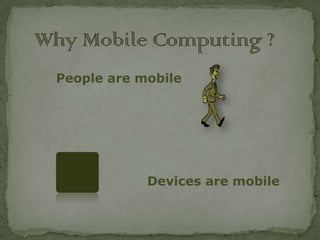
People are mobile


            Devices are mobile
 A person who moves


   Between different geographical locations
   Between different networks
   Between different communication devices
   Between different applications


 A device that moves


   Between different geographical locations
   Between different networks
 Offline feature   see…
 Automated
 Predictive
 Use Friendly
 Windows
 Linux
 OS/2
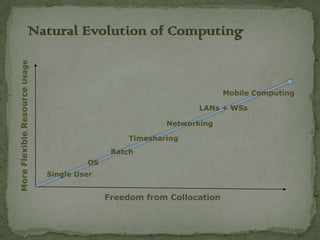
Natural Evolution of Computing
More Flexible Resource Usage


                                                                        Mobile Computing

                                                                 LANs + WSs

                                                          Networking

                                                  Timesharing
                                              Batch
                                        OS
                               Single User


                                             Freedom from Collocation
Research Issues in Mobile Computing
• Wireless Communications

– Quality of connectivity
– Bandwidth limitations

• Mobility

– Location transparency
– Location dependency

• Portability

– Power limitations
– Display, processing, storage limitations
Classes of Mobile Devices
• Display Only

– InfoPad model: limited portable processing
– Constrained to operation within prepared infrastructure,
like a cordless phone
– Advantages with respect to power consumption, upgrade
path, lightweight, impact of lost/broken/stolen device

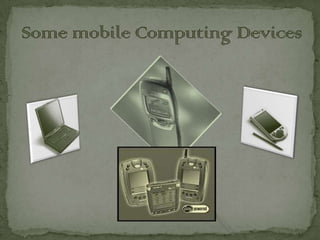
• Laptop Computer

– ThinkPad model: significant portable processing,
operates independently of wireless infrastructure
– Disadvantages: power consumption, expensive,
significant loss exposure, typically greater than 5 pounds

• Personal Digital Assistant

– Somewhere between these extremes
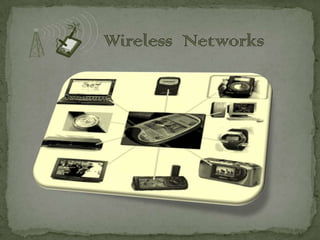
Wireless C0mmunication
• Harsh communications environment:

– Lower bandwidth/higher latency:
good enough for videoconferencing?
– Higher error rates
– More frequent disconnection
– Performance depends on density of nearby users but inherent
scalability of cellular/frequency reuse architecture helps

• Connection/Disconnection

–   Network failure is common
–   Autonomous operation is highly desirable
»   Caching is a good idea, e.g., web cache
–   Asynchronous/spool-oriented applications, like mail or printing
»   Trickle back data when bandwidth is available
–   Disconnected file systems: CODA (CMU), Ficus (UCLA)
Wireless C0mmunication (contd…)
• Low Bandwidth

– Orders of magnitude differences between wide-area, in building
Wireless

• Variable Bandwidth

– Applications adaptation to changing quality of
connectivity
» High bandwidth, low latency: business as usual
» High bandwidth, high latency: aggressive prefetching
» Low bandwidth, high latency: asynchronous
operation, use caches to hide latency, predict future
references/trickle in, etc. etc.

• Heterogeneous Networks

– “Vertical Handoff” among co-located wireless networks
Security Concerns in
Wireless C0mmunication

 – Authentication is critical
 » Normal network point of attachment is a wall tap
 » Wireless access makes network attachment too easy
 – Exposure to over-the-air wiretapping
 » Any transmitter can also be a receiver!
 » Some wireless networks provide secure air-links
 (e.g., CDPD)
 » Made more difficult by spread spectrum technologies
Mobility
• Address Migration
– Existing applications send packets to a fixed network
address
– Need to support dynamically changing “local” addresses
as mobile device moves through network
– Mobile IP specification: home environment tracks mobile
device’s current location through registration procedure
– Route optimization: exploit local caches of <global
destination node addresses, current care-of address>
– Location updates:
» Forwarding
» Hierarchical mobility agents
– Other routing issues: e.g., multicast
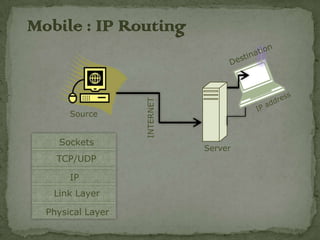
Mobile : IP Routing


                   INTERNET
       Source


    Sockets
                              Server
    TCP/UDP

       IP
   Link Layer

  Physical Layer
Mobility
• Location Dependent Services

– Discovery: What services exist in my local
environment?
e.g., printers, file and compute services, special local
applications, etc.
– Follow me services: “Route calls to my current
location,”
“Migrate my workstation desktop to the nearest
workstation screen”
– Information services:
» Broadcast/“push” information (e.g., “Flight 59 will
depart from Gate 23”)
» “Pull” information (e.g., “What gate will Flight 59
depart from?”)
– Service migration: computations, caches, state, etc.
follow mobile device as it moves through the network
– Privacy: what applications can track user locations?
Portability
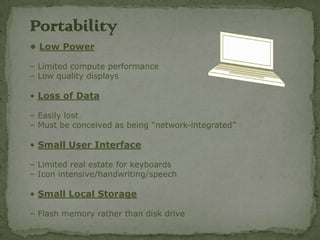
• Low Power

– Limited compute performance
– Low quality displays

• Loss of Data

– Easily lost
– Must be conceived as being “network-integrated”

• Small User Interface

– Limited real estate for keyboards
– Icon intensive/handwriting/speech

• Small Local Storage

– Flash memory rather than disk drive
Portability Issues

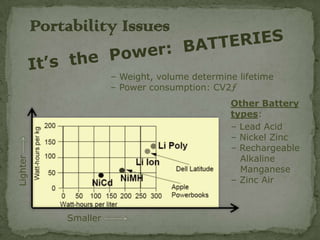
                        – Weight, volume determine lifetime
                        – Power consumption: CV2ƒ
                                                 Other Battery
                                                 types:
                                                 – Lead Acid
                                                 – Nickel Zinc
                                                 – Rechargeable
                                                   Alkaline
Lighter


                                                   Manganese
                                                 – Zinc Air


              Smaller
Concepts in Mobile Computing
  • Identification

  – Subscriber mobility: 700 phone number
  – Terminal mobility: mobile phone # or IP address
  – Application mobility

  • Registration

  – Authentication: who are you?
  – Authorization: what can you do?
  – Allocation: how much will I give you?
Continued…
• Call/Connection Establishment

– Mobile Routing: Mobile IP, Cellular System HLR/VLR
– Resource Reservations: Reserve channels in advance
– Location Update: forward vs. hierarchy

• Mobility

– Handoff: when to do it, choice of network
– Process Migration: application support infrastructure that
  follows the mobile

• Privacy and Security

– Authentication
– Authorization
– Encryption: over-the-air security
Thank You

Mobile computing

  • 1.
    Anand Kumar IT/07/18 7th Semester
  • 2.
    People are mobile Devices are mobile
  • 3.
     A personwho moves  Between different geographical locations  Between different networks  Between different communication devices  Between different applications  A device that moves  Between different geographical locations  Between different networks
  • 6.
     Offline feature see…  Automated  Predictive  Use Friendly  Windows  Linux  OS/2
  • 7.
    Natural Evolution ofComputing More Flexible Resource Usage Mobile Computing LANs + WSs Networking Timesharing Batch OS Single User Freedom from Collocation
  • 8.
    Research Issues inMobile Computing • Wireless Communications – Quality of connectivity – Bandwidth limitations • Mobility – Location transparency – Location dependency • Portability – Power limitations – Display, processing, storage limitations
  • 9.
    Classes of MobileDevices • Display Only – InfoPad model: limited portable processing – Constrained to operation within prepared infrastructure, like a cordless phone – Advantages with respect to power consumption, upgrade path, lightweight, impact of lost/broken/stolen device • Laptop Computer – ThinkPad model: significant portable processing, operates independently of wireless infrastructure – Disadvantages: power consumption, expensive, significant loss exposure, typically greater than 5 pounds • Personal Digital Assistant – Somewhere between these extremes
  • 10.
    Wireless C0mmunication • Harshcommunications environment: – Lower bandwidth/higher latency: good enough for videoconferencing? – Higher error rates – More frequent disconnection – Performance depends on density of nearby users but inherent scalability of cellular/frequency reuse architecture helps • Connection/Disconnection – Network failure is common – Autonomous operation is highly desirable » Caching is a good idea, e.g., web cache – Asynchronous/spool-oriented applications, like mail or printing » Trickle back data when bandwidth is available – Disconnected file systems: CODA (CMU), Ficus (UCLA)
  • 11.
    Wireless C0mmunication (contd…) •Low Bandwidth – Orders of magnitude differences between wide-area, in building Wireless • Variable Bandwidth – Applications adaptation to changing quality of connectivity » High bandwidth, low latency: business as usual » High bandwidth, high latency: aggressive prefetching » Low bandwidth, high latency: asynchronous operation, use caches to hide latency, predict future references/trickle in, etc. etc. • Heterogeneous Networks – “Vertical Handoff” among co-located wireless networks
  • 12.
    Security Concerns in WirelessC0mmunication – Authentication is critical » Normal network point of attachment is a wall tap » Wireless access makes network attachment too easy – Exposure to over-the-air wiretapping » Any transmitter can also be a receiver! » Some wireless networks provide secure air-links (e.g., CDPD) » Made more difficult by spread spectrum technologies
  • 13.
    Mobility • Address Migration –Existing applications send packets to a fixed network address – Need to support dynamically changing “local” addresses as mobile device moves through network – Mobile IP specification: home environment tracks mobile device’s current location through registration procedure – Route optimization: exploit local caches of <global destination node addresses, current care-of address> – Location updates: » Forwarding » Hierarchical mobility agents – Other routing issues: e.g., multicast
  • 14.
    Mobile : IPRouting INTERNET Source Sockets Server TCP/UDP IP Link Layer Physical Layer
  • 15.
    Mobility • Location DependentServices – Discovery: What services exist in my local environment? e.g., printers, file and compute services, special local applications, etc. – Follow me services: “Route calls to my current location,” “Migrate my workstation desktop to the nearest workstation screen” – Information services: » Broadcast/“push” information (e.g., “Flight 59 will depart from Gate 23”) » “Pull” information (e.g., “What gate will Flight 59 depart from?”) – Service migration: computations, caches, state, etc. follow mobile device as it moves through the network – Privacy: what applications can track user locations?
  • 16.
    Portability • Low Power –Limited compute performance – Low quality displays • Loss of Data – Easily lost – Must be conceived as being “network-integrated” • Small User Interface – Limited real estate for keyboards – Icon intensive/handwriting/speech • Small Local Storage – Flash memory rather than disk drive
  • 17.
    Portability Issues – Weight, volume determine lifetime – Power consumption: CV2ƒ Other Battery types: – Lead Acid – Nickel Zinc – Rechargeable Alkaline Lighter Manganese – Zinc Air Smaller
  • 18.
    Concepts in MobileComputing • Identification – Subscriber mobility: 700 phone number – Terminal mobility: mobile phone # or IP address – Application mobility • Registration – Authentication: who are you? – Authorization: what can you do? – Allocation: how much will I give you?
  • 19.
    Continued… • Call/Connection Establishment –Mobile Routing: Mobile IP, Cellular System HLR/VLR – Resource Reservations: Reserve channels in advance – Location Update: forward vs. hierarchy • Mobility – Handoff: when to do it, choice of network – Process Migration: application support infrastructure that follows the mobile • Privacy and Security – Authentication – Authorization – Encryption: over-the-air security
  • 20.