Ted Chien Supervisory Engineer viWave Co. Ltd. LinkedIn: http://www.linkedin.com/in/htchien
Android Introduction The Platform Google Mobile Service SDKs Tools Application Fundamentals Q&A
An open source, freely Linux-based software stack for mobile devices. Code license: Apache License Including: Operating System Use Linux as base Middlewares Libraries, Dalvik VM, etc. Application Framework Java layer; provides system services. Key Applications Home, Browser, Calendar, Contacts, Phone, etc.
 
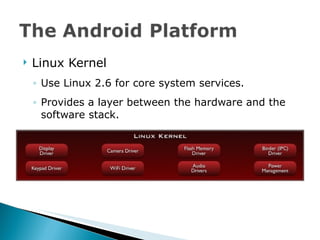
Linux Kernel Use Linux 2.6 for core system services. Provides a layer between the hardware and the software stack.
Libraries System C Libraries Heavily modified BSD C libraries.
Libraries Media Framework Based on PacketVideo OpenCORE, supports AAC, AMR, H.263, MP3, MPEG-4, JPG, PNG. Also supports VC-1 to playback Windows Media 9 files. Advanced framework with simple Java API layer.
Libraries Surface Manager : system-wide renderer, manage display system. LibWebCore : web browser engine (from WebKit). SGL : Skia Graphics Library, for 2D Graphics. 3D Libraries : based on OpenGL ES 1.1. FreeType : font libraries. SQLite : data base engine.
Runtime Java Core Libraries Dalvik VM
Dalvik VM Customized Java-compatible VM. Runs optimized file format (.dex) Also run unmodified Java .class / .jar files. Designed for embedded system Use memory efficiently. Highly CPU-optimized bytecode interpreter. Supports multiple VM processes per device.
Dalvik VM Cache applications in  .dex  format to speed up loading. Transformed from Java .class file. Stored in data partition, might generated multiple times. In GEP build, applications are run in  .odex  format. Optimized DEX format, compressed to have smaller size. Stored in system image, only generated once. Relies on Linux kernel for threading and low level memory management.
Application Framework Provides framework APIs, a sets of services and systems. More: Sensor Manager, Power Manager, Search Manager, etc.
Applications Java applications written by engineers to support different use.
Google Experience Phone (GEP) Has “with Google” logo. Has Google Mobile apps. Totally controlled by Google, made by Google. Vendor Experience Phone (HEP, MEP, etc) No “with Google” logo. Must pass Google verification. Have Google Mobile apps. Vendors can add their own bonus applications. Open Source Phone No “with Google” logo. No Google Mobile apps.
Setup Wizard Provides OOBE setup. Login user to Gmail so device can sync data from Google online services. Gmail With Contact Info. Google Calendar Google Talk Google Maps With Navigation in 2.0 YouTube Android Market
Similar to Apple App Store. Can download free / paid apps. Add preview images in Android 1.6. Filter applications by API level defined in the applications. Share revenue with developers and telecom operators: Developer: 70% Telecom Operator: 30% http://market.android.com
ROM images hboot.img : low level boot loader. radio.img : radio code. boot.img : Linux kernel. system.img : Android framework, system applications / libraries, etc. recovery.img : used to recovery / upgrade Android system. userdata.img : user-specific data or user applications downloaded from Android Market.
Needs to work with ADT (Android Developer Toolkit) and Eclipse Has following contents: Emulator images (with Dream skin). Development tools AVD: Android Virtual Device DDMS: Dalvik Debug Monitor Service Has sample programs. Has documentations.
Supports all mainstream OS Linux (Ubuntu 8.04 LTS suggested) Mac OS X Leopard Windows XP / Vista Requires Eclipse 3.3 or later.
ADT: Android Developer Toolkit Need to work in Eclipse IDE. Integrated with AVD Manager. Integrated with DDMS. Has WYSWYG UI Designer. Has Create Project Wizard. Has code / XML editor. Easy to write / build / debug Java code and get log.
ADT + SDK: Only can write / debug Java codes for Framework and Applications. No support for native code (C/C++) applications. For native code applications, we need to use commands to manually build and use GNU Debugger to debug under shell console. Can only integrate with Eclipse IDE.
Where to download the SDK? http://developer.android.com/sdk/ Where to download ADT? Download via Android.com: http://developer.android.com/sdk/eclipse-adt.html Download within Eclipse IDE: Help->Install New Software. Download URL:  https://dl-ssl.google.com/android/eclipse/ After download and install ADT, need to set SDK location in Window ->Preference->Android.
An developer challenge that Google hold every year. For Android mobile platform. Demonstrates the capabilities of each Android platform. http://code.google.com/android/adc
See  http://developer.android.com/guide/developing/tools/ fastboot Tool used to detect devices. Can flash Android ROM images to device. Can write specific oem data to low level boot loader. adb (Android Debug Bridge) Communication protocol between PC and device. Tool to send / receive data between PC and device.
Android Native Development Kit Use shell commands to build C/C++ libraries and Java applications for the Android platform. Can embedded native code libraries (.so) into .apk file for easy deployment. Provides following native libraries: libc, libm, JNI interface, libz, liblog, OpenGL ES 1.1, minimal set of C++ headers. Where to download: http://developer.android.com/sdk/ndk/
Application Activity & Task Service Intent & IntentFilter Broadcast Receiver Content Provider
Application = Android Project in Eclipse = .apk (Android Package) Packed by aapt tool. Has following main building blocks: Activity ContentProvider IntentReceiver Service
Defines the API Level used in the application. Android Market will filter applications based on the API Level defined.
One application will have only one AndroidManifest.xml. Declare permissions that are required to use protected API or interact with applications. Describes the resources the application can use.
List all components used in the application. Describes capabilities and behaviors of each component. Lists the libraries that application must be linked with.
Each application runs in its own Linux process. Each process has its own Java VM. Each process has an unique Linux user ID to access resources. Activities / Services with the same user ID can run in the same process and share Java VM. Processes are started / stopped as needed to run an application’s components. Process might be killed by system to reclaim resources.
Activites, IntentReceivers, Services run in the main thread Can start other threads if needed. ContentProviders are always multi-threaded.
Represents a window that we can place UI on. Can be embedded. Can be faceless. Can be in a floating window. Can return a value.
Defined in  AndroidManifest.xml  with  <activity>  tags. An application can have one or more activities. One activity can invoke other activities, even not in the same application. One activity can be replaced by an activity in other application with the same Intent action.
Task: a group of activities, arranged in stack. Root activity: beginning of a task. Top activity: current running activity in a task. Activity can start new activity and push the old one into stack. Press on BACK key will pop the old activity back to screen.
 
Defined in  AndroidManifest.xml  with  <service>  tags. An activity that has no UI but runs in background for infinite period of time. Ex: music player, network download, etc. It runs in the main thread of the process. Can run not only in its process but also in other application’s process. For CPU intensive / block resource services, suggested to run threads in the service.
 
An object that holds the content of a message: action : requested operation to perform. ACTION_VIEW, ACTION_PICK, etc. data : data to perform with, described as URI. URI: Uniform Resource Identifier. category : the intent belongs to which intent group. type : MIME type to handle with. extras : other customized application data.
Match activities in the application against an intent. Defined in  AndroidManifest.xml , using < intent-fliter>  tags. Or defined in  Activity.onResume()  with  BroadcastReciever .
Android can broadcast an intent to all activities in the system, and activities can receive broadcasted intents by registering  BroadcastReceiver .
The way to register an broadcast intent: Define the intent with  <receiver>  tags in  AndroidManifest.xml . Register  BroadcastReceiver  in  OnResume()  and unregister it in  OnPause()  in an activity . Example: SD card handling in Gallery.
Provide uniform APIs to access data, and then provide to multiple applications through  ContentResolver . All content is represented by URIs.
ContentProvider defines how the data is stored in SQLite database in the system for different types of content. has its own URI path content://contacts/1/phones maps URIs to different MIME types content://media/… -> JPG, PNG, etc.
ContentResolver defines how to access the data via URI from the database. Cursor defines how to access the sorted data set after query via  ContentResolver . Can be bound to ListView, GridView, Gallery, Spinner for displaying data.
Google Android  手機應用程式入門,文魁出版社 , Taiwan Android 1.1~1.5 Google Android SDK  開發範例大全,悅知文化 , Taiwan Android 1.1~1.5 Busy Coder’s Guide to Android Development, CommonsWare, Mark Murphy, USA Android 1.1~2.0 Busy Coder’s Guide to Advanced Android Development, CommonsWare, Mark Murphy, USA Andorid 1.1~2.0


Android In A Nutshell

  • 1.
    Ted Chien SupervisoryEngineer viWave Co. Ltd. LinkedIn: http://www.linkedin.com/in/htchien
  • 2.
    Android Introduction ThePlatform Google Mobile Service SDKs Tools Application Fundamentals Q&A
  • 3.
    An open source,freely Linux-based software stack for mobile devices. Code license: Apache License Including: Operating System Use Linux as base Middlewares Libraries, Dalvik VM, etc. Application Framework Java layer; provides system services. Key Applications Home, Browser, Calendar, Contacts, Phone, etc.
  • 4.
  • 5.
    Linux Kernel UseLinux 2.6 for core system services. Provides a layer between the hardware and the software stack.
  • 6.
    Libraries System CLibraries Heavily modified BSD C libraries.
  • 7.
    Libraries Media FrameworkBased on PacketVideo OpenCORE, supports AAC, AMR, H.263, MP3, MPEG-4, JPG, PNG. Also supports VC-1 to playback Windows Media 9 files. Advanced framework with simple Java API layer.
  • 8.
    Libraries Surface Manager: system-wide renderer, manage display system. LibWebCore : web browser engine (from WebKit). SGL : Skia Graphics Library, for 2D Graphics. 3D Libraries : based on OpenGL ES 1.1. FreeType : font libraries. SQLite : data base engine.
  • 9.
    Runtime Java CoreLibraries Dalvik VM
  • 10.
    Dalvik VM CustomizedJava-compatible VM. Runs optimized file format (.dex) Also run unmodified Java .class / .jar files. Designed for embedded system Use memory efficiently. Highly CPU-optimized bytecode interpreter. Supports multiple VM processes per device.
  • 11.
    Dalvik VM Cacheapplications in .dex format to speed up loading. Transformed from Java .class file. Stored in data partition, might generated multiple times. In GEP build, applications are run in .odex format. Optimized DEX format, compressed to have smaller size. Stored in system image, only generated once. Relies on Linux kernel for threading and low level memory management.
  • 12.
    Application Framework Providesframework APIs, a sets of services and systems. More: Sensor Manager, Power Manager, Search Manager, etc.
  • 13.
    Applications Java applicationswritten by engineers to support different use.
  • 14.
    Google Experience Phone(GEP) Has “with Google” logo. Has Google Mobile apps. Totally controlled by Google, made by Google. Vendor Experience Phone (HEP, MEP, etc) No “with Google” logo. Must pass Google verification. Have Google Mobile apps. Vendors can add their own bonus applications. Open Source Phone No “with Google” logo. No Google Mobile apps.
  • 15.
    Setup Wizard ProvidesOOBE setup. Login user to Gmail so device can sync data from Google online services. Gmail With Contact Info. Google Calendar Google Talk Google Maps With Navigation in 2.0 YouTube Android Market
  • 16.
    Similar to AppleApp Store. Can download free / paid apps. Add preview images in Android 1.6. Filter applications by API level defined in the applications. Share revenue with developers and telecom operators: Developer: 70% Telecom Operator: 30% http://market.android.com
  • 17.
    ROM images hboot.img: low level boot loader. radio.img : radio code. boot.img : Linux kernel. system.img : Android framework, system applications / libraries, etc. recovery.img : used to recovery / upgrade Android system. userdata.img : user-specific data or user applications downloaded from Android Market.
  • 18.
    Needs to workwith ADT (Android Developer Toolkit) and Eclipse Has following contents: Emulator images (with Dream skin). Development tools AVD: Android Virtual Device DDMS: Dalvik Debug Monitor Service Has sample programs. Has documentations.
  • 19.
    Supports all mainstreamOS Linux (Ubuntu 8.04 LTS suggested) Mac OS X Leopard Windows XP / Vista Requires Eclipse 3.3 or later.
  • 20.
    ADT: Android DeveloperToolkit Need to work in Eclipse IDE. Integrated with AVD Manager. Integrated with DDMS. Has WYSWYG UI Designer. Has Create Project Wizard. Has code / XML editor. Easy to write / build / debug Java code and get log.
  • 21.
    ADT + SDK:Only can write / debug Java codes for Framework and Applications. No support for native code (C/C++) applications. For native code applications, we need to use commands to manually build and use GNU Debugger to debug under shell console. Can only integrate with Eclipse IDE.
  • 22.
    Where to downloadthe SDK? http://developer.android.com/sdk/ Where to download ADT? Download via Android.com: http://developer.android.com/sdk/eclipse-adt.html Download within Eclipse IDE: Help->Install New Software. Download URL: https://dl-ssl.google.com/android/eclipse/ After download and install ADT, need to set SDK location in Window ->Preference->Android.
  • 23.
    An developer challengethat Google hold every year. For Android mobile platform. Demonstrates the capabilities of each Android platform. http://code.google.com/android/adc
  • 24.
    See http://developer.android.com/guide/developing/tools/fastboot Tool used to detect devices. Can flash Android ROM images to device. Can write specific oem data to low level boot loader. adb (Android Debug Bridge) Communication protocol between PC and device. Tool to send / receive data between PC and device.
  • 25.
    Android Native DevelopmentKit Use shell commands to build C/C++ libraries and Java applications for the Android platform. Can embedded native code libraries (.so) into .apk file for easy deployment. Provides following native libraries: libc, libm, JNI interface, libz, liblog, OpenGL ES 1.1, minimal set of C++ headers. Where to download: http://developer.android.com/sdk/ndk/
  • 26.
    Application Activity &Task Service Intent & IntentFilter Broadcast Receiver Content Provider
  • 27.
    Application = AndroidProject in Eclipse = .apk (Android Package) Packed by aapt tool. Has following main building blocks: Activity ContentProvider IntentReceiver Service
  • 28.
    Defines the APILevel used in the application. Android Market will filter applications based on the API Level defined.
  • 29.
    One application willhave only one AndroidManifest.xml. Declare permissions that are required to use protected API or interact with applications. Describes the resources the application can use.
  • 30.
    List all componentsused in the application. Describes capabilities and behaviors of each component. Lists the libraries that application must be linked with.
  • 31.
    Each application runsin its own Linux process. Each process has its own Java VM. Each process has an unique Linux user ID to access resources. Activities / Services with the same user ID can run in the same process and share Java VM. Processes are started / stopped as needed to run an application’s components. Process might be killed by system to reclaim resources.
  • 32.
    Activites, IntentReceivers, Servicesrun in the main thread Can start other threads if needed. ContentProviders are always multi-threaded.
  • 33.
    Represents a windowthat we can place UI on. Can be embedded. Can be faceless. Can be in a floating window. Can return a value.
  • 34.
    Defined in AndroidManifest.xml with <activity> tags. An application can have one or more activities. One activity can invoke other activities, even not in the same application. One activity can be replaced by an activity in other application with the same Intent action.
  • 35.
    Task: a groupof activities, arranged in stack. Root activity: beginning of a task. Top activity: current running activity in a task. Activity can start new activity and push the old one into stack. Press on BACK key will pop the old activity back to screen.
  • 36.
  • 37.
    Defined in AndroidManifest.xml with <service> tags. An activity that has no UI but runs in background for infinite period of time. Ex: music player, network download, etc. It runs in the main thread of the process. Can run not only in its process but also in other application’s process. For CPU intensive / block resource services, suggested to run threads in the service.
  • 38.
  • 39.
    An object thatholds the content of a message: action : requested operation to perform. ACTION_VIEW, ACTION_PICK, etc. data : data to perform with, described as URI. URI: Uniform Resource Identifier. category : the intent belongs to which intent group. type : MIME type to handle with. extras : other customized application data.
  • 40.
    Match activities inthe application against an intent. Defined in AndroidManifest.xml , using < intent-fliter> tags. Or defined in Activity.onResume() with BroadcastReciever .
  • 41.
    Android can broadcastan intent to all activities in the system, and activities can receive broadcasted intents by registering BroadcastReceiver .
  • 42.
    The way toregister an broadcast intent: Define the intent with <receiver> tags in AndroidManifest.xml . Register BroadcastReceiver in OnResume() and unregister it in OnPause() in an activity . Example: SD card handling in Gallery.
  • 43.
    Provide uniform APIsto access data, and then provide to multiple applications through ContentResolver . All content is represented by URIs.
  • 44.
    ContentProvider defines howthe data is stored in SQLite database in the system for different types of content. has its own URI path content://contacts/1/phones maps URIs to different MIME types content://media/… -> JPG, PNG, etc.
  • 45.
    ContentResolver defines howto access the data via URI from the database. Cursor defines how to access the sorted data set after query via ContentResolver . Can be bound to ListView, GridView, Gallery, Spinner for displaying data.
  • 46.
    Google Android 手機應用程式入門,文魁出版社 , Taiwan Android 1.1~1.5 Google Android SDK 開發範例大全,悅知文化 , Taiwan Android 1.1~1.5 Busy Coder’s Guide to Android Development, CommonsWare, Mark Murphy, USA Android 1.1~2.0 Busy Coder’s Guide to Advanced Android Development, CommonsWare, Mark Murphy, USA Andorid 1.1~2.0
  • 47.
  • 48.