   Open software platform for mobile
    development
   A complete stack –
    OS, Middleware, Applications
   An Open Handset Alliance (OHA) project
   Powered by Linux operating system
   Fast application development in Java
   Open source under the Apache 2 license
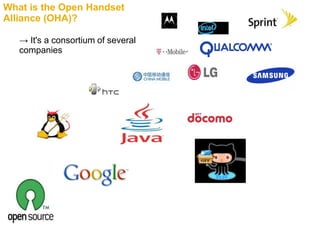
What is the Open Handset
Alliance (OHA)?

   → It's a consortium of several
   companies
Smart phone market
Versions
Name             Version
Cupcake          1.5
Donut            1.6
Eclair           2.1
Froyo            2.2
Gingerbread      2.3
Honeycomb        3.0
Icecream         2.4
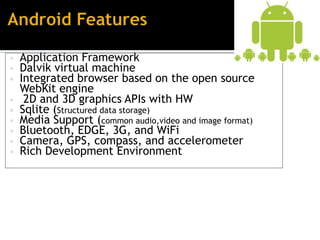
• Application Framework
• Dalvik virtual machine
• Integrated browser based on the open source
    WebKit engine
•    2D and 3D graphics APIs with HW
•   Sqlite (Structured data storage)
•   Media Support (common audio,video and image format)
•   Bluetooth, EDGE, 3G, and WiFi
•   Camera, GPS, compass, and accelerometer
•   Rich Development Environment
Write app in Java

                                 Compiled in Java


                Transformed to Dalvik bytecode


                                            Loaded into Dalvik VM

                                                 Linux OS
   Activity
   IntentReceiver
   Service
   ContentProvider
   Android Emulator -A virtual mobile device that runs
    on our computer -use to design, debug, and test our
    applications in an actual Android run-time environment

   Android Development Tools Plugin -for the Eclipse
    IDE – adds powerful extensions to the Eclipse
    integrated environment

   Dalvik Debug Monitor Service (DDMS) -Integrated
    with Dalvik-this tool let us manage processes on an
    emulator and assists in debugging
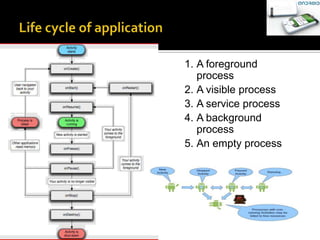
1. A foreground
               process
            2. A visible process
            3. A service process
            4. A background
               process
            5. An empty process


3/17/2013
   Download and Install the Android SDK and
    Test the Emulator.
   Installing JDK and JRE(1.5 or above)
   Install Eclipse.
   Install ADT plugin for Eclipse


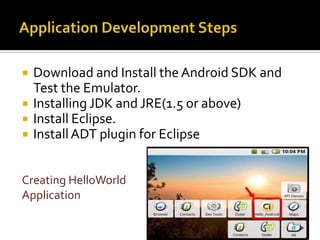
Creating HelloWorld
Application
New > Project…   Select Android project in wizard menu
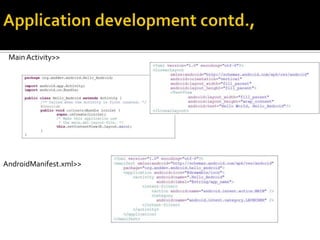
Main.xml>>
 Main Activity>>


AndroidManifest.xml>>
>>Running Your First Application


Output in the emulator
   Resource files are bundled to .apk file archive
   Bundled by aapt tool
   One .apk file archive is a Single application
   Android uses proven technology like
    Java, XML andLinux
   There is an initial learning effort
   Android doesn‘t have many of the limitations
    of current mobile platforms
    It offers a rich API for application
    development
   Android is still in beta
   Android development is fun
http://developer.android.com

Android ppt

  • 2.
    Open software platform for mobile development  A complete stack – OS, Middleware, Applications  An Open Handset Alliance (OHA) project  Powered by Linux operating system  Fast application development in Java  Open source under the Apache 2 license
  • 3.
    What is theOpen Handset Alliance (OHA)? → It's a consortium of several companies
  • 5.
  • 6.
    Versions Name Version Cupcake 1.5 Donut 1.6 Eclair 2.1 Froyo 2.2 Gingerbread 2.3 Honeycomb 3.0 Icecream 2.4
  • 7.
    • Application Framework •Dalvik virtual machine • Integrated browser based on the open source WebKit engine • 2D and 3D graphics APIs with HW • Sqlite (Structured data storage) • Media Support (common audio,video and image format) • Bluetooth, EDGE, 3G, and WiFi • Camera, GPS, compass, and accelerometer • Rich Development Environment
  • 9.
    Write app inJava Compiled in Java Transformed to Dalvik bytecode Loaded into Dalvik VM Linux OS
  • 10.
    Activity  IntentReceiver  Service  ContentProvider
  • 11.
    Android Emulator -A virtual mobile device that runs on our computer -use to design, debug, and test our applications in an actual Android run-time environment  Android Development Tools Plugin -for the Eclipse IDE – adds powerful extensions to the Eclipse integrated environment  Dalvik Debug Monitor Service (DDMS) -Integrated with Dalvik-this tool let us manage processes on an emulator and assists in debugging
  • 12.
    1. A foreground process 2. A visible process 3. A service process 4. A background process 5. An empty process 3/17/2013
  • 14.
    Download and Install the Android SDK and Test the Emulator.  Installing JDK and JRE(1.5 or above)  Install Eclipse.  Install ADT plugin for Eclipse Creating HelloWorld Application
  • 15.
    New > Project… Select Android project in wizard menu
  • 16.
  • 17.
    >>Running Your FirstApplication Output in the emulator
  • 18.
    Resource files are bundled to .apk file archive  Bundled by aapt tool  One .apk file archive is a Single application
  • 19.
    Android uses proven technology like Java, XML andLinux  There is an initial learning effort  Android doesn‘t have many of the limitations of current mobile platforms  It offers a rich API for application development  Android is still in beta  Android development is fun
  • 20.