MS Excel - Macros
EL Abquina
Tech Ops PH
www.techopsph.com
This is not a
programming class (but
we will teach a bit of
code)
INTRODUCTION
If you want to eliminate repetitious command
sequence or data manipulation tasks, MACROS
will help as it is the automation capability of MS
Excel.
A single instruction that
expands automatically into a
set of instructions.
In computer science; it is
described as a RULE or
PATTERN
MACROS
Be familiar with features like:
• Create Macros by Recording
• Expand macros for multiple tasks
• Making macros available to all workbooks
• Launch Macros by Keystroke or Toolbar
• Learn VBA environment and edit code
• Debug and Testing via Step-mode or split
screens
• Do Loops and If commands
GETTING STARTED
• Let us know when it is appropriate to use
macros
• Prepare our exercise files
Let us make sure you
have MACROS in your
computer
The idea of MACROS
• Any sequences of actions can be turned into a
MACRO.
• Record and Store that, so can be used in the
future by doing a single click or action
• WHy Macros?
• To automate your work, and save you precious
time!
Macro Example
• Open Exercises
Before starting…Security Concerns
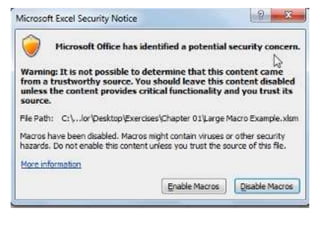
• Security issues about macro usage;
– File extension is .xlsx
– Macro enabled files are .xlsm
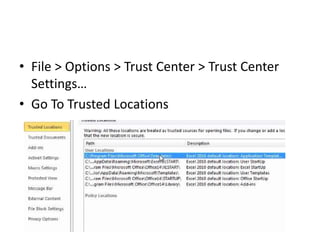
• File > Options > Trust Center > Trust Center
Settings…
• Go To Trusted Locations
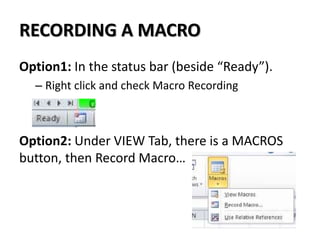
RECORDING A MACRO
Option1: In the status bar (beside “Ready”).
– Right click and check Macro Recording
Option2: Under VIEW Tab, there is a MACROS
button, then Record Macro…
RECORDING A MACRO
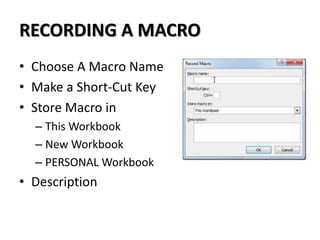
• Choose A Macro Name
• Make a Short-Cut Key
• Store Macro in
– This Workbook
– New Workbook
– PERSONAL Workbook
• Description
RECORDING A MACRO - Watchout
• Almost ANYTHING you do can be recording
(even scrolling, clicking cells,) except for
CANCEL, etc./
• After testing/running a macro, we cannot
UNDO the actions
– Stay away from DELETE data
RECORDING A MACRO - VBA
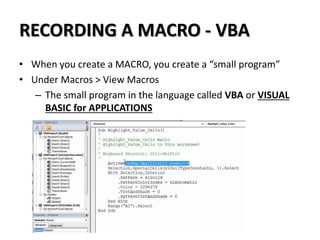
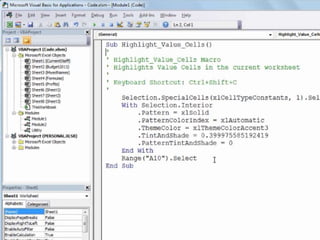
• When you create a MACRO, you create a “small program”
• Under Macros > View Macros
– The small program in the language called VBA or VISUAL
BASIC for APPLICATIONS
• The more you do recording, you will get to
learn about
• Later we will learn about simple codes,
Function and Module
RUNNING A MACRO
• Here we will discuss how to Execute, Play
Back, etc.
• There are 3 ways to run a Macro
– Keystroke
– Toolbar
– Object
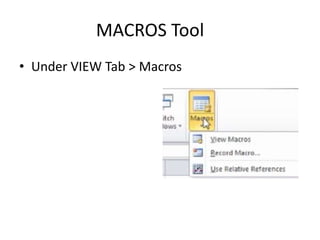
MACROS Tool
• Under VIEW Tab > Macros
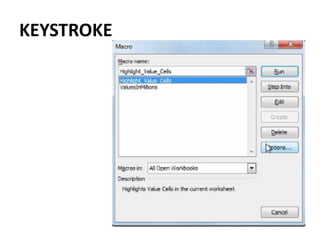
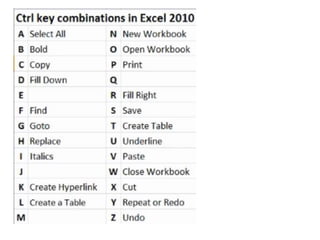
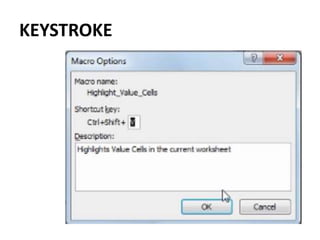
KEYSTROKE
KEYSTROKE
PLAYBACK RIBBON
• You can add a button in the QUICK ACCESS
TOOLBAR (Excel 2007/2010)
PERSONAL MACRO WORKBOOK
• This is a repository of MACROS you create that
can be ran on ALL WORKBOOS that you might
open.
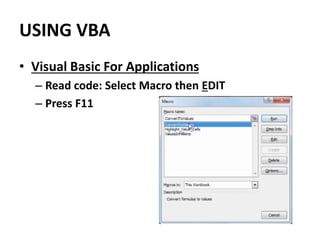
USING VBA
• Visual Basic For Applications
– Read code: Select Macro then EDIT
– Press F11
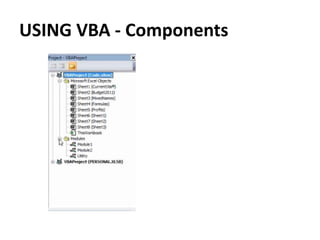
USING VBA - Components
RECORDING A MACRO IN STAGES
• Knowing the stages of recording will make you
familiar if you should need to do any change.
TIP
• Whenever you record, always look for the
code by pressing F11
• This will get you familiar on how you make
some alterations
2ND SESSION
CREATING NON RECORDED VBA CODE
• ABSOLUTE and RELATIVE
• FOR LOOP
• DO LOOP
• INTERACTIVE
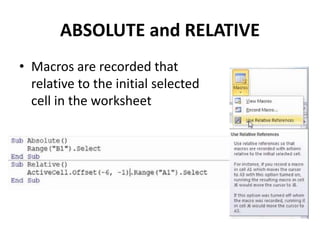
ABSOLUTE and RELATIVE
• Macros are recorded that
relative to the initial selected
cell in the worksheet
The concept of
repetition is within
macros.
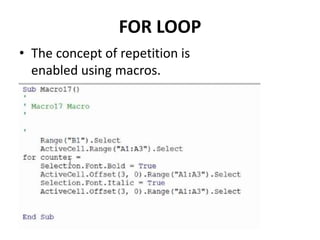
FOR LOOP
• The concept of repetition is
enabled using macros.
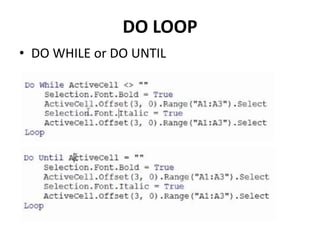
DO LOOP
• DO WHILE or DO UNTIL
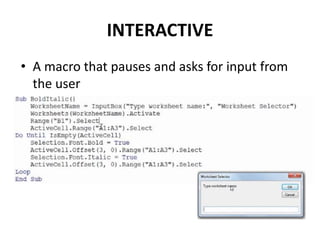
INTERACTIVE
• A macro that pauses and asks for input from
the user
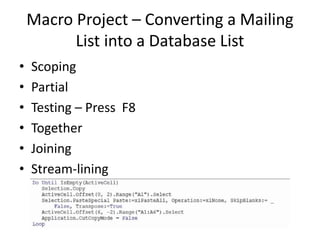
Macro Project – Converting a Mailing
List into a Database List
• Scoping
• Partial
• Testing – Press F8
• Together
• Joining
• Stream-lining
PERSONAL MACRO WORKBOOK –
ADVANCED
Conclusion
Assignment
Thank You

Microsoft Excel - Macros

  • 1.
    MS Excel -Macros EL Abquina Tech Ops PH www.techopsph.com
  • 2.
    This is nota programming class (but we will teach a bit of code)
  • 3.
    INTRODUCTION If you wantto eliminate repetitious command sequence or data manipulation tasks, MACROS will help as it is the automation capability of MS Excel. A single instruction that expands automatically into a set of instructions. In computer science; it is described as a RULE or PATTERN MACROS
  • 4.
    Be familiar withfeatures like: • Create Macros by Recording • Expand macros for multiple tasks • Making macros available to all workbooks • Launch Macros by Keystroke or Toolbar • Learn VBA environment and edit code • Debug and Testing via Step-mode or split screens • Do Loops and If commands
  • 5.
    GETTING STARTED • Letus know when it is appropriate to use macros • Prepare our exercise files
  • 6.
    Let us makesure you have MACROS in your computer
  • 7.
    The idea ofMACROS • Any sequences of actions can be turned into a MACRO. • Record and Store that, so can be used in the future by doing a single click or action • WHy Macros? • To automate your work, and save you precious time!
  • 8.
  • 9.
    Before starting…Security Concerns •Security issues about macro usage; – File extension is .xlsx – Macro enabled files are .xlsm
  • 11.
    • File >Options > Trust Center > Trust Center Settings… • Go To Trusted Locations
  • 12.
    RECORDING A MACRO Option1:In the status bar (beside “Ready”). – Right click and check Macro Recording Option2: Under VIEW Tab, there is a MACROS button, then Record Macro…
  • 13.
    RECORDING A MACRO •Choose A Macro Name • Make a Short-Cut Key • Store Macro in – This Workbook – New Workbook – PERSONAL Workbook • Description
  • 14.
    RECORDING A MACRO- Watchout • Almost ANYTHING you do can be recording (even scrolling, clicking cells,) except for CANCEL, etc./ • After testing/running a macro, we cannot UNDO the actions – Stay away from DELETE data
  • 15.
    RECORDING A MACRO- VBA • When you create a MACRO, you create a “small program” • Under Macros > View Macros – The small program in the language called VBA or VISUAL BASIC for APPLICATIONS
  • 16.
    • The moreyou do recording, you will get to learn about • Later we will learn about simple codes, Function and Module
  • 17.
    RUNNING A MACRO •Here we will discuss how to Execute, Play Back, etc. • There are 3 ways to run a Macro – Keystroke – Toolbar – Object
  • 18.
    MACROS Tool • UnderVIEW Tab > Macros
  • 19.
  • 21.
  • 22.
    PLAYBACK RIBBON • Youcan add a button in the QUICK ACCESS TOOLBAR (Excel 2007/2010)
  • 23.
    PERSONAL MACRO WORKBOOK •This is a repository of MACROS you create that can be ran on ALL WORKBOOS that you might open.
  • 24.
    USING VBA • VisualBasic For Applications – Read code: Select Macro then EDIT – Press F11
  • 26.
    USING VBA -Components
  • 27.
    RECORDING A MACROIN STAGES • Knowing the stages of recording will make you familiar if you should need to do any change.
  • 28.
    TIP • Whenever yourecord, always look for the code by pressing F11 • This will get you familiar on how you make some alterations
  • 29.
  • 30.
    CREATING NON RECORDEDVBA CODE • ABSOLUTE and RELATIVE • FOR LOOP • DO LOOP • INTERACTIVE
  • 31.
    ABSOLUTE and RELATIVE •Macros are recorded that relative to the initial selected cell in the worksheet
  • 32.
    The concept of repetitionis within macros.
  • 33.
    FOR LOOP • Theconcept of repetition is enabled using macros.
  • 34.
    DO LOOP • DOWHILE or DO UNTIL
  • 35.
    INTERACTIVE • A macrothat pauses and asks for input from the user
  • 36.
    Macro Project –Converting a Mailing List into a Database List • Scoping • Partial • Testing – Press F8 • Together • Joining • Stream-lining
  • 37.
  • 38.
  • 39.
  • 40.

Editor's Notes

  • #4 If you want to elimante repeititous command sequence or data manipulation tasks. Macros is for you! The automation capability of Excel Macros is a power tools with unlimited capabilities
  • #5 Familiar Features: Create Macros by Recording Expand macros for multiple tasks Making macros available to all excel workbooks Launch Macros by Keystroke or Toolbar Edit VBA Code/ Debug and Testing/Stepmode and Split screens Do Loops and If commands
  • #9 Open Chapter 1 introduction and Large Macro Files
  • #18 Once you create a macro, you need to run it. Sometimes you forget there is a KeyStroke ShortCut.
  • #34 Chapter 5 – Mailing Lists The concept of repetition is enabled using macros.
  • #35 Chapter 5 – Mailing Lists The concept of repetition is enabled using macros.