Introduction to
Excel VBA/Macros:
Some Examples on Logistics
and Supply Chain Management
Dr. Kang Mun Arturo Tan
Assistant Professor
Logistics and Supply Chain Management
Data Analytics
Yanbu University College
General Outline
A_Why does Excel VBA matter?
B_ What is VBA?
C_ How do we start with VBA?
D_ Recording some macros.
E_ Running the macros.
F_ Functions and Sub_Routines.
G_ The User Form.
slideNo3
Thanks
COVER
A_ Why does Excel VBA Matter
A_ Why does VBA Excel Matter
Excel is widely used across the world.
A_ Why does VBA Excel Matter
Excel is widely used across the world.
Many corporate data, both structured
and unstructured are in Excel.
A_ Why does VBA Excel Matter
Excel is widely used across the world.
Many corporate data, both structured
and unstructured are in Excel.
Processing of data residing in Excel
has become a routine work for many
professionals.
A_ Why does VBA Excel Matter
Excel is widely used across the world.
Many corporate data, both structured
and unstructured are in Excel.
Processing of data residing in Excel
has become a routine work for many
professionals.
Automating this work could be an added
advantage for the students who are
entering the workforce.
BackToTOC
B_ What is VBA
VBA stands for Visual Basic for
Application.
It is very similar to Visual Basic
in form and structure.
It works with Excel, Word, Access,
Powerpoint and Outlook.
Theory:
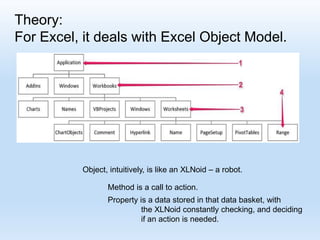
For Excel, it deals with Excel Object Model.
Object, intuitively, is like an XLNoid – a robot.
Method is a call to action.
Property is a data stored in that data basket, with
the XLNoid constantly checking, and deciding
if an action is needed.
Theory: Overall Structure
Application Project
Worksheets Modules User_Form
Macro Window
Buttons
Call Form
Read/Write Data
For Excel, it deals with Excel Object Model.
Application
Workbook
Worksheets
Range
Cell
BackToTOC
BackTo_B
C_ How do we start with Excel VBA
Check for Activation
Demo for Start Up
Tan_C_Slide
C_ How do we start with Excel VBA
BackToTOC
BackToC
D_ Recording some VBA Macros Show
Recording
Process
Tan_D_Slide
D_ Recording some VBA Macros
Overall code
D_ Recording some VBA Macros
R[ Up/Down CellDistance] C[Left/Right CellDistance]
Focusing on the formula:
“R[-4] C + R[-3] C - R[-2] C “
D_ Recording some VBA Macros
ActiveCell.Offset( Up/Down CellStep, Left/Right CellStep)
Relative Recording
D_ Recording some VBA Macros
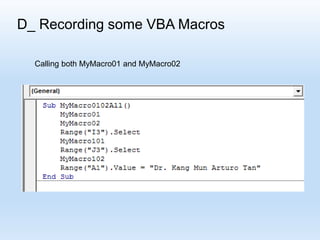
Calling both MyMacro01 and MyMacro02
D_ Recording some VBA Macros
Clearing the area
BackToTOC
BackToD
E_ Running the macros
Alt+F8
Analyzing
the recorded
macros
Tan_E_Slide
E_ Running the macros
BackToTOC
BackToE
F_ Functions and Sub Routines
Cell
To Fill Up a Cell with a Value
To Fill Up a Cell with a Formula
To Read a Cell’s Value
F_ Functions and Sub Routines
BegInvy + Receipts – Issuances
= EndInvy
As a function:
As a subprocedure:
Demo for
Coding
of
Sub proc
and
Functions
Tan_FA_Slide
F_ Functions and Sub Routines
EoQ = Sqrt (2 DS / H )
D = Demand for a Year
S = Cost for each Ordering
H = Holding Cost per Item per Year
Demo for Preparing
A report
BackToTOC
BackToF
Tan_FA_Slide
Fc1_ General Example
Option Explicit
Sub MyMacroGetMax()
Dim q As Variant
Dim x(100) As Integer
Dim i As Integer, nPtr As Integer
Dim Start As Integer, Last As Integer, Num As Integer
Dim AssumedHeaviest, Heaviest As Integer
' Defining the array
q = Array(7, 2, 3, 20, 15, 6, 35, 12, 9, 5, 18, 23, _
9, 16, 22, 10)
Demo for Straight Coding
Tan_FC_Slide
Fc2_ General Example
Start = LBound(q)
MsgBox "StartBoxNo is " & Start
Last = UBound(q)
MsgBox "LastBoxNo is " & Last
Num = Last - Start + 1
MsgBox "BoxCount is " & Num
' = = == = = = = = =
' transferring the content of container q to container x.
‘ container x is a temporary place for comparison.
' ========= = = = = =
For i = Start To Last
x(i) = q(i)
Next i
' = = = = = = = = = = =
Fc3_ General Example
' = =
' assume the first box to be the heaviest.
' = = =
AssumedHeaviest = x(Start) ‘// Start means the first box
' = = = =
For nPtr = Start + 1 To Last ‘// Start+1 means the second box
If x(nPtr) > AssumedHeaviest Then
AssumedHeaviest = x(nPtr)
End If
Next nPtr
Heaviest = AssumedHeaviest
MsgBox "Heaviest is " & Heaviest
End Sub
BackToTOC
BackToFc
G_ UserForm Example
Call Demo G
Tan_G_Slide
G_ UserForm Example
G_ UserForm Example
G_ UserForm Example
G_ UserForm Example
G_ UserForm Example
G_ UserForm Example
BackToTOC
BackToG
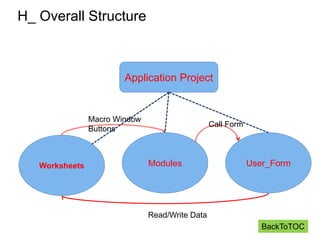
H_ Overall Structure
Application Project
Worksheets Modules User_Form
Macro Window
Buttons
Call Form
Read/Write Data
BackToTOC
Thank You!!!!!
BackToTOC

Introduction to Excel VBA/Macros

  • 1.
    Introduction to Excel VBA/Macros: SomeExamples on Logistics and Supply Chain Management Dr. Kang Mun Arturo Tan Assistant Professor Logistics and Supply Chain Management Data Analytics Yanbu University College
  • 2.
    General Outline A_Why doesExcel VBA matter? B_ What is VBA? C_ How do we start with VBA? D_ Recording some macros. E_ Running the macros. F_ Functions and Sub_Routines. G_ The User Form. slideNo3 Thanks COVER
  • 3.
    A_ Why doesExcel VBA Matter
  • 4.
    A_ Why doesVBA Excel Matter Excel is widely used across the world.
  • 5.
    A_ Why doesVBA Excel Matter Excel is widely used across the world. Many corporate data, both structured and unstructured are in Excel.
  • 6.
    A_ Why doesVBA Excel Matter Excel is widely used across the world. Many corporate data, both structured and unstructured are in Excel. Processing of data residing in Excel has become a routine work for many professionals.
  • 7.
    A_ Why doesVBA Excel Matter Excel is widely used across the world. Many corporate data, both structured and unstructured are in Excel. Processing of data residing in Excel has become a routine work for many professionals. Automating this work could be an added advantage for the students who are entering the workforce. BackToTOC
  • 8.
    B_ What isVBA VBA stands for Visual Basic for Application. It is very similar to Visual Basic in form and structure. It works with Excel, Word, Access, Powerpoint and Outlook.
  • 9.
    Theory: For Excel, itdeals with Excel Object Model. Object, intuitively, is like an XLNoid – a robot. Method is a call to action. Property is a data stored in that data basket, with the XLNoid constantly checking, and deciding if an action is needed.
  • 10.
    Theory: Overall Structure ApplicationProject Worksheets Modules User_Form Macro Window Buttons Call Form Read/Write Data
  • 11.
    For Excel, itdeals with Excel Object Model. Application Workbook Worksheets Range Cell BackToTOC BackTo_B
  • 12.
    C_ How dowe start with Excel VBA Check for Activation Demo for Start Up Tan_C_Slide
  • 13.
    C_ How dowe start with Excel VBA
  • 14.
    C_ How dowe start with Excel VBA
  • 15.
    C_ How dowe start with Excel VBA
  • 16.
    C_ How dowe start with Excel VBA
  • 17.
    C_ How dowe start with Excel VBA BackToTOC BackToC
  • 18.
    D_ Recording someVBA Macros Show Recording Process Tan_D_Slide
  • 19.
  • 20.
  • 21.
  • 22.
  • 23.
  • 24.
    D_ Recording someVBA Macros Overall code
  • 25.
    D_ Recording someVBA Macros R[ Up/Down CellDistance] C[Left/Right CellDistance] Focusing on the formula: “R[-4] C + R[-3] C - R[-2] C “
  • 26.
    D_ Recording someVBA Macros ActiveCell.Offset( Up/Down CellStep, Left/Right CellStep) Relative Recording
  • 27.
    D_ Recording someVBA Macros Calling both MyMacro01 and MyMacro02
  • 28.
  • 29.
  • 30.
    D_ Recording someVBA Macros Clearing the area BackToTOC BackToD
  • 31.
    E_ Running themacros Alt+F8 Analyzing the recorded macros Tan_E_Slide
  • 32.
  • 33.
  • 34.
    E_ Running themacros BackToTOC BackToE
  • 35.
    F_ Functions andSub Routines Cell To Fill Up a Cell with a Value To Fill Up a Cell with a Formula To Read a Cell’s Value
  • 36.
    F_ Functions andSub Routines BegInvy + Receipts – Issuances = EndInvy As a function: As a subprocedure: Demo for Coding of Sub proc and Functions Tan_FA_Slide
  • 37.
    F_ Functions andSub Routines EoQ = Sqrt (2 DS / H ) D = Demand for a Year S = Cost for each Ordering H = Holding Cost per Item per Year Demo for Preparing A report BackToTOC BackToF Tan_FA_Slide
  • 38.
    Fc1_ General Example OptionExplicit Sub MyMacroGetMax() Dim q As Variant Dim x(100) As Integer Dim i As Integer, nPtr As Integer Dim Start As Integer, Last As Integer, Num As Integer Dim AssumedHeaviest, Heaviest As Integer ' Defining the array q = Array(7, 2, 3, 20, 15, 6, 35, 12, 9, 5, 18, 23, _ 9, 16, 22, 10) Demo for Straight Coding Tan_FC_Slide
  • 39.
    Fc2_ General Example Start= LBound(q) MsgBox "StartBoxNo is " & Start Last = UBound(q) MsgBox "LastBoxNo is " & Last Num = Last - Start + 1 MsgBox "BoxCount is " & Num ' = = == = = = = = = ' transferring the content of container q to container x. ‘ container x is a temporary place for comparison. ' ========= = = = = = For i = Start To Last x(i) = q(i) Next i ' = = = = = = = = = = =
  • 40.
    Fc3_ General Example '= = ' assume the first box to be the heaviest. ' = = = AssumedHeaviest = x(Start) ‘// Start means the first box ' = = = = For nPtr = Start + 1 To Last ‘// Start+1 means the second box If x(nPtr) > AssumedHeaviest Then AssumedHeaviest = x(nPtr) End If Next nPtr Heaviest = AssumedHeaviest MsgBox "Heaviest is " & Heaviest End Sub BackToTOC BackToFc
  • 41.
    G_ UserForm Example CallDemo G Tan_G_Slide
  • 42.
  • 43.
  • 44.
  • 45.
  • 46.
  • 47.
  • 48.
    H_ Overall Structure ApplicationProject Worksheets Modules User_Form Macro Window Buttons Call Form Read/Write Data BackToTOC
  • 49.