In computerized information system data are the basic
resource of the organization. So, proper organization and
management for data is required for organization to run
smoothly. Database management system deals the
knowledge of how data stored and managed on a
computerized information system. In any organization, it
requires accurate and reliable data for better decision
making, ensuring privacy of data and controlling data
efficiently.
The examples include deposit and/or withdrawal from a
bank, hotel, airline or railway reservation, purchase items
from supermarkets in all cases, a database is accessed.
The idea of MACROS
• Any sequences of actions can be turned into a
MACRO.
• Record and Store that, so can be used in the
future by doing a single click or action
• WHy Macros?
• To automate your work, and save you precious
time!
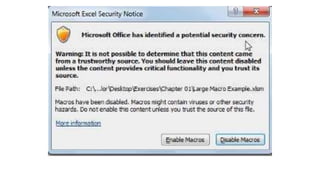
Before starting…Security Concerns
• Security issues about macro usage;
– File extension is .xlsx
– Macro enabled files are .xlsm
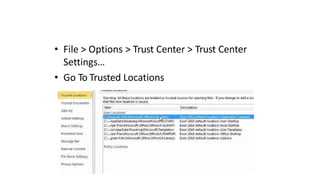
• File > Options > Trust Center > Trust Center
Settings…
• Go To Trusted Locations
RECORDING A MACRO
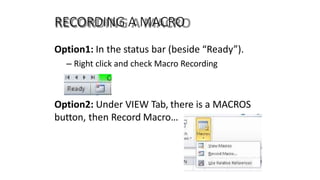
Option1: In the status bar (beside “Ready”).
– Right click and check Macro Recording
Option2: Under VIEW Tab, there is a MACROS
button, then Record Macro…
RECORDING A MACRO
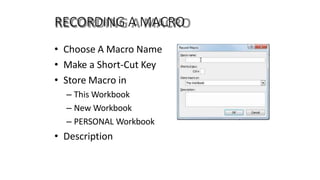
• Choose A Macro Name
• Make a Short-Cut Key
• Store Macro in
– This Workbook
– New Workbook
– PERSONAL Workbook
• Description
RECORDING A MACRO - Watchout
• Almost ANYTHING you do can be recording
(even scrolling, clicking cells,) except for
CANCEL, etc./
• After testing/running a macro, we cannot
UNDO the actions
– Stay away from DELETE data
• The more you do recording, you will get to
learn about
• Later we will learn about simple codes,
Function and Module
RUNNING A MACRO
• Here we will discuss how to Execute, Play
Back, etc.
• There are 3 ways to run a Macro
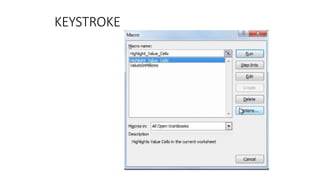
– Keystroke
– Toolbar
– Object
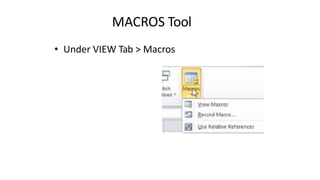
MACROS Tool
• Under VIEW Tab > Macros
KEYSTROKE

Presentation3.pptx

  • 1.
    In computerized informationsystem data are the basic resource of the organization. So, proper organization and management for data is required for organization to run smoothly. Database management system deals the knowledge of how data stored and managed on a computerized information system. In any organization, it requires accurate and reliable data for better decision making, ensuring privacy of data and controlling data efficiently. The examples include deposit and/or withdrawal from a bank, hotel, airline or railway reservation, purchase items from supermarkets in all cases, a database is accessed.
  • 2.
    The idea ofMACROS • Any sequences of actions can be turned into a MACRO. • Record and Store that, so can be used in the future by doing a single click or action • WHy Macros? • To automate your work, and save you precious time!
  • 3.
    Before starting…Security Concerns •Security issues about macro usage; – File extension is .xlsx – Macro enabled files are .xlsm
  • 5.
    • File >Options > Trust Center > Trust Center Settings… • Go To Trusted Locations
  • 6.
    RECORDING A MACRO Option1:In the status bar (beside “Ready”). – Right click and check Macro Recording Option2: Under VIEW Tab, there is a MACROS button, then Record Macro…
  • 7.
    RECORDING A MACRO •Choose A Macro Name • Make a Short-Cut Key • Store Macro in – This Workbook – New Workbook – PERSONAL Workbook • Description
  • 8.
    RECORDING A MACRO- Watchout • Almost ANYTHING you do can be recording (even scrolling, clicking cells,) except for CANCEL, etc./ • After testing/running a macro, we cannot UNDO the actions – Stay away from DELETE data
  • 9.
    • The moreyou do recording, you will get to learn about • Later we will learn about simple codes, Function and Module
  • 10.
    RUNNING A MACRO •Here we will discuss how to Execute, Play Back, etc. • There are 3 ways to run a Macro – Keystroke – Toolbar – Object
  • 11.
    MACROS Tool • UnderVIEW Tab > Macros
  • 12.