Security As A Service
-Peace of Mind
David Rosenthal, VP & GM, Digital Business Solutions
Razor Technology July 6, 2017
Microsoft Technology Center New York City
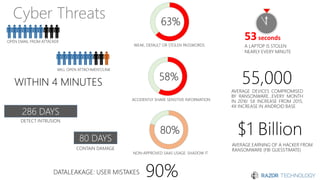
Cyber Threats
286 DAYS
80 DAYS
53seconds
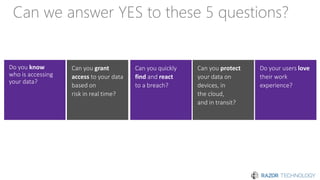
Can we answer YES to these 5 questions?
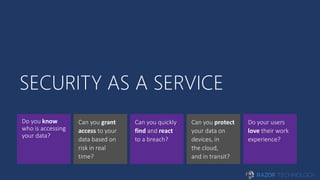
SECURITY AS A SERVICE
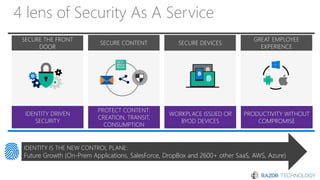
4 lens of Security As A Service
SECURE CONTENT
PROTECT CONTENT:
CREATION, TRANSIT,
CONSUMPTION
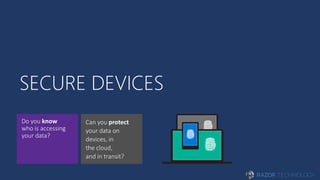
SECURE DEVICES
WORKPLACE ISSUED OR
BYOD DEVICES
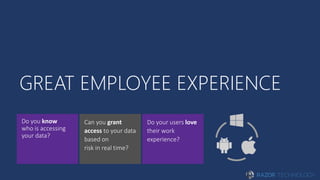
GREAT EMPLOYEE
EXPERIENCE
PRODUCTIVITY WITHOUT
COMPROMISE
SECURE THE FRONT
DOOR
IDENTITY DRIVEN
SECURITY
IDENTITY IS THE NEW CONTROL PLANE:
Future Growth (On-Prem Applications, SalesForce, DropBox and 2600+ other SaaS, AWS, Azure)
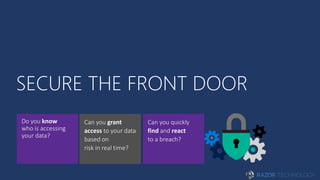
SECURE THE FRONT DOOR
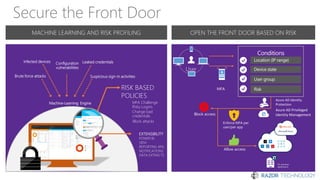
Secure the Front Door
Leaked
credentials
Infected
devices
Configuration
vulnerabilities
Risk-based
policies
MFA Challenge
Risky Logins
Block attacks
Change bad credentials
Suspicious sign-in
activities
MACHINE LEARNING AND RISK PROFILING OPEN THE FRONT DOOR BASED ON RISK
Shadow IT
Risk
Assessment
User
MFA
Conditions
Location (IP range)
Device state
User group
Risk
Block access
Enforce MFA per
user/per app
Allow access
Leaked credentialsInfected devices Configuration
vulnerabilities
RISK BASED
POLICIES
MFA Challenge
Risky Logins
Block attacks
Change bad
credentials
Machine-Learning Engine
Brute force attacks Suspicious sign-in activities
EXTENSIBILITY
POWER BI,
SIEM
REPORTING APIs
NOTIFICATIONS
DATA EXTRACTS
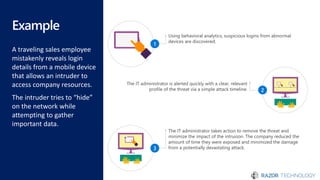
Example
A traveling sales employee
mistakenly reveals login
details from a mobile device
that allows an intruder to
access company resources.
The intruder tries to “hide”
on the network while
attempting to gather
important data.
The IT administrator takes action to remove the threat and
minimize the impact of the intrusion. The company reduced the
amount of time they were exposed and minimized the damage
from a potentially devastating attack.3
Using behavioral analytics, suspicious logins from abnormal
devices are discovered.
1
The IT administrator is alerted quickly with a clear, relevant
profile of the threat via a simple attack timeline. 2
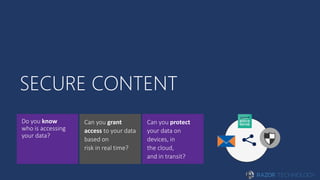
SECURE CONTENT
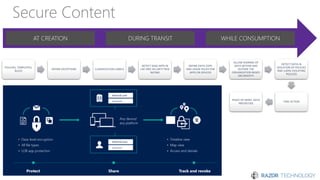
Secure Content
AT CREATION DURING TRANSIT WHILE CONSUMPTION
POLICIES, TEMPLATES,
RULES
DEFINE EXCEPTIONS CLASSIFICATION LABELS
DETECT SAAS APPS IN
USE AND SECURITY RISK
RATING
DEFINE DATA COPY
AND USAGE RULES FOR
APPS ON DEVICES
ALLOW SHARING OF
DATA WITHIN AND
OUTSIDE THE
ORGANIZATION BASED
ON IDENTITY
DETECT DATA IN
VIOLATION OF POLICIES
AND USERS VIOLATING
POLICIES
TAKE ACTION
PEACE OF MIND: DATA
PROTECTED
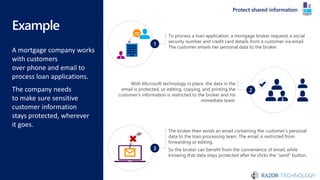
Example
A mortgage company works
with customers
over phone and email to
process loan applications.
The company needs
to make sure sensitive
customer information
stays protected, wherever
it goes.
Protect shared information
The broker then sends an email containing the customer’s personal
data to the loan processing team. The email is restricted from
forwarding or editing.
So the broker can benefit from the convenience of email, while
knowing that data stays protected after he clicks the “send” button.
3
To process a loan application, a mortgage broker requests a social
security number and credit card details from a customer via email.
The customer emails her personal data to the broker.
1
With Microsoft technology in place, the data in the
email is protected, so editing, copying, and printing the
customer’s information is restricted to the broker and his
immediate team.
2
SECURE DEVICES
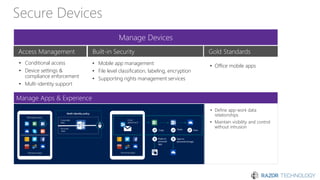
Secure Devices
Manage Devices
Manage Apps & Experience
Access Management Built-in Security Gold Standards
• Conditional access
• Device settings &
compliance enforcement
• Multi-identity support
• Mobile app management
• File level classification, labeling, encryption
• Supporting rights management services
• Office mobile apps
• Define app-work data
relationships
• Maintain visibility and control
without intrusion
Example
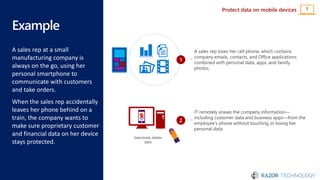
A sales rep at a small
manufacturing company is
always on the go, using her
personal smartphone to
communicate with customers
and take orders.
When the sales rep accidentally
leaves her phone behind on a
train, the company wants to
make sure proprietary customer
and financial data on her device
stays protected.
Protect data on mobile devices !
A sales rep loses her cell phone, which contains
company emails, contacts, and Office applications
combined with personal data, apps, and family
photos.
1
IT remotely erases the company information—
including customer data and business apps—from the
employee’s phone without touching or losing her
personal data.
2
Selectively delete
data
Example
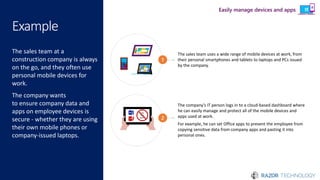
The sales team at a
construction company is always
on the go, and they often use
personal mobile devices for
work.
The company wants
to ensure company data and
apps on employee devices is
secure - whether they are using
their own mobile phones or
company-issued laptops.
The sales team uses a wide range of mobile devices at work, from
their personal smartphones and tablets to laptops and PCs issued
by the company.
1
The company’s IT person logs in to a cloud-based dashboard where
he can easily manage and protect all of the mobile devices and
apps used at work.
For example, he can set Office apps to prevent the employee from
copying sensitive data from company apps and pasting it into
personal ones.
Copy
and
paste
2
Easily manage devices and apps
GREAT EMPLOYEE EXPERIENCE
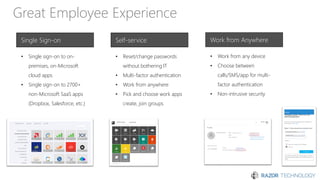
Great Employee Experience
Single Sign-on Self-service Work from Anywhere
• Single sign-on to on-
premises, on-Microsoft
cloud apps
• Single sign-on to 2700+
non-Microsoft SaaS apps
(Dropbox, Salesforce, etc.)
• Reset/change passwords
without bothering IT
• Multi-factor authentication
• Work from anywhere
• Pick and choose work apps
create, join groups
• Work from any device
• Choose between
calls/SMS/app for multi-
factor authentication
• Non-intrusive security
Example
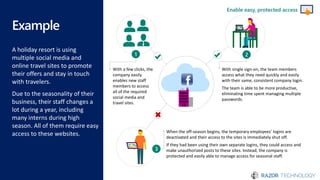
A holiday resort is using
multiple social media and
online travel sites to promote
their offers and stay in touch
with travelers.
Due to the seasonality of their
business, their staff changes a
lot during a year, including
many interns during high
season. All of them require easy
access to these websites. When the off-season begins, the temporary employees’ logins are
deactivated and their access to the sites is immediately shut off.
If they had been using their own separate logins, they could access and
make unauthorized posts to these sites. Instead, the company is
protected and easily able to manage access for seasonal staff.
3
With single sign-on, the team members
access what they need quickly and easily
with their same, consistent company login.
The team is able to be more productive,
eliminating time spent managing multiple
passwords.
2
With a few clicks, the
company easily
enables new staff
members to access
all of the required
social media and
travel sites.
1
Enable easy, protected access
Example
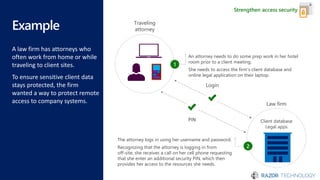
A law firm has attorneys who
often work from home or while
traveling to client sites.
To ensure sensitive client data
stays protected, the firm
wanted a way to protect remote
access to company systems.
1001110011
0110011010
1100010101
1001110011
0110011010
1100010101
1001110011
0110011010
1100010101
1001110011
0110011010
1100010101
Strengthen access security
Traveling
attorney
An attorney needs to do some prep work in her hotel
room prior to a client meeting.
She needs to access the firm’s client database and
online legal application on their laptop.
1
Login
Law firm
PIN Client database
Legal apps
The attorney logs in using her username and password.
Recognizing that the attorney is logging in from
off-site, she receives a call on her cell phone requesting
that she enter an additional security PIN, which then
provides her access to the resources she needs.
2
ENABLING
SECURITY AS A SERVICE
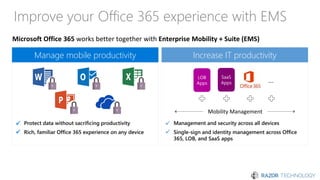
Improve your Office 365 experience with EMS
Microsoft Office 365 works better together with Enterprise Mobility + Suite (EMS)
Protect data without sacrificing productivity
Rich, familiar Office 365 experience on any device
Manage mobile productivity
✓
✓
Management and security across all devices
Single-sign and identity management across Office
365, LOB, and SaaS apps
Increase IT productivity
LOB
Apps
SaaS
Apps …
Mobility Management
✓
✓
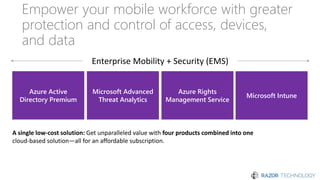
Empower your mobile workforce with greater
protection and control of access, devices,
and data
A single low-cost solution: Get unparalleled value with four products combined into one
cloud-based solution—all for an affordable subscription.
Azure Active
Directory Premium
Microsoft Intune
Azure Rights
Management Service
Microsoft Advanced
Threat Analytics
Enterprise Mobility + Security (EMS)
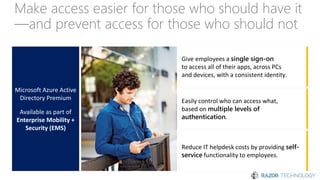
Make access easier for those who should have it
—and prevent access for those who should not
Microsoft Azure Active
Directory Premium
Available as part of
Enterprise Mobility +
Security (EMS)
Easily control who can access what,
based on multiple levels of
authentication.
Reduce IT helpdesk costs by providing self-
service functionality to employees.
Give employees a single sign-on
to access all of their apps, across PCs
and devices, with a consistent identity.
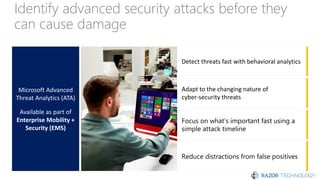
Identify advanced security attacks before they
can cause damage
Microsoft Advanced
Threat Analytics (ATA)
Available as part of
Enterprise Mobility +
Security (EMS)
Detect threats fast with behavioral analytics
Adapt to the changing nature of
cyber-security threats
Focus on what’s important fast using a
simple attack timeline
Reduce distractions from false positives
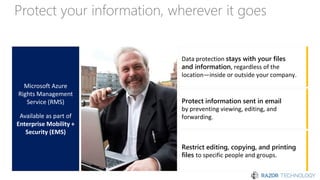
Protect your information, wherever it goes
Microsoft Azure
Rights Management
Service (RMS)
Available as part of
Enterprise Mobility +
Security (EMS)
Protect information sent in email
by preventing viewing, editing, and
forwarding.
Restrict editing, copying, and printing
files to specific people and groups.
Data protection stays with your files
and information, regardless of the
location—inside or outside your company.
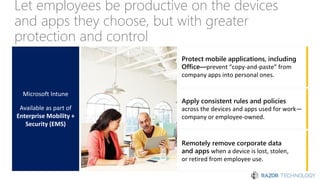
Let employees be productive on the devices
and apps they choose, but with greater
protection and control
Microsoft Intune
Available as part of
Enterprise Mobility +
Security (EMS)
Apply consistent rules and policies
across the devices and apps used for work—
company or employee-owned.
Remotely remove corporate data
and apps when a device is lost, stolen,
or retired from employee use.
Protect mobile applications, including
Office—prevent “copy-and-paste” from
company apps into personal ones.
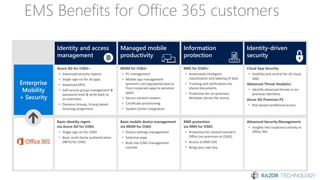
EMS Benefits for Office 365 customers
Enterprise
Mobility
+ Security
Basic identity mgmt.
via Azure AD for O365
• Single sign-on for O365
• Basic multi-factor authentication
(MFA) for O365
Basic mobile device management
via MDM for O365
• Device settings management
• Selective wipe
• Built into O365 management
console
RMS protection
via RMS for O365
• Protection for content stored in
Office (on-premises or O365)
• Access to RMS SDK
• Bring your own key
Azure AD for O365+
• Advanced security reports
• Single sign-on for all apps
• Advanced MFA
• Self-service group management &
password reset & write back to
on-premises,
• Dynamic Groups, Group based
licensing assignment
MDM for O365+
• PC management
• Mobile app management
(prevent cut/copy/paste/save as
from corporate apps to personal
apps)
• Secure content viewers
• Certificate provisioning
• System Center integration
RMS for O365+
• Automated intelligent
classification and labeling of data
• Tracking and notifications for
shared documents
• Protection for on-premises
Windows Server file shares
Advanced Security Management
• Insights into suspicious activity in
Office 365
Cloud App Security
• Visibility and control for all cloud
apps
Advanced Threat Analytics
• Identify advanced threats in on
premises identities
Azure AD Premium P2
• Risk based conditional access
Information
protection
Identity-driven
security
Managed mobile
productivity
Identity and access
management
© Copyright Microsoft Corporation. All rights reserved.
Contact us for additional information & deployment
offers
David.Rosenthal@razor-tech.com

Security as a Service with Microsoft Presented by Razor Technology

  • 1.
    Security As AService -Peace of Mind David Rosenthal, VP & GM, Digital Business Solutions Razor Technology July 6, 2017 Microsoft Technology Center New York City
  • 3.
  • 4.
    Can we answerYES to these 5 questions?
  • 5.
  • 6.
    4 lens ofSecurity As A Service SECURE CONTENT PROTECT CONTENT: CREATION, TRANSIT, CONSUMPTION SECURE DEVICES WORKPLACE ISSUED OR BYOD DEVICES GREAT EMPLOYEE EXPERIENCE PRODUCTIVITY WITHOUT COMPROMISE SECURE THE FRONT DOOR IDENTITY DRIVEN SECURITY IDENTITY IS THE NEW CONTROL PLANE: Future Growth (On-Prem Applications, SalesForce, DropBox and 2600+ other SaaS, AWS, Azure)
  • 7.
  • 9.
    Secure the FrontDoor Leaked credentials Infected devices Configuration vulnerabilities Risk-based policies MFA Challenge Risky Logins Block attacks Change bad credentials Suspicious sign-in activities MACHINE LEARNING AND RISK PROFILING OPEN THE FRONT DOOR BASED ON RISK Shadow IT Risk Assessment User MFA Conditions Location (IP range) Device state User group Risk Block access Enforce MFA per user/per app Allow access Leaked credentialsInfected devices Configuration vulnerabilities RISK BASED POLICIES MFA Challenge Risky Logins Block attacks Change bad credentials Machine-Learning Engine Brute force attacks Suspicious sign-in activities EXTENSIBILITY POWER BI, SIEM REPORTING APIs NOTIFICATIONS DATA EXTRACTS
  • 10.
    Example A traveling salesemployee mistakenly reveals login details from a mobile device that allows an intruder to access company resources. The intruder tries to “hide” on the network while attempting to gather important data. The IT administrator takes action to remove the threat and minimize the impact of the intrusion. The company reduced the amount of time they were exposed and minimized the damage from a potentially devastating attack.3 Using behavioral analytics, suspicious logins from abnormal devices are discovered. 1 The IT administrator is alerted quickly with a clear, relevant profile of the threat via a simple attack timeline. 2
  • 11.
  • 12.
    Secure Content AT CREATIONDURING TRANSIT WHILE CONSUMPTION POLICIES, TEMPLATES, RULES DEFINE EXCEPTIONS CLASSIFICATION LABELS DETECT SAAS APPS IN USE AND SECURITY RISK RATING DEFINE DATA COPY AND USAGE RULES FOR APPS ON DEVICES ALLOW SHARING OF DATA WITHIN AND OUTSIDE THE ORGANIZATION BASED ON IDENTITY DETECT DATA IN VIOLATION OF POLICIES AND USERS VIOLATING POLICIES TAKE ACTION PEACE OF MIND: DATA PROTECTED
  • 13.
    Example A mortgage companyworks with customers over phone and email to process loan applications. The company needs to make sure sensitive customer information stays protected, wherever it goes. Protect shared information The broker then sends an email containing the customer’s personal data to the loan processing team. The email is restricted from forwarding or editing. So the broker can benefit from the convenience of email, while knowing that data stays protected after he clicks the “send” button. 3 To process a loan application, a mortgage broker requests a social security number and credit card details from a customer via email. The customer emails her personal data to the broker. 1 With Microsoft technology in place, the data in the email is protected, so editing, copying, and printing the customer’s information is restricted to the broker and his immediate team. 2
  • 14.
  • 15.
    Secure Devices Manage Devices ManageApps & Experience Access Management Built-in Security Gold Standards • Conditional access • Device settings & compliance enforcement • Multi-identity support • Mobile app management • File level classification, labeling, encryption • Supporting rights management services • Office mobile apps • Define app-work data relationships • Maintain visibility and control without intrusion
  • 16.
    Example A sales repat a small manufacturing company is always on the go, using her personal smartphone to communicate with customers and take orders. When the sales rep accidentally leaves her phone behind on a train, the company wants to make sure proprietary customer and financial data on her device stays protected. Protect data on mobile devices ! A sales rep loses her cell phone, which contains company emails, contacts, and Office applications combined with personal data, apps, and family photos. 1 IT remotely erases the company information— including customer data and business apps—from the employee’s phone without touching or losing her personal data. 2 Selectively delete data
  • 17.
    Example The sales teamat a construction company is always on the go, and they often use personal mobile devices for work. The company wants to ensure company data and apps on employee devices is secure - whether they are using their own mobile phones or company-issued laptops. The sales team uses a wide range of mobile devices at work, from their personal smartphones and tablets to laptops and PCs issued by the company. 1 The company’s IT person logs in to a cloud-based dashboard where he can easily manage and protect all of the mobile devices and apps used at work. For example, he can set Office apps to prevent the employee from copying sensitive data from company apps and pasting it into personal ones. Copy and paste 2 Easily manage devices and apps
  • 18.
  • 19.
    Great Employee Experience SingleSign-on Self-service Work from Anywhere • Single sign-on to on- premises, on-Microsoft cloud apps • Single sign-on to 2700+ non-Microsoft SaaS apps (Dropbox, Salesforce, etc.) • Reset/change passwords without bothering IT • Multi-factor authentication • Work from anywhere • Pick and choose work apps create, join groups • Work from any device • Choose between calls/SMS/app for multi- factor authentication • Non-intrusive security
  • 20.
    Example A holiday resortis using multiple social media and online travel sites to promote their offers and stay in touch with travelers. Due to the seasonality of their business, their staff changes a lot during a year, including many interns during high season. All of them require easy access to these websites. When the off-season begins, the temporary employees’ logins are deactivated and their access to the sites is immediately shut off. If they had been using their own separate logins, they could access and make unauthorized posts to these sites. Instead, the company is protected and easily able to manage access for seasonal staff. 3 With single sign-on, the team members access what they need quickly and easily with their same, consistent company login. The team is able to be more productive, eliminating time spent managing multiple passwords. 2 With a few clicks, the company easily enables new staff members to access all of the required social media and travel sites. 1 Enable easy, protected access
  • 21.
    Example A law firmhas attorneys who often work from home or while traveling to client sites. To ensure sensitive client data stays protected, the firm wanted a way to protect remote access to company systems. 1001110011 0110011010 1100010101 1001110011 0110011010 1100010101 1001110011 0110011010 1100010101 1001110011 0110011010 1100010101 Strengthen access security Traveling attorney An attorney needs to do some prep work in her hotel room prior to a client meeting. She needs to access the firm’s client database and online legal application on their laptop. 1 Login Law firm PIN Client database Legal apps The attorney logs in using her username and password. Recognizing that the attorney is logging in from off-site, she receives a call on her cell phone requesting that she enter an additional security PIN, which then provides her access to the resources she needs. 2
  • 22.
  • 23.
    Improve your Office365 experience with EMS Microsoft Office 365 works better together with Enterprise Mobility + Suite (EMS) Protect data without sacrificing productivity Rich, familiar Office 365 experience on any device Manage mobile productivity ✓ ✓ Management and security across all devices Single-sign and identity management across Office 365, LOB, and SaaS apps Increase IT productivity LOB Apps SaaS Apps … Mobility Management ✓ ✓
  • 24.
    Empower your mobileworkforce with greater protection and control of access, devices, and data A single low-cost solution: Get unparalleled value with four products combined into one cloud-based solution—all for an affordable subscription. Azure Active Directory Premium Microsoft Intune Azure Rights Management Service Microsoft Advanced Threat Analytics Enterprise Mobility + Security (EMS)
  • 25.
    Make access easierfor those who should have it —and prevent access for those who should not Microsoft Azure Active Directory Premium Available as part of Enterprise Mobility + Security (EMS) Easily control who can access what, based on multiple levels of authentication. Reduce IT helpdesk costs by providing self- service functionality to employees. Give employees a single sign-on to access all of their apps, across PCs and devices, with a consistent identity.
  • 26.
    Identify advanced securityattacks before they can cause damage Microsoft Advanced Threat Analytics (ATA) Available as part of Enterprise Mobility + Security (EMS) Detect threats fast with behavioral analytics Adapt to the changing nature of cyber-security threats Focus on what’s important fast using a simple attack timeline Reduce distractions from false positives
  • 27.
    Protect your information,wherever it goes Microsoft Azure Rights Management Service (RMS) Available as part of Enterprise Mobility + Security (EMS) Protect information sent in email by preventing viewing, editing, and forwarding. Restrict editing, copying, and printing files to specific people and groups. Data protection stays with your files and information, regardless of the location—inside or outside your company.
  • 28.
    Let employees beproductive on the devices and apps they choose, but with greater protection and control Microsoft Intune Available as part of Enterprise Mobility + Security (EMS) Apply consistent rules and policies across the devices and apps used for work— company or employee-owned. Remotely remove corporate data and apps when a device is lost, stolen, or retired from employee use. Protect mobile applications, including Office—prevent “copy-and-paste” from company apps into personal ones.
  • 29.
    EMS Benefits forOffice 365 customers Enterprise Mobility + Security Basic identity mgmt. via Azure AD for O365 • Single sign-on for O365 • Basic multi-factor authentication (MFA) for O365 Basic mobile device management via MDM for O365 • Device settings management • Selective wipe • Built into O365 management console RMS protection via RMS for O365 • Protection for content stored in Office (on-premises or O365) • Access to RMS SDK • Bring your own key Azure AD for O365+ • Advanced security reports • Single sign-on for all apps • Advanced MFA • Self-service group management & password reset & write back to on-premises, • Dynamic Groups, Group based licensing assignment MDM for O365+ • PC management • Mobile app management (prevent cut/copy/paste/save as from corporate apps to personal apps) • Secure content viewers • Certificate provisioning • System Center integration RMS for O365+ • Automated intelligent classification and labeling of data • Tracking and notifications for shared documents • Protection for on-premises Windows Server file shares Advanced Security Management • Insights into suspicious activity in Office 365 Cloud App Security • Visibility and control for all cloud apps Advanced Threat Analytics • Identify advanced threats in on premises identities Azure AD Premium P2 • Risk based conditional access Information protection Identity-driven security Managed mobile productivity Identity and access management
  • 30.
    © Copyright MicrosoftCorporation. All rights reserved. Contact us for additional information & deployment offers David.Rosenthal@razor-tech.com