


Microsoft Security
Azure Information protection
Shadow IT for cloud apps
About me ..
@vrykodee
MCSE1
MCPS
MCSA1
MCNPS
MCTS
MCSA
MCSE
MCSD
MS
BVT
MCTEM
David De Vos
Cybersecurity Solutions Architect
Synergics
David.DeVos@synergics.be
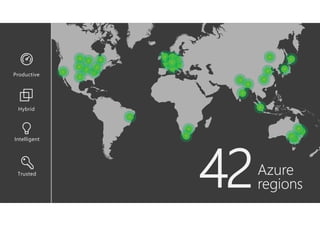
Azure
regions
Trusted
Intelligent
Hybrid
Productive
Modern Datacenters
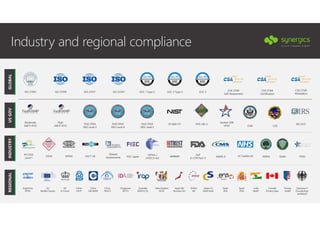
Industry and regional compliance
HIPAA /
HITECH Act
FERPA
GxP
21 CFR Part 11
ISO 27001 SOC 1 Type 2ISO 27018 CSA STAR
Self-Assessment
Singapore
MTCS
UK
G-Cloud
Australia
IRAP/CCSL
FISC Japan
New Zealand
GCIO
China
GB 18030
EU
Model Clauses
ENISA
IAF
Argentina
PDPA
Japan CS
Mark Gold
CDSA
Shared
Assessments
Japan My
Number Act
FACT UK GLBA
Spain
ENS
PCI DSS
Level 1 MARS-E FFIEC
China
TRUCS
SOC 2 Type 2 SOC 3
Canada
Privacy Laws
MPAA
Privacy
Shield
ISO 22301
India
MeitY
Germany IT
Grundschutz
workbook
Spain
DPA
CSA STAR
Certification
CSA STAR
Attestation
HITRUST IG Toolkit UK
China
DJCP
ITAR
Section 508
VPAT
SP 800-171 FIPS 140-2
High
JAB P-ATO CJIS
DoD DISA
SRG Level 2
DoD DISA
SRG Level 4
IRS 1075DoD DISA
SRG Level 5
Moderate
JAB P-ATO
ISO 27017
GLOBALUSGOVINDUSTRYREGIONAL
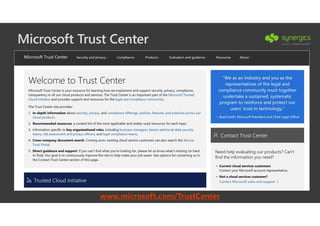
Microsoft Trust Center
www.microsoft.com/TrustCenter
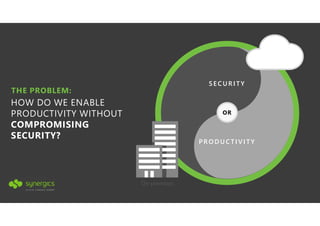
THE PROBLEM:
HOW DO WE ENABLE
PRODUCTIVITY WITHOUT
COMPROMISING
SECURITY?
PRO DU CTI VI TY
OR
SE CURITY
On-premises
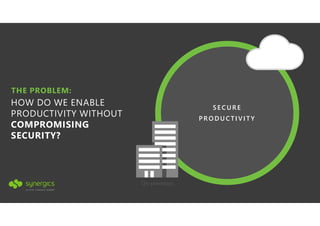
THE PROBLEM:
HOW DO WE ENABLE
PRODUCTIVITY WITHOUT
COMPROMISING
SECURITY?
PRO DU CTI VI TY
SE CURE
On-premises
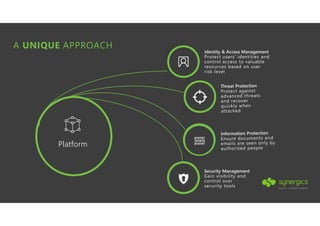
A UNIQUE APPROACH
Identity & Access Management
Protect users’ identities and
control access to valuable
resources based on user
risk level
Security Management
Gain visibility and
control over
security tools
Platform
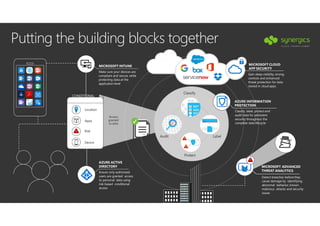
Putting the building blocks together
Apps
Risk
MICROSOFT INTUNE
Make sure your devices are
compliant and secure, while
protecting data at the
application level
AZURE ACTIVE
DIRECTORY
Ensure only authorized
users are granted access
to personal data using
risk-based conditional
access
MICROSOFT CLOUD
APP SECURITY
Gain deep visibility, strong
controls and enhanced
threat protection for data
stored in cloud apps
AZURE INFORMATION
PROTECTION
Classify, label, protect and
audit data for persistent
security throughout the
complete data lifecycle
MICROSOFT ADVANCED
THREAT ANALYTICS
Detect breaches before they
cause damage by identifying
abnormal behavior, known
malicious attacks and security
issues
!
Device
!
Access
granted
to data
CONDITIONAL
ACCESS
Classify
LabelAudit
Protect
!
!
Location
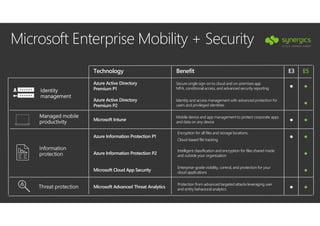
Microsoft Enterprise Mobility + Security
Technology Benefit E3 E5
Azure Active Directory
Premium P1
Secure single sign-on to cloud and on-premises app
MFA, conditional access, and advanced security reporting ● ●
Azure Active Directory
Premium P2
Identity and access management with advanced protection for
users and privileged identities ●
Microsoft Intune
Mobile device and app management to protect corporate apps
and data on any device ● ●
Azure Information Protection P1
Encryption for all files and storage locations
Cloud-based file tracking
● ●
Azure Information Protection P2
Intelligent classification and encryption for files shared inside
and outside your organization ●
Microsoft Cloud App Security
Enterprise-grade visibility, control, and protection for your
cloud applications ●
Microsoft Advanced Threat Analytics
Protection from advanced targeted attacks leveraging user
and entity behavioral analytics ● ●
Identity
management
Managed mobile
productivity
Information
protection
Threat protection
Azure
Information Protection
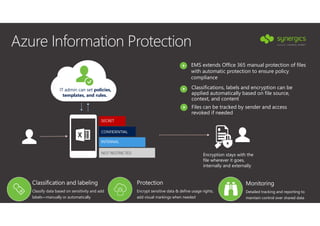
Azure Information Protection
SECRET
CONFIDENTIAL
INTERNAL
NOT RESTRICTED
IT admin can set policies,
templates, and rules.
Classifications, labels and encryption can be
applied automatically based on file source,
context, and content
EMS extends Office 365 manual protection of files
with automatic protection to ensure policy
compliance
Encryption stays with the
file wherever it goes,
internally and externally
Files can be tracked by sender and access
revoked if needed
Classification and labeling
Classify data based on sensitivity and add
labels—manually or automatically
Protection
Encrypt sensitive data & define usage rights,
add visual markings when needed
Monitoring
Detailed tracking and reporting to
maintain control over shared data
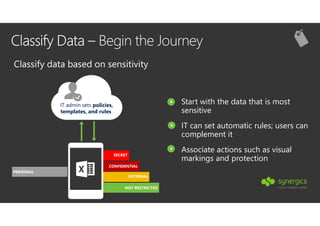
Classify Data – Begin the Journey
SECRET
CONFIDENTIAL
INTERNAL
NOT RESTRICTED
IT admin sets policies,
templates, and rules
PERSONAL
Classify data based on sensitivity
Start with the data that is most
sensitive
IT can set automatic rules; users can
complement it
Associate actions such as visual
markings and protection
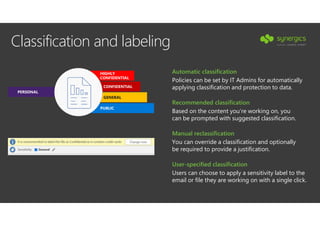
Classification and labeling
PERSONAL
HIGHLY
CONFIDENTIAL
CONFIDENTIAL
GENERAL
PUBLIC
You can override a classification and optionally
be required to provide a justification.
Manual reclassification
Policies can be set by IT Admins for automatically
applying classification and protection to data.
Automatic classification
Based on the content you’re working on, you
can be prompted with suggested classification.
Recommended classification
Users can choose to apply a sensitivity label to the
email or file they are working on with a single click.
User-specified classification
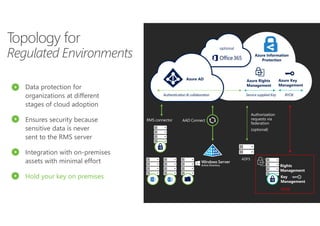
Authentication & collaboration
RMS connector
Authorization
requests via
federation
(optional)
Data protection for
organizations at different
stages of cloud adoption
Ensures security because
sensitive data is never
sent to the RMS server
Integration with on-premises
assets with minimal effort
Hold your key on premises
AAD Connect
ADFS
HYOK
Service supplied Key BYOK
Topology for
Regulated Environments
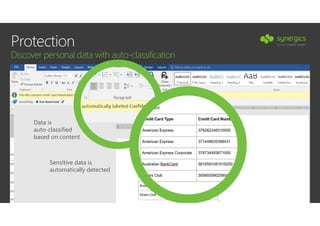
Protection
Discover personal data with auto-classification
Data is
auto-classified
based on content
Sensitive data is
automatically detected
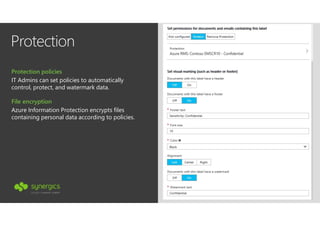
Protection
IT Admins can set policies to automatically
control, protect, and watermark data.
Protection policies
Azure Information Protection encrypts files
containing personal data according to policies.
File encryption
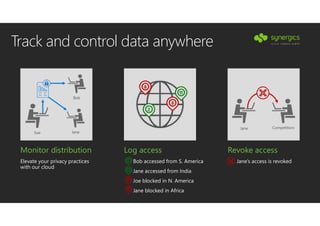
Monitor distribution
Elevate your privacy practices
with our cloud
Track and control data anywhere
Log access
Bob accessed from S. America
Jane accessed from India
Joe blocked in N. America
Jane blocked in Africa
11
2
8
8
8
8
2
11
Jane Competitors
Revoke access
Jane’s access is revoked
Bob
JaneSue
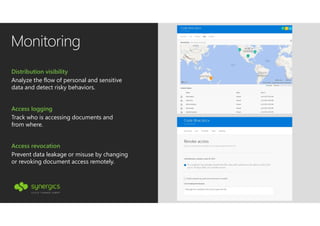
Monitoring
Analyze the flow of personal and sensitive
data and detect risky behaviors.
Distribution visibility
Track who is accessing documents and
from where.
Access logging
Prevent data leakage or misuse by changing
or revoking document access remotely.
Access revocation
How do we get there?
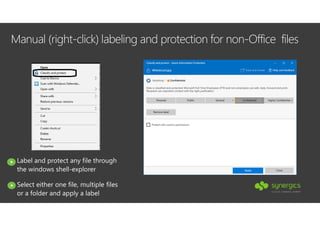
Manual (right-click) labeling and protection for non-Office files
Label and protect any file through
the windows shell-explorer
Select either one file, multiple files
or a folder and apply a label
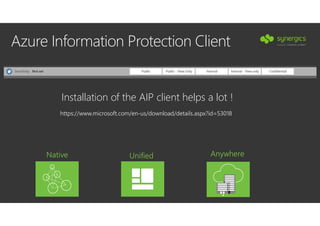
Azure Information Protection Client
Installation of the AIP client helps a lot !
Native Unified Anywhere
•
https://www.microsoft.com/en-us/download/details.aspx?id=53018
Azure Information Protection Scanner
Crawls files stored in CIFS based storage locations and SharePoint
Server sites
Provide scan locations and rules to apply based on conditions
Uses AIP policies configured to determine classification
Can be run in report or “Label and protect” mode
Results can help identify data that meets specific regulations and
compliances
Native Unified Anywhere
•
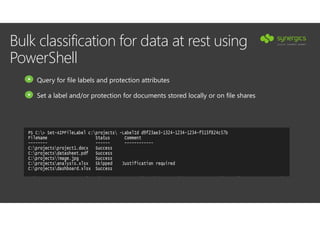
Bulk classification for data at rest using
PowerShell
Query for file labels and protection attributes
Set a label and/or protection for documents stored locally or on file shares
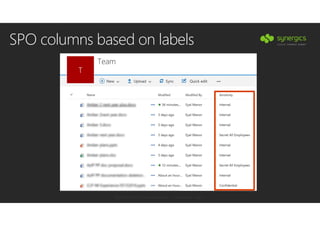
SPO columns based on labels
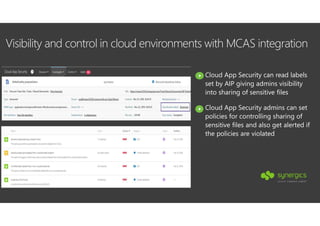
Visibility and control in cloud environments with MCAS integration
Cloud App Security can read labels
set by AIP giving admins visibility
into sharing of sensitive files
Cloud App Security admins can set
policies for controlling sharing of
sensitive files and also get alerted if
the policies are violated
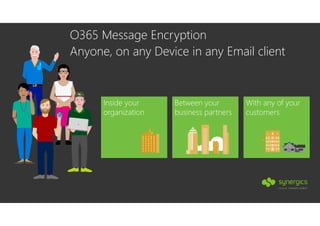
O365 Message Encryption
Anyone, on any Device in any Email client
Inside your
organization
Between your
business partners
With any of your
customers
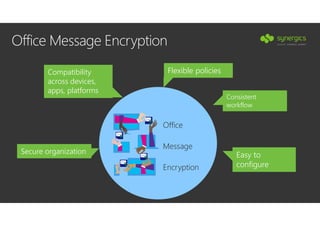
Flexible policies
Consistent
workflow
Easy to
configure
Compatibility
across devices,
apps, platforms
Office Message Encryption
Office
Message
Encryption
Secure organization
Demo Time
Microsoft
Cloud App Security
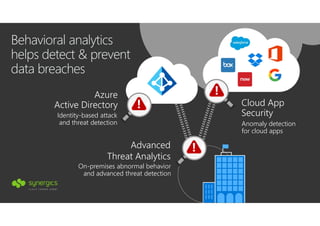
On-premises abnormal behavior
and advanced threat detection
Advanced
Threat Analytics
Identity-based attack
and threat detection
Azure
Active Directory
Behavioral analytics
helps detect & prevent
data breaches
Anomaly detection
for cloud apps
Cloud App
Security
!
!
!
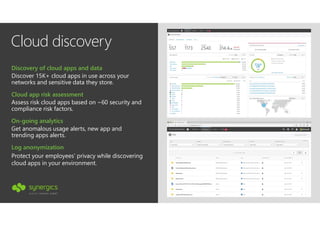
Cloud discovery
Get anomalous usage alerts, new app and
trending apps alerts.
On-going analytics
Discover 15K+ cloud apps in use across your
networks and sensitive data they store.
Discovery of cloud apps and data
Assess risk cloud apps based on ~60 security and
compliance risk factors.
Cloud app risk assessment
Protect your employees’ privacy while discovering
cloud apps in your environment.
Log anonymization
Cloud App Security
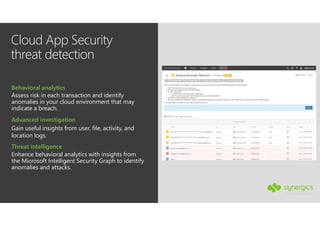
threat detection
Gain useful insights from user, file, activity, and
location logs.
Advanced investigation
Assess risk in each transaction and identify
anomalies in your cloud environment that may
indicate a breach.
Behavioral analytics
Enhance behavioral analytics with insights from
the Microsoft Intelligent Security Graph to identify
anomalies and attacks.
Threat intelligence
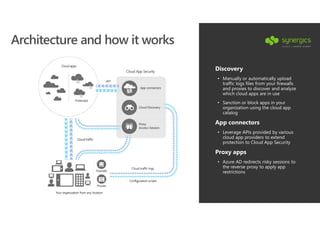
Architecture and how it works
Discovery
• Manually or automatically upload
traffic logs files from your firewalls
and proxies to discover and analyze
which cloud apps are in use
• Sanction or block apps in your
organization using the cloud app
catalog
App connectors
• Leverage APIs provided by various
cloud app providers to extend
protection to Cloud App Security
Proxy apps
• Azure AD redirects risky sessions to
the reverse proxy to apply app
restrictions
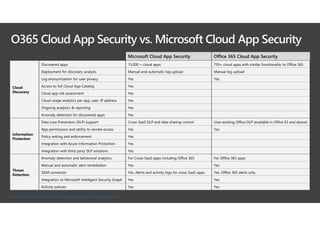
O365 Cloud App Security vs. Microsoft Cloud App Security
Microsoft Cloud App Security Office 365 Cloud App Security
Cloud
Discovery
Discovered apps 15,000 + cloud apps 750+ cloud apps with similar functionality to Office 365
Deployment for discovery analysis Manual and automatic log upload Manual log upload
Log anonymization for user privacy Yes Yes
Access to full Cloud App Catalog Yes
Cloud app risk assessment Yes
Cloud usage analytics per app, user, IP address Yes
Ongoing analytics & reporting Yes
Anomaly detection for discovered apps Yes
Information
Protection
Data Loss Prevention (DLP) support Cross-SaaS DLP and data sharing control Uses existing Office DLP (available in Office E3 and above)
App permissions and ability to revoke access Yes Yes
Policy setting and enforcement Yes
Integration with Azure Information Protection Yes
Integration with third party DLP solutions Yes
Threat
Detection
Anomaly detection and behavioral analytics For Cross-SaaS apps including Office 365 For Office 365 apps
Manual and automatic alert remediation Yes Yes
SIEM connector Yes. Alerts and activity logs for cross-SaaS apps. Yes. Office 365 alerts only.
Integration to Microsoft Intelligent Security Graph Yes Yes
Activity policies Yes Yes
https://docs.microsoft.com/en-us/cloud-app-security/editions-cloud-app-security
Demo Time
Thank you
@vrykodee
For more information
https://security.synergics.be
https://aka.ms/security David.DeVos@synergics.be

Information protection & classification

  • 1.
    Microsoft Security Azure Informationprotection Shadow IT for cloud apps
  • 2.
    About me .. @vrykodee MCSE1 MCPS MCSA1 MCNPS MCTS MCSA MCSE MCSD MS BVT MCTEM DavidDe Vos Cybersecurity Solutions Architect Synergics David.DeVos@synergics.be
  • 3.
  • 4.
  • 6.
    Industry and regionalcompliance HIPAA / HITECH Act FERPA GxP 21 CFR Part 11 ISO 27001 SOC 1 Type 2ISO 27018 CSA STAR Self-Assessment Singapore MTCS UK G-Cloud Australia IRAP/CCSL FISC Japan New Zealand GCIO China GB 18030 EU Model Clauses ENISA IAF Argentina PDPA Japan CS Mark Gold CDSA Shared Assessments Japan My Number Act FACT UK GLBA Spain ENS PCI DSS Level 1 MARS-E FFIEC China TRUCS SOC 2 Type 2 SOC 3 Canada Privacy Laws MPAA Privacy Shield ISO 22301 India MeitY Germany IT Grundschutz workbook Spain DPA CSA STAR Certification CSA STAR Attestation HITRUST IG Toolkit UK China DJCP ITAR Section 508 VPAT SP 800-171 FIPS 140-2 High JAB P-ATO CJIS DoD DISA SRG Level 2 DoD DISA SRG Level 4 IRS 1075DoD DISA SRG Level 5 Moderate JAB P-ATO ISO 27017 GLOBALUSGOVINDUSTRYREGIONAL
  • 7.
  • 8.
    THE PROBLEM: HOW DOWE ENABLE PRODUCTIVITY WITHOUT COMPROMISING SECURITY? PRO DU CTI VI TY OR SE CURITY On-premises
  • 9.
    THE PROBLEM: HOW DOWE ENABLE PRODUCTIVITY WITHOUT COMPROMISING SECURITY? PRO DU CTI VI TY SE CURE On-premises
  • 10.
    A UNIQUE APPROACH Identity& Access Management Protect users’ identities and control access to valuable resources based on user risk level Security Management Gain visibility and control over security tools Platform
  • 11.
    Putting the buildingblocks together Apps Risk MICROSOFT INTUNE Make sure your devices are compliant and secure, while protecting data at the application level AZURE ACTIVE DIRECTORY Ensure only authorized users are granted access to personal data using risk-based conditional access MICROSOFT CLOUD APP SECURITY Gain deep visibility, strong controls and enhanced threat protection for data stored in cloud apps AZURE INFORMATION PROTECTION Classify, label, protect and audit data for persistent security throughout the complete data lifecycle MICROSOFT ADVANCED THREAT ANALYTICS Detect breaches before they cause damage by identifying abnormal behavior, known malicious attacks and security issues ! Device ! Access granted to data CONDITIONAL ACCESS Classify LabelAudit Protect ! ! Location
  • 12.
    Microsoft Enterprise Mobility+ Security Technology Benefit E3 E5 Azure Active Directory Premium P1 Secure single sign-on to cloud and on-premises app MFA, conditional access, and advanced security reporting ● ● Azure Active Directory Premium P2 Identity and access management with advanced protection for users and privileged identities ● Microsoft Intune Mobile device and app management to protect corporate apps and data on any device ● ● Azure Information Protection P1 Encryption for all files and storage locations Cloud-based file tracking ● ● Azure Information Protection P2 Intelligent classification and encryption for files shared inside and outside your organization ● Microsoft Cloud App Security Enterprise-grade visibility, control, and protection for your cloud applications ● Microsoft Advanced Threat Analytics Protection from advanced targeted attacks leveraging user and entity behavioral analytics ● ● Identity management Managed mobile productivity Information protection Threat protection
  • 13.
  • 14.
    Azure Information Protection SECRET CONFIDENTIAL INTERNAL NOTRESTRICTED IT admin can set policies, templates, and rules. Classifications, labels and encryption can be applied automatically based on file source, context, and content EMS extends Office 365 manual protection of files with automatic protection to ensure policy compliance Encryption stays with the file wherever it goes, internally and externally Files can be tracked by sender and access revoked if needed Classification and labeling Classify data based on sensitivity and add labels—manually or automatically Protection Encrypt sensitive data & define usage rights, add visual markings when needed Monitoring Detailed tracking and reporting to maintain control over shared data
  • 15.
    Classify Data –Begin the Journey SECRET CONFIDENTIAL INTERNAL NOT RESTRICTED IT admin sets policies, templates, and rules PERSONAL Classify data based on sensitivity Start with the data that is most sensitive IT can set automatic rules; users can complement it Associate actions such as visual markings and protection
  • 16.
    Classification and labeling PERSONAL HIGHLY CONFIDENTIAL CONFIDENTIAL GENERAL PUBLIC Youcan override a classification and optionally be required to provide a justification. Manual reclassification Policies can be set by IT Admins for automatically applying classification and protection to data. Automatic classification Based on the content you’re working on, you can be prompted with suggested classification. Recommended classification Users can choose to apply a sensitivity label to the email or file they are working on with a single click. User-specified classification
  • 17.
    Authentication & collaboration RMSconnector Authorization requests via federation (optional) Data protection for organizations at different stages of cloud adoption Ensures security because sensitive data is never sent to the RMS server Integration with on-premises assets with minimal effort Hold your key on premises AAD Connect ADFS HYOK Service supplied Key BYOK Topology for Regulated Environments
  • 18.
    Protection Discover personal datawith auto-classification Data is auto-classified based on content Sensitive data is automatically detected
  • 19.
    Protection IT Admins canset policies to automatically control, protect, and watermark data. Protection policies Azure Information Protection encrypts files containing personal data according to policies. File encryption
  • 20.
    Monitor distribution Elevate yourprivacy practices with our cloud Track and control data anywhere Log access Bob accessed from S. America Jane accessed from India Joe blocked in N. America Jane blocked in Africa 11 2 8 8 8 8 2 11 Jane Competitors Revoke access Jane’s access is revoked Bob JaneSue
  • 21.
    Monitoring Analyze the flowof personal and sensitive data and detect risky behaviors. Distribution visibility Track who is accessing documents and from where. Access logging Prevent data leakage or misuse by changing or revoking document access remotely. Access revocation
  • 22.
    How do weget there?
  • 23.
    Manual (right-click) labelingand protection for non-Office files Label and protect any file through the windows shell-explorer Select either one file, multiple files or a folder and apply a label
  • 24.
    Azure Information ProtectionClient Installation of the AIP client helps a lot ! Native Unified Anywhere • https://www.microsoft.com/en-us/download/details.aspx?id=53018
  • 25.
    Azure Information ProtectionScanner Crawls files stored in CIFS based storage locations and SharePoint Server sites Provide scan locations and rules to apply based on conditions Uses AIP policies configured to determine classification Can be run in report or “Label and protect” mode Results can help identify data that meets specific regulations and compliances Native Unified Anywhere •
  • 26.
    Bulk classification fordata at rest using PowerShell Query for file labels and protection attributes Set a label and/or protection for documents stored locally or on file shares
  • 27.
  • 28.
    Visibility and controlin cloud environments with MCAS integration Cloud App Security can read labels set by AIP giving admins visibility into sharing of sensitive files Cloud App Security admins can set policies for controlling sharing of sensitive files and also get alerted if the policies are violated
  • 29.
    O365 Message Encryption Anyone,on any Device in any Email client Inside your organization Between your business partners With any of your customers
  • 30.
    Flexible policies Consistent workflow Easy to configure Compatibility acrossdevices, apps, platforms Office Message Encryption Office Message Encryption Secure organization
  • 31.
  • 32.
  • 33.
    On-premises abnormal behavior andadvanced threat detection Advanced Threat Analytics Identity-based attack and threat detection Azure Active Directory Behavioral analytics helps detect & prevent data breaches Anomaly detection for cloud apps Cloud App Security ! ! !
  • 34.
    Cloud discovery Get anomaloususage alerts, new app and trending apps alerts. On-going analytics Discover 15K+ cloud apps in use across your networks and sensitive data they store. Discovery of cloud apps and data Assess risk cloud apps based on ~60 security and compliance risk factors. Cloud app risk assessment Protect your employees’ privacy while discovering cloud apps in your environment. Log anonymization
  • 35.
    Cloud App Security threatdetection Gain useful insights from user, file, activity, and location logs. Advanced investigation Assess risk in each transaction and identify anomalies in your cloud environment that may indicate a breach. Behavioral analytics Enhance behavioral analytics with insights from the Microsoft Intelligent Security Graph to identify anomalies and attacks. Threat intelligence
  • 36.
    Architecture and howit works Discovery • Manually or automatically upload traffic logs files from your firewalls and proxies to discover and analyze which cloud apps are in use • Sanction or block apps in your organization using the cloud app catalog App connectors • Leverage APIs provided by various cloud app providers to extend protection to Cloud App Security Proxy apps • Azure AD redirects risky sessions to the reverse proxy to apply app restrictions
  • 37.
    O365 Cloud AppSecurity vs. Microsoft Cloud App Security Microsoft Cloud App Security Office 365 Cloud App Security Cloud Discovery Discovered apps 15,000 + cloud apps 750+ cloud apps with similar functionality to Office 365 Deployment for discovery analysis Manual and automatic log upload Manual log upload Log anonymization for user privacy Yes Yes Access to full Cloud App Catalog Yes Cloud app risk assessment Yes Cloud usage analytics per app, user, IP address Yes Ongoing analytics & reporting Yes Anomaly detection for discovered apps Yes Information Protection Data Loss Prevention (DLP) support Cross-SaaS DLP and data sharing control Uses existing Office DLP (available in Office E3 and above) App permissions and ability to revoke access Yes Yes Policy setting and enforcement Yes Integration with Azure Information Protection Yes Integration with third party DLP solutions Yes Threat Detection Anomaly detection and behavioral analytics For Cross-SaaS apps including Office 365 For Office 365 apps Manual and automatic alert remediation Yes Yes SIEM connector Yes. Alerts and activity logs for cross-SaaS apps. Yes. Office 365 alerts only. Integration to Microsoft Intelligent Security Graph Yes Yes Activity policies Yes Yes https://docs.microsoft.com/en-us/cloud-app-security/editions-cloud-app-security
  • 38.
  • 39.
    Thank you @vrykodee For moreinformation https://security.synergics.be https://aka.ms/security David.DeVos@synergics.be