Modern Workplace
Conference Paris 2022
online
#MWCP22 Coming soon!
Share. Discover.
Explore.
Partager. Découvrir.
Explorer.
Modern Workplace
Conference Paris 2022
online
#MWCP22 24,25,26 Jan 2022
Suivez-nous tout au long de l’année !
Follow us all year round!
https://aos.community
https://twitter.com/mwcparis
#MWCP22
https://modern-workplace.pro
https://twitter.com/aOSComm
https://www.linkedin.com/company/
ams-community
https://www.linkedin.com/company/
mwcp
https://www.facebook.com/
modernworkplaceconferenceparis
https://www.facebook.com/
aOSCommunity (FR)
https://www.facebook.com/
aosComm (EN)
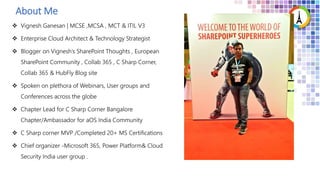
Vignesh Ganesan
Enterprise Cloud Architect & Technology Strategist
NGUNGU JOEL
Etudiant
About Me
Let’s get
started
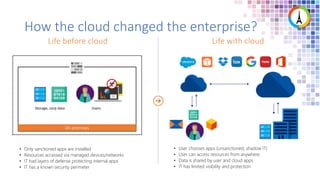
• User chooses apps (unsanctioned, shadow IT)
• User can access resources from anywhere
• Data is shared by user and cloud apps
• IT has limited visibility and protection
• Only sanctioned apps are installed
• Resources accessed via managed devices/networks
• IT had layers of defense protecting internal apps
• IT has a known security perimeter
Life with cloud
Life before cloud
On-premises
Storage, corp data Users
How the cloud changed the enterprise?
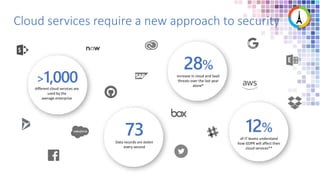
Cloud services require a new approach to security
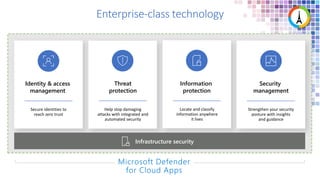
Enterprise-class technology
Secure identities to
reach zero trust
Identity & access
management
Security
management
Strengthen your security
posture with insights
and guidance
Threat
protection
Help stop damaging
attacks with integrated and
automated security
Locate and classify
information anywhere
it lives
Information
protection
Infrastructure security
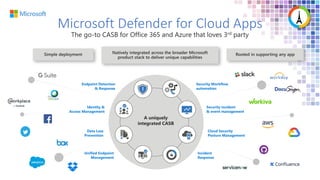
Microsoft Defender for Cloud Apps
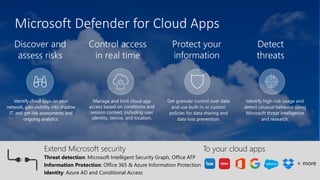
Discover and
assess risks
Control access
in real time
Detect
threats
Protect your
information
Identify cloud apps on your
network, gain visibility into shadow
IT, and get risk assessments and
ongoing analytics.
Manage and limit cloud app
access based on conditions and
session context, including user
identity, device, and location.
Identify high-risk usage and
detect unusual behavior using
Microsoft threat intelligence
and research.
Get granular control over data
and use built-in or custom
policies for data sharing and
data loss prevention.
Threat detection: Microsoft Intelligent Security Graph, Office ATP
Information Protection: Office 365 & Azure Information Protection
Identity: Azure AD and Conditional Access
To your cloud apps
Extend Microsoft security
+ more
Microsoft Defender for Cloud Apps
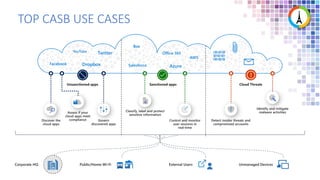
TOP CASB USE CASES
Office 365
Salesforce Azure
Box
AWS
Dropbox
Facebook
Twitter
YouTube
Case study
A company named Contoso is using Microsoft 365 for collaborating within themselves and other
organizations . All their employees are currently on WFH due to COVID.
Challenges
• Users are downloading sensitive information to their personal PC
• Users are downloading company confidential files to their personal PC
• Users are uploading PII information to SPO
• Customer’s PII data is being copied and shared with a competitor
• Legal regulations state that Contract Employees/Contingent employees shouldn’t have access
to Office 365 from their personal PC
• Contoso would also like to control sharing of sensitive information from 3rd party apps such as
Box
• Block risky sign-ins
1. All the users in Contoso have a Microsoft 365 license and an Azure AD P1 license assigned to them .
2. They all have an Intune compliant/ Hybrid Azure AD joined PC given to them
3. Contoso is currently using cloud apps such as Office 365 , Box & Workplace by Facebook
4. Contoso has rolled out AIP & DLP for all its users and they also have Azure AD conditional access policies
configured
Contoso’s Current setup
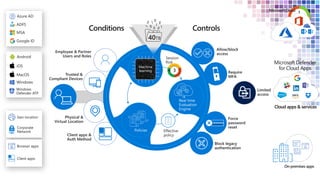
Conditional Access App control
Cloud apps & services
Require MFA
Allow access
Deny access
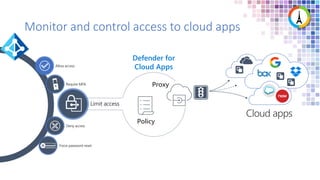
Force password reset
******
Monitor and control access to cloud apps
Defender for
Cloud Apps
Limit access
Policy
Proxy
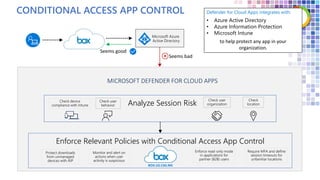
CONDITIONAL ACCESS APP CONTROL
Microsoft Azure
Active Directory
Analyze Session Risk
Check device
compliance with Intune
Check
location
Check user
behavior
Check user
organization
Enforce Relevant Policies with Conditional Access App Control
Protect downloads
from unmanaged
devices with AIP
Monitor and alert on
actions when user
activity is suspicious
Enforce read-only mode
in applications for
partner (B2B) users
Require MFA and define
session timeouts for
unfamiliar locations
BOX.US.CAS.MS
Defender for Cloud Apps integrates with:
• Azure Active Directory
• Azure Information Protection
• Microsoft Intune
to help protect any app in your
organization.
MICROSOFT DEFENDER FOR CLOUD APPS
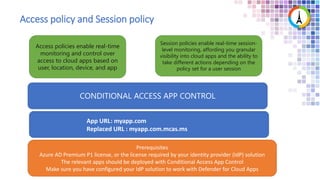
Access policy and Session policy
Access policies enable real-time
monitoring and control over
access to cloud apps based on
user, location, device, and app
Session policies enable real-time session-
level monitoring, affording you granular
visibility into cloud apps and the ability to
take different actions depending on the
policy set for a user session
CONDITIONAL ACCESS APP CONTROL
Prerequisites
Azure AD Premium P1 license, or the license required by your identity provider (IdP) solution
The relevant apps should be deployed with Conditional Access App Control
Make sure you have configured your IdP solution to work with Defender for Cloud Apps
App URL: myapp.com
Replaced URL : myapp.com.mcas.ms
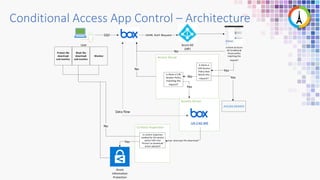
Conditional Access App Control – Architecture
User
SSO
Azure AD
(IdP)
SAML Auth Request
Is there an Azure
AD Conditional
Access policy
matching this
request?
No
Yes
Yes
No
Yes
No
Data flow
Azure
Information
Protection
Is content inspection
enabled for this session
policy? OR is the
Protect on Download
action selected?
Yes User attempts file download
Block file
download
and monitor
Protect file
download
and monitor
Monitor
No
Is there a CAS
Session Policy
matching this
request?
Is there a
CAS Access
Policy that
blocks this
request?
ACCESS DENIED
.US.CAS.MS
Challenge 1: Users are downloading sensitive information to
their personal PC
Challenge 2: Users are downloading company confidential
files to their personal PC
Challenge 3:Users are uploading PII information to SPO
Challenge 4 : Customer’s PII data is being copied and shared
with a competitor
Challenge 5 : Legal regulations state that Contract
Employees/Contingent employees shouldn’t have access to
Office 365 from their personal PC
Challenge 6 : Contoso would also like to control sharing of
sensitive information from 3rd party apps such as Box
Challenge 7 : Block risky sign-ins
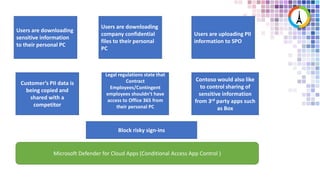
Users are downloading
sensitive information
to their personal PC
Users are downloading
company confidential
files to their personal
PC
Users are uploading PII
information to SPO
Customer’s PII data is
being copied and
shared with a
competitor
Legal regulations state that
Contract
Employees/Contingent
employees shouldn’t have
access to Office 365 from
their personal PC
Contoso would also like
to control sharing of
sensitive information
from 3rd party apps such
as Box
Microsoft Defender for Cloud Apps (Conditional Access App Control )
Block risky sign-ins
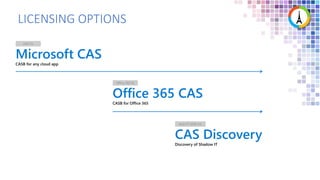
LICENSING OPTIONS
Microsoft CAS
CASB for any cloud app
EMS E5
Office 365 CAS
CASB for Office 365
Office 365 E5
CAS Discovery
Discovery of Shadow IT
AAD P1 (EMS E3)
Ref
• https://docs.microsoft.com/en-us/defender-cloud-apps/
• https://techcommunity.microsoft.com/t5/security-compliance-and-
identity/announcing-microsoft-defender-for-cloud-apps/ba-p/2835842
• https://docs.microsoft.com/en-us/defender-cloud-apps/proxy-intro-aad
• https://docs.microsoft.com/en-us/defender-cloud-apps/access-policy-aad
• https://docs.microsoft.com/en-us/defender-cloud-apps/session-policy-aad
• https://docs.microsoft.com/en-us/defender-cloud-apps/proxy-deployment-aad
• https://docs.microsoft.com/en-us/defender-cloud-apps/proxy-deployment-any-
app
• https://www.aka.ms/mcaslicensing
• https://docs.microsoft.com/en-us/defender-cloud-apps/editions-cloud-app-
security-o365
Merci pour
votre
attention !
Thanks
for your
attention!

Secure your Access to Cloud Apps using Microsoft Defender for Cloud Apps

  • 2.
    Modern Workplace Conference Paris2022 online #MWCP22 Coming soon! Share. Discover. Explore. Partager. Découvrir. Explorer. Modern Workplace Conference Paris 2022 online #MWCP22 24,25,26 Jan 2022
  • 3.
    Suivez-nous tout aulong de l’année ! Follow us all year round! https://aos.community https://twitter.com/mwcparis #MWCP22 https://modern-workplace.pro https://twitter.com/aOSComm https://www.linkedin.com/company/ ams-community https://www.linkedin.com/company/ mwcp https://www.facebook.com/ modernworkplaceconferenceparis https://www.facebook.com/ aOSCommunity (FR) https://www.facebook.com/ aosComm (EN)
  • 4.
    Vignesh Ganesan Enterprise CloudArchitect & Technology Strategist NGUNGU JOEL Etudiant
  • 5.
  • 6.
  • 7.
    • User choosesapps (unsanctioned, shadow IT) • User can access resources from anywhere • Data is shared by user and cloud apps • IT has limited visibility and protection • Only sanctioned apps are installed • Resources accessed via managed devices/networks • IT had layers of defense protecting internal apps • IT has a known security perimeter Life with cloud Life before cloud On-premises Storage, corp data Users How the cloud changed the enterprise?
  • 8.
    Cloud services requirea new approach to security
  • 9.
    Enterprise-class technology Secure identitiesto reach zero trust Identity & access management Security management Strengthen your security posture with insights and guidance Threat protection Help stop damaging attacks with integrated and automated security Locate and classify information anywhere it lives Information protection Infrastructure security
  • 11.
    Microsoft Defender forCloud Apps Discover and assess risks Control access in real time Detect threats Protect your information Identify cloud apps on your network, gain visibility into shadow IT, and get risk assessments and ongoing analytics. Manage and limit cloud app access based on conditions and session context, including user identity, device, and location. Identify high-risk usage and detect unusual behavior using Microsoft threat intelligence and research. Get granular control over data and use built-in or custom policies for data sharing and data loss prevention. Threat detection: Microsoft Intelligent Security Graph, Office ATP Information Protection: Office 365 & Azure Information Protection Identity: Azure AD and Conditional Access To your cloud apps Extend Microsoft security + more
  • 12.
  • 13.
    TOP CASB USECASES Office 365 Salesforce Azure Box AWS Dropbox Facebook Twitter YouTube
  • 14.
    Case study A companynamed Contoso is using Microsoft 365 for collaborating within themselves and other organizations . All their employees are currently on WFH due to COVID. Challenges • Users are downloading sensitive information to their personal PC • Users are downloading company confidential files to their personal PC • Users are uploading PII information to SPO • Customer’s PII data is being copied and shared with a competitor • Legal regulations state that Contract Employees/Contingent employees shouldn’t have access to Office 365 from their personal PC • Contoso would also like to control sharing of sensitive information from 3rd party apps such as Box • Block risky sign-ins
  • 15.
    1. All theusers in Contoso have a Microsoft 365 license and an Azure AD P1 license assigned to them . 2. They all have an Intune compliant/ Hybrid Azure AD joined PC given to them 3. Contoso is currently using cloud apps such as Office 365 , Box & Workplace by Facebook 4. Contoso has rolled out AIP & DLP for all its users and they also have Azure AD conditional access policies configured Contoso’s Current setup
  • 16.
  • 17.
    Cloud apps &services
  • 18.
    Require MFA Allow access Denyaccess Force password reset ****** Monitor and control access to cloud apps Defender for Cloud Apps Limit access Policy Proxy
  • 19.
    CONDITIONAL ACCESS APPCONTROL Microsoft Azure Active Directory Analyze Session Risk Check device compliance with Intune Check location Check user behavior Check user organization Enforce Relevant Policies with Conditional Access App Control Protect downloads from unmanaged devices with AIP Monitor and alert on actions when user activity is suspicious Enforce read-only mode in applications for partner (B2B) users Require MFA and define session timeouts for unfamiliar locations BOX.US.CAS.MS Defender for Cloud Apps integrates with: • Azure Active Directory • Azure Information Protection • Microsoft Intune to help protect any app in your organization. MICROSOFT DEFENDER FOR CLOUD APPS
  • 20.
    Access policy andSession policy Access policies enable real-time monitoring and control over access to cloud apps based on user, location, device, and app Session policies enable real-time session- level monitoring, affording you granular visibility into cloud apps and the ability to take different actions depending on the policy set for a user session CONDITIONAL ACCESS APP CONTROL Prerequisites Azure AD Premium P1 license, or the license required by your identity provider (IdP) solution The relevant apps should be deployed with Conditional Access App Control Make sure you have configured your IdP solution to work with Defender for Cloud Apps App URL: myapp.com Replaced URL : myapp.com.mcas.ms
  • 21.
    Conditional Access AppControl – Architecture User SSO Azure AD (IdP) SAML Auth Request Is there an Azure AD Conditional Access policy matching this request? No Yes Yes No Yes No Data flow Azure Information Protection Is content inspection enabled for this session policy? OR is the Protect on Download action selected? Yes User attempts file download Block file download and monitor Protect file download and monitor Monitor No Is there a CAS Session Policy matching this request? Is there a CAS Access Policy that blocks this request? ACCESS DENIED .US.CAS.MS
  • 22.
    Challenge 1: Usersare downloading sensitive information to their personal PC
  • 23.
    Challenge 2: Usersare downloading company confidential files to their personal PC
  • 24.
    Challenge 3:Users areuploading PII information to SPO
  • 25.
    Challenge 4 :Customer’s PII data is being copied and shared with a competitor
  • 26.
    Challenge 5 :Legal regulations state that Contract Employees/Contingent employees shouldn’t have access to Office 365 from their personal PC
  • 27.
    Challenge 6 :Contoso would also like to control sharing of sensitive information from 3rd party apps such as Box
  • 28.
    Challenge 7 :Block risky sign-ins
  • 29.
    Users are downloading sensitiveinformation to their personal PC Users are downloading company confidential files to their personal PC Users are uploading PII information to SPO Customer’s PII data is being copied and shared with a competitor Legal regulations state that Contract Employees/Contingent employees shouldn’t have access to Office 365 from their personal PC Contoso would also like to control sharing of sensitive information from 3rd party apps such as Box Microsoft Defender for Cloud Apps (Conditional Access App Control ) Block risky sign-ins
  • 30.
    LICENSING OPTIONS Microsoft CAS CASBfor any cloud app EMS E5 Office 365 CAS CASB for Office 365 Office 365 E5 CAS Discovery Discovery of Shadow IT AAD P1 (EMS E3)
  • 31.
    Ref • https://docs.microsoft.com/en-us/defender-cloud-apps/ • https://techcommunity.microsoft.com/t5/security-compliance-and- identity/announcing-microsoft-defender-for-cloud-apps/ba-p/2835842 •https://docs.microsoft.com/en-us/defender-cloud-apps/proxy-intro-aad • https://docs.microsoft.com/en-us/defender-cloud-apps/access-policy-aad • https://docs.microsoft.com/en-us/defender-cloud-apps/session-policy-aad • https://docs.microsoft.com/en-us/defender-cloud-apps/proxy-deployment-aad • https://docs.microsoft.com/en-us/defender-cloud-apps/proxy-deployment-any- app • https://www.aka.ms/mcaslicensing • https://docs.microsoft.com/en-us/defender-cloud-apps/editions-cloud-app- security-o365
  • 32.

Editor's Notes

  • #9 While hopefully none of these stats are particularly surprising, I always like to start the conversation with some insights that we have about the cloud use in organizations Our data shows that in the average organization, more than 1000 cloud services are regularly used by end user and that more than half of those are unmanaged and go unmonitored by IT *28%: https://dt-x.io/dtx/en/node/newsitem-ai-reveals-2018-s-biggest-cyber-threats:-part-one-the-rise-of-non-traditional-it **https://www.dsm.net/it-solutions-blog/cloud-security-statistics-every-cio-should-know
  • #10 Our investments here are guided by the four strategies for success with infrastructure based on Azure security to secure your data in the cloud. Let’s talk about Infrastructure Security first as this is woven throughout all of our 4 key areas and foundational to security.
  • #12 11
  • #13 Microsoft has a CASB and here is why it’s unique Add 3rd party logos to emphasize our commitment there Add a datapoint to drive a perception on the recognition
  • #14 CASBs are used to address these security issues Here are some of the top CASB use cases Discovering the application Assess if the application meets company compliance Govern the applications by controlling access to the applications
  • #18 17
  • #22 Conditional Access App Control uses a reverse proxy architecture and integrates with your IdP. When integrating with Azure AD Conditional Access, you can configure apps to work with Conditional Access App Control with just a few clicks, allowing you to easily and selectively enforce access and session controls on your organization's apps based on any condition in Conditional Access. The conditions define who (user or group of users) and what (which cloud apps) and where (which locations and networks) a Conditional Access policy is applied to. After you've determined the conditions, you can route users to Defender for Cloud Apps where you can protect data with Conditional Access App Control by applying access and session controls.