Azure Information
Protection
April 2018
@directorcia
http://about.me/ciaops
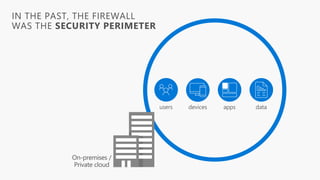
IN THE PAST, THE FIREWALL
WAS THE SECURITY PERIMETER
devices datausers apps
On-premises /
Private cloud
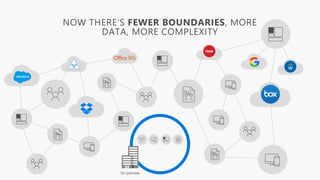
On-premises
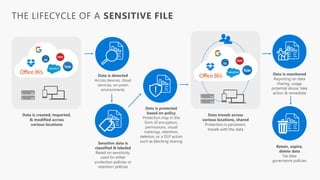
THE LIFECYCLE OF A SENSITIVE FILE
Data is created, imported,
& modified across
various locations
Data is detected
Across devices, cloud
services, on-prem
environments
Sensitive data is
classified & labeled
Based on sensitivity;
used for either
protection policies or
retention policies
Data is protected
based on policy
Protection may in the
form of encryption,
permissions, visual
markings, retention,
deletion, or a DLP action
such as blocking sharing
Data travels across
various locations, shared
Protection is persistent,
travels with the data
Data is monitored
Reporting on data
sharing, usage,
potential abuse; take
action & remediate
Retain, expire,
delete data
Via data
governance policies
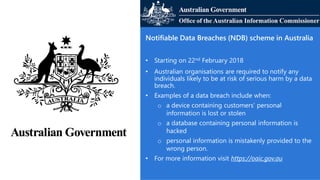
Notifiable Data Breaches (NDB) scheme in Australia
• Starting on 22nd February 2018
• Australian organisations are required to notify any
individuals likely to be at risk of serious harm by a data
breach.
• Examples of a data breach include when:
o a device containing customers’ personal
information is lost or stolen
o a database containing personal information is
hacked
o personal information is mistakenly provided to the
wrong person.
• For more information visit https://oaic.gov.au
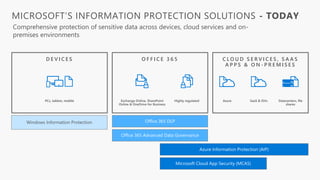
PCs, tablets, mobile
Office 365 DLPWindows Information Protection
Azure Information Protection (AIP)
Exchange Online, SharePoint
Online & OneDrive for Business
Highly regulated
Microsoft Cloud App Security (MCAS)
Office 365 Advanced Data Governance
Datacenters, file
shares
Azure SaaS & ISVs
MICROSOFT’S INFORMATION PROTECTION SOLUTIONS - TODAY
Comprehensive protection of sensitive data across devices, cloud services and on-
premises environments
O F F I C E 3 6 5D E V I C E S C L O U D S E R V I C E S , S A A S
A P P S & O N - P R E M I S E S
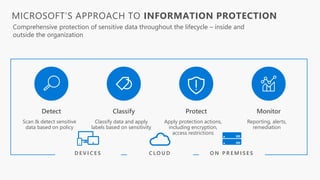
MICROSOFT’S APPROACH TO INFORMATION PROTECTION
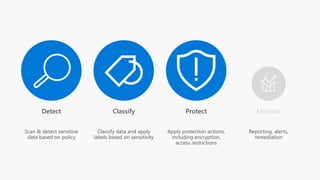
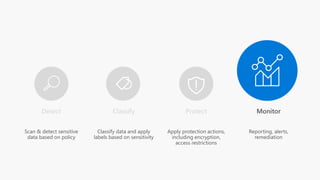
Detect ProtectClassify Monitor
C L O U DD E V I C E S O N P R E M I S E S
Comprehensive protection of sensitive data throughout the lifecycle – inside and
outside the organization
Scan & detect sensitive
data based on policy
Classify data and apply
labels based on sensitivity
Apply protection actions,
including encryption,
access restrictions
Reporting, alerts,
remediation
DETECT
PROTECT
CLASSIFYMONITOR
MICROSOFT’S
INFORMATION
PROTECTION
SOLUTIONS
WINDOWS INFORMATION PROTECTION
Separate personal vs. work data on Windows 10 devices and
prevent work data from traveling to non-work locations
OFFICE 365 ADVANCED SECURITY MANAGEMENT
Visibility into Office 365 app usage and potential
data abuse
MICROSOFT CLOUD APP SECURITY
Visibility into 15k+ cloud apps, data access & usage,
potential abuse
MESSAGE ENCRYPTION
Send encrypted emails in Office 365 to anyone –
inside or outside of the company
CONDITIONAL ACCESS
Control access to files based on policy, such as identity,
machine configuration, geo location
OFFICE APPS
Protect sensitive information while working in Excel, Word,
PowerPoint, Outlook
AZURE INFORMATION PROTECTION
Classify, label & protect files – beyond Office 365, including
on-prem & hybrid
OFFICE 365 DLP
Prevent data loss across Exchange Online, SharePoint Online,
OneDrive for Business
ISV APPLICATIONS
Enable ISV partners to consume labels, apply protection
OFFICE 365 ADVANCED DATA GOVERNANCE
Apply retention and deletion policies to sensitive and
important data in Office 365
SHAREPOINT & GROUPS
Protect files in libraries and lists
MICROSOFT’S INFORMATION PROTECTION SOLUTIONS
Detect ProtectClassify Monitor
Scan & detect sensitive
data based on policy
Classify data and apply
labels based on sensitivity
Apply protection actions,
including encryption,
access restrictions
Reporting, alerts,
remediation
Classify Protect
Detect and Classify sensitive
information across cloud services &
on-premises
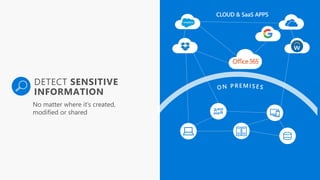
Detect, Classify and Protect sensitive
information across cloud services &
on-premises
a
DETECT SENSITIVE
INFORMATION
CLOUD & SaaS APPS
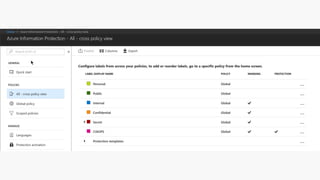
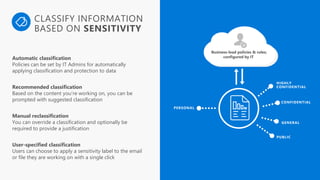
HIGHLY
CONFIDENTIAL
CONFIDENTIAL
GENERAL
PUBLIC
PERSONAL
Business-lead policies & rules;
configured by ITAutomatic classification
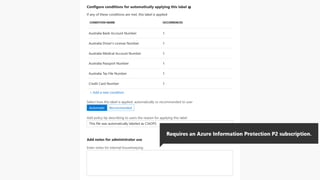
Policies can be set by IT Admins for automatically
applying classification and protection to data
Recommended classification
Based on the content you’re working on, you can be
prompted with suggested classification
Manual reclassification
You can override a classification and optionally be
required to provide a justification
User-specified classification
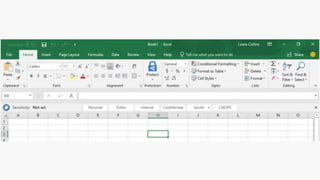
Users can choose to apply a sensitivity label to the email
or file they are working on with a single click
CLASSIFY INFORMATION
BASED ON SENSITIVITY
FINANCE
CONFIDENTIAL
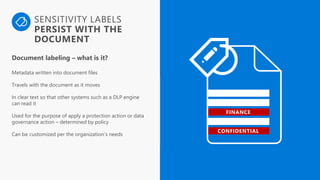
SENSITIVITY LABELS
PERSIST WITH THE
DOCUMENT
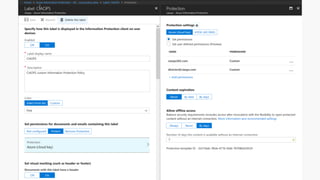
Document labeling – what is it?
Metadata written into document files
Travels with the document as it moves
In clear text so that other systems such as a DLP engine
can read it
Used for the purpose of apply a protection action or data
governance action – determined by policy
Can be customized per the organization’s needs
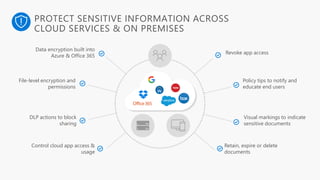
PROTECT SENSITIVE INFORMATION ACROSS
CLOUD SERVICES & ON PREMISES
Data encryption built into
Azure & Office 365
Revoke app access
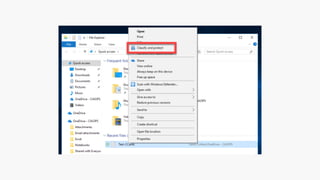
File-level encryption and
permissions
Policy tips to notify and
educate end users
DLP actions to block
sharing
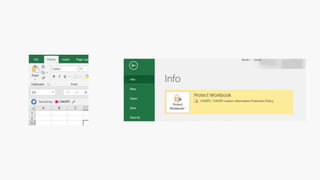
Visual markings to indicate
sensitive documents
Control cloud app access &
usage
Retain, expire or delete
documents
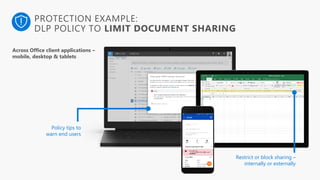
PROTECTION EXAMPLE:
DLP POLICY TO LIMIT DOCUMENT SHARING
Policy tips to
warn end users
Restrict or block sharing –
internally or externally
Across Office client applications –
mobile, desktop & tablets
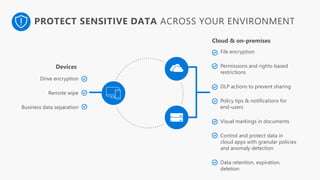
PROTECT SENSITIVE DATA ACROSS YOUR ENVIRONMENT
Drive encryption
Remote wipe
Business data separation
File encryption
Permissions and rights-based
restrictions
DLP actions to prevent sharing
Policy tips & notifications for
end-users
Visual markings in documents
Control and protect data in
cloud apps with granular policies
and anomaly detection
Data retention, expiration,
deletion
Devices
Cloud & on-premises
Detect ProtectClassify Monitor
Scan & detect sensitive
data based on policy
Classify data and apply
labels based on sensitivity
Apply protection actions,
including encryption,
access restrictions
Reporting, alerts,
remediation
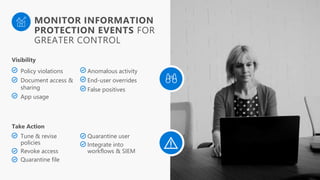
MONITOR INFORMATION
PROTECTION EVENTS FOR
GREATER CONTROL
Policy violations
Document access &
sharing
App usage
Anomalous activity
End-user overrides
False positives
Visibility
Tune & revise
policies
Revoke access
Quarantine file
Quarantine user
Integrate into
workflows & SIEM
Take Action
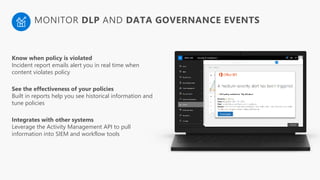
Know when policy is violated
Incident report emails alert you in real time when
content violates policy
See the effectiveness of your policies
Built in reports help you see historical information and
tune policies
Integrates with other systems
Leverage the Activity Management API to pull
information into SIEM and workflow tools
MONITOR DLP AND DATA GOVERNANCE EVENTS
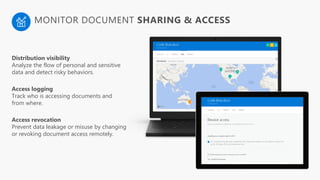
Distribution visibility
Analyze the flow of personal and sensitive
data and detect risky behaviors.
Access logging
Track who is accessing documents and
from where.
Access revocation
Prevent data leakage or misuse by changing
or revoking document access remotely.
MONITOR DOCUMENT SHARING & ACCESS
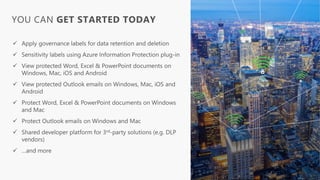
YOU CAN GET STARTED TODAY
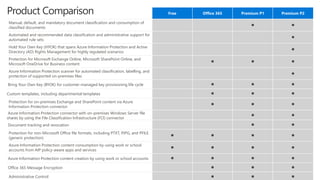
Free Office 365 Premium P1 Premium P2
Manual, default, and mandatory document classification and consumption of
classified documents
• •
Automated and recommended data classification and administrative support for
automated rule sets
•
Hold Your Own Key (HYOK) that spans Azure Information Protection and Active
Directory (AD) Rights Management for highly regulated scenarios
•
Protection for Microsoft Exchange Online, Microsoft SharePoint Online, and
Microsoft OneDrive for Business content
• • •
Azure Information Protection scanner for automated classification, labelling, and
protection of supported on-premises files
•
Bring Your Own Key (BYOK) for customer-managed key provisioning life cycle • • •
Custom templates, including departmental templates • • •
Protection for on-premises Exchange and SharePoint content via Azure
Information Protection connector
• • •
Azure Information Protection connector with on-premises Windows Server file
shares by using the File Classification Infrastructure (FCI) connector
• •
Document tracking and revocation • •
Protection for non-Microsoft Office file formats, including PTXT, PJPG, and PFILE
(generic protection)
• • • •
Azure Information Protection content consumption by using work or school
accounts from AIP policy-aware apps and services
• • • •
Azure Information Protection content creation by using work or school accounts • • • •
Office 365 Message Encryption • • •
Administrative Control • • •
Product Comparison
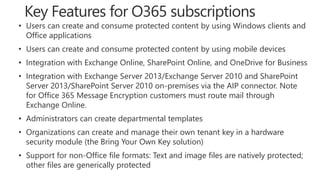
• Users can create and consume protected content by using Windows clients and
Office applications
• Users can create and consume protected content by using mobile devices
• Integration with Exchange Online, SharePoint Online, and OneDrive for Business
• Integration with Exchange Server 2013/Exchange Server 2010 and SharePoint
Server 2013/SharePoint Server 2010 on-premises via the AIP connector. Note
for Office 365 Message Encryption customers must route mail through
Exchange Online.
• Administrators can create departmental templates
• Organizations can create and manage their own tenant key in a hardware
security module (the Bring Your Own Key solution)
• Support for non-Office file formats: Text and image files are natively protected;
other files are generically protected
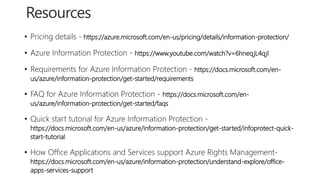
• Pricing details - https://azure.microsoft.com/en-us/pricing/details/information-protection/
• Azure Information Protection - https://www.youtube.com/watch?v=6hneqjL4qjI
• Requirements for Azure Information Protection - https://docs.microsoft.com/en-
us/azure/information-protection/get-started/requirements
• FAQ for Azure Information Protection - https://docs.microsoft.com/en-
us/azure/information-protection/get-started/faqs
• Quick start tutorial for Azure Information Protection -
https://docs.microsoft.com/en-us/azure/information-protection/get-started/infoprotect-quick-
start-tutorial
• How Office Applications and Services support Azure Rights Management-
https://docs.microsoft.com/en-us/azure/information-protection/understand-explore/office-
apps-services-support
CIAOPS Resources
• Blog – http://blog.ciaops.com
• Free SharePoint Training via email – http://bit.ly/cia-gs-spo
• Free Office 365, Azure Administration newsletter – http://bit.ly/cia-o365-tech
• Free Office 365, Azure video tutorials – http://www.youtube.com/directorciaops
• Free documents, presentations, eBooks – http://docs.com/ciaops
• Office 365, Azure, Cloud podcast – http://ciaops.podbean.com
• Office 365, Azure online training courses – http://www.ciaopsacademy.com
• Office 365 and Office 365 Community – http://www.ciaopspatron.com/
Twitter
@directorcia
Facebook
https://www.facebook.com/ciaops
Email
director@ciaops.com
Skype for Business
admin@ciaops365.com

Azure Information Protection

  • 1.
  • 2.
    IN THE PAST,THE FIREWALL WAS THE SECURITY PERIMETER devices datausers apps On-premises / Private cloud
  • 3.
  • 4.
    THE LIFECYCLE OFA SENSITIVE FILE Data is created, imported, & modified across various locations Data is detected Across devices, cloud services, on-prem environments Sensitive data is classified & labeled Based on sensitivity; used for either protection policies or retention policies Data is protected based on policy Protection may in the form of encryption, permissions, visual markings, retention, deletion, or a DLP action such as blocking sharing Data travels across various locations, shared Protection is persistent, travels with the data Data is monitored Reporting on data sharing, usage, potential abuse; take action & remediate Retain, expire, delete data Via data governance policies
  • 5.
    Notifiable Data Breaches(NDB) scheme in Australia • Starting on 22nd February 2018 • Australian organisations are required to notify any individuals likely to be at risk of serious harm by a data breach. • Examples of a data breach include when: o a device containing customers’ personal information is lost or stolen o a database containing personal information is hacked o personal information is mistakenly provided to the wrong person. • For more information visit https://oaic.gov.au
  • 6.
    PCs, tablets, mobile Office365 DLPWindows Information Protection Azure Information Protection (AIP) Exchange Online, SharePoint Online & OneDrive for Business Highly regulated Microsoft Cloud App Security (MCAS) Office 365 Advanced Data Governance Datacenters, file shares Azure SaaS & ISVs MICROSOFT’S INFORMATION PROTECTION SOLUTIONS - TODAY Comprehensive protection of sensitive data across devices, cloud services and on- premises environments O F F I C E 3 6 5D E V I C E S C L O U D S E R V I C E S , S A A S A P P S & O N - P R E M I S E S
  • 7.
    MICROSOFT’S APPROACH TOINFORMATION PROTECTION Detect ProtectClassify Monitor C L O U DD E V I C E S O N P R E M I S E S Comprehensive protection of sensitive data throughout the lifecycle – inside and outside the organization Scan & detect sensitive data based on policy Classify data and apply labels based on sensitivity Apply protection actions, including encryption, access restrictions Reporting, alerts, remediation
  • 8.
    DETECT PROTECT CLASSIFYMONITOR MICROSOFT’S INFORMATION PROTECTION SOLUTIONS WINDOWS INFORMATION PROTECTION Separatepersonal vs. work data on Windows 10 devices and prevent work data from traveling to non-work locations OFFICE 365 ADVANCED SECURITY MANAGEMENT Visibility into Office 365 app usage and potential data abuse MICROSOFT CLOUD APP SECURITY Visibility into 15k+ cloud apps, data access & usage, potential abuse MESSAGE ENCRYPTION Send encrypted emails in Office 365 to anyone – inside or outside of the company CONDITIONAL ACCESS Control access to files based on policy, such as identity, machine configuration, geo location OFFICE APPS Protect sensitive information while working in Excel, Word, PowerPoint, Outlook AZURE INFORMATION PROTECTION Classify, label & protect files – beyond Office 365, including on-prem & hybrid OFFICE 365 DLP Prevent data loss across Exchange Online, SharePoint Online, OneDrive for Business ISV APPLICATIONS Enable ISV partners to consume labels, apply protection OFFICE 365 ADVANCED DATA GOVERNANCE Apply retention and deletion policies to sensitive and important data in Office 365 SHAREPOINT & GROUPS Protect files in libraries and lists MICROSOFT’S INFORMATION PROTECTION SOLUTIONS
  • 9.
    Detect ProtectClassify Monitor Scan& detect sensitive data based on policy Classify data and apply labels based on sensitivity Apply protection actions, including encryption, access restrictions Reporting, alerts, remediation Classify Protect
  • 10.
    Detect and Classifysensitive information across cloud services & on-premises
  • 14.
    Detect, Classify andProtect sensitive information across cloud services & on-premises
  • 20.
  • 21.
    HIGHLY CONFIDENTIAL CONFIDENTIAL GENERAL PUBLIC PERSONAL Business-lead policies &rules; configured by ITAutomatic classification Policies can be set by IT Admins for automatically applying classification and protection to data Recommended classification Based on the content you’re working on, you can be prompted with suggested classification Manual reclassification You can override a classification and optionally be required to provide a justification User-specified classification Users can choose to apply a sensitivity label to the email or file they are working on with a single click CLASSIFY INFORMATION BASED ON SENSITIVITY
  • 22.
    FINANCE CONFIDENTIAL SENSITIVITY LABELS PERSIST WITHTHE DOCUMENT Document labeling – what is it? Metadata written into document files Travels with the document as it moves In clear text so that other systems such as a DLP engine can read it Used for the purpose of apply a protection action or data governance action – determined by policy Can be customized per the organization’s needs
  • 23.
    PROTECT SENSITIVE INFORMATIONACROSS CLOUD SERVICES & ON PREMISES Data encryption built into Azure & Office 365 Revoke app access File-level encryption and permissions Policy tips to notify and educate end users DLP actions to block sharing Visual markings to indicate sensitive documents Control cloud app access & usage Retain, expire or delete documents
  • 24.
    PROTECTION EXAMPLE: DLP POLICYTO LIMIT DOCUMENT SHARING Policy tips to warn end users Restrict or block sharing – internally or externally Across Office client applications – mobile, desktop & tablets
  • 25.
    PROTECT SENSITIVE DATAACROSS YOUR ENVIRONMENT Drive encryption Remote wipe Business data separation File encryption Permissions and rights-based restrictions DLP actions to prevent sharing Policy tips & notifications for end-users Visual markings in documents Control and protect data in cloud apps with granular policies and anomaly detection Data retention, expiration, deletion Devices Cloud & on-premises
  • 26.
    Detect ProtectClassify Monitor Scan& detect sensitive data based on policy Classify data and apply labels based on sensitivity Apply protection actions, including encryption, access restrictions Reporting, alerts, remediation
  • 27.
    MONITOR INFORMATION PROTECTION EVENTSFOR GREATER CONTROL Policy violations Document access & sharing App usage Anomalous activity End-user overrides False positives Visibility Tune & revise policies Revoke access Quarantine file Quarantine user Integrate into workflows & SIEM Take Action
  • 28.
    Know when policyis violated Incident report emails alert you in real time when content violates policy See the effectiveness of your policies Built in reports help you see historical information and tune policies Integrates with other systems Leverage the Activity Management API to pull information into SIEM and workflow tools MONITOR DLP AND DATA GOVERNANCE EVENTS
  • 29.
    Distribution visibility Analyze theflow of personal and sensitive data and detect risky behaviors. Access logging Track who is accessing documents and from where. Access revocation Prevent data leakage or misuse by changing or revoking document access remotely. MONITOR DOCUMENT SHARING & ACCESS
  • 30.
    YOU CAN GETSTARTED TODAY
  • 31.
    Free Office 365Premium P1 Premium P2 Manual, default, and mandatory document classification and consumption of classified documents • • Automated and recommended data classification and administrative support for automated rule sets • Hold Your Own Key (HYOK) that spans Azure Information Protection and Active Directory (AD) Rights Management for highly regulated scenarios • Protection for Microsoft Exchange Online, Microsoft SharePoint Online, and Microsoft OneDrive for Business content • • • Azure Information Protection scanner for automated classification, labelling, and protection of supported on-premises files • Bring Your Own Key (BYOK) for customer-managed key provisioning life cycle • • • Custom templates, including departmental templates • • • Protection for on-premises Exchange and SharePoint content via Azure Information Protection connector • • • Azure Information Protection connector with on-premises Windows Server file shares by using the File Classification Infrastructure (FCI) connector • • Document tracking and revocation • • Protection for non-Microsoft Office file formats, including PTXT, PJPG, and PFILE (generic protection) • • • • Azure Information Protection content consumption by using work or school accounts from AIP policy-aware apps and services • • • • Azure Information Protection content creation by using work or school accounts • • • • Office 365 Message Encryption • • • Administrative Control • • • Product Comparison
  • 32.
    • Users cancreate and consume protected content by using Windows clients and Office applications • Users can create and consume protected content by using mobile devices • Integration with Exchange Online, SharePoint Online, and OneDrive for Business • Integration with Exchange Server 2013/Exchange Server 2010 and SharePoint Server 2013/SharePoint Server 2010 on-premises via the AIP connector. Note for Office 365 Message Encryption customers must route mail through Exchange Online. • Administrators can create departmental templates • Organizations can create and manage their own tenant key in a hardware security module (the Bring Your Own Key solution) • Support for non-Office file formats: Text and image files are natively protected; other files are generically protected
  • 33.
    • Pricing details- https://azure.microsoft.com/en-us/pricing/details/information-protection/ • Azure Information Protection - https://www.youtube.com/watch?v=6hneqjL4qjI • Requirements for Azure Information Protection - https://docs.microsoft.com/en- us/azure/information-protection/get-started/requirements • FAQ for Azure Information Protection - https://docs.microsoft.com/en- us/azure/information-protection/get-started/faqs • Quick start tutorial for Azure Information Protection - https://docs.microsoft.com/en-us/azure/information-protection/get-started/infoprotect-quick- start-tutorial • How Office Applications and Services support Azure Rights Management- https://docs.microsoft.com/en-us/azure/information-protection/understand-explore/office- apps-services-support
  • 34.
    CIAOPS Resources • Blog– http://blog.ciaops.com • Free SharePoint Training via email – http://bit.ly/cia-gs-spo • Free Office 365, Azure Administration newsletter – http://bit.ly/cia-o365-tech • Free Office 365, Azure video tutorials – http://www.youtube.com/directorciaops • Free documents, presentations, eBooks – http://docs.com/ciaops • Office 365, Azure, Cloud podcast – http://ciaops.podbean.com • Office 365, Azure online training courses – http://www.ciaopsacademy.com • Office 365 and Office 365 Community – http://www.ciaopspatron.com/ Twitter @directorcia Facebook https://www.facebook.com/ciaops Email director@ciaops.com Skype for Business admin@ciaops365.com