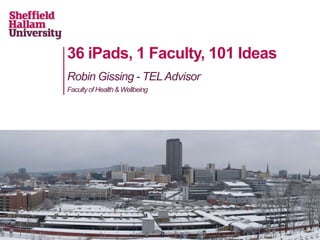
36 iPads, 1 Faculty, 101 Ideas
Robin Gissing - TEL Advisor
Faculty of Health & Wellbeing
Session Overview:
36 iPads (Give or take a few)
We have a two phase project on-going at the moment. Phase
1 is written up over at acamedia.edu (http://goo.gl/h5VLV) and
phase 2 is on going.

1 Faculty
All this work has been undertaken within the Faculty of Health
& Wellbeing at Sheffield Hallam University. The faculty covers
subject areas like Sport, Nursing, Allied Health Professions
and Biosciences.

101 Ideas
We're going to show you a few ideas generated by myself or
academic colleagues that are currently being used live in
teaching now.

As for the rest...
Staff Members:
Robin Gissing & Tom Jolley

Managing iPads in a Higher Ed
faculty.
HWB iPad Project
• Our2 phase project gave the faculty access to a number of
 iPads.

• Originally   6 iPads for phase 1 (and 2 Motorola Xoom's)

• Phase 2 (Classroom use) added an additional 16, then a
further 10, and finally a further further 10 (so, actually 42 now)

• We use the Apple Configurator to manage the iPads in two
 'Bretford' iPad carts (split across two sites)

• We started off using mainly free applications, but since the
 Volume Purchase Programme launched in the UK we have
 switched some to better, paid, apps.
Apple Configurator
• Theconfigurator app for OSX allows you to manage at a
 granular level any iPad plugged into an iPad cart.

• Our   cart holds 30 iPads at a time, in two rows of 15.

• Configuring the iPads beforehand means that you can deploy
 a set of iPads with a specific set of applications or set up (eg.
 lock iPad to one app) with profiles.

• Youcan lock down en-masse the iPads in different levels, or
 apps which could be disruptive to the learning experience (eg.
 email, iOS facebook integration etc.)
Volume Purchase Program
• Volume   purchasing on the iPad was opened up last year in the
 UK.

• It
   allows you to purchase redeem codes (at heavy discounts)
 for iPads to either give out or as we have been doing sync with
 the iPads in the cabinet to automatically load the apps on for a
 specific session.

• Its
   challenging to get to grips with because you need separate
 apple ID accounts for every stage of the process.
But what about Android?
• We   also have a pilot project around Nexus7 tablet computers

• A cohortof students in biosciences, and the associated staff
 have been loaned Google Nexus 7 devices to assist with their
 studies.

• Studentsare using apps and connecting to the google apps for
 education system within the university

• This
     pilot is looking at how students would work, if they were
 each given or had their own tablet computer in class.


                            The Android robot modified from work created and shared by Google and used according to terms described in the Creative Commons 3.0 Attribution License.
3 Stories from
the Faculty...
Staff Member:
Mel Lindley

Students:
Lizzie May & Ryan Morton


Embedding technology enhanced
and mobile resources into the UG
Physiotherapy curriculum

Technologies used:
TedED, Google Sites, 3D VERT
suite, Aurasma App,
Background
• Aware that clinical experience in respiratory physiotherapy is
  limited
• Desire to improve overall student experience and try and
  make teaching more meaningful
  – Gained feedback from students over 2 academic years as
     to key content that is difficult to understand/apply to
     practice
  – Worked with students to develop resources
• Aimed to create a variety of different resources that were
  engaging, accessible and directly transferable to practice
What did we do?
• Identified range of formats available
  – TEL advisor key role in translating ideas
• Redesigned current workbooks and identified key content to
  be delivered by video whilst maintaining key interactive
  content to develop students' knowledge and understanding
• Worked with students to agree content and develop videos
• Used TEDEd template for ease of design and interactivity
  – created 12 different TEDEd resources
  – housed within 1 Google site


    https://sites.google.com/site/respphysiointerventions/
    goo.gl/hvBkq
Student perspective - why get involved?
•   To develop our own knowledge and understanding.
•   To provide a learning resource for other students to access.
•   Preparation for developing and presenting In Service Training
    in later careers
    – Gained detailed insight into our own presentation skills,
        communication style and how we come across to patients
        in a clinical setting
Proposed benefits
•   Easy to access resource online that has good practical
    demonstrations and detailed descriptions that provide more
    information than would normally be found in textbooks/other
    learning resources
•   Benefits:
    – Easy to access across many devices (PC, iPad, android tablet)
    – Accessible at any time
    – Short so easy to follow and understand
    – Can listen to the explanation and see the demonstration
    – Can watch it as many times as required
    – Written transcripts of the videos to improve accessibility
Student Feedback
“I think the videos are a great learning   " the videos helped my style of
resource, they are really clear and         learning more than reading a
concise. I think they are very helpful             normal textbook"
since we don’t cover those devices that
much except when on placement, and
since my respiratory placement was the      “ I thought it was a really good
first, it's really useful as a recap.”      idea and really helpful not only
                                            as a demonstration but to also
                                            consider learning from a different
“The videos were long enough to             perspective and creating another
contain all the relevant info and a         method of learning to access.”
comprehensive demo, as well as
professional behaviour, without being
too long-winded or becoming tedious.”
                                                " I'm lovin' the videos!"
Student Feedback
Summary
Student summary
• Very enjoyable experience, which we would definitely
  recommend for other students to get involved with

Staff summary
• Varied engagement from teaching team
• Identified development needs for staff
• Required a very different approach to developing learning
  materials
• Generated external interest and request for collaboration
  within 24 hours
• Overall very enjoyable experience
Staff Members:
Mandy Brailsford & Mel Lindley

Using Augmented Reality in
Nursing & Physiotherapy
respectively wholly on iPad

Technologies used:
AurasmaApp
What?
• Augmented   Reality overlays of patient actors onto manikins

• Augmented  reality is a technology which allows the addition of
text, video or graphics to be overlaid onto the real world via
computer based device.
How?
•   Using ipads and an off the shelf application 'Aurasma'

•   Students have been surveyed about how its used, and trials
    have been undertaken to show its impact.

•   Some students were given the iPad, and nearly 100 students
    accessed the scenarios with the iPad in at least one of their
    scenarios.
Staff Member:
Dave Ridley

Using iPads in Sport to provide
instant feedback to students and
video annotation

Technologies used:
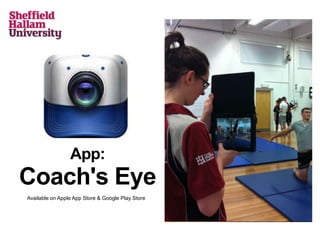
Coaches Eye App
Physical Education Students
Context:
Video analysis helps students to view performance, gain
feedback and monitor progress

•   2003 VHS                  2013 iPads

Advantages of iPads:
• Quick and slick to use both iPads and the Coaches' Eye App

•   Recorded data is impressive and relevant for student's
    learning

•   Students quickly integrate iPads into their learning and use it
    fluently to support their learning

•   Large screen for playback compared to a phone/ipod touch
Impact on
Student
Learning
Subject Specific                      Generic
• Subject knowledge                   • Communication, social skills,
• Observational & Analytical skills     giving receiving feedback
• Quicker 'performance' progress      • Problem solving and prioritising,
   and associated motivation            action planning
                                      • Independent learners
App:
Coach's Eye
Available on Apple App Store & Google Play Store
101 Ideas
I've collated a list of ideas to be used with mobile devices like iPads in
Learning & Teaching in HE. So far I've got about 80 ideas and I am
writing up each idea into a mini case study.

You can see the list at the link below and follow the progress of the
project on the main blog page.


https://blogs.shu.ac.uk/hwbtel/app-catalogue/
Any Questions?

36 iPads, 1 Faculty, 101 ideas

  • 1.
    36 iPads, 1Faculty, 101 Ideas Robin Gissing - TEL Advisor Faculty of Health & Wellbeing
  • 2.
    Session Overview: 36 iPads(Give or take a few) We have a two phase project on-going at the moment. Phase 1 is written up over at acamedia.edu (http://goo.gl/h5VLV) and phase 2 is on going. 1 Faculty All this work has been undertaken within the Faculty of Health & Wellbeing at Sheffield Hallam University. The faculty covers subject areas like Sport, Nursing, Allied Health Professions and Biosciences. 101 Ideas We're going to show you a few ideas generated by myself or academic colleagues that are currently being used live in teaching now. As for the rest...
  • 3.
    Staff Members: Robin Gissing& Tom Jolley Managing iPads in a Higher Ed faculty.
  • 4.
    HWB iPad Project •Our2 phase project gave the faculty access to a number of iPads. • Originally 6 iPads for phase 1 (and 2 Motorola Xoom's) • Phase 2 (Classroom use) added an additional 16, then a further 10, and finally a further further 10 (so, actually 42 now) • We use the Apple Configurator to manage the iPads in two 'Bretford' iPad carts (split across two sites) • We started off using mainly free applications, but since the Volume Purchase Programme launched in the UK we have switched some to better, paid, apps.
  • 5.
    Apple Configurator • Theconfiguratorapp for OSX allows you to manage at a granular level any iPad plugged into an iPad cart. • Our cart holds 30 iPads at a time, in two rows of 15. • Configuring the iPads beforehand means that you can deploy a set of iPads with a specific set of applications or set up (eg. lock iPad to one app) with profiles. • Youcan lock down en-masse the iPads in different levels, or apps which could be disruptive to the learning experience (eg. email, iOS facebook integration etc.)
  • 6.
    Volume Purchase Program •Volume purchasing on the iPad was opened up last year in the UK. • It allows you to purchase redeem codes (at heavy discounts) for iPads to either give out or as we have been doing sync with the iPads in the cabinet to automatically load the apps on for a specific session. • Its challenging to get to grips with because you need separate apple ID accounts for every stage of the process.
  • 7.
    But what aboutAndroid? • We also have a pilot project around Nexus7 tablet computers • A cohortof students in biosciences, and the associated staff have been loaned Google Nexus 7 devices to assist with their studies. • Studentsare using apps and connecting to the google apps for education system within the university • This pilot is looking at how students would work, if they were each given or had their own tablet computer in class. The Android robot modified from work created and shared by Google and used according to terms described in the Creative Commons 3.0 Attribution License.
  • 8.
  • 9.
    Staff Member: Mel Lindley Students: LizzieMay & Ryan Morton Embedding technology enhanced and mobile resources into the UG Physiotherapy curriculum Technologies used: TedED, Google Sites, 3D VERT suite, Aurasma App,
  • 10.
    Background • Aware thatclinical experience in respiratory physiotherapy is limited • Desire to improve overall student experience and try and make teaching more meaningful – Gained feedback from students over 2 academic years as to key content that is difficult to understand/apply to practice – Worked with students to develop resources • Aimed to create a variety of different resources that were engaging, accessible and directly transferable to practice
  • 11.
    What did wedo? • Identified range of formats available – TEL advisor key role in translating ideas • Redesigned current workbooks and identified key content to be delivered by video whilst maintaining key interactive content to develop students' knowledge and understanding • Worked with students to agree content and develop videos • Used TEDEd template for ease of design and interactivity – created 12 different TEDEd resources – housed within 1 Google site https://sites.google.com/site/respphysiointerventions/ goo.gl/hvBkq
  • 12.
    Student perspective -why get involved? • To develop our own knowledge and understanding. • To provide a learning resource for other students to access. • Preparation for developing and presenting In Service Training in later careers – Gained detailed insight into our own presentation skills, communication style and how we come across to patients in a clinical setting
  • 13.
    Proposed benefits • Easy to access resource online that has good practical demonstrations and detailed descriptions that provide more information than would normally be found in textbooks/other learning resources • Benefits: – Easy to access across many devices (PC, iPad, android tablet) – Accessible at any time – Short so easy to follow and understand – Can listen to the explanation and see the demonstration – Can watch it as many times as required – Written transcripts of the videos to improve accessibility
  • 14.
    Student Feedback “I thinkthe videos are a great learning " the videos helped my style of resource, they are really clear and learning more than reading a concise. I think they are very helpful normal textbook" since we don’t cover those devices that much except when on placement, and since my respiratory placement was the “ I thought it was a really good first, it's really useful as a recap.” idea and really helpful not only as a demonstration but to also consider learning from a different “The videos were long enough to perspective and creating another contain all the relevant info and a method of learning to access.” comprehensive demo, as well as professional behaviour, without being too long-winded or becoming tedious.” " I'm lovin' the videos!"
  • 15.
  • 16.
    Summary Student summary • Veryenjoyable experience, which we would definitely recommend for other students to get involved with Staff summary • Varied engagement from teaching team • Identified development needs for staff • Required a very different approach to developing learning materials • Generated external interest and request for collaboration within 24 hours • Overall very enjoyable experience
  • 17.
    Staff Members: Mandy Brailsford& Mel Lindley Using Augmented Reality in Nursing & Physiotherapy respectively wholly on iPad Technologies used: AurasmaApp
  • 18.
    What? • Augmented Reality overlays of patient actors onto manikins • Augmented reality is a technology which allows the addition of text, video or graphics to be overlaid onto the real world via computer based device.
  • 19.
    How? • Using ipads and an off the shelf application 'Aurasma' • Students have been surveyed about how its used, and trials have been undertaken to show its impact. • Some students were given the iPad, and nearly 100 students accessed the scenarios with the iPad in at least one of their scenarios.
  • 21.
    Staff Member: Dave Ridley UsingiPads in Sport to provide instant feedback to students and video annotation Technologies used: Coaches Eye App
  • 22.
    Physical Education Students Context: Videoanalysis helps students to view performance, gain feedback and monitor progress • 2003 VHS 2013 iPads Advantages of iPads: • Quick and slick to use both iPads and the Coaches' Eye App • Recorded data is impressive and relevant for student's learning • Students quickly integrate iPads into their learning and use it fluently to support their learning • Large screen for playback compared to a phone/ipod touch
  • 23.
    Impact on Student Learning Subject Specific Generic • Subject knowledge • Communication, social skills, • Observational & Analytical skills giving receiving feedback • Quicker 'performance' progress • Problem solving and prioritising, and associated motivation action planning • Independent learners
  • 24.
    App: Coach's Eye Available onApple App Store & Google Play Store
  • 25.
    101 Ideas I've collateda list of ideas to be used with mobile devices like iPads in Learning & Teaching in HE. So far I've got about 80 ideas and I am writing up each idea into a mini case study. You can see the list at the link below and follow the progress of the project on the main blog page. https://blogs.shu.ac.uk/hwbtel/app-catalogue/
  • 26.

Editor's Notes