Communicate Effectively
      Impact of Media
      Information Era
Interact in Global Economy
         Plug me in
  Teach me to Collaborate
   Explore my Creativity
        Tell my Story
Don’t Panic...we’ll work it out
          together
Vision


This is ALL about the LEARNING, not the
               technology.
Our students deserve
 a curriculum that meets the demands of an
 increasingly globalised and interconnected
          world in the 21st Century.

  iPads/mobile devices are becoming native
  tools of the 21st Century, they can enable
teachers to create learning opportunities that
develop the knowledge, skills and behaviours
that children require to live, learn and work in
               the 21st Century.
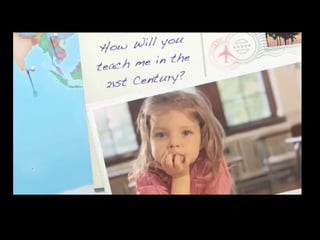
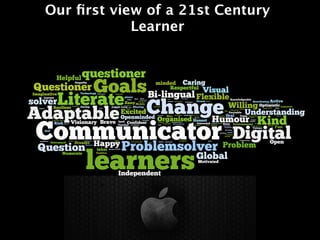
Our first view of a 21st Century
            Learner
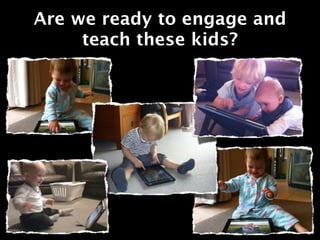
Are we ready to engage and
     teach these kids?
PL not PD
“I have yet to have a student tell me they can't
 use technology in class because they haven't
             received any PD on it.”
Professional Learning
         My choice
       Self Reflecting
           Inquiry
       Trial and Error
  Personalised (it’s all about me)
          Intrinsic
     My pace, My Needs
       Problem Solver
The Introduction Document
        All focused on PL not PD
Commitment to
 Collaboration
Your Commitment
             Voluntary
            PL Meetings
              PL Days
             PL Journal

Let's not focus on what we can do with
  an iPad but what learning outcomes
 are we trying to enhance for children.
The Biggest
Commitments...
Perseverance & Resilience
We will need to model the
Key Competencies as adult
         learners!
We need to start
somewhere… and thats at
     the beginning!
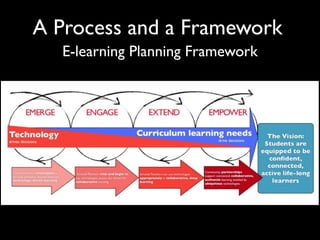
A Process and a Framework
  E-learning Planning Framework
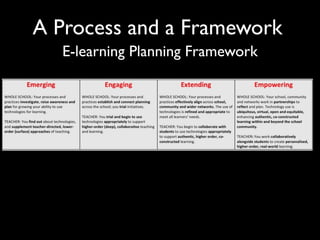
A Process and a Framework
  E-learning Planning Framework
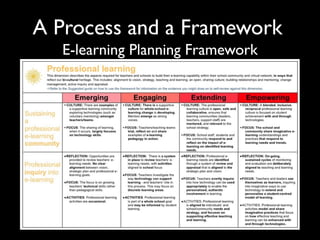
A Process and a Framework
  E-learning Planning Framework
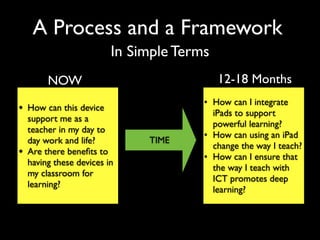
A Process and a Framework
                          In Simple Terms
         NOW                                12-18 Months
                                        • How can I integrate
• How can this device                     iPads to support
    support me as a
                                          powerful learning?
    teacher in my day to
                                        • How can using an iPad
    day work and life?         TIME
                                          change the way I teach?
•   Are there benefits to
                                        • How can I ensure that
    having these devices in
                                          the way I teach with
    my classroom for
                                          ICT promotes deep
    learning?
                                          learning?
The beginning
Relevant to you as teachers in your life… personal and
                     professional
Lets get into the
sandpit and play!
This Afternoon...
We will need to model a 21C classroom approach
   Many learners at many different stages...
At the end of this PL Session
     You are encouraged to share 1 of the following;

1.             Something you have learned
2.              What you are excited about
3.            The thing I really want to know
4.           The thing I really want to do next
5.             I might try in the classroom?
6.            This can help my personal life
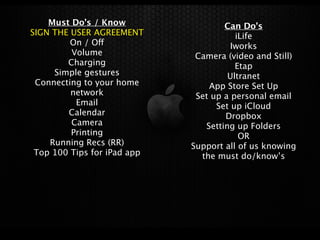
Must Do’s / Know                 Can Do’s
SIGN THE USER AGREEMENT                 iLife
         On / Off                      Iworks
         Volume               Camera (video and Still)
        Charging                        Etap
     Simple gestures                  Ultranet
 Connecting to your home         App Store Set Up
         network              Set up a personal email
          Email                    Set up iCloud
        Calendar                     Dropbox
         Camera                 Setting up Folders
         Printing                        OR
    Running Recs (RR)        Support all of us knowing
 Top 100 Tips for iPad app     the must do/know’s
Just use it!
At the end of this PL Session
     You are encouraged to share 1 of the following;

1.             Something you have learned
2.              What you are excited about
3.            The thing I really want to know
4.           The thing I really want to do next
5.             I might try in the classroom?
6.            This can help my personal life

I pad pl one

  • 5.
    Communicate Effectively Impact of Media Information Era Interact in Global Economy Plug me in Teach me to Collaborate Explore my Creativity Tell my Story
  • 6.
  • 7.
    Vision This is ALLabout the LEARNING, not the technology.
  • 8.
    Our students deserve a curriculum that meets the demands of an increasingly globalised and interconnected world in the 21st Century. iPads/mobile devices are becoming native tools of the 21st Century, they can enable teachers to create learning opportunities that develop the knowledge, skills and behaviours that children require to live, learn and work in the 21st Century.
  • 9.
    Our first viewof a 21st Century Learner
  • 10.
    Are we readyto engage and teach these kids?
  • 11.
    PL not PD “Ihave yet to have a student tell me they can't use technology in class because they haven't received any PD on it.”
  • 12.
    Professional Learning My choice Self Reflecting Inquiry Trial and Error Personalised (it’s all about me) Intrinsic My pace, My Needs Problem Solver
  • 13.
    The Introduction Document All focused on PL not PD
  • 14.
  • 15.
    Your Commitment Voluntary PL Meetings PL Days PL Journal Let's not focus on what we can do with an iPad but what learning outcomes are we trying to enhance for children.
  • 16.
  • 17.
  • 18.
    We will needto model the Key Competencies as adult learners!
  • 19.
    We need tostart somewhere… and thats at the beginning!
  • 20.
    A Process anda Framework E-learning Planning Framework
  • 21.
    A Process anda Framework E-learning Planning Framework
  • 22.
    A Process anda Framework E-learning Planning Framework
  • 23.
    A Process anda Framework In Simple Terms NOW 12-18 Months • How can I integrate • How can this device iPads to support support me as a powerful learning? teacher in my day to • How can using an iPad day work and life? TIME change the way I teach? • Are there benefits to • How can I ensure that having these devices in the way I teach with my classroom for ICT promotes deep learning? learning?
  • 24.
    The beginning Relevant toyou as teachers in your life… personal and professional
  • 25.
    Lets get intothe sandpit and play!
  • 26.
    This Afternoon... We willneed to model a 21C classroom approach Many learners at many different stages...
  • 27.
    At the endof this PL Session You are encouraged to share 1 of the following; 1. Something you have learned 2. What you are excited about 3. The thing I really want to know 4. The thing I really want to do next 5. I might try in the classroom? 6. This can help my personal life
  • 28.
    Must Do’s /Know Can Do’s SIGN THE USER AGREEMENT iLife On / Off Iworks Volume Camera (video and Still) Charging Etap Simple gestures Ultranet Connecting to your home App Store Set Up network Set up a personal email Email Set up iCloud Calendar Dropbox Camera Setting up Folders Printing OR Running Recs (RR) Support all of us knowing Top 100 Tips for iPad app the must do/know’s
  • 29.
  • 30.
    At the endof this PL Session You are encouraged to share 1 of the following; 1. Something you have learned 2. What you are excited about 3. The thing I really want to know 4. The thing I really want to do next 5. I might try in the classroom? 6. This can help my personal life