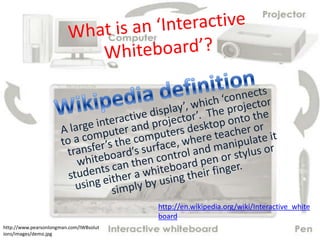
http://en.wikipedia.org/wiki/Interactive_white
                                         board
http://www.pearsonlongman.com/IWBsolut
ions/images/demo.jpg
Rationale
The Interactive Whiteboard takes the everyday
classroom teaching aide ‘the whiteboard’ and
brings it into the world of ICT. The progress
from the blackboard and chalk to where we are
now with the Interactive White board has the
potential to question ‘Is this a step in the right
direction in education’. It has the capacity to
take away some of the role of the teacher or the
ability to excite children through learning.
            http://www.interactiveteaching.com.au/image
            s/eno1.jpg
My Position
I am for the ‘Interactive White Board’ in the
classroom. The reasons for this I will extend
upon as we continue into this presentation. I
will use the information gained through my on-
line survey and research information to
conclude an overall understanding of the
Interactive White Board in the audience of you
the pre service teacher and informed
professionals.
U Tube Clip
Source : Survey Monkey


                     What You Said!!


What you believe the
White Board is used for….
• Support Learning
• Viewing video’s, presentations
  and activities
• Promote group learning
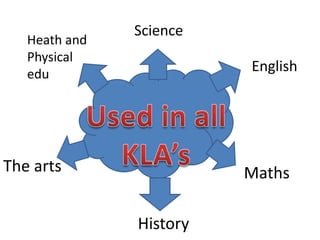
• Used across all KLA’s


Your rating of the White Board
                                   http://www.innovationmanagement.se/wp-
                                   content/uploads/2010/10/Use-cocreation-to-drive-public-sector-
                                   innovation.jpg
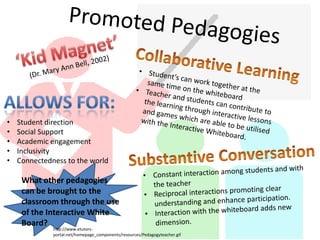
•   Student direction
•   Social Support
•   Academic engagement
•   Inclusivity
•   Connectedness to the world

     What other pedagogies
     can be brought to the
     classroom through the use
     of the Interactive White
     Board?
              http://www.etutors-
              portal.net/homepage_components/resources/Pedagogyteacher.gif
Context for Learning
  • As a learning Tool – To introduce/reinforce
    new skills, techniques or information.
  • As formative assessment – Keep a check of
    student progression and knowledge retention.
  • During the morning for morning routines and
    student settle-ins after lunch breaks to wind
    back down.
  • Source of information – U Tube clips and
    internet searches.
http://www.grad.ucl.ac.uk/comp/2005-
2006/research/gallery/entries/056.jpg
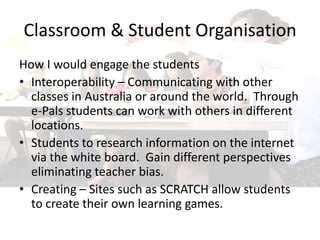
Classroom & Student Organisation
How I would engage the students
• Interoperability – Communicating with other
  classes in Australia or around the world. Through
  e-Pals students can work with others in different
  locations.
• Students to research information on the internet
  via the white board. Gain different perspectives
  eliminating teacher bias.
• Creating – Sites such as SCRATCH allow students
  to create their own learning games.
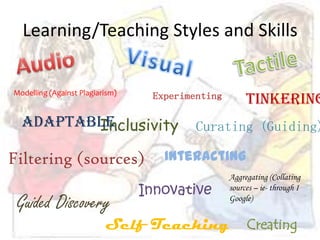
Learning/Teaching Styles and Skills


Modelling (Against Plagiarism)
                                  Experimenting        Tinkering
  Adaptable
         Inclusivity                      Curating (Guiding)

Filtering (sources)                 Interacting
                                                  Aggregating (Collating
                                 Innovative       sources – ie- through I

 Guided Discovery                                 Google)


                          Self Teaching                Creating
Science
   Heath and
   Physical
   edu
                         English


The arts                 Maths

               History
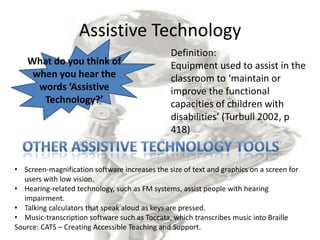
Assistive Technology
                                               Definition:
   What do you think of                        Equipment used to assist in the
    when you hear the                          classroom to ‘maintain or
     words ‘Assistive                          improve the functional
      Technology?’                             capacities of children with
                                               disabilities’ (Turbull 2002, p
                                               418)


• Screen-magnification software increases the size of text and graphics on a screen for
   users with low vision.
• Hearing-related technology, such as FM systems, assist people with hearing
   impairment.
• Talking calculators that speak aloud as keys are pressed.
• Music-transcription software such as Toccata, which transcribes music into Braille
Source: CATS – Creating Accessible Teaching and Support.
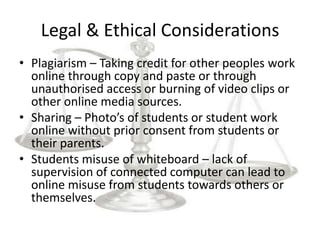
Legal & Ethical Considerations
• Plagiarism – Taking credit for other peoples work
  online through copy and paste or through
  unauthorised access or burning of video clips or
  other online media sources.
• Sharing – Photo’s of students or student work
  online without prior consent from students or
  their parents.
• Students misuse of whiteboard – lack of
  supervision of connected computer can lead to
  online misuse from students towards others or
  themselves.
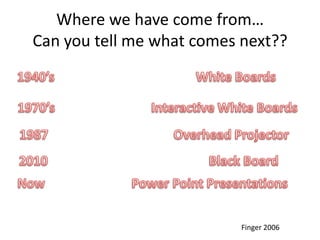
Where we have come from…
Can you tell me what comes next??


                           Finger 2006
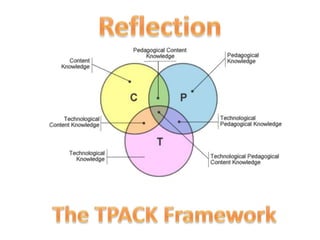
My Reflection using – The TPACK
                Framework
Using the TPACK Framework as a guide to reflection in relation to the
Interactive White Board’s (IWB) effectiveness in the classroom. To be a
positive inclusion in the classroom the following is needed…..
• Tk - The teacher’s ability to work and guide the children through the IWB
    safely and effectively.
• Pk – Using methods, values and aims to get the best outcome from your
    students. Understanding the learning styles that exist in your room and
    developing a program to cater to these needs.
• Pc- Understanding what you are teaching and the way it needs to be
    taught to students so they get the best understanding out of the lesson.
    Using the IWB when it best suited and not because it is easier. This point
    also overlaps into TC sector – with knowing what technology best suits the
    lesson.
• TPK – bringing all these together means that your classroom is getting the
    best out of technologies implemented to accompany your content and
    personal pedagogies.
References
•   Bell, M. A. (January, 2002). Why use an Interactive Whiteboard? A Baker’s Dozen Reasons! The teachers,net
    Gazette. Retrieved November 20, 2011 from http://teachers.net/gazette/JAN02/mabell.html
•   Turnbull, R., Turbull, A., Shank, M., Smith, S., & Leal, D. (2002). Exceptional Lives: Special Education in Today’s
    Schools (3rd ed.). Upper Saddle River, NJ: Merrill Prentice Hall.
•   Basilicato, A. N. (2005). Interactive Whiteboards: Assistive Technology for Every Classroom. Today’s School,
    March/April 2005.
•   Interactive Whiteboard: From Wikipedia, the free encyclopedia. Retrieved November 21, 2011 from
    http://en.wikipedia.org/wiki/Interactive_whiteboard
•   Seeshareshape.com. (2011). Electroboard Solutions Pty Ltd. Retrieved November 20, 2011 from
    http://www.seeshareshape.com.au/default.aspx
•   Classroom image. Retrieved December 2, 2011 from http://www.interactiveteaching.com.au/images/eno1.jpg
•   Interactive Whiteboard flowchart image. Retreived December 2, from
    http://www.pearsonlongman.com/IWBsolutions/images/demo.jpg
•   A guide to Productive Pedagogies: Classroom reflection Manual (2002). The State of Queensland (Department of
    Education). Curriculum Implementation Unit, Brisbane.
•   Assistive Technology – Cats. Creating Assessable Teaching and Support. Retrieved December 10, 2011 from
    http://www.adcet.edu.au/Cats/Technology_and_Facilities/Assistive_Technology.chpx
•   Finger, Russell, Jamieson-Proctor, Russell (2006). Transforming Learning with ICT. Pearson Education Australia.
•   Mishra, P. & Koehler, M. J., (2008). Introducing Technological Pedagogical Content Knowledge. Michigan State
    University.
•   Koehler, M. & Mishra, P. (2006). Technological pedagogical content knowledge: A framework for teacher
    knowledge. Teachers College Record, 108(6), 1017-1054. Retrieved on December 11, 2011 from
    http://www.tcrecord.org/Content.asp?ContentID=12516

White board assigment 1

  • 1.
    http://en.wikipedia.org/wiki/Interactive_white board http://www.pearsonlongman.com/IWBsolut ions/images/demo.jpg
  • 2.
    Rationale The Interactive Whiteboardtakes the everyday classroom teaching aide ‘the whiteboard’ and brings it into the world of ICT. The progress from the blackboard and chalk to where we are now with the Interactive White board has the potential to question ‘Is this a step in the right direction in education’. It has the capacity to take away some of the role of the teacher or the ability to excite children through learning. http://www.interactiveteaching.com.au/image s/eno1.jpg
  • 3.
    My Position I amfor the ‘Interactive White Board’ in the classroom. The reasons for this I will extend upon as we continue into this presentation. I will use the information gained through my on- line survey and research information to conclude an overall understanding of the Interactive White Board in the audience of you the pre service teacher and informed professionals.
  • 4.
  • 5.
    Source : SurveyMonkey What You Said!! What you believe the White Board is used for…. • Support Learning • Viewing video’s, presentations and activities • Promote group learning • Used across all KLA’s Your rating of the White Board http://www.innovationmanagement.se/wp- content/uploads/2010/10/Use-cocreation-to-drive-public-sector- innovation.jpg
  • 6.
    Student direction • Social Support • Academic engagement • Inclusivity • Connectedness to the world What other pedagogies can be brought to the classroom through the use of the Interactive White Board? http://www.etutors- portal.net/homepage_components/resources/Pedagogyteacher.gif
  • 7.
    Context for Learning • As a learning Tool – To introduce/reinforce new skills, techniques or information. • As formative assessment – Keep a check of student progression and knowledge retention. • During the morning for morning routines and student settle-ins after lunch breaks to wind back down. • Source of information – U Tube clips and internet searches. http://www.grad.ucl.ac.uk/comp/2005- 2006/research/gallery/entries/056.jpg
  • 8.
    Classroom & StudentOrganisation How I would engage the students • Interoperability – Communicating with other classes in Australia or around the world. Through e-Pals students can work with others in different locations. • Students to research information on the internet via the white board. Gain different perspectives eliminating teacher bias. • Creating – Sites such as SCRATCH allow students to create their own learning games.
  • 9.
    Learning/Teaching Styles andSkills Modelling (Against Plagiarism) Experimenting Tinkering Adaptable Inclusivity Curating (Guiding) Filtering (sources) Interacting Aggregating (Collating Innovative sources – ie- through I Guided Discovery Google) Self Teaching Creating
  • 10.
    Science Heath and Physical edu English The arts Maths History
  • 11.
    Assistive Technology Definition: What do you think of Equipment used to assist in the when you hear the classroom to ‘maintain or words ‘Assistive improve the functional Technology?’ capacities of children with disabilities’ (Turbull 2002, p 418) • Screen-magnification software increases the size of text and graphics on a screen for users with low vision. • Hearing-related technology, such as FM systems, assist people with hearing impairment. • Talking calculators that speak aloud as keys are pressed. • Music-transcription software such as Toccata, which transcribes music into Braille Source: CATS – Creating Accessible Teaching and Support.
  • 12.
    Legal & EthicalConsiderations • Plagiarism – Taking credit for other peoples work online through copy and paste or through unauthorised access or burning of video clips or other online media sources. • Sharing – Photo’s of students or student work online without prior consent from students or their parents. • Students misuse of whiteboard – lack of supervision of connected computer can lead to online misuse from students towards others or themselves.
  • 13.
    Where we havecome from… Can you tell me what comes next?? Finger 2006
  • 15.
    My Reflection using– The TPACK Framework Using the TPACK Framework as a guide to reflection in relation to the Interactive White Board’s (IWB) effectiveness in the classroom. To be a positive inclusion in the classroom the following is needed….. • Tk - The teacher’s ability to work and guide the children through the IWB safely and effectively. • Pk – Using methods, values and aims to get the best outcome from your students. Understanding the learning styles that exist in your room and developing a program to cater to these needs. • Pc- Understanding what you are teaching and the way it needs to be taught to students so they get the best understanding out of the lesson. Using the IWB when it best suited and not because it is easier. This point also overlaps into TC sector – with knowing what technology best suits the lesson. • TPK – bringing all these together means that your classroom is getting the best out of technologies implemented to accompany your content and personal pedagogies.
  • 16.
    References • Bell, M. A. (January, 2002). Why use an Interactive Whiteboard? A Baker’s Dozen Reasons! The teachers,net Gazette. Retrieved November 20, 2011 from http://teachers.net/gazette/JAN02/mabell.html • Turnbull, R., Turbull, A., Shank, M., Smith, S., & Leal, D. (2002). Exceptional Lives: Special Education in Today’s Schools (3rd ed.). Upper Saddle River, NJ: Merrill Prentice Hall. • Basilicato, A. N. (2005). Interactive Whiteboards: Assistive Technology for Every Classroom. Today’s School, March/April 2005. • Interactive Whiteboard: From Wikipedia, the free encyclopedia. Retrieved November 21, 2011 from http://en.wikipedia.org/wiki/Interactive_whiteboard • Seeshareshape.com. (2011). Electroboard Solutions Pty Ltd. Retrieved November 20, 2011 from http://www.seeshareshape.com.au/default.aspx • Classroom image. Retrieved December 2, 2011 from http://www.interactiveteaching.com.au/images/eno1.jpg • Interactive Whiteboard flowchart image. Retreived December 2, from http://www.pearsonlongman.com/IWBsolutions/images/demo.jpg • A guide to Productive Pedagogies: Classroom reflection Manual (2002). The State of Queensland (Department of Education). Curriculum Implementation Unit, Brisbane. • Assistive Technology – Cats. Creating Assessable Teaching and Support. Retrieved December 10, 2011 from http://www.adcet.edu.au/Cats/Technology_and_Facilities/Assistive_Technology.chpx • Finger, Russell, Jamieson-Proctor, Russell (2006). Transforming Learning with ICT. Pearson Education Australia. • Mishra, P. & Koehler, M. J., (2008). Introducing Technological Pedagogical Content Knowledge. Michigan State University. • Koehler, M. & Mishra, P. (2006). Technological pedagogical content knowledge: A framework for teacher knowledge. Teachers College Record, 108(6), 1017-1054. Retrieved on December 11, 2011 from http://www.tcrecord.org/Content.asp?ContentID=12516