MALWARESpreading Awareness of Harmful Software . . .
ICT – 7 Presentation
WHAT IS MALWARE ?
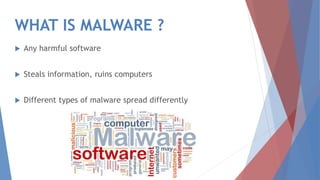
 Any harmful software
 Steals information, ruins computers
 Different types of malware spread differently
The Types of Malware
At a glance . . . .
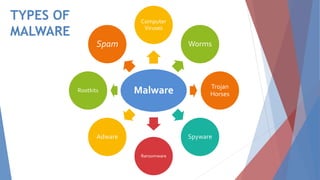
TYPES OF
MALWARE
Malware
Computer
Viruses
Worms
Trojan
Horses
Spyware
Ransomware
Adware
Rootkits
Spam
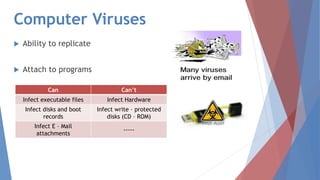
Computer Viruses
 Ability to replicate
 Attach to programs
Can Can’t
Infect executable files Infect Hardware
Infect disks and boot
records
Infect write – protected
disks (CD – ROM)
Infect E – Mail
attachments
-----
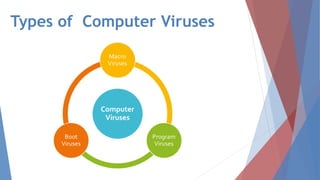
Types of Computer Viruses
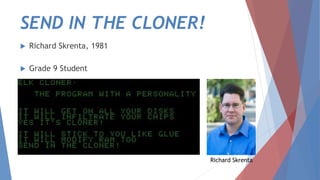
SEND IN THE CLONER!
 Richard Skrenta, 1981
 Grade 9 Student
Richard Skrenta
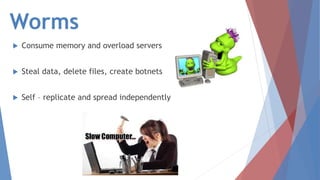
Worms
 Consume memory and overload servers
 Steal data, delete files, create botnets
 Self – replicate and spread independently
Trojan Horses
 Useful or normal appearing programs
 Offers remote access to malicious parties
 Access information, steal data, modify etc…
Spyware
 Spies on user activity
 Monitors, harvests data and keystrokes
 Modifies security software and browsers
 Consume memory and can slow down computers
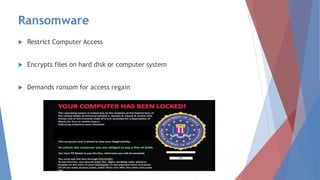
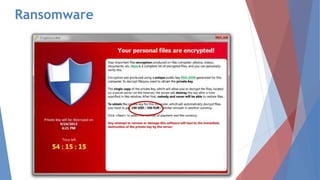
Ransomware
 Restrict Computer Access
 Encrypts files on hard disk or computer system
 Demands ransom for access regain
Ransomware
Adware
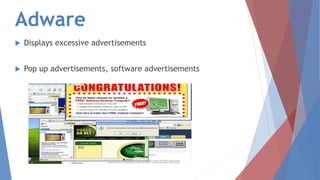
 Displays excessive advertisements
 Pop up advertisements, software advertisements
Rootkits
 Remotely access computer systems
 Control party can freely access files, configurations, software
 Hard to detect, remove or prevent
Spam
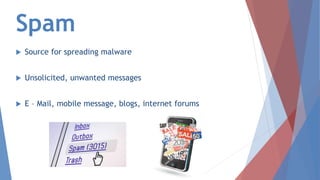
 Source for spreading malware
 Unsolicited, unwanted messages
 E – Mail, mobile message, blogs, internet forums
Detecting, Removing and
Preventing Malware
Antivirus software and prevention methods for malware at a
glance
Preventing Malware Infections
 Restricting computer access
 Vigilance while installing programs
 Refusing malicious requests while browsing
 Allowing only trustworthy users
 Using trusted removable storage media
Preventing Malware Infections
 Keep files and programs on separate disks
 Open E – Mail attachments from trusted sources
 Using Antivirus Software, Anti – Spyware and free Firewall
program
Symptoms of a Malware Infection
 Increased CPU Usage
 Slow Response and Browser Speed
 Frequently Freezing, Irresponsive, Crashing
 Unable to connect to networks
Symptoms of a Malware Infection
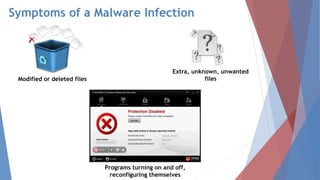
Modified or deleted files
Extra, unknown, unwanted
files
Programs turning on and off,
reconfiguring themselves
No Fear …. ANTIVIRUS Is Here!
 Detect and remove viruses and malware
 Able to scan downloaded, data and system files
 Should be kept updated for efficiency
Kaspersky Antivirus
Norton Antivirus
McAfee Antivirus
ANTISPYWARE
 For defense against and removal of spyware
 Should be kept updated
 Ad Aware SE and Windows Defender
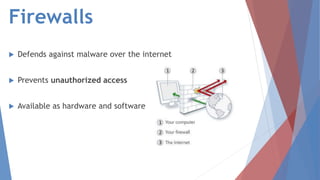
Firewalls
 Defends against malware over the internet
 Prevents unauthorized access
 Available as hardware and software
STOP MALWARE!
 Spreading awareness and discouraging malware development
 Malware developer be given heavier punishments and fines
 Development of new, advanced protection software
 Encouraging the use of better protective software
“Conflicker” caused a loss of up to
$9.1 billion
“Love Letter” or “ILOVEYOU”
caused a loss of over $37.1 billion
MALWARE SPREADS WORLDWIDE CAUSE HUGE
LOSSES OF MONEY
MyDoom E – Mail worm caused a loss
of upto $38.5 billion
13.3 people in the U.S. become victims of
identity theft every minute
15% of spyware sends potentially confidential
info inputted by users collected via keyloggers
or other devices
PEOPLE LOSE PRIVACY
THANK YOU!
Spread The Message ...
Stop Malware!

Malicious Software

  • 1.
    MALWARESpreading Awareness ofHarmful Software . . . ICT – 7 Presentation
  • 2.
    WHAT IS MALWARE?  Any harmful software  Steals information, ruins computers  Different types of malware spread differently
  • 3.
    The Types ofMalware At a glance . . . .
  • 4.
  • 5.
    Computer Viruses  Abilityto replicate  Attach to programs Can Can’t Infect executable files Infect Hardware Infect disks and boot records Infect write – protected disks (CD – ROM) Infect E – Mail attachments -----
  • 6.
  • 7.
    SEND IN THECLONER!  Richard Skrenta, 1981  Grade 9 Student Richard Skrenta
  • 8.
    Worms  Consume memoryand overload servers  Steal data, delete files, create botnets  Self – replicate and spread independently
  • 9.
    Trojan Horses  Usefulor normal appearing programs  Offers remote access to malicious parties  Access information, steal data, modify etc…
  • 10.
    Spyware  Spies onuser activity  Monitors, harvests data and keystrokes  Modifies security software and browsers  Consume memory and can slow down computers
  • 11.
    Ransomware  Restrict ComputerAccess  Encrypts files on hard disk or computer system  Demands ransom for access regain
  • 12.
  • 13.
    Adware  Displays excessiveadvertisements  Pop up advertisements, software advertisements
  • 14.
    Rootkits  Remotely accesscomputer systems  Control party can freely access files, configurations, software  Hard to detect, remove or prevent
  • 15.
    Spam  Source forspreading malware  Unsolicited, unwanted messages  E – Mail, mobile message, blogs, internet forums
  • 16.
    Detecting, Removing and PreventingMalware Antivirus software and prevention methods for malware at a glance
  • 17.
    Preventing Malware Infections Restricting computer access  Vigilance while installing programs  Refusing malicious requests while browsing  Allowing only trustworthy users  Using trusted removable storage media
  • 18.
    Preventing Malware Infections Keep files and programs on separate disks  Open E – Mail attachments from trusted sources  Using Antivirus Software, Anti – Spyware and free Firewall program
  • 19.
    Symptoms of aMalware Infection  Increased CPU Usage  Slow Response and Browser Speed  Frequently Freezing, Irresponsive, Crashing  Unable to connect to networks
  • 20.
    Symptoms of aMalware Infection Modified or deleted files Extra, unknown, unwanted files Programs turning on and off, reconfiguring themselves
  • 21.
    No Fear ….ANTIVIRUS Is Here!  Detect and remove viruses and malware  Able to scan downloaded, data and system files  Should be kept updated for efficiency Kaspersky Antivirus Norton Antivirus McAfee Antivirus
  • 22.
    ANTISPYWARE  For defenseagainst and removal of spyware  Should be kept updated  Ad Aware SE and Windows Defender
  • 23.
    Firewalls  Defends againstmalware over the internet  Prevents unauthorized access  Available as hardware and software
  • 24.
    STOP MALWARE!  Spreadingawareness and discouraging malware development  Malware developer be given heavier punishments and fines  Development of new, advanced protection software  Encouraging the use of better protective software
  • 25.
    “Conflicker” caused aloss of up to $9.1 billion “Love Letter” or “ILOVEYOU” caused a loss of over $37.1 billion MALWARE SPREADS WORLDWIDE CAUSE HUGE LOSSES OF MONEY MyDoom E – Mail worm caused a loss of upto $38.5 billion
  • 26.
    13.3 people inthe U.S. become victims of identity theft every minute 15% of spyware sends potentially confidential info inputted by users collected via keyloggers or other devices PEOPLE LOSE PRIVACY
  • 27.
    THANK YOU! Spread TheMessage ... Stop Malware!