NAME: BANSARI SHAH
ENROLLMENT: 150410107098
CLASS: CE-2
BATCH: B
SUBJECT:CYBER SECURITY
TYPES OF ATTACKS IN
CYBER SECURITY
What is cyber security?
 Cyber security is a practice which intends to protect
computers, networks, programs and data from unintended or
unauthorized access, change or destruction
 Why Cyber Security?
 Now-a-days everything is going on web
 Major proportion of systems connected to internet (i.e.
large inventory for intruders to attack)
 That’s why cyber security became major concern in the
world of computers over the past decade
Cyber Attack
 Act or action that exploits vulnerability in controlled system.
 Vulnerability-
 An information security "vulnerability" is a mistake in
software that can be directly used by a hacker to gain
access to a system or network.
Types of cyber attacks
 These can be classified into
 Web-based attacks
 These are the attacks on a website or web application
 System-based attacks
 Attacks that are intended to compromise a computer or a
computer network
Web-based attacks
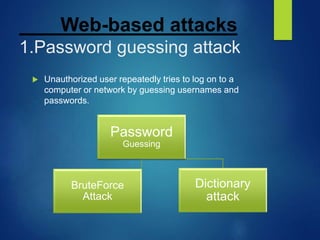
1.Password guessing attack
 Unauthorized user repeatedly tries to log on to a
computer or network by guessing usernames and
passwords.
Password
Guessing
Dictionary
attack
BruteForce
Attack
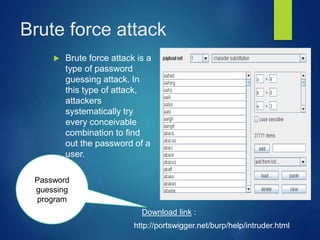
Brute force attack
 Brute force attack is a
type of password
guessing attack. In
this type of attack,
attackers
systematically try
every conceivable
combination to find
out the password of a
user.
Password
guessing
program
http://portswigger.net/burp/help/intruder.html
Download link :
Dictionary attack
 This type of attack uses a
dictionary of common words to
find out the password of a user.
It can also use common words
in either upper or lower case to
find a password. There are
many programs available on
the Internet to automate and
execute dictionary attacks.
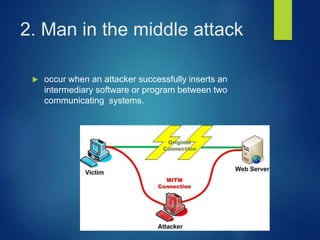
2. Man in the middle attack
 occur when an attacker successfully inserts an
intermediary software or program between two
communicating systems.
Man in the middle
attack(contd..)
 The MITM attack is very effective because of the
nature of the http protocol and data transfer which are
all ASCII based. It’s possible to capture a session
cookie reading the http header, but it’s also possible to
change an amount of money transaction inside the
application context,
3.Phishing
 Phishing is a type of deception designed to steal your
valuable personal data, such as credit card numbers,
passwords, account data, or other information.
 Con artists might send millions of fraudulent e-mail
messages that appear to come from Web sites you
trust, like your bank or credit card company, and
request that you provide personal information.
4.Denial of Service (DoS)
 DoS attack is an attempt to make a server or
network resource unavailable to users
 This is generally done by flooding the server with
communication requests
 DoS uses single system and single internet
connection to attack a server
 Distributed Dos (DDoS) uses multiple systems and
internet connections to flood a server with
requests, making it harder to counteract
 DoS can be classified into
 Volume based attacks
 goal is to saturate the bandwidth of the
attacked site, and is measured in bits per
second
 Protocal attacks
 consumes actual server resources, and is
measured in packets per second
 Application layer attacks
 goal of these attacks is to crash the web
server, and is measured in requests per
second
System based attacks.
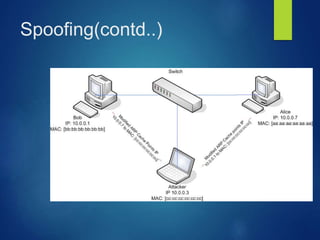
1.Spoofing
 Spoofing is a technique that makes a transmission
appear to have come from an authentic source by
forging the IP address.
 In IP spoofing, a hacker modifies packet headers by
using someone else’s IP address to hide his identity.
Spoofing(contd..)
2.Back Door
 Back door is a program or account that allows access
to a system by skipping the security checks.
 Many vendors and developers implement back doors
to save time and effort by skipping the security checks
while troubleshooting.
 Back door is considered to be a security threat and
should be kept with the highest security.
 If a back door becomes known to attackers and
malicious users, they can use it to exploit the system.
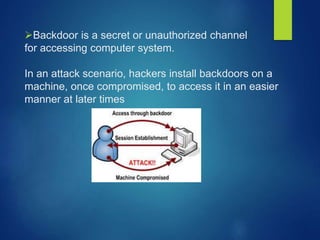
Backdoor is a secret or unauthorized channel
for accessing computer system.
In an attack scenario, hackers install backdoors on a
machine, once compromised, to access it in an easier
manner at later times
3.Virus
 Definition
 A virus is a small piece of software that piggybacks
on real programs in order to get executed
 Once it’s running, it spreads by inserting copies of
itself into other executable code or documents
General virus types
 While there are thousands of variations of viruses,
most fall into one of following general categories, each
of which works slightly differently.
1. Boot sector virus
2. Macro virus
3. Multipartite virus
4. Polymorphic virus
5. Stealth virus
6. E-mail viruses
BOOT VIRUS : replaces or implants itself in the boot sector. this
kind of virus can prevent you from being able to boot your hard
disk.
MACRO VIRUS : written using a simple macro programming
language, these viruses affect microsoft office application such
as word and excel. a document infected with a macro virus
generally modifies a pre-existing, common command(such as
save) to trigger
to trigger its payload upon execution of that command.
MULTIPARTITE VIRUS :
Infects both files and boot sector--a double wham that can
reinfect your system dozen times before it's
caught.
POLYMORPHIC VIRUS :
Changes code whenever it passes to another
machine
STEALTH VIRUS:
Hides in presence by making an infected
file not appear infected.
E-MAIL VIRUS :
An e-mail virus moves around in e-mail messages, and usually
replicates itself by automatically mailing itself dozens of
people in victims e-mail address book.
4.Worms
 Worm – A worm is a computer program that has ability
to copy itself from machine to machine. Worms
normally move around and infect other machines
through computer networks. Worms eat up storage
space and slows down the computer. But worms don’t
alter or delete files.
5.Trojan horses
 A Trojean horse is simply a computer program that
claims to do one thing (it may claim to be a game) but
instead does damage when you run it (it may erase
your hard disk).
 When loaded onto your machine, a Trojan horse can
capture information from your system.
Trojan horses(contd..)
 It allows a malicious hacker to remotely control your
computer.
 Trojan horse has no way to replicate automatically.
Types of attacks in cyber security

Types of attacks in cyber security

  • 1.
    NAME: BANSARI SHAH ENROLLMENT:150410107098 CLASS: CE-2 BATCH: B SUBJECT:CYBER SECURITY TYPES OF ATTACKS IN CYBER SECURITY
  • 2.
    What is cybersecurity?  Cyber security is a practice which intends to protect computers, networks, programs and data from unintended or unauthorized access, change or destruction  Why Cyber Security?  Now-a-days everything is going on web  Major proportion of systems connected to internet (i.e. large inventory for intruders to attack)  That’s why cyber security became major concern in the world of computers over the past decade
  • 3.
    Cyber Attack  Actor action that exploits vulnerability in controlled system.  Vulnerability-  An information security "vulnerability" is a mistake in software that can be directly used by a hacker to gain access to a system or network.
  • 4.
    Types of cyberattacks  These can be classified into  Web-based attacks  These are the attacks on a website or web application  System-based attacks  Attacks that are intended to compromise a computer or a computer network
  • 5.
    Web-based attacks 1.Password guessingattack  Unauthorized user repeatedly tries to log on to a computer or network by guessing usernames and passwords. Password Guessing Dictionary attack BruteForce Attack
  • 6.
    Brute force attack Brute force attack is a type of password guessing attack. In this type of attack, attackers systematically try every conceivable combination to find out the password of a user. Password guessing program http://portswigger.net/burp/help/intruder.html Download link :
  • 7.
    Dictionary attack  Thistype of attack uses a dictionary of common words to find out the password of a user. It can also use common words in either upper or lower case to find a password. There are many programs available on the Internet to automate and execute dictionary attacks.
  • 8.
    2. Man inthe middle attack  occur when an attacker successfully inserts an intermediary software or program between two communicating systems.
  • 9.
    Man in themiddle attack(contd..)  The MITM attack is very effective because of the nature of the http protocol and data transfer which are all ASCII based. It’s possible to capture a session cookie reading the http header, but it’s also possible to change an amount of money transaction inside the application context,
  • 10.
    3.Phishing  Phishing isa type of deception designed to steal your valuable personal data, such as credit card numbers, passwords, account data, or other information.  Con artists might send millions of fraudulent e-mail messages that appear to come from Web sites you trust, like your bank or credit card company, and request that you provide personal information.
  • 11.
    4.Denial of Service(DoS)  DoS attack is an attempt to make a server or network resource unavailable to users  This is generally done by flooding the server with communication requests  DoS uses single system and single internet connection to attack a server  Distributed Dos (DDoS) uses multiple systems and internet connections to flood a server with requests, making it harder to counteract
  • 12.
     DoS canbe classified into  Volume based attacks  goal is to saturate the bandwidth of the attacked site, and is measured in bits per second  Protocal attacks  consumes actual server resources, and is measured in packets per second  Application layer attacks  goal of these attacks is to crash the web server, and is measured in requests per second
  • 13.
    System based attacks. 1.Spoofing Spoofing is a technique that makes a transmission appear to have come from an authentic source by forging the IP address.  In IP spoofing, a hacker modifies packet headers by using someone else’s IP address to hide his identity.
  • 14.
  • 15.
    2.Back Door  Backdoor is a program or account that allows access to a system by skipping the security checks.  Many vendors and developers implement back doors to save time and effort by skipping the security checks while troubleshooting.  Back door is considered to be a security threat and should be kept with the highest security.  If a back door becomes known to attackers and malicious users, they can use it to exploit the system.
  • 16.
    Backdoor is asecret or unauthorized channel for accessing computer system. In an attack scenario, hackers install backdoors on a machine, once compromised, to access it in an easier manner at later times
  • 17.
    3.Virus  Definition  Avirus is a small piece of software that piggybacks on real programs in order to get executed  Once it’s running, it spreads by inserting copies of itself into other executable code or documents
  • 18.
    General virus types While there are thousands of variations of viruses, most fall into one of following general categories, each of which works slightly differently. 1. Boot sector virus 2. Macro virus 3. Multipartite virus 4. Polymorphic virus 5. Stealth virus 6. E-mail viruses
  • 19.
    BOOT VIRUS :replaces or implants itself in the boot sector. this kind of virus can prevent you from being able to boot your hard disk. MACRO VIRUS : written using a simple macro programming language, these viruses affect microsoft office application such as word and excel. a document infected with a macro virus generally modifies a pre-existing, common command(such as save) to trigger to trigger its payload upon execution of that command.
  • 20.
    MULTIPARTITE VIRUS : Infectsboth files and boot sector--a double wham that can reinfect your system dozen times before it's caught. POLYMORPHIC VIRUS : Changes code whenever it passes to another machine
  • 21.
    STEALTH VIRUS: Hides inpresence by making an infected file not appear infected. E-MAIL VIRUS : An e-mail virus moves around in e-mail messages, and usually replicates itself by automatically mailing itself dozens of people in victims e-mail address book.
  • 22.
    4.Worms  Worm –A worm is a computer program that has ability to copy itself from machine to machine. Worms normally move around and infect other machines through computer networks. Worms eat up storage space and slows down the computer. But worms don’t alter or delete files.
  • 23.
    5.Trojan horses  ATrojean horse is simply a computer program that claims to do one thing (it may claim to be a game) but instead does damage when you run it (it may erase your hard disk).  When loaded onto your machine, a Trojan horse can capture information from your system.
  • 24.
    Trojan horses(contd..)  Itallows a malicious hacker to remotely control your computer.  Trojan horse has no way to replicate automatically.