Submitted by- Rohit Raj Singh
Roll No.- 1442310031
Contact No.- 9170190050
Presentation
on
CCNA
6/1/2019 1SMS INSTITUTE OF TECHNOLOGY, LUCKNOW
Content
 Introduction
 Types of networking
 Networking Device
 Hub VS Switch
 Router
 Subnetting & Supernetting
 Router Configuration
 Router Access Mode
 How to login into the Router
• Routing
• RIP Protocol
• EIGRP
• VLAN
6/1/2019 2SMS INSTITUTE OF TECHNOLOGY, LUCKNOW
Introduction
 CCNA stands for Cisco Certified Network Associate.
 It gives the information about networking, its types and
its application.
 Networking is very important as it provides
communication.
 It is also very useful as it helps in resource sharing.
 Thus ,overall it is a cost saving technique.
6/1/2019 3SMS INSTITUTE OF TECHNOLOGY, LUCKNOW
Types of Networking
 LAN- It stands for local area network. Eg: network
within a campus.
 MAN-It stands for metropolitan area network. Eg:
network connecting various cities
 WAN-It stands for wide area network. Eg: internet on a
whole world
6/1/2019 4SMS INSTITUTE OF TECHNOLOGY, LUCKNOW
Networking Devices
 NIC
 Hub
 Switch
 Router
6/1/2019 5SMS INSTITUTE OF TECHNOLOGY, LUCKNOW
Hub Vs. Switches
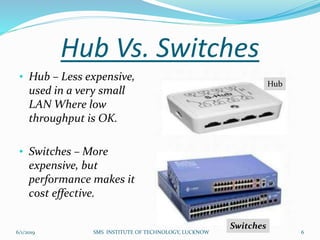
• Hub – Less expensive,
used in a very small
LAN Where low
throughput is OK.
• Switches – More
expensive, but
performance makes it
cost effective.
Switches
Hub
6/1/2019 6SMS INSTITUTE OF TECHNOLOGY, LUCKNOW
Router
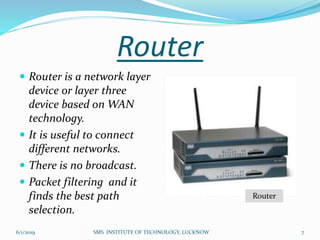
 Router is a network layer
device or layer three
device based on WAN
technology.
 It is useful to connect
different networks.
 There is no broadcast.
 Packet filtering and it
finds the best path
selection.
Router
6/1/2019 7SMS INSTITUTE OF TECHNOLOGY, LUCKNOW
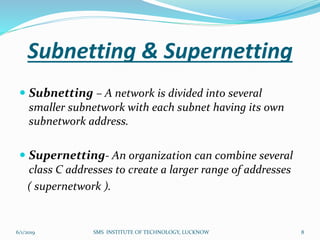
Subnetting & Supernetting
 Subnetting – A network is divided into several
smaller subnetwork with each subnet having its own
subnetwork address.
 Supernetting- An organization can combine several
class C addresses to create a larger range of addresses
( supernetwork ).
6/1/2019 8SMS INSTITUTE OF TECHNOLOGY, LUCKNOW
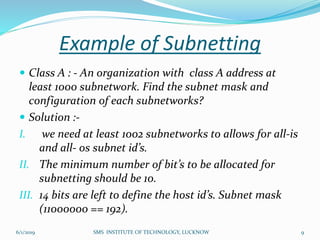
Example of Subnetting
 Class A : - An organization with class A address at
least 1000 subnetwork. Find the subnet mask and
configuration of each subnetworks?
 Solution :-
I. we need at least 1002 subnetworks to allows for all-is
and all- os subnet id’s.
II. The minimum number of bit’s to be allocated for
subnetting should be 10.
III. 14 bits are left to define the host id’s. Subnet mask
(11000000 == 192).
6/1/2019 9SMS INSTITUTE OF TECHNOLOGY, LUCKNOW
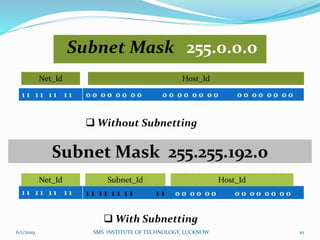
Subnet Mask 255.0.0.0
1 1 1 1 1 1 1 1 0 0 0 0 0 0 0 0 0 0 0 0 0 0 0 0 0 0 0 0 0 0 0 0
Net_Id Host_Id
 Without Subnetting
Subnet Mask 255.255.192.0
1 1 1 1 1 1 1 1 1 1 1 1 1 1 1 1 1 1 0 0 0 0 0 0 0 0 0 0 0 0 0 0
Net_Id Subnet_Id Host_Id
 With Subnetting
6/1/2019 10SMS INSTITUTE OF TECHNOLOGY, LUCKNOW
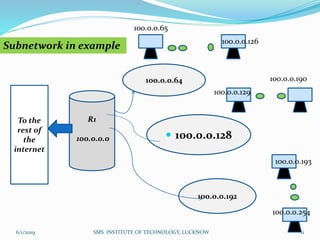
R1
100.0.0.0
To the
rest of
the
internet
100.0.0.64
 100.0.0.128
100.0.0.192
100.0.0.65
100.0.0.126
100.0.0.129
100.0.0.190
100.0.0.193
100.0.0.254
Subnetwork in example
6/1/2019 11SMS INSTITUTE OF TECHNOLOGY, LUCKNOW
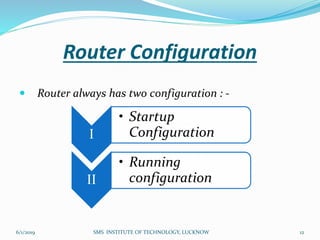
Router Configuration
 Router always has two configuration : -
I
• Startup
Configuration
II
• Running
configuration
6/1/2019 12SMS INSTITUTE OF TECHNOLOGY, LUCKNOW
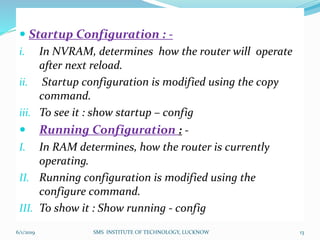
 Startup Configuration : -
i. In NVRAM, determines how the router will operate
after next reload.
ii. Startup configuration is modified using the copy
command.
iii. To see it : show startup – config
 Running Configuration : -
I. In RAM determines, how the router is currently
operating.
II. Running configuration is modified using the
configure command.
III. To show it : Show running - config
6/1/2019 13SMS INSTITUTE OF TECHNOLOGY, LUCKNOW
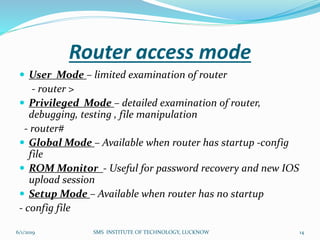
Router access mode
 User Mode – limited examination of router
- router >
 Privileged Mode – detailed examination of router,
debugging, testing , file manipulation
- router#
 Global Mode – Available when router has startup -config
file
 ROM Monitor - Useful for password recovery and new IOS
upload session
 Setup Mode – Available when router has no startup
- config file
6/1/2019 14SMS INSTITUTE OF TECHNOLOGY, LUCKNOW
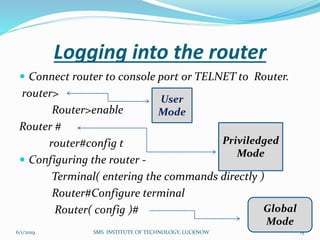
Logging into the router
 Connect router to console port or TELNET to Router.
router>
Router>enable
Router #
router#config t
 Configuring the router -
Terminal( entering the commands directly )
Router#Configure terminal
Router( config )#
User
Mode
Priviledged
Mode
Global
Mode
6/1/2019 15SMS INSTITUTE OF TECHNOLOGY, LUCKNOW
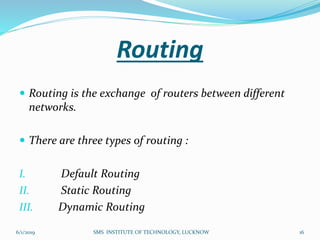
Routing
 Routing is the exchange of routers between different
networks.
 There are three types of routing :
I. Default Routing
II. Static Routing
III. Dynamic Routing
6/1/2019 16SMS INSTITUTE OF TECHNOLOGY, LUCKNOW
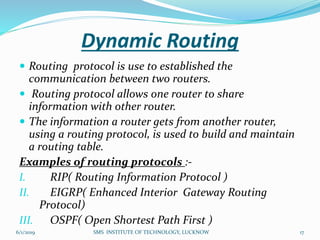
Dynamic Routing
 Routing protocol is use to established the
communication between two routers.
 Routing protocol allows one router to share
information with other router.
 The information a router gets from another router,
using a routing protocol, is used to build and maintain
a routing table.
Examples of routing protocols :-
I. RIP( Routing Information Protocol )
II. EIGRP( Enhanced Interior Gateway Routing
Protocol)
III. OSPF( Open Shortest Path First )
6/1/2019 17SMS INSTITUTE OF TECHNOLOGY, LUCKNOW
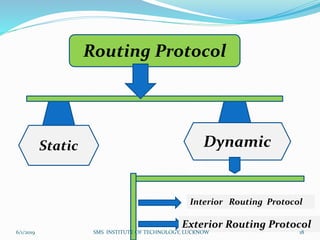
Routing Protocol
Static Dynamic
.
Interior Routing Protocol
Exterior Routing Protocol
6/1/2019 18SMS INSTITUTE OF TECHNOLOGY, LUCKNOW
.
6/1/2019 SMS INSTITUTE OF TECHNOLOGY, LUCKNOW 19
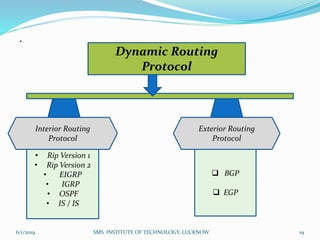
Dynamic Routing
Protocol
Interior Routing
Protocol
Exterior Routing
Protocol
• Rip Version 1
• Rip Version 2
• EIGRP
• IGRP
• OSPF
• IS / IS
 BGP
 EGP
Routing Information Protocol
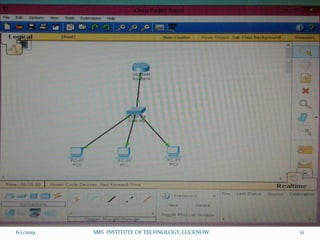
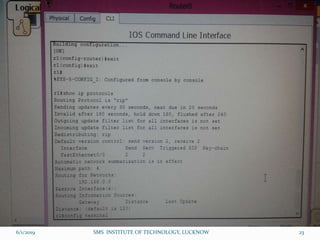
 RIP is a distance vector routing protocol.
 Hope count is used as the metric of path selection.
 If the hope count is greater than 15 the packet will be
discarded.
 By default, Routing update are broadcast every 30
second.
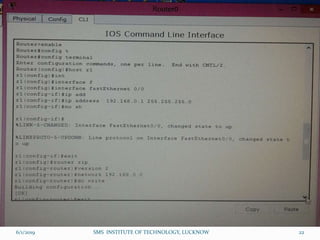
 Configuring Rip :-
Router( config )#router rip
6/1/2019 20SMS INSTITUTE OF TECHNOLOGY, LUCKNOW
6/1/2019 21SMS INSTITUTE OF TECHNOLOGY, LUCKNOW
6/1/2019 22SMS INSTITUTE OF TECHNOLOGY, LUCKNOW
6/1/2019 23SMS INSTITUTE OF TECHNOLOGY, LUCKNOW
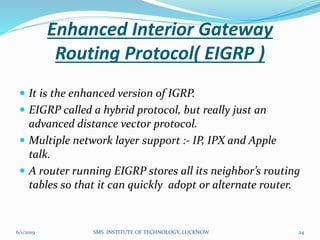
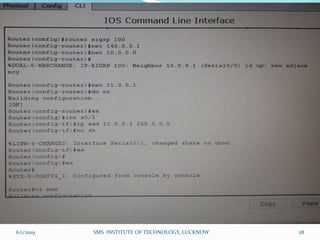
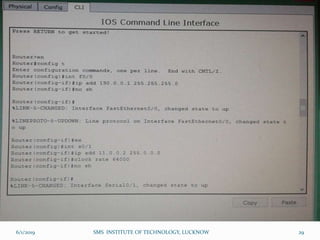
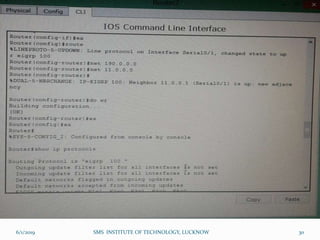
Enhanced Interior Gateway
Routing Protocol( EIGRP )
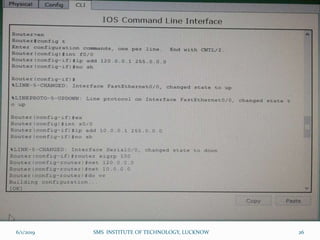
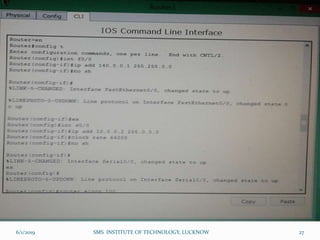
 It is the enhanced version of IGRP.
 EIGRP called a hybrid protocol, but really just an
advanced distance vector protocol.
 Multiple network layer support :- IP, IPX and Apple
talk.
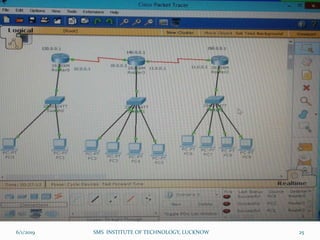
 A router running EIGRP stores all its neighbor’s routing
tables so that it can quickly adopt or alternate router.
6/1/2019 24SMS INSTITUTE OF TECHNOLOGY, LUCKNOW
6/1/2019 SMS INSTITUTE OF TECHNOLOGY, LUCKNOW 25
6/1/2019 SMS INSTITUTE OF TECHNOLOGY, LUCKNOW 26
6/1/2019 SMS INSTITUTE OF TECHNOLOGY, LUCKNOW 27
6/1/2019 SMS INSTITUTE OF TECHNOLOGY, LUCKNOW 28
6/1/2019 SMS INSTITUTE OF TECHNOLOGY, LUCKNOW 29
6/1/2019 SMS INSTITUTE OF TECHNOLOGY, LUCKNOW 30
6/1/2019 SMS INSTITUTE OF TECHNOLOGY, LUCKNOW 31
Packet Types that are used in
EIGRP
 EIGRP uses five packet types, they are :-
1. Hello
2. Acknowledgment
3. Update
4. Query
5. Reply
6/1/2019 SMS INSTITUTE OF TECHNOLOGY, LUCKNOW 32
 Hello :-
EIGRP uses hello packet in the discovery of
neighbours. They are multicast to 244.0.0.10 by
default, EIGRP sends hello packets every 5 seconds.
 Acknowledgment :-
It acknowledges the reception of an update packet.
It is a hello packet with no data. EIGRP sends
acknowledgment packet to the unicast adderss of the
sender of the update packet.
6/1/2019 SMS INSTITUTE OF TECHNOLOGY, LUCKNOW 33
 Update :-
Update packets contain routing information for
destinations. EIGRP unicast update packets to newly
discovered neighbors; otherwise it multicasts update
packets to 224.0.0.10 when a link or metric changes.
 Query :-
EIGRP sends query packets to find feasible
successors to a destination. Query packets are always
multicast.
 Reply :-
Reply packets provide a feasible successor to the
sender of the query , It’s unicast to sender of query
packet.
6/1/2019 SMS INSTITUTE OF TECHNOLOGY, LUCKNOW 34
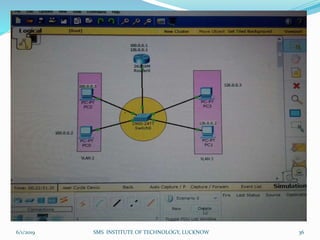
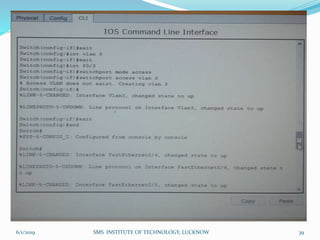
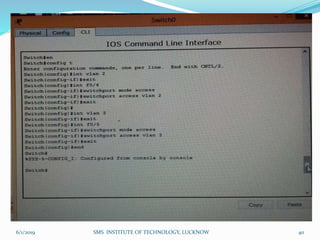
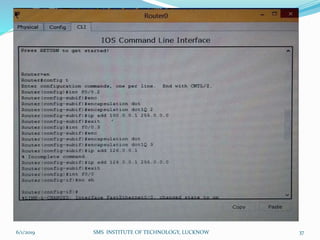
VLAN
 VLAN is a virtual local area network.
 VLAN can not communicate without network
layer.
 Devices on different VLAN must have a router to
communicate with each other.
 If devices are on the same VLAN, then they can
communicate through a switch.
6/1/2019 SMS INSTITUTE OF TECHNOLOGY, LUCKNOW 35
6/1/2019 SMS INSTITUTE OF TECHNOLOGY, LUCKNOW 36
6/1/2019 SMS INSTITUTE OF TECHNOLOGY, LUCKNOW 37
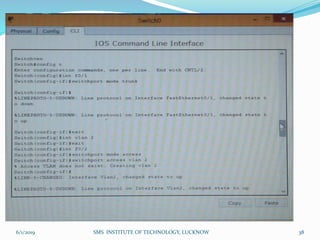
6/1/2019 SMS INSTITUTE OF TECHNOLOGY, LUCKNOW 38
6/1/2019 SMS INSTITUTE OF TECHNOLOGY, LUCKNOW 39
6/1/2019 SMS INSTITUTE OF TECHNOLOGY, LUCKNOW 40
Thank You
Any Query
6/1/2019 SMS INSTITUTE OF TECHNOLOGY, LUCKNOW 41

CCNA Course Training Presentation

  • 1.
    Submitted by- RohitRaj Singh Roll No.- 1442310031 Contact No.- 9170190050 Presentation on CCNA 6/1/2019 1SMS INSTITUTE OF TECHNOLOGY, LUCKNOW
  • 2.
    Content  Introduction  Typesof networking  Networking Device  Hub VS Switch  Router  Subnetting & Supernetting  Router Configuration  Router Access Mode  How to login into the Router • Routing • RIP Protocol • EIGRP • VLAN 6/1/2019 2SMS INSTITUTE OF TECHNOLOGY, LUCKNOW
  • 3.
    Introduction  CCNA standsfor Cisco Certified Network Associate.  It gives the information about networking, its types and its application.  Networking is very important as it provides communication.  It is also very useful as it helps in resource sharing.  Thus ,overall it is a cost saving technique. 6/1/2019 3SMS INSTITUTE OF TECHNOLOGY, LUCKNOW
  • 4.
    Types of Networking LAN- It stands for local area network. Eg: network within a campus.  MAN-It stands for metropolitan area network. Eg: network connecting various cities  WAN-It stands for wide area network. Eg: internet on a whole world 6/1/2019 4SMS INSTITUTE OF TECHNOLOGY, LUCKNOW
  • 5.
    Networking Devices  NIC Hub  Switch  Router 6/1/2019 5SMS INSTITUTE OF TECHNOLOGY, LUCKNOW
  • 6.
    Hub Vs. Switches •Hub – Less expensive, used in a very small LAN Where low throughput is OK. • Switches – More expensive, but performance makes it cost effective. Switches Hub 6/1/2019 6SMS INSTITUTE OF TECHNOLOGY, LUCKNOW
  • 7.
    Router  Router isa network layer device or layer three device based on WAN technology.  It is useful to connect different networks.  There is no broadcast.  Packet filtering and it finds the best path selection. Router 6/1/2019 7SMS INSTITUTE OF TECHNOLOGY, LUCKNOW
  • 8.
    Subnetting & Supernetting Subnetting – A network is divided into several smaller subnetwork with each subnet having its own subnetwork address.  Supernetting- An organization can combine several class C addresses to create a larger range of addresses ( supernetwork ). 6/1/2019 8SMS INSTITUTE OF TECHNOLOGY, LUCKNOW
  • 9.
    Example of Subnetting Class A : - An organization with class A address at least 1000 subnetwork. Find the subnet mask and configuration of each subnetworks?  Solution :- I. we need at least 1002 subnetworks to allows for all-is and all- os subnet id’s. II. The minimum number of bit’s to be allocated for subnetting should be 10. III. 14 bits are left to define the host id’s. Subnet mask (11000000 == 192). 6/1/2019 9SMS INSTITUTE OF TECHNOLOGY, LUCKNOW
  • 10.
    Subnet Mask 255.0.0.0 11 1 1 1 1 1 1 0 0 0 0 0 0 0 0 0 0 0 0 0 0 0 0 0 0 0 0 0 0 0 0 Net_Id Host_Id  Without Subnetting Subnet Mask 255.255.192.0 1 1 1 1 1 1 1 1 1 1 1 1 1 1 1 1 1 1 0 0 0 0 0 0 0 0 0 0 0 0 0 0 Net_Id Subnet_Id Host_Id  With Subnetting 6/1/2019 10SMS INSTITUTE OF TECHNOLOGY, LUCKNOW
  • 11.
    R1 100.0.0.0 To the rest of the internet 100.0.0.64 100.0.0.128 100.0.0.192 100.0.0.65 100.0.0.126 100.0.0.129 100.0.0.190 100.0.0.193 100.0.0.254 Subnetwork in example 6/1/2019 11SMS INSTITUTE OF TECHNOLOGY, LUCKNOW
  • 12.
    Router Configuration  Routeralways has two configuration : - I • Startup Configuration II • Running configuration 6/1/2019 12SMS INSTITUTE OF TECHNOLOGY, LUCKNOW
  • 13.
     Startup Configuration: - i. In NVRAM, determines how the router will operate after next reload. ii. Startup configuration is modified using the copy command. iii. To see it : show startup – config  Running Configuration : - I. In RAM determines, how the router is currently operating. II. Running configuration is modified using the configure command. III. To show it : Show running - config 6/1/2019 13SMS INSTITUTE OF TECHNOLOGY, LUCKNOW
  • 14.
    Router access mode User Mode – limited examination of router - router >  Privileged Mode – detailed examination of router, debugging, testing , file manipulation - router#  Global Mode – Available when router has startup -config file  ROM Monitor - Useful for password recovery and new IOS upload session  Setup Mode – Available when router has no startup - config file 6/1/2019 14SMS INSTITUTE OF TECHNOLOGY, LUCKNOW
  • 15.
    Logging into therouter  Connect router to console port or TELNET to Router. router> Router>enable Router # router#config t  Configuring the router - Terminal( entering the commands directly ) Router#Configure terminal Router( config )# User Mode Priviledged Mode Global Mode 6/1/2019 15SMS INSTITUTE OF TECHNOLOGY, LUCKNOW
  • 16.
    Routing  Routing isthe exchange of routers between different networks.  There are three types of routing : I. Default Routing II. Static Routing III. Dynamic Routing 6/1/2019 16SMS INSTITUTE OF TECHNOLOGY, LUCKNOW
  • 17.
    Dynamic Routing  Routingprotocol is use to established the communication between two routers.  Routing protocol allows one router to share information with other router.  The information a router gets from another router, using a routing protocol, is used to build and maintain a routing table. Examples of routing protocols :- I. RIP( Routing Information Protocol ) II. EIGRP( Enhanced Interior Gateway Routing Protocol) III. OSPF( Open Shortest Path First ) 6/1/2019 17SMS INSTITUTE OF TECHNOLOGY, LUCKNOW
  • 18.
    Routing Protocol Static Dynamic . InteriorRouting Protocol Exterior Routing Protocol 6/1/2019 18SMS INSTITUTE OF TECHNOLOGY, LUCKNOW
  • 19.
    . 6/1/2019 SMS INSTITUTEOF TECHNOLOGY, LUCKNOW 19 Dynamic Routing Protocol Interior Routing Protocol Exterior Routing Protocol • Rip Version 1 • Rip Version 2 • EIGRP • IGRP • OSPF • IS / IS  BGP  EGP
  • 20.
    Routing Information Protocol RIP is a distance vector routing protocol.  Hope count is used as the metric of path selection.  If the hope count is greater than 15 the packet will be discarded.  By default, Routing update are broadcast every 30 second.  Configuring Rip :- Router( config )#router rip 6/1/2019 20SMS INSTITUTE OF TECHNOLOGY, LUCKNOW
  • 21.
    6/1/2019 21SMS INSTITUTEOF TECHNOLOGY, LUCKNOW
  • 22.
    6/1/2019 22SMS INSTITUTEOF TECHNOLOGY, LUCKNOW
  • 23.
    6/1/2019 23SMS INSTITUTEOF TECHNOLOGY, LUCKNOW
  • 24.
    Enhanced Interior Gateway RoutingProtocol( EIGRP )  It is the enhanced version of IGRP.  EIGRP called a hybrid protocol, but really just an advanced distance vector protocol.  Multiple network layer support :- IP, IPX and Apple talk.  A router running EIGRP stores all its neighbor’s routing tables so that it can quickly adopt or alternate router. 6/1/2019 24SMS INSTITUTE OF TECHNOLOGY, LUCKNOW
  • 25.
    6/1/2019 SMS INSTITUTEOF TECHNOLOGY, LUCKNOW 25
  • 26.
    6/1/2019 SMS INSTITUTEOF TECHNOLOGY, LUCKNOW 26
  • 27.
    6/1/2019 SMS INSTITUTEOF TECHNOLOGY, LUCKNOW 27
  • 28.
    6/1/2019 SMS INSTITUTEOF TECHNOLOGY, LUCKNOW 28
  • 29.
    6/1/2019 SMS INSTITUTEOF TECHNOLOGY, LUCKNOW 29
  • 30.
    6/1/2019 SMS INSTITUTEOF TECHNOLOGY, LUCKNOW 30
  • 31.
    6/1/2019 SMS INSTITUTEOF TECHNOLOGY, LUCKNOW 31
  • 32.
    Packet Types thatare used in EIGRP  EIGRP uses five packet types, they are :- 1. Hello 2. Acknowledgment 3. Update 4. Query 5. Reply 6/1/2019 SMS INSTITUTE OF TECHNOLOGY, LUCKNOW 32
  • 33.
     Hello :- EIGRPuses hello packet in the discovery of neighbours. They are multicast to 244.0.0.10 by default, EIGRP sends hello packets every 5 seconds.  Acknowledgment :- It acknowledges the reception of an update packet. It is a hello packet with no data. EIGRP sends acknowledgment packet to the unicast adderss of the sender of the update packet. 6/1/2019 SMS INSTITUTE OF TECHNOLOGY, LUCKNOW 33
  • 34.
     Update :- Updatepackets contain routing information for destinations. EIGRP unicast update packets to newly discovered neighbors; otherwise it multicasts update packets to 224.0.0.10 when a link or metric changes.  Query :- EIGRP sends query packets to find feasible successors to a destination. Query packets are always multicast.  Reply :- Reply packets provide a feasible successor to the sender of the query , It’s unicast to sender of query packet. 6/1/2019 SMS INSTITUTE OF TECHNOLOGY, LUCKNOW 34
  • 35.
    VLAN  VLAN isa virtual local area network.  VLAN can not communicate without network layer.  Devices on different VLAN must have a router to communicate with each other.  If devices are on the same VLAN, then they can communicate through a switch. 6/1/2019 SMS INSTITUTE OF TECHNOLOGY, LUCKNOW 35
  • 36.
    6/1/2019 SMS INSTITUTEOF TECHNOLOGY, LUCKNOW 36
  • 37.
    6/1/2019 SMS INSTITUTEOF TECHNOLOGY, LUCKNOW 37
  • 38.
    6/1/2019 SMS INSTITUTEOF TECHNOLOGY, LUCKNOW 38
  • 39.
    6/1/2019 SMS INSTITUTEOF TECHNOLOGY, LUCKNOW 39
  • 40.
    6/1/2019 SMS INSTITUTEOF TECHNOLOGY, LUCKNOW 40
  • 41.
    Thank You Any Query 6/1/2019SMS INSTITUTE OF TECHNOLOGY, LUCKNOW 41