Topic: TELNET Protocol
By
Sunilkumarsingh Kumpawat
Master of Library and Information Science Sem-1
Dept. of Library and Information Science
Maharaja Sayajirao University of Baroda
content
i. Meaning
ii. How it Works?
iii.What is mean by NVT?
iv.What is NVT Character Sets?
v. TELNET Options
vi.TELNET Options Negotiations
vii.TELNET Mode of Operation
viii.Symmetry
ix.User’s Interference
x. Security Issue
xi.Conclusion
xii.References
Meaning
• Telnet (Terminal Networks) is a networking protocol and software program used
to access remote computers and terminals over the Internet or a TCP/IP computer
network.
• Telnet was conceived in 1969 and standardized as one of the first Internet
standards by the Internet Engineering Task Force (IETF).
• It can be use Programs and data from other Computers if they are into the same
LAN (Local Area Network). Telnet protocol is available on port number 23 of
the host machine.
• Telnet sends all messages in clear text and has no specific security mechanisms.
Thus, in many applications and services, Telnet has been replaced by Secure Shell
(SSH).
How it works?
Telnet works on two logins
• Local Login
• Remote Login
Local Login
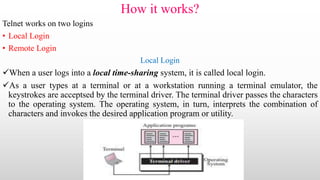
When a user logs into a local time-sharing system, it is called local login.
As a user types at a terminal or at a workstation running a terminal emulator, the
keystrokes are acceptsed by the terminal driver. The terminal driver passes the characters
to the operating system. The operating system, in turn, interprets the combination of
characters and invokes the desired application program or utility.
Conti.
• Remote Login
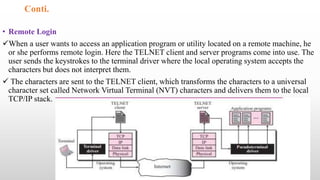
When a user wants to access an application program or utility located on a remote machine, he
or she performs remote login. Here the TELNET client and server programs come into use. The
user sends the keystrokes to the terminal driver where the local operating system accepts the
characters but does not interpret them.
 The characters are sent to the TELNET client, which transforms the characters to a universal
character set called Network Virtual Terminal (NVT) characters and delivers them to the local
TCP/IP stack.
What is mean by NVT?
• The mechanism to access a remote computer is complex. This is because every computer and its
operating system accept a special combination of characters as tokens. For example, the end-of-file token
in a computer running the DOS operating system is Ctrl+z, while the UNIX operating system recognizes
Ctrl+d.
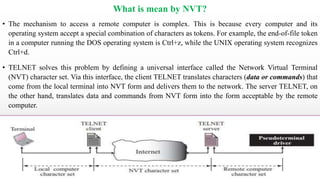
• TELNET solves this problem by defining a universal interface called the Network Virtual Terminal
(NVT) character set. Via this interface, the client TELNET translates characters (data or commands) that
come from the local terminal into NVT form and delivers them to the network. The server TELNET, on
the other hand, translates data and commands from NVT form into the form acceptable by the remote
computer.
NVT Cont.
• NVT Character Set
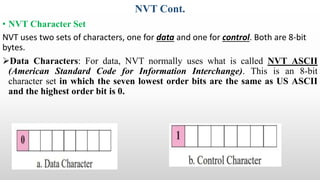
NVT uses two sets of characters, one for data and one for control. Both are 8-bit
bytes.
Data Characters: For data, NVT normally uses what is called NVT ASCII
(American Standard Code for Information Interchange). This is an 8-bit
character set in which the seven lowest order bits are the same as US ASCII
and the highest order bit is 0.
NVT Cont.
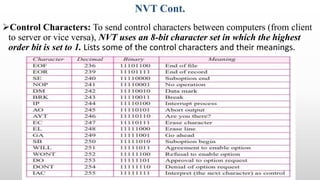
Control Characters: To send control characters between computers (from client
to server or vice versa), NVT uses an 8-bit character set in which the highest
order bit is set to 1. Lists some of the control characters and their meanings.
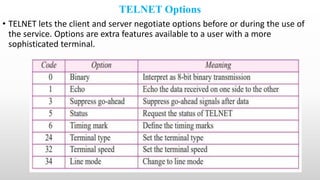
TELNET Options
• TELNET lets the client and server negotiate options before or during the use of
the service. Options are extra features available to a user with a more
sophisticated terminal.
TELNET Options Negotiations
• To use any of the options mentioned in the previous Slide first requires option negotiation between the client
and the server. Four control characters are used for this purpose;
Enabling an Option: Some options can only be enabled by the server, some only by the client, and
some by both. An option is enabled either through an offer or a request.
Offer to Enable
The offering party sends the WILL command, which means “Will I enable the option?” The other party sends either the DO
command, which means “Please do,” or the DONT command, which means “Please don’t.”
Request to Enable
The requesting party sends the DO command, which means “Please do enable the option.” The other party sends either the
WILL command, which means “I will,” or the WONT command, which means “I won’t.”
Cont.
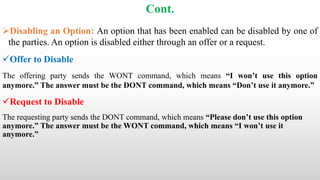
Disabling an Option: An option that has been enabled can be disabled by one of
the parties. An option is disabled either through an offer or a request.
Offer to Disable
The offering party sends the WONT command, which means “I won’t use this option
anymore.” The answer must be the DONT command, which means “Don’t use it anymore.”
Request to Disable
The requesting party sends the DONT command, which means “Please don’t use this option
anymore.” The answer must be the WONT command, which means “I won’t use it
anymore.”
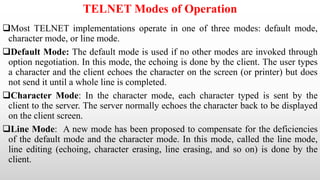
TELNET Modes of Operation
Most TELNET implementations operate in one of three modes: default mode,
character mode, or line mode.
Default Mode: The default mode is used if no other modes are invoked through
option negotiation. In this mode, the echoing is done by the client. The user types
a character and the client echoes the character on the screen (or printer) but does
not send it until a whole line is completed.
Character Mode: In the character mode, each character typed is sent by the
client to the server. The server normally echoes the character back to be displayed
on the client screen.
Line Mode: A new mode has been proposed to compensate for the deficiencies
of the default mode and the character mode. In this mode, called the line mode,
line editing (echoing, character erasing, line erasing, and so on) is done by the
client.
Symmetry
• One interesting feature of TELNET is its symmetric option negotiation in which the client and
server are given equal opportunity. This means that, at the beginning of connection, it is
assumed that both sides are using a default TELNET implementation with no options enabled.
• If one party wants an option enabled, it can offer or request. The other party has the right to
approve the offer or reject the request if the party is not capable of using the option or does not
want to use the option. This allows for the expansion of TELNET. A client or server can install a
more sophisticated version of TELNET with more options.
• When it is connected to a party, it can offer or request these new options. If the other party also
supports these options, the options can be enabled; otherwise, they are rejected.
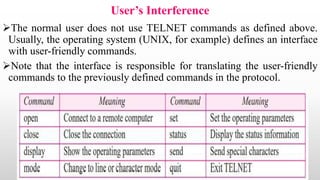
User’s Interference
The normal user does not use TELNET commands as defined above.
Usually, the operating system (UNIX, for example) defines an interface
with user-friendly commands.
Note that the interface is responsible for translating the user-friendly
commands to the previously defined commands in the protocol.
Security Issue
TELNET suffers from security problems. Although TELNET
requires a login name and password (when exchanging text),
often this is not enough. A microcomputer connected to a
broadcast LAN can easily eavesdrop using snooper software
and capture a login name and the corresponding password
(even if it is encrypted)
Conclusion
To conclude in simple words the TELNET is used for remote
login of the computer and features like TELNET Options,
Negotiation & Commands and symmetry were used for smooth
run in the default or line or character mode.
References
1. Telnet(TN).(2020).Techopedia.Com.https://www.techopedia.com/definition/2457/telnet-tn retrieved on 16th Dec.
2020
2. Dhillon, G. (2013). Remote Login: TELNET and SSH. Https://Gursimrandhillon.Wordpress.Com.
https://gursimrandhillon.files.wordpress.com/2013/09/telnet-and-ssh.pdf, retrieved on 22nd Jan. 2021
3. Slideshare (2017, May 5). Telnet presentation. Slideshare.Com. https://www.slideshare.net/travel_affair/telnet-
presentation, retrieved on 17th Dec. 2020.
Telnet ppt

Telnet ppt

  • 1.
    Topic: TELNET Protocol By SunilkumarsinghKumpawat Master of Library and Information Science Sem-1 Dept. of Library and Information Science Maharaja Sayajirao University of Baroda
  • 2.
    content i. Meaning ii. Howit Works? iii.What is mean by NVT? iv.What is NVT Character Sets? v. TELNET Options vi.TELNET Options Negotiations vii.TELNET Mode of Operation viii.Symmetry ix.User’s Interference x. Security Issue xi.Conclusion xii.References
  • 3.
    Meaning • Telnet (TerminalNetworks) is a networking protocol and software program used to access remote computers and terminals over the Internet or a TCP/IP computer network. • Telnet was conceived in 1969 and standardized as one of the first Internet standards by the Internet Engineering Task Force (IETF). • It can be use Programs and data from other Computers if they are into the same LAN (Local Area Network). Telnet protocol is available on port number 23 of the host machine. • Telnet sends all messages in clear text and has no specific security mechanisms. Thus, in many applications and services, Telnet has been replaced by Secure Shell (SSH).
  • 4.
    How it works? Telnetworks on two logins • Local Login • Remote Login Local Login When a user logs into a local time-sharing system, it is called local login. As a user types at a terminal or at a workstation running a terminal emulator, the keystrokes are acceptsed by the terminal driver. The terminal driver passes the characters to the operating system. The operating system, in turn, interprets the combination of characters and invokes the desired application program or utility.
  • 5.
    Conti. • Remote Login Whena user wants to access an application program or utility located on a remote machine, he or she performs remote login. Here the TELNET client and server programs come into use. The user sends the keystrokes to the terminal driver where the local operating system accepts the characters but does not interpret them.  The characters are sent to the TELNET client, which transforms the characters to a universal character set called Network Virtual Terminal (NVT) characters and delivers them to the local TCP/IP stack.
  • 6.
    What is meanby NVT? • The mechanism to access a remote computer is complex. This is because every computer and its operating system accept a special combination of characters as tokens. For example, the end-of-file token in a computer running the DOS operating system is Ctrl+z, while the UNIX operating system recognizes Ctrl+d. • TELNET solves this problem by defining a universal interface called the Network Virtual Terminal (NVT) character set. Via this interface, the client TELNET translates characters (data or commands) that come from the local terminal into NVT form and delivers them to the network. The server TELNET, on the other hand, translates data and commands from NVT form into the form acceptable by the remote computer.
  • 7.
    NVT Cont. • NVTCharacter Set NVT uses two sets of characters, one for data and one for control. Both are 8-bit bytes. Data Characters: For data, NVT normally uses what is called NVT ASCII (American Standard Code for Information Interchange). This is an 8-bit character set in which the seven lowest order bits are the same as US ASCII and the highest order bit is 0.
  • 8.
    NVT Cont. Control Characters:To send control characters between computers (from client to server or vice versa), NVT uses an 8-bit character set in which the highest order bit is set to 1. Lists some of the control characters and their meanings.
  • 9.
    TELNET Options • TELNETlets the client and server negotiate options before or during the use of the service. Options are extra features available to a user with a more sophisticated terminal.
  • 10.
    TELNET Options Negotiations •To use any of the options mentioned in the previous Slide first requires option negotiation between the client and the server. Four control characters are used for this purpose; Enabling an Option: Some options can only be enabled by the server, some only by the client, and some by both. An option is enabled either through an offer or a request. Offer to Enable The offering party sends the WILL command, which means “Will I enable the option?” The other party sends either the DO command, which means “Please do,” or the DONT command, which means “Please don’t.” Request to Enable The requesting party sends the DO command, which means “Please do enable the option.” The other party sends either the WILL command, which means “I will,” or the WONT command, which means “I won’t.”
  • 11.
    Cont. Disabling an Option:An option that has been enabled can be disabled by one of the parties. An option is disabled either through an offer or a request. Offer to Disable The offering party sends the WONT command, which means “I won’t use this option anymore.” The answer must be the DONT command, which means “Don’t use it anymore.” Request to Disable The requesting party sends the DONT command, which means “Please don’t use this option anymore.” The answer must be the WONT command, which means “I won’t use it anymore.”
  • 12.
    TELNET Modes ofOperation Most TELNET implementations operate in one of three modes: default mode, character mode, or line mode. Default Mode: The default mode is used if no other modes are invoked through option negotiation. In this mode, the echoing is done by the client. The user types a character and the client echoes the character on the screen (or printer) but does not send it until a whole line is completed. Character Mode: In the character mode, each character typed is sent by the client to the server. The server normally echoes the character back to be displayed on the client screen. Line Mode: A new mode has been proposed to compensate for the deficiencies of the default mode and the character mode. In this mode, called the line mode, line editing (echoing, character erasing, line erasing, and so on) is done by the client.
  • 13.
    Symmetry • One interestingfeature of TELNET is its symmetric option negotiation in which the client and server are given equal opportunity. This means that, at the beginning of connection, it is assumed that both sides are using a default TELNET implementation with no options enabled. • If one party wants an option enabled, it can offer or request. The other party has the right to approve the offer or reject the request if the party is not capable of using the option or does not want to use the option. This allows for the expansion of TELNET. A client or server can install a more sophisticated version of TELNET with more options. • When it is connected to a party, it can offer or request these new options. If the other party also supports these options, the options can be enabled; otherwise, they are rejected.
  • 14.
    User’s Interference The normaluser does not use TELNET commands as defined above. Usually, the operating system (UNIX, for example) defines an interface with user-friendly commands. Note that the interface is responsible for translating the user-friendly commands to the previously defined commands in the protocol.
  • 15.
    Security Issue TELNET suffersfrom security problems. Although TELNET requires a login name and password (when exchanging text), often this is not enough. A microcomputer connected to a broadcast LAN can easily eavesdrop using snooper software and capture a login name and the corresponding password (even if it is encrypted)
  • 16.
    Conclusion To conclude insimple words the TELNET is used for remote login of the computer and features like TELNET Options, Negotiation & Commands and symmetry were used for smooth run in the default or line or character mode.
  • 18.
    References 1. Telnet(TN).(2020).Techopedia.Com.https://www.techopedia.com/definition/2457/telnet-tn retrievedon 16th Dec. 2020 2. Dhillon, G. (2013). Remote Login: TELNET and SSH. Https://Gursimrandhillon.Wordpress.Com. https://gursimrandhillon.files.wordpress.com/2013/09/telnet-and-ssh.pdf, retrieved on 22nd Jan. 2021 3. Slideshare (2017, May 5). Telnet presentation. Slideshare.Com. https://www.slideshare.net/travel_affair/telnet- presentation, retrieved on 17th Dec. 2020.