A Beginner’s Guide to 
Programming Logic, 
Introductory 
Chapter 3 
Understanding Structure
Objectives 
In this chapter, you will learn about: 
• The features of unstructured spaghetti code 
• The three basic structures—sequence, selection, 
and loop 
• Using a priming input to structure a program 
• The need for structure 
• Recognizing structure 
• Structuring and modularizing unstructured logic 
A Beginner's Guide to Programming Logic, Introductory 2
Understanding Unstructured 
Spaghetti Code 
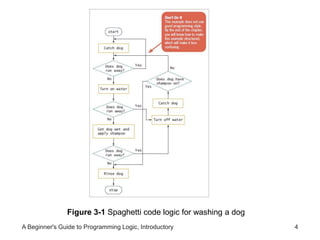
• Spaghetti code 
– Logically snarled program statements 
– Can be the result of poor program design 
– Programs often work but are difficult to read and 
maintain 
– Convoluted logic usually requires more code 
• Unstructured programs 
– Do not follow the rules of structured logic 
• Structured programs 
– Do follow rules of structured logic 
A Beginner's Guide to Programming Logic, Introductory 3
Figure 3-1 Spaghetti code logic for washing a dog 
A Beginner's Guide to Programming Logic, Introductory 4
Understanding the Three Basic 
Structures 
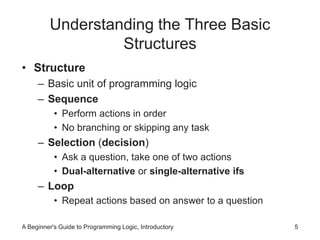
• Structure 
– Basic unit of programming logic 
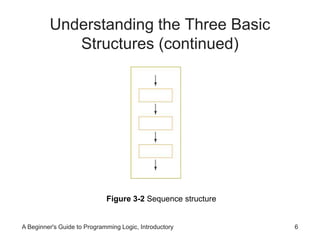
– Sequence 
• Perform actions in order 
• No branching or skipping any task 
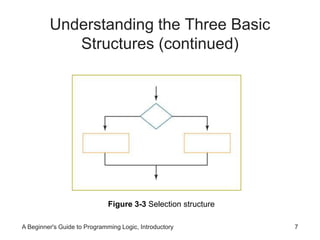
– Selection (decision) 
• Ask a question, take one of two actions 
• Dual-alternative or single-alternative ifs 
– Loop 
• Repeat actions based on answer to a question 
A Beginner's Guide to Programming Logic, Introductory 5
Understanding the Three Basic 
Structures (continued) 
Figure 3-2 Sequence structure 
A Beginner's Guide to Programming Logic, Introductory 6
Understanding the Three Basic 
Structures (continued) 
Figure 3-3 Selection structure 
A Beginner's Guide to Programming Logic, Introductory 7
Understanding the Three Basic 
Structures (continued) 
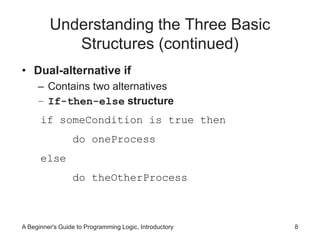
• Dual-alternative if 
– Contains two alternatives 
– If-then-else structure 
if someCondition is true then 
do oneProcess 
else 
do theOtherProcess 
A Beginner's Guide to Programming Logic, Introductory 8
Understanding the Three Basic 
Structures (continued) 
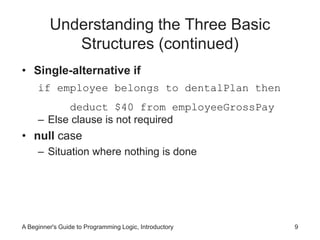
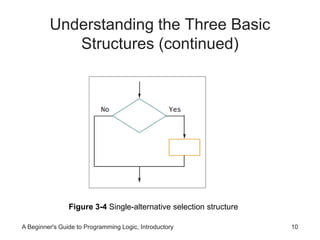
• Single-alternative if 
if employee belongs to dentalPlan then 
deduct $40 from employeeGrossPay 
– Else clause is not required 
• null case 
– Situation where nothing is done 
A Beginner's Guide to Programming Logic, Introductory 9
Understanding the Three Basic 
Structures (continued) 
Figure 3-4 Single-alternative selection structure 
A Beginner's Guide to Programming Logic, Introductory 10
Understanding the Three Basic 
Structures (continued) 
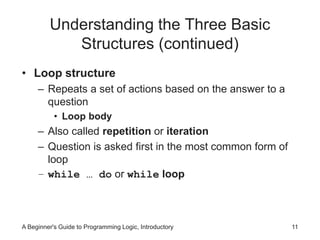
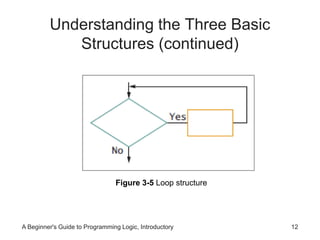
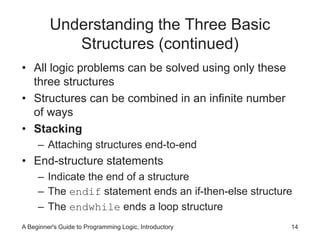
• Loop structure 
– Repeats a set of actions based on the answer to a 
question 
• Loop body 
– Also called repetition or iteration 
– Question is asked first in the most common form of 
loop 
– while … do or while loop 
A Beginner's Guide to Programming Logic, Introductory 11
Understanding the Three Basic 
Structures (continued) 
Figure 3-5 Loop structure 
A Beginner's Guide to Programming Logic, Introductory 12
Understanding the Three Basic 
Structures (continued) 
• Loop structure 
while testCondition continues to be true 
do someProcess 
while quantityInInventory remains low 
continue to orderItems 
A Beginner's Guide to Programming Logic, Introductory 13
Understanding the Three Basic 
Structures (continued) 
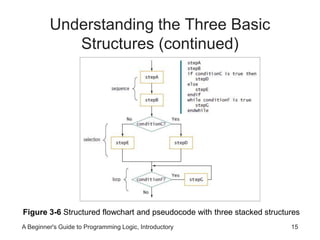
• All logic problems can be solved using only these 
three structures 
• Structures can be combined in an infinite number 
of ways 
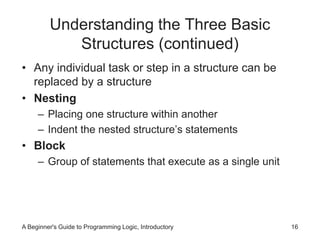
• Stacking 
– Attaching structures end-to-end 
• End-structure statements 
– Indicate the end of a structure 
– The endif statement ends an if-then-else structure 
– The endwhile ends a loop structure 
A Beginner's Guide to Programming Logic, Introductory 14
Understanding the Three Basic 
Structures (continued) 
Figure 3-6 Structured flowchart and pseudocode with three stacked structures 
A Beginner's Guide to Programming Logic, Introductory 15
Understanding the Three Basic 
Structures (continued) 
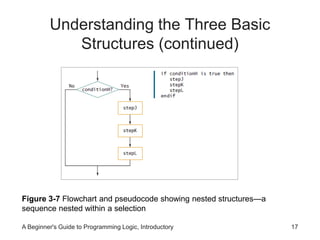
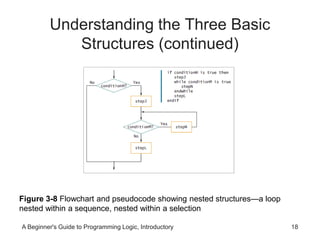
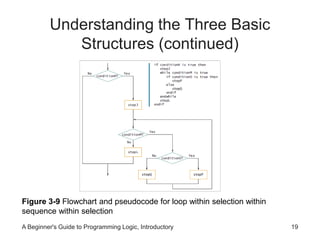
• Any individual task or step in a structure can be 
replaced by a structure 
• Nesting 
– Placing one structure within another 
– Indent the nested structure’s statements 
• Block 
– Group of statements that execute as a single unit 
A Beginner's Guide to Programming Logic, Introductory 16
Understanding the Three Basic 
Structures (continued) 
Figure 3-7 Flowchart and pseudocode showing nested structures—a 
sequence nested within a selection 
A Beginner's Guide to Programming Logic, Introductory 17
Understanding the Three Basic 
Structures (continued) 
Figure 3-8 Flowchart and pseudocode showing nested structures—a loop 
nested within a sequence, nested within a selection 
A Beginner's Guide to Programming Logic, Introductory 18
Understanding the Three Basic 
Structures (continued) 
Figure 3-9 Flowchart and pseudocode for loop within selection within 
sequence within selection 
A Beginner's Guide to Programming Logic, Introductory 19
Understanding the Three Basic 
Structures (continued) 
• Structured programs have the following 
characteristics: 
– Include only combinations of the three basic structures 
– Each of the structures has a single entry point and a 
single exit point 
– Structures can be stacked or connected to one 
another only at their entry or exit points 
– Any structure can be nested within another structure 
A Beginner's Guide to Programming Logic, Introductory 20
Using a Priming Input to Structure 
a Program 
• Priming read (or priming input) 
– Reads the first input data record 
– Outside the loop that reads the rest of the records 
– Helps keep the program structured 
• Analyze a flowchart for structure one step at a time 
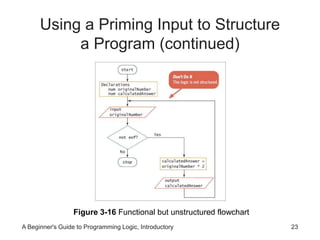
• Watch for unstructured loops that do not follow this 
order 
– First ask a question 
– Take action based on the answer 
– Return to ask the question again 
A Beginner's Guide to Programming Logic, Introductory 21
Using a Priming Input to Structure 
a Program (continued) 
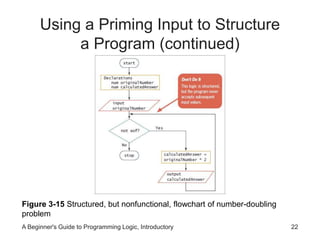
Figure 3-15 Structured, but nonfunctional, flowchart of number-doubling 
problem 
A Beginner's Guide to Programming Logic, Introductory 22
Using a Priming Input to Structure 
a Program (continued) 
Figure 3-16 Functional but unstructured flowchart 
A Beginner's Guide to Programming Logic, Introductory 23
Using a Priming Input to Structure 
a Program (continued) 
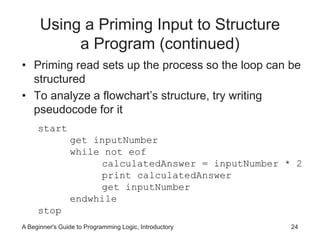
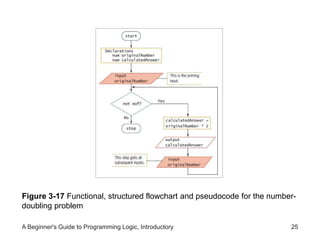
• Priming read sets up the process so the loop can be 
structured 
• To analyze a flowchart’s structure, try writing 
pseudocode for it 
start 
get inputNumber 
while not eof 
calculatedAnswer = inputNumber * 2 
print calculatedAnswer 
get inputNumber 
endwhile 
stop 
A Beginner's Guide to Programming Logic, Introductory 24
Figure 3-17 Functional, structured flowchart and pseudocode for the number-doubling 
problem 
A Beginner's Guide to Programming Logic, Introductory 25
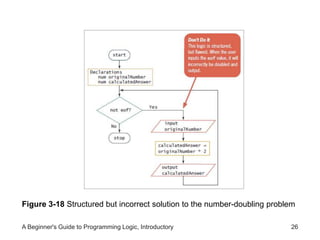
Figure 3-18 Structured but incorrect solution to the number-doubling problem 
A Beginner's Guide to Programming Logic, Introductory 26
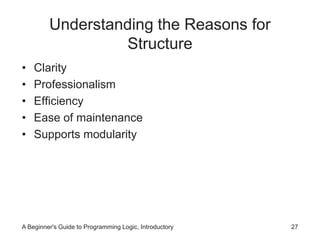
Understanding the Reasons for 
Structure 
• Clarity 
• Professionalism 
• Efficiency 
• Ease of maintenance 
• Supports modularity 
A Beginner's Guide to Programming Logic, Introductory 27
Recognizing Structure 
• Any set of instructions can be expressed in 
structured format 
• Any task to which you can apply rules can be 
expressed logically using sequence, selection, loop 
• It can be difficult to detect whether a flowchart is 
structured 
A Beginner's Guide to Programming Logic, Introductory 28
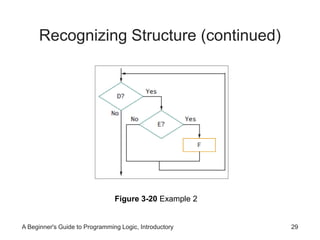
Recognizing Structure (continued) 
Figure 3-20 Example 2 
A Beginner's Guide to Programming Logic, Introductory 29
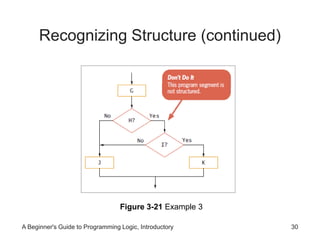
Recognizing Structure (continued) 
Figure 3-21 Example 3 
A Beginner's Guide to Programming Logic, Introductory 30
Recognizing Structure (continued) 
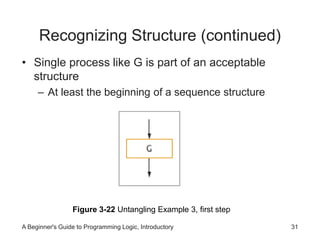
• Single process like G is part of an acceptable 
structure 
– At least the beginning of a sequence structure 
Figure 3-22 Untangling Example 3, first step 
A Beginner's Guide to Programming Logic, Introductory 31
Recognizing Structure (continued) 
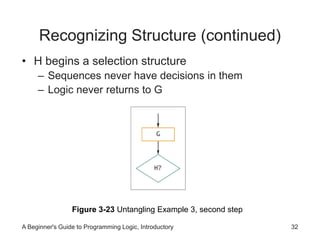
• H begins a selection structure 
– Sequences never have decisions in them 
– Logic never returns to G 
Figure 3-23 Untangling Example 3, second step 
A Beginner's Guide to Programming Logic, Introductory 32
Recognizing Structure (continued) 
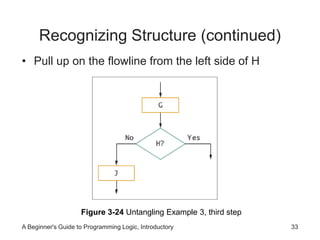
• Pull up on the flowline from the left side of H 
Figure 3-24 Untangling Example 3, third step 
A Beginner's Guide to Programming Logic, Introductory 33
Recognizing Structure (continued) 
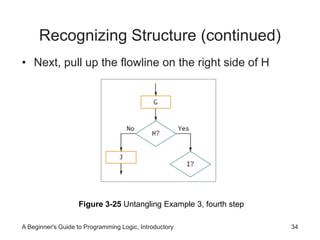
• Next, pull up the flowline on the right side of H 
Figure 3-25 Untangling Example 3, fourth step 
A Beginner's Guide to Programming Logic, Introductory 34
Recognizing Structure (continued) 
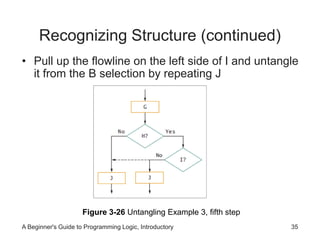
• Pull up the flowline on the left side of I and untangle 
it from the B selection by repeating J 
Figure 3-26 Untangling Example 3, fifth step 
A Beginner's Guide to Programming Logic, Introductory 35
Recognizing Structure (continued) 
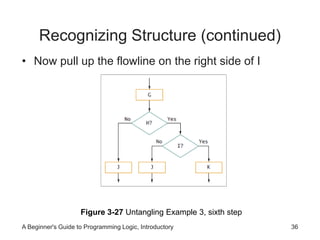
• Now pull up the flowline on the right side of I 
Figure 3-27 Untangling Example 3, sixth step 
A Beginner's Guide to Programming Logic, Introductory 36
Recognizing Structure (continued) 
• Bring together the loose ends of I and of H 
Figure 3-28 Finished flowchart and pseudocode for untangling Example 3 
A Beginner's Guide to Programming Logic, Introductory 37
Structuring and Modularizing 
Unstructured Logic 
• Dog-washing process 
– Unstructured 
– Can be reconfigured to be structured 
• First step simple sequence 
Figure 3-29 Washing the dog, part 1 
A Beginner's Guide to Programming Logic, Introductory 38
Structuring and Modularizing 
Unstructured Logic (continued) 
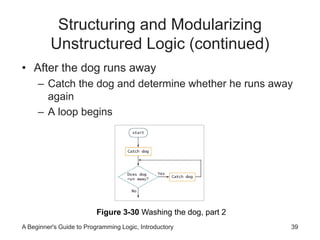
• After the dog runs away 
– Catch the dog and determine whether he runs away 
again 
– A loop begins 
Figure 3-30 Washing the dog, part 2 
A Beginner's Guide to Programming Logic, Introductory 39
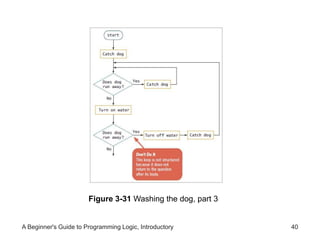
Figure 3-31 Washing the dog, part 3 
A Beginner's Guide to Programming Logic, Introductory 40
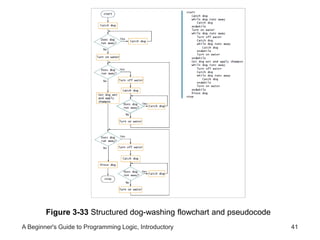
Figure 3-33 Structured dog-washing flowchart and pseudocode 
A Beginner's Guide to Programming Logic, Introductory 41
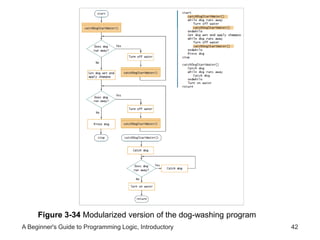
Figure 3-34 Modularized version of the dog-washing program 
A Beginner's Guide to Programming Logic, Introductory 42
Summary 
• Spaghetti code 
– Snarled program logic 
• Three basic structures 
– Sequence, selection, and loop 
– Combined by stacking and nesting 
• Priming read 
– Statement that reads the first input data record 
A Beginner's Guide to Programming Logic, Introductory 43
Summary (continued) 
• Structured techniques promote: 
– Clarity 
– Professionalism 
– Efficiency 
– Modularity 
• Flowchart can be made structured by untangling 
A Beginner's Guide to Programming Logic, Introductory 44

Logic Formulation 3

  • 1.
    A Beginner’s Guideto Programming Logic, Introductory Chapter 3 Understanding Structure
  • 2.
    Objectives In thischapter, you will learn about: • The features of unstructured spaghetti code • The three basic structures—sequence, selection, and loop • Using a priming input to structure a program • The need for structure • Recognizing structure • Structuring and modularizing unstructured logic A Beginner's Guide to Programming Logic, Introductory 2
  • 3.
    Understanding Unstructured SpaghettiCode • Spaghetti code – Logically snarled program statements – Can be the result of poor program design – Programs often work but are difficult to read and maintain – Convoluted logic usually requires more code • Unstructured programs – Do not follow the rules of structured logic • Structured programs – Do follow rules of structured logic A Beginner's Guide to Programming Logic, Introductory 3
  • 4.
    Figure 3-1 Spaghetticode logic for washing a dog A Beginner's Guide to Programming Logic, Introductory 4
  • 5.
    Understanding the ThreeBasic Structures • Structure – Basic unit of programming logic – Sequence • Perform actions in order • No branching or skipping any task – Selection (decision) • Ask a question, take one of two actions • Dual-alternative or single-alternative ifs – Loop • Repeat actions based on answer to a question A Beginner's Guide to Programming Logic, Introductory 5
  • 6.
    Understanding the ThreeBasic Structures (continued) Figure 3-2 Sequence structure A Beginner's Guide to Programming Logic, Introductory 6
  • 7.
    Understanding the ThreeBasic Structures (continued) Figure 3-3 Selection structure A Beginner's Guide to Programming Logic, Introductory 7
  • 8.
    Understanding the ThreeBasic Structures (continued) • Dual-alternative if – Contains two alternatives – If-then-else structure if someCondition is true then do oneProcess else do theOtherProcess A Beginner's Guide to Programming Logic, Introductory 8
  • 9.
    Understanding the ThreeBasic Structures (continued) • Single-alternative if if employee belongs to dentalPlan then deduct $40 from employeeGrossPay – Else clause is not required • null case – Situation where nothing is done A Beginner's Guide to Programming Logic, Introductory 9
  • 10.
    Understanding the ThreeBasic Structures (continued) Figure 3-4 Single-alternative selection structure A Beginner's Guide to Programming Logic, Introductory 10
  • 11.
    Understanding the ThreeBasic Structures (continued) • Loop structure – Repeats a set of actions based on the answer to a question • Loop body – Also called repetition or iteration – Question is asked first in the most common form of loop – while … do or while loop A Beginner's Guide to Programming Logic, Introductory 11
  • 12.
    Understanding the ThreeBasic Structures (continued) Figure 3-5 Loop structure A Beginner's Guide to Programming Logic, Introductory 12
  • 13.
    Understanding the ThreeBasic Structures (continued) • Loop structure while testCondition continues to be true do someProcess while quantityInInventory remains low continue to orderItems A Beginner's Guide to Programming Logic, Introductory 13
  • 14.
    Understanding the ThreeBasic Structures (continued) • All logic problems can be solved using only these three structures • Structures can be combined in an infinite number of ways • Stacking – Attaching structures end-to-end • End-structure statements – Indicate the end of a structure – The endif statement ends an if-then-else structure – The endwhile ends a loop structure A Beginner's Guide to Programming Logic, Introductory 14
  • 15.
    Understanding the ThreeBasic Structures (continued) Figure 3-6 Structured flowchart and pseudocode with three stacked structures A Beginner's Guide to Programming Logic, Introductory 15
  • 16.
    Understanding the ThreeBasic Structures (continued) • Any individual task or step in a structure can be replaced by a structure • Nesting – Placing one structure within another – Indent the nested structure’s statements • Block – Group of statements that execute as a single unit A Beginner's Guide to Programming Logic, Introductory 16
  • 17.
    Understanding the ThreeBasic Structures (continued) Figure 3-7 Flowchart and pseudocode showing nested structures—a sequence nested within a selection A Beginner's Guide to Programming Logic, Introductory 17
  • 18.
    Understanding the ThreeBasic Structures (continued) Figure 3-8 Flowchart and pseudocode showing nested structures—a loop nested within a sequence, nested within a selection A Beginner's Guide to Programming Logic, Introductory 18
  • 19.
    Understanding the ThreeBasic Structures (continued) Figure 3-9 Flowchart and pseudocode for loop within selection within sequence within selection A Beginner's Guide to Programming Logic, Introductory 19
  • 20.
    Understanding the ThreeBasic Structures (continued) • Structured programs have the following characteristics: – Include only combinations of the three basic structures – Each of the structures has a single entry point and a single exit point – Structures can be stacked or connected to one another only at their entry or exit points – Any structure can be nested within another structure A Beginner's Guide to Programming Logic, Introductory 20
  • 21.
    Using a PrimingInput to Structure a Program • Priming read (or priming input) – Reads the first input data record – Outside the loop that reads the rest of the records – Helps keep the program structured • Analyze a flowchart for structure one step at a time • Watch for unstructured loops that do not follow this order – First ask a question – Take action based on the answer – Return to ask the question again A Beginner's Guide to Programming Logic, Introductory 21
  • 22.
    Using a PrimingInput to Structure a Program (continued) Figure 3-15 Structured, but nonfunctional, flowchart of number-doubling problem A Beginner's Guide to Programming Logic, Introductory 22
  • 23.
    Using a PrimingInput to Structure a Program (continued) Figure 3-16 Functional but unstructured flowchart A Beginner's Guide to Programming Logic, Introductory 23
  • 24.
    Using a PrimingInput to Structure a Program (continued) • Priming read sets up the process so the loop can be structured • To analyze a flowchart’s structure, try writing pseudocode for it start get inputNumber while not eof calculatedAnswer = inputNumber * 2 print calculatedAnswer get inputNumber endwhile stop A Beginner's Guide to Programming Logic, Introductory 24
  • 25.
    Figure 3-17 Functional,structured flowchart and pseudocode for the number-doubling problem A Beginner's Guide to Programming Logic, Introductory 25
  • 26.
    Figure 3-18 Structuredbut incorrect solution to the number-doubling problem A Beginner's Guide to Programming Logic, Introductory 26
  • 27.
    Understanding the Reasonsfor Structure • Clarity • Professionalism • Efficiency • Ease of maintenance • Supports modularity A Beginner's Guide to Programming Logic, Introductory 27
  • 28.
    Recognizing Structure •Any set of instructions can be expressed in structured format • Any task to which you can apply rules can be expressed logically using sequence, selection, loop • It can be difficult to detect whether a flowchart is structured A Beginner's Guide to Programming Logic, Introductory 28
  • 29.
    Recognizing Structure (continued) Figure 3-20 Example 2 A Beginner's Guide to Programming Logic, Introductory 29
  • 30.
    Recognizing Structure (continued) Figure 3-21 Example 3 A Beginner's Guide to Programming Logic, Introductory 30
  • 31.
    Recognizing Structure (continued) • Single process like G is part of an acceptable structure – At least the beginning of a sequence structure Figure 3-22 Untangling Example 3, first step A Beginner's Guide to Programming Logic, Introductory 31
  • 32.
    Recognizing Structure (continued) • H begins a selection structure – Sequences never have decisions in them – Logic never returns to G Figure 3-23 Untangling Example 3, second step A Beginner's Guide to Programming Logic, Introductory 32
  • 33.
    Recognizing Structure (continued) • Pull up on the flowline from the left side of H Figure 3-24 Untangling Example 3, third step A Beginner's Guide to Programming Logic, Introductory 33
  • 34.
    Recognizing Structure (continued) • Next, pull up the flowline on the right side of H Figure 3-25 Untangling Example 3, fourth step A Beginner's Guide to Programming Logic, Introductory 34
  • 35.
    Recognizing Structure (continued) • Pull up the flowline on the left side of I and untangle it from the B selection by repeating J Figure 3-26 Untangling Example 3, fifth step A Beginner's Guide to Programming Logic, Introductory 35
  • 36.
    Recognizing Structure (continued) • Now pull up the flowline on the right side of I Figure 3-27 Untangling Example 3, sixth step A Beginner's Guide to Programming Logic, Introductory 36
  • 37.
    Recognizing Structure (continued) • Bring together the loose ends of I and of H Figure 3-28 Finished flowchart and pseudocode for untangling Example 3 A Beginner's Guide to Programming Logic, Introductory 37
  • 38.
    Structuring and Modularizing Unstructured Logic • Dog-washing process – Unstructured – Can be reconfigured to be structured • First step simple sequence Figure 3-29 Washing the dog, part 1 A Beginner's Guide to Programming Logic, Introductory 38
  • 39.
    Structuring and Modularizing Unstructured Logic (continued) • After the dog runs away – Catch the dog and determine whether he runs away again – A loop begins Figure 3-30 Washing the dog, part 2 A Beginner's Guide to Programming Logic, Introductory 39
  • 40.
    Figure 3-31 Washingthe dog, part 3 A Beginner's Guide to Programming Logic, Introductory 40
  • 41.
    Figure 3-33 Structureddog-washing flowchart and pseudocode A Beginner's Guide to Programming Logic, Introductory 41
  • 42.
    Figure 3-34 Modularizedversion of the dog-washing program A Beginner's Guide to Programming Logic, Introductory 42
  • 43.
    Summary • Spaghetticode – Snarled program logic • Three basic structures – Sequence, selection, and loop – Combined by stacking and nesting • Priming read – Statement that reads the first input data record A Beginner's Guide to Programming Logic, Introductory 43
  • 44.
    Summary (continued) •Structured techniques promote: – Clarity – Professionalism – Efficiency – Modularity • Flowchart can be made structured by untangling A Beginner's Guide to Programming Logic, Introductory 44