UNIT-I ALGORITHMIC PROBLEM
SOLVING
• By
K.Karthick, AP/CSE
Kongunadu College Of Engineering And
Technology, Trichy
Algorithm -Introduction
Introduction:
After the preparation of suitable plan for
developing the program by it’s logic, The
correct sequence and procedure of
instructions required to complete the task.
The algorithms is also used to refer the
logic of a program.
Definition:
Algorithm is defined as a step by step
procedure for solving any problem.
It is also a precise rule to specifying how to
solve a problem,
An algorithm is a sequence of finite
instructions used for calculation and data
processing.
Example:
STEP-1: Start
STEP-2: Read the value of radius r
STEP-3: Calculate Area=3.14*r*r
STEP-4: Print the area of circle
STEP-5: Stop
Characteristics of Algorithm
• An Algorithm contains step by step effective
information, It is not a computer program ,It is
one of the basic tool in problem solving.
Characteristics:
Algorithm has a finite number of inputs.
Every instruction should be precise and
unambiguous.
It looks like a normal English.
Effectiveness of each step is very important.
The desired output must obtained only after the
algorithm terminates.
The algorithm should written in sequence.
Qualities of an Algorithm
Different algorithm may perform the same task
with different set of instruction. Some algorithm is
better than the other in solving problem.
The following factors that determine the Quality of
algorithm are :
1.Time
2. Memory
3. Accuracy
4. Sequence
5. Generability
Building blocks of Algorithm
• Instruction/Statements
• State
• Control flow
• functions
Statements:
• Reserved words-words with predefined meaning
• Identifier- words created by programmer
• Literals- int, float, character, string
• Operators- unary, binary, ternary
State:
• Each step in an algorithm is a state.
• Start state, Input state, terminate in a defined
end-state, etc
Control flow:
• Control flow is the flow of control.
• It is used to determine what selection of code
is run in a program. It is the order in which the
program or statements are executed.
• It contains
(i) sequential
(iii) selective(decision making)
(iv) Iteration(loops)
1. Sequence Structure:
• the sequential control structure is used to
perform the actions one after another.
Eg:
Step 1: start
Step 2:Input first number as A
Step 3: Input second number as B
Step 4: set sum= A+B
Step 5: Print sum
Step 6:Stop
2. Selection Structure:
• Selection control structures (or) Decision
structures allows the program to make a
choice between two alternate paths whether
it is true or false.
Eg: Step 1: start
Step 2:Input first number as A
Step 3: Input second number as B
Step 4: IF A=B
print “equal”
ELSE
print ”Not equal”
[End of IF]
step 5: stop
IF THEN STRUCTURE
IF THEN ELSE STRUCTURE
CASE STRUCTURE
3. Iteration(Loops):
Iterative structures are used when part of
the program is to be executed several times.
Eg:
Step 1: [initialize]set I=1,N=10
Step 2:Repeat steps 3 & 4 while I<=N
Step 3: Print I
Step 4: set I=I+1
[End of the loop]
Step 5: end
Functions:
• Functions are “self contained” modules of
code that accomplish specific task.
• Functions usually “take in” data, process it
and “return “ result.
• Once a function is written, it can be used over
and over again.
• Functions can be “called” from the inside of
other functions.
Notation
1. Pseudocode
2. Flow chart
3. Programming language
Pseudocode:
pseudo means imitation
code means instruction
• Pseudo codes cannot be run, and there is no real
formatting or rules.
• Pseudo codes are an outline of a program that can
easily be converted into programming statements.
• Pseudo codes are not really codes, it is a mix of
choice of programming languages and your
preferred human languages.
Eg: sum of two numbers
READ the value of variables a and B
sum= A+B
WRITE the output of sum
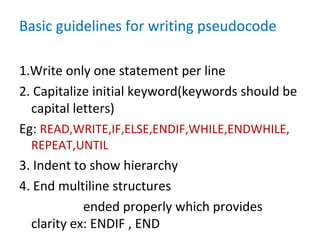
Basic guidelines for writing pseudocode
1.Write only one statement per line
2. Capitalize initial keyword(keywords should be
capital letters)
Eg: READ,WRITE,IF,ELSE,ENDIF,WHILE,ENDWHILE,
REPEAT,UNTIL
3. Indent to show hierarchy
4. End multiline structures
ended properly which provides
clarity ex: ENDIF , END
• 5. Keep statements language independent
• user can write in whatever language they are most
comfortable .
• Advantages
– Can be easily done on a word processor
– Easily modified
– It is simple like English statements
– No special symbols used
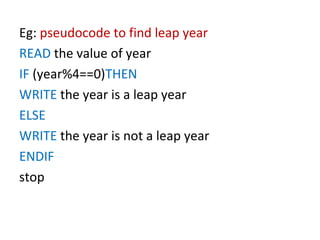
Eg: pseudocode to find leap year
READ the value of year
IF (year%4==0)THEN
WRITE the year is a leap year
ELSE
WRITE the year is not a leap year
ENDIF
stop
Flowchart
• Flowchart is a pictorial representation of an
algorithm.
• A flowchart uses different shaped symbols for
representing different instruction and this
information written into small boxes using
clear statement.
• Here lines and arrow mark represent flow of
operation.
Aim of flowchart
• Program preparation is simplified
• Easier to understand
• Provide effective documentation
• Easy to analyze and compare with various
method
• Reviewing and debugging is easy
Flowchart Basic symbols
• Flow lines
• Start and Terminal symbols
• Input/output symbols
• Process symbols
• Decision symbols
• Connectors
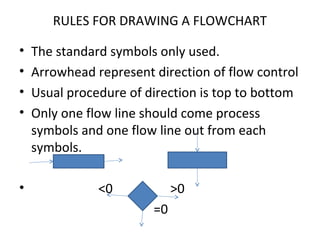
RULES FOR DRAWING A FLOWCHART
• The standard symbols only used.
• Arrowhead represent direction of flow control
• Usual procedure of direction is top to bottom
• Only one flow line should come process
symbols and one flow line out from each
symbols.
• <0 >0
=0
Algorithm to perform addition
Step-1: Start the program
Step-2: Read the input values a,b
Step-3:Perform addition using the formula
c=a+b;
Step-4:write the result c
Step-5:stop the program.
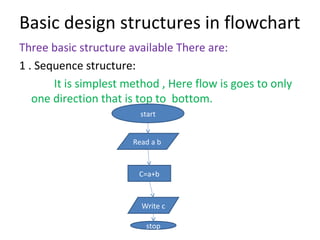
Basic design structures in flowchart
Three basic structure available There are:
1 . Sequence structure:
It is simplest method , Here flow is goes to only
one direction that is top to bottom.
start
C=a+b
Read a b
Write c
stop
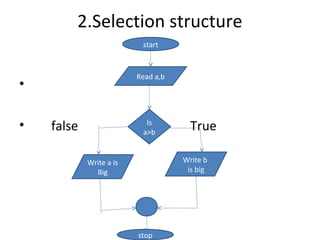
2.Selection structure
•
• false TrueIs
a>b
Write a is
Big
Write b
is big
stop
Read a,b
start
3. Loop structure
Top tested loop
No
Yes
start
Add 1 to count
Read
count =0
Write
count
If
count<5
Stop
Bottom tested loop
start
Add 1 to count
Read
count =0
Write
count
If
count<5
Stop
Advantages of Flowcharts
1. To understand the logic clearly
2. Better communication
3. Effective analysis (problem can be solved)
4. Effective synthesis
5. Effective coding
6. Proper program documentation
7. Systematic Debugging
8. Systematic testing
9. Efficient Program Maintenance.
Programming Language
Types:
(i)Machine language (eg: 01001101)
(ii)Assembly language (eg:mnemonics)
start
add x,y
sub x,y
(iii)High level language
Main()
{
if(x>y)
{
max=x;
}
else
{
max=y;
}
……………
}

Unit 1 psp

  • 1.
    UNIT-I ALGORITHMIC PROBLEM SOLVING •By K.Karthick, AP/CSE Kongunadu College Of Engineering And Technology, Trichy
  • 2.
    Algorithm -Introduction Introduction: After thepreparation of suitable plan for developing the program by it’s logic, The correct sequence and procedure of instructions required to complete the task. The algorithms is also used to refer the logic of a program.
  • 3.
    Definition: Algorithm is definedas a step by step procedure for solving any problem. It is also a precise rule to specifying how to solve a problem, An algorithm is a sequence of finite instructions used for calculation and data processing. Example: STEP-1: Start STEP-2: Read the value of radius r STEP-3: Calculate Area=3.14*r*r STEP-4: Print the area of circle STEP-5: Stop
  • 4.
    Characteristics of Algorithm •An Algorithm contains step by step effective information, It is not a computer program ,It is one of the basic tool in problem solving. Characteristics: Algorithm has a finite number of inputs. Every instruction should be precise and unambiguous. It looks like a normal English. Effectiveness of each step is very important. The desired output must obtained only after the algorithm terminates. The algorithm should written in sequence.
  • 5.
    Qualities of anAlgorithm Different algorithm may perform the same task with different set of instruction. Some algorithm is better than the other in solving problem. The following factors that determine the Quality of algorithm are : 1.Time 2. Memory 3. Accuracy 4. Sequence 5. Generability
  • 6.
    Building blocks ofAlgorithm • Instruction/Statements • State • Control flow • functions
  • 7.
    Statements: • Reserved words-wordswith predefined meaning • Identifier- words created by programmer • Literals- int, float, character, string • Operators- unary, binary, ternary State: • Each step in an algorithm is a state. • Start state, Input state, terminate in a defined end-state, etc
  • 8.
    Control flow: • Controlflow is the flow of control. • It is used to determine what selection of code is run in a program. It is the order in which the program or statements are executed. • It contains (i) sequential (iii) selective(decision making) (iv) Iteration(loops)
  • 9.
    1. Sequence Structure: •the sequential control structure is used to perform the actions one after another. Eg: Step 1: start Step 2:Input first number as A Step 3: Input second number as B Step 4: set sum= A+B Step 5: Print sum Step 6:Stop
  • 10.
    2. Selection Structure: •Selection control structures (or) Decision structures allows the program to make a choice between two alternate paths whether it is true or false. Eg: Step 1: start Step 2:Input first number as A Step 3: Input second number as B Step 4: IF A=B print “equal” ELSE print ”Not equal” [End of IF] step 5: stop
  • 11.
  • 12.
    IF THEN ELSESTRUCTURE
  • 13.
  • 14.
    3. Iteration(Loops): Iterative structuresare used when part of the program is to be executed several times. Eg: Step 1: [initialize]set I=1,N=10 Step 2:Repeat steps 3 & 4 while I<=N Step 3: Print I Step 4: set I=I+1 [End of the loop] Step 5: end
  • 15.
    Functions: • Functions are“self contained” modules of code that accomplish specific task. • Functions usually “take in” data, process it and “return “ result. • Once a function is written, it can be used over and over again. • Functions can be “called” from the inside of other functions.
  • 16.
    Notation 1. Pseudocode 2. Flowchart 3. Programming language
  • 17.
    Pseudocode: pseudo means imitation codemeans instruction • Pseudo codes cannot be run, and there is no real formatting or rules. • Pseudo codes are an outline of a program that can easily be converted into programming statements. • Pseudo codes are not really codes, it is a mix of choice of programming languages and your preferred human languages.
  • 18.
    Eg: sum oftwo numbers READ the value of variables a and B sum= A+B WRITE the output of sum
  • 19.
    Basic guidelines forwriting pseudocode 1.Write only one statement per line 2. Capitalize initial keyword(keywords should be capital letters) Eg: READ,WRITE,IF,ELSE,ENDIF,WHILE,ENDWHILE, REPEAT,UNTIL 3. Indent to show hierarchy 4. End multiline structures ended properly which provides clarity ex: ENDIF , END
  • 20.
    • 5. Keepstatements language independent • user can write in whatever language they are most comfortable . • Advantages – Can be easily done on a word processor – Easily modified – It is simple like English statements – No special symbols used
  • 21.
    Eg: pseudocode tofind leap year READ the value of year IF (year%4==0)THEN WRITE the year is a leap year ELSE WRITE the year is not a leap year ENDIF stop
  • 22.
    Flowchart • Flowchart isa pictorial representation of an algorithm. • A flowchart uses different shaped symbols for representing different instruction and this information written into small boxes using clear statement. • Here lines and arrow mark represent flow of operation.
  • 23.
    Aim of flowchart •Program preparation is simplified • Easier to understand • Provide effective documentation • Easy to analyze and compare with various method • Reviewing and debugging is easy
  • 24.
    Flowchart Basic symbols •Flow lines • Start and Terminal symbols • Input/output symbols • Process symbols • Decision symbols • Connectors
  • 25.
    RULES FOR DRAWINGA FLOWCHART • The standard symbols only used. • Arrowhead represent direction of flow control • Usual procedure of direction is top to bottom • Only one flow line should come process symbols and one flow line out from each symbols. • <0 >0 =0
  • 26.
    Algorithm to performaddition Step-1: Start the program Step-2: Read the input values a,b Step-3:Perform addition using the formula c=a+b; Step-4:write the result c Step-5:stop the program.
  • 27.
    Basic design structuresin flowchart Three basic structure available There are: 1 . Sequence structure: It is simplest method , Here flow is goes to only one direction that is top to bottom. start C=a+b Read a b Write c stop
  • 28.
    2.Selection structure • • falseTrueIs a>b Write a is Big Write b is big stop Read a,b start
  • 29.
    3. Loop structure Toptested loop No Yes start Add 1 to count Read count =0 Write count If count<5 Stop
  • 30.
    Bottom tested loop start Add1 to count Read count =0 Write count If count<5 Stop
  • 31.
    Advantages of Flowcharts 1.To understand the logic clearly 2. Better communication 3. Effective analysis (problem can be solved) 4. Effective synthesis 5. Effective coding 6. Proper program documentation 7. Systematic Debugging 8. Systematic testing 9. Efficient Program Maintenance.
  • 32.
    Programming Language Types: (i)Machine language(eg: 01001101) (ii)Assembly language (eg:mnemonics) start add x,y sub x,y
  • 33.