Algorithms andAlgorithms and
Control Flow StructuresControl Flow Structures
AlgorithmsAlgorithms
 An algorithm is a sequential collection of
actions which is used to solve a problem.
 It is a segment of precise steps that
describes exactly the tasks to be performed,
and the order in which they are to be carried
out.
AlgorithmAlgorithm
 There Are two ways to outline the precise
steps of solving a problem.

Algorithm

Flowchart
Algorithm & FlowchartAlgorithm & Flowchart
 It is a structured form of the sequential
actions to be carried out, which is
written in simple English language..
AlgorithmAlgorithm
1. Start
2. Declare Variables A, B and C
3. Input first number in A
4. Input second number in B
5. C = A + B
6. Print the value of C
7. Stop
1. Start
2. Declare Variables R and A
3. Input Radius in R
4. A = 3.14 * R * R
5. Print the value of A
6. Stop
Algorithm for the program of
addition of 2 numbers.
Algorithm for the program of
Calculating area of circle.
FlowchartFlowchart
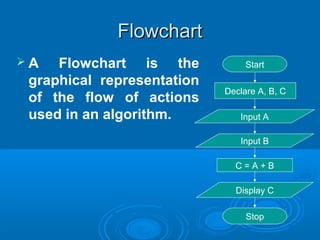
 A Flowchart is the
graphical representation
of the flow of actions
used in an algorithm.
Start
Input A
Input B
C = A + B
Declare A, B, C
Display C
Stop
Symbols Used in FlowchartSymbols Used in Flowchart
Start
Input Radius in R
A = 3.14 * R * R
Declare A, R
Display A
Stop
Terminal
Input/Output
Process
Flow Lines
Condition
True False
Entry
Decision
Making
Control FlowControl Flow
Structures/Control StatementsStructures/Control Statements
 At a simplistic level a program executes its
instructions sequentially in the order in
which they are written,
 It starts with the first line written in main()
function and ends with the last line, always
moving from top to bottom.
Control flow structures.Control flow structures.
 But most real-time programs are more
complex than a simple linear sequence.
 Real programs contains numerous code
blocks that must be executed only if
certain conditions are met, or some code
blocks must be executed repeatedly until
certain conditions evaluates to false.
Control flow structures.Control flow structures.
 Control flow statements are the tools
programmers use to make decisions
about which statement to execute from the
available choices,
 It also allows us to change the flow of
execution in a program depending upon
certain conditions.
Control flow structures.Control flow structures.
Control Flow StructureControl Flow Structure
 4 Categories of Control Statements Are

Sequential Control Structure

Selection / Decision Control Structure

Iterative / Repetitive / Loop Control Structure

Jump Statements
Start
Input a number in A
B = A * A
Declare A, B
Display B
Stop
Sequential Control StructureSequential Control Structure
Step by Step Flow of
Execution
Sequential Control StructureSequential Control Structure
voidvoid mainmain()()
{{
intint aa,, bb;;
clrscrclrscr();();
printfprintf((“Enter a no : ““Enter a no : “););
scanfscanf((“%d”“%d”,&,&aa););
bb == a * aa * a;;
printfprintf((“nSquare is“nSquare is : %d”: %d”,, bb););
getchgetch();();
}}
Control flow structuresControl flow structures
Start
Statement
Statement
Statement
Stop
Start
Stop
Test
Condition
Some Statement
Sequential Control Structure Selection Control Structure /
Decision Making
Some Statement
True False
Control flow structuresControl flow structures
Start
Stop
Test
Condition
Some Statement
Selection Control Structure /
Decision Making
Some Statement
Start
Stop
Test
Condition
Loop Statements
Loop / Repetitive Control Structure
True False
True
False
Control flow structures.Control flow structures.
Sequential Selection/Decision Repetition/Loop Jump Statements
If
switch
? :
(Conditional
Operator)
while
do…while
for
break
goto
continue
return
 Selection / Decision control statementsSelection / Decision control statements
allow us to decide whether or not toallow us to decide whether or not to
execute a particular statement or a blockexecute a particular statement or a block
of statements enclosed in curly braces.of statements enclosed in curly braces.
 It also allows to execute a particularIt also allows to execute a particular
statement or a block of statement withinstatement or a block of statement within
the available two or more choices.the available two or more choices.
Selection/Decision Control StructureSelection/Decision Control Structure
 Decision Control Structure consists ofDecision Control Structure consists of

Some type of Condition (T/F Test).Some type of Condition (T/F Test).

One or more block of executable code.One or more block of executable code.

Which block of code will execute depends onWhich block of code will execute depends on
the result of the condition (true or false)the result of the condition (true or false)
Selection/Decision Control StructureSelection/Decision Control Structure
 C supports 3 types of selection controlC supports 3 types of selection control
statements.statements.

ifif

switchswitch

?: (Conditional (Ternary)Operator)?: (Conditional (Ternary)Operator)
Selection/Decision Control StructureSelection/Decision Control Structure
 The if statement is used to execute a
single statement or a set of statements
based on the evaluation of a condition.
 It is basically a two-way decision control
structure.
The if...else StatementThe if...else Statement
if(condition)if(condition)
{{
statement 1;statement 1;
}}
elseelse
{{
statement 2;statement 2;
}}
If…else… the Two-Way BranchingIf…else… the Two-Way Branching
Statement 1 Statement 2
Condition
Entry
Exit
True False
if(condition)if(condition)
{{
statement 1;statement 1;
}}
elseelse
{{
statement 2;statement 2;
}}
The if...else StatementThe if...else Statement
True Part
False Part
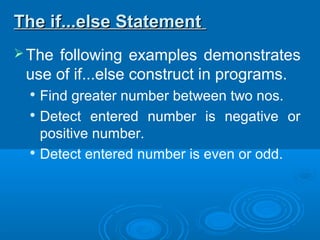
The following examples demonstrates
use of if...else construct in programs.

Find greater number between two nos.

Detect entered number is negative or
positive number.

Detect entered number is even or odd.
The if...else StatementThe if...else Statement
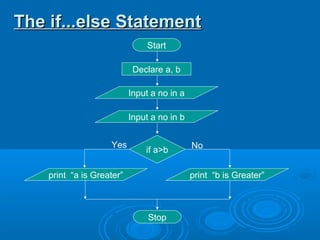
Start
Input a no in b
Declare a, b
Input a no in a
if a>b
print “a is Greater” print “b is Greater”
Stop
Yes No
voidvoid mainmain()()
{{
intint aa,, bb;;
clrscrclrscr();();
printfprintf((“Enter Two Nosn”“Enter Two Nosn”););
scanfscanf((“%d%d”“%d%d”,&,&aa,&,&bb););
ifif((aa>>bb))
{{
printfprintf((“First No is greater”“First No is greater”););
}}
elseelse
{{
printfprintf((“Second No is greater”“Second No is greater”););
}}
}}
The if...else StatementThe if...else Statement
Start
Declare N
Input a number in N
if N>0
print “Negative Number”
Stop
Yes No
print “Positive Number”
The if...else StatementThe if...else Statement
voidvoid mainmain()()
{{
intint nn;;
clrscrclrscr();();
printfprintf((“Enter A No : ”“Enter A No : ”););
scanfscanf((“%d”“%d”,&,&nn););
ifif((nn>>00))
{{
printfprintf((“It’s A Positive Number”“It’s A Positive Number”););
}}
elseelse
{{
printfprintf((“It’s A Negative Number”“It’s A Negative Number”););
}}
}}
The if...else StatementThe if...else Statement
Start
Declare N
Input a number in N
if N%2==0
print “Even Number” print “Odd Number”
Stop
Yes No
The if...else StatementThe if...else Statement
voidvoid mainmain()()
{{
intint nn;;
clrscrclrscr();();
printfprintf((“Enter A No : ”“Enter A No : ”););
scanfscanf((“%d”“%d”,&,&nn););
ifif((nn%%22====00))
{{
printfprintf((“It’s A Even Number”“It’s A Even Number”););
}}
elseelse
{{
printfprintf((“It’s A Odd Number”“It’s A Odd Number”););
}}
}}
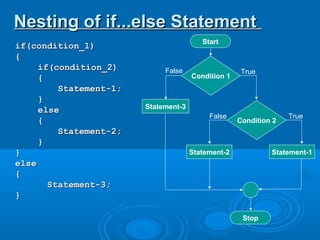
 When the true or false part of an if
statement contains another if-else
statement, an extremely useful
construction is got which is mostly used
for multi way decision.
Nesting of if...else StatementNesting of if...else Statement
if(condition_1)if(condition_1)
{{
if(condition_2)if(condition_2)
{{
Statement-1;Statement-1;
}}
elseelse
{{
Statement-2;Statement-2;
}}
}}
elseelse
{{
Statement-3;Statement-3;
}}
Nesting of if...else StatementNesting of if...else Statement
Stop
Condition 1
Statement-3
Statement-2
False True
Start
Condition 2
Statement-1
False True
if(condition_1)if(condition_1)
{{
Statement-1;Statement-1;
}}
elseelse
{{
if(condition_2)if(condition_2)
{{
Statement-2;Statement-2;
}}
elseelse
{{
Statement-3;Statement-3;
}}
}}
Nesting of if...else StatementNesting of if...else Statement
Stop
Condition 1
Statement-1
Statement-3
False True
Start
Condition 2
Statement-2
False True
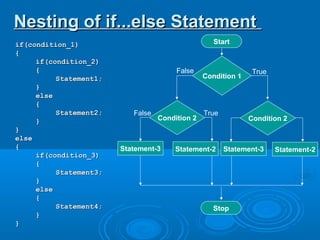
if(condition_1)if(condition_1)
{{
if(condition_2)if(condition_2)
{{
Statement1;Statement1;
}}
elseelse
{{
Statement2;Statement2;
}}
}}
elseelse
{{
if(condition_3)if(condition_3)
{{
Statement3;Statement3;
}}
elseelse
{{
Statement4;Statement4;
}}
}}
Nesting of if...else StatementNesting of if...else Statement
Condition 1
Stop
Statement-3
False True
Start
Condition 2
Statement-2
False True
Statement-3
Condition 2
Statement-2
 Example to detect greater no between two
numbers, The program should display
appropriate message if both numbers are
equal.
Nesting of if...else StatementNesting of if...else Statement
Start
Declare a, b
Input 2 numbers in a and b
if a>b
print “a is Greater” print “b is Greater”
Stop
Yes No
if a==b
print “Equal Numbers”
Yes No
Nesting of if...else StatementNesting of if...else Statement
voidvoid mainmain()()
{{
intint n1n1,, n2n2;;
printfprintf((“Enter Two Nosn”“Enter Two Nosn”););
scanfscanf((“%d%d”“%d%d”,&,&n1n1,&,&n2n2););
ifif((n1n1====n2n2))
{{
printfprintf((“Both Nos Are Equal”“Both Nos Are Equal”););
}}
elseelse
{{
ifif((n1n1>>n2n2))
{{
printfprintf((“First No is greater”“First No is greater”););
}}
elseelse
{{
printfprintf((“Second No is greater”“Second No is greater”););
}}
}}
}}
Nesting of if...else StatementNesting of if...else Statement
if(condition_1)if(condition_1)
{{
Statement1;Statement1;
}}
elseelse
{{
if(condition_2)if(condition_2)
{{
Statement2;Statement2;
}}
elseelse
{{
Statement3;Statement3;
}}
}}
The if...else...if LadderThe if...else...if Ladder
if(condition_1)if(condition_1)
{{
Statement1;Statement1;
}}
else if(condition_2)else if(condition_2)
{{
Statement2;Statement2;
}}
elseelse
{{
Statement3;Statement3;
}}
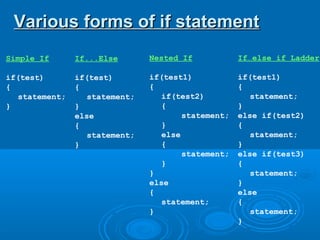
Simple If
if(test)
{
statement;
}
Various forms of if statementVarious forms of if statement
If...Else
if(test)
{
statement;
}
else
{
statement;
}
Nested If
if(test1)
{
if(test2)
{
statement;
}
else
{
statement;
}
}
else
{
statement;
}
If…else if Ladder
if(test1)
{
statement;
}
else if(test2)
{
statement;
}
else if(test3)
{
statement;
}
else
{
statement;
}
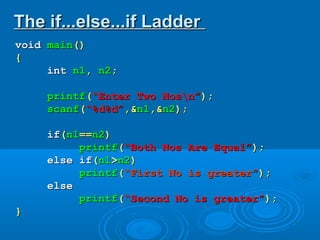
voidvoid mainmain()()
{{
intint n1n1,, n2n2;;
printfprintf((“Enter Two Nosn”“Enter Two Nosn”););
scanfscanf((“%d%d”“%d%d”,&,&n1n1,&,&n2n2););
ifif((n1n1====n2n2))
printfprintf((“Both Nos Are Equal”“Both Nos Are Equal”););
else ifelse if((n1n1>>n2n2))
printfprintf((“First No is greater”“First No is greater”););
elseelse
printfprintf((“Second No is greater”“Second No is greater”););
}}
The if...else...if LadderThe if...else...if Ladder
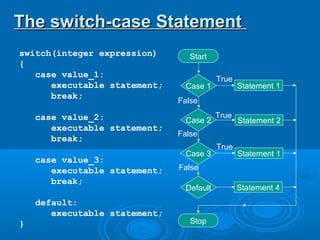
 Instead of using if-else-if ladder, the switch
construct can be used to handle multiple
choices, such as menu options.
 The objective is to check several possible
constant values for an expression.
 Switch control structure allows us to make
a decision from the number of choices
called as ‘Cases’.
The switch-case StatementThe switch-case Statement
switch(integer expression)
{
case value_1:
executable statement;
break;
case value_2:
executable statement;
break;
case value_3:
executable statement;
break;
default:
executable statement;
}
Start
Case 1
Case 2
Case 3
Stop
Statement 1
Statement 2
True
False
Statement 4Default
True
False
Statement 1
True
False
switch(integer expression)
{
case value_1:
executable statement;
break;
case value_2:
executable statement;
break;
case value_3:
executable statement;
break;
default:
executable statement;
}
 Even if there are
multiple statements
in front of a case,
there is no need to
enclose them within
pair of curly braces.
Points to remember about SwitchPoints to remember about Switch
switch(integer expression)
{
case value_1:
executable statement;
break;
case value_2:
executable statement;
break;
case value_3:
executable statement;
break;
}
 It’s not necessary to
have a ‘default’ case
in switch construct.
 In such case program
simply falls through
the entire switch and
continues with the
next instruction, that
follows the closing
brace of switch
Points to remember about SwitchPoints to remember about Switch
void main()
{
int a;
printf(“Enter A Number : “);
scanf(“%d”, &a);
switch(a%2)
{
case 0:
printf(“Even Number”);
break;
case 1:
printf(“Odd Number”);
break;
}
}
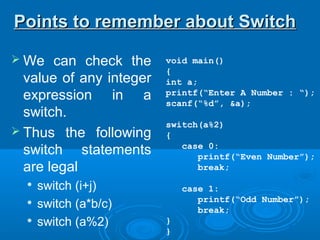
 We can check the
value of any integer
expression in a
switch.
 Thus the following
switch statements
are legal

switch (i+j)

switch (a*b/c)

switch (a%2)
Points to remember about SwitchPoints to remember about Switch
switch(integer expression)
{
case value_1:
executable statement;
break;
case value_2:
executable statement;
break;
case value_3:
executable statement;
break;
default:
executable statement;
}
 The switch statement
is very useful while
writing menu driven
programs.
Points to remember about SwitchPoints to remember about Switch
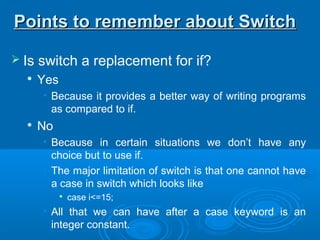
 Is switch a replacement for if?

Yes
• Because it provides a better way of writing programs
as compared to if.

No
• Because in certain situations we don’t have any
choice but to use if.
• The major limitation of switch is that one cannot have
a case in switch which looks like

case i<=15;
• All that we can have after a case keyword is an
integer constant.
Points to remember about SwitchPoints to remember about Switch
 There are some things which u cannot do
with a switch, these are.

A float expression cannot be tested using
switch, because switch can compare only char
or integer type of variable/expression.

You cannot use relational operator in switch.
• For example the case is wrong like, case <=15

Cases can never have variables expressions
• For example the case is wrong like, case i+j;
Switch versus if-else ladderSwitch versus if-else ladder
 The Conditional “ ? : ” operator is usefulThe Conditional “ ? : ” operator is useful
for making two way decisions. It can befor making two way decisions. It can be
used to replace an if…else statement.used to replace an if…else statement.
 This operator is a combination of ? and :This operator is a combination of ? and :
 This operator used three operands. That’sThis operator used three operands. That’s
why its called as ‘Ternary Operator’why its called as ‘Ternary Operator’
Condition ? Expression1 : expression2;
The ? : OperatorThe ? : Operator
Condition ? Expression1 : expression2;
 The condition evaluated first, if theThe condition evaluated first, if the
condition is true then expression1 iscondition is true then expression1 is
executed and its value is returned, and ifexecuted and its value is returned, and if
the condition is false then expression2 isthe condition is false then expression2 is
executed and its values is returned.executed and its values is returned.
The ? : OperatorThe ? : Operator
 Consider the following codeConsider the following code
The ? : OperatorThe ? : Operator
if(a>b)if(a>b)
max = a;max = a;
elseelse
max = b;max = b;
 Above if can be replaced by conditionalAbove if can be replaced by conditional
operator as below.operator as below.
max = a>b ? a : b;
 A Segment of program code that isA Segment of program code that is
executed repeatedly is called a loop. Theexecuted repeatedly is called a loop. The
repetition is done until some condition forrepetition is done until some condition for
termination of the loop is satisfied.termination of the loop is satisfied.
 A Loop structure essentially contains.A Loop structure essentially contains.

A Test ConditionA Test Condition

Loop StatementsLoop Statements
Iterative Control StructureIterative Control Structure
 while loopwhile loop
 do...while loopdo...while loop
 for loopfor loop
Iterative Control StructureIterative Control Structure
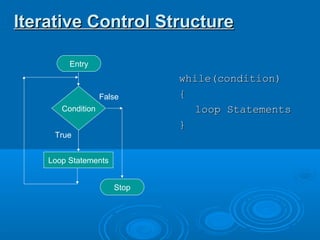
Condition
Loop Statements
True
False
Stop
Entry
while(condition)while(condition)
{{
loop Statementsloop Statements
}}
voidvoid mainmain()()
{{
intint numnum==11;;
whilewhile((numnum<=<=1010))
{{
printfprintf((“n%d”“n%d”,,numnum););
numnum == numnum ++ 11;;
}}
}}
Iterative Control StructureIterative Control Structure
 This Iteration procedure takesThis Iteration procedure takes
place in four stepsplace in four steps

Initializing Loop Control VariableInitializing Loop Control Variable

Testing The ConditionTesting The Condition

Execution of Loop StatementsExecution of Loop Statements

Changing value of the controlChanging value of the control
variablevariable
In this construct, condition is tested at the beginning of theIn this construct, condition is tested at the beginning of the
loop, and if loop condition satisfies then statements in theloop, and if loop condition satisfies then statements in the
loop body will execute.loop body will execute.
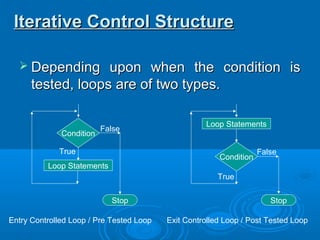
 Depending upon when the condition isDepending upon when the condition is
tested, loops are of two types.tested, loops are of two types.
Iterative Control StructureIterative Control Structure
Condition
Loop Statements
True
False
Stop
Condition
Loop Statements
True
False
Stop
Entry Controlled Loop / Pre Tested Loop Exit Controlled Loop / Post Tested Loop
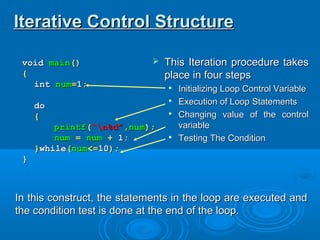
voidvoid mainmain()()
{{
intint numnum==11;;
dodo
{{
printfprintf((“n%d”“n%d”,,numnum););
numnum == numnum ++ 11;;
}}whilewhile((numnum<=<=1010););
}}
Iterative Control StructureIterative Control Structure
 This Iteration procedure takesThis Iteration procedure takes
place in four stepsplace in four steps

Initializing Loop Control VariableInitializing Loop Control Variable

Execution of Loop StatementsExecution of Loop Statements

Changing value of the controlChanging value of the control
variablevariable

Testing The ConditionTesting The Condition
In this construct, the statements in the loop are executed andIn this construct, the statements in the loop are executed and
the condition test is done at the end of the loop.the condition test is done at the end of the loop.
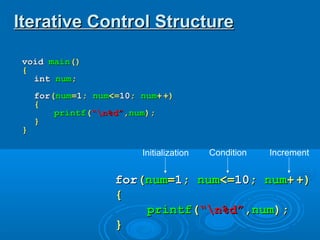
voidvoid mainmain()()
{{
intint numnum;;
forfor((numnum==11;; numnum<=<=1010;; numnum++ +)+)
{{
printfprintf((“n%d”“n%d”,,numnum););
}}
}}
Iterative Control StructureIterative Control Structure
forfor((numnum==11;; numnum<=<=1010;; numnum++ +)+)
{{
printfprintf((“n%d”“n%d”,,numnum););
}}
Initialization Condition Increment
Iterative Control StructureIterative Control Structure
forfor((initialiseinitialise;; testtest;; incrementincrement))
{{
statementstatement;;
}}

3. control statements

  • 1.
    Algorithms andAlgorithms and ControlFlow StructuresControl Flow Structures
  • 2.
  • 3.
     An algorithmis a sequential collection of actions which is used to solve a problem.  It is a segment of precise steps that describes exactly the tasks to be performed, and the order in which they are to be carried out. AlgorithmAlgorithm
  • 4.
     There Aretwo ways to outline the precise steps of solving a problem.  Algorithm  Flowchart Algorithm & FlowchartAlgorithm & Flowchart
  • 5.
     It isa structured form of the sequential actions to be carried out, which is written in simple English language.. AlgorithmAlgorithm 1. Start 2. Declare Variables A, B and C 3. Input first number in A 4. Input second number in B 5. C = A + B 6. Print the value of C 7. Stop 1. Start 2. Declare Variables R and A 3. Input Radius in R 4. A = 3.14 * R * R 5. Print the value of A 6. Stop Algorithm for the program of addition of 2 numbers. Algorithm for the program of Calculating area of circle.
  • 6.
    FlowchartFlowchart  A Flowchartis the graphical representation of the flow of actions used in an algorithm. Start Input A Input B C = A + B Declare A, B, C Display C Stop
  • 7.
    Symbols Used inFlowchartSymbols Used in Flowchart Start Input Radius in R A = 3.14 * R * R Declare A, R Display A Stop Terminal Input/Output Process Flow Lines Condition True False Entry Decision Making
  • 8.
    Control FlowControl Flow Structures/ControlStatementsStructures/Control Statements
  • 9.
     At asimplistic level a program executes its instructions sequentially in the order in which they are written,  It starts with the first line written in main() function and ends with the last line, always moving from top to bottom. Control flow structures.Control flow structures.
  • 10.
     But mostreal-time programs are more complex than a simple linear sequence.  Real programs contains numerous code blocks that must be executed only if certain conditions are met, or some code blocks must be executed repeatedly until certain conditions evaluates to false. Control flow structures.Control flow structures.
  • 11.
     Control flowstatements are the tools programmers use to make decisions about which statement to execute from the available choices,  It also allows us to change the flow of execution in a program depending upon certain conditions. Control flow structures.Control flow structures.
  • 12.
    Control Flow StructureControlFlow Structure  4 Categories of Control Statements Are  Sequential Control Structure  Selection / Decision Control Structure  Iterative / Repetitive / Loop Control Structure  Jump Statements
  • 13.
    Start Input a numberin A B = A * A Declare A, B Display B Stop Sequential Control StructureSequential Control Structure Step by Step Flow of Execution
  • 14.
    Sequential Control StructureSequentialControl Structure voidvoid mainmain()() {{ intint aa,, bb;; clrscrclrscr();(); printfprintf((“Enter a no : ““Enter a no : “);); scanfscanf((“%d”“%d”,&,&aa);); bb == a * aa * a;; printfprintf((“nSquare is“nSquare is : %d”: %d”,, bb);); getchgetch();(); }}
  • 15.
    Control flow structuresControlflow structures Start Statement Statement Statement Stop Start Stop Test Condition Some Statement Sequential Control Structure Selection Control Structure / Decision Making Some Statement True False
  • 16.
    Control flow structuresControlflow structures Start Stop Test Condition Some Statement Selection Control Structure / Decision Making Some Statement Start Stop Test Condition Loop Statements Loop / Repetitive Control Structure True False True False
  • 17.
    Control flow structures.Controlflow structures. Sequential Selection/Decision Repetition/Loop Jump Statements If switch ? : (Conditional Operator) while do…while for break goto continue return
  • 18.
     Selection /Decision control statementsSelection / Decision control statements allow us to decide whether or not toallow us to decide whether or not to execute a particular statement or a blockexecute a particular statement or a block of statements enclosed in curly braces.of statements enclosed in curly braces.  It also allows to execute a particularIt also allows to execute a particular statement or a block of statement withinstatement or a block of statement within the available two or more choices.the available two or more choices. Selection/Decision Control StructureSelection/Decision Control Structure
  • 19.
     Decision ControlStructure consists ofDecision Control Structure consists of  Some type of Condition (T/F Test).Some type of Condition (T/F Test).  One or more block of executable code.One or more block of executable code.  Which block of code will execute depends onWhich block of code will execute depends on the result of the condition (true or false)the result of the condition (true or false) Selection/Decision Control StructureSelection/Decision Control Structure
  • 20.
     C supports3 types of selection controlC supports 3 types of selection control statements.statements.  ifif  switchswitch  ?: (Conditional (Ternary)Operator)?: (Conditional (Ternary)Operator) Selection/Decision Control StructureSelection/Decision Control Structure
  • 21.
     The ifstatement is used to execute a single statement or a set of statements based on the evaluation of a condition.  It is basically a two-way decision control structure. The if...else StatementThe if...else Statement
  • 22.
    if(condition)if(condition) {{ statement 1;statement 1; }} elseelse {{ statement2;statement 2; }} If…else… the Two-Way BranchingIf…else… the Two-Way Branching Statement 1 Statement 2 Condition Entry Exit True False
  • 23.
    if(condition)if(condition) {{ statement 1;statement 1; }} elseelse {{ statement2;statement 2; }} The if...else StatementThe if...else Statement True Part False Part
  • 24.
    The following examplesdemonstrates use of if...else construct in programs.  Find greater number between two nos.  Detect entered number is negative or positive number.  Detect entered number is even or odd. The if...else StatementThe if...else Statement
  • 25.
    The if...else StatementTheif...else Statement Start Input a no in b Declare a, b Input a no in a if a>b print “a is Greater” print “b is Greater” Stop Yes No
  • 26.
    voidvoid mainmain()() {{ intint aa,,bb;; clrscrclrscr();(); printfprintf((“Enter Two Nosn”“Enter Two Nosn”);); scanfscanf((“%d%d”“%d%d”,&,&aa,&,&bb);); ifif((aa>>bb)) {{ printfprintf((“First No is greater”“First No is greater”);); }} elseelse {{ printfprintf((“Second No is greater”“Second No is greater”);); }} }} The if...else StatementThe if...else Statement
  • 27.
    The if...else StatementTheif...else Statement Start Declare N Input a number in N if N>0 print “Negative Number” Stop Yes No print “Positive Number”
  • 28.
    The if...else StatementTheif...else Statement voidvoid mainmain()() {{ intint nn;; clrscrclrscr();(); printfprintf((“Enter A No : ”“Enter A No : ”);); scanfscanf((“%d”“%d”,&,&nn);); ifif((nn>>00)) {{ printfprintf((“It’s A Positive Number”“It’s A Positive Number”);); }} elseelse {{ printfprintf((“It’s A Negative Number”“It’s A Negative Number”);); }} }}
  • 29.
    The if...else StatementTheif...else Statement Start Declare N Input a number in N if N%2==0 print “Even Number” print “Odd Number” Stop Yes No
  • 30.
    The if...else StatementTheif...else Statement voidvoid mainmain()() {{ intint nn;; clrscrclrscr();(); printfprintf((“Enter A No : ”“Enter A No : ”);); scanfscanf((“%d”“%d”,&,&nn);); ifif((nn%%22====00)) {{ printfprintf((“It’s A Even Number”“It’s A Even Number”);); }} elseelse {{ printfprintf((“It’s A Odd Number”“It’s A Odd Number”);); }} }}
  • 31.
     When thetrue or false part of an if statement contains another if-else statement, an extremely useful construction is got which is mostly used for multi way decision. Nesting of if...else StatementNesting of if...else Statement
  • 32.
    if(condition_1)if(condition_1) {{ if(condition_2)if(condition_2) {{ Statement-1;Statement-1; }} elseelse {{ Statement-2;Statement-2; }} }} elseelse {{ Statement-3;Statement-3; }} Nesting of if...elseStatementNesting of if...else Statement Stop Condition 1 Statement-3 Statement-2 False True Start Condition 2 Statement-1 False True
  • 33.
    if(condition_1)if(condition_1) {{ Statement-1;Statement-1; }} elseelse {{ if(condition_2)if(condition_2) {{ Statement-2;Statement-2; }} elseelse {{ Statement-3;Statement-3; }} }} Nesting of if...elseStatementNesting of if...else Statement Stop Condition 1 Statement-1 Statement-3 False True Start Condition 2 Statement-2 False True
  • 34.
  • 35.
     Example todetect greater no between two numbers, The program should display appropriate message if both numbers are equal. Nesting of if...else StatementNesting of if...else Statement
  • 36.
    Start Declare a, b Input2 numbers in a and b if a>b print “a is Greater” print “b is Greater” Stop Yes No if a==b print “Equal Numbers” Yes No Nesting of if...else StatementNesting of if...else Statement
  • 37.
    voidvoid mainmain()() {{ intint n1n1,,n2n2;; printfprintf((“Enter Two Nosn”“Enter Two Nosn”);); scanfscanf((“%d%d”“%d%d”,&,&n1n1,&,&n2n2);); ifif((n1n1====n2n2)) {{ printfprintf((“Both Nos Are Equal”“Both Nos Are Equal”);); }} elseelse {{ ifif((n1n1>>n2n2)) {{ printfprintf((“First No is greater”“First No is greater”);); }} elseelse {{ printfprintf((“Second No is greater”“Second No is greater”);); }} }} }} Nesting of if...else StatementNesting of if...else Statement
  • 38.
    if(condition_1)if(condition_1) {{ Statement1;Statement1; }} elseelse {{ if(condition_2)if(condition_2) {{ Statement2;Statement2; }} elseelse {{ Statement3;Statement3; }} }} The if...else...if LadderTheif...else...if Ladder if(condition_1)if(condition_1) {{ Statement1;Statement1; }} else if(condition_2)else if(condition_2) {{ Statement2;Statement2; }} elseelse {{ Statement3;Statement3; }}
  • 39.
    Simple If if(test) { statement; } Various formsof if statementVarious forms of if statement If...Else if(test) { statement; } else { statement; } Nested If if(test1) { if(test2) { statement; } else { statement; } } else { statement; } If…else if Ladder if(test1) { statement; } else if(test2) { statement; } else if(test3) { statement; } else { statement; }
  • 40.
    voidvoid mainmain()() {{ intint n1n1,,n2n2;; printfprintf((“Enter Two Nosn”“Enter Two Nosn”);); scanfscanf((“%d%d”“%d%d”,&,&n1n1,&,&n2n2);); ifif((n1n1====n2n2)) printfprintf((“Both Nos Are Equal”“Both Nos Are Equal”);); else ifelse if((n1n1>>n2n2)) printfprintf((“First No is greater”“First No is greater”);); elseelse printfprintf((“Second No is greater”“Second No is greater”);); }} The if...else...if LadderThe if...else...if Ladder
  • 41.
     Instead ofusing if-else-if ladder, the switch construct can be used to handle multiple choices, such as menu options.  The objective is to check several possible constant values for an expression.  Switch control structure allows us to make a decision from the number of choices called as ‘Cases’. The switch-case StatementThe switch-case Statement
  • 42.
    The switch-case StatementTheswitch-case Statement switch(integer expression) { case value_1: executable statement; break; case value_2: executable statement; break; case value_3: executable statement; break; default: executable statement; } Start Case 1 Case 2 Case 3 Stop Statement 1 Statement 2 True False Statement 4Default True False Statement 1 True False
  • 43.
    switch(integer expression) { case value_1: executablestatement; break; case value_2: executable statement; break; case value_3: executable statement; break; default: executable statement; }  Even if there are multiple statements in front of a case, there is no need to enclose them within pair of curly braces. Points to remember about SwitchPoints to remember about Switch
  • 44.
    switch(integer expression) { case value_1: executablestatement; break; case value_2: executable statement; break; case value_3: executable statement; break; }  It’s not necessary to have a ‘default’ case in switch construct.  In such case program simply falls through the entire switch and continues with the next instruction, that follows the closing brace of switch Points to remember about SwitchPoints to remember about Switch
  • 45.
    void main() { int a; printf(“EnterA Number : “); scanf(“%d”, &a); switch(a%2) { case 0: printf(“Even Number”); break; case 1: printf(“Odd Number”); break; } }  We can check the value of any integer expression in a switch.  Thus the following switch statements are legal  switch (i+j)  switch (a*b/c)  switch (a%2) Points to remember about SwitchPoints to remember about Switch
  • 46.
    switch(integer expression) { case value_1: executablestatement; break; case value_2: executable statement; break; case value_3: executable statement; break; default: executable statement; }  The switch statement is very useful while writing menu driven programs. Points to remember about SwitchPoints to remember about Switch
  • 47.
     Is switcha replacement for if?  Yes • Because it provides a better way of writing programs as compared to if.  No • Because in certain situations we don’t have any choice but to use if. • The major limitation of switch is that one cannot have a case in switch which looks like  case i<=15; • All that we can have after a case keyword is an integer constant. Points to remember about SwitchPoints to remember about Switch
  • 48.
     There aresome things which u cannot do with a switch, these are.  A float expression cannot be tested using switch, because switch can compare only char or integer type of variable/expression.  You cannot use relational operator in switch. • For example the case is wrong like, case <=15  Cases can never have variables expressions • For example the case is wrong like, case i+j; Switch versus if-else ladderSwitch versus if-else ladder
  • 49.
     The Conditional“ ? : ” operator is usefulThe Conditional “ ? : ” operator is useful for making two way decisions. It can befor making two way decisions. It can be used to replace an if…else statement.used to replace an if…else statement.  This operator is a combination of ? and :This operator is a combination of ? and :  This operator used three operands. That’sThis operator used three operands. That’s why its called as ‘Ternary Operator’why its called as ‘Ternary Operator’ Condition ? Expression1 : expression2; The ? : OperatorThe ? : Operator
  • 50.
    Condition ? Expression1: expression2;  The condition evaluated first, if theThe condition evaluated first, if the condition is true then expression1 iscondition is true then expression1 is executed and its value is returned, and ifexecuted and its value is returned, and if the condition is false then expression2 isthe condition is false then expression2 is executed and its values is returned.executed and its values is returned. The ? : OperatorThe ? : Operator
  • 51.
     Consider thefollowing codeConsider the following code The ? : OperatorThe ? : Operator if(a>b)if(a>b) max = a;max = a; elseelse max = b;max = b;  Above if can be replaced by conditionalAbove if can be replaced by conditional operator as below.operator as below. max = a>b ? a : b;
  • 52.
     A Segmentof program code that isA Segment of program code that is executed repeatedly is called a loop. Theexecuted repeatedly is called a loop. The repetition is done until some condition forrepetition is done until some condition for termination of the loop is satisfied.termination of the loop is satisfied.  A Loop structure essentially contains.A Loop structure essentially contains.  A Test ConditionA Test Condition  Loop StatementsLoop Statements Iterative Control StructureIterative Control Structure
  • 53.
     while loopwhileloop  do...while loopdo...while loop  for loopfor loop Iterative Control StructureIterative Control Structure
  • 54.
    Iterative Control StructureIterativeControl Structure Condition Loop Statements True False Stop Entry while(condition)while(condition) {{ loop Statementsloop Statements }}
  • 55.
    voidvoid mainmain()() {{ intint numnum==11;; whilewhile((numnum<=<=1010)) {{ printfprintf((“n%d”“n%d”,,numnum);); numnum== numnum ++ 11;; }} }} Iterative Control StructureIterative Control Structure  This Iteration procedure takesThis Iteration procedure takes place in four stepsplace in four steps  Initializing Loop Control VariableInitializing Loop Control Variable  Testing The ConditionTesting The Condition  Execution of Loop StatementsExecution of Loop Statements  Changing value of the controlChanging value of the control variablevariable In this construct, condition is tested at the beginning of theIn this construct, condition is tested at the beginning of the loop, and if loop condition satisfies then statements in theloop, and if loop condition satisfies then statements in the loop body will execute.loop body will execute.
  • 56.
     Depending uponwhen the condition isDepending upon when the condition is tested, loops are of two types.tested, loops are of two types. Iterative Control StructureIterative Control Structure Condition Loop Statements True False Stop Condition Loop Statements True False Stop Entry Controlled Loop / Pre Tested Loop Exit Controlled Loop / Post Tested Loop
  • 57.
    voidvoid mainmain()() {{ intint numnum==11;; dodo {{ printfprintf((“n%d”“n%d”,,numnum);); numnum== numnum ++ 11;; }}whilewhile((numnum<=<=1010);); }} Iterative Control StructureIterative Control Structure  This Iteration procedure takesThis Iteration procedure takes place in four stepsplace in four steps  Initializing Loop Control VariableInitializing Loop Control Variable  Execution of Loop StatementsExecution of Loop Statements  Changing value of the controlChanging value of the control variablevariable  Testing The ConditionTesting The Condition In this construct, the statements in the loop are executed andIn this construct, the statements in the loop are executed and the condition test is done at the end of the loop.the condition test is done at the end of the loop.
  • 58.
    voidvoid mainmain()() {{ intint numnum;; forfor((numnum==11;;numnum<=<=1010;; numnum++ +)+) {{ printfprintf((“n%d”“n%d”,,numnum);); }} }} Iterative Control StructureIterative Control Structure forfor((numnum==11;; numnum<=<=1010;; numnum++ +)+) {{ printfprintf((“n%d”“n%d”,,numnum);); }} Initialization Condition Increment
  • 59.
    Iterative Control StructureIterativeControl Structure forfor((initialiseinitialise;; testtest;; incrementincrement)) {{ statementstatement;; }}