SDLC
(Software Development
Lifecycle)
BY: PRITHVIRAJ
DATE: 31-03-2023
What is SDLC ?
 SDLC stands for Software Development Lifecycle
 It is a set of planned activities for developing any software product
 Using SDLC is very important for developing a software, SDLC divides all
the tasks to be followed while developing a software into various phases
which makes the software most accurate and perfect satisfying all the
requirements and also for maintenance of the software
 Without SDLC, it becomes tough for software project managers to
monitor the progress of the project.
Phases of SDLC
 There are 6 stages of SDLC which are:
1. Planning and Requirements
2. Analysis
3. Designing
4. Development/Coding
5. Testing
6. Deployment and Maintenance
Planning and Requirements
 It is the first and the most important phase of SDLC
 In this phase the Business analyst collects the client’s requirements
 Based on that information it is then used to plan the basic project
approach, expenditure, risk analysis, technical analysis, etc.
 After planning a document is prepared called BRS (Business requirement
specification)
Analysis
 Once the requirement analysis is completed the next step is to make SRS
(Software requirement specification) based on BSR (Business requirement
specification)
 SRS document consists of all the product requirements to be designed
and developed during the project
 Based on SRS, two documents are further made that are FRS (Functional
requirement specification) and SRS (System requirement specification)
Designing
 Based on the requirements specified in SRS, product architecture is
proposed and a document is made called DDS (Design Document
Specification)
 System architect will convert the design into LLD (Low-Level Design) and
HLD (High-Level Design) which can de done by third-party application if
required
 LLD -
 HLD -
Development
 The coding of the project is started as per DDS during this stage.
 DDS helps in coding for accomplishing the project without much hassle.
 Developers must follow the coding guidelines defined by their
organization or manager and programming tools like compilers,
interpreters, debuggers, etc. are used to generate the code.
 Different high-level programming languages are used such as C, C++,
Pascal, Java, and PHP are used for coding. The programming language is
chosen with respect to the type of software being developed.
Testing
 This stage refers to the testing of the software where software’s defects
are reported, tracked, fixed, and retested until the product reaches the
quality standards defined in the SRS (Software Requirement Specification)
 Testing can be done manually and or by using automation tools
Deployment and Maintenance
 Deployment
 Once the product is tested and ready to be deployed, it is released in the
market.
 Maintenance
 Once the product is deployed in the market the client may want to update
or want to do some changes to the product then the maintenance part
does this task
 Also, when product users use the software they may give feedback which
should be resolved from time to time
SDLC Models
 There are various software development life cycle models which are followed during the
software development process.
 Each model follows a Series of steps to ensure success in the process of software
development.
 There are 9 models of SDLC which are:
I. Waterfall Model
II. V–Model
III. Iterative Model
IV. Spiral Model
V. Agile Model
VI. Fish Model
VII. Big-Bang Model
VIII. RAD Model (Rapid Application Development)
IX. Prototype Model
1. Waterfall Model
 In the waterfall model all the processes of software development are
divided into various phases/parts
 These parts are nothing but SDLC phases (Planning and Requirement,
Analysis, Designing, Development/Coding, Testing, Deployment and
Maintenance)
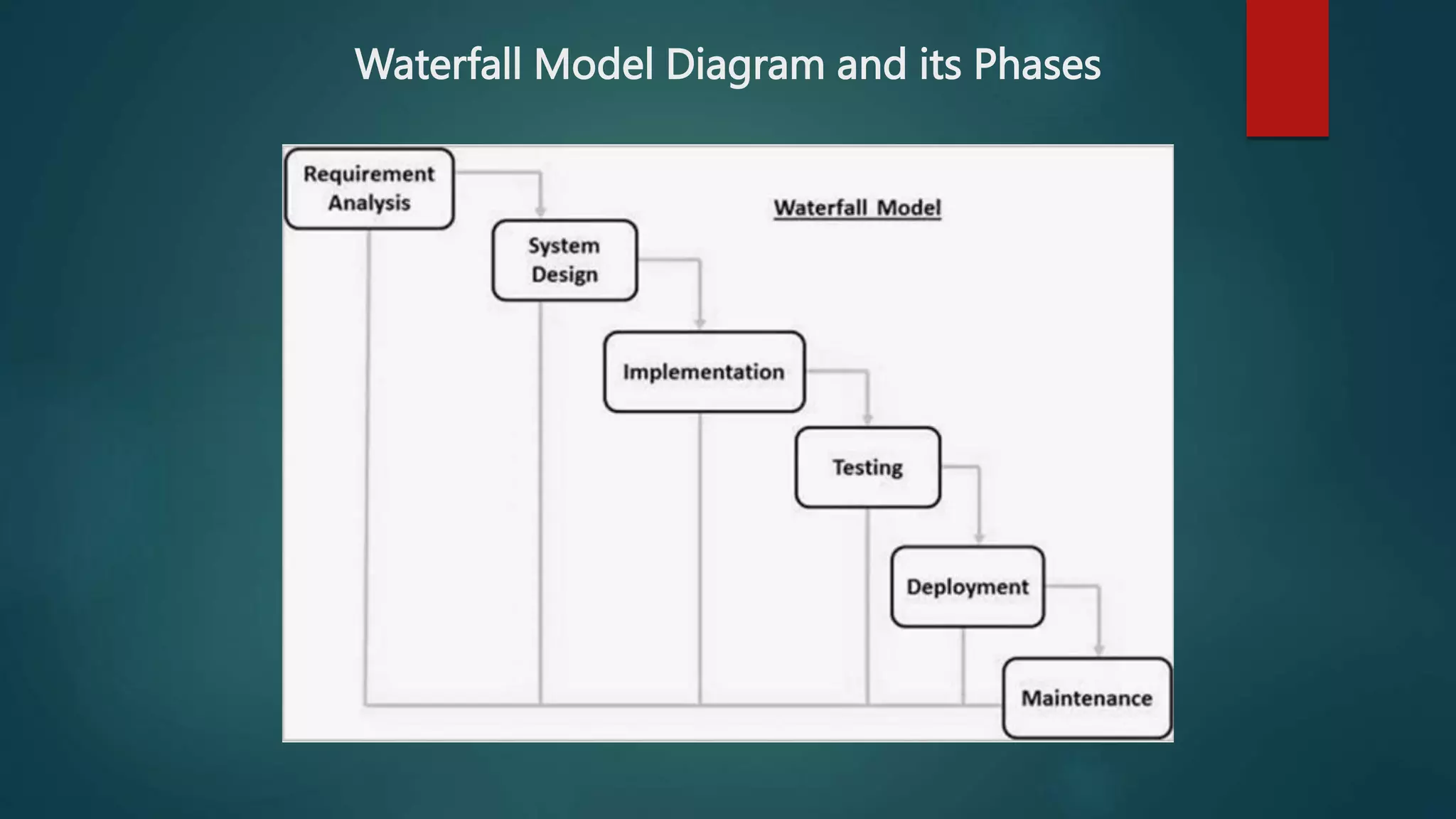
 In the waterfall Model the output of one phase is the input to its next
phase sequentially
 When one phase is completed fully (100%) only then next phase will be
executed
 In this model we can’t go back from any phase
Waterfall Model Diagram and its Phases
Advantages and Disadvantages Of
Waterfall Model
 Advantages
• Simple and easy to understand and use
• Easy to manage due to its rigidness
• Phases are processed and completed one at a time
• In the Waterfall Model, processes and results are well documented
 Disadvantages
• If any changes are required at any phase, the whole process needs to be start
from the beginning. For example, if the application has now shifted to the
coding phase, and there is a change in requirement, It becomes tough to go
back and change it.
• This Model is not suitable for complex/large projects.
2. V–Model
 ‘V’ in ‘V-Model’ stands for verification and validation, hence it is called V-
Model
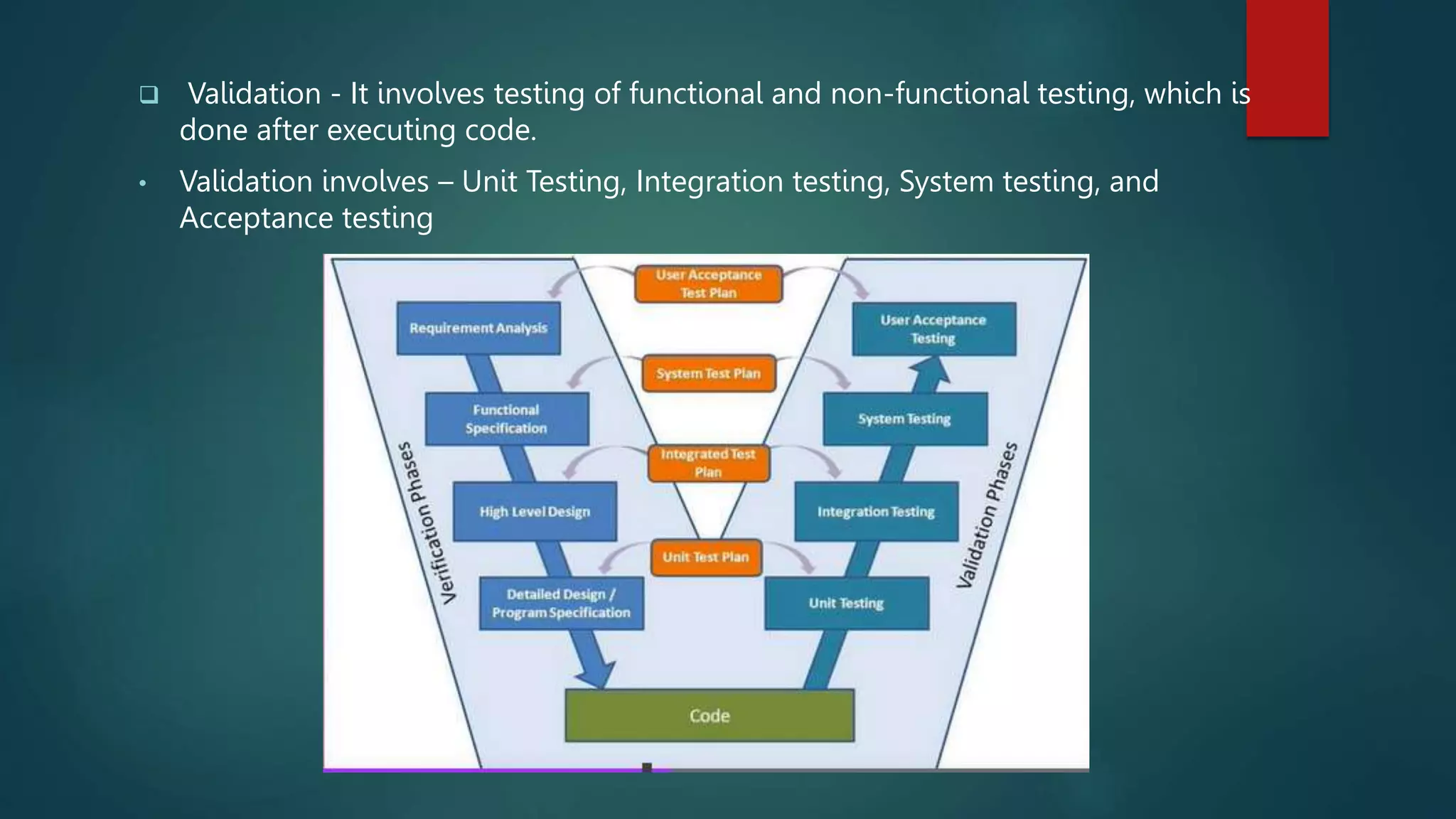
 It is called V-Model because of its structure. On the left side, there are all the
verification processes and on the right side, there are all the validation phases,
they are connected by the development/coding phase at the bottom, which
makes a v shape like structure
 In this model, testing is associated with every phase, which means that every
single phase in the development cycle, they are directly associated to the
testing phase
 Verification – In verification, reviewing is done without executing code. It is the
process of evaluation of the product development process to find whether
specified requirements meet.
• Verification involves – Requirement analysis, System design, Architecture
design, and Module design
 Validation - It involves testing of functional and non-functional testing, which is
done after executing code.
• Validation involves – Unit Testing, Integration testing, System testing, and
Acceptance testing
Advantages and Disadvantages Of
V-Model
 Advantages
• Simple and easy to understand and use.
• It works perfectly for smaller projects where requirements are very well
understood.
• Each and every component is tested parallelly at every phase, so the chances
of errors are less
 Disadvantages
• This Model is not suitable for large and complex
• Once an application is in the testing stage, it is difficult to go back and change
functionality, which means we can’t go back from any phase which affects
customer satisfaction
3. Iterative Model
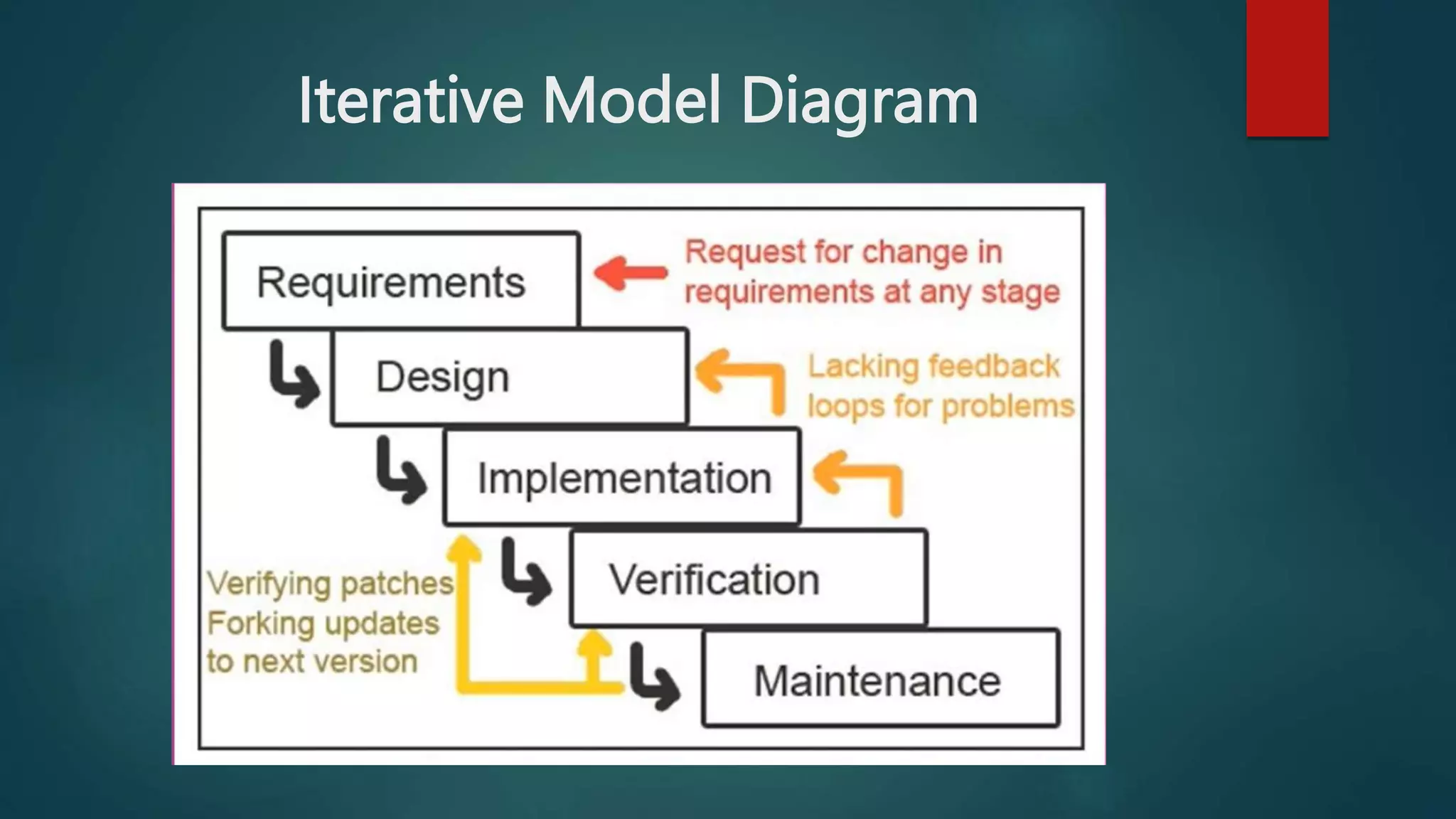
 This Model is just like Waterfall Model, unlike waterfall Model, in this, we
can go back to the previous phase if any changes are required
 The Iterative Model allows going not only to the previous phase but also
allows accessing all of its earlier phases
 Due to its allowance to go back to the previous or earlier phase, it results
in time-saving, cost-saving as well as effort-saving as we have to not start
from the beginning again if any change is required
 It is also called Advanced version of the Waterfall Model
Iterative Model Diagram
Advantages and Disadvantages Of
Iterative Model
 Advantages
• This model is easy to understand and execute
• Some working functionality can be developed quickly and early in the life
cycle.
• Less costly to change the scope/requirements.
• Testing and debugging during smaller iterations are easy.
 Disadvantages
• Requirement changes can cause over budget.
• Project completion date is not confirmed because of changing
requirements.
4. Spiral Model
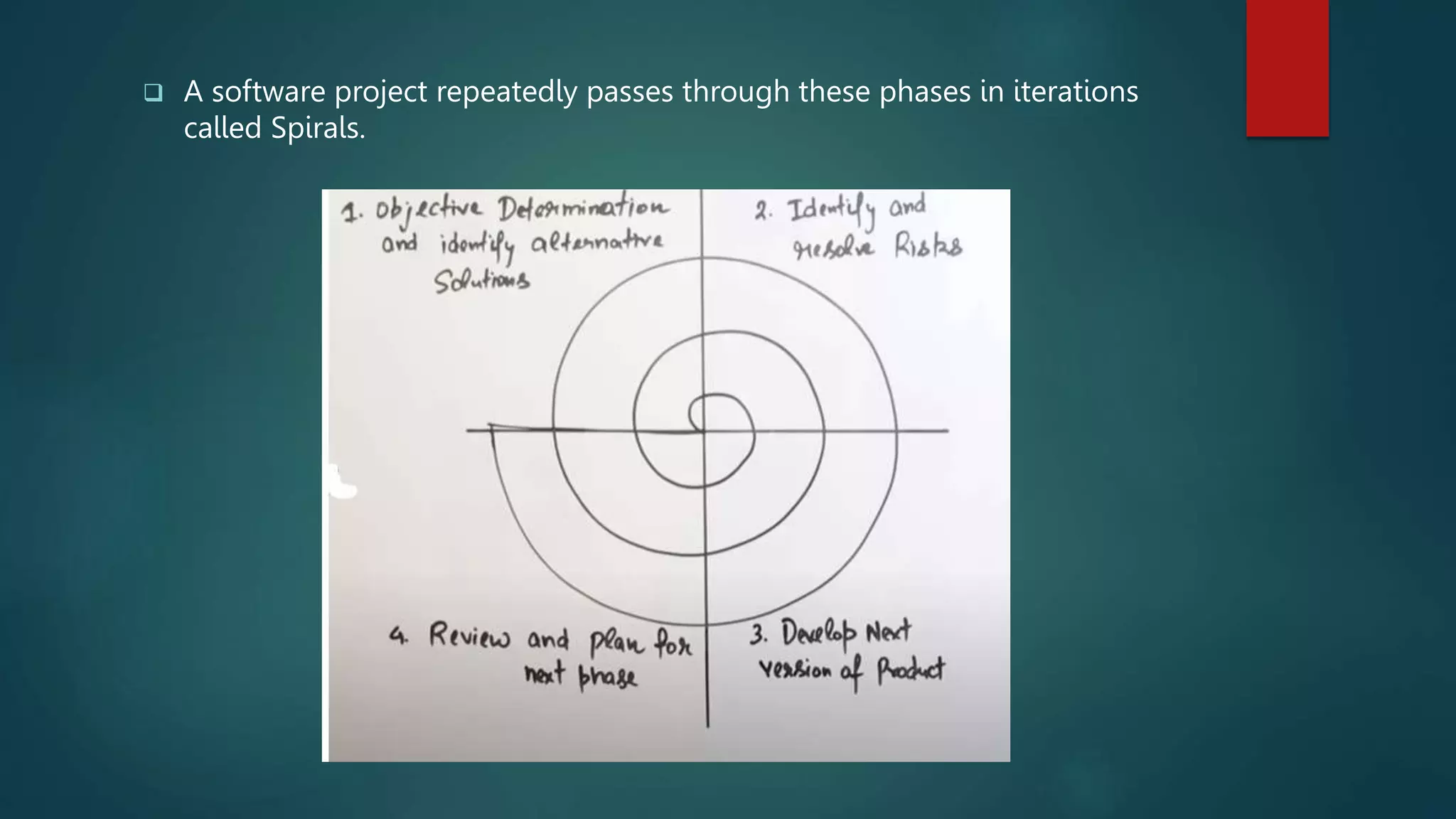
 In the Spiral Model all phases are divided into 4 quadrants that are:
i. Objective determination and identifying alternative solutions
ii. Identifying and resolving risks
iii. Developing and verifying
iv. Reviewing and planning for the next phase
 Objective determination and identifying alternative solutions:
This phase starts with gathering the business requirements This phase also
includes understanding the system requirements by continuous
communication between the customer and the system analyst.
 Identifying and resolving risks:
It is the next phase in the spiral model, in this phase, we calculate and identify
all the risks and prepare solutions for that risks before developing the project
 Developing and verifying:
In this phase, the design of the project is made and after designing the
developers develop the project after developing the project, the testing team
will test the software deeply and then the project goes into the last
quadrant/phase
 Reviewing and planning for the next phase:
In this phase, the developed project is shown to the client or manager if any
refinement is required it again starts from 1st quadrant which makes one
spiral
 A software project repeatedly passes through these phases in iterations
called Spirals.
5. Agile Model
 In this model the ’Agile’ means – fast, so as the name suggests, this model
is used when the project deadline is short/less
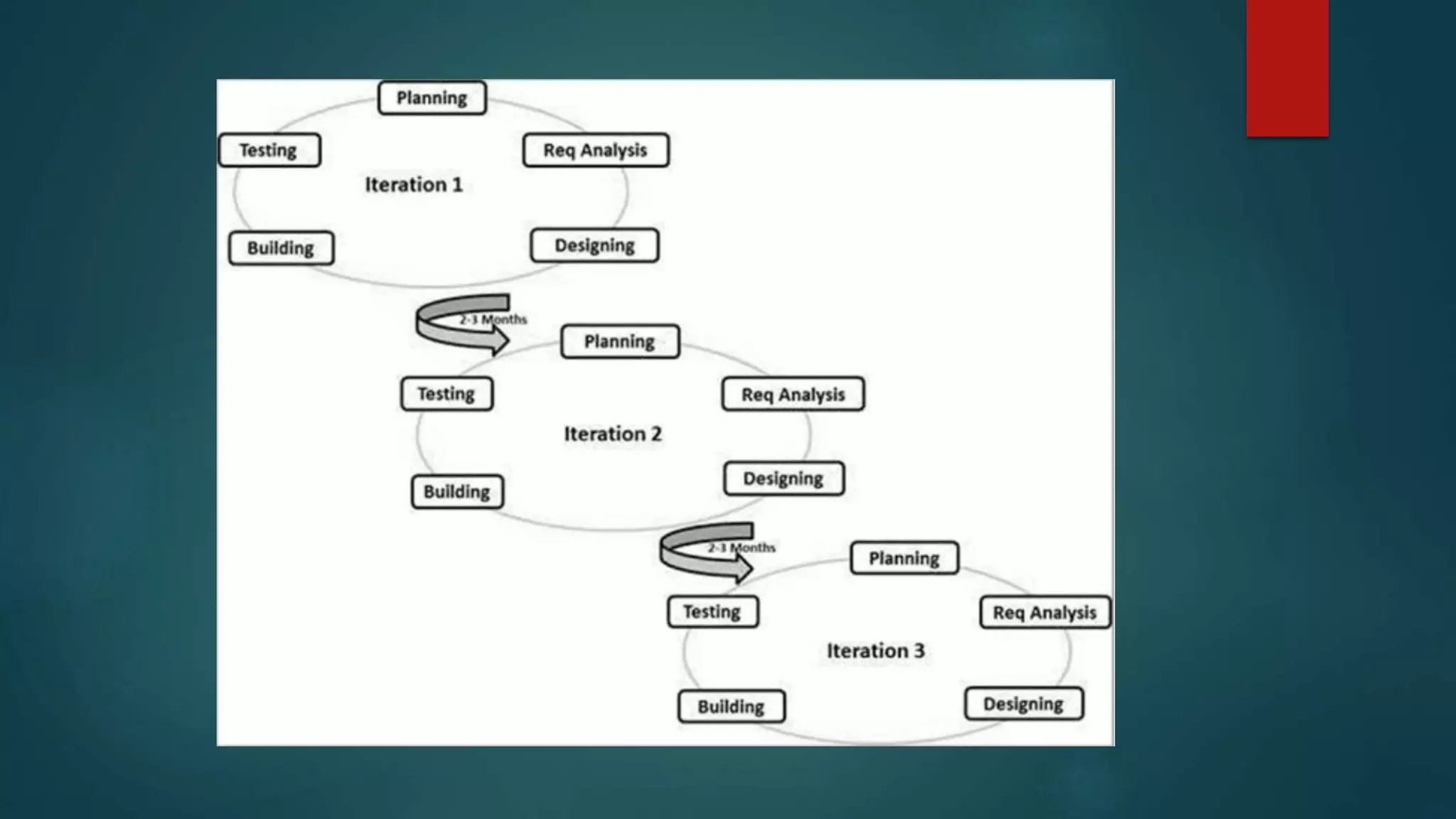
 In Agile Model, the tasks are divided into smaller parts which are done
from time to time which is called iteration for delivering the project
instantly
 In this Model, a working software build is delivered after each iteration.
 The final build/iterations hold all the features required by the customer.
 Customer’s interaction is the backbone of the Agile Model
Advantages and Disadvantages Of
Agile Model
 Advantages
• Resource requirements are minimum.
• Project delivery time is fast
• One-to-one communication with the client
• Changes can be done frequently
• Little or no planning is required
• Easy to manage
• Adaptive software development methods
 Disadvantages
• Less documentation may result in confusion and conflicts
• Transfer of technology to new team members may be quite challenging
due to lack of documentation.
• Depends heavily on customer interaction, so if customer is not clear, team
can be driven in the wrong direction
6. Fish Model
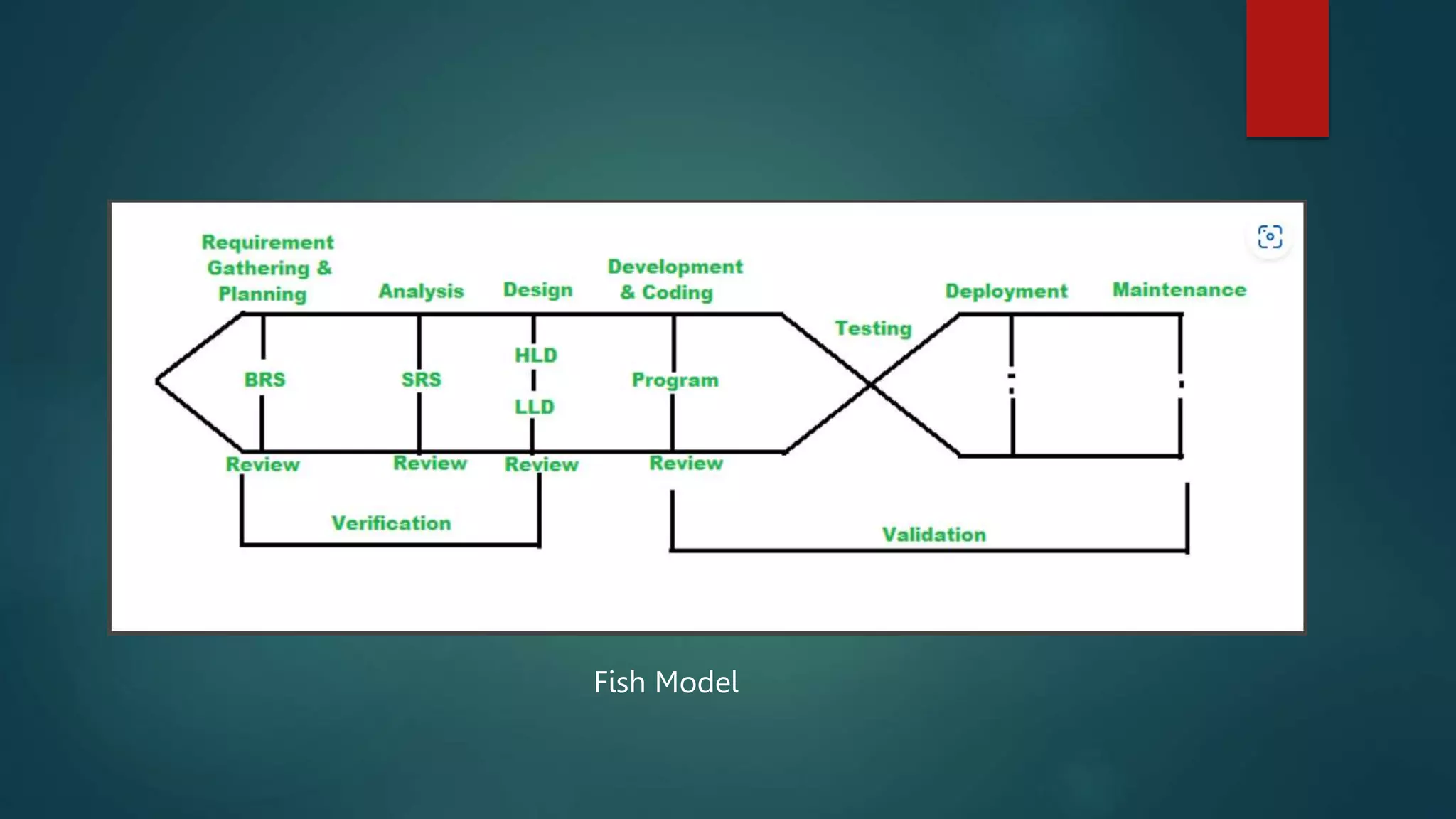
 In the Fish Model, verification and validation are done parallelly at each
phase by two different teams.
 In Verification, reviewing is done of the whole phase, and In Validation,
testing is done of the whole phase.
 Except deployment and maintenance phases all other processes are done
by separate teams and then reports are generated, by the end of the
phases.
 All the phases when connected via a diagram it makes a fish like structure,
that’s why it is called Fish Model
Fish Model
Advantages and Disadvantages Of
Iterative Model
 Advantages
• Fish Model is easy to implement
• Fish model is used for developing secure and Highly quality software
• Fish Model is easy to implement and all the documents are created one by
one as the phases are completed
 Disadvantages
• This SDLC is expensive in terms of cost & time since it involves verification
as well as validation on almost all the phases
• it is not suitable for small projects
7. Big- Bang Model
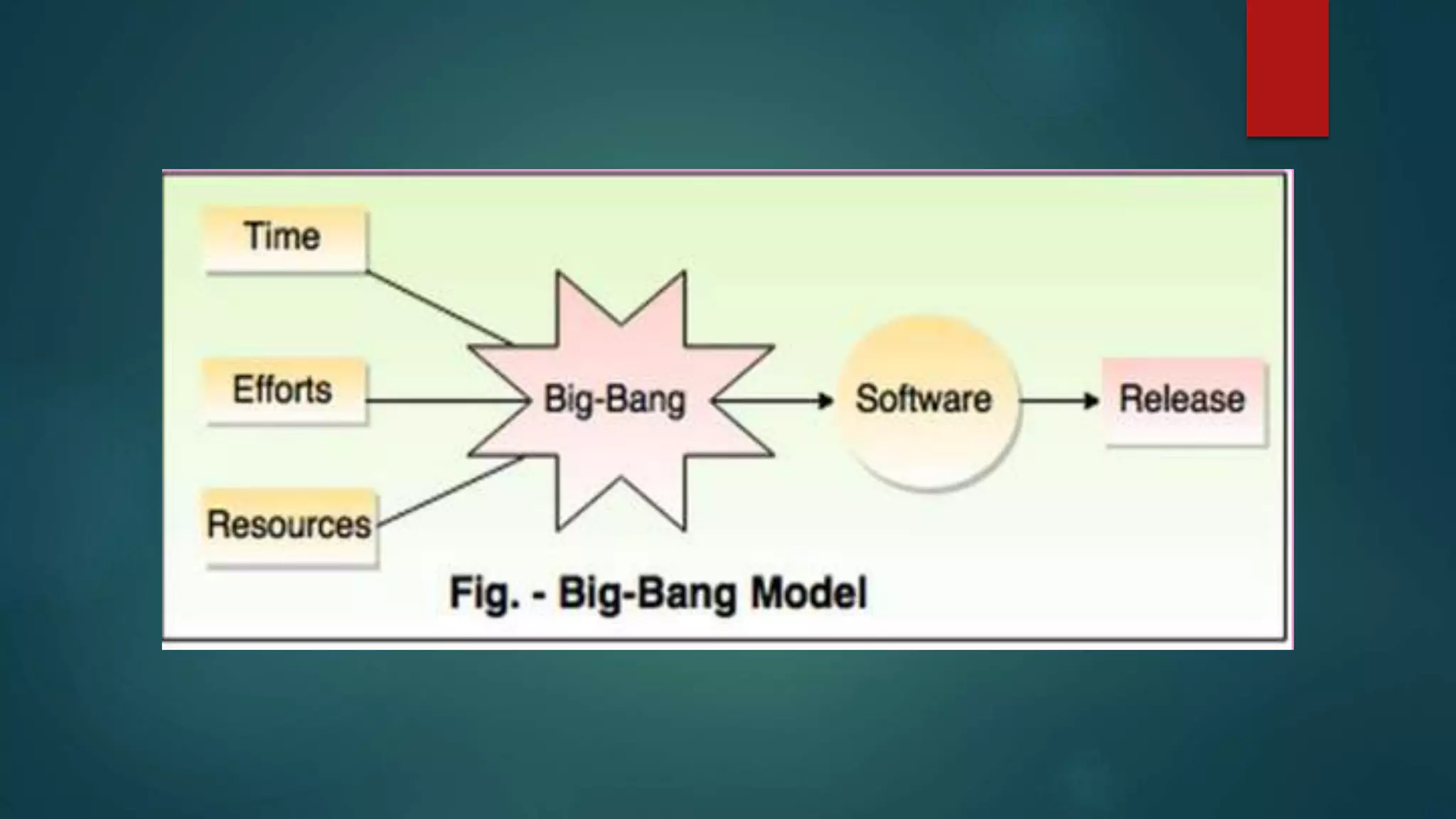
 In the Big Bang model of the SDLC model, the model does not follow any
specific process
 The development just starts with the required money and efforts as the
input, and the output is the software developed which may or may not be
as per customer requirement
 There is no/less planning
 Usually this model is followed for small projects where the development
teams are very small
For example – Academic projects
Advantages and Disadvantages Of Big-
Bang Model
 Advantages
• This is a very simple model to understand
• Little or no planning required
• Easy to manage
• Very few resources required
 Disadvantages
• Very High risk and uncertainty
• Not a good model for complex and object-oriented projects
• Poor model for long and ongoing projects
9. RAD Model (Rapid Application
Development Model)
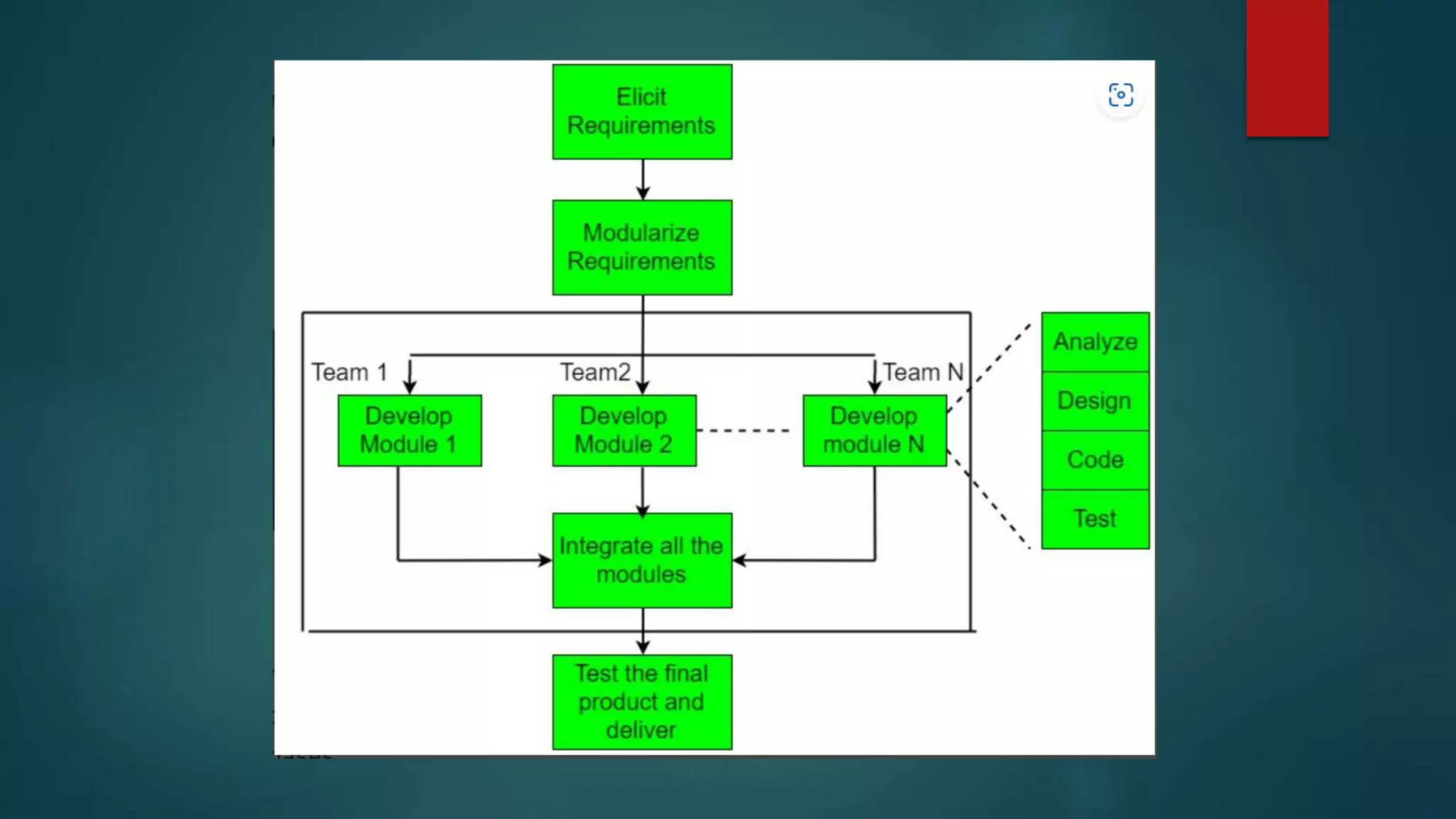
 Rapid application development is an SDLC Model that uses minimal
planning or not specific planning
 In this model the project is broken down into small modules and each
module may/may not be assigned independently to separate teams.
 These modules can finally be combined to form the final product using
some powerful developer tools such as JAVA, C++, Visual BASIC, XML, etc.
is also an integral part of the projects.
Advantages and Disadvantages Of
RAD Model
 Advantages
• It takes less time as powerful RAD tools are used
• Feedback from the customer is available at the initial stages
• Expenses are lesser as fewer developers are required and automation tools
are used
 Disadvantages
• Highly skilled professionals are required for use of powerful tools
• It is suitable for large projects only
9. Prototype Model
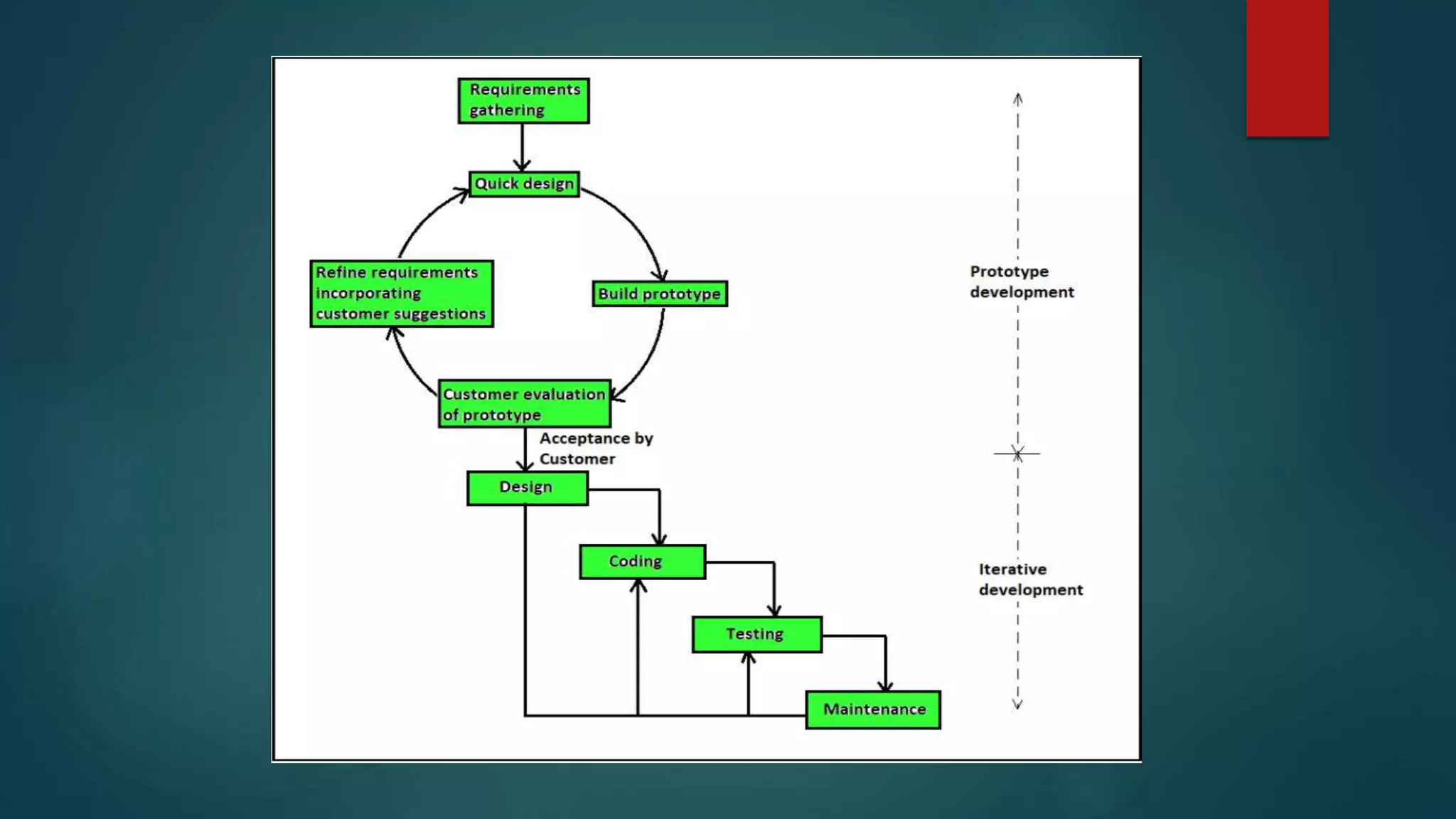
 In this type of model, a toy model (aka Prototype Model) is made first
which is only a dummy model of a project that is made on the basis of the
client’s requirement
 If the client accepts that toy model (Acceptance) then it goes to the next
phases which are designing, developing, testing, deploying & Maintenance
which is called iterative development
 If any changes are required by the user, it can be done at an earlier stage
itself
Advantages and Disadvantages Of
Prototype Model
 Advantages
• Customer satisfaction
• Reduce Maintenance cost
• Reduces time and cost as the defects can be detected much earlier
 Disadvantages
• Can take a long time
• It would be difficult if the customer is not clear with their idea

SDLC (Software development life Cycle)

  • 1.
  • 2.
    What is SDLC?  SDLC stands for Software Development Lifecycle  It is a set of planned activities for developing any software product  Using SDLC is very important for developing a software, SDLC divides all the tasks to be followed while developing a software into various phases which makes the software most accurate and perfect satisfying all the requirements and also for maintenance of the software  Without SDLC, it becomes tough for software project managers to monitor the progress of the project.
  • 3.
    Phases of SDLC There are 6 stages of SDLC which are: 1. Planning and Requirements 2. Analysis 3. Designing 4. Development/Coding 5. Testing 6. Deployment and Maintenance
  • 4.
    Planning and Requirements It is the first and the most important phase of SDLC  In this phase the Business analyst collects the client’s requirements  Based on that information it is then used to plan the basic project approach, expenditure, risk analysis, technical analysis, etc.  After planning a document is prepared called BRS (Business requirement specification)
  • 5.
    Analysis  Once therequirement analysis is completed the next step is to make SRS (Software requirement specification) based on BSR (Business requirement specification)  SRS document consists of all the product requirements to be designed and developed during the project  Based on SRS, two documents are further made that are FRS (Functional requirement specification) and SRS (System requirement specification)
  • 6.
    Designing  Based onthe requirements specified in SRS, product architecture is proposed and a document is made called DDS (Design Document Specification)  System architect will convert the design into LLD (Low-Level Design) and HLD (High-Level Design) which can de done by third-party application if required  LLD -  HLD -
  • 7.
    Development  The codingof the project is started as per DDS during this stage.  DDS helps in coding for accomplishing the project without much hassle.  Developers must follow the coding guidelines defined by their organization or manager and programming tools like compilers, interpreters, debuggers, etc. are used to generate the code.  Different high-level programming languages are used such as C, C++, Pascal, Java, and PHP are used for coding. The programming language is chosen with respect to the type of software being developed.
  • 8.
    Testing  This stagerefers to the testing of the software where software’s defects are reported, tracked, fixed, and retested until the product reaches the quality standards defined in the SRS (Software Requirement Specification)  Testing can be done manually and or by using automation tools
  • 9.
    Deployment and Maintenance Deployment  Once the product is tested and ready to be deployed, it is released in the market.  Maintenance  Once the product is deployed in the market the client may want to update or want to do some changes to the product then the maintenance part does this task  Also, when product users use the software they may give feedback which should be resolved from time to time
  • 10.
    SDLC Models  Thereare various software development life cycle models which are followed during the software development process.  Each model follows a Series of steps to ensure success in the process of software development.  There are 9 models of SDLC which are: I. Waterfall Model II. V–Model III. Iterative Model IV. Spiral Model V. Agile Model VI. Fish Model VII. Big-Bang Model VIII. RAD Model (Rapid Application Development) IX. Prototype Model
  • 11.
    1. Waterfall Model In the waterfall model all the processes of software development are divided into various phases/parts  These parts are nothing but SDLC phases (Planning and Requirement, Analysis, Designing, Development/Coding, Testing, Deployment and Maintenance)  In the waterfall Model the output of one phase is the input to its next phase sequentially  When one phase is completed fully (100%) only then next phase will be executed  In this model we can’t go back from any phase
  • 12.
  • 13.
    Advantages and DisadvantagesOf Waterfall Model  Advantages • Simple and easy to understand and use • Easy to manage due to its rigidness • Phases are processed and completed one at a time • In the Waterfall Model, processes and results are well documented  Disadvantages • If any changes are required at any phase, the whole process needs to be start from the beginning. For example, if the application has now shifted to the coding phase, and there is a change in requirement, It becomes tough to go back and change it. • This Model is not suitable for complex/large projects.
  • 14.
    2. V–Model  ‘V’in ‘V-Model’ stands for verification and validation, hence it is called V- Model  It is called V-Model because of its structure. On the left side, there are all the verification processes and on the right side, there are all the validation phases, they are connected by the development/coding phase at the bottom, which makes a v shape like structure  In this model, testing is associated with every phase, which means that every single phase in the development cycle, they are directly associated to the testing phase  Verification – In verification, reviewing is done without executing code. It is the process of evaluation of the product development process to find whether specified requirements meet. • Verification involves – Requirement analysis, System design, Architecture design, and Module design
  • 15.
     Validation -It involves testing of functional and non-functional testing, which is done after executing code. • Validation involves – Unit Testing, Integration testing, System testing, and Acceptance testing
  • 16.
    Advantages and DisadvantagesOf V-Model  Advantages • Simple and easy to understand and use. • It works perfectly for smaller projects where requirements are very well understood. • Each and every component is tested parallelly at every phase, so the chances of errors are less  Disadvantages • This Model is not suitable for large and complex • Once an application is in the testing stage, it is difficult to go back and change functionality, which means we can’t go back from any phase which affects customer satisfaction
  • 17.
    3. Iterative Model This Model is just like Waterfall Model, unlike waterfall Model, in this, we can go back to the previous phase if any changes are required  The Iterative Model allows going not only to the previous phase but also allows accessing all of its earlier phases  Due to its allowance to go back to the previous or earlier phase, it results in time-saving, cost-saving as well as effort-saving as we have to not start from the beginning again if any change is required  It is also called Advanced version of the Waterfall Model
  • 18.
  • 19.
    Advantages and DisadvantagesOf Iterative Model  Advantages • This model is easy to understand and execute • Some working functionality can be developed quickly and early in the life cycle. • Less costly to change the scope/requirements. • Testing and debugging during smaller iterations are easy.  Disadvantages • Requirement changes can cause over budget. • Project completion date is not confirmed because of changing requirements.
  • 20.
    4. Spiral Model In the Spiral Model all phases are divided into 4 quadrants that are: i. Objective determination and identifying alternative solutions ii. Identifying and resolving risks iii. Developing and verifying iv. Reviewing and planning for the next phase  Objective determination and identifying alternative solutions: This phase starts with gathering the business requirements This phase also includes understanding the system requirements by continuous communication between the customer and the system analyst.
  • 21.
     Identifying andresolving risks: It is the next phase in the spiral model, in this phase, we calculate and identify all the risks and prepare solutions for that risks before developing the project  Developing and verifying: In this phase, the design of the project is made and after designing the developers develop the project after developing the project, the testing team will test the software deeply and then the project goes into the last quadrant/phase  Reviewing and planning for the next phase: In this phase, the developed project is shown to the client or manager if any refinement is required it again starts from 1st quadrant which makes one spiral
  • 22.
     A softwareproject repeatedly passes through these phases in iterations called Spirals.
  • 23.
    5. Agile Model In this model the ’Agile’ means – fast, so as the name suggests, this model is used when the project deadline is short/less  In Agile Model, the tasks are divided into smaller parts which are done from time to time which is called iteration for delivering the project instantly  In this Model, a working software build is delivered after each iteration.  The final build/iterations hold all the features required by the customer.  Customer’s interaction is the backbone of the Agile Model
  • 25.
    Advantages and DisadvantagesOf Agile Model  Advantages • Resource requirements are minimum. • Project delivery time is fast • One-to-one communication with the client • Changes can be done frequently • Little or no planning is required • Easy to manage • Adaptive software development methods
  • 26.
     Disadvantages • Lessdocumentation may result in confusion and conflicts • Transfer of technology to new team members may be quite challenging due to lack of documentation. • Depends heavily on customer interaction, so if customer is not clear, team can be driven in the wrong direction
  • 27.
    6. Fish Model In the Fish Model, verification and validation are done parallelly at each phase by two different teams.  In Verification, reviewing is done of the whole phase, and In Validation, testing is done of the whole phase.  Except deployment and maintenance phases all other processes are done by separate teams and then reports are generated, by the end of the phases.  All the phases when connected via a diagram it makes a fish like structure, that’s why it is called Fish Model
  • 28.
  • 29.
    Advantages and DisadvantagesOf Iterative Model  Advantages • Fish Model is easy to implement • Fish model is used for developing secure and Highly quality software • Fish Model is easy to implement and all the documents are created one by one as the phases are completed  Disadvantages • This SDLC is expensive in terms of cost & time since it involves verification as well as validation on almost all the phases • it is not suitable for small projects
  • 30.
    7. Big- BangModel  In the Big Bang model of the SDLC model, the model does not follow any specific process  The development just starts with the required money and efforts as the input, and the output is the software developed which may or may not be as per customer requirement  There is no/less planning  Usually this model is followed for small projects where the development teams are very small For example – Academic projects
  • 32.
    Advantages and DisadvantagesOf Big- Bang Model  Advantages • This is a very simple model to understand • Little or no planning required • Easy to manage • Very few resources required  Disadvantages • Very High risk and uncertainty • Not a good model for complex and object-oriented projects • Poor model for long and ongoing projects
  • 33.
    9. RAD Model(Rapid Application Development Model)  Rapid application development is an SDLC Model that uses minimal planning or not specific planning  In this model the project is broken down into small modules and each module may/may not be assigned independently to separate teams.  These modules can finally be combined to form the final product using some powerful developer tools such as JAVA, C++, Visual BASIC, XML, etc. is also an integral part of the projects.
  • 35.
    Advantages and DisadvantagesOf RAD Model  Advantages • It takes less time as powerful RAD tools are used • Feedback from the customer is available at the initial stages • Expenses are lesser as fewer developers are required and automation tools are used  Disadvantages • Highly skilled professionals are required for use of powerful tools • It is suitable for large projects only
  • 36.
    9. Prototype Model In this type of model, a toy model (aka Prototype Model) is made first which is only a dummy model of a project that is made on the basis of the client’s requirement  If the client accepts that toy model (Acceptance) then it goes to the next phases which are designing, developing, testing, deploying & Maintenance which is called iterative development  If any changes are required by the user, it can be done at an earlier stage itself
  • 38.
    Advantages and DisadvantagesOf Prototype Model  Advantages • Customer satisfaction • Reduce Maintenance cost • Reduces time and cost as the defects can be detected much earlier  Disadvantages • Can take a long time • It would be difficult if the customer is not clear with their idea