Control Structures of
Programming
Introduction to Programming Concepts
Presenter's Name : Amali Gunasinghe
MSc, BSc(Hons) in Information Technology(SLIIT)
Objectives
• At the end of this lecture, students should be able to:
• Understand the concept of control structures and their
importance in programming.
• Identify and differentiate between the types of control structures
sequential, conditional, iterative and branching .
• Implement and use control structures in programs.
What are Control Structures?
• A control structure is a fundamental concept in programming that
allows developers to control the flow of execution of a program.
• Control structures enable a program to make decisions, repeat tasks,
or execute code conditionally.
• Types of Control Structures:
• Sequential Control
• Conditional Control (Selection)
• Iterative Control (Loops)
• Branching Control
Sequential Control
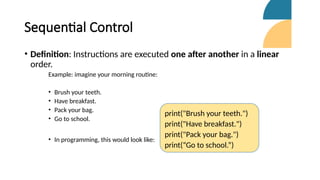
• Definition: Instructions are executed one after another in a linear
order.
Example: imagine your morning routine:
• Brush your teeth.
• Have breakfast.
• Pack your bag.
• Go to school.
• In programming, this would look like:
print("Brush your teeth.")
print("Have breakfast.")
print("Pack your bag.")
print(“Go to school.”)
Conditional Control (Selection)
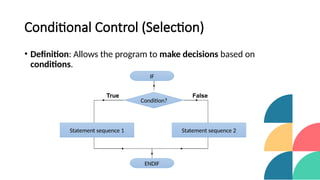
• Definition: Allows the program to make decisions based on
conditions.
IF
Condition?
Statement sequence 1
ENDIF
Statement sequence 2
False
True
Types of Conditional Statements:
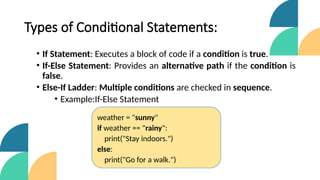
• If Statement: Executes a block of code if a condition is true.
• If-Else Statement: Provides an alternative path if the condition is
false.
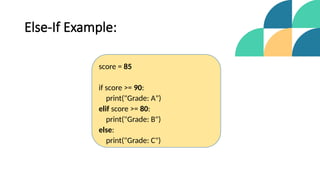
• Else-If Ladder: Multiple conditions are checked in sequence.
• Example:If-Else Statement
weather = "sunny"
if weather == "rainy":
print("Stay indoors.")
else:
print("Go for a walk.")
Else-If Example:
score = 85
if score >= 90:
print("Grade: A")
elif score >= 80:
print("Grade: B")
else:
print("Grade: C")
Iterative Control (Loops)
• Definition: Repeats a block of code multiple times.
• Types of Loops:
• For Loop: Repeats a known number of times.
• While Loop: Repeats as long as a condition is true.
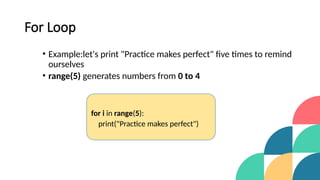
For Loop
• Example:let's print "Practice makes perfect" five times to remind
ourselves
• range(5) generates numbers from 0 to 4
for i in range(5):
print("Practice makes perfect")
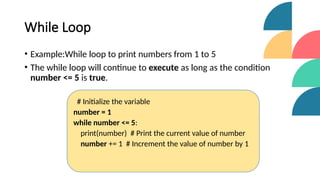
While Loop
• Example:While loop to print numbers from 1 to 5
• The while loop will continue to execute as long as the condition
number <= 5 is true.
# Initialize the variable
number = 1
while number <= 5:
print(number) # Print the current value of number
number += 1 # Increment the value of number by 1
Branching Control
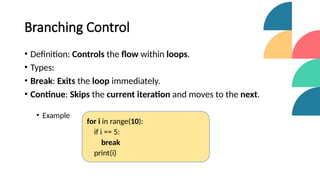
• Definition: Controls the flow within loops.
• Types:
• Break: Exits the loop immediately.
• Continue: Skips the current iteration and moves to the next.
• Example
for i in range(10):
if i == 5:
break
print(i)
Summary
• Recap of Key Points:
• Sequential, Conditional, Iterative and Branching control structures
are fundamental for programming.
• Control structures help in decision-making and repeating tasks.
• Next Steps:
• Practice using different control structures in simple programs.
• Understand how they help in problem-solving.
Questions & Answers
• Do you have any questions about control structures? Feel free to ask!
References
1) B. W. Kernighan and D. M. Ritchie, The C Programming Language, 2nd ed. Upper Saddle River,
NJ, USA: Prentice Hall, 1988.
2) S. G. Kochan, Programming in C, 4th ed. Upper Saddle River, NJ, USA: Addison-Wesley
Professional, 2014.
3) M. Sipser, Introduction to the Theory of Computation, 3rd ed. Boston, MA, USA: Cengage
Learning, 2012.
4) GeeksforGeeks, "Control Structures in C," [Online]. Available: https://www.geeksforgeeks.org.
[Accessed: 27-Aug-2024].
5) TutorialsPoint, "Control Structures," [Online]. Available: https://www.tutorialspoint.com.
[Accessed: 27-Aug-2024].
Thank You
• "Thank you for your attention! Happy coding, and keep practicing!"
• Contact Information:
• Email: amali.gunasinghe5@gmail.com

Control Structures of Programming (Introduction to Programming Concepts)

  • 1.
    Control Structures of Programming Introductionto Programming Concepts Presenter's Name : Amali Gunasinghe MSc, BSc(Hons) in Information Technology(SLIIT)
  • 2.
    Objectives • At theend of this lecture, students should be able to: • Understand the concept of control structures and their importance in programming. • Identify and differentiate between the types of control structures sequential, conditional, iterative and branching . • Implement and use control structures in programs.
  • 3.
    What are ControlStructures? • A control structure is a fundamental concept in programming that allows developers to control the flow of execution of a program. • Control structures enable a program to make decisions, repeat tasks, or execute code conditionally. • Types of Control Structures: • Sequential Control • Conditional Control (Selection) • Iterative Control (Loops) • Branching Control
  • 4.
    Sequential Control • Definition:Instructions are executed one after another in a linear order. Example: imagine your morning routine: • Brush your teeth. • Have breakfast. • Pack your bag. • Go to school. • In programming, this would look like: print("Brush your teeth.") print("Have breakfast.") print("Pack your bag.") print(“Go to school.”)
  • 5.
    Conditional Control (Selection) •Definition: Allows the program to make decisions based on conditions. IF Condition? Statement sequence 1 ENDIF Statement sequence 2 False True
  • 6.
    Types of ConditionalStatements: • If Statement: Executes a block of code if a condition is true. • If-Else Statement: Provides an alternative path if the condition is false. • Else-If Ladder: Multiple conditions are checked in sequence. • Example:If-Else Statement weather = "sunny" if weather == "rainy": print("Stay indoors.") else: print("Go for a walk.")
  • 7.
    Else-If Example: score =85 if score >= 90: print("Grade: A") elif score >= 80: print("Grade: B") else: print("Grade: C")
  • 8.
    Iterative Control (Loops) •Definition: Repeats a block of code multiple times. • Types of Loops: • For Loop: Repeats a known number of times. • While Loop: Repeats as long as a condition is true.
  • 9.
    For Loop • Example:let'sprint "Practice makes perfect" five times to remind ourselves • range(5) generates numbers from 0 to 4 for i in range(5): print("Practice makes perfect")
  • 10.
    While Loop • Example:Whileloop to print numbers from 1 to 5 • The while loop will continue to execute as long as the condition number <= 5 is true. # Initialize the variable number = 1 while number <= 5: print(number) # Print the current value of number number += 1 # Increment the value of number by 1
  • 11.
    Branching Control • Definition:Controls the flow within loops. • Types: • Break: Exits the loop immediately. • Continue: Skips the current iteration and moves to the next. • Example for i in range(10): if i == 5: break print(i)
  • 12.
    Summary • Recap ofKey Points: • Sequential, Conditional, Iterative and Branching control structures are fundamental for programming. • Control structures help in decision-making and repeating tasks. • Next Steps: • Practice using different control structures in simple programs. • Understand how they help in problem-solving.
  • 13.
    Questions & Answers •Do you have any questions about control structures? Feel free to ask!
  • 14.
    References 1) B. W.Kernighan and D. M. Ritchie, The C Programming Language, 2nd ed. Upper Saddle River, NJ, USA: Prentice Hall, 1988. 2) S. G. Kochan, Programming in C, 4th ed. Upper Saddle River, NJ, USA: Addison-Wesley Professional, 2014. 3) M. Sipser, Introduction to the Theory of Computation, 3rd ed. Boston, MA, USA: Cengage Learning, 2012. 4) GeeksforGeeks, "Control Structures in C," [Online]. Available: https://www.geeksforgeeks.org. [Accessed: 27-Aug-2024]. 5) TutorialsPoint, "Control Structures," [Online]. Available: https://www.tutorialspoint.com. [Accessed: 27-Aug-2024].
  • 15.
    Thank You • "Thankyou for your attention! Happy coding, and keep practicing!" • Contact Information: • Email: amali.gunasinghe5@gmail.com

Editor's Notes

  • #8 # range(5) generates numbers from 0 to 4 This loop repeats "Practice makes perfect" five times.
  • #9 # range(5) generates numbers from 0 to 4 This loop repeats "Practice makes perfect" five times.
  • #10 prints the numbers from 1 to 5
  • #11 0 1 2 3 4