LMS/CMS Integration: Common Issues and PracticesMichelle Read & RenataGuertzELEARN 2010Orlando, Florida Integration Experiences at Three Universities
IntroductionLMS/CMS use on the rise at secondary and higher education institutions (Ellis & Calvo, 2007; Falvo & Johnson, 2007; Georgouli, Skalkidis & Guerreiro, 2008)Face-t0-face supplementalFull online offering
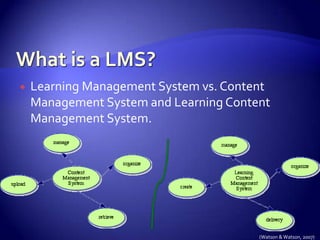
What is a LMS?Learning Management System vs. Content Management System and Learning Content Management System. (Watson & Watson, 2007)
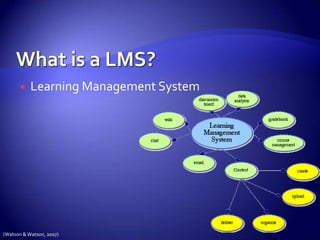
What is a LMS?Learning Management System (Watson & Watson, 2007)
Blackboard, Moodle, Sakai, SimplyDigiVariation in offerings:  Wikis
 Blogs
 polling/surveys
 video conferencing
 Whiteboards✗ portfolios✗ desktop/application sharingAll shared: ✓Announcements✓Email✓Chat✓Quiz building✓Gradebook✓Reporting✓Grouping✓Various document types for uploading✓Video/audio
Pre-adoption considerationsOpen Source vs. Proprietary(Black et al., 2007)CompatibilityRelative advantageTrialabilityComplexityobservability
Implementation frameworkInitiationAdoption-----------------------AdaptionAcceptanceUseincorporation(Kwon & Zmud (1987)
LMS/CMS Integration at Kingston University(Heaton-Shrestha, Edirisingha, Burkey & Linsey, 2005)United KingdomBlackboard2002-2005http://en.wikipedia.org/wiki/Kingston_University
LMS/CMS Integration at Dublin City University (Blin & Munro, 2008)United Kingdom, IrelandMoodle2004http://en.wikipedia.org/wiki/Dublin_City_University
LMS/CMS Integration at Brigham Young University(West, Waddoups & Graham, 2006)United States, UtahBlackboard2004-2005
Findings: uploading existing contentPlacing course assets onlineSyllabusReadingsLecture notesVery limited uploads of video or soundInitial LMS activityDownloaded from: www.actx.edu/web/index.php?module=article&id=45 on 5/5/2010
Findings: integration of advanced collaborative toolsTypes of advanced collaborative toolsDiscussion boardsWikisOnline journalsChallenge for facultyTechnical skillsPedagogical knowledgeWorkloadDownloaded from: pius7.slu.edu/mclnews/?p=3 on 5/5/2010
Findings: data on student activity levels in coursesUser statisticsNumber of accessesAmount of time spent in the LMSTypes of materials accessedFaculty interpretation of the statsCheck attendanceGuide for face-to-face lecturesDownloaded from: www.mugatlanta.org/ on 5/5/2010
Findings: technology challengesAnxiety about technologyNot knowing how to operate the LMSNegative impact on professional imageConcern about system changes or downtimeDownloaded from: www.insanit.com/featured_partners.htm on 5/5/2010
Findings: assessment and grade reportingDrop box accepts electronic assignmentsQuiz tool can be used for testingDiscussion boards can be used for submitting short answer responsesAssignment grades are reported as faculty post themGrades are available 24/7Downloaded from: www.trusmart.com/Default.aspx?tabid=58 on 5/5/2010
Findings: increased communicationEmail to entire class Email to individual studentStudent to student emailsMessages posted on the LMSDownloaded from: http://alexandracollege.eu/about-the-college/alexandra-learning-teachingict on 5/5/2010
Findings: attendance to class meetingsIncrease in absences to class lecturesNotes posted to LMS were a substitute for attending classNote-taking during class droppedDownloaded from: http://economistsview.typepad.com/economics470/2006/07/technology_and_.html on 5/5/2010
Findings: selection of tool integrationFaculty asked students which tools to useDemand driven education?Student use of tools impacted faculty teaching practicesStudents recommend tools based on experiences in other coursesDownloaded from: www.oread.ku.edu on 5/5/2010

Lm swith notes 5-5 at 4pm

  • 1.
    LMS/CMS Integration: CommonIssues and PracticesMichelle Read & RenataGuertzELEARN 2010Orlando, Florida Integration Experiences at Three Universities
  • 2.
    IntroductionLMS/CMS use onthe rise at secondary and higher education institutions (Ellis & Calvo, 2007; Falvo & Johnson, 2007; Georgouli, Skalkidis & Guerreiro, 2008)Face-t0-face supplementalFull online offering
  • 3.
    What is aLMS?Learning Management System vs. Content Management System and Learning Content Management System. (Watson & Watson, 2007)
  • 4.
    What is aLMS?Learning Management System (Watson & Watson, 2007)
  • 5.
    Blackboard, Moodle, Sakai,SimplyDigiVariation in offerings: Wikis
  • 6.
  • 7.
  • 8.
  • 9.
    Whiteboards✗ portfolios✗desktop/application sharingAll shared: ✓Announcements✓Email✓Chat✓Quiz building✓Gradebook✓Reporting✓Grouping✓Various document types for uploading✓Video/audio
  • 10.
    Pre-adoption considerationsOpen Sourcevs. Proprietary(Black et al., 2007)CompatibilityRelative advantageTrialabilityComplexityobservability
  • 11.
  • 12.
    LMS/CMS Integration atKingston University(Heaton-Shrestha, Edirisingha, Burkey & Linsey, 2005)United KingdomBlackboard2002-2005http://en.wikipedia.org/wiki/Kingston_University
  • 13.
    LMS/CMS Integration atDublin City University (Blin & Munro, 2008)United Kingdom, IrelandMoodle2004http://en.wikipedia.org/wiki/Dublin_City_University
  • 14.
    LMS/CMS Integration atBrigham Young University(West, Waddoups & Graham, 2006)United States, UtahBlackboard2004-2005
  • 15.
    Findings: uploading existingcontentPlacing course assets onlineSyllabusReadingsLecture notesVery limited uploads of video or soundInitial LMS activityDownloaded from: www.actx.edu/web/index.php?module=article&id=45 on 5/5/2010
  • 16.
    Findings: integration ofadvanced collaborative toolsTypes of advanced collaborative toolsDiscussion boardsWikisOnline journalsChallenge for facultyTechnical skillsPedagogical knowledgeWorkloadDownloaded from: pius7.slu.edu/mclnews/?p=3 on 5/5/2010
  • 17.
    Findings: data onstudent activity levels in coursesUser statisticsNumber of accessesAmount of time spent in the LMSTypes of materials accessedFaculty interpretation of the statsCheck attendanceGuide for face-to-face lecturesDownloaded from: www.mugatlanta.org/ on 5/5/2010
  • 18.
    Findings: technology challengesAnxietyabout technologyNot knowing how to operate the LMSNegative impact on professional imageConcern about system changes or downtimeDownloaded from: www.insanit.com/featured_partners.htm on 5/5/2010
  • 19.
    Findings: assessment andgrade reportingDrop box accepts electronic assignmentsQuiz tool can be used for testingDiscussion boards can be used for submitting short answer responsesAssignment grades are reported as faculty post themGrades are available 24/7Downloaded from: www.trusmart.com/Default.aspx?tabid=58 on 5/5/2010
  • 20.
    Findings: increased communicationEmailto entire class Email to individual studentStudent to student emailsMessages posted on the LMSDownloaded from: http://alexandracollege.eu/about-the-college/alexandra-learning-teachingict on 5/5/2010
  • 21.
    Findings: attendance toclass meetingsIncrease in absences to class lecturesNotes posted to LMS were a substitute for attending classNote-taking during class droppedDownloaded from: http://economistsview.typepad.com/economics470/2006/07/technology_and_.html on 5/5/2010
  • 22.
    Findings: selection oftool integrationFaculty asked students which tools to useDemand driven education?Student use of tools impacted faculty teaching practicesStudents recommend tools based on experiences in other coursesDownloaded from: www.oread.ku.edu on 5/5/2010

Editor's Notes

  • #2 Our presentation is entitled “LMS/CMS Integration: Common Issues and Practices.” We scoured databases within our local UT library system and Google Scholar for articles pertaining to the use of LMSs in higher education in order to see how they were being used. We found three studies which we felt exemplified the tale we were seeking.
  • #3 The use of LMS/CMSs in higher education institutions is rising in order to support face-to-face instruction and as fully online course offerings. One study by Falvo & Johnson cited a 2003 Sloan Report claiming that 81% of universities were offering online courses. Most of the universities they studied were using Blackboard/WebCT as their preferred LMS, although many had also built their own systems.
  • #4 Many use the terms, LMS, CMS,and LCMS interchangeably.Several authors noted a difference, or at least intended difference, between the terms Learning Management Systems, Content Management Systems, and Learning Content Management Systems. While a CMS seemed to describe a place for uploading, organizing and retrieving documents, a LCMS seemed to be a system which allowed for the creation and delivery of content within it.
  • #5 On the other hand, a LMS seemed to combine both the ability to create and deliver content and upload and retrieve documents in addition to being able to manage learners, through grouping, grading, registration, etc., and provide activities, such as wikis, blogs, discussion boards, email, etc. A LMS can usually run reports and analyze data for overall student status or prescribed learning needs.
  • #6 We compared four LMS/CMS systems currently on the market. Two open-source systems, Moodle and Sakai, and two proprietary systems, Blackboard and SimplyDigi. All of these LMSs seem to share certain features and functionalities such as announcements, email, chat, the ability to build quizzes, gradebooks, basic reports, audio and video. The differences came in special features such as the ability to desktop share, whiteboards, blogs, wikis and portfolios.
  • #7 Black and his colleagues noted that institutions must take several factors into consideration before adopting, such as compatibility—How compatible is the system with what I have going on now? Relative Advantage—What can the system do for me that I don’t already have? Trialability—How long can I use this before I have to make a decision? Complexity—How easy is it to use? And Observabililty—How are my colleagues faring using it?
  • #8 Kwon & Zmud identified an implementation framework for all ICT or IT adoption. After initiation and adoption decisions, faculty still go through the stages of adaption, acceptance, initial use and finally full incorporation of a system. The studies we looked at focus on these remaining stages.
  • #9 The first study we look at took place at Kingston University in London. They integrated the Blackboard System during the 2002-2005 school year. It opened as the Kingston Technical University in 1899, and gained university status in 1992. In 2009, Kingston University had over 22,000 students, four campuses and seven faculties, or colleges, offering both undergraduate and graduate degrees.
  • #10 Our second study is at Dublin City University in Ireland. They implemented Moodle in 2004. It opened as the National Institute for Higher Education in 1975 and reached university status in 1989. It has 8400 undergrad and graduate students, 1100 distance education students and four colleges. It is also host to “Oscail” Ireland’s National Distance Education Centre.
  • #11 Finally, our last study takes place at Brigham Young University in the United States, where they adopted Blackboard during the 2004-2005 school year. BYU is a private university in Utah. Brigham Young Academy was founded in 1875 and took on university status in 1903 when the academy dissolved into two institutions, a High School and the University. It services are focused on undergraduate studies, but the system also offers many graduate programs.
  • #12 Most faculty begin integration by uploading course documents. At DCU, 70% of faculty using the Moodle uploaded course documents. Also interestingly, the majority of uploads were text based. Only 7% of uploads were sound or video. The responsibility of getting course materials to students has moved to the LMS
  • #13 We know from pedagogical research that collaborate learning is most effective, yet very few faculty took advantage of the collaborative tools available in the LMS. Faculty don’t know how to set up the tools within the LMS, faculty don’t know how to teach using collaborative methods, and finally faculty want to limit their workload.
  • #14 Once the faculty posts materials on the LMS, they can use the user statistics information to check how that information is being used by the student. What is the student doing in the LMS? Faculty can see how many times a students has logged in, how long the student stayed, and what assets did the student access. This information can be an indicator of how engaged a student is in the course. As one faculty member described, he can check whether students are “attending the course” online.
  • #15 Faculty are well educated people who are capable of accomplishing most tasks. However, when it comes to technology, faculty reported a high level of anxiety. 2/3 of faculty at BUY expressed concern about technology issues such as log-in problems, access denied to tests, emails being lost or not posted.
  • #16 I don’t know the educational theory that postulates that knowing your grades impacts students learning, but my practical experience is that this knowledge changes student behavior. A strong tool within most LMS is the ability to post assignment grades and have them available 24/7. Some systems even provide some statistical analysis letting the student know the class average for the assignment and the percentile ranking of his/her grade.
  • #17 When an LMS is available communicating becomes easier. While using the email tool is easy, many faculty question the pedagogy of emails; just because you can email the entire class, should you? What is the academic merit of emailing the entire class? Is this good use of teacher time, how about student time? At KU faculty noticed an increase in student emails at the same time that they noticed an increase in face-to-face conversations.
  • #18 Isn’t it nice to get the lecture notes and then refer to them as the lecture is being delivered during class. That way, you can really concentrate on what is being said instead to struggling to write down your notes. For this reason, many faculty post their lecture notes on the LMS. At the same time, they noticed that students began to skip face-to-face meetings. Student’s interpreted that since they had the notes, they didn’t need the lecture.
  • #19 With a new learning management system, faculty can be at a loss as to which tools to use. Students often influenced faculty decision of which tool will be integrated. At DCU, students let the faculty member know that they didn’t like using the IM tool, so the faculty member dropped it as a requirement, even though they felt the tool was worthwhile.
  • #20 Faculty have many demands on their time. Between teaching, research, service to the academic community, there is little time for new responsibilities. Learning a new LMS requires time and energy and many faculty are not knowledgeable about the educational benefits that LMS can deliver. LMS integration becomes a trade-off in terms of faculty time and energy and good learning and teaching.
  • #21 Experienced are used to thinking of technology as a tool which improves student learning. In fact, this group reported that they felt constrained by the LMS environment itself.Novice ICT users have a steep learning curve ahead of them. In addition to becoming comfortable with technology, they need to learn the specifics of the LMS and then finally they need to learn the pedagogical practices which integrate LMS tools into their course.