DIGITAL TEACHING
Dr. Sanjay
Assistant Professor,
Department of Science & Technology
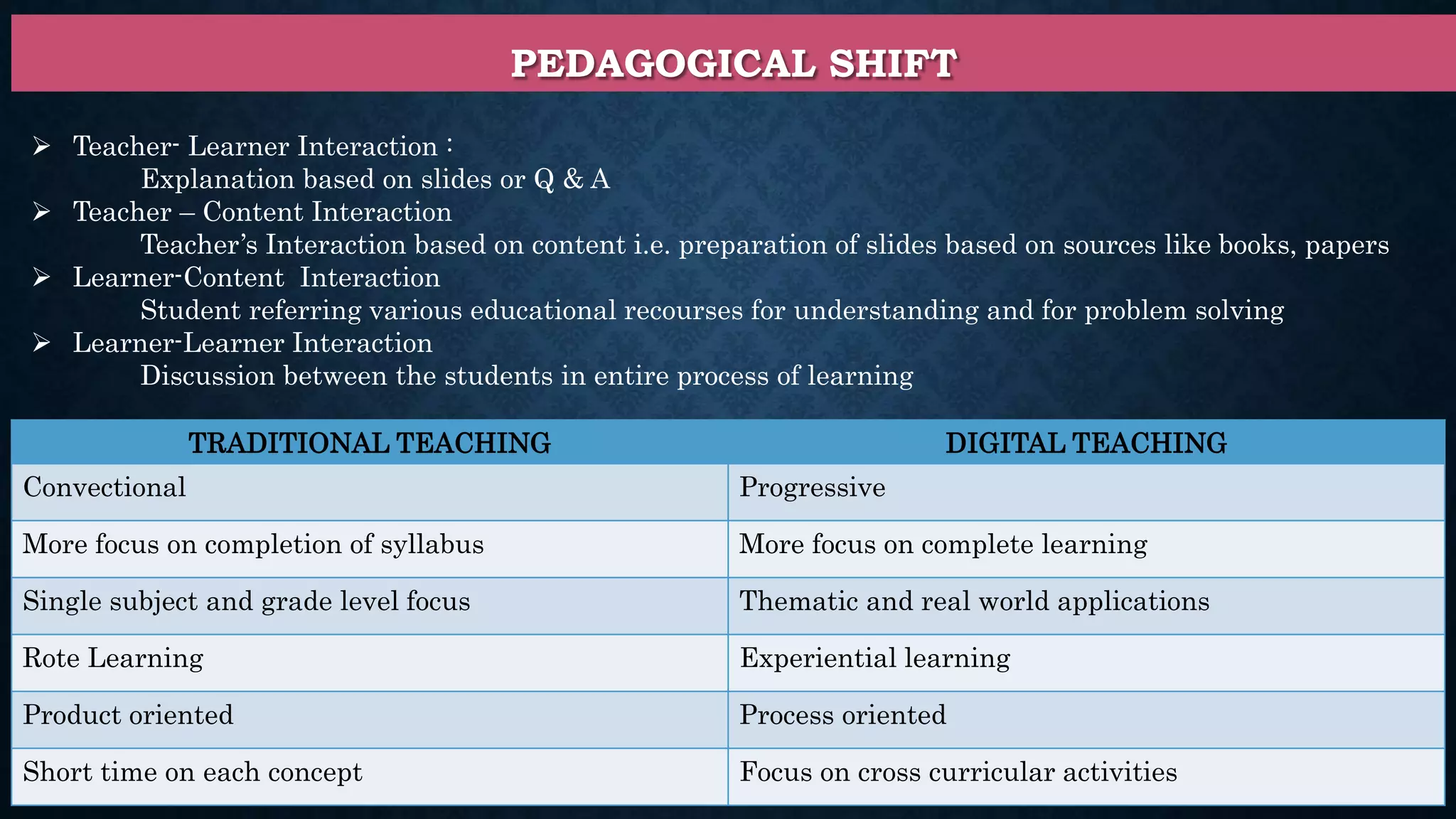
PEDAGOGICAL SHIFT
 Teacher- Learner Interaction :
Explanation based on slides or Q & A
 Teacher – Content Interaction
Teacher’s Interaction based on content i.e. preparation of slides based on sources like books, papers
 Learner-Content Interaction
Student referring various educational recourses for understanding and for problem solving
 Learner-Learner Interaction
Discussion between the students in entire process of learning
TRADITIONAL TEACHING DIGITAL TEACHING
Convectional Progressive
More focus on completion of syllabus More focus on complete learning
Single subject and grade level focus Thematic and real world applications
Rote Learning Experiential learning
Product oriented Process oriented
Short time on each concept Focus on cross curricular activities
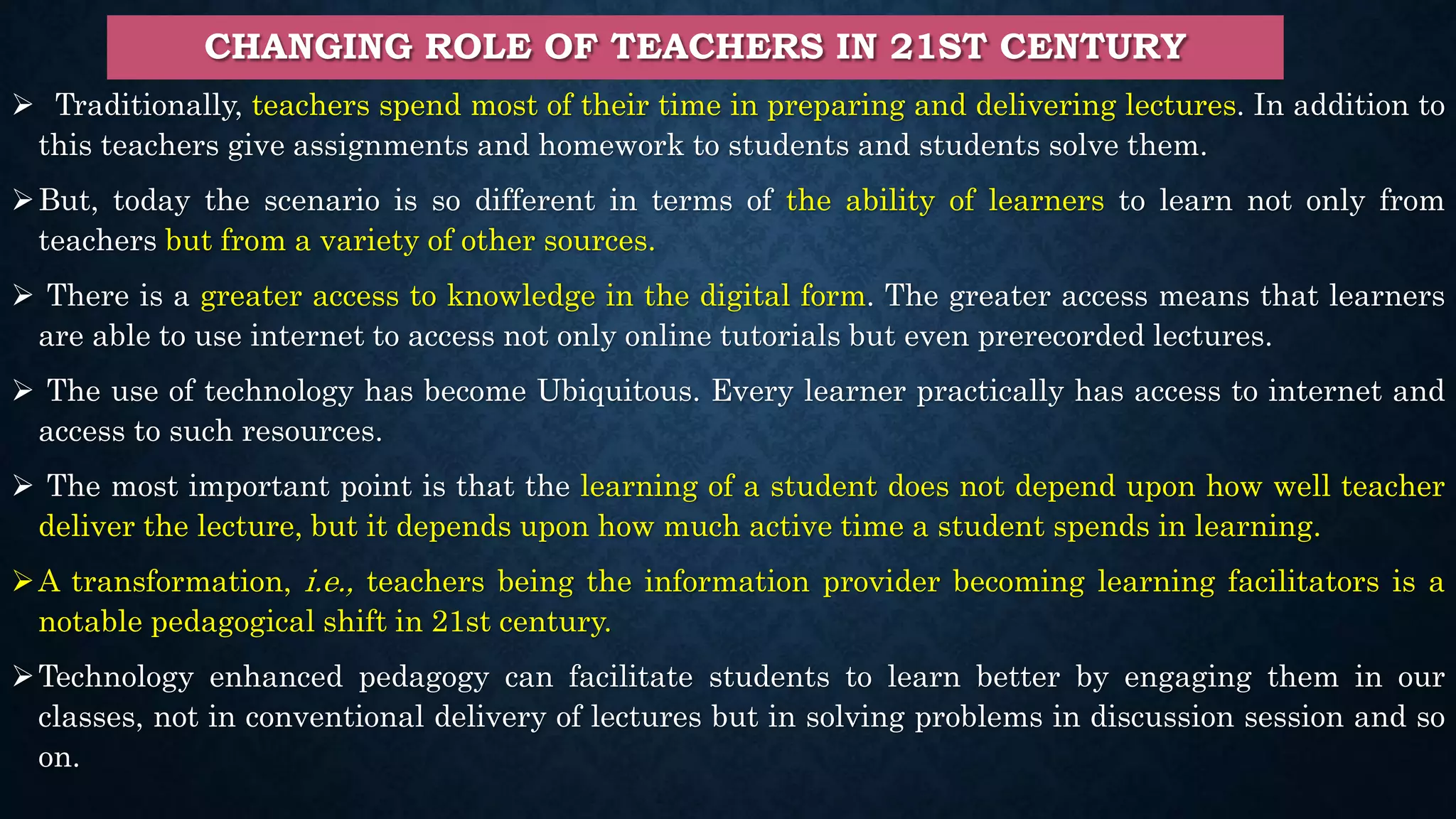
CHANGING ROLE OF TEACHERS IN 21ST CENTURY
 Traditionally, teachers spend most of their time in preparing and delivering lectures. In addition to
this teachers give assignments and homework to students and students solve them.
But, today the scenario is so different in terms of the ability of learners to learn not only from
teachers but from a variety of other sources.
 There is a greater access to knowledge in the digital form. The greater access means that learners
are able to use internet to access not only online tutorials but even prerecorded lectures.
 The use of technology has become Ubiquitous. Every learner practically has access to internet and
access to such resources.
 The most important point is that the learning of a student does not depend upon how well teacher
deliver the lecture, but it depends upon how much active time a student spends in learning.
A transformation, i.e., teachers being the information provider becoming learning facilitators is a
notable pedagogical shift in 21st century.
Technology enhanced pedagogy can facilitate students to learn better by engaging them in our
classes, not in conventional delivery of lectures but in solving problems in discussion session and so
on.
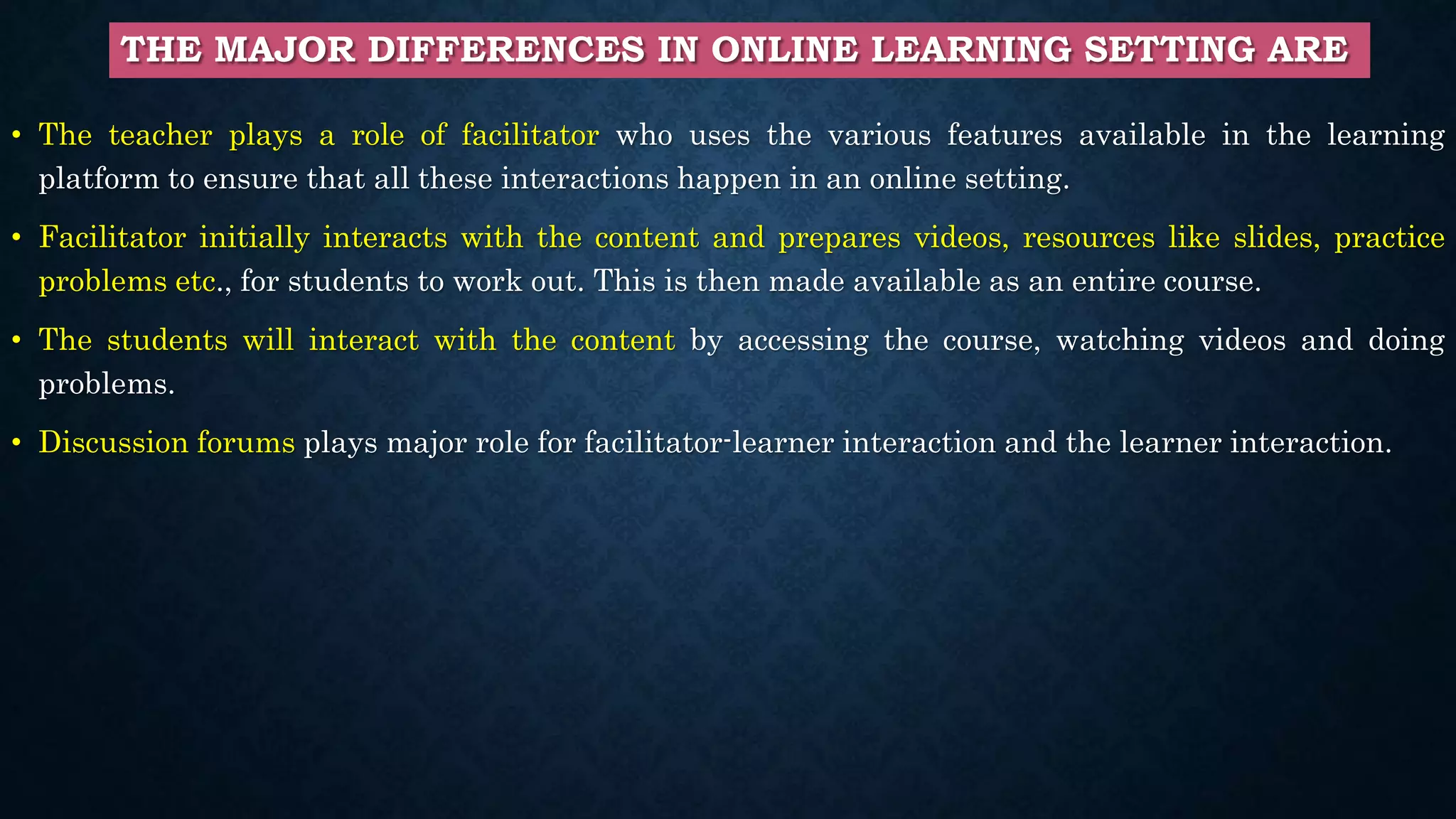
THE MAJOR DIFFERENCES IN ONLINE LEARNING SETTING ARE
• The teacher plays a role of facilitator who uses the various features available in the learning
platform to ensure that all these interactions happen in an online setting.
• Facilitator initially interacts with the content and prepares videos, resources like slides, practice
problems etc., for students to work out. This is then made available as an entire course.
• The students will interact with the content by accessing the course, watching videos and doing
problems.
• Discussion forums plays major role for facilitator-learner interaction and the learner interaction.
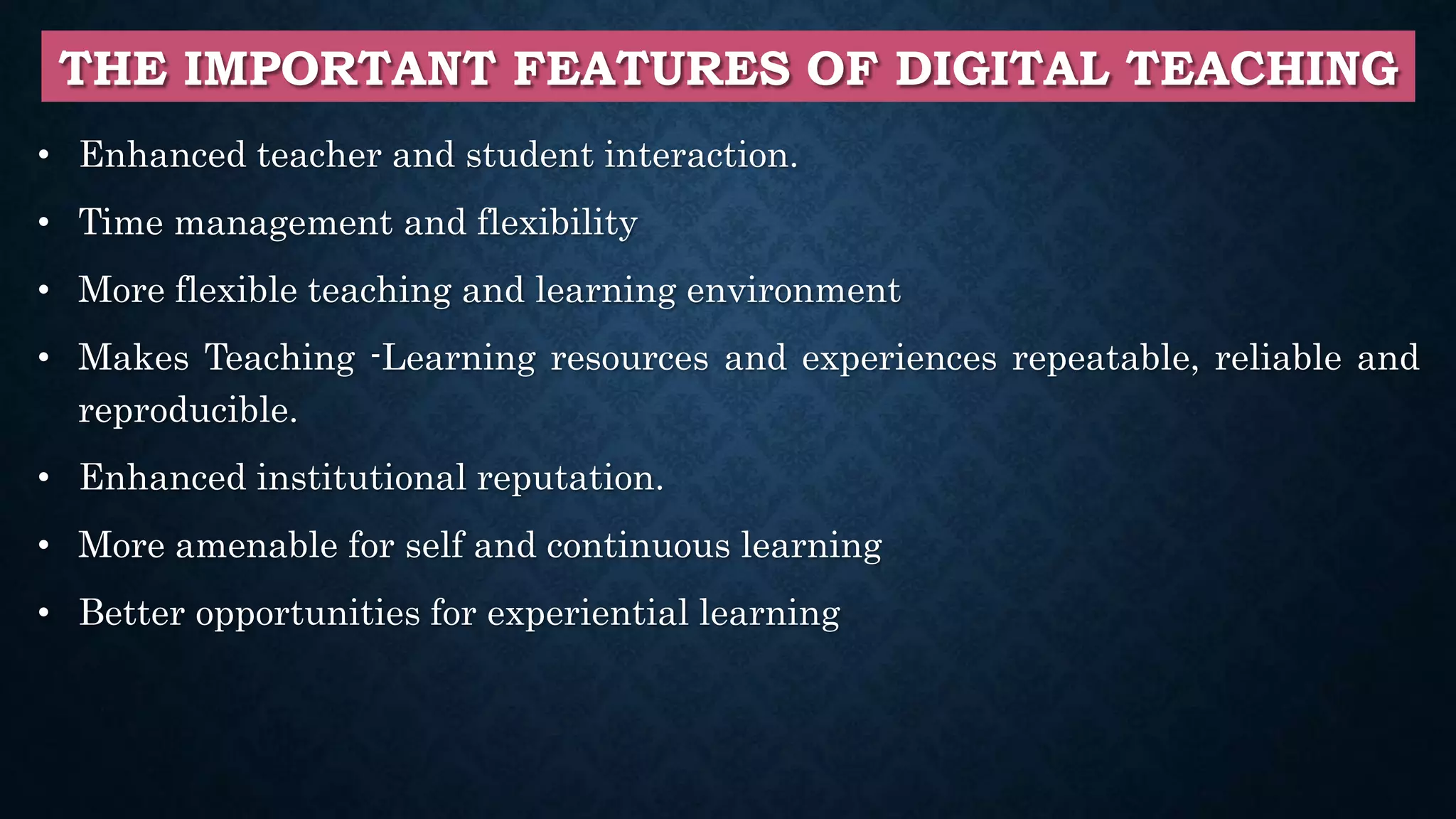
THE IMPORTANT FEATURES OF DIGITAL TEACHING
• Enhanced teacher and student interaction.
• Time management and flexibility
• More flexible teaching and learning environment
• Makes Teaching -Learning resources and experiences repeatable, reliable and
reproducible.
• Enhanced institutional reputation.
• More amenable for self and continuous learning
• Better opportunities for experiential learning
ONLINE LEARNING ENVIRONMENT: LEARNER-CENTRIC APPROACH
• Learning Dialogues
• The Reflection Spots
• Learning by Doing Activities
• Learning Extension Resources
• Assimilation Quizzes
• Learning Experience Interactions
• Reflection Quiz
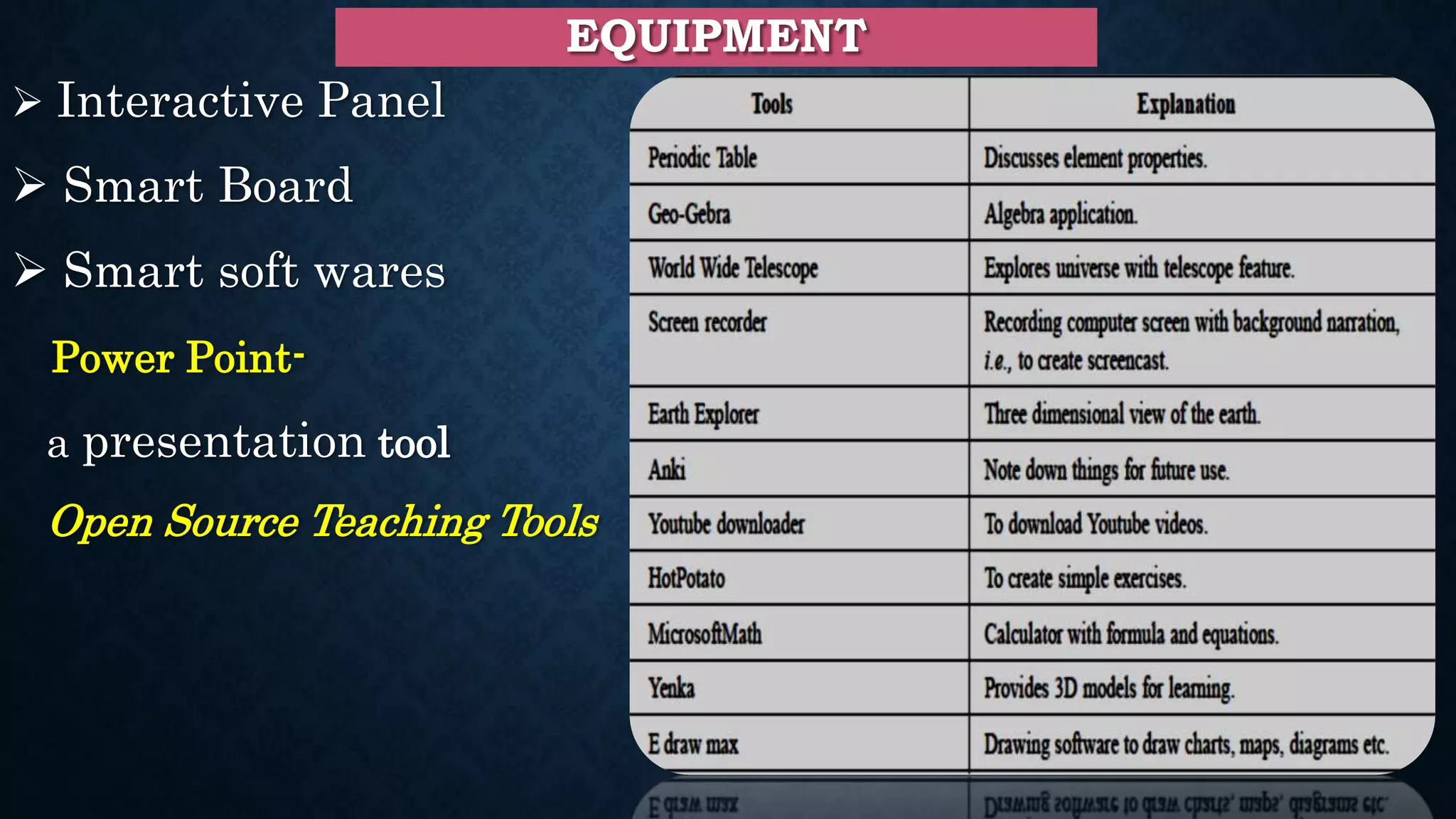
EQUIPMENT
 Interactive Panel
 Smart Board
 Smart soft wares
Power Point-
a presentation tool
Open Source Teaching Tools
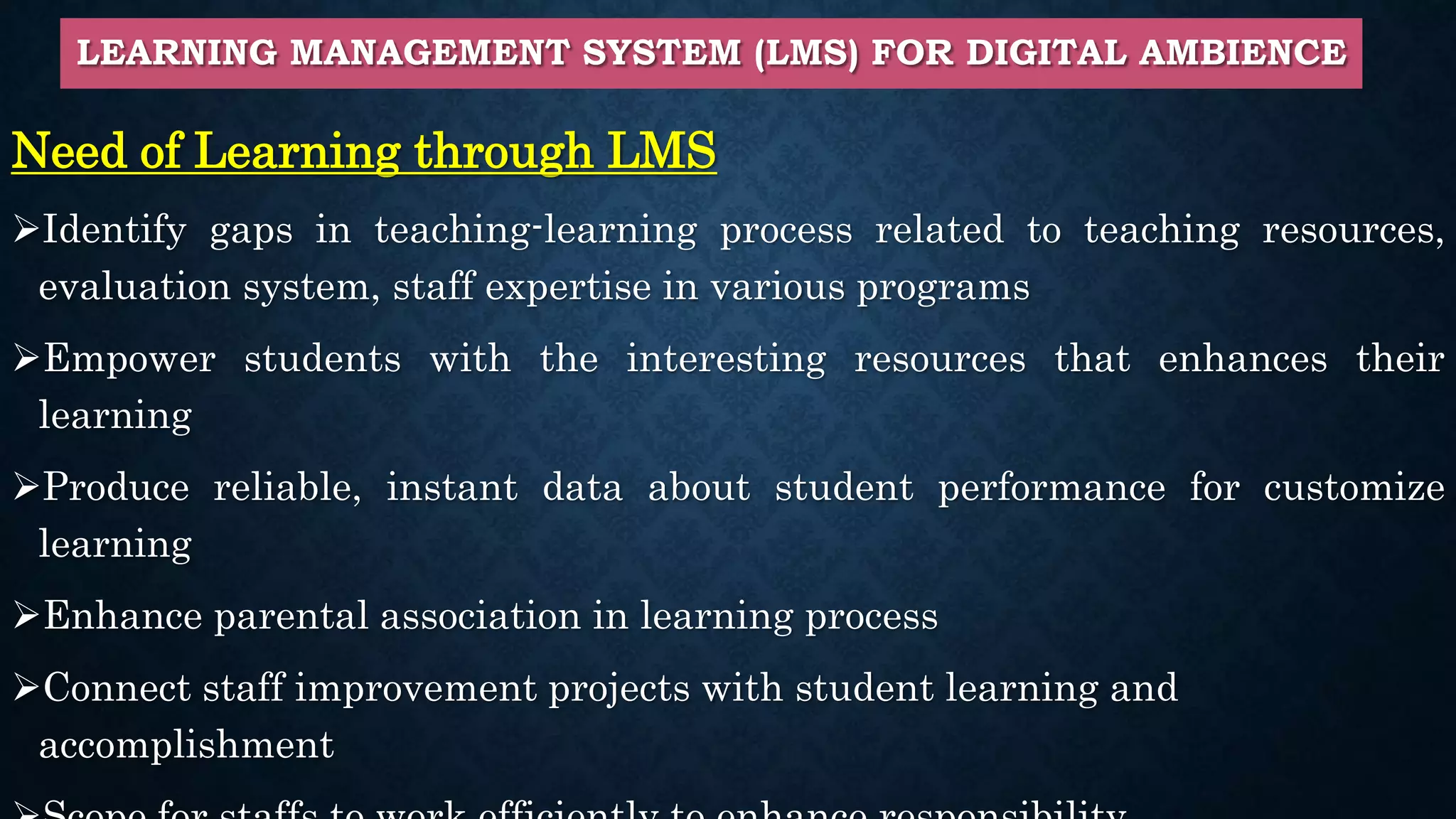
LEARNING MANAGEMENT SYSTEM (LMS) FOR DIGITAL AMBIENCE
Need of Learning through LMS
Identify gaps in teaching-learning process related to teaching resources,
evaluation system, staff expertise in various programs
Empower students with the interesting resources that enhances their
learning
Produce reliable, instant data about student performance for customize
learning
Enhance parental association in learning process
Connect staff improvement projects with student learning and
accomplishment
CAPABILITIES AND FEATURES OF LMS
 Create content and integrate content with outsider courseware.
 Access to content delivery including the medium, strategy and learners.
 Prepare lecture plans for learners, teachers and classrooms.
 Constructivist-based guideline for example learner-characterised
objectives.
 Responsiveness to learner needs.
 Evaluate learners’ performance and instant feedback on learning.
 Learning in and out of the classroom environment.
 Account security in terms of passwords and encryption.
 Parental participation.
LMS TOOLS
 LMS tools encourage learning and correspondence with students in
and outside of the classroom.
 This may include: Learning resources, links to online material,
instant assessment and feedback mechanism, Discussion forum, Real-
time messaging, E-mail, Announcement posts.
In addition to this, appraisals and online review books are utilised to
build educator profitability and track student performance while
guaranteeing that the course is meeting curricular goals.
COMPONENTS OF LMS
LMS TOOLS (FOR REFERENCE)
• Moodle
• Schoology
• Desire2Learn
• Blackboard
• Eliademy
• Rcampus
• Edu2.0
• Atutor
• Edmodo
• Forma LMS
• Benefits of LMS
LMS can contextualize the instructive experience and helps teachers
to balance among teaching and learning.
Enables teachers to provide additional resources to enhance the
curriculum.
Blogs, Wikis, Discussion Forum provides collaborative learning.
Self-directed learning provides flexibility for students control over
their learning.
The LMS assists teachers in creating question banks and use other
evaluation techniques to monitor students’ understanding.
Web-based Web-based LMS are open to all understudies, they can
access course contents from anywhere.
• Choosing LMS
Suitable LMS is picked in light of following components:
 Reason behind adapting LMS with objective and goals
 Need to check can goals satisfied by open source LMS or go for commercial
 Support for web resource access
 Students evaluation system
 Details of multimedia support
 Communication and correspondence feature support
 Level of technical support
MOODLE — AN ONLINE LEARNING PLATFORM
• Moodle is a web based Learning Management System (LMS)
• Empower instructors to make dynamic courses that broaden learning, at
anytime, anyplace.
• The activities and resources are prime parts of courses in Moodle.
• Tools such as Resource upload, News, Glossary are example for easy
Information exchange from instructor to learners
• Discussion forums support dynamic correspondence and interaction among
peer learners and interaction with the instructor.
• Students can work in team projects, hence collaborative environment
experience is possible in online learning too.
• Assessment mechanism allows teacher to get instant feedback on students’
learning, survey helps in gathering feedback on learning process.
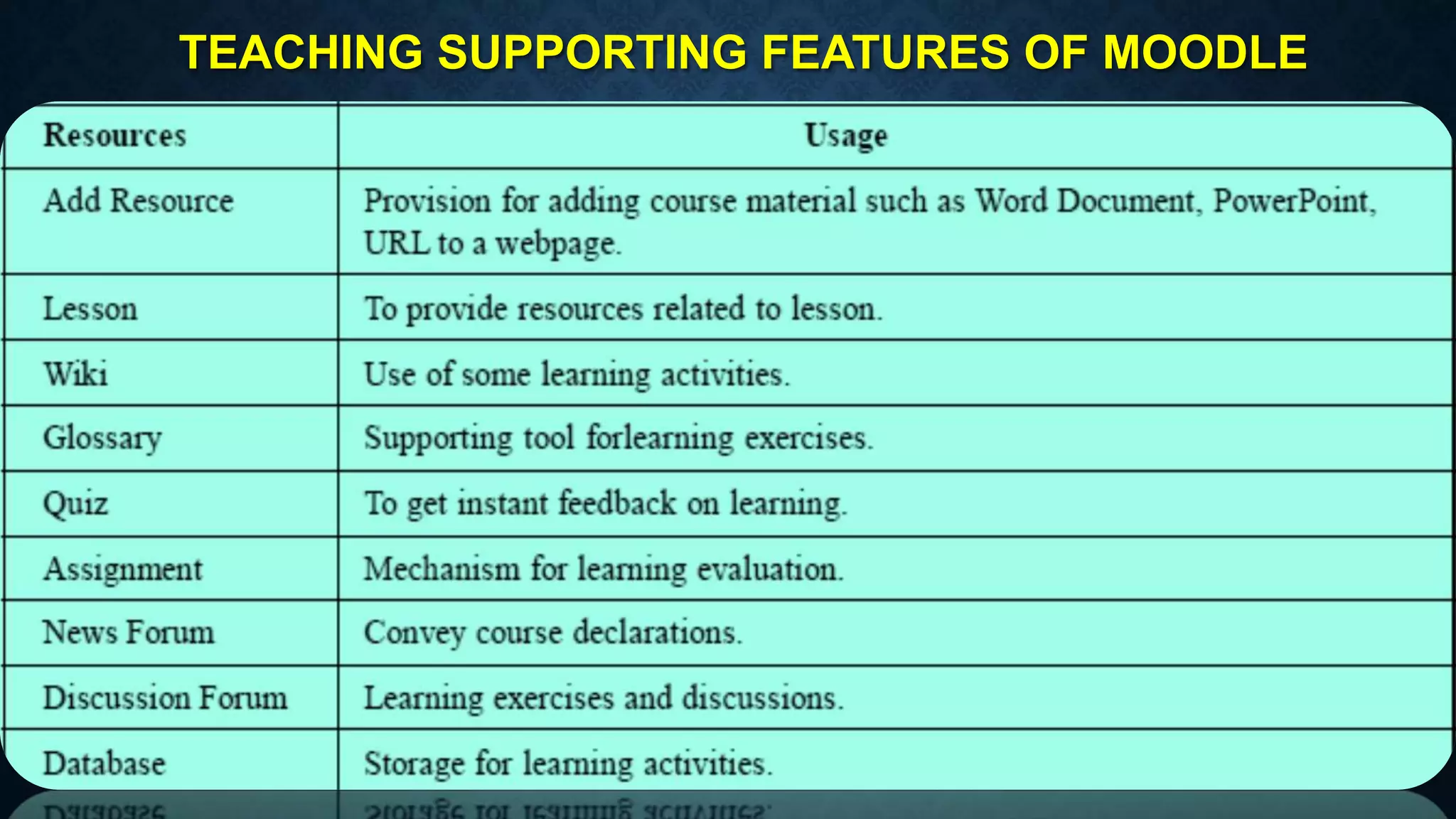
TEACHING SUPPORTING FEATURES OF MOODLE
MOODLE TOOL GUIDE FOR TEACHER
1. Course Settings: Settings of the course such as course in week format or section format, number of
sections etc in course settings page.
2. Design Course Homepage: Can customize appearance of course page with different themes
available for the display of blocks in different regions.
3. Add an Activity or Resources: Can add resources for example, a file, a video or link in course the
page to assist learning. So Moodle provides activity module where learner can contribute in a
discussion, upload assignment, answer inquiries in a test or team up in a wiki.
4. Course Enrollment: Different types of enrolment such as manual enrolment, as guest, self
enrolment. Thus only the authenticated users can access the course contents. The enrolled user page
records activities performed by users.
5. Quiz: Can get instant feedback on learning by using Quiz module. A quiz with different types of
questions such as multiple choice, true-false and short answer questions can be set so that students
need to answer immediately . Thus created questions maintained in the question bank and can be re-
utilized.
6. Grade: All grades for each student in a course can be found in the course grade book, or Grader
report.
Settings of the course such as course in
week format or section format, number of
sections etc in course settings page.
Can customize appearance of course page with different
themes available for the display of blocks in different
regions.
Can add resources for example, a file, a video or link
in course the page to assist learning.
Different types of enrolment such as manual enrolment, as
guest, self enrolment. Thus only the authenticated users
can access the course contents.
Quiz design page Students’ Grade Report Page
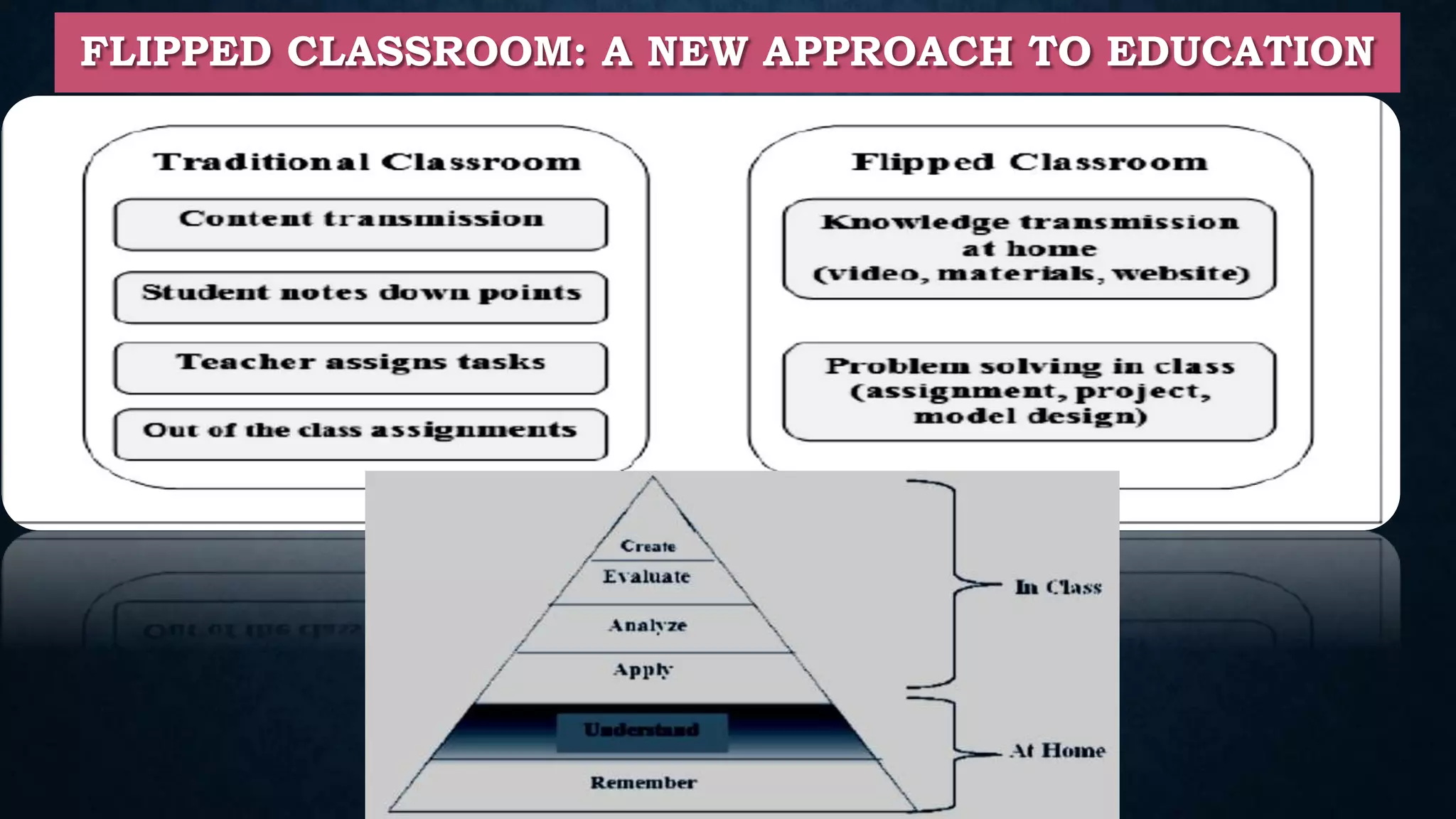
FLIPPED CLASSROOM: A NEW APPROACH TO EDUCATION
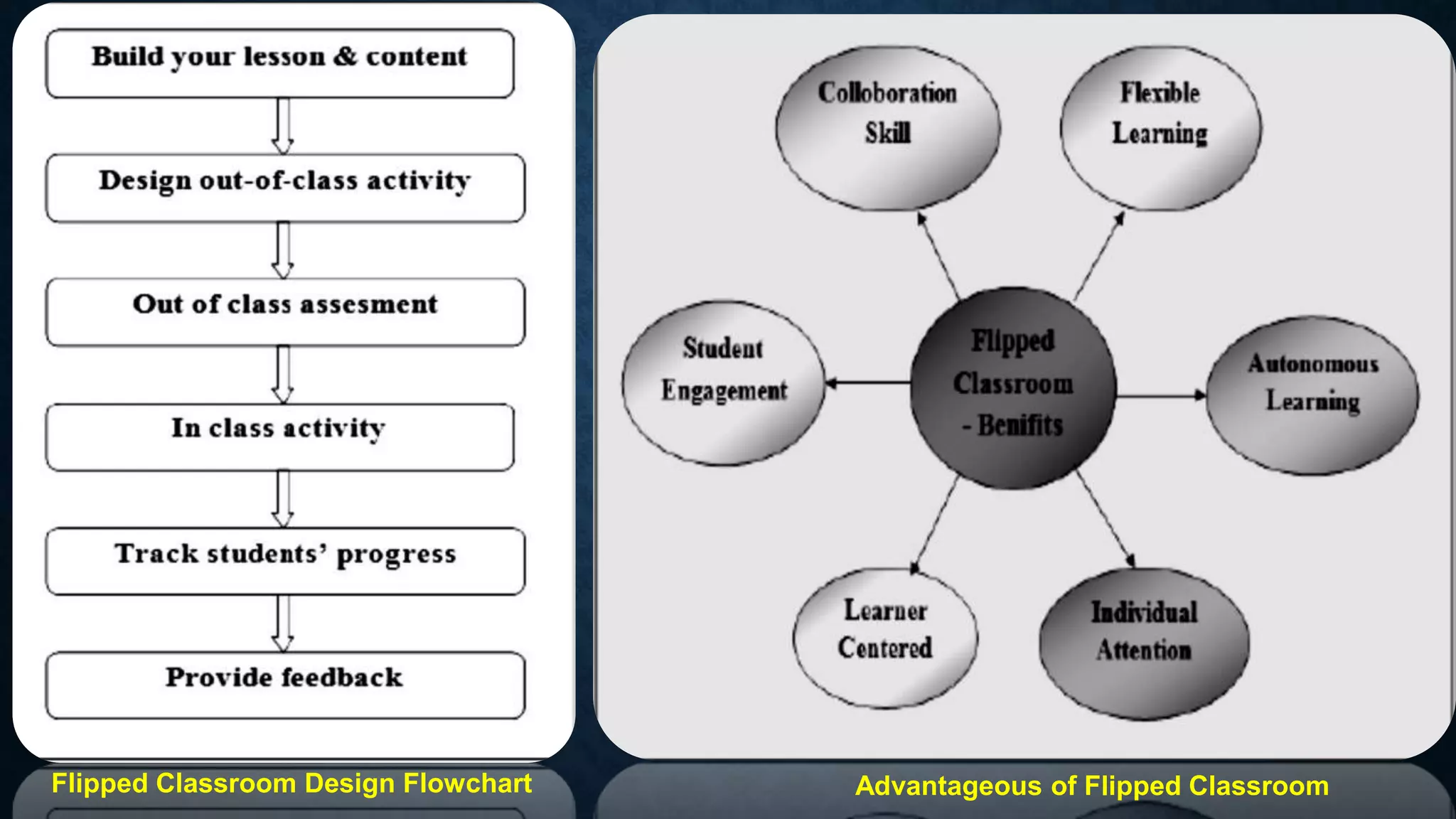
Flipped Classroom Design Flowchart Advantageous of Flipped Classroom
REFERENCES
• Flip the classroom: Bloom’s Taxonomy to MOOCS….A Pragmatic Approach (2020) by Dr.
R.K.Kamat, Dr. K.G. Kharade, and Dr. R.S. Kamat, Himalaya Publishing House, Pvt.Ltd.
• Garrison, D. R., & Kanuka, H. (2004). Blended learning: Uncovering its transformative potential in
higher education. The Internet and Higher Education
• T.D. Dongale, S.S. Patil, Rajanish K. Kamat, Learning by Simulations: A New and Effective
Pedagogical Approach for Science, Engineering and Technology Students in a Traditional Setting,
Journal of Quality Assurance in Engineering and Technology Education, 4(2), pp. 13-25, 2015.
• Tornabene, L. (1991). The SMART Classroom Versus the traditional classroom: What the students
are saying. 1-11. Retrieved from
http://eric.ed.gov/ERICWebPortal/contentdelivery/servlet/ERICServlet?accno+ED421963.
• Bloom, Benjamin S., ed.Taxonomy of Educational Objectives: The Classification of Educational
Goals: Handbook I, Cognitive Domain. New York: Longmans, 1956.
Feel Free to Contact @
Dr. Iranna S. Udachan
Assistant Professor,
Department of Technology,
Shivaji University, Kolhapur-416004, Maharashtra
9822262946
isu_tech@unishivaji.ac.in

Digital teaching

  • 1.
    DIGITAL TEACHING Dr. Sanjay AssistantProfessor, Department of Science & Technology
  • 2.
    PEDAGOGICAL SHIFT  Teacher-Learner Interaction : Explanation based on slides or Q & A  Teacher – Content Interaction Teacher’s Interaction based on content i.e. preparation of slides based on sources like books, papers  Learner-Content Interaction Student referring various educational recourses for understanding and for problem solving  Learner-Learner Interaction Discussion between the students in entire process of learning TRADITIONAL TEACHING DIGITAL TEACHING Convectional Progressive More focus on completion of syllabus More focus on complete learning Single subject and grade level focus Thematic and real world applications Rote Learning Experiential learning Product oriented Process oriented Short time on each concept Focus on cross curricular activities
  • 3.
    CHANGING ROLE OFTEACHERS IN 21ST CENTURY  Traditionally, teachers spend most of their time in preparing and delivering lectures. In addition to this teachers give assignments and homework to students and students solve them. But, today the scenario is so different in terms of the ability of learners to learn not only from teachers but from a variety of other sources.  There is a greater access to knowledge in the digital form. The greater access means that learners are able to use internet to access not only online tutorials but even prerecorded lectures.  The use of technology has become Ubiquitous. Every learner practically has access to internet and access to such resources.  The most important point is that the learning of a student does not depend upon how well teacher deliver the lecture, but it depends upon how much active time a student spends in learning. A transformation, i.e., teachers being the information provider becoming learning facilitators is a notable pedagogical shift in 21st century. Technology enhanced pedagogy can facilitate students to learn better by engaging them in our classes, not in conventional delivery of lectures but in solving problems in discussion session and so on.
  • 4.
    THE MAJOR DIFFERENCESIN ONLINE LEARNING SETTING ARE • The teacher plays a role of facilitator who uses the various features available in the learning platform to ensure that all these interactions happen in an online setting. • Facilitator initially interacts with the content and prepares videos, resources like slides, practice problems etc., for students to work out. This is then made available as an entire course. • The students will interact with the content by accessing the course, watching videos and doing problems. • Discussion forums plays major role for facilitator-learner interaction and the learner interaction.
  • 5.
    THE IMPORTANT FEATURESOF DIGITAL TEACHING • Enhanced teacher and student interaction. • Time management and flexibility • More flexible teaching and learning environment • Makes Teaching -Learning resources and experiences repeatable, reliable and reproducible. • Enhanced institutional reputation. • More amenable for self and continuous learning • Better opportunities for experiential learning
  • 6.
    ONLINE LEARNING ENVIRONMENT:LEARNER-CENTRIC APPROACH • Learning Dialogues • The Reflection Spots • Learning by Doing Activities • Learning Extension Resources • Assimilation Quizzes • Learning Experience Interactions • Reflection Quiz
  • 7.
    EQUIPMENT  Interactive Panel Smart Board  Smart soft wares Power Point- a presentation tool Open Source Teaching Tools
  • 8.
    LEARNING MANAGEMENT SYSTEM(LMS) FOR DIGITAL AMBIENCE Need of Learning through LMS Identify gaps in teaching-learning process related to teaching resources, evaluation system, staff expertise in various programs Empower students with the interesting resources that enhances their learning Produce reliable, instant data about student performance for customize learning Enhance parental association in learning process Connect staff improvement projects with student learning and accomplishment
  • 9.
    CAPABILITIES AND FEATURESOF LMS  Create content and integrate content with outsider courseware.  Access to content delivery including the medium, strategy and learners.  Prepare lecture plans for learners, teachers and classrooms.  Constructivist-based guideline for example learner-characterised objectives.  Responsiveness to learner needs.  Evaluate learners’ performance and instant feedback on learning.  Learning in and out of the classroom environment.  Account security in terms of passwords and encryption.  Parental participation.
  • 10.
    LMS TOOLS  LMStools encourage learning and correspondence with students in and outside of the classroom.  This may include: Learning resources, links to online material, instant assessment and feedback mechanism, Discussion forum, Real- time messaging, E-mail, Announcement posts. In addition to this, appraisals and online review books are utilised to build educator profitability and track student performance while guaranteeing that the course is meeting curricular goals.
  • 11.
  • 12.
    LMS TOOLS (FORREFERENCE) • Moodle • Schoology • Desire2Learn • Blackboard • Eliademy • Rcampus • Edu2.0 • Atutor • Edmodo • Forma LMS
  • 13.
    • Benefits ofLMS LMS can contextualize the instructive experience and helps teachers to balance among teaching and learning. Enables teachers to provide additional resources to enhance the curriculum. Blogs, Wikis, Discussion Forum provides collaborative learning. Self-directed learning provides flexibility for students control over their learning. The LMS assists teachers in creating question banks and use other evaluation techniques to monitor students’ understanding. Web-based Web-based LMS are open to all understudies, they can access course contents from anywhere.
  • 14.
    • Choosing LMS SuitableLMS is picked in light of following components:  Reason behind adapting LMS with objective and goals  Need to check can goals satisfied by open source LMS or go for commercial  Support for web resource access  Students evaluation system  Details of multimedia support  Communication and correspondence feature support  Level of technical support
  • 15.
    MOODLE — ANONLINE LEARNING PLATFORM • Moodle is a web based Learning Management System (LMS) • Empower instructors to make dynamic courses that broaden learning, at anytime, anyplace. • The activities and resources are prime parts of courses in Moodle. • Tools such as Resource upload, News, Glossary are example for easy Information exchange from instructor to learners • Discussion forums support dynamic correspondence and interaction among peer learners and interaction with the instructor. • Students can work in team projects, hence collaborative environment experience is possible in online learning too. • Assessment mechanism allows teacher to get instant feedback on students’ learning, survey helps in gathering feedback on learning process.
  • 16.
  • 17.
    MOODLE TOOL GUIDEFOR TEACHER 1. Course Settings: Settings of the course such as course in week format or section format, number of sections etc in course settings page. 2. Design Course Homepage: Can customize appearance of course page with different themes available for the display of blocks in different regions. 3. Add an Activity or Resources: Can add resources for example, a file, a video or link in course the page to assist learning. So Moodle provides activity module where learner can contribute in a discussion, upload assignment, answer inquiries in a test or team up in a wiki. 4. Course Enrollment: Different types of enrolment such as manual enrolment, as guest, self enrolment. Thus only the authenticated users can access the course contents. The enrolled user page records activities performed by users. 5. Quiz: Can get instant feedback on learning by using Quiz module. A quiz with different types of questions such as multiple choice, true-false and short answer questions can be set so that students need to answer immediately . Thus created questions maintained in the question bank and can be re- utilized. 6. Grade: All grades for each student in a course can be found in the course grade book, or Grader report.
  • 18.
    Settings of thecourse such as course in week format or section format, number of sections etc in course settings page. Can customize appearance of course page with different themes available for the display of blocks in different regions.
  • 19.
    Can add resourcesfor example, a file, a video or link in course the page to assist learning. Different types of enrolment such as manual enrolment, as guest, self enrolment. Thus only the authenticated users can access the course contents.
  • 20.
    Quiz design pageStudents’ Grade Report Page
  • 21.
    FLIPPED CLASSROOM: ANEW APPROACH TO EDUCATION
  • 22.
    Flipped Classroom DesignFlowchart Advantageous of Flipped Classroom
  • 24.
    REFERENCES • Flip theclassroom: Bloom’s Taxonomy to MOOCS….A Pragmatic Approach (2020) by Dr. R.K.Kamat, Dr. K.G. Kharade, and Dr. R.S. Kamat, Himalaya Publishing House, Pvt.Ltd. • Garrison, D. R., & Kanuka, H. (2004). Blended learning: Uncovering its transformative potential in higher education. The Internet and Higher Education • T.D. Dongale, S.S. Patil, Rajanish K. Kamat, Learning by Simulations: A New and Effective Pedagogical Approach for Science, Engineering and Technology Students in a Traditional Setting, Journal of Quality Assurance in Engineering and Technology Education, 4(2), pp. 13-25, 2015. • Tornabene, L. (1991). The SMART Classroom Versus the traditional classroom: What the students are saying. 1-11. Retrieved from http://eric.ed.gov/ERICWebPortal/contentdelivery/servlet/ERICServlet?accno+ED421963. • Bloom, Benjamin S., ed.Taxonomy of Educational Objectives: The Classification of Educational Goals: Handbook I, Cognitive Domain. New York: Longmans, 1956.
  • 25.
    Feel Free toContact @ Dr. Iranna S. Udachan Assistant Professor, Department of Technology, Shivaji University, Kolhapur-416004, Maharashtra 9822262946 isu_tech@unishivaji.ac.in