Linux	
  Systems	
  
Performance	
  
Brendan Gregg
Senior Performance Architect
Apr,	
  2016	
  
Systems	
  Performance	
  in	
  50	
  mins	
  
Agenda	
  
A brief discussion of 6 facets of Linux performance:
1.  Observability
2.  Methodologies
3.  Benchmarking
4.  Profiling
5.  Tracing
6.  Tuning
Audience: Everyone (DBAs, developers, operations, …)
1.	
  Observability	
  
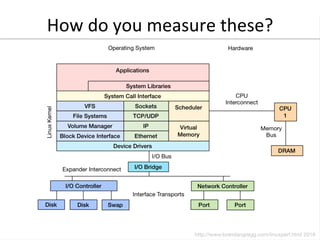
How	
  do	
  you	
  measure	
  these?	
  
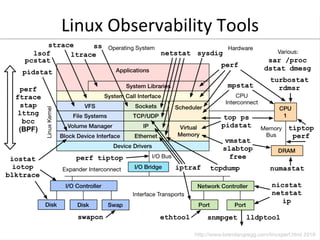
Linux	
  Observability	
  Tools	
  
Observability	
  Tools	
  
•  Tools showcase common metrics
–  Learning Linux tools is useful even if you never use them:
the same metrics are in GUIs
•  We usually use these metrics via:
–  Netflix Atlas: cloud-wide monitoring
–  Netflix Vector: instance analysis
•  Linux has many tools
–  Plus many extra kernel sources of data that lack tools, are
harder to use, and are practically undocumented
•  Some tool examples…
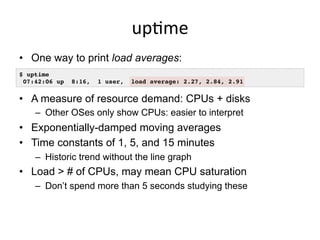
upGme	
  
•  One way to print load averages:
•  A measure of resource demand: CPUs + disks
–  Other OSes only show CPUs: easier to interpret
•  Exponentially-damped moving averages
•  Time constants of 1, 5, and 15 minutes
–  Historic trend without the line graph
•  Load > # of CPUs, may mean CPU saturation
–  Don’t spend more than 5 seconds studying these
$ uptime
07:42:06 up 8:16, 1 user, load average: 2.27, 2.84, 2.91
top	
  (or	
  htop)	
  
•  System and per-process interval summary:
•  %CPU is summed across all CPUs
•  Can miss short-lived processes (atop won’t)
•  Can consume noticeable CPU to read /proc
$ top - 18:50:26 up 7:43, 1 user, load average: 4.11, 4.91, 5.22
Tasks: 209 total, 1 running, 206 sleeping, 0 stopped, 2 zombie
Cpu(s): 47.1%us, 4.0%sy, 0.0%ni, 48.4%id, 0.0%wa, 0.0%hi, 0.3%si, 0.2%st
Mem: 70197156k total, 44831072k used, 25366084k free, 36360k buffers
Swap: 0k total, 0k used, 0k free, 11873356k cached
PID USER PR NI VIRT RES SHR S %CPU %MEM TIME+ COMMAND
5738 apiprod 20 0 62.6g 29g 352m S 417 44.2 2144:15 java
1386 apiprod 20 0 17452 1388 964 R 0 0.0 0:00.02 top
1 root 20 0 24340 2272 1340 S 0 0.0 0:01.51 init
2 root 20 0 0 0 0 S 0 0.0 0:00.00 kthreadd
[…]
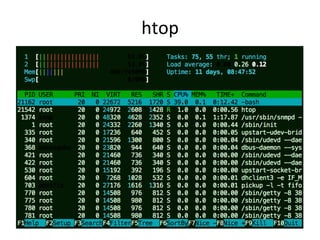
htop	
  
vmstat	
  
•  Virtual memory statistics and more:
•  USAGE: vmstat [interval [count]]
•  First output line has some summary since boot values
–  Should be all; partial is confusing
•  High level CPU summary
–  “r” is runnable tasks
$ vmstat –Sm 1
procs -----------memory---------- ---swap-- -----io---- -system-- ----cpu----
r b swpd free buff cache si so bi bo in cs us sy id wa
8 0 0 1620 149 552 0 0 1 179 77 12 25 34 0 0
7 0 0 1598 149 552 0 0 0 0 205 186 46 13 0 0
8 0 0 1617 149 552 0 0 0 8 210 435 39 21 0 0
8 0 0 1589 149 552 0 0 0 0 218 219 42 17 0 0
[…]
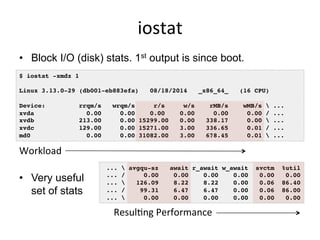
iostat	
  
•  Block I/O (disk) stats. 1st output is since boot.
•  Very useful
set of stats
$ iostat -xmdz 1
Linux 3.13.0-29 (db001-eb883efa) 08/18/2014 _x86_64_ (16 CPU)
Device: rrqm/s wrqm/s r/s w/s rMB/s wMB/s  ...
xvda 0.00 0.00 0.00 0.00 0.00 0.00 / ...
xvdb 213.00 0.00 15299.00 0.00 338.17 0.00  ...
xvdc 129.00 0.00 15271.00 3.00 336.65 0.01 / ...
md0 0.00 0.00 31082.00 3.00 678.45 0.01  ...
...  avgqu-sz await r_await w_await svctm %util
... / 0.00 0.00 0.00 0.00 0.00 0.00
...  126.09 8.22 8.22 0.00 0.06 86.40
... / 99.31 6.47 6.47 0.00 0.06 86.00
...  0.00 0.00 0.00 0.00 0.00 0.00
Workload	
  
ResulGng	
  Performance	
  
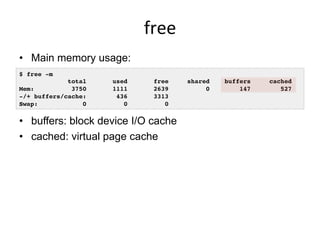
free	
  
•  Main memory usage:
•  buffers: block device I/O cache
•  cached: virtual page cache
$ free -m
total used free shared buffers cached
Mem: 3750 1111 2639 0 147 527
-/+ buffers/cache: 436 3313
Swap: 0 0 0
strace	
  
•  System call tracer:
•  Eg, -ttt: time (us) since epoch; -T: syscall time (s)
•  Translates syscall args
–  Very helpful for solving system usage issues
•  Currently has massive overhead (ptrace based)
–  Can slow the target by > 100x. Use extreme caution.
$ strace –tttT –p 313
1408393285.779746 getgroups(0, NULL) = 1 <0.000016>
1408393285.779873 getgroups(1, [0]) = 1 <0.000015>
1408393285.780797 close(3) = 0 <0.000016>
1408393285.781338 write(1, "LinuxCon 2014!n", 15LinuxCon 2014!
) = 15 <0.000048>
tcpdump	
  
•  Sniff network packets for post analysis:
•  Study packet sequences with timestamps (us)
•  CPU overhead optimized (socket ring buffers), but can
still be significant. Use caution.
$ tcpdump -i eth0 -w /tmp/out.tcpdump
tcpdump: listening on eth0, link-type EN10MB (Ethernet), capture size 65535 bytes
^C7985 packets captured
8996 packets received by filter
1010 packets dropped by kernel
# tcpdump -nr /tmp/out.tcpdump | head
reading from file /tmp/out.tcpdump, link-type EN10MB (Ethernet)
20:41:05.038437 IP 10.44.107.151.22 > 10.53.237.72.46425: Flags [P.], seq 18...
20:41:05.038533 IP 10.44.107.151.22 > 10.53.237.72.46425: Flags [P.], seq 48...
20:41:05.038584 IP 10.44.107.151.22 > 10.53.237.72.46425: Flags [P.], seq 96...
[…]
netstat	
  
•  Various network protocol statistics using -s:
•  A multi-tool:
-i: interface stats
-r: route table
default: list conns
•  netstat -p: shows
process details!
•  Per-second interval
with -c
$ netstat –s
[…]
Tcp:
736455 active connections openings
176887 passive connection openings
33 failed connection attempts
1466 connection resets received
3311 connections established
91975192 segments received
180415763 segments send out
223685 segments retransmited
2 bad segments received.
39481 resets sent
[…]
TcpExt:
12377 invalid SYN cookies received
2982 delayed acks sent
[…]
slabtop	
  
•  Kernel slab allocator memory usage:
$ slabtop
Active / Total Objects (% used) : 4692768 / 4751161 (98.8%)
Active / Total Slabs (% used) : 129083 / 129083 (100.0%)
Active / Total Caches (% used) : 71 / 109 (65.1%)
Active / Total Size (% used) : 729966.22K / 738277.47K (98.9%)
Minimum / Average / Maximum Object : 0.01K / 0.16K / 8.00K
OBJS ACTIVE USE OBJ SIZE SLABS OBJ/SLAB CACHE SIZE NAME
3565575 3565575 100% 0.10K 91425 39 365700K buffer_head
314916 314066 99% 0.19K 14996 21 59984K dentry
184192 183751 99% 0.06K 2878 64 11512K kmalloc-64
138618 138618 100% 0.94K 4077 34 130464K xfs_inode
138602 138602 100% 0.21K 3746 37 29968K xfs_ili
102116 99012 96% 0.55K 3647 28 58352K radix_tree_node
97482 49093 50% 0.09K 2321 42 9284K kmalloc-96
22695 20777 91% 0.05K 267 85 1068K shared_policy_node
21312 21312 100% 0.86K 576 37 18432K ext4_inode_cache
16288 14601 89% 0.25K 509 32 4072K kmalloc-256
[…]
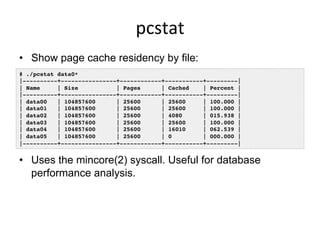
pcstat	
  
•  Show page cache residency by file:
•  Uses the mincore(2) syscall. Useful for database
performance analysis.
# ./pcstat data0*
|----------+----------------+------------+-----------+---------|
| Name | Size | Pages | Cached | Percent |
|----------+----------------+------------+-----------+---------|
| data00 | 104857600 | 25600 | 25600 | 100.000 |
| data01 | 104857600 | 25600 | 25600 | 100.000 |
| data02 | 104857600 | 25600 | 4080 | 015.938 |
| data03 | 104857600 | 25600 | 25600 | 100.000 |
| data04 | 104857600 | 25600 | 16010 | 062.539 |
| data05 | 104857600 | 25600 | 0 | 000.000 |
|----------+----------------+------------+-----------+---------|
perf_events	
  
•  Provides the "perf" command
•  In Linux source code: tools/perf
–  Usually pkg added by linux-tools-common, etc.
•  Multi-tool with many capabilities
–  CPU profiling
–  PMC profiling
–  Static & dynamic tracing
•  Covered later in Profiling & Tracing
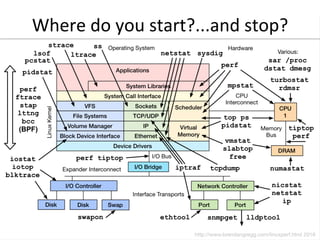
Where	
  do	
  you	
  start?...and	
  stop?	
  
2.	
  Methodologies	
  
An#-­‐Methodologies	
  
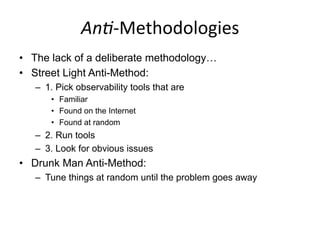
•  The lack of a deliberate methodology…
•  Street Light Anti-Method:
–  1. Pick observability tools that are
•  Familiar
•  Found on the Internet
•  Found at random
–  2. Run tools
–  3. Look for obvious issues
•  Drunk Man Anti-Method:
–  Tune things at random until the problem goes away
Methodologies	
  
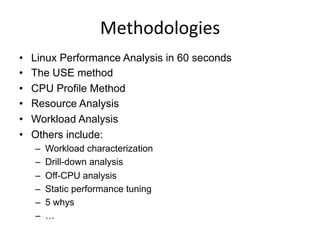
•  Linux Performance Analysis in 60 seconds
•  The USE method
•  CPU Profile Method
•  Resource Analysis
•  Workload Analysis
•  Others include:
–  Workload characterization
–  Drill-down analysis
–  Off-CPU analysis
–  Static performance tuning
–  5 whys
–  …
Linux	
  Perf	
  Analysis	
  in	
  60s	
  
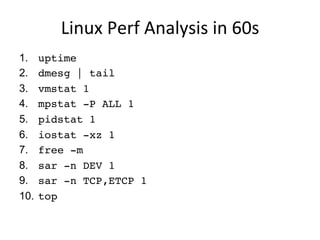
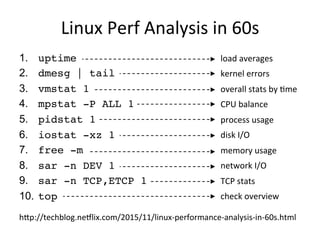
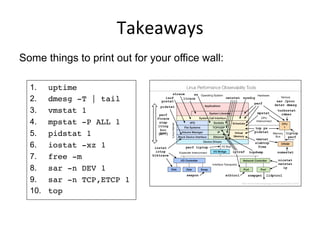
1.  uptime
2.  dmesg | tail
3.  vmstat 1
4.  mpstat -P ALL 1
5.  pidstat 1
6.  iostat -xz 1
7.  free -m
8.  sar -n DEV 1
9.  sar -n TCP,ETCP 1
10.  top
Linux	
  Perf	
  Analysis	
  in	
  60s	
  
1.  uptime
2.  dmesg | tail
3.  vmstat 1
4.  mpstat -P ALL 1
5.  pidstat 1
6.  iostat -xz 1
7.  free -m
8.  sar -n DEV 1
9.  sar -n TCP,ETCP 1
10.  top
load	
  averages	
  
kernel	
  errors	
  
overall	
  stats	
  by	
  Gme	
  
CPU	
  balance	
  
process	
  usage	
  
disk	
  I/O	
  
memory	
  usage	
  
network	
  I/O	
  
TCP	
  stats	
  
check	
  overview	
  
hTp://techblog.neVlix.com/2015/11/linux-­‐performance-­‐analysis-­‐in-­‐60s.html	
  
The	
  USE	
  Method	
  
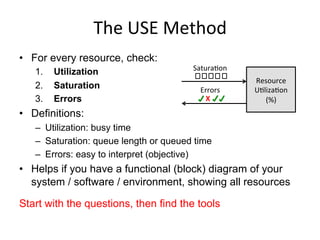
•  For every resource, check:
1.  Utilization
2.  Saturation
3.  Errors
•  Definitions:
–  Utilization: busy time
–  Saturation: queue length or queued time
–  Errors: easy to interpret (objective)
•  Helps if you have a functional (block) diagram of your
system / software / environment, showing all resources
Start with the questions, then find the tools
Resource	
  
UGlizaGon	
  
(%)	
  X	
  
USE	
  Method	
  for	
  Hardware	
  
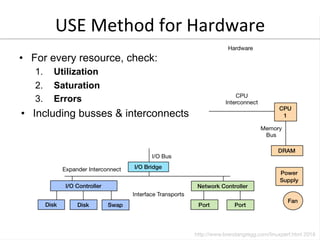
•  For every resource, check:
1.  Utilization
2.  Saturation
3.  Errors
•  Including busses & interconnects
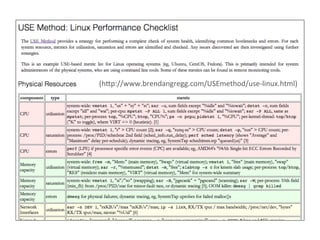
(hTp://www.brendangregg.com/USEmethod/use-­‐linux.html)	
  
CPU	
  Profile	
  Method	
  
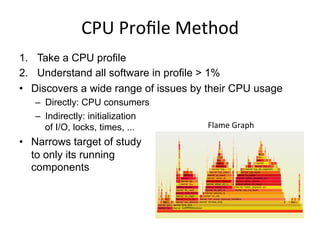
1.  Take a CPU profile
2.  Understand all software in profile > 1%
•  Discovers a wide range of issues by their CPU usage
–  Directly: CPU consumers
–  Indirectly: initialization
of I/O, locks, times, ...
•  Narrows target of study
to only its running
components
Flame	
  Graph	
  
Resource	
  Analysis	
  
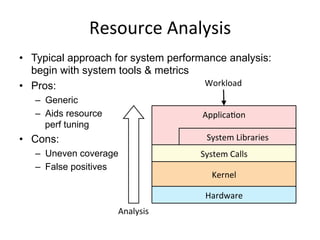
•  Typical approach for system performance analysis:
begin with system tools & metrics
•  Pros:
–  Generic
–  Aids resource
perf tuning
•  Cons:
–  Uneven coverage
–  False positives
ApplicaGon	


  System	
  Libraries	
  
System	
  Calls	
  
Kernel	
  
Hardware	
  
Workload	
  
Analysis	
  
Workload	
  Analysis	
  
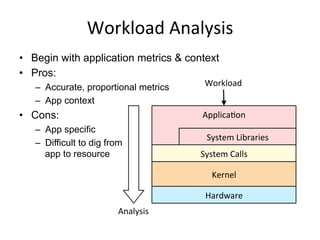
•  Begin with application metrics & context
•  Pros:
–  Accurate, proportional metrics
–  App context
•  Cons:
–  App specific
–  Difficult to dig from
app to resource
ApplicaGon	


  System	
  Libraries	
  
System	
  Calls	
  
Kernel	
  
Hardware	
  
Workload	
  
Analysis	
  
3.	
  Benchmarking	
  
~100% of benchmarks are
wrong
Benchmarking	
  
•  Apart from observational analysis, benchmarking is a
useful form of experimental analysis
–  Try observational first; benchmarks can perturb
•  However, benchmarking is error prone:
–  Testing the wrong target: eg, FS cache instead of disk
–  Choosing the wrong target: eg, disk instead of FS cache
… doesn’t resemble real world usage
–  Invalid results: eg, bugs
–  Misleading results: you benchmark A, but actually measure B,
and conclude you measured C
•  The energy needed to refute benchmarks is multiple
orders of magnitude bigger than to run them
Benchmark	
  Examples	
  
•  Micro benchmarks:
–  File system maximum cached read operations/sec
–  Network maximum throughput
•  Macro (application) benchmarks:
–  Simulated application maximum request rate
•  Bad benchmarks:
–  gitpid() in a tight loop
–  Context switch timing
The	
  Benchmark	
  Paradox	
  
•  Benchmarking is used for product evaluations
–  Eg, evaluating cloud vendors
•  The Benchmark Paradox:
–  If your product’s chances of winning a benchmark are 50/50,
you’ll usually lose
–  http://www.brendangregg.com/blog/2014-05-03/the-benchmark-paradox.html
•  Solving this seeming paradox (and benchmarking in
general)…
For any given benchmark result,
ask:
why isn’t it 10x?
AcGve	
  Benchmarking	
  
•  Root cause performance analysis while the benchmark is
still running
–  Use the earlier observability tools
–  Identify the limiter (or suspected limiter) and include it with the
benchmark results
–  Answer: why not 10x?
•  This takes time, but uncovers most mistakes
4.	
  Profiling	
  
Profiling	
  
•  Can you do this?
“As an experiment to investigate the performance of the
resulting TCP/IP implementation ... the 11/750 is CPU
saturated, but the 11/780 has about 30% idle time. The time
spent in the system processing the data is spread out among
handling for the Ethernet (20%), IP packet processing
(10%), TCP processing (30%), checksumming (25%), and
user system call handling (15%), with no single part of the
handling dominating the time in the system.”
Profiling	
  
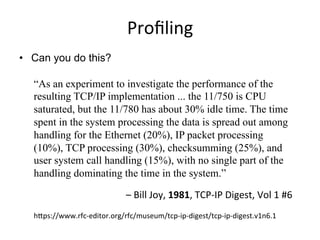
•  Can you do this?
“As an experiment to investigate the performance of the
resulting TCP/IP implementation ... the 11/750 is CPU
saturated, but the 11/780 has about 30% idle time. The time
spent in the system processing the data is spread out among
handling for the Ethernet (20%), IP packet processing
(10%), TCP processing (30%), checksumming (25%), and
user system call handling (15%), with no single part of the
handling dominating the time in the system.”
–	
  Bill	
  Joy,	
  1981,	
  TCP-­‐IP	
  Digest,	
  Vol	
  1	
  #6	
  
hTps://www.rfc-­‐editor.org/rfc/museum/tcp-­‐ip-­‐digest/tcp-­‐ip-­‐digest.v1n6.1	
  
perf_events	
  
•  Introduced earlier: multi-tool, profiler. Provides "perf".
usage: perf [--version] [--help] [OPTIONS] COMMAND [ARGS]
The most commonly used perf commands are:
annotate Read perf.data (created by perf record) and display annotated code
archive Create archive with object files with build-ids found in perf.data file
bench General framework for benchmark suites
buildid-cache Manage build-id cache.
buildid-list List the buildids in a perf.data file
data Data file related processing
diff Read perf.data files and display the differential profile
evlist List the event names in a perf.data file
inject Filter to augment the events stream with additional information
kmem Tool to trace/measure kernel memory(slab) properties
kvm Tool to trace/measure kvm guest os
list List all symbolic event types
lock Analyze lock events
mem Profile memory accesses
record Run a command and record its profile into perf.data
report Read perf.data (created by perf record) and display the profile
sched Tool to trace/measure scheduler properties (latencies)
script Read perf.data (created by perf record) and display trace output
stat Run a command and gather performance counter statistics
test Runs sanity tests.
timechart Tool to visualize total system behavior during a workload
top System profiling tool.
trace strace inspired tool
probe Define new dynamic tracepoints
See 'perf help COMMAND' for more information on a specific command.
perf_events:	
  CPU	
  profiling	
  
•  Sampling full stack traces at 99 Hertz, for 30 secs:
# perf record -F 99 -ag -- sleep 30
[ perf record: Woken up 9 times to write data ]
[ perf record: Captured and wrote 2.745 MB perf.data (~119930 samples) ]
# perf report -n --stdio
1.40% 162 java [kernel.kallsyms] [k] _raw_spin_lock
|
--- _raw_spin_lock
|
|--63.21%-- try_to_wake_up
| |
| |--63.91%-- default_wake_function
| | |
| | |--56.11%-- __wake_up_common
| | | __wake_up_locked
| | | ep_poll_callback
| | | __wake_up_common
| | | __wake_up_sync_key
| | | |
| | | |--59.19%-- sock_def_readable
[…78,000 lines truncated…]
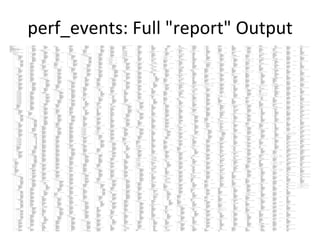
perf_events:	
  Full	
  "report"	
  Output	
  
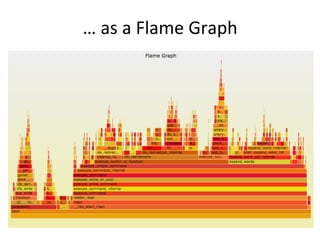
…	
  as	
  a	
  Flame	
  Graph	
  
perf_events:	
  Flame	
  Graphs	
  
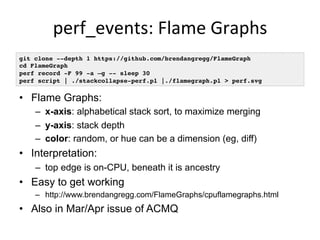
•  Flame Graphs:
–  x-axis: alphabetical stack sort, to maximize merging
–  y-axis: stack depth
–  color: random, or hue can be a dimension (eg, diff)
•  Interpretation:
–  top edge is on-CPU, beneath it is ancestry
•  Easy to get working
–  http://www.brendangregg.com/FlameGraphs/cpuflamegraphs.html
•  Also in Mar/Apr issue of ACMQ
git clone --depth 1 https://github.com/brendangregg/FlameGraph
cd FlameGraph
perf record -F 99 -a –g -- sleep 30
perf script | ./stackcollapse-perf.pl |./flamegraph.pl > perf.svg
Size	
  of	
  
one	
  stack	
  
•  The first ever flame graph was generated for MySQL
•  This background is the output of a DTrace CPU profile,
which only printed unique stacks with counts


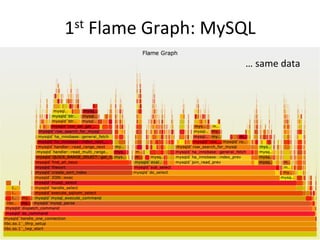
1st	
  Flame	
  Graph:	
  MySQL	
  
…	
  same	
  data	
  
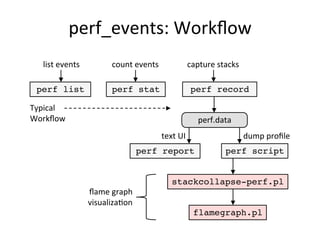
perf_events:	
  Workflow	
  
perf stat perf record
perf report perf script
count	
  events	
   capture	
  stacks	
  
text	
  UI	
   dump	
  profile	
  
stackcollapse-perf.pl
flamegraph.pl
perf.data	
  
flame	
  graph	
  
visualizaGon	
  
perf list
list	
  events	
  
Typical	
  
Workflow	
  
perf_events:	
  Counters	
  
•  Performance Monitoring Counters (PMCs):
•  Identify CPU cycle breakdowns, esp. stall types
•  PMCs not enabled by-default in clouds (yet)
•  Can be time-consuming to use (CPU manuals)
$ perf list | grep –i hardware
cpu-cycles OR cycles [Hardware event]
stalled-cycles-frontend OR idle-cycles-frontend [Hardware event]
stalled-cycles-backend OR idle-cycles-backend [Hardware event]
instructions [Hardware event]
[…]
branch-misses [Hardware event]
bus-cycles [Hardware event]
L1-dcache-loads [Hardware cache event]
L1-dcache-load-misses [Hardware cache event]
[…]
rNNN (see 'perf list --help' on how to encode it) [Raw hardware event …
mem:<addr>[:access] [Hardware breakpoint]
5.	
  Tracing	
  
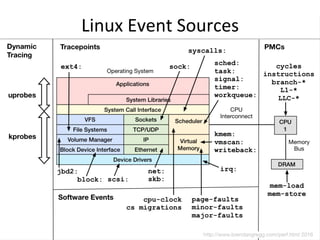
Linux	
  Event	
  Sources	
  
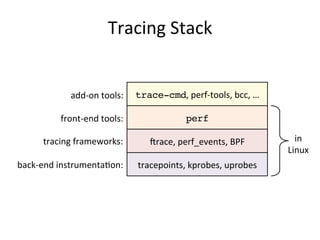
Tracing	
  Stack	
  
tracepoints,	
  kprobes,	
  uprobes	
  
jrace,	
  perf_events,	
  BPF	
  
perf	
  front-­‐end	
  tools:	
  
tracing	
  frameworks:	
  
back-­‐end	
  instrumentaGon:	
  
trace-cmd,	
  perf-­‐tools,	
  bcc,	
  …	
  add-­‐on	
  tools:	
  
in	
  
Linux	
  
jrace	
  
•  Added by Steven Rostedt and others since 2.6.27
–  CONFIG_FTRACE, CONFIG_FUNCTION_PROFILER, …
–  See Linux source: Documentation/trace/ftrace.txt
–  A collection of powerful features, good for hacking
•  Use directly via /sys/kernel/debug/tracing (not easy):
•  Or via front-ends:
–  Steven's trace-cmd
–  my perf-tools: iosnoop, iolatency, funccount, kprobe, …
linux-4.0.0+# ls /sys/kernel/debug/tracing/
available_events max_graph_depth stack_max_size
available_filter_functions options stack_trace
available_tracers per_cpu stack_trace_filter
buffer_size_kb printk_formats trace
[…]
jrace:	
  perf-­‐tools	
  iosnoop	
  
•  Block I/O (disk) events with latency:
# ./iosnoop –ts
Tracing block I/O. Ctrl-C to end.
STARTs ENDs COMM PID TYPE DEV BLOCK BYTES LATms
5982800.302061 5982800.302679 supervise 1809 W 202,1 17039600 4096 0.62
5982800.302423 5982800.302842 supervise 1809 W 202,1 17039608 4096 0.42
5982800.304962 5982800.305446 supervise 1801 W 202,1 17039616 4096 0.48
5982800.305250 5982800.305676 supervise 1801 W 202,1 17039624 4096 0.43
[…]
# ./iosnoop –h
USAGE: iosnoop [-hQst] [-d device] [-i iotype] [-p PID] [-n name] [duration]
-d device # device string (eg, "202,1)
-i iotype # match type (eg, '*R*' for all reads)
-n name # process name to match on I/O issue
-p PID # PID to match on I/O issue
-Q # include queueing time in LATms
-s # include start time of I/O (s)
-t # include completion time of I/O (s)
-h # this usage message
duration # duration seconds, and use buffers
[…]
jrace:	
  perf-­‐tools	
  iolatency	
  
•  Block I/O (disk) latency distributions:
# ./iolatency
Tracing block I/O. Output every 1 seconds. Ctrl-C to end.
>=(ms) .. <(ms) : I/O |Distribution |
0 -> 1 : 2104 |######################################|
1 -> 2 : 280 |###### |
2 -> 4 : 2 |# |
4 -> 8 : 0 | |
8 -> 16 : 202 |#### |
>=(ms) .. <(ms) : I/O |Distribution |
0 -> 1 : 1144 |######################################|
1 -> 2 : 267 |######### |
2 -> 4 : 10 |# |
4 -> 8 : 5 |# |
8 -> 16 : 248 |######### |
16 -> 32 : 601 |#################### |
32 -> 64 : 117 |#### |
[…]
jrace:	
  perf-­‐tools	
  funccount	
  
•  Count a kernel function call rate:
–  -i: set an output interval (seconds), otherwise until Ctrl-C
# ./funccount -i 1 'bio_*'
Tracing "bio_*"... Ctrl-C to end.
FUNC COUNT
bio_attempt_back_merge 26
bio_get_nr_vecs 361
bio_alloc 536
bio_alloc_bioset 536
bio_endio 536
bio_free 536
bio_fs_destructor 536
bio_init 536
bio_integrity_enabled 536
bio_put 729
bio_add_page 1004
[...]
Counts	
  are	
  in-­‐kernel,	
  
for	
  low	
  overhead	
  
jrace:	
  perf-­‐tools	
  uprobe	
  
•  Dynamically trace user-level functions; eg, MySQL:
–  Filter on string match; eg, "SELECT":
•  Ok for hacking, but not friendly; need perf_events/BPF
# ./uprobe 'p:dispatch_command /opt/mysql/bin/mysqld:_Z16dispatch_command19enum_server_commandP3THDPcj
+0(%dx):string'
Tracing uprobe dispatch_command (p:dispatch_command /opt/mysql/bin/mysqld:0x2dbd40 +0(%dx):string).
Ctrl-C to end.
mysqld-2855 [001] d... 19956674.509085: dispatch_command: (0x6dbd40) arg1="show tables"
mysqld-2855 [001] d... 19956675.541155: dispatch_command: (0x6dbd40) arg1="SELECT * FROM
numbers where number > 32000"
# ./uprobe 'p:dispatch_command /opt/mysql/bin/mysqld:_Z16dispatch_command19enum_server_commandP3THDPcj
cmd=+0(%dx):string' 'cmd ~ "SELECT*"'
Tracing uprobe dispatch_command (p:dispatch_command /opt/mysql/bin/mysqld:0x2dbd40 cmd=
+0(%dx):string). Ctrl-C to end.
mysqld-2855 [001] d... 19956754.619958: dispatch_command: (0x6dbd40) cmd="SELECT * FROM
numbers where number > 32000"
mysqld-2855 [001] d... 19956755.060125: dispatch_command: (0x6dbd40) cmd="SELECT * FROM
numbers where number > 32000"
perf_events	
  
•  Powerful profiler (covered earlier) and tracer:
–  User-level and kernel dynamic tracing
–  Kernel line tracing and local variables (debuginfo)
–  Kernel filtering expressions
–  Efficient in-kernel counts (perf stat)
•  Intended as the official Linux tracer/profiler
•  Becoming more programmable with BPF support (2016)
–  Search lkml for "perf" and "BPF"
perf_events:	
  LisGng	
  Events	
  
# perf list
cpu-cycles OR cycles [Hardware event]
instructions [Hardware event]
cache-references [Hardware event]
cache-misses [Hardware event]
branch-instructions OR branches [Hardware event]
[…]
skb:kfree_skb [Tracepoint event]
skb:consume_skb [Tracepoint event]
skb:skb_copy_datagram_iovec [Tracepoint event]
net:net_dev_xmit [Tracepoint event]
net:net_dev_queue [Tracepoint event]
net:netif_receive_skb [Tracepoint event]
net:netif_rx [Tracepoint event]
[…]
block:block_rq_abort [Tracepoint event]
block:block_rq_requeue [Tracepoint event]
block:block_rq_complete [Tracepoint event]
block:block_rq_insert [Tracepoint event]
block:block_rq_issue [Tracepoint event]
block:block_bio_bounce [Tracepoint event]
block:block_bio_complete [Tracepoint event]
[…]
perf_events:	
  Tracing	
  Tracepoints	
  
•  If -g is used in "perf record", stack traces are included
•  If "perf script" output is too verbose, try "perf report",
or making a flame graph
# perf record -e block:block_rq_complete -a sleep 10
[ perf record: Woken up 1 times to write data ]
[ perf record: Captured and wrote 0.428 MB perf.data (~18687 samples) ]
# perf script
run 30339 [000] 2083345.722767: block:block_rq_complete: 202,1 W () 12984648 + 8 [0]
run 30339 [000] 2083345.722857: block:block_rq_complete: 202,1 W () 12986336 + 8 [0]
run 30339 [000] 2083345.723180: block:block_rq_complete: 202,1 W () 12986528 + 8 [0]
swapper 0 [000] 2083345.723489: block:block_rq_complete: 202,1 W () 12986496 + 8 [0]
swapper 0 [000] 2083346.745840: block:block_rq_complete: 202,1 WS () 1052984 + 144 [0]
supervise 30342 [000] 2083346.746571: block:block_rq_complete: 202,1 WS () 1053128 + 8 [0]
supervise 30342 [000] 2083346.746663: block:block_rq_complete: 202,1 W () 12986608 + 8 [0]
run 30342 [000] 2083346.747003: block:block_rq_complete: 202,1 W () 12986832 + 8 [0]
[...]
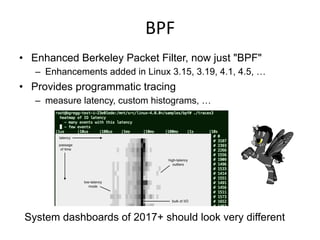
BPF	
  
•  Enhanced Berkeley Packet Filter, now just "BPF"
–  Enhancements added in Linux 3.15, 3.19, 4.1, 4.5, …
•  Provides programmatic tracing
–  measure latency, custom histograms, …
System dashboards of 2017+ should look very different
BPF:	
  bcc	
  ext4slower	
  
•  ext4 operations slower than the threshold:
•  Better indicator of application pain than disk I/O
•  Measures & filters in-kernel for efficiency using BPF
–  https://github.com/iovisor/bcc
# ./ext4slower 1
Tracing ext4 operations slower than 1 ms
TIME COMM PID T BYTES OFF_KB LAT(ms) FILENAME
06:49:17 bash 3616 R 128 0 7.75 cksum
06:49:17 cksum 3616 R 39552 0 1.34 [
06:49:17 cksum 3616 R 96 0 5.36 2to3-2.7
06:49:17 cksum 3616 R 96 0 14.94 2to3-3.4
06:49:17 cksum 3616 R 10320 0 6.82 411toppm
06:49:17 cksum 3616 R 65536 0 4.01 a2p
06:49:17 cksum 3616 R 55400 0 8.77 ab
06:49:17 cksum 3616 R 36792 0 16.34 aclocal-1.14
06:49:17 cksum 3616 R 15008 0 19.31 acpi_listen
[…]
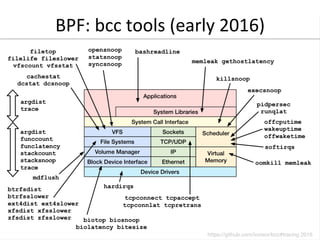
BPF:	
  bcc	
  tools	
  (early	
  2016)	
  
6.	
  Tuning	
  
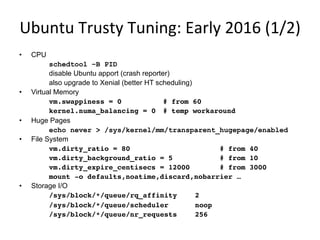
Ubuntu	
  Trusty	
  Tuning:	
  Early	
  2016	
  (1/2)	
  
•  CPU
schedtool –B PID
disable Ubuntu apport (crash reporter)
also upgrade to Xenial (better HT scheduling)
•  Virtual Memory
vm.swappiness = 0 # from 60
kernel.numa_balancing = 0 # temp workaround
•  Huge Pages
echo never > /sys/kernel/mm/transparent_hugepage/enabled
•  File System
vm.dirty_ratio = 80 # from 40
vm.dirty_background_ratio = 5 # from 10
vm.dirty_expire_centisecs = 12000 # from 3000
mount -o defaults,noatime,discard,nobarrier …
•  Storage I/O
/sys/block/*/queue/rq_affinity 2
/sys/block/*/queue/scheduler noop
/sys/block/*/queue/nr_requests 256
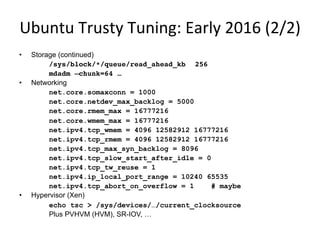
Ubuntu	
  Trusty	
  Tuning:	
  Early	
  2016	
  (2/2)	
  
•  Storage (continued)
/sys/block/*/queue/read_ahead_kb 256
mdadm –chunk=64 …
•  Networking
net.core.somaxconn = 1000
net.core.netdev_max_backlog = 5000
net.core.rmem_max = 16777216
net.core.wmem_max = 16777216
net.ipv4.tcp_wmem = 4096 12582912 16777216
net.ipv4.tcp_rmem = 4096 12582912 16777216
net.ipv4.tcp_max_syn_backlog = 8096
net.ipv4.tcp_slow_start_after_idle = 0
net.ipv4.tcp_tw_reuse = 1
net.ipv4.ip_local_port_range = 10240 65535
net.ipv4.tcp_abort_on_overflow = 1 # maybe
•  Hypervisor (Xen)
echo tsc > /sys/devices/…/current_clocksource
Plus PVHVM (HVM), SR-IOV, …
Summary	
  
A brief discussion of 6 facets of Linux performance:
1.  Observability
2.  Methodologies
3.  Benchmarking
4.  Profiling
5.  Tracing
6.  Tuning
Takeaways	
  
Some things to print out for your office wall:
1.  uptime
2.  dmesg -T | tail
3.  vmstat 1
4.  mpstat -P ALL 1
5.  pidstat 1
6.  iostat -xz 1
7.  free -m
8.  sar -n DEV 1
9.  sar -n TCP,ETCP 1
10.  top
More	
  Links	
  
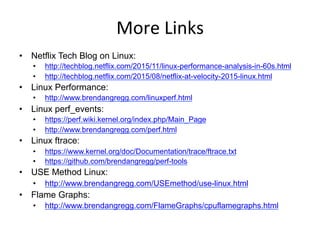
•  Netflix Tech Blog on Linux:
•  http://techblog.netflix.com/2015/11/linux-performance-analysis-in-60s.html
•  http://techblog.netflix.com/2015/08/netflix-at-velocity-2015-linux.html
•  Linux Performance:
•  http://www.brendangregg.com/linuxperf.html
•  Linux perf_events:
•  https://perf.wiki.kernel.org/index.php/Main_Page
•  http://www.brendangregg.com/perf.html
•  Linux ftrace:
•  https://www.kernel.org/doc/Documentation/trace/ftrace.txt
•  https://github.com/brendangregg/perf-tools
•  USE Method Linux:
•  http://www.brendangregg.com/USEmethod/use-linux.html
•  Flame Graphs:
•  http://www.brendangregg.com/FlameGraphs/cpuflamegraphs.html
•  http://queue.acm.org/detail.cfm?id=2927301
Thanks	
  
•  Questions?
•  http://slideshare.net/brendangregg
•  http://www.brendangregg.com
•  bgregg@netflix.com
•  @brendangregg

Linux Systems Performance 2016

  • 1.
    Linux  Systems   Performance   Brendan Gregg Senior Performance Architect Apr,  2016  
  • 2.
  • 4.
    Agenda   A briefdiscussion of 6 facets of Linux performance: 1.  Observability 2.  Methodologies 3.  Benchmarking 4.  Profiling 5.  Tracing 6.  Tuning Audience: Everyone (DBAs, developers, operations, …)
  • 5.
  • 6.
    How  do  you  measure  these?  
  • 7.
  • 8.
    Observability  Tools   • Tools showcase common metrics –  Learning Linux tools is useful even if you never use them: the same metrics are in GUIs •  We usually use these metrics via: –  Netflix Atlas: cloud-wide monitoring –  Netflix Vector: instance analysis •  Linux has many tools –  Plus many extra kernel sources of data that lack tools, are harder to use, and are practically undocumented •  Some tool examples…
  • 9.
    upGme   •  Oneway to print load averages: •  A measure of resource demand: CPUs + disks –  Other OSes only show CPUs: easier to interpret •  Exponentially-damped moving averages •  Time constants of 1, 5, and 15 minutes –  Historic trend without the line graph •  Load > # of CPUs, may mean CPU saturation –  Don’t spend more than 5 seconds studying these $ uptime 07:42:06 up 8:16, 1 user, load average: 2.27, 2.84, 2.91
  • 10.
    top  (or  htop)   •  System and per-process interval summary: •  %CPU is summed across all CPUs •  Can miss short-lived processes (atop won’t) •  Can consume noticeable CPU to read /proc $ top - 18:50:26 up 7:43, 1 user, load average: 4.11, 4.91, 5.22 Tasks: 209 total, 1 running, 206 sleeping, 0 stopped, 2 zombie Cpu(s): 47.1%us, 4.0%sy, 0.0%ni, 48.4%id, 0.0%wa, 0.0%hi, 0.3%si, 0.2%st Mem: 70197156k total, 44831072k used, 25366084k free, 36360k buffers Swap: 0k total, 0k used, 0k free, 11873356k cached PID USER PR NI VIRT RES SHR S %CPU %MEM TIME+ COMMAND 5738 apiprod 20 0 62.6g 29g 352m S 417 44.2 2144:15 java 1386 apiprod 20 0 17452 1388 964 R 0 0.0 0:00.02 top 1 root 20 0 24340 2272 1340 S 0 0.0 0:01.51 init 2 root 20 0 0 0 0 S 0 0.0 0:00.00 kthreadd […]
  • 11.
  • 12.
    vmstat   •  Virtualmemory statistics and more: •  USAGE: vmstat [interval [count]] •  First output line has some summary since boot values –  Should be all; partial is confusing •  High level CPU summary –  “r” is runnable tasks $ vmstat –Sm 1 procs -----------memory---------- ---swap-- -----io---- -system-- ----cpu---- r b swpd free buff cache si so bi bo in cs us sy id wa 8 0 0 1620 149 552 0 0 1 179 77 12 25 34 0 0 7 0 0 1598 149 552 0 0 0 0 205 186 46 13 0 0 8 0 0 1617 149 552 0 0 0 8 210 435 39 21 0 0 8 0 0 1589 149 552 0 0 0 0 218 219 42 17 0 0 […]
  • 13.
    iostat   •  BlockI/O (disk) stats. 1st output is since boot. •  Very useful set of stats $ iostat -xmdz 1 Linux 3.13.0-29 (db001-eb883efa) 08/18/2014 _x86_64_ (16 CPU) Device: rrqm/s wrqm/s r/s w/s rMB/s wMB/s ... xvda 0.00 0.00 0.00 0.00 0.00 0.00 / ... xvdb 213.00 0.00 15299.00 0.00 338.17 0.00 ... xvdc 129.00 0.00 15271.00 3.00 336.65 0.01 / ... md0 0.00 0.00 31082.00 3.00 678.45 0.01 ... ... avgqu-sz await r_await w_await svctm %util ... / 0.00 0.00 0.00 0.00 0.00 0.00 ... 126.09 8.22 8.22 0.00 0.06 86.40 ... / 99.31 6.47 6.47 0.00 0.06 86.00 ... 0.00 0.00 0.00 0.00 0.00 0.00 Workload   ResulGng  Performance  
  • 14.
    free   •  Mainmemory usage: •  buffers: block device I/O cache •  cached: virtual page cache $ free -m total used free shared buffers cached Mem: 3750 1111 2639 0 147 527 -/+ buffers/cache: 436 3313 Swap: 0 0 0
  • 15.
    strace   •  Systemcall tracer: •  Eg, -ttt: time (us) since epoch; -T: syscall time (s) •  Translates syscall args –  Very helpful for solving system usage issues •  Currently has massive overhead (ptrace based) –  Can slow the target by > 100x. Use extreme caution. $ strace –tttT –p 313 1408393285.779746 getgroups(0, NULL) = 1 <0.000016> 1408393285.779873 getgroups(1, [0]) = 1 <0.000015> 1408393285.780797 close(3) = 0 <0.000016> 1408393285.781338 write(1, "LinuxCon 2014!n", 15LinuxCon 2014! ) = 15 <0.000048>
  • 16.
    tcpdump   •  Sniffnetwork packets for post analysis: •  Study packet sequences with timestamps (us) •  CPU overhead optimized (socket ring buffers), but can still be significant. Use caution. $ tcpdump -i eth0 -w /tmp/out.tcpdump tcpdump: listening on eth0, link-type EN10MB (Ethernet), capture size 65535 bytes ^C7985 packets captured 8996 packets received by filter 1010 packets dropped by kernel # tcpdump -nr /tmp/out.tcpdump | head reading from file /tmp/out.tcpdump, link-type EN10MB (Ethernet) 20:41:05.038437 IP 10.44.107.151.22 > 10.53.237.72.46425: Flags [P.], seq 18... 20:41:05.038533 IP 10.44.107.151.22 > 10.53.237.72.46425: Flags [P.], seq 48... 20:41:05.038584 IP 10.44.107.151.22 > 10.53.237.72.46425: Flags [P.], seq 96... […]
  • 17.
    netstat   •  Variousnetwork protocol statistics using -s: •  A multi-tool: -i: interface stats -r: route table default: list conns •  netstat -p: shows process details! •  Per-second interval with -c $ netstat –s […] Tcp: 736455 active connections openings 176887 passive connection openings 33 failed connection attempts 1466 connection resets received 3311 connections established 91975192 segments received 180415763 segments send out 223685 segments retransmited 2 bad segments received. 39481 resets sent […] TcpExt: 12377 invalid SYN cookies received 2982 delayed acks sent […]
  • 18.
    slabtop   •  Kernelslab allocator memory usage: $ slabtop Active / Total Objects (% used) : 4692768 / 4751161 (98.8%) Active / Total Slabs (% used) : 129083 / 129083 (100.0%) Active / Total Caches (% used) : 71 / 109 (65.1%) Active / Total Size (% used) : 729966.22K / 738277.47K (98.9%) Minimum / Average / Maximum Object : 0.01K / 0.16K / 8.00K OBJS ACTIVE USE OBJ SIZE SLABS OBJ/SLAB CACHE SIZE NAME 3565575 3565575 100% 0.10K 91425 39 365700K buffer_head 314916 314066 99% 0.19K 14996 21 59984K dentry 184192 183751 99% 0.06K 2878 64 11512K kmalloc-64 138618 138618 100% 0.94K 4077 34 130464K xfs_inode 138602 138602 100% 0.21K 3746 37 29968K xfs_ili 102116 99012 96% 0.55K 3647 28 58352K radix_tree_node 97482 49093 50% 0.09K 2321 42 9284K kmalloc-96 22695 20777 91% 0.05K 267 85 1068K shared_policy_node 21312 21312 100% 0.86K 576 37 18432K ext4_inode_cache 16288 14601 89% 0.25K 509 32 4072K kmalloc-256 […]
  • 19.
    pcstat   •  Showpage cache residency by file: •  Uses the mincore(2) syscall. Useful for database performance analysis. # ./pcstat data0* |----------+----------------+------------+-----------+---------| | Name | Size | Pages | Cached | Percent | |----------+----------------+------------+-----------+---------| | data00 | 104857600 | 25600 | 25600 | 100.000 | | data01 | 104857600 | 25600 | 25600 | 100.000 | | data02 | 104857600 | 25600 | 4080 | 015.938 | | data03 | 104857600 | 25600 | 25600 | 100.000 | | data04 | 104857600 | 25600 | 16010 | 062.539 | | data05 | 104857600 | 25600 | 0 | 000.000 | |----------+----------------+------------+-----------+---------|
  • 20.
    perf_events   •  Providesthe "perf" command •  In Linux source code: tools/perf –  Usually pkg added by linux-tools-common, etc. •  Multi-tool with many capabilities –  CPU profiling –  PMC profiling –  Static & dynamic tracing •  Covered later in Profiling & Tracing
  • 21.
    Where  do  you  start?...and  stop?  
  • 22.
  • 23.
    An#-­‐Methodologies   •  Thelack of a deliberate methodology… •  Street Light Anti-Method: –  1. Pick observability tools that are •  Familiar •  Found on the Internet •  Found at random –  2. Run tools –  3. Look for obvious issues •  Drunk Man Anti-Method: –  Tune things at random until the problem goes away
  • 24.
    Methodologies   •  LinuxPerformance Analysis in 60 seconds •  The USE method •  CPU Profile Method •  Resource Analysis •  Workload Analysis •  Others include: –  Workload characterization –  Drill-down analysis –  Off-CPU analysis –  Static performance tuning –  5 whys –  …
  • 25.
    Linux  Perf  Analysis  in  60s   1.  uptime 2.  dmesg | tail 3.  vmstat 1 4.  mpstat -P ALL 1 5.  pidstat 1 6.  iostat -xz 1 7.  free -m 8.  sar -n DEV 1 9.  sar -n TCP,ETCP 1 10.  top
  • 26.
    Linux  Perf  Analysis  in  60s   1.  uptime 2.  dmesg | tail 3.  vmstat 1 4.  mpstat -P ALL 1 5.  pidstat 1 6.  iostat -xz 1 7.  free -m 8.  sar -n DEV 1 9.  sar -n TCP,ETCP 1 10.  top load  averages   kernel  errors   overall  stats  by  Gme   CPU  balance   process  usage   disk  I/O   memory  usage   network  I/O   TCP  stats   check  overview   hTp://techblog.neVlix.com/2015/11/linux-­‐performance-­‐analysis-­‐in-­‐60s.html  
  • 27.
    The  USE  Method   •  For every resource, check: 1.  Utilization 2.  Saturation 3.  Errors •  Definitions: –  Utilization: busy time –  Saturation: queue length or queued time –  Errors: easy to interpret (objective) •  Helps if you have a functional (block) diagram of your system / software / environment, showing all resources Start with the questions, then find the tools Resource   UGlizaGon   (%)  X  
  • 28.
    USE  Method  for  Hardware   •  For every resource, check: 1.  Utilization 2.  Saturation 3.  Errors •  Including busses & interconnects
  • 29.
  • 30.
    CPU  Profile  Method   1.  Take a CPU profile 2.  Understand all software in profile > 1% •  Discovers a wide range of issues by their CPU usage –  Directly: CPU consumers –  Indirectly: initialization of I/O, locks, times, ... •  Narrows target of study to only its running components Flame  Graph  
  • 31.
    Resource  Analysis   • Typical approach for system performance analysis: begin with system tools & metrics •  Pros: –  Generic –  Aids resource perf tuning •  Cons: –  Uneven coverage –  False positives ApplicaGon      System  Libraries   System  Calls   Kernel   Hardware   Workload   Analysis  
  • 32.
    Workload  Analysis   • Begin with application metrics & context •  Pros: –  Accurate, proportional metrics –  App context •  Cons: –  App specific –  Difficult to dig from app to resource ApplicaGon      System  Libraries   System  Calls   Kernel   Hardware   Workload   Analysis  
  • 33.
  • 34.
  • 35.
    Benchmarking   •  Apartfrom observational analysis, benchmarking is a useful form of experimental analysis –  Try observational first; benchmarks can perturb •  However, benchmarking is error prone: –  Testing the wrong target: eg, FS cache instead of disk –  Choosing the wrong target: eg, disk instead of FS cache … doesn’t resemble real world usage –  Invalid results: eg, bugs –  Misleading results: you benchmark A, but actually measure B, and conclude you measured C •  The energy needed to refute benchmarks is multiple orders of magnitude bigger than to run them
  • 36.
    Benchmark  Examples   • Micro benchmarks: –  File system maximum cached read operations/sec –  Network maximum throughput •  Macro (application) benchmarks: –  Simulated application maximum request rate •  Bad benchmarks: –  gitpid() in a tight loop –  Context switch timing
  • 37.
    The  Benchmark  Paradox   •  Benchmarking is used for product evaluations –  Eg, evaluating cloud vendors •  The Benchmark Paradox: –  If your product’s chances of winning a benchmark are 50/50, you’ll usually lose –  http://www.brendangregg.com/blog/2014-05-03/the-benchmark-paradox.html •  Solving this seeming paradox (and benchmarking in general)…
  • 38.
    For any givenbenchmark result, ask: why isn’t it 10x?
  • 39.
    AcGve  Benchmarking   • Root cause performance analysis while the benchmark is still running –  Use the earlier observability tools –  Identify the limiter (or suspected limiter) and include it with the benchmark results –  Answer: why not 10x? •  This takes time, but uncovers most mistakes
  • 40.
  • 41.
    Profiling   •  Canyou do this? “As an experiment to investigate the performance of the resulting TCP/IP implementation ... the 11/750 is CPU saturated, but the 11/780 has about 30% idle time. The time spent in the system processing the data is spread out among handling for the Ethernet (20%), IP packet processing (10%), TCP processing (30%), checksumming (25%), and user system call handling (15%), with no single part of the handling dominating the time in the system.”
  • 42.
    Profiling   •  Canyou do this? “As an experiment to investigate the performance of the resulting TCP/IP implementation ... the 11/750 is CPU saturated, but the 11/780 has about 30% idle time. The time spent in the system processing the data is spread out among handling for the Ethernet (20%), IP packet processing (10%), TCP processing (30%), checksumming (25%), and user system call handling (15%), with no single part of the handling dominating the time in the system.” –  Bill  Joy,  1981,  TCP-­‐IP  Digest,  Vol  1  #6   hTps://www.rfc-­‐editor.org/rfc/museum/tcp-­‐ip-­‐digest/tcp-­‐ip-­‐digest.v1n6.1  
  • 43.
    perf_events   •  Introducedearlier: multi-tool, profiler. Provides "perf". usage: perf [--version] [--help] [OPTIONS] COMMAND [ARGS] The most commonly used perf commands are: annotate Read perf.data (created by perf record) and display annotated code archive Create archive with object files with build-ids found in perf.data file bench General framework for benchmark suites buildid-cache Manage build-id cache. buildid-list List the buildids in a perf.data file data Data file related processing diff Read perf.data files and display the differential profile evlist List the event names in a perf.data file inject Filter to augment the events stream with additional information kmem Tool to trace/measure kernel memory(slab) properties kvm Tool to trace/measure kvm guest os list List all symbolic event types lock Analyze lock events mem Profile memory accesses record Run a command and record its profile into perf.data report Read perf.data (created by perf record) and display the profile sched Tool to trace/measure scheduler properties (latencies) script Read perf.data (created by perf record) and display trace output stat Run a command and gather performance counter statistics test Runs sanity tests. timechart Tool to visualize total system behavior during a workload top System profiling tool. trace strace inspired tool probe Define new dynamic tracepoints See 'perf help COMMAND' for more information on a specific command.
  • 44.
    perf_events:  CPU  profiling   •  Sampling full stack traces at 99 Hertz, for 30 secs: # perf record -F 99 -ag -- sleep 30 [ perf record: Woken up 9 times to write data ] [ perf record: Captured and wrote 2.745 MB perf.data (~119930 samples) ] # perf report -n --stdio 1.40% 162 java [kernel.kallsyms] [k] _raw_spin_lock | --- _raw_spin_lock | |--63.21%-- try_to_wake_up | | | |--63.91%-- default_wake_function | | | | | |--56.11%-- __wake_up_common | | | __wake_up_locked | | | ep_poll_callback | | | __wake_up_common | | | __wake_up_sync_key | | | | | | | |--59.19%-- sock_def_readable […78,000 lines truncated…]
  • 45.
  • 46.
    …  as  a  Flame  Graph  
  • 47.
    perf_events:  Flame  Graphs   •  Flame Graphs: –  x-axis: alphabetical stack sort, to maximize merging –  y-axis: stack depth –  color: random, or hue can be a dimension (eg, diff) •  Interpretation: –  top edge is on-CPU, beneath it is ancestry •  Easy to get working –  http://www.brendangregg.com/FlameGraphs/cpuflamegraphs.html •  Also in Mar/Apr issue of ACMQ git clone --depth 1 https://github.com/brendangregg/FlameGraph cd FlameGraph perf record -F 99 -a –g -- sleep 30 perf script | ./stackcollapse-perf.pl |./flamegraph.pl > perf.svg
  • 48.
    Size  of   one  stack   •  The first ever flame graph was generated for MySQL •  This background is the output of a DTrace CPU profile, which only printed unique stacks with counts    
  • 49.
    1st  Flame  Graph:  MySQL   …  same  data  
  • 50.
    perf_events:  Workflow   perfstat perf record perf report perf script count  events   capture  stacks   text  UI   dump  profile   stackcollapse-perf.pl flamegraph.pl perf.data   flame  graph   visualizaGon   perf list list  events   Typical   Workflow  
  • 51.
    perf_events:  Counters   • Performance Monitoring Counters (PMCs): •  Identify CPU cycle breakdowns, esp. stall types •  PMCs not enabled by-default in clouds (yet) •  Can be time-consuming to use (CPU manuals) $ perf list | grep –i hardware cpu-cycles OR cycles [Hardware event] stalled-cycles-frontend OR idle-cycles-frontend [Hardware event] stalled-cycles-backend OR idle-cycles-backend [Hardware event] instructions [Hardware event] […] branch-misses [Hardware event] bus-cycles [Hardware event] L1-dcache-loads [Hardware cache event] L1-dcache-load-misses [Hardware cache event] […] rNNN (see 'perf list --help' on how to encode it) [Raw hardware event … mem:<addr>[:access] [Hardware breakpoint]
  • 52.
  • 53.
  • 54.
    Tracing  Stack   tracepoints,  kprobes,  uprobes   jrace,  perf_events,  BPF   perf  front-­‐end  tools:   tracing  frameworks:   back-­‐end  instrumentaGon:   trace-cmd,  perf-­‐tools,  bcc,  …  add-­‐on  tools:   in   Linux  
  • 55.
    jrace   •  Addedby Steven Rostedt and others since 2.6.27 –  CONFIG_FTRACE, CONFIG_FUNCTION_PROFILER, … –  See Linux source: Documentation/trace/ftrace.txt –  A collection of powerful features, good for hacking •  Use directly via /sys/kernel/debug/tracing (not easy): •  Or via front-ends: –  Steven's trace-cmd –  my perf-tools: iosnoop, iolatency, funccount, kprobe, … linux-4.0.0+# ls /sys/kernel/debug/tracing/ available_events max_graph_depth stack_max_size available_filter_functions options stack_trace available_tracers per_cpu stack_trace_filter buffer_size_kb printk_formats trace […]
  • 56.
    jrace:  perf-­‐tools  iosnoop   •  Block I/O (disk) events with latency: # ./iosnoop –ts Tracing block I/O. Ctrl-C to end. STARTs ENDs COMM PID TYPE DEV BLOCK BYTES LATms 5982800.302061 5982800.302679 supervise 1809 W 202,1 17039600 4096 0.62 5982800.302423 5982800.302842 supervise 1809 W 202,1 17039608 4096 0.42 5982800.304962 5982800.305446 supervise 1801 W 202,1 17039616 4096 0.48 5982800.305250 5982800.305676 supervise 1801 W 202,1 17039624 4096 0.43 […] # ./iosnoop –h USAGE: iosnoop [-hQst] [-d device] [-i iotype] [-p PID] [-n name] [duration] -d device # device string (eg, "202,1) -i iotype # match type (eg, '*R*' for all reads) -n name # process name to match on I/O issue -p PID # PID to match on I/O issue -Q # include queueing time in LATms -s # include start time of I/O (s) -t # include completion time of I/O (s) -h # this usage message duration # duration seconds, and use buffers […]
  • 57.
    jrace:  perf-­‐tools  iolatency   •  Block I/O (disk) latency distributions: # ./iolatency Tracing block I/O. Output every 1 seconds. Ctrl-C to end. >=(ms) .. <(ms) : I/O |Distribution | 0 -> 1 : 2104 |######################################| 1 -> 2 : 280 |###### | 2 -> 4 : 2 |# | 4 -> 8 : 0 | | 8 -> 16 : 202 |#### | >=(ms) .. <(ms) : I/O |Distribution | 0 -> 1 : 1144 |######################################| 1 -> 2 : 267 |######### | 2 -> 4 : 10 |# | 4 -> 8 : 5 |# | 8 -> 16 : 248 |######### | 16 -> 32 : 601 |#################### | 32 -> 64 : 117 |#### | […]
  • 58.
    jrace:  perf-­‐tools  funccount   •  Count a kernel function call rate: –  -i: set an output interval (seconds), otherwise until Ctrl-C # ./funccount -i 1 'bio_*' Tracing "bio_*"... Ctrl-C to end. FUNC COUNT bio_attempt_back_merge 26 bio_get_nr_vecs 361 bio_alloc 536 bio_alloc_bioset 536 bio_endio 536 bio_free 536 bio_fs_destructor 536 bio_init 536 bio_integrity_enabled 536 bio_put 729 bio_add_page 1004 [...] Counts  are  in-­‐kernel,   for  low  overhead  
  • 59.
    jrace:  perf-­‐tools  uprobe   •  Dynamically trace user-level functions; eg, MySQL: –  Filter on string match; eg, "SELECT": •  Ok for hacking, but not friendly; need perf_events/BPF # ./uprobe 'p:dispatch_command /opt/mysql/bin/mysqld:_Z16dispatch_command19enum_server_commandP3THDPcj +0(%dx):string' Tracing uprobe dispatch_command (p:dispatch_command /opt/mysql/bin/mysqld:0x2dbd40 +0(%dx):string). Ctrl-C to end. mysqld-2855 [001] d... 19956674.509085: dispatch_command: (0x6dbd40) arg1="show tables" mysqld-2855 [001] d... 19956675.541155: dispatch_command: (0x6dbd40) arg1="SELECT * FROM numbers where number > 32000" # ./uprobe 'p:dispatch_command /opt/mysql/bin/mysqld:_Z16dispatch_command19enum_server_commandP3THDPcj cmd=+0(%dx):string' 'cmd ~ "SELECT*"' Tracing uprobe dispatch_command (p:dispatch_command /opt/mysql/bin/mysqld:0x2dbd40 cmd= +0(%dx):string). Ctrl-C to end. mysqld-2855 [001] d... 19956754.619958: dispatch_command: (0x6dbd40) cmd="SELECT * FROM numbers where number > 32000" mysqld-2855 [001] d... 19956755.060125: dispatch_command: (0x6dbd40) cmd="SELECT * FROM numbers where number > 32000"
  • 60.
    perf_events   •  Powerfulprofiler (covered earlier) and tracer: –  User-level and kernel dynamic tracing –  Kernel line tracing and local variables (debuginfo) –  Kernel filtering expressions –  Efficient in-kernel counts (perf stat) •  Intended as the official Linux tracer/profiler •  Becoming more programmable with BPF support (2016) –  Search lkml for "perf" and "BPF"
  • 61.
    perf_events:  LisGng  Events   # perf list cpu-cycles OR cycles [Hardware event] instructions [Hardware event] cache-references [Hardware event] cache-misses [Hardware event] branch-instructions OR branches [Hardware event] […] skb:kfree_skb [Tracepoint event] skb:consume_skb [Tracepoint event] skb:skb_copy_datagram_iovec [Tracepoint event] net:net_dev_xmit [Tracepoint event] net:net_dev_queue [Tracepoint event] net:netif_receive_skb [Tracepoint event] net:netif_rx [Tracepoint event] […] block:block_rq_abort [Tracepoint event] block:block_rq_requeue [Tracepoint event] block:block_rq_complete [Tracepoint event] block:block_rq_insert [Tracepoint event] block:block_rq_issue [Tracepoint event] block:block_bio_bounce [Tracepoint event] block:block_bio_complete [Tracepoint event] […]
  • 62.
    perf_events:  Tracing  Tracepoints   •  If -g is used in "perf record", stack traces are included •  If "perf script" output is too verbose, try "perf report", or making a flame graph # perf record -e block:block_rq_complete -a sleep 10 [ perf record: Woken up 1 times to write data ] [ perf record: Captured and wrote 0.428 MB perf.data (~18687 samples) ] # perf script run 30339 [000] 2083345.722767: block:block_rq_complete: 202,1 W () 12984648 + 8 [0] run 30339 [000] 2083345.722857: block:block_rq_complete: 202,1 W () 12986336 + 8 [0] run 30339 [000] 2083345.723180: block:block_rq_complete: 202,1 W () 12986528 + 8 [0] swapper 0 [000] 2083345.723489: block:block_rq_complete: 202,1 W () 12986496 + 8 [0] swapper 0 [000] 2083346.745840: block:block_rq_complete: 202,1 WS () 1052984 + 144 [0] supervise 30342 [000] 2083346.746571: block:block_rq_complete: 202,1 WS () 1053128 + 8 [0] supervise 30342 [000] 2083346.746663: block:block_rq_complete: 202,1 W () 12986608 + 8 [0] run 30342 [000] 2083346.747003: block:block_rq_complete: 202,1 W () 12986832 + 8 [0] [...]
  • 63.
    BPF   •  EnhancedBerkeley Packet Filter, now just "BPF" –  Enhancements added in Linux 3.15, 3.19, 4.1, 4.5, … •  Provides programmatic tracing –  measure latency, custom histograms, … System dashboards of 2017+ should look very different
  • 64.
    BPF:  bcc  ext4slower   •  ext4 operations slower than the threshold: •  Better indicator of application pain than disk I/O •  Measures & filters in-kernel for efficiency using BPF –  https://github.com/iovisor/bcc # ./ext4slower 1 Tracing ext4 operations slower than 1 ms TIME COMM PID T BYTES OFF_KB LAT(ms) FILENAME 06:49:17 bash 3616 R 128 0 7.75 cksum 06:49:17 cksum 3616 R 39552 0 1.34 [ 06:49:17 cksum 3616 R 96 0 5.36 2to3-2.7 06:49:17 cksum 3616 R 96 0 14.94 2to3-3.4 06:49:17 cksum 3616 R 10320 0 6.82 411toppm 06:49:17 cksum 3616 R 65536 0 4.01 a2p 06:49:17 cksum 3616 R 55400 0 8.77 ab 06:49:17 cksum 3616 R 36792 0 16.34 aclocal-1.14 06:49:17 cksum 3616 R 15008 0 19.31 acpi_listen […]
  • 65.
    BPF:  bcc  tools  (early  2016)  
  • 66.
  • 67.
    Ubuntu  Trusty  Tuning:  Early  2016  (1/2)   •  CPU schedtool –B PID disable Ubuntu apport (crash reporter) also upgrade to Xenial (better HT scheduling) •  Virtual Memory vm.swappiness = 0 # from 60 kernel.numa_balancing = 0 # temp workaround •  Huge Pages echo never > /sys/kernel/mm/transparent_hugepage/enabled •  File System vm.dirty_ratio = 80 # from 40 vm.dirty_background_ratio = 5 # from 10 vm.dirty_expire_centisecs = 12000 # from 3000 mount -o defaults,noatime,discard,nobarrier … •  Storage I/O /sys/block/*/queue/rq_affinity 2 /sys/block/*/queue/scheduler noop /sys/block/*/queue/nr_requests 256
  • 68.
    Ubuntu  Trusty  Tuning:  Early  2016  (2/2)   •  Storage (continued) /sys/block/*/queue/read_ahead_kb 256 mdadm –chunk=64 … •  Networking net.core.somaxconn = 1000 net.core.netdev_max_backlog = 5000 net.core.rmem_max = 16777216 net.core.wmem_max = 16777216 net.ipv4.tcp_wmem = 4096 12582912 16777216 net.ipv4.tcp_rmem = 4096 12582912 16777216 net.ipv4.tcp_max_syn_backlog = 8096 net.ipv4.tcp_slow_start_after_idle = 0 net.ipv4.tcp_tw_reuse = 1 net.ipv4.ip_local_port_range = 10240 65535 net.ipv4.tcp_abort_on_overflow = 1 # maybe •  Hypervisor (Xen) echo tsc > /sys/devices/…/current_clocksource Plus PVHVM (HVM), SR-IOV, …
  • 69.
    Summary   A briefdiscussion of 6 facets of Linux performance: 1.  Observability 2.  Methodologies 3.  Benchmarking 4.  Profiling 5.  Tracing 6.  Tuning
  • 70.
    Takeaways   Some thingsto print out for your office wall: 1.  uptime 2.  dmesg -T | tail 3.  vmstat 1 4.  mpstat -P ALL 1 5.  pidstat 1 6.  iostat -xz 1 7.  free -m 8.  sar -n DEV 1 9.  sar -n TCP,ETCP 1 10.  top
  • 71.
    More  Links   • Netflix Tech Blog on Linux: •  http://techblog.netflix.com/2015/11/linux-performance-analysis-in-60s.html •  http://techblog.netflix.com/2015/08/netflix-at-velocity-2015-linux.html •  Linux Performance: •  http://www.brendangregg.com/linuxperf.html •  Linux perf_events: •  https://perf.wiki.kernel.org/index.php/Main_Page •  http://www.brendangregg.com/perf.html •  Linux ftrace: •  https://www.kernel.org/doc/Documentation/trace/ftrace.txt •  https://github.com/brendangregg/perf-tools •  USE Method Linux: •  http://www.brendangregg.com/USEmethod/use-linux.html •  Flame Graphs: •  http://www.brendangregg.com/FlameGraphs/cpuflamegraphs.html •  http://queue.acm.org/detail.cfm?id=2927301
  • 72.
    Thanks   •  Questions? • http://slideshare.net/brendangregg •  http://www.brendangregg.com •  bgregg@netflix.com •  @brendangregg