Building Data Pipelines Using
Apache Airflow
PURNA CHANDER RAO . KATHULA
Agenda
1. What is a Data Pipeline ?
2. Components of a Data pipeline.
3. Traditional Data Flows and issues
4. Introduction to Apache Airflow
5. Features
6. Core Components
7. Key Components
8. Demo
What is a Data Pipeline
Data Pipeline is a set of data processing elements connected in series, where the
output of one element is the input of the next one. The elements of the pipeline are
often executed in parallel or in time-sliced fashion. The name ‘pipeline’ come from
a rough analogy with physical plumbing.
● Modern data pipelines are used to ingest & process vast volumes of data in
real time.
● Real time processing of data as opposed to traditional ETL / batch modes.
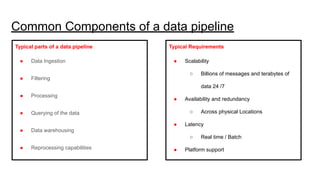
Common Components of a data pipeline
Typical parts of a data pipeline
● Data Ingestion
● Filtering
● Processing
● Querying of the data
● Data warehousing
● Reprocessing capabilities
Typical Requirements
● Scalability
○ Billions of messages and terabytes of
data 24 /7
● Availability and redundancy
○ Across physical Locations
● Latency
○ Real time / Batch
● Platform support
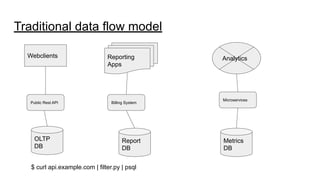
Traditional data flow model
Webclients Reporting
Apps
Public Rest API Billing System
Microservices
OLTP
DB
Report
DB
Metrics
DB
$ curl api.example.com | filter.py | psql
Analytics
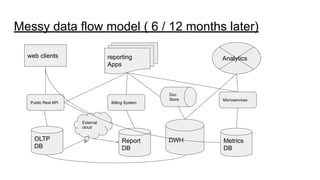
Messy data flow model ( 6 / 12 months later)
web clients reporting
Apps
Public Rest API Billing System
Microservices
OLTP
DB
Report
DB
Metrics
DB
Analytics
External
cloud
Doc
Store
DWH
Apache Airflow Introduction
● Apache Airflow is a way to programatically author, schedule and monitor
workflows
● Developed in Python and is open source.
● Workflows are configured as Python code.
● It uses python as the programming language, where in we can enrich the quality
of data pipelines by using python inbuilt libraries.
● Has multiple hooks and operators for handling BigData ecosystem components, (
Hive, Sqoop etc.. ) and DB hooks for RDBMS and Other NOSQL databases.
Features
● Cron replacement
● Fault tolerant.
● Dependency rules.
● Beautiful UI.
● Handle task failures.
● Python Code.
● Report / Alert on failures.
● Monitor your pipelines from the WebUI.
● And etc..
Core Components
● Webserver - Apache Airflow WebUI.
● Scheduler - Responsible for scheduling your jobs.
● Executor - bound to the scheduler , determine the worker process that
executes the the schedule task. ( Sequential , LocalExecutor, CeleryExecutor)
● Worker - Process that execute the task , determined by the executor.
● Metadatabase - Database were all the metadata related to your jobs are stored
Key Concepts
● DAG - Directed Acyclic graph . the graphical representation of your data
pipeline
● Operator - describes a single task in your data pipeline
● Task - An instance of operator task.
● Workflow - DAG + Operator + Task
Overview
● What is a DAG?
● What is an Operator?
● Operator relationships and Bitshift composition
● How the scheduler works?
● What is a Workflow ?
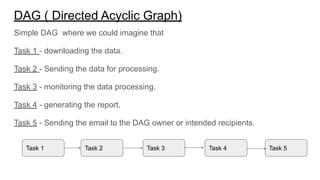
DAG ( Directed Acyclic Graph)
Simple DAG where we could imagine that
Task 1 - downloading the data.
Task 2 - Sending the data for processing.
Task 3 - monitoring the data processing.
Task 4 - generating the report.
Task 5 - Sending the email to the DAG owner or intended recipients.
Task 1 Task 2 Task 3 Task 4 Task 5
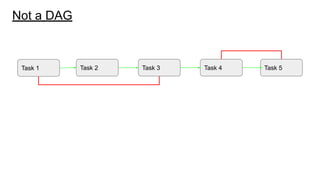
Not a DAG
Task 1 Task 2 Task 3 Task 4 Task 5
Operators
While DAG describes how to run a workflow , Operator defines what actually gets
done.
● Operator describes a single task in a workflow.
● Operators should be idempotent. ( it should produce the same result
irrespective of how many times it is executed.
● Retry Automatically in case of Failure.
Different Operators
● Bash Operator
○ Executes a bash command
● Python Operator
○ Calls an Arbitrary python function
● Email Operator
○ Sends an Email
● Mysql Operator, SQLite Operator, Postgres Operator.
○ Executes the SQL commands
● <Custom Operators> Inheriting from the BaseOperator
Types of Operators
There are 3 types of operators
● Action Operators
○ Perform an action ( Bash operator, Python Operator , Email Operator)
● Transfer Operators
○ Moving data from one system to another ( PrestoToMySQL operator, SFTP operator
● Sensor Operators
○ Waiting for the data to arrive at the default location.
Important Properties
● DAG’s are defined in Python files placed into Airflows DAG_FOLDER
● dag_id serves as a unique identifier for your DAG.
● description the description of your DAG.
● start_date - tell when your DAG should start.
● schedule_interval - define how often your DAG runs.
● depend_on_past - run the next DAGRun if the previous one is completed
successfully.
● default_args - a dictionary of variables to be used as constructor keyword
parameter when initializing operators
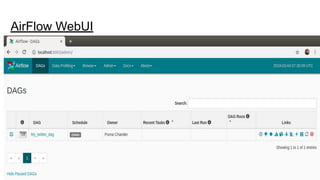
AirFlow WebUI
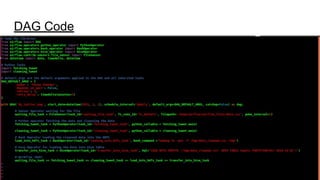
DAG Code
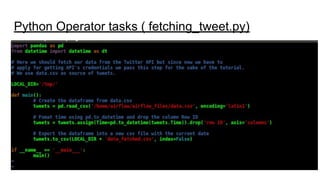
Python Operator tasks ( fetching_tweet.py)
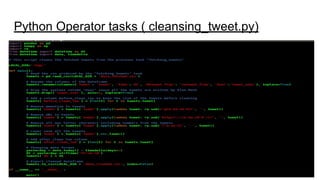
Python Operator tasks ( cleansing_tweet.py)
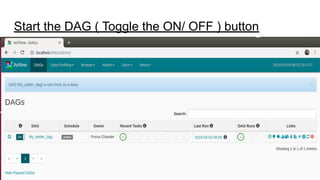
Start the DAG ( Toggle the ON/ OFF ) button
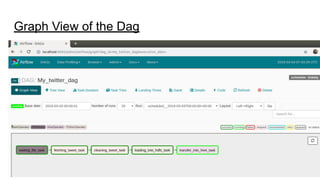
Graph View of the Dag
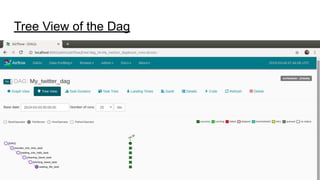
Tree View of the Dag
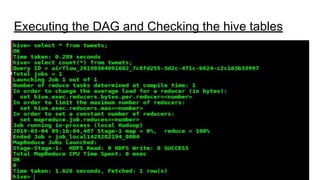
Executing the DAG and Checking the hive tables
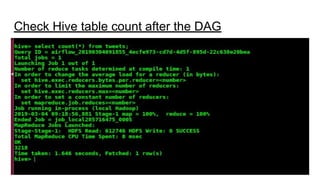
Check Hive table count after the DAG
Questions
THANK YOU

Apache airflow

  • 1.
    Building Data PipelinesUsing Apache Airflow PURNA CHANDER RAO . KATHULA
  • 2.
    Agenda 1. What isa Data Pipeline ? 2. Components of a Data pipeline. 3. Traditional Data Flows and issues 4. Introduction to Apache Airflow 5. Features 6. Core Components 7. Key Components 8. Demo
  • 3.
    What is aData Pipeline Data Pipeline is a set of data processing elements connected in series, where the output of one element is the input of the next one. The elements of the pipeline are often executed in parallel or in time-sliced fashion. The name ‘pipeline’ come from a rough analogy with physical plumbing. ● Modern data pipelines are used to ingest & process vast volumes of data in real time. ● Real time processing of data as opposed to traditional ETL / batch modes.
  • 4.
    Common Components ofa data pipeline Typical parts of a data pipeline ● Data Ingestion ● Filtering ● Processing ● Querying of the data ● Data warehousing ● Reprocessing capabilities Typical Requirements ● Scalability ○ Billions of messages and terabytes of data 24 /7 ● Availability and redundancy ○ Across physical Locations ● Latency ○ Real time / Batch ● Platform support
  • 5.
    Traditional data flowmodel Webclients Reporting Apps Public Rest API Billing System Microservices OLTP DB Report DB Metrics DB $ curl api.example.com | filter.py | psql Analytics
  • 6.
    Messy data flowmodel ( 6 / 12 months later) web clients reporting Apps Public Rest API Billing System Microservices OLTP DB Report DB Metrics DB Analytics External cloud Doc Store DWH
  • 7.
    Apache Airflow Introduction ●Apache Airflow is a way to programatically author, schedule and monitor workflows ● Developed in Python and is open source. ● Workflows are configured as Python code. ● It uses python as the programming language, where in we can enrich the quality of data pipelines by using python inbuilt libraries. ● Has multiple hooks and operators for handling BigData ecosystem components, ( Hive, Sqoop etc.. ) and DB hooks for RDBMS and Other NOSQL databases.
  • 8.
    Features ● Cron replacement ●Fault tolerant. ● Dependency rules. ● Beautiful UI. ● Handle task failures. ● Python Code. ● Report / Alert on failures. ● Monitor your pipelines from the WebUI. ● And etc..
  • 9.
    Core Components ● Webserver- Apache Airflow WebUI. ● Scheduler - Responsible for scheduling your jobs. ● Executor - bound to the scheduler , determine the worker process that executes the the schedule task. ( Sequential , LocalExecutor, CeleryExecutor) ● Worker - Process that execute the task , determined by the executor. ● Metadatabase - Database were all the metadata related to your jobs are stored
  • 10.
    Key Concepts ● DAG- Directed Acyclic graph . the graphical representation of your data pipeline ● Operator - describes a single task in your data pipeline ● Task - An instance of operator task. ● Workflow - DAG + Operator + Task
  • 11.
    Overview ● What isa DAG? ● What is an Operator? ● Operator relationships and Bitshift composition ● How the scheduler works? ● What is a Workflow ?
  • 12.
    DAG ( DirectedAcyclic Graph) Simple DAG where we could imagine that Task 1 - downloading the data. Task 2 - Sending the data for processing. Task 3 - monitoring the data processing. Task 4 - generating the report. Task 5 - Sending the email to the DAG owner or intended recipients. Task 1 Task 2 Task 3 Task 4 Task 5
  • 13.
    Not a DAG Task1 Task 2 Task 3 Task 4 Task 5
  • 14.
    Operators While DAG describeshow to run a workflow , Operator defines what actually gets done. ● Operator describes a single task in a workflow. ● Operators should be idempotent. ( it should produce the same result irrespective of how many times it is executed. ● Retry Automatically in case of Failure.
  • 15.
    Different Operators ● BashOperator ○ Executes a bash command ● Python Operator ○ Calls an Arbitrary python function ● Email Operator ○ Sends an Email ● Mysql Operator, SQLite Operator, Postgres Operator. ○ Executes the SQL commands ● <Custom Operators> Inheriting from the BaseOperator
  • 16.
    Types of Operators Thereare 3 types of operators ● Action Operators ○ Perform an action ( Bash operator, Python Operator , Email Operator) ● Transfer Operators ○ Moving data from one system to another ( PrestoToMySQL operator, SFTP operator ● Sensor Operators ○ Waiting for the data to arrive at the default location.
  • 17.
    Important Properties ● DAG’sare defined in Python files placed into Airflows DAG_FOLDER ● dag_id serves as a unique identifier for your DAG. ● description the description of your DAG. ● start_date - tell when your DAG should start. ● schedule_interval - define how often your DAG runs. ● depend_on_past - run the next DAGRun if the previous one is completed successfully. ● default_args - a dictionary of variables to be used as constructor keyword parameter when initializing operators
  • 18.
  • 19.
  • 20.
    Python Operator tasks( fetching_tweet.py)
  • 21.
    Python Operator tasks( cleansing_tweet.py)
  • 22.
    Start the DAG( Toggle the ON/ OFF ) button
  • 23.
  • 24.
    Tree View ofthe Dag
  • 25.
    Executing the DAGand Checking the hive tables
  • 26.
    Check Hive tablecount after the DAG
  • 27.
  • 28.