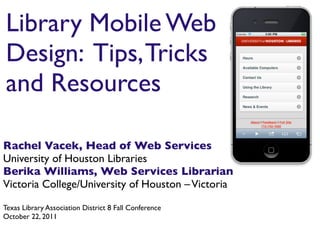
Library Mobile Web
Design: Tips, Tricks
and Resources

Rachel Vacek, Head of Web Services
University of Houston Libraries
Berika Williams, Web Services Librarian
Victoria College/University of Houston – Victoria

Texas Library Association District 8 Fall Conference
October 22, 2011
The mobile phone is history’s fastest growing
communication device
In 2009,
     530 million people
used a cell phone or smartphone
   to access the mobile web


       Strategy Analytics, March 2010
By 2015,
that number is expected
     to rise to over
ONE BILLION people


   Strategy Analytics, March 2010
Smart phones have even
 overtaken the PC in sales
How smartphone owners describe their phones


    Browse the web


    http://www.pewinternet.org/Reports/2011/Smartphones.aspx, July 11, 2011
It’s not just
about the
phones.

It’s about the
experiences
they have with
their phones.
Name 5 things your
users do when they
visit your physical
       library.
Name 5 things your
users do when they
visit your library’s
      website.
Should the
resources and
services that are in
your physical
building and on
your website
also be offered on
your mobile
website?
Yes

   No


It depends
Reference               RSS feeds
    Mobile          services                from blogs
    friendly
    databases
                                              Library
Open access                                   instruction
resources
                                  Your                      SMS
     QR codes                                               services
                                library
                                website        Event calendar
Location guides
or floor maps                     here

    Research or                                             Catalog
    homework
    guides                                  Social media

                          Augmented
                Videos    reality            Image
                                    Audio
                                             collections
                                    tours
With so many options,
how do you begin to plan
  for a mobile website?
Get to know your users
• Conduct surveys or interviews of library
  users who use mobile devices
• Ask in different geographic regions and cover
  all your demographics
• Understand their mobile habits
• Learn their device
  ownership trends
Get your users more
  involved in the process
• Look at focus group alternatives
• Create a “Developer’s Lab”
• Create Internships
• Conduct mobile evaluations, testing, and
  marketing through embedded librarianship
Ask questions
• Why does your library
  want a mobile presence?
• What are your peer
  libraries doing?
• Do you know what your
  users want?
• What defines success?
You want your
users to feel good
using the services
and resources you
provide on your
mobile library site
Which do you choose?

 mobile website
        or
native application
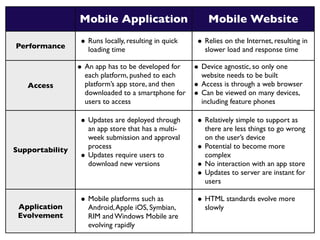
Mobile Application                          Mobile Website

Performance
                  • Runs locally, resulting in quick    • Relies on the Internet, resulting in
                      loading time                          slower load and response time

                 • An app has to be developed for      • Device agnostic, so only one
                   each platform, pushed to each           website needs to be built
   Access          platform’s app store, and then      •   Access is through a web browser
                   downloaded to a smartphone for      •   Can be viewed on many devices,
                   users to access                         including feature phones

                  • Updates are deployed through        • Relatively simple to support as
                      an app store that has a multi-        there are less things to go wrong
                      week submission and approval          on the user’s device
Supportability        process                           •   Potential to become more
                  •   Updates require users to              complex
                      download new versions             •   No interaction with an app store
                                                        •   Updates to server are instant for
                                                            users

                  • Mobile platforms such as            • HTML standards evolve more
 Application          Android, Apple iOS, Symbian,          slowly
 Evolvement           RIM and Windows Mobile are
                      evolving rapidly
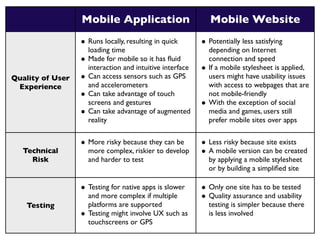
Mobile Application                            Mobile Website
                  • Runs locally, resulting in quick        • Potentially less satisfying
                      loading time                              depending on Internet
                  •   Made for mobile so it has fluid            connection and speed
                      interaction and intuitive interface   •   If a mobile stylesheet is applied,
Quality of User   •   Can access sensors such as GPS            users might have usability issues
 Experience           and accelerometers                        with access to webpages that are
                  •   Can take advantage of touch               not mobile-friendly
                      screens and gestures                  •   With the exception of social
                  •   Can take advantage of augmented           media and games, users still
                      reality                                   prefer mobile sites over apps


                  • More risky because they can be          • Less risky because site exists
  Technical           more complex, riskier to develop      • A mobile version can be created
    Risk              and harder to test                        by applying a mobile stylesheet
                                                                or by building a simplified site

                  • Testing for native apps is slower       • Only one site has to be tested
                      and more complex if multiple          • Quality assurance and usability
   Testing            platforms are supported                   testing is simpler because there
                  •   Testing might involve UX such as          is less involved
                      touchscreens or GPS
Mobile Application                         Mobile Website
              • More investment because it           • Less investment because it’s
                  requires more resources, time          quicker and easier to build
   Cost           and skills                         •   Can support any device that has
              •   Have to develop for multiple           a web browser
                  platforms

              • Thousands of mobile apps             • Users can find your mobile
                  available on each platforms’s          website via search engines, links
Marketing         store, making the audience             from other websites, and links
                  smaller and more focused               embedded in emails


Operational   • Must have room on the                • Good cellular or wifi signal is
                  smartphone to download                 required
  Issues


              • Application development              • Knowledge of HTML and CSS
                  demands more sophisticated             for basic mobile theming
                  skills                             •   Skills in HTML5 and PHP are
 Skill Set    •   Developers with these skills are       useful for creating more engaging
                  harder to find                          websites, but not all smartphone
                                                         browsers support HTML5 yet
Summary of features

         Mobile Application                            Mobile Website

         • Easy to locate in an app store          • Platform agnostic
Pros
         • Faster speed because it’s installed     • Flexible and easier control over
             locally                                   maintenance of content
         •   Specialized functionality             •   Can be built in HTML & CSS

         • Requires specific knowledge and          • Slower than a mobile app
             skills to develop                     • Less functionality than a mobile
Cons     •   Built differently for each platform       app, but HTML 5 is changing that
         •   Approvals are required to place
             in app store
Which is best for
 your library?
Mobile Website
Mobile Application
      Both
     Neither
You know what’s on your website


You know the needs of your users


You know what tech skills you have
available to you

 You know the limitations of your
library’s wifi
Let’s dig in!
Options for building
     mobile native apps
• Native platform SDK (software development kit)
• General purpose multi-platform tools - attempts
  to “write once, run anywhere”
• Outsource the development, or hire a developer
  with mobile app development experience on
  each platform you want to create
Options for building
      mobile websites
• Develop a mobile CSS
• Do nothing - users will still see your site, but it
  won’t be optimized for the best mobile user
  experience
• Google sites - mobile templates
   - http://sites.google.com/mobilize
• Have an open-source cms like Wordpress or
  Drupal that power your website? Find a mobile
  friendly theme!
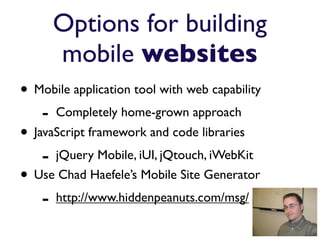
Options for building
        mobile websites
• Mobile application tool with web capability
    -   Completely home-grown approach
• JavaScript framework and code libraries
    - jQuery Mobile, iUI, jQtouch, iWebKit
• Use Chad Haefele’s Mobile Site Generator
    - http://www.hiddenpeanuts.com/msg/
Hybrid Approach
You can do more than one of the methods for
     creating your library’s mobile presence
Managing your mobile site
• Design & Functionality
   - Can be determined by the stylesheet or the
     framework chosen
   - Keep your branding consistent
• Content
   - Have a strategy for maintaining the content
   - Pull (RSS feeds, from other systems if you
     can
          in content
                      APIs, etc.)
Examples of mobile
library websites and
    applications
New York Public Library
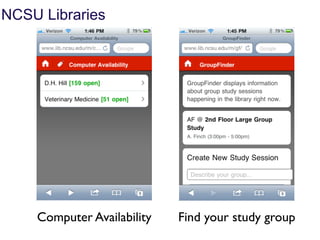
NCSU Libraries


    Computer Availability   Find your study group
NCSU Libraries


      Reserve a room   Historic image collections
Seattle Public Library
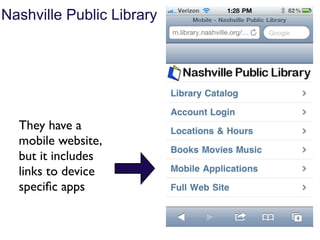
Nashville Public Library


  They have a
  mobile website,
  but it includes
  links to device
  specific apps
VC/UHV Library
Mobile Web Presence
Library Website
Mobile
Website -
vcuhvlibrary.uhv.edu/mobile
Mobile-friendly   Research applications users
research tools     can download themselves
Users love the     Users can get directions
popular LibGuides        to the library
Using QR codes to
market mobile site
UH Libraries
Mobile Web Presence
A different approach


iPhone App + Mobile Website
An iPhone app for searching the UH Libraries’ Catalog
    was developed by graduate students in the the
       “Ubiquitous Computing” course in the
University of Houston Computational Physiology Lab
Mobile Website - m.lib.uh.edu


 Think differently about the   RSS feeds are quick and
hierarchy of your homepage     easy but have limitations
Include catalog and/or
                             LibGuides comes with a
discovery platform, but be
                               mobile interface, too
 clear on tool’s purpose
You have videos? Create a   Show off your images on
channel and include them     your library’s Flickr site
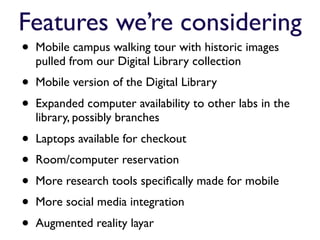
Features we’re considering
•   Mobile campus walking tour with historic images
    pulled from our Digital Library collection
•   Mobile version of the Digital Library
•   Expanded computer availability to other labs in the
    library, possibly branches
•   Laptops available for checkout
•   Room/computer reservation
•   More research tools specifically made for mobile
•   More social media integration
•   Augmented reality layar
Reference               RSS feeds
    Mobile          services                from blogs
    friendly
    databases
                                              Library
Open access                                   instruction
resources
                                  Your                      SMS
     QR codes                                               services
                                library
                                website        Event calendar
Location guides
or floor maps                     here

    Research or                                             Catalog
    homework
    guides                                  Social media

                          Augmented
                Videos    reality            Image
                                    Audio
                                             collections
                                    tours
Final thoughts
• Understand your users’ mobile behaviors and needs
  and look at the tools at your disposal before you
  decide between a mobile app or website
• Sometimes a simple mobile stylesheet is a good
  enough place to start
• Don’t just recreate your entire website in a whole
  new mobile website
• Start small, add more complex features over time
• Walk a day in your users’ shoes to get a feel for
  what services might be helpful on a mobile device
Helpful resources
•   “Choosing Between Native and Mobile Web Applications.”
    Gartner Report by Analyst Nick Jones. February 23, 2011.
•   The Anywhere Library: A Primer for the Mobile Web.
    Courtney Greene, Missy Roser, and Elizabeth Ruane. ACRL
    2010.
•   M-Libraries, Library Success Wiki -
    http://www.libsuccess.org/index.php?title=M-Libraries
•   Chad Haefele’s Mobile Site Generator -
    http://www.hiddenpeanuts.com/msg/
•   Google Mobile Sites - http://sites.google.com/mobilize
Thanks!
Rachel Vacek
Head of Web Services
University of Houston Libraries
revacek@uh.edu

Berika Williams
Web Services Librarian
Victoria College/University of Houston – Victoria
williamsbs@uhv.edu


Presentation available online:
slideshare.net/vacekrae

Library Mobile Web Design: Tips, Tricks and Resources

  • 1.
    Library Mobile Web Design:Tips, Tricks and Resources Rachel Vacek, Head of Web Services University of Houston Libraries Berika Williams, Web Services Librarian Victoria College/University of Houston – Victoria Texas Library Association District 8 Fall Conference October 22, 2011
  • 2.
    The mobile phoneis history’s fastest growing communication device
  • 3.
    In 2009, 530 million people used a cell phone or smartphone to access the mobile web Strategy Analytics, March 2010
  • 4.
    By 2015, that numberis expected to rise to over ONE BILLION people Strategy Analytics, March 2010
  • 5.
    Smart phones haveeven overtaken the PC in sales
  • 6.
    How smartphone ownersdescribe their phones Browse the web http://www.pewinternet.org/Reports/2011/Smartphones.aspx, July 11, 2011
  • 7.
    It’s not just aboutthe phones. It’s about the experiences they have with their phones.
  • 8.
    Name 5 thingsyour users do when they visit your physical library.
  • 9.
    Name 5 thingsyour users do when they visit your library’s website.
  • 10.
    Should the resources and servicesthat are in your physical building and on your website also be offered on your mobile website?
  • 11.
    Yes No It depends
  • 12.
    Reference RSS feeds Mobile services from blogs friendly databases Library Open access instruction resources Your SMS QR codes services library website Event calendar Location guides or floor maps here Research or Catalog homework guides Social media Augmented Videos reality Image Audio collections tours
  • 13.
    With so manyoptions, how do you begin to plan for a mobile website?
  • 14.
    Get to knowyour users • Conduct surveys or interviews of library users who use mobile devices • Ask in different geographic regions and cover all your demographics • Understand their mobile habits • Learn their device ownership trends
  • 15.
    Get your usersmore involved in the process • Look at focus group alternatives • Create a “Developer’s Lab” • Create Internships • Conduct mobile evaluations, testing, and marketing through embedded librarianship
  • 16.
    Ask questions • Whydoes your library want a mobile presence? • What are your peer libraries doing? • Do you know what your users want? • What defines success?
  • 17.
    You want your usersto feel good using the services and resources you provide on your mobile library site
  • 18.
    Which do youchoose? mobile website or native application
  • 19.
    Mobile Application Mobile Website Performance • Runs locally, resulting in quick • Relies on the Internet, resulting in loading time slower load and response time • An app has to be developed for • Device agnostic, so only one each platform, pushed to each website needs to be built Access platform’s app store, and then • Access is through a web browser downloaded to a smartphone for • Can be viewed on many devices, users to access including feature phones • Updates are deployed through • Relatively simple to support as an app store that has a multi- there are less things to go wrong week submission and approval on the user’s device Supportability process • Potential to become more • Updates require users to complex download new versions • No interaction with an app store • Updates to server are instant for users • Mobile platforms such as • HTML standards evolve more Application Android, Apple iOS, Symbian, slowly Evolvement RIM and Windows Mobile are evolving rapidly
  • 20.
    Mobile Application Mobile Website • Runs locally, resulting in quick • Potentially less satisfying loading time depending on Internet • Made for mobile so it has fluid connection and speed interaction and intuitive interface • If a mobile stylesheet is applied, Quality of User • Can access sensors such as GPS users might have usability issues Experience and accelerometers with access to webpages that are • Can take advantage of touch not mobile-friendly screens and gestures • With the exception of social • Can take advantage of augmented media and games, users still reality prefer mobile sites over apps • More risky because they can be • Less risky because site exists Technical more complex, riskier to develop • A mobile version can be created Risk and harder to test by applying a mobile stylesheet or by building a simplified site • Testing for native apps is slower • Only one site has to be tested and more complex if multiple • Quality assurance and usability Testing platforms are supported testing is simpler because there • Testing might involve UX such as is less involved touchscreens or GPS
  • 21.
    Mobile Application Mobile Website • More investment because it • Less investment because it’s requires more resources, time quicker and easier to build Cost and skills • Can support any device that has • Have to develop for multiple a web browser platforms • Thousands of mobile apps • Users can find your mobile available on each platforms’s website via search engines, links Marketing store, making the audience from other websites, and links smaller and more focused embedded in emails Operational • Must have room on the • Good cellular or wifi signal is smartphone to download required Issues • Application development • Knowledge of HTML and CSS demands more sophisticated for basic mobile theming skills • Skills in HTML5 and PHP are Skill Set • Developers with these skills are useful for creating more engaging harder to find websites, but not all smartphone browsers support HTML5 yet
  • 22.
    Summary of features Mobile Application Mobile Website • Easy to locate in an app store • Platform agnostic Pros • Faster speed because it’s installed • Flexible and easier control over locally maintenance of content • Specialized functionality • Can be built in HTML & CSS • Requires specific knowledge and • Slower than a mobile app skills to develop • Less functionality than a mobile Cons • Built differently for each platform app, but HTML 5 is changing that • Approvals are required to place in app store
  • 23.
    Which is bestfor your library?
  • 24.
  • 25.
    You know what’son your website You know the needs of your users You know what tech skills you have available to you You know the limitations of your library’s wifi
  • 26.
  • 27.
    Options for building mobile native apps • Native platform SDK (software development kit) • General purpose multi-platform tools - attempts to “write once, run anywhere” • Outsource the development, or hire a developer with mobile app development experience on each platform you want to create
  • 28.
    Options for building mobile websites • Develop a mobile CSS • Do nothing - users will still see your site, but it won’t be optimized for the best mobile user experience • Google sites - mobile templates - http://sites.google.com/mobilize • Have an open-source cms like Wordpress or Drupal that power your website? Find a mobile friendly theme!
  • 30.
    Options for building mobile websites • Mobile application tool with web capability - Completely home-grown approach • JavaScript framework and code libraries - jQuery Mobile, iUI, jQtouch, iWebKit • Use Chad Haefele’s Mobile Site Generator - http://www.hiddenpeanuts.com/msg/
  • 31.
    Hybrid Approach You cando more than one of the methods for creating your library’s mobile presence
  • 32.
    Managing your mobilesite • Design & Functionality - Can be determined by the stylesheet or the framework chosen - Keep your branding consistent • Content - Have a strategy for maintaining the content - Pull (RSS feeds, from other systems if you can in content APIs, etc.)
  • 33.
    Examples of mobile librarywebsites and applications
  • 34.
  • 35.
    NCSU Libraries Computer Availability Find your study group
  • 36.
    NCSU Libraries Reserve a room Historic image collections
  • 37.
  • 38.
    Nashville Public Library They have a mobile website, but it includes links to device specific apps
  • 39.
  • 40.
  • 41.
  • 42.
    Mobile-friendly Research applications users research tools can download themselves
  • 43.
    Users love the Users can get directions popular LibGuides to the library
  • 44.
    Using QR codesto market mobile site
  • 45.
  • 46.
    A different approach iPhoneApp + Mobile Website
  • 47.
    An iPhone appfor searching the UH Libraries’ Catalog was developed by graduate students in the the “Ubiquitous Computing” course in the University of Houston Computational Physiology Lab
  • 48.
    Mobile Website -m.lib.uh.edu Think differently about the RSS feeds are quick and hierarchy of your homepage easy but have limitations
  • 49.
    Include catalog and/or LibGuides comes with a discovery platform, but be mobile interface, too clear on tool’s purpose
  • 50.
    You have videos?Create a Show off your images on channel and include them your library’s Flickr site
  • 52.
    Features we’re considering • Mobile campus walking tour with historic images pulled from our Digital Library collection • Mobile version of the Digital Library • Expanded computer availability to other labs in the library, possibly branches • Laptops available for checkout • Room/computer reservation • More research tools specifically made for mobile • More social media integration • Augmented reality layar
  • 53.
    Reference RSS feeds Mobile services from blogs friendly databases Library Open access instruction resources Your SMS QR codes services library website Event calendar Location guides or floor maps here Research or Catalog homework guides Social media Augmented Videos reality Image Audio collections tours
  • 54.
    Final thoughts • Understandyour users’ mobile behaviors and needs and look at the tools at your disposal before you decide between a mobile app or website • Sometimes a simple mobile stylesheet is a good enough place to start • Don’t just recreate your entire website in a whole new mobile website • Start small, add more complex features over time • Walk a day in your users’ shoes to get a feel for what services might be helpful on a mobile device
  • 55.
    Helpful resources • “Choosing Between Native and Mobile Web Applications.” Gartner Report by Analyst Nick Jones. February 23, 2011. • The Anywhere Library: A Primer for the Mobile Web. Courtney Greene, Missy Roser, and Elizabeth Ruane. ACRL 2010. • M-Libraries, Library Success Wiki - http://www.libsuccess.org/index.php?title=M-Libraries • Chad Haefele’s Mobile Site Generator - http://www.hiddenpeanuts.com/msg/ • Google Mobile Sites - http://sites.google.com/mobilize
  • 56.
    Thanks! Rachel Vacek Head ofWeb Services University of Houston Libraries revacek@uh.edu Berika Williams Web Services Librarian Victoria College/University of Houston – Victoria williamsbs@uhv.edu Presentation available online: slideshare.net/vacekrae

Editor's Notes

  • #2 We each introduce one another, and Berika kicks it off. :)\n
  • #3 \n
  • #4 \n
  • #5 \n
  • #6 In fact, when it comes to sales, smartphones have overtaken pc sales. With more consumers trading in their old feature phones for smartphones, the smartphone market actually eclipsed the PC market during the last quarter of 2010 for the first time, according to data from the IDC (International Data Corporation –a market intelligence source). Vendors shipped 100.0 million smartphones during the fourth quarter, while IDC logged 92.1 million PC shipments during the same time period, according to IDC numbers from January.\n\n
  • #7 Mostly good feelings. Some people don’t like the feeling of being connected all the time. But people have deep connections with their mobile devices, it seems. Those connections - and feelings - are part of the user experience. Our mobile library websites should also also give users these same feelings.\n
  • #8 \n
  • #9 Stop and interact with the audience. Get them thinking....Ask them to name 5 things their users do when visiting the physical library.\n
  • #10 After they have named a few things, ask them to name 5 things users do on their websites.\n
  • #11 Should those resources, services, AND experiences (user experiences) be replicated on a mobile site? \n
  • #12 \n
  • #13 \n
  • #14 \n
  • #15 \n
  • #16 •Focus Group Alternatives: Informal setting such as a library open house, planned social event in a party-esque /social type atmosphere. You can collaborate with other departments or organizations by “hosting” the event and initiating informal discussions, conversations with topics including, but not limited to - mobile web access to get an insider’s perspective on what users are doing while advocating library resources and services[perfect for all types of libraries]\n•“Developers Lab”: Take advantage of students or patron users’ capital (their skill sets) by giving them a chance to further develop them, gain experience and get exposure by participating in the process. [perfect for academic, school, and public libraries;]Corporate Libraries can garner\n•Internships: Partner up with talented students who would like to further develop their skillsets and make meaning contributions to meet a need or provide a service to users that hasn’t been met through the building of mobile apps. Corporate and other libraries can do competitions for their user or consumer base to rally up ideas to stimulate creativity and boost maximum PR for the library and its services.\n•Mobile Evaluation, Testing, and Branding through Embedded Librarianship: Ask questions to see what users are thinking, how they are behaving in their environment while in development. Create a deliberate, “casual” encounter with mentions of the finished mobile website or product during a reference session or at the point of need.\n\n
  • #17 •We went mobile to reach a larger subset users that were already using mobile devices to access our desktop site based on our web statistics and generalized national indicators such as the research found on Pew Internet and American Life Project.\n•A great website that gives a peak at how a portion of other libraries are going mobile is: http://www.libsuccess.org/index.php?title=M-Libraries\n•Based on our research, we knew that users wanted a quick and convenient way to access information from our library. They wanted something user friendly, intuitive and easy to navigate.\n•We simply define success with our mobile site based on traffic and repeat visitors. We rely on comments and feedback and constantly question: what keeps bringing them back? Are there any frustrations or obstacles that keep them from using it again?\n\n
  • #18 having a good user experience is vital to people coming back and using it again.\n
  • #19 Rachel picks up here.\n
  • #20 \n
  • #21 \n
  • #22 \n
  • #23 \n
  • #24 \n
  • #25 \n
  • #26 \n
  • #27 \n
  • #28 \n
  • #29 \n
  • #30 \n
  • #31 \n
  • #32 \n
  • #33 \n
  • #34 Berika picks up here again.\n
  • #35 \n
  • #36 \n
  • #37 \n
  • #38 \n
  • #39 \n
  • #40 Based on our resources and staff, we started off with a mobile website. Over time we may go more advanced offering apps, but we are starting off small based on basic needs of our users and the ability to reach cross platforms in the least expensive way possible.\n\n
  • #41 On our desktop homepage of the VC/UHV Library’s website, we created a portal for users to access the information that was most important to them through research. We also accessed the most commonly visited pages and most asked questions at the reference desk to present this content. When it came to our mobile website, we selected the “basics” where physical and online needs intersected by placing our library hours, maps and directions, library catalog and ways to contact us on our mobile site. Additionally, we created a research section with select mobile friendly databases with subjects that generated the most traffic on her desktop site and at the reference desk. \n
  • #42 The VC/UHV Library’s approach was (sort of) hybrid. We took advantage of certain features that were already mobile optimized like Google Maps, their APIs, LibGuides, and select databases to offer on our mobile website. For everything else, we coded in HTML and CSS, such as building an interface for our catalog and ASKALIBRARIAN chat. The only drawback with the actual online catalog results, was that our OPAC is not mobile optimized. (We have Horizon through Sirsi Dynix) It is actually a miniature desktop version of the OPAC, which is not exactly the best solution, but it works for now.\nThe usage statistics from the VC/UHV Library’s website and most commonly asked reference questions set the tone for how we chose to arrange the hierarchy of our homepage. We also used RSS feeds for library hours, but an important consideration is that the source content still needs to be maintained.\n\n
  • #43 \n
  • #44 \n
  • #45 •Publicize different areas of the mobile website by creating QR codes (free on sites such as www.qrstuff.com), which can be scanned for quick access to those webpages\n•QR codes can be used in the library stacks for instant help, such as access to study guides or tutorials, or even an interactive library call number floor map.\n•I’ve learned that the shorter the URL, the more simple the QR Code, and thus the easier it is to scan. \n•I recommend URL shortners like bitly.com that can instantly gauge the traffic of who uses the link without going through web analytics software.\n• Must carefully plan the QR Code information representing the library or you’ll overdo it… like a child with pages of stickers! \n\n
  • #46 Rachel picks it up again.\n
  • #47 \n
  • #48 \n
  • #49 \n
  • #50 \n
  • #51 \n
  • #52 \n
  • #53 \n
  • #54 \n
  • #55 \n
  • #56 Berika puts in her final thoughts too.\n
  • #57 We take questions! Yay for us!\n